
Table of Contents
Table of Contents
An AI incident rarely starts with a broker outage. It starts with a support agent approving the wrong refund, a retrieval pipeline injecting stale context, or a workflow engine skipping a guardrail because one tool returned an unexpected payload. The hard question is not "did the model call succeed?" The hard question is: what sequence of prompts, tool calls, retrieved documents, feature values, and policy decisions produced this answer?
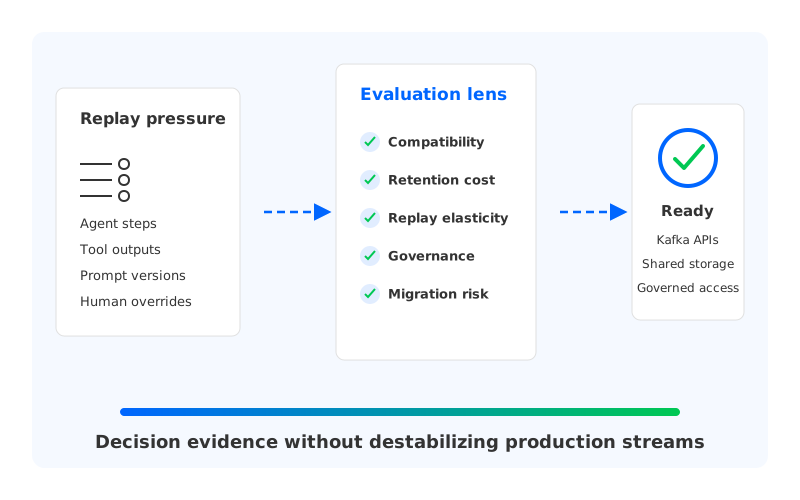
That is why teams search for ai workflow replay kafka. They are looking for a way to reconstruct decisions after the fact without asking every application team to build a separate audit store. Kafka-compatible streams are attractive because they give production teams durable ordering within partitions, consumer groups, offset-based replay, backpressure handling, and a broad connector ecosystem. The challenge is that AI workflows put unusual pressure on the streaming layer: events are small but numerous, retention grows, payloads may contain regulated data, and replay often happens under scrutiny.
1Why AI Workflow Replay Belongs in the Streaming Layer
Replay is different from logging. Logs explain what a service thought was important at runtime; replay requires enough structured state to rebuild a decision path. A useful AI event stream captures the request envelope, model version, prompt template version, retrieved document IDs, tool inputs and outputs, policy results, user-visible response, and correction signals. Some fields are sensitive, so the event design must separate traceability from unnecessary data exposure.
Kafka-compatible infrastructure fits this pattern because the replay boundary is explicit. A consumer can restart from a known offset, branch into a separate group, or materialize a timeline into a lakehouse without stopping the production path. A live workflow service can continue consuming the current stream while an investigation job replays the same topic from a historical position.
The trap is assuming that "Kafka-compatible" alone solves the operational problem. It solves the application integration problem first: services, Flink jobs, connectors, schema workflows, and observability tools can use familiar APIs. But replay workloads also stress storage, network, governance, and recovery paths. A platform that is fine for online inference events may become painful when the AI team asks to retain traces for weeks, replay subsets repeatedly, and prove that sensitive prompts are controlled.
2The Freshness and Governance Problem Behind AI Event Streams
AI decisions decay faster than ordinary business events. A payment authorization from last month is still a payment authorization, but an LLM decision from last month may depend on a prompt template that no longer exists, an embedding model that has been replaced, and a retrieval index that has been compacted. Replay is only meaningful when the event stream records enough versioned context to explain the decision in its original environment.
That does not mean every byte belongs in Kafka. Large documents, full prompt transcripts, and raw tool responses may be better stored in object storage or a governed data lake, with the stream carrying stable references, hashes, classification labels, and enough metadata to correlate the artifacts. Topics can hold the decision timeline while sensitive blobs live behind storage policies, encryption controls, and data retention rules.
For platform teams, the governance model should answer five questions before the first production topic is created:
- Which event fields are required to replay the decision, and which fields are only useful for debugging convenience?
- Which fields contain personal data, secrets, licensed content, prompts, or proprietary customer context?
- Can investigators replay a workflow without seeing raw sensitive payloads?
- How are schema changes, model changes, and prompt-template changes versioned in the stream?
- What happens when legal retention, model evaluation, and cost targets disagree?
These questions cross team boundaries. The AI platform team owns model and agent behavior. The data platform team owns Kafka-compatible infrastructure. Security owns access control and retention rules. SRE owns failure recovery. A replay system that ignores any one of those boundaries may work in a demo, then fail when an incident demands evidence.
3Architecture Options for Durable, Replayable AI Context
The simplest design is a set of Kafka topics for workflow events, model calls, tool calls, policy decisions, and feedback. Producers write structured events with correlation IDs, and consumers build projections for observability, offline evaluation, and incident replay. The design is easy to understand, but its retention footprint grows quickly as teams add agents, tools, tenants, and evaluation pipelines.
Traditional Kafka's shared-nothing architecture makes that growth visible to operators. Each broker owns local data, and replication protects durability by copying partitions across brokers. Scaling storage or compute often means moving partition data, rebalancing broker load, and reserving capacity for peak traffic plus retention. In cloud deployments, multi-AZ replication and client placement can also produce cross-zone traffic that looks small in a design review and large on a monthly bill.
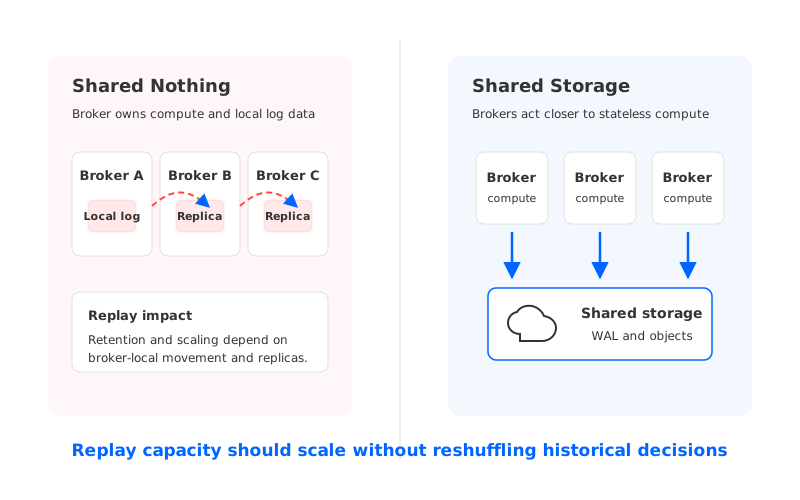
Tiered storage can reduce the pressure on local disks by moving older data to object storage, and it can be a reasonable fit for many workloads. The important distinction is that tiering still leaves the hot write path and primary partition ownership tied to brokers. For AI replay, where retention, repeated historical reads, and elastic investigation jobs are common, the operational question becomes: how much of the replay system still depends on broker-local data movement?
A cloud-native shared storage model changes that question. Instead of treating object storage as a colder secondary tier, it makes shared storage the primary durability layer and keeps brokers closer to compute. Replay capacity, retention depth, and broker lifecycle become less tightly coupled. When an AI incident creates a sudden replay workload, the team needs to add compute for investigation, not spend hours reshuffling historical partitions.
4Evaluation Checklist for Platform Teams
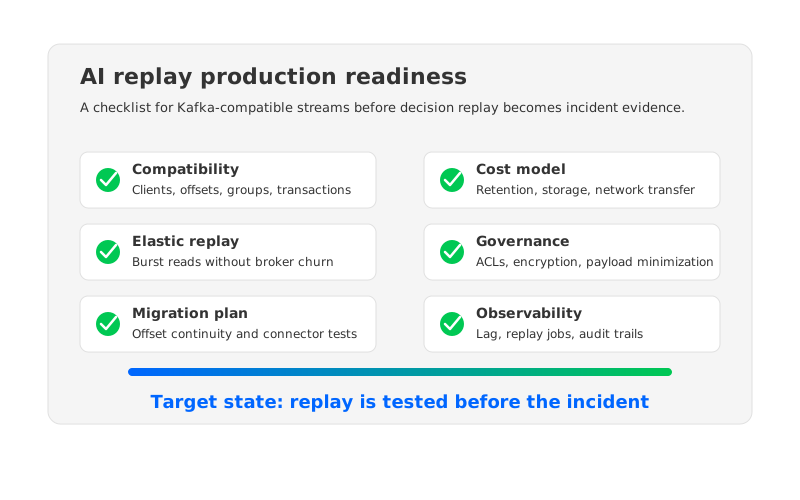
A useful ai workflow replay kafka design starts with a neutral checklist. Product names come later. First decide what the replay system must prove under pressure.
| Evaluation area | What to test | Why it matters for AI replay |
|---|---|---|
| Kafka compatibility | Existing clients, consumer groups, offset reset, transactions where used, Connect integrations, and stream processors | Replay should not force every AI service and data pipeline to change libraries. |
| Retention economics | Topic growth, object storage use, local disk requirements, network transfer, and historical read patterns | AI traces can grow faster than business events because each decision may include many intermediate steps. |
| Elastic investigation | Ability to add consumers or brokers for replay without long data movement | Incidents create bursty read workloads that should not destabilize online inference. |
| Governance | Topic ACLs, encryption, schema evolution, payload references, audit trails, and deletion workflows | Replay often touches sensitive prompts, customer context, and internal policy logic. |
| Recovery | Broker failure behavior, metadata recovery, offset preservation, and rollback options | Debugging a decision requires trust in the timeline, not only service uptime. |
| Migration risk | Compatibility with current Kafka versions, connector behavior, offset continuity, and cutover plan | Replay infrastructure usually lands in an existing data estate, not a greenfield lab. |
The checklist also exposes a subtle design choice: whether replay is a production capability or a forensic afterthought. Production replay needs stable schemas, enough retention, consistent correlation IDs, and tested access paths before an incident. Otherwise, the team ends up scraping logs, joining incomplete traces, and arguing about which system had the true version of a decision.
5A Practical Topic Model for AI Workflow Replay
One workable pattern is to separate the control plane of the decision from heavy artifacts. A workflow-events topic records lifecycle transitions such as request received, plan created, tool selected, response generated, and human override applied. A model-invocations topic records model provider, model version, prompt template version, latency band, and references to secured prompt artifacts. Tool, policy, and feedback topics then capture outputs, guardrail decisions, evaluator scores, and downstream outcomes.
This model gives replay jobs several entry points. An SRE can replay by workflow ID to reconstruct a single incident. A model evaluation pipeline can replay all decisions that used a specific prompt template. A governance team can inspect policy outcomes without reading raw prompts.
Partitioning deserves careful thought. Workflow ID keeps each decision timeline ordered, but it may create skew if large customers or high-volume agents dominate traffic. Tenant ID improves locality for governance and billing, but it can scatter a single workflow if workflows cross tenants or services. Many teams choose workflow-level ordering for decision events, separate topics for high-volume tool or retrieval events, and explicit correlation IDs everywhere.
Schema design should be strict enough to support replay and flexible enough to survive AI system changes. That usually means versioned event types, stable IDs for prompts and tools, explicit timestamps from the producing service, and a clear distinction between raw content, derived metadata, and external artifact references. The stream should tell investigators what happened and where to fetch governed evidence, not become an unbounded dumping ground for every intermediate byte.
6How AutoMQ Changes the Operating Model
Once the evaluation framework is clear, AutoMQ becomes relevant as a specific architectural answer rather than a product dropped into the opening paragraph. AutoMQ is a Kafka-compatible, cloud-native streaming platform that keeps Kafka protocol and semantic compatibility while replacing Kafka's local log storage with S3Stream, WAL storage, and object storage. Brokers become much closer to stateless compute nodes, while durable stream data is stored in shared cloud storage.
That separation is useful for AI workflow replay because replay systems are retention-heavy and investigation-heavy. A conventional broker-local model asks operators to think about disk sizing, partition movement, replica placement, and local recovery whenever pressure changes. AutoMQ's shared storage model shifts more of that burden to object storage and WAL-backed durability, making broker lifecycle and elastic scaling less dependent on moving historical data between brokers.
AutoMQ's documented Kafka compatibility is also important for adoption. AI workflow infrastructure touches many teams and languages, so a migration that changes client behavior can be more expensive than the storage system it replaces. Keeping Kafka-compatible APIs, consumer group behavior, Connect integration paths, and familiar operational concepts lets teams evaluate the storage model without rewriting every producer and consumer first.
Cloud networking is another place where replay changes the cost model. Multi-AZ Kafka deployments often replicate data across zones for durability, and client traffic can cross zones depending on producer, consumer, and partition placement. AutoMQ documents an inter-zone traffic reduction model based on S3-backed shared storage and zone-aware routing. For AI teams retaining large workflow traces, reducing unnecessary cross-zone movement can matter as much as raw storage price.
Migration should still be treated as an engineering project, not a checkbox. AutoMQ provides Kafka Linking for migration from Apache Kafka and other Kafka distributions to AutoMQ, including offset-preserving synchronization concepts and producer cutover support. A replay platform team should test representative topics, clients, consumer group progress, connector behavior, and rollback paths before moving production decision streams. The goal is to preserve trust in the replay timeline.
7Readiness Scorecard
Before standardizing on any Kafka-compatible platform for AI workflow replay, score the design from 1 to 5 in each category: 1 means "not designed," 3 means "works with manual coordination," and 5 means "tested, observable, and owned."
| Category | 1 | 3 | 5 |
|---|---|---|---|
| Replay fidelity | Events are incomplete or log-derived | Core workflow steps are replayable | Decisions can be reconstructed with versioned context and artifact references |
| Operational elasticity | Replay competes with production | Replay jobs need scheduled capacity | Replay capacity can scale without disruptive data movement |
| Governance | Sensitive data appears in ad hoc fields | ACLs and retention exist by topic | Payload minimization, audit trails, encryption, and deletion workflows are designed together |
| Migration safety | Cutover plan is informal | Test topics and consumers are validated | Offset continuity, rollback, and connector behavior are rehearsed |
| Cost control | Retention is guessed | Storage and traffic are measured | Retention, object storage, network, and investigation bursts are modeled together |
The scorecard is intentionally blunt. A replay system that scores high on model observability but low on governance is not production-ready. A system that scores high on retention but low on replay fidelity is an archive, not a debugging tool. The platform is valuable when it can answer a decision question with evidence, keep production traffic stable, and stay inside defensible operating boundaries.
If your team is evaluating a Kafka-compatible replay architecture and wants to compare broker-local storage with a shared storage model, start with the AutoMQ architecture overview and deployment model: Explore AutoMQ's cloud-native Kafka architecture. The next step is mapping one real AI workflow, its replay events, retention target, and failure modes onto the checklist above.
8References
- Apache Kafka documentation: consumers and consumer groups. https://kafka.apache.org/documentation/#intro_consumers
- Apache Kafka documentation: delivery semantics and transactions. https://kafka.apache.org/documentation/#semantics
- Apache Kafka documentation: Kafka Connect. https://kafka.apache.org/documentation/#connect
- Apache Kafka documentation: KRaft mode. https://kafka.apache.org/documentation/#kraft
- AutoMQ documentation: architecture overview. https://docs.automq.com/automq/architecture/overview.md
- AutoMQ documentation: native compatibility with Apache Kafka. https://docs.automq.com/automq/architecture/technical-advantage/native-compatible-with-apache-kafka.md
- AutoMQ documentation: eliminating inter-zone traffic. https://docs.automq.com/automq/eliminate-inter-zone-traffics/overview.md
- AutoMQ Cloud documentation: migration overview and Kafka Linking. https://docs.automq.com/automq-cloud/migrate-to-automq/overview.md
- AWS documentation: Amazon S3 user guide. https://docs.aws.amazon.com/AmazonS3/latest/userguide/Welcome.html
- AWS documentation: AWS PrivateLink concepts. https://docs.aws.amazon.com/vpc/latest/privatelink/what-is-privatelink.html
9FAQ
9.1Is Kafka required for AI workflow replay?
No. A database, object store, tracing system, or lakehouse can store parts of the evidence. Kafka-compatible streams become useful when teams need ordered event timelines, independent replay consumers, connector integration, and a durable boundary between online workflows and offline investigation.
9.2Should raw prompts and tool outputs be stored directly in Kafka topics?
Only when the governance model supports it. Many teams are better served by storing sensitive or large payloads in governed object storage and writing references, hashes, classification labels, and version metadata into Kafka-compatible topics. That keeps replay possible without turning every topic into a high-risk data dump.
9.3How long should AI replay events be retained?
Retention should follow the business risk, not a default cluster setting. A fraud workflow, medical-support assistant, or regulated customer-service agent may require longer retention than an internal coding assistant. Model evaluation teams may also need separate analytical retention in a lakehouse after operational replay windows expire.
9.4What is the difference between replay and observability?
Observability tells operators whether the system is healthy and where latency or errors appear. Replay reconstructs a specific decision path with enough context to explain why a workflow produced an output. They overlap, but replay needs stronger event design, versioning, and artifact references.
9.5Where does AutoMQ fit in an AI replay architecture?
AutoMQ fits at the Kafka-compatible streaming layer when a team wants familiar Kafka APIs with a cloud-native shared storage operating model. It does not remove the need for schema design, governance, or incident procedures, but it can reduce the operational coupling between retention-heavy streams and broker-local storage management.


