Your pipeline, from Day 0 to Day 2
Evaluate the integration, launch a Connector, and keep production operations in view.
- Day 0
Explore & design
- Find your pluginCatalog · Source & Sink
- Try a sample pipelinePlayground · Tutorials
- Define the data flowTopics · Transforms · Destinations
A pipeline ready to deployExplore plugins - Day 1
Deploy & connect
- Provision a Connect ClusterConsole · Terraform
- Install your pluginManaged · Built-in · Custom
- Create a ConnectorETL configuration · Task count
A running ConnectorView deployment demo - Day 2
Operate & observe
- Set cluster capacityWorker count · Worker Tier
- Configure Auto ScalingCPU · Network bandwidth
- Monitor pipeline healthMetrics · Logs · Alerts
Capacity and health in viewExplore operations
Know who operates what
AutoMQ maintains the Connect runtime. Your team supplies the infrastructure and maintains the systems your pipelines connect.
Managed operations, with your infrastructure and business systems under your control.
| Operating responsibility | AutoMQ | Customer |
|---|---|---|
| Connect Cluster provisioning & lifecycle | Responsible | Not the primary owner |
| Runtime maintenance & upgrades | Responsible | Not the primary owner |
| Managed / Built-in Plugin versions & fixes | Responsible | Not the primary owner |
| Capacity configuration & Auto Scaling framework | Responsible | Not the primary owner |
| Metrics collection & monitoring integration | Responsible | Not the primary owner |
| Infrastructure supply | Not the primary owner | Responsible |
| Custom Plugin version maintenance | Not the primary owner | Responsible |
| Source / Sink service availability | Not the primary owner | Responsible |
| Network reachability & external credentials | Not the primary owner | Responsible |
How Managed Connect works
Kafka Connect workers run in your cloud environment. Source connectors bring data into AutoMQ; Sink connectors deliver it to your downstream systems.
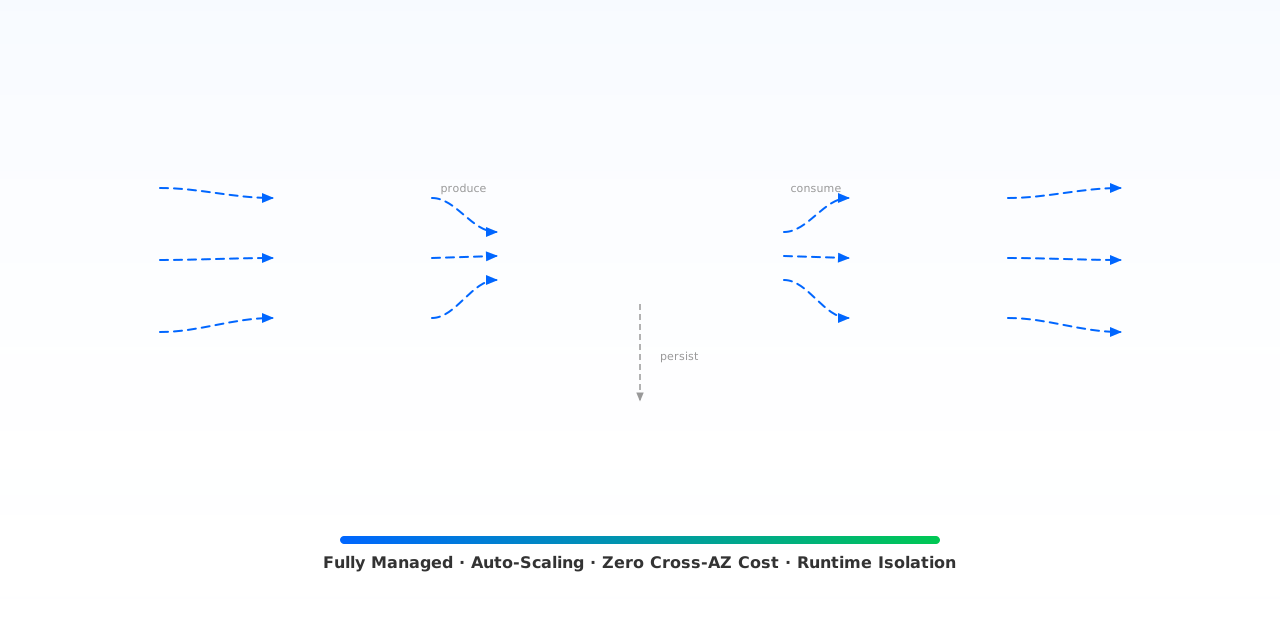
- Standard Kafka Connect
Source, Sink, Transform, and Converter plugins.
- Managed worker runtime
Lifecycle, plugin distribution, capacity, and metrics.
- Your infrastructure
Your network, cloud resources, and connected systems.
Build the pipeline your business needs
Capture database changes, deliver streams to a lakehouse, or keep Kafka clusters in sync.
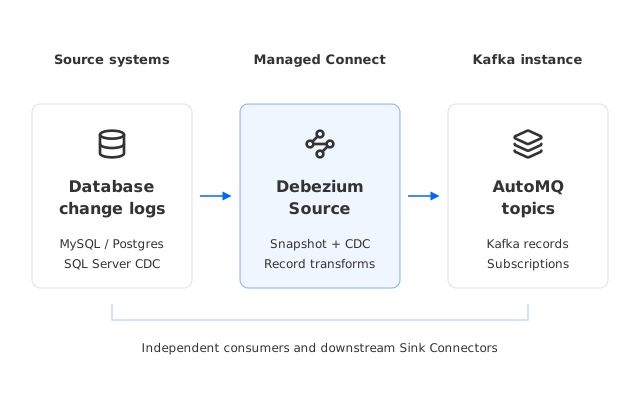
- 01Database change logsMySQL binlog · PostgreSQL WAL · SQL Server CDC
- 02Debezium SourceSnapshot and change capture
- 03AutoMQ topicsSubscribers and downstream Sink Connectors
 MySQL
MySQL PostgreSQL
 SQL Server
- 1Choose the database plugin
- 2Configure access and topics
- 3Verify snapshot and live events
Turn database changes into event streams
Capture row-level changes with a Source Connector. Publish them to Kafka topics so applications and downstream systems can subscribe independently.
Order events, inventory updates, cache refreshes, and downstream analytics.
- Initial snapshot followed by continuous change capture
- Independent subscriptions through Kafka topics
- Transforms and downstream Sink integration
Capture permissions, log retention, and snapshot behavior depend on the source database and plugin.
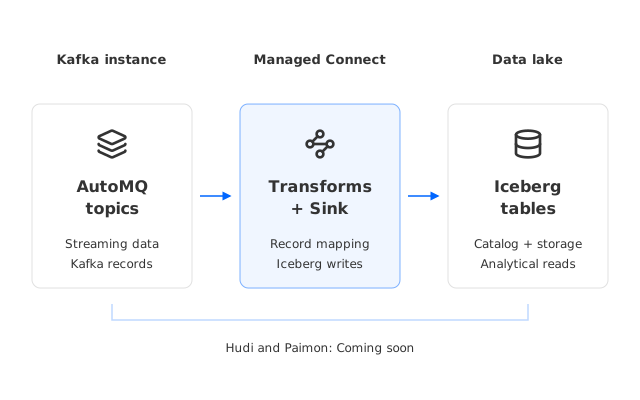
- 01AutoMQ topicsStreaming records
- 02Transforms + SinkRecord mapping and Iceberg writes
- 03Iceberg tablesHudi and Paimon: Coming soon
 Iceberg
 HudiComing soon
 PaimonComing soon
- 1Select the Iceberg Sink
- 2Configure catalog and table writes
- 3Verify records in your lake
Deliver Kafka data to your lakehouse
Write Kafka topics to Iceberg through a managed Sink runtime. Apply record transforms and configure the table, file format, and partitioning for your analytical workload.
Event archival, lakehouse ingestion, and analytics over streaming data.
- Optional record transforms and format conversion
- Configurable compression and partitioning where supported
- Managed runtime with task status, logs, and metrics
Compression, partitioning, retries, and delivery guarantees depend on the Sink plugin and target configuration.
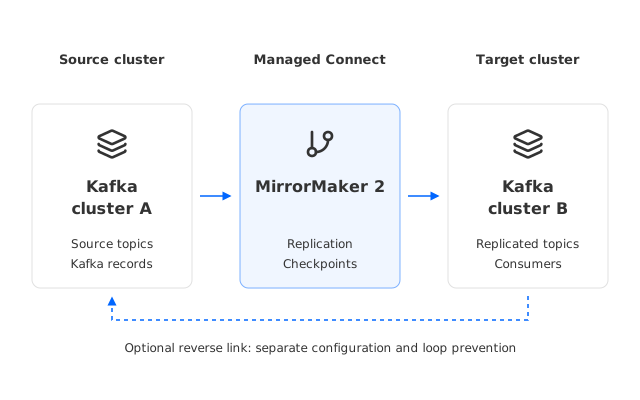
- 01Kafka cluster ASource topics
- 02MirrorMaker 2Replication and checkpoint connectors
- 03Kafka cluster BReplicated topics and consumers
 Apache Kafka
 AutoMQ
- 1Connect both Kafka clusters
- 2Set topic and replication policies
- 3Validate lag and consumer cutover
Run continuous Kafka replication
Use MirrorMaker 2 connectors to maintain a replication link between Kafka clusters for migration, redundancy, or ongoing synchronization.
Long-running replication, migration preparation, and regional redundancy.
- Continuous replication with latency and task monitoring
- Restartable tasks with source progress tracking
- Two configured directions for a bidirectional topology
Bidirectional links need loop prevention and topic policies. MirrorMaker 2 does not preserve source offsets or provide automatic conflict resolution.
The operations behind every pipeline
Extend the runtime, manage worker capacity, and connect production telemetry to your existing tools.
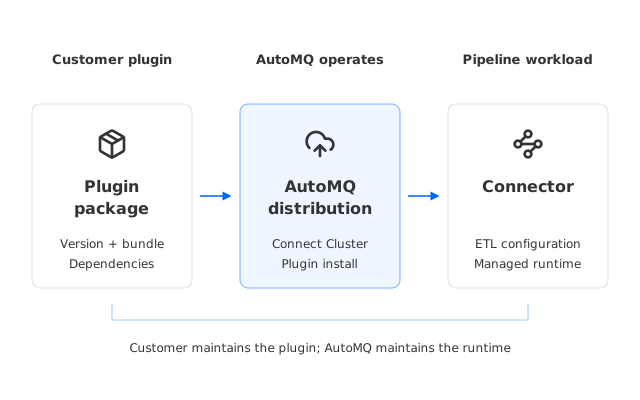
- 01Plugin packageCustomer-managed versions
- 02AutoMQ distributionInstall on Connect Cluster
- 03ConnectorImport ETL configuration and run tasks
- 1Upload a plugin version
- 2Install it on a Connect Cluster
- 3Create a Connector and configure ETL
Your plugin. A managed runtime.
Upload a compatible Kafka Connect plugin and retain your connector configuration. AutoMQ distributes the package to your Connect Cluster and maintains the worker runtime.
Private connectors, enterprise-specific integrations, and custom dependencies.
- Reuse compatible Kafka Connect plugins and configuration
- AutoMQ handles distribution and worker lifecycle
- Maintain explicit plugin versions across clusters
Your team maintains the custom plugin package, its dependencies, and access to external systems.
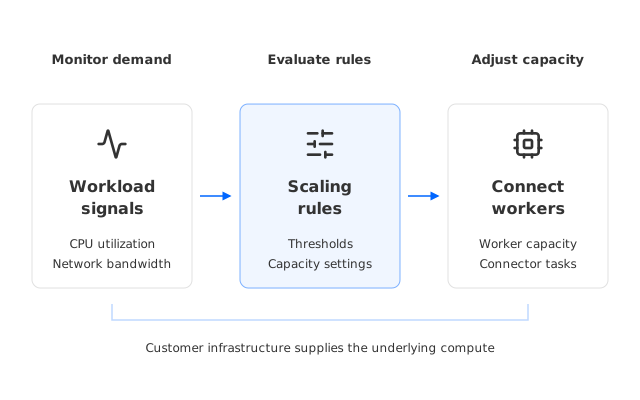
- 01Workload signalsCPU and network bandwidth
- 02Scaling rulesConfigured thresholds and capacity
- 03Connect workersCluster capacity for Connector tasks
- 1Create the cluster and Connector
- 2Configure CPU and bandwidth rules
- 3Monitor utilization and capacity
Manage capacity at the cluster level
Configure worker capacity and Auto Scaling rules around CPU and network utilization. AutoMQ provides the scaling framework; your infrastructure supplies the underlying resources.
CDC bursts, traffic peaks, and batch backfills that change worker demand.
- Monitor CPU and network demand across the cluster
- Set worker capacity and configure scaling rules
- Share managed worker capacity across Connectors
Worker capacity does not override plugin concurrency limits. Available infrastructure, task count, and source or sink throughput still bound the pipeline.
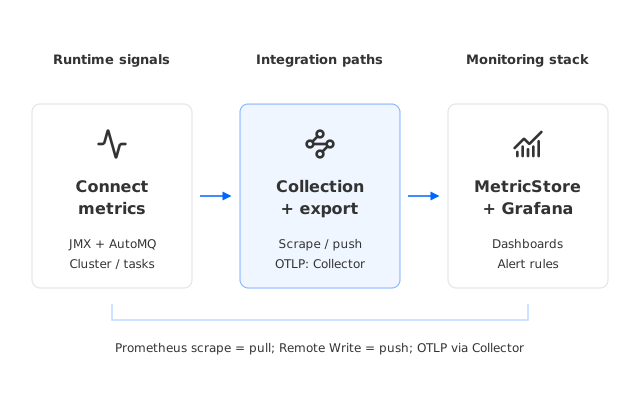
- 01Connect metricsCluster · Connector · Task
- 02Collection & exportPrometheus scrape / Remote Write; OTLP via Collector
- 03MetricStore + GrafanaDashboards and alert rules
 Prometheus
 OpenTelemetry
 Grafana
- 1Choose the metrics export path
- 2Connect your MetricStore
- 3Configure dashboards and alerts
Follow health from cluster to task
Collect Kafka Connect JMX and AutoMQ metrics, then integrate them with your monitoring backend. Use Prometheus-compatible storage with Grafana dashboards and alert rules.
Centralized monitoring, production incident investigation, and capacity planning.
- Cluster: worker capacity, CPU, and network metrics
- Connector: task state, throughput, and record failures
- Prometheus integrations and reusable alert templates
OTLP requires an OTLP-compatible receiver or Collector. Prometheus scrape and Remote Write are separate pull and push integration paths.
Managed Connector Catalog
Find a plugin for your data systems and open its configuration documentation.
Find a Source or Sink plugin by data system, capability, or keyword. Each entry links to the matching AutoMQ Connect configuration guide.
Azure IoT Hub Source Connector
Bring device telemetry into Kafka
Reads device telemetry from Azure IoT Hub's Event Hubs-compatible endpoint and writes structured records to a Kafka topic.

Camunda Zeebe Source Connector
Turn workflow jobs into events
Claims Zeebe jobs and publishes their job keys and JSON payloads to Kafka for event processing and downstream integration.

Couchbase Source Connector
Stream document changes from Couchbase
Reads Couchbase DCP mutation, deletion, and expiration events and routes them to Kafka topics by bucket, scope, and collection.
Debezium MongoDB CDC Source Connector
Capture MongoDB change events
Snapshots existing MongoDB documents, then publishes create, update, and delete events from change streams to Kafka.
Debezium MySQL Source Connector
Capture MySQL row changes
Reads MySQL schemas, snapshots existing rows, and streams row-level and DDL changes from the binlog into Kafka topics.
Debezium PostgreSQL Source Connector
Capture PostgreSQL changes
Establishes a snapshot baseline and continuously captures PostgreSQL inserts, updates, and deletes through logical replication.
Debezium SQL Server Source Connector
Capture SQL Server CDC events
Snapshots SQL Server tables and streams INSERT, UPDATE, and DELETE operations captured by SQL Server change data capture.
Diffusion Source Connector
Bring live topic updates into Kafka
Subscribes to Diffusion topic updates that match a selector and writes each received value to Kafka.

Elasticsearch Source Connector
Republish searchable documents
Reads search-visible documents from Elasticsearch indices and publishes each index to its corresponding Kafka topic.
IRC Source Connector
Ingest IRC channel messages
Joins configured IRC channels and writes received PRIVMSG messages, sender details, and timestamps to Kafka.

JR Source Connector
Generate controlled JSON test data
Runs the JR command-line generator on the Connect Worker and publishes configurable JSON records for development and testing.

MongoDB Source Connector
Capture database change streams
Uses MongoDB Change Streams to read changes from a database, collection, or deployment and write complete events to Kafka.
Can't find the plugin you need? Contact us or upload a Custom Plugin.
Currently in production at




















See Managed Connector in Action
Experience how easy it is to set up and manage Kafka connectors with AutoMQ. Watch the interactive demo below to see the complete connector deployment workflow.
Loading Interactive Demo...
This may take a moment depending on your network connection
Powering Your Kafka Ecosystem
Go beyond basic Kafka with enterprise‑grade solutions for seamless migration, managed connectors, multi‑cluster resilience, and lakehouse integration—all in one unified platform.
Table Topic
Natively integrates Iceberg/Delta Lake table formats to auto-convert Kafka topics into query-ready tables without ETL pipelines.
Managed Connector
300+ connectors with 100% compatibility with Kafka upstream and downstream ecosystem.
AutoMQ Linking
Zero-downtime migration from any Kafka. Byte-for-byte replication. Rolling cutover. Done.
Multi-Cluster DR
Unified access point for multiple clusters with transparent topic cluster switching through proxy metadata routing for disaster recovery capabilities.
FAQs
Don't see an answer to your question? Check our docs, or contact us.
Get Started with AutoMQ Today
Start your 30-day free trial. No credit card required
Available on Cloud Marketplaces
Subscribe to AutoMQ directly from your preferred cloud platform