
Table of Contents
Table of Contents
A connector can be “running” while its workload is already outgrowing the worker pool. CPU may be below an alert threshold because a sink is waiting on a slow destination. Tasks may be configured with a high tasks.max value but cannot process more partitions than the source topic has. A custom plugin may fit on one worker and fail on another after a dependency change. Worker sizing becomes a production problem when teams treat one number—throughput—as the whole capacity model.
Amazon MSK Connect gives you a managed Kafka Connect runtime, but it does not know the semantics of your connector, database, destination, or failure budget. AWS defines capacity in its connector capacity documentation as the number of workers multiplied by the MSK Connect Units (MCUs) assigned to each worker. One MCU represents 1 vCPU and 4 GiB of worker memory, and the memory figure describes the worker instance rather than Java heap. That is a useful starting point, not a promise that an MCU processes a fixed number of megabytes per second.
The reliable approach is to size four things together: the work each task performs, the worker resources that host those tasks, the plugin package and its dependencies, and the isolation boundary that limits a bad connector’s blast radius.
1Start with workload shape, not a throughput guess
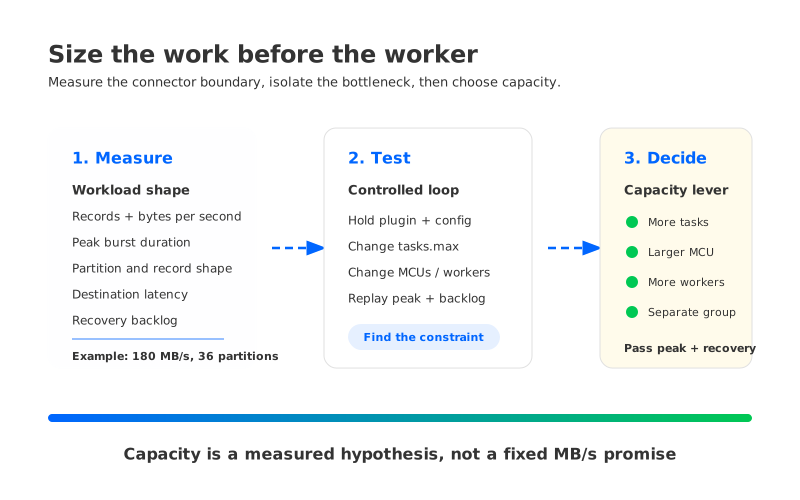
Throughput is a rate. A connector’s resource demand is a rate multiplied by the amount of work required for each record. A source connector that makes one database query per batch, a sink that waits for an external API, and a transform that parses large JSON payloads can all report the same input rate while consuming very different worker resources.
Record the following measurements for each connector and for both normal and peak windows:
- Records and bytes: measure records per second and bytes per second at the connector boundary. Keep the distributions, not only the average; a bursty workload needs headroom for its burst duration.
- Record cost: capture average and high-percentile record size, serialization cost, transformation count, compression behavior, and whether one record expands into multiple destination writes.
- External dependency: measure destination acknowledgment latency, database fetch time, API rate limits, retries, and connection-pool saturation. A connector that spends most of its time waiting may not need more CPU; it may need a destination or batch-size change.
- Partition shape: count assigned partitions and observe whether a few hot partitions dominate. Tasks are parallel units, but Kafka partition assignment still limits useful parallelism for many connectors.
- Recovery work: estimate how much backlog must be cleared after a restart or destination outage. Recovery throughput is often higher than steady state, and it can compete with live traffic.
A simple worksheet can turn those observations into a testable hypothesis:
| Input | Example measurement | Why it affects sizing |
|---|---|---|
| Steady input | 180 MB/s across 36 partitions | Establishes the normal work rate |
| Peak input | 300 MB/s for 10 minutes | Sets burst headroom and scale-out expectations |
| Destination latency | 40 ms median, 180 ms p95 | Indicates whether tasks wait on I/O |
| Record size | 2 KiB median, 32 KiB p99 | Influences serialization and memory pressure |
| Recovery backlog | 90 GB after a 30-minute outage | Tests catch-up without starving live traffic |
The numbers in this table are an example worksheet, not a benchmark. Replace them with measurements from your connector and destination. A useful test keeps the connector configuration, plugin version, topic partitioning, and destination limits constant while changing worker count or MCU size. Without that control, a “bigger worker” result often hides a different bottleneck.
2Translate workers and tasks into capacity
MSK Connect supports two capacity modes. In provisioned mode, you set the number of workers and MCUs per worker. In autoscaled mode, you set minimum and maximum worker counts, scale-in and scale-out CPU utilization percentages, MCUs per worker, and optionally a maximum autoscaling task count. AWS documents that autoscaling uses the connector’s CpuUtilization metric and that MSK Connect adjusts workers within the bounds you specify.
That model produces a useful capacity equation:
Total worker capacity = worker count × MCUs per worker.
It does not produce a universal “MB/s per MCU” conversion. A connector’s useful throughput also depends on task parallelism, partition assignment, batch settings, external latency, serialization, and retries. Use a rate measured at the connector’s boundary and confirm it with lag or backlog recovery, rather than inferring capacity from CPU alone.
Tasks are the second half of the model. Each worker starts tasks as parallel threads, and Kafka Connect coordinates them through consumer groups. tasks.max is an upper bound; it does not create more useful work than the source partitions, connector implementation, or destination can sustain. Raising it can improve parallelism until a downstream limit appears, then increase context switching, open more connections, or trigger destination throttling.
A practical sizing sequence is:
- Hold the plugin and connector configuration constant.
- Run a representative load with one worker and a conservative task count.
- Increase task parallelism until throughput stops improving or an external limit appears.
- Increase MCUs per worker when CPU, memory, or transform cost is the constraint.
- Add workers when task parallelism, failure isolation, or recovery time requires another JVM boundary.
- Repeat the test with the expected peak and with a backlog replay.
The last step matters because recovery is a separate workload. A sink that comfortably follows 180 MB/s may take too long to clear 90 GB if the destination enforces a lower write rate. Size the system against the recovery objective you actually need, and document the test conditions alongside the result.
3Treat plugins as runtime dependencies
A custom plugin is an AWS resource created from a JAR or ZIP stored in Amazon S3. AWS states in its custom plugin guide that MSK Connect copies the object when the plugin is created; later changes to the S3 object do not update that plugin. Custom plugins also cannot be updated in place. To use a replacement version, you must delete the connectors that reference the plugin, delete the plugin, and recreate it.
That lifecycle makes packaging part of capacity planning. A plugin that omits a transitive dependency can fail during startup or behave differently from a local Kafka Connect test. AWS recommends packaging all required JAR files and dependencies in a ZIP or an uber JAR. The selected Kafka Connect version also determines the Java runtime: AWS documents Java 11 for Kafka Connect 2.7.1 and Java 17 for 3.7.x.
Use a repeatable package check before a worker-sizing test:
- Build the exact artifact that will be uploaded, including connector, converter, transform, and client dependencies.
- Scan for duplicate classes and incompatible versions before creating the custom plugin.
- Launch the connector with the same Kafka Connect version and worker configuration used in production.
- Verify that the plugin can serialize, transform, and connect to its destination under peak record size.
- Record the plugin ARN or versioned identifier next to the test result so a later rerun uses the same artifact.
The plugin boundary also affects isolation. Two connectors sharing a plugin may be convenient, but they share upgrade timing and dependency risk. A package that bundles a client library with an incompatible version can turn one connector deployment into a fleet-wide restart.
4Use isolation to control failure blast radius
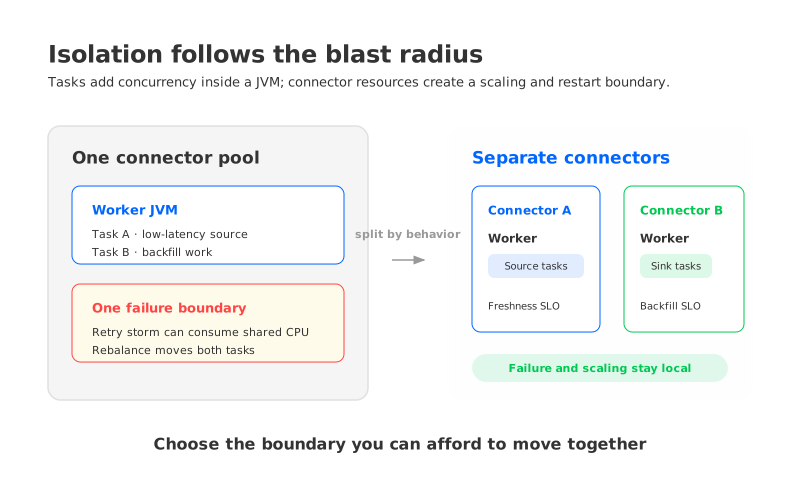
MSK Connect capacity is configured per connector. A worker is a JVM process, and the tasks belonging to that connector run as parallel threads across its worker pool. That distinction gives you two isolation levers: increasing task count changes concurrency inside the connector’s capacity envelope, while creating separate connector resources creates independent process and scaling boundaries.
Give each connector a capacity envelope that matches its operational behavior rather than its team ownership. A low-latency source, a large backfill sink, and a connector that calls a rate-limited API should not automatically share the same scaling assumptions. Separate connector resources when one of these conditions is true:
- The connectors have different peak windows or recovery objectives.
- One plugin has a faster release cadence or a larger dependency graph.
- One destination can throttle, retry, or block for minutes.
- One connector handles sensitive data and needs a narrower operational boundary.
- The cost of a rebalance or restart is materially different between workloads.
Isolation has a cost. More connector resources mean more minimum capacity, more subnet IP addresses, more dashboards, and more configuration to test. AWS notes that each MSK Connect worker consumes one IP address from a customer-provided subnet, and autoscaling can change the number of workers over time. Reserve addresses for the maximum configured capacity, plus deployment and recovery headroom.
The useful question is not “Can these connectors fit on one worker?” It is “If this connector is delayed, restarted, or upgraded, what else should be allowed to move with it?” That answer defines a better group boundary than an arbitrary connector count.
5Choose scaling triggers that match the failure
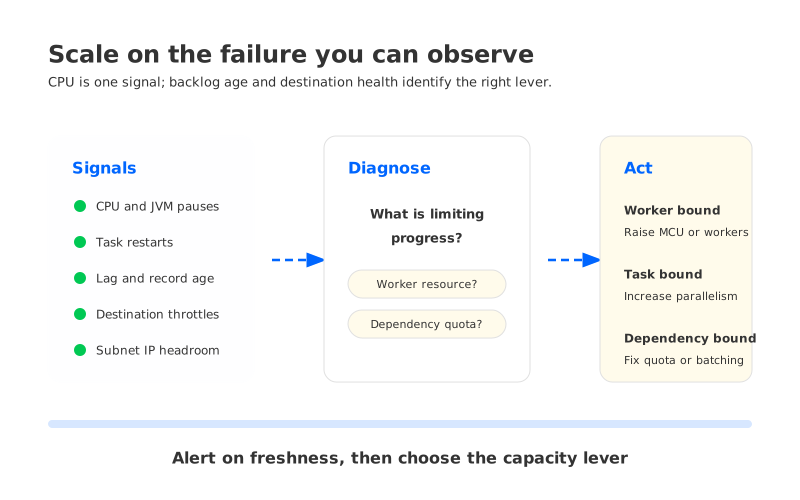
CPU utilization is a useful signal for MSK Connect autoscaling, but it is not a complete service-level objective. A sink can be blocked on destination latency while CPU remains modest. A source can be CPU-bound while Kafka lag looks healthy for a short period because the topic has retention headroom. Scale decisions should combine resource, work, and dependency signals.
Use at least one signal from each layer:
| Layer | Signals to watch | Interpretation |
|---|---|---|
| Worker resource | CpuUtilization, memory pressure, JVM pauses | Shows worker contention and whether MCUs are sufficient |
| Connector work | Source or sink record rate, task state, task restart count | Shows whether tasks are making progress |
| Kafka backlog | Consumer lag, records behind, oldest record age | Shows freshness risk and recovery progress |
| Dependency | Destination latency, throttles, error rate, connection failures | Distinguishes worker pressure from an external bottleneck |
| Network | Subnet IP availability, bytes, connection limits | Catches capacity constraints outside the JVM |
For autoscaling, set the scale-out threshold below the point where lag or destination freshness becomes unacceptable. Set scale-in conservatively and observe whether a scale-in event causes task rebalance churn. The exact percentages are workload-specific; AWS exposes the control, but your SLO defines the safe range.
A worker increase also triggers coordination. Workers use Kafka Connect consumer groups to rebalance tasks when the worker set changes. That rebalance is expected, but it can briefly change task ownership and destination concurrency. Test scale-out and scale-in during a controlled load window, and alert on task restarts and backlog age rather than assuming that a successful scaling event means the connector recovered.
6Make cost a guardrail, not the first input
MSK Connect pricing is resource-based, so worker count, MCU size, and the time each connector runs all affect spend. A small worker pool that misses a recovery objective can cost more operationally than a larger pool that clears backlog predictably. Conversely, an autoscaled connector with an overly high maximum can spend through a burst when the real bottleneck is a destination quota.
Set three guardrails before enabling autoscaling:
- Capacity guardrail: maximum workers and MCUs per worker reflect tested limits and available subnet IPs.
- Freshness guardrail: lag or oldest-record age defines when the connector is failing its purpose.
- Spend guardrail: a budget alarm or daily review catches sustained scale-out and retry loops.
Review costs by connector group and by event, such as backfill, schema migration, or destination outage. That makes an unexpected bill explainable. It also stops teams from “fixing” a slow destination by increasing workers indefinitely.
7Where a different Kafka storage architecture fits
Worker sizing solves the connector plane. It does not change the storage and broker architecture of the Kafka cluster that connectors read from or write to. If the connector workload is healthy but MSK broker storage, partition movement, or cross-AZ replication becomes the limiting factor, adding Connect workers addresses the wrong layer.
The architectural question is whether Kafka compute and storage must scale together. AutoMQ is a Kafka-compatible streaming platform that separates broker compute from shared object storage. That can give teams a different scaling boundary when connector throughput grows independently from retained Kafka data. The trade-off still needs a workload test: connector parallelism, broker request limits, object-storage behavior, and the chosen WAL type all matter.
Keep the decision boundary explicit. Use MSK Connect worker sizing to make connector capacity predictable. Evaluate a different Kafka storage architecture only when the cluster’s storage and broker scaling coupling is the constraint you are trying to remove.
8FAQ
8.1How many MSK Connect workers do I need?
Start with measured task throughput and recovery requirements. Choose a worker count and MCU size that pass peak and backlog tests, then leave room for a failed worker, rebalance, or destination retry. There is no reliable universal MB/s-per-worker number.
8.2Is more CPU or more workers better?
More MCUs per worker help when one JVM is CPU- or memory-bound. More workers help when you need more task parallelism, faster recovery, or a failure boundary. Test both while holding the plugin and connector settings constant.
8.3Does tasks.max equal the number of tasks that will run?
No. It is an upper bound. The connector implementation, source partitions, destination, and capacity mode can all result in fewer useful tasks. In autoscaled mode, MSK Connect can override tasks.max based on worker capacity unless you set a maximum autoscaling task count.
8.4Do custom plugins update automatically when the S3 object changes?
No. MSK Connect copies the plugin artifact when the plugin is created. Create a replacement plugin version and recreate dependent connectors when the code or dependency package changes.
8.5How do I prevent one connector from affecting others?
Separate connectors with different failure, dependency, or scaling behavior into different capacity groups. Validate the extra worker cost, subnet IPs, and operational dashboards as part of the isolation decision.
Sizing MSK Connect is therefore a worksheet and a test loop, not a single worker number. Start with the connector’s work shape, prove task and MCU behavior against peak and recovery loads, package the exact plugin artifact, and choose isolation boundaries that match the blast radius you can accept. When those tests show that broker storage—not connector compute—is the limiting layer, evaluate a Kafka architecture whose storage and compute can scale independently.
If you are comparing that boundary for an AWS deployment, explore AutoMQ with the same workload measurements you used for MSK Connect.


