
Table of Contents
Table of Contents
An EKS pod can have a valid Kubernetes service account and still fail to publish to Amazon MSK. The missing piece is usually not Kafka code. It is one of the boundaries between the pod, the VPC, AWS Security Token Service (STS), and the MSK broker: a route is missing, the IAM trust policy names the wrong service account, or the client is using a TLS endpoint without the MSK IAM mechanism.
A reliable connection test follows that path in order. First prove that the pod can resolve and reach the private broker endpoint. Then prove that the service account can exchange its projected identity token for the intended IAM role. Only after both are true should you debug Kafka permissions and client properties. This order turns a vague “MSK connection refused” incident into a short set of testable boundaries.
1What the connection actually crosses
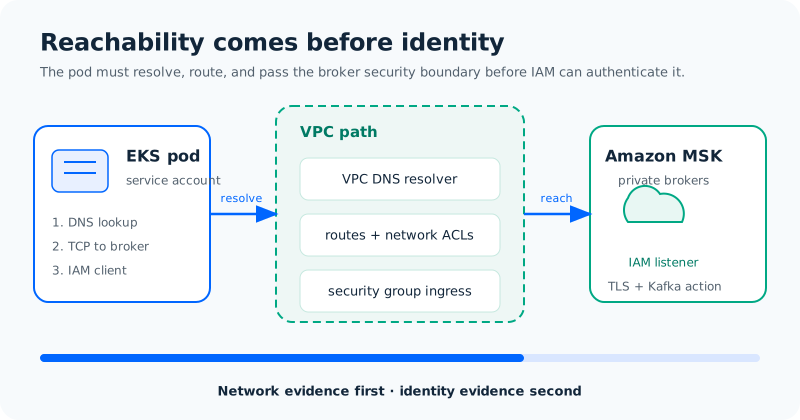
Amazon MSK brokers are private endpoints in the cluster VPC. An EKS cluster can reach them when the pod network has a path to those broker subnets, the relevant security groups allow the broker listener, and DNS resolves the broker names to private addresses. EKS and MSK do not become connected merely because both are AWS services.
The path has four separate checks:
- Addressing: the pod resolves the MSK bootstrap hostname using the VPC DNS configuration.
- Routing: the pod subnet, node subnet, or connected VPC has routes to the broker subnets. The exact route depends on whether the clusters share a VPC, use peering, or use a Transit Gateway.
- Filtering: the MSK security group allows traffic from the EKS node or pod security group on the listener used by the selected authentication mode. The EKS side must also allow egress.
- Identity: after the TCP connection is open, the Kafka client must authenticate and be authorized for its topic and consumer group.
A pod that fails the first three checks never reaches IAM. A pod that passes them but receives SASL authentication failed has a different problem. Keeping these layers separate is the main operational advantage of a staged test.
The AWS MSK and EKS VPC peering walkthrough reflects the same sequence used in many third-party implementation guides: establish private network reachability, verify security-group rules, then configure the client.
2Choose the network shape before writing IAM policies
A shared VPC is the shortest path to reason about because the broker and pod subnets use one VPC DNS namespace and one set of route tables. It still requires non-overlapping subnets and security-group rules. If MSK and EKS live in different VPCs, VPC peering or a Transit Gateway can carry the traffic; the peering route tables and network ACLs then become part of the connection contract.
Private connectivity also affects STS. IRSA uses the EKS cluster’s OIDC issuer and exchanges a projected service-account token with STS. A private cluster with no egress to the issuer or STS endpoints can reach MSK while failing the role exchange. EKS documents that creating or using the OIDC provider from inside a VPC can fail when the issuer hostname is not resolvable; teams using private clusters should plan the required Route 53 resolver path or VPC endpoints before rollout.
Record the selected shape in the runbook:
| Boundary | Evidence to collect | Typical failure |
|---|---|---|
| Pod to DNS | getent hosts <bootstrap-host> from the same pod image | UnknownHostException or a public address |
| Pod to broker | TCP check to the MSK listener returned by GetBootstrapBrokers | timeout or security-group rejection |
| Pod to STS | AWS SDK credential call with the projected token | WebIdentityTokenCredentialsProvider error |
| Kafka action | produce or consume using the intended principal | AccessDenied or a Kafka authorization error |
This table is more useful than a single “networking is configured” checkbox. It tells the next operator which evidence to collect before changing a policy.
3Build the IRSA trust chain
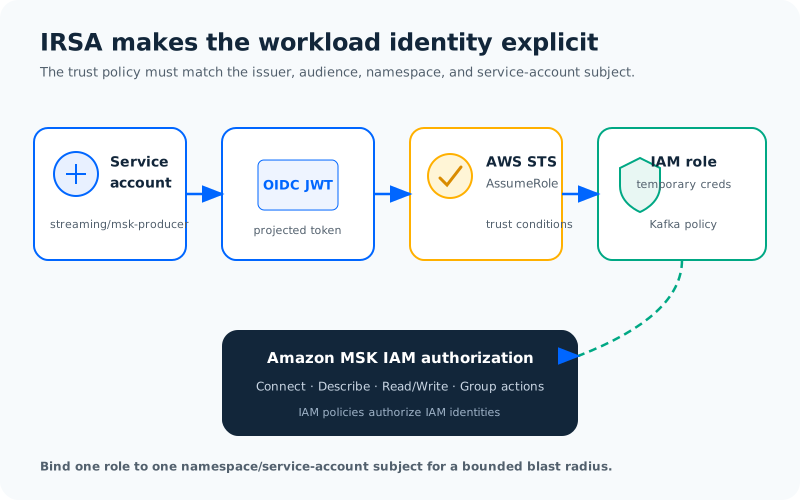
IAM Roles for Service Accounts (IRSA) works by giving the EKS cluster an IAM OIDC identity provider. The pod receives a projected service-account token. The AWS SDK reads that token and calls AssumeRoleWithWebIdentity; STS returns temporary credentials for the IAM role whose trust policy accepts the token’s issuer, audience, and subject.
The trust policy should bind the role to one namespace and one service-account name. A broad system:serviceaccount:*:* subject may make the first test pass, but it gives every service account in the cluster a path to the role. The EKS IRSA guide recommends restricting the sub and aud claims and treating the node role and pod role as separate identities.
A minimal trust relationship has this shape. Replace the placeholders with the cluster issuer host, namespace, and service-account name; do not copy a wildcard into production:
{
  "Version": "2012-10-17",
  "Statement": [{
    "Effect": "Allow",
    "Principal": {
      "Federated": "arn:aws:iam::<account-id>:oidc-provider/<oidc-host>"
    },
    "Action": "sts:AssumeRoleWithWebIdentity",
    "Condition": {
      "StringEquals": {
        "<oidc-host>:aud": "sts.amazonaws.com",
        "<oidc-host>:sub": "system:serviceaccount:streaming:msk-producer"
      }
    }
  }]
}
Amazon MSK IAM access control handles authentication and authorization together for IAM identities, and AWS states that Kafka ACLs do not authorize those identities. Follow the MSK IAM access-control model and scope cluster, topic, and consumer-group resources to the workload’s actual needs.
For a producer, the policy commonly includes permission to connect to the cluster, describe the cluster and topic, and write to the intended topic. A consumer usually needs the corresponding read and group permissions. The exact ARN format and action set depend on the operation; generate the policy from the current MSK documentation and test a deny case before deployment. A policy that contains kafka-cluster:* may hide the difference between a valid trust chain and an over-privileged role.
4Map the role to the Kubernetes service account
The Kubernetes service account carries the IAM role annotation. Keep the service account in the same namespace named in the trust policy, and deploy the workload with that service account explicitly. A typo in either name produces a valid pod with the wrong identity.
apiVersion: v1
kind: ServiceAccount
metadata:
  name: msk-producer
  namespace: streaming
  annotations:
    eks.amazonaws.com/role-arn: arn:aws:iam::<account-id>:role/eks-msk-producer
---
apiVersion: apps/v1
kind: Deployment
metadata:
  name: orders-producer
  namespace: streaming
spec:
  template:
    spec:
      serviceAccountName: msk-producer
      containers:
        - name: producer
          image: <application-image>
After the pod starts, inspect the rendered environment and projected token volume rather than trusting the manifest alone. The EKS admission component injects the web-identity configuration used by the AWS SDK. From a debug container that uses the same service account, call aws sts get-caller-identity and confirm that the returned ARN is the intended role. This test proves the IRSA exchange; it does not yet prove that MSK authorizes the Kafka action.
EKS also warns that pods using hostNetwork: true always have access to the instance metadata service. The SDK still prefers IRSA credentials when it is configured, but an unrestricted metadata path can expose the node role to processes that should only have the pod role. Restrict metadata access as part of the cluster hardening plan and avoid using host networking for a Kafka client unless the workload needs it.
5Configure the Kafka client for MSK IAM
Do not substitute the TLS-only or unauthenticated bootstrap string. Run GetBootstrapBrokers for the cluster and select BootstrapBrokerStringSaslIam when the cluster is configured for IAM access control.
aws kafka get-bootstrap-brokers \
  --cluster-arn "$MSK_CLUSTER_ARN" \
  --query 'BootstrapBrokerStringSaslIam' \
  --output text
For a Java client using the AWS MSK IAM authentication library, the relevant properties look like this:
security.protocol=SASL_SSL
sasl.mechanism=AWS_MSK_IAM
sasl.jaas.config=software.amazon.msk.auth.iam.IAMLoginModule required;
sasl.client.callback.handler.class=software.amazon.msk.auth.iam.IAMClientCallbackHandler
bootstrap.servers=<BootstrapBrokerStringSaslIam>
The library obtains AWS credentials through the standard provider chain. Inside the pod, that chain should resolve to the web-identity credentials injected for msk-producer; static access keys in a Secret would bypass the identity boundary that IRSA is meant to create. For Python, Go, JavaScript, or a connector, verify the current MSK IAM integration and the client’s supported Kafka version before selecting the equivalent configuration.
6Troubleshoot in the order the packet travels
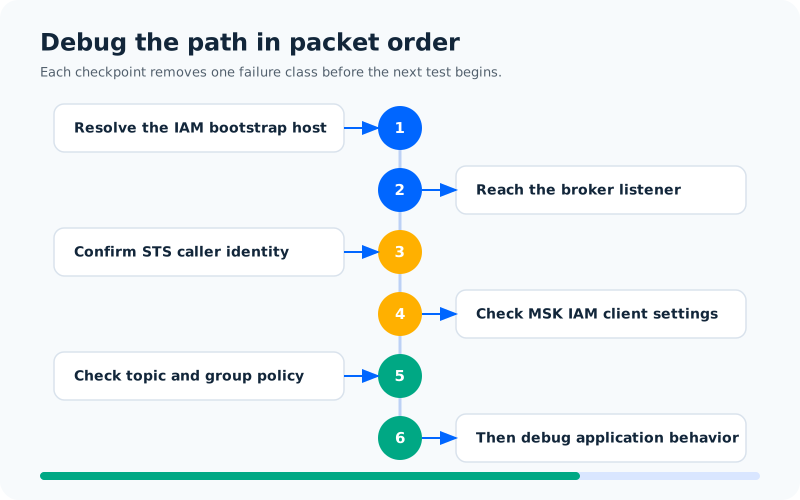
When an EKS pod cannot connect to MSK, changing the IAM policy first is tempting and often wrong. Use the following order so each test removes one class of failure.
6.1Confirm the endpoint and DNS result
Use the exact IAM bootstrap string returned for the cluster. From the running pod, resolve one broker hostname. If the name does not resolve, inspect the pod’s DNS policy, CoreDNS logs, the VPC resolver, and any private hosted-zone association before touching IAM. A hostname that resolves to an address outside the intended VPC is a topology problem, even if the name itself is valid.
6.2Confirm a TCP path to the listener
A TCP timeout usually points to security groups, route tables, network ACLs, or a missing VPC attachment. Test the listener port with a small diagnostic image in the same namespace and node path as the application. The test needs to run from the pod network; a successful connection from an EC2 bastion proves a different path.
6.3Confirm the pod’s AWS identity
Run aws sts get-caller-identity with the same service account and inspect the pod’s projected-token configuration. If STS fails, check the OIDC provider ARN, issuer hostname, trust-policy condition keys, namespace, service-account name, and the cluster’s ability to resolve or reach the issuer and STS. AccessDenied from STS means the web-identity exchange reached IAM but the trust conditions did not match.
6.4Confirm MSK IAM client configuration
A Kafka error such as SASL authentication failed after a successful TCP connection usually means the client is using the wrong mechanism, an expired or unavailable credential, or a bootstrap string for a different listener. Check security.protocol, the IAM mechanism, callback handler, and the client library version. A generic SASL_SSL configuration is not automatically an MSK IAM client.
6.5Confirm the Kafka policy and resource names
An AccessDenied response after the IAM handshake means the role was recognized but its policy did not allow the requested cluster, topic, or group action. Compare the topic and group names in the client with the ARN resources in the policy. Remember that Kafka ACL commands do not grant permissions to an IAM principal on an IAM-enabled MSK cluster.
6.6Confirm application behavior after identity succeeds
Only after the previous tests pass should you debug consumer rebalances, serializers, partition assignment, or application-level retries. Keep the first test small: one topic, one producer, one consumer group, and a known record. This gives the network and identity runbook an observable checkpoint before production traffic is added.
7Production hardening
Make the failure path observable. Keep CloudTrail enabled for IAM events, collect EKS audit and admission logs, and export Kafka client errors with the cluster, namespace, service-account, and topic labels needed to correlate an incident. Avoid logging projected tokens or temporary credentials. If the client library refreshes credentials automatically, test the refresh path by running a long-lived pod through a role-policy change in a non-production cluster.
Network changes deserve the same discipline. Treat MSK security-group rules, route tables, DNS resolution, and STS access as versioned infrastructure. A cluster migration or VPC redesign can preserve the Kubernetes manifests while silently breaking the private route or OIDC issuer path. Re-run the four boundary tests after every topology change.
8Where a Kafka-compatible platform changes the portability question
The EKS integration pattern is portable at the client boundary: a pod needs a reachable bootstrap endpoint, a workload identity, a TLS or SASL configuration, and authorization for its Kafka operations. The parts that are MSK-specific are the IAM token mechanism, BootstrapBrokerStringSaslIam, MSK resource ARNs, and the IAM policy actions. Treat those as an adapter in the deployment rather than assuming every Kafka-compatible service implements them.
AutoMQ is a Kafka-compatible cloud-native streaming platform. Teams evaluating it alongside MSK should repeat the same EKS tests against the target deployment, then replace the MSK-specific identity adapter with the target platform’s documented authentication and authorization path. The useful migration artifact is a client contract that names the bootstrap endpoint, security protocol, principal mapping, topic and group permissions, and credential rotation behavior.
That boundary keeps the EKS design honest. Pods, service accounts, VPC routes, and runbook checks can remain stable while the Kafka provider changes. The authentication plugin and policy resources need explicit validation.
9FAQ
9.1Can EKS connect to Amazon MSK across VPCs?
Yes, when the VPC connectivity method provides routes and DNS resolution between the pod network and the private MSK broker subnets. VPC peering and Transit Gateway are common choices. Security groups, network ACLs, and non-overlapping CIDR ranges still apply.
9.2Does IRSA replace MSK authorization?
No. IRSA lets the pod obtain temporary AWS credentials for an IAM role. Amazon MSK then evaluates that role for Kafka actions. The role still needs a scoped MSK permissions policy, and a successful sts get-caller-identity call does not prove that the role can write to a topic.
9.3Do I need a special Kafka client for MSK IAM?
You need a client integration that implements the Amazon MSK IAM mechanism and uses the IAM bootstrap broker string. A client configured only for SASL_SSL or username/password authentication does not gain IAM support automatically.
9.4Why does the pod reach the broker but receive AccessDenied?
The network and TLS path may be working. Check the IAM principal returned by STS, the MSK IAM client configuration, and the role’s cluster, topic, and group permissions. Kafka ACLs do not authorize IAM identities on an MSK cluster using IAM access control.
9.5Should every EKS workload share one MSK IAM role?
Sharing a role makes the first deployment easier but widens the blast radius and weakens audit trails. Use separate service accounts and roles for workloads with different topic or consumer-group responsibilities.
10References
- Amazon EKS IAM roles for service accounts
- Amazon EKS associate an IAM role with a service account
- Amazon EKS Pod Identity
- Amazon MSK IAM access control
- Configure clients for IAM access control
- Connecting from EKS pods to MSK: IAM, service accounts, trust relationships, and security groups
- How to deploy AWS MSK on EKS using VPC peering
Return to the original failure question: is the pod unable to resolve MSK, unable to obtain its AWS identity, or unauthorized for a Kafka action? Once those three outcomes are logged separately, connecting Amazon MSK to Amazon EKS becomes a repeatable deployment check instead of a trial-and-error policy exercise. If you are comparing Kafka-compatible platforms as part of that design, explore AutoMQ’s deployment options with the same client and failure tests.


