
Table of Contents
Table of Contents
A throttled Amazon MSK workload rarely announces the exact limit it reached. Producers report rising latency, a consumer falls behind, or a topic-creation call starts failing after a deployment. The same symptoms can come from a broker throughput ceiling, a partition boundary, an IAM connection rate, a Serverless request limit, or an AWS API quota. Treating all of them as “the cluster is full” leads to the wrong mitigation.
An incident runbook should classify the boundary first, collect evidence at the same time scale as the failure, and then choose between a safe rate reduction, capacity change, quota request, or architecture review. This guide uses the current Amazon MSK quota model and CloudWatch signals to make that sequence repeatable.
1Start with the violated boundary, not the symptom
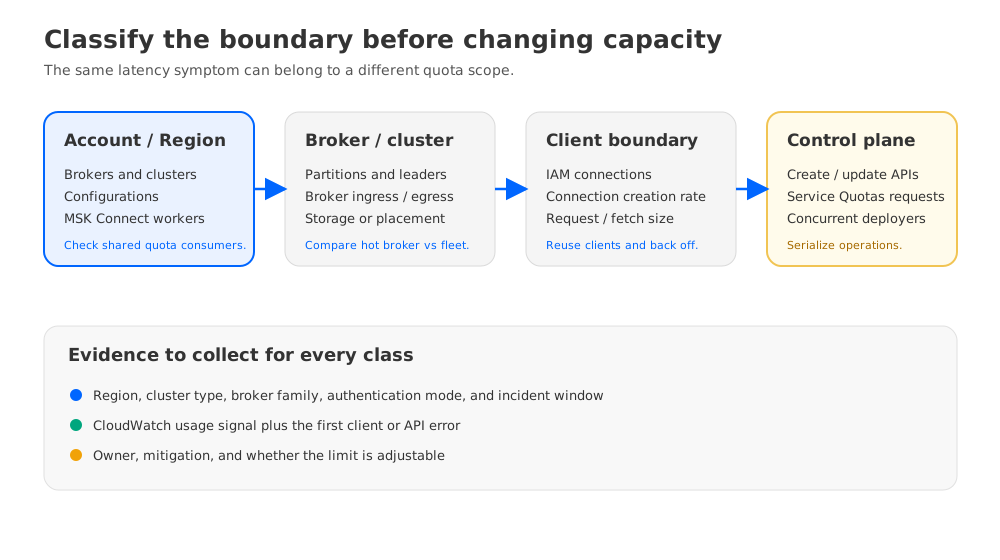
Amazon MSK quotas exist at different scopes. Account quotas are Region-specific unless AWS says otherwise. Cluster and broker limits follow the deployment type, while Kafka client quotas and service API quotas may be enforced on another path entirely. Record the Region, cluster type, broker family, and authentication mode before comparing a metric with a limit.
| Boundary | Typical evidence | First question |
|---|---|---|
| Account and Region | Broker, cluster, configuration, or MSK Connect resource request is rejected | Is another cluster or connector consuming the same Regional quota? |
| Broker and cluster | Partition pressure, broker traffic shaping, or a busy broker | Is the load concentrated on one broker or spread across the fleet? |
| Client connections | Authentication failures, connection closes, or reconnect storms | Are clients reusing connections, and is IAM connection creation spiking? |
| Throughput and requests | Producer or fetch latency rises while traffic continues | Is the limit per broker, per partition, per cluster, or per request? |
| Serverless operations | INVALID_REQUEST or THROUGHPUT_QUOTA_EXCEEDED on topic or partition work | Does the Serverless quota table define this as a hard boundary? |
| MSK Connect | Connector deployment or autoscaling stops at a worker limit | Is the connector asking for more workers than the account or connector quota allows? |
The AWS quota page is the source of truth for current values. For example, Standard brokers have account and cluster broker quotas, an IAM connection limit per broker, and a connection-creation rate that differs by instance family. Express brokers add documented ingress, egress, and partition ceilings. Serverless publishes per-cluster limits for request rate, client connections, message size, fetch size, partition leaders, and partition operations. These tables are different on purpose; do not apply a Serverless number to a provisioned cluster.
2Build an evidence packet in the first 15 minutes
Capture the failure window in UTC and keep the first error from each affected client. A useful packet contains the cluster ARN and Region, deployment type, broker and Kafka versions, authentication mode, affected topic or API, client IDs, and the first and last timestamps. Include the deployment or configuration change that preceded the incident. A quota diagnosis without a time boundary is hard to reproduce because a five-minute burst and a twelve-hour saturation event look different in a dashboard.
Use CloudWatch to inspect both the resource and the symptom. For Standard brokers, the MSK metrics reference defines signals such as GlobalPartitionCount, PartitionCount, LeaderCount, ClientConnectionCount, ConnectionCreationRate, BytesInPerSec, BytesOutPerSec, RequestBytesMean, RequestTime, and TrafficShaping. OfflinePartitionsCount and UnderReplicatedPartitions help distinguish a quota response from a wider availability problem. Select a period that shows the burst; a five-minute average can hide a one-minute connection storm.
List the metrics and preserve the raw values before changing clients:
aws cloudwatch list-metrics \
  --namespace AWS/Kafka \
  --dimensions Name="Cluster Name",Value="$CLUSTER_NAME" \
  --region "$AWS_REGION"

aws kafka describe-cluster-v2 \
  --cluster-arn "$CLUSTER_ARN" \
  --region "$AWS_REGION" \
  --query 'ClusterInfo.{State:State,Provisioned:Provisioned,Serverless:Serverless}'
The control plane needs its own evidence. Save the request ID and complete error body from failed CreateTopic, UpdateClusterConfiguration, UpdateBrokerType, or other AWS API calls. CloudTrail can confirm which principal made the call and whether several deployment systems were issuing the same operation. For an MSK Connect incident, record the connector name, capacity mode, requested worker count, plugin, and task errors. Do not turn a quota increase request into a workaround before identifying the request path that is actually failing.
3Map each symptom to a quota class
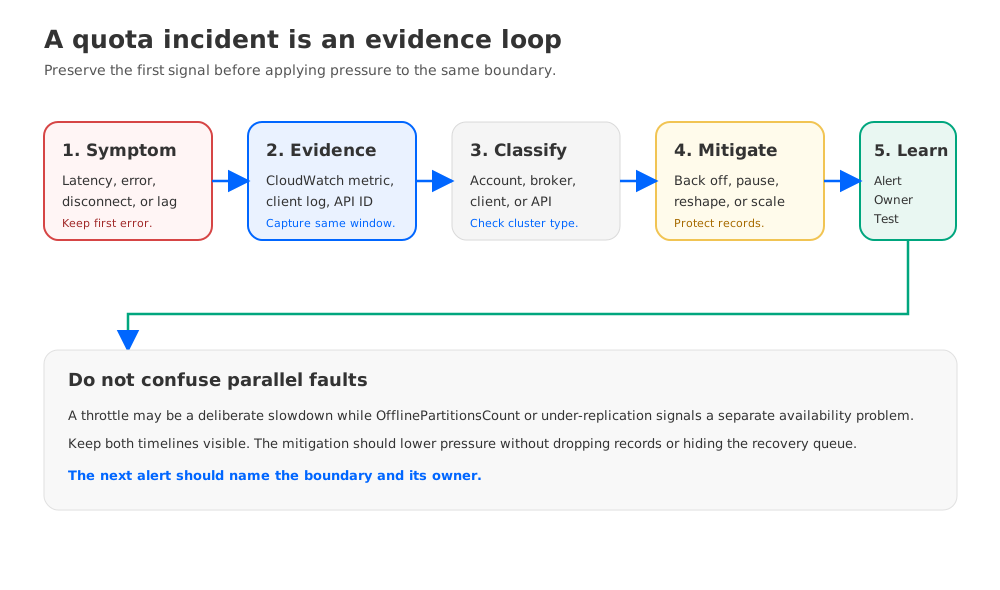
The following mapping keeps a plausible symptom from becoming an unsupported diagnosis:
- Produce or fetch calls slow down, and
TrafficShapingorRequestTimerises. Check bytes by broker and by partition, then compare the observed path with the throughput quota for the cluster type. A throttle can protect the broker while the client remains technically connected. - A Serverless partition or topic operation returns
THROUGHPUT_QUOTA_EXCEEDED. The Serverless quota table identifies partition creation and deletion rate and compacted partition size as boundaries that fail the request. Stop the operation burst; retrying faster increases the same pressure. - A Serverless request returns
INVALID_REQUEST. Check message size, fetch bytes, consumer-group count, or partition-leader count against the documented limits. The code is not evidence that the whole cluster is unavailable. - IAM clients repeatedly disconnect or authenticate slowly. Compare
ClientConnectionCountandConnectionCreationRateper broker. A reconnect loop can hit the connection-count or connection-creation-rate boundary even when steady-state traffic is modest. - An MSK API call returns a throttling exception. Treat this as control-plane rate limiting, separate from Kafka data-plane traffic. Serialize deployment operations, back off with jitter, and inspect CloudTrail for concurrent callers.
- A connector cannot add workers or remains in a provisioning state. Check the MSK Connect account and connector worker quotas, then check whether autoscaling has requested the configured maximum. More workers do not fix a broker or topic-level quota.
The distinction matters during escalation. A quota response is often a deliberate slowdown or rejected operation; OfflinePartitionsCount, under-replication, or broker CPU pressure may indicate a second fault. Keep those signals in the same incident timeline instead of attributing every error to throttling.
4Mitigate safely while preserving data
The first mitigation should lower the pressure without discarding records or creating a second outage.
For producers, apply bounded retries and exponential backoff with jitter. Kafka client settings such as retry.backoff.ms, request.timeout.ms, and delivery.timeout.ms should match the service’s recovery window. Keep acks=all where the durability requirement calls for it, and do not “solve” a throttle by silently lowering acknowledgements. Pause a replay or batch job before pausing a business-critical stream, and document which source will catch up later.
For consumers, reuse clients and avoid creating one connection per short-lived task. If IAM connection creation is the signal, increase client-side reconnect backoff and stop a restart loop. Reducing fetch concurrency can protect a broker while you move consumers to a controlled rate. Watch consumer lag and the age of the oldest record so that a lower request rate does not become an unbounded recovery queue.
For topic and partition operations, stop a create/delete loop and queue changes in batches. A partition limit cannot be fixed by repeating the same API call. If a topic has a hot partition, review the key distribution and producer batching; adding partitions changes ordering and consumer assignment, so treat it as a design change with a validation window.
For throughput pressure, rate-limit the producer or replay job, spread traffic across healthy partitions, and evaluate broker capacity only after checking the actual bottleneck. Express broker quotas include sustained and maximum ingress/egress guidance by broker size; exceeding a sustained level can degrade performance before the documented maximum causes throttling. Scaling a cluster without moving a hot key or a concentrated consumer may leave the same partition as the bottleneck.
For control-plane pressure, make infrastructure operations idempotent and serialize them per cluster. Use exponential backoff with a cap, preserve the original request, and stop after a bounded number of attempts. A quota increase is a separate workflow: AWS says requests can be approved, denied, or partially approved and may take days to take effect, so it is not a minute-by-minute incident control.
5Choose between an increase, a scale change, and a redesign
| Evidence after mitigation | Likely decision | Boundary to record |
|---|---|---|
| A Regional account quota is exhausted, and the workload is otherwise healthy | Request an adjustable quota increase or spread resources across Regions/accounts | Quota name, Region, current usage, requested value, and owner |
| One broker or partition is hot while fleet averages are normal | Fix key distribution, client placement, or partition assignment before scaling | Hot broker/partition, bytes, requests, and leader count |
| Steady throughput is above the documented broker guidance | Resize or add brokers after a capacity test | Instance size, ingress/egress, replication, and headroom assumption |
| Serverless hard limit is reached repeatedly | Redesign topic/request pattern or evaluate a different deployment model | Quota name, error code, request rate, and business requirement |
| MSK Connect workers are the scarce resource | Right-size tasks, cap autoscaling, or request the MSK Connect quota increase | Connector, task count, worker count, and retry rate |
Use the Service Quotas console or the AWS CLI for adjustable MSK quotas. AWS documents the quota request flow in Amazon MSK quotas and notes that the quota applies per Region unless stated otherwise. Confirm the effective value after approval; a submitted request is not an active limit.
6Turn recovery into a guardrail
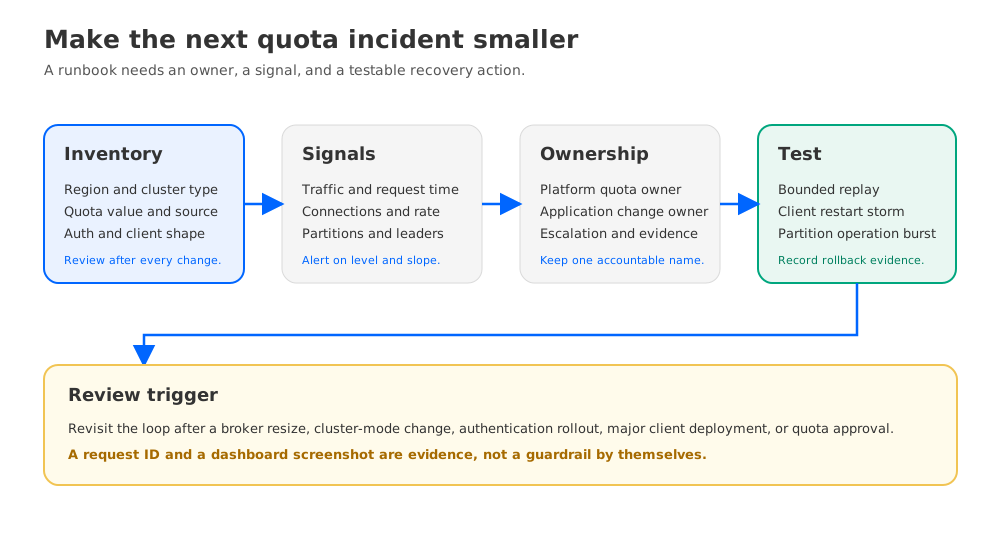
A runbook becomes useful when it leaves behind signals and ownership. For every production cluster, maintain a quota inventory with the cluster type, Region, broker family, account quota values, partition counts, authentication modes, and the source URL or console record for each limit. Update it when a cluster changes mode or version.
Create alerts from a declared headroom policy rather than copying one threshold to every workload. Track broker and partition traffic, leader distribution, GlobalPartitionCount, ClientConnectionCount, ConnectionCreationRate, request latency, throttled or shaped traffic, consumer lag, and MSK Connect worker demand. Alert on both the absolute value and the rate of change. A slow climb toward a quota needs capacity planning; a sharp spike needs a client or deployment owner.
Test the failure path in a non-production cluster. Generate a bounded partition-operation burst, restart a controlled IAM client group, and run a replay with the same producer and consumer settings used in production. Record the returned error, CloudWatch metric, client behavior, and rollback step. Do not test a quota by taking a customer workload to an undocumented limit.
After each incident, preserve the timeline, the first evidence packet, mitigation, AWS request ID, and decision. Assign one owner to the quota inventory and another to the application change when they differ. This prevents a platform team from carrying an unexplained quota problem that was caused by a product deployment.
7Where AutoMQ fits in the decision
Quota troubleshooting can reveal a structural coupling rather than a one-time burst. If teams repeatedly add broker-local capacity to cover uneven retention, replay, or traffic patterns, compare the storage and compute assumptions before treating every event as a quota ticket.
AutoMQ is a Kafka-compatible cloud-native streaming platform with a shared-storage data plane. Its architecture overview explains how compute and object-storage-backed durability can be evaluated separately. That model can change which capacity signals dominate an incident, but it does not bypass AWS quotas, remove network limits, or eliminate the need for client and topic guardrails.
Use the same workload window, retention policy, availability objective, and evidence packet when comparing architectures. If the recurring failure is a broker-local storage or capacity coupling, start with AutoMQ and test that hypothesis. If the failure is an application reconnect storm or an account-level API limit, changing the data plane will not remove the immediate cause.
8FAQ
8.1Are Amazon MSK quotas the same for Standard, Express, and Serverless clusters?
No. AWS publishes separate quota sections for Standard brokers, Express brokers, and Serverless clusters. Check the section that matches the cluster type and Region before choosing a mitigation.
8.2Does a quota increase fix throttling immediately?
No. AWS says an increase request can be approved, denied, or partially approved and may take days to take effect. Rate-limit the workload and keep the incident mitigation separate from the support request.
8.3Which CloudWatch metrics help diagnose MSK throttling?
Start with TrafficShaping, RequestTime, BytesInPerSec, BytesOutPerSec, GlobalPartitionCount, PartitionCount, LeaderCount, ClientConnectionCount, and ConnectionCreationRate. Add OfflinePartitionsCount, UnderReplicatedPartitions, and consumer-lag signals to identify a concurrent availability or recovery issue.
8.4Should I add partitions when a topic is throttled?
Only after identifying whether the problem is a hot partition, a per-broker limit, or a cluster-level quota. Adding partitions changes producer key distribution, ordering, and consumer assignment. It is not a generic response to a request throttle.
8.5Can AutoMQ remove Amazon MSK quota limits?
No. AutoMQ is a different Kafka-compatible data-plane architecture, so it may change how storage and compute capacity are coupled. It still requires capacity planning, client backoff, ownership, and service-specific guardrails.
9References
- Amazon MSK quotas
- Amazon MSK metrics for CloudWatch
- Amazon MSK best practices for Standard brokers
- Amazon MSK best practices for Express brokers
- Requesting a quota increase in the AWS Service Quotas User Guide
- Apache Kafka producer configurations
- Apache Kafka consumer configurations
- Amazon MSK Connect quotas
- Amazon MSK IAM access control


