
Table of Contents
Table of Contents
A certificate warning in an Amazon MSK client is easy to misread. The broker certificate may be renewing under AWS control, while the client is failing because an old truststore, a pinned intermediate, or an expiring mutual TLS certificate is still in the path. The fix depends on identifying which certificate is changing before anyone restarts a producer or connector.
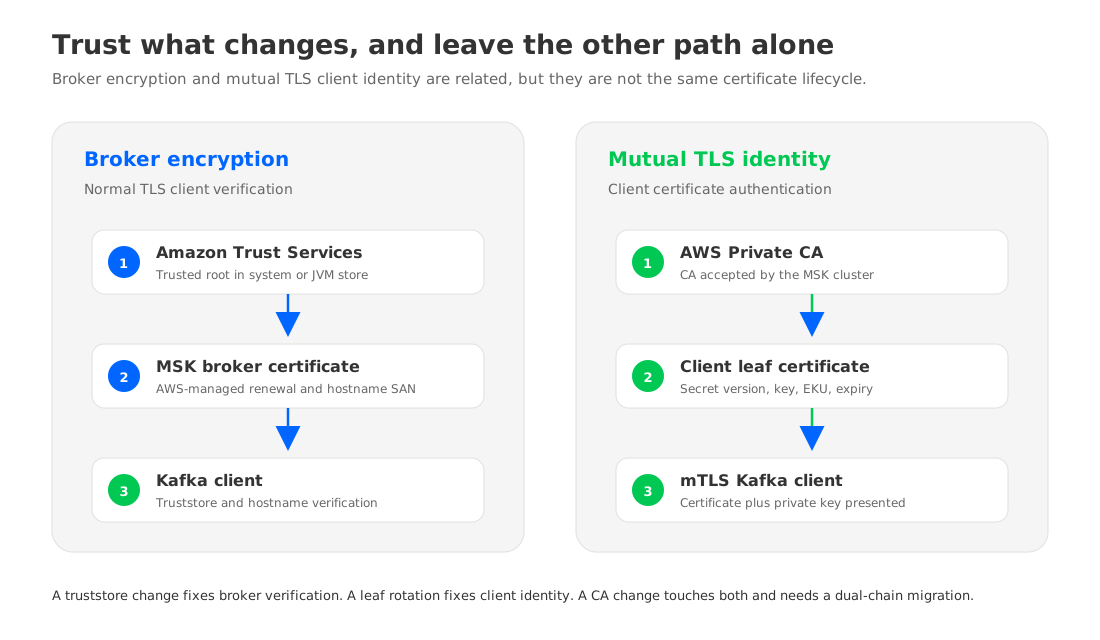
Amazon MSK has two separate certificate stories. MSK automatically renews the public certificates it uses for broker encryption every 13 months. Your clients normally continue to produce and consume while that broker-side operation runs. A team using TLS client authentication has a second lifecycle to own: certificates issued by an AWS Private CA for applications, connectors, or other clients. Those leaf certificates and their private keys still need an inventory, a rollout plan, and a tested rollback.
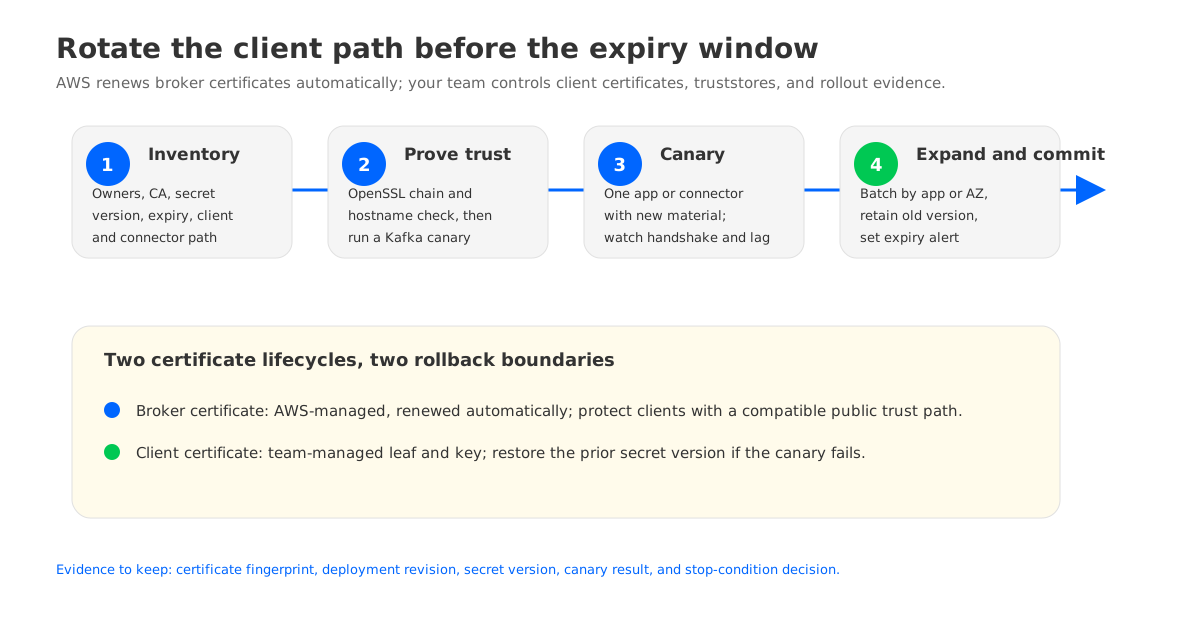
The safe runbook starts by separating those two paths. It then proves that every client trusts the intended chain, rolls client material in small batches, and records evidence that can be used to stop or reverse the change.
1Start with a certificate inventory
Do not begin by changing a Java keystore. Begin with a table that says who owns each certificate, where it is used, and what event can replace it. A broker certificate managed by MSK has a different owner and rollback boundary from a client certificate stored in Secrets Manager or mounted into an EKS pod.
| Certificate or artifact | Who changes it | What clients must trust | Rollback boundary |
|---|---|---|---|
| MSK broker certificate | AWS manages renewal | Amazon Trust Services in the normal public trust path | You cannot schedule a broker-certificate rollback; protect clients instead |
| Private CA chain for mTLS | Security or platform team | The CA root and any required intermediate | Restore the prior trust bundle while the old CA remains valid |
| Client leaf certificate and key | Application or security team | Broker-side CA acceptance plus the client key pair | Re-enable the previous leaf certificate before its expiry |
| Java, Go, or Python truststore | Application owner | The broker or CA chain used by that client | Redeploy the last known-good bundle |
| MSK Connect worker and connector secrets | Connector owner | Worker truststore, client key, and connector configuration | Roll back the worker or connector revision |
The first row is often the source of confusion. AWS documents that MSK brokers use public AWS Certificate Manager certificates and that clients trusting Amazon Trust Services also trust those broker certificates. A custom truststore that contains only a private, pinned intermediate can therefore fail even though the new broker certificate is valid. The client does not care that the certificate was “renewed”; it cares whether the presented chain and hostname match its trust and verification rules.
For mTLS, record the certificate authority ARN, the leaf certificate subject and expiry, the secret or file path, and the deployment revision that consumes it. Amazon MSK does not support certificate revocation lists for TLS client authentication, so a compromised or retired certificate is controlled through your ACLs, security groups, secret rotation, and removal of the client identity. That limitation belongs in the incident runbook before rotation day.
2Prove compatibility before rotation
A compatibility test should answer three questions: can the client build a trusted chain, does it verify the MSK broker hostname, and can it complete the Kafka protocol after the TLS handshake? Testing only openssl s_client answers the first two partially. It does not prove that a Kafka library, connector, or JVM security provider will load the same material.
Capture the broker hostname from the MSK bootstrap broker string and test the endpoint from the same network location as the workload. Keep the output as evidence, but redact private keys and authentication material.
openssl s_client \
  -connect <broker-hostname>:9094 \
  -servername <broker-hostname> \
  -CAfile trust-bundle.pem \
  -verify_return_error \
  -showcerts </dev/null
A successful handshake is only a transport check. Run a producer and consumer canary with the exact security protocol, truststore, SASL or mTLS settings, and client library version used in production. For Java, inspect the truststore rather than assuming a base image contains the expected root:
keytool -list -v -keystore client-truststore.jks \
  -storepass "$TRUSTSTORE_PASSWORD" \
  | egrep 'Owner:|Issuer:|Valid from:'
Go clients generally use crypto/x509 and the host system pool unless a custom RootCAs pool is supplied. Python clients may inherit the system OpenSSL bundle or load a path through the Kafka library. Those defaults differ across container images, so include the image digest and the trust-bundle path in the test record. A successful test from a laptop is weak evidence if the production connector uses a stripped-down image.
The compatibility matrix should include the paths that can fail independently:
- JVM producer and consumer: truststore type, provider, hostname verification, and the Kafka client’s
ssl.truststore.location. - Go or Python services: system CA bundle versus an explicitly mounted bundle, plus file permissions for the process user.
- MSK Connect: worker-level trust settings, connector-level overrides, plugin libraries, and the secret version that the worker reads.
- mTLS clients: client certificate chain, private-key format, key password, certificate subject, and the CA that MSK expects.
3Roll client material in stages
A client certificate rotation is safer when the trust relationship changes before the leaf certificate changes. If the new client leaf is signed by the same Private CA, the broker-side trust boundary may remain stable and the rollout is mostly a client secret change. If the CA itself changes, treat it as a trust migration: deploy a bundle that can validate the old and new chains, prove both paths, and only then remove the old root where the service supports that sequence.
Use a four-stage rollout:
- Prepare. Issue the new client certificate, store it under a new secret version, and validate its subject, key usage, extended key usage, and expiry. Keep the old version available until the rollback window closes.
- Canary. Deploy one producer, consumer, or connector task with the new bundle. Confirm TLS handshakes, Kafka authentication, authorization, produce and consume checks, and reconnect behavior after a broker connection is closed.
- Expand. Move one application group or availability zone at a time. Watch authentication failures, connection churn, consumer lag, producer retries, and connector task state before expanding the batch.
- Commit. Mark the new secret version as the active configuration, remove stale references from deployment templates, and set an expiry alert for the next certificate boundary.
Do not use “the pod is Ready” as the canary signal. A Kafka client can pass its process health check while every request fails with an authorization or handshake error. The canary should publish a uniquely identified record, consume it with a test group, and verify that the application’s normal ACLs still apply.
For MSK Connect, update the worker or connector configuration in the same controlled sequence as an application. A plugin can load its own truststore or HTTP client configuration, so inspect the plugin documentation and runtime logs rather than assuming worker defaults flow into every connector. Keep the previous worker revision and secret version addressable until task restarts, rebalance behavior, and recovery from a transient network error have been observed.
4Treat broker renewal and client rollback differently
AWS-managed broker renewal is not a change you schedule or reverse. AWS states that broker encryption certificates are renewed every 13 months. Express broker clusters remain in ACTIVE while the certificate update runs. Standard broker clusters enter MAINTENANCE, then return to ACTIVE; producing and consuming can continue, but other cluster update operations are blocked during the certificate update. That means the practical protection is client readiness and monitoring, not a pretend “rollback” button for the broker certificate.
Client-side rollback is concrete. Define a stop condition before the first canary, such as a rise in TLS handshake failures, authentication failures, or connector task errors above the baseline for the same workload. When the condition fires:
- Stop expanding the rollout and preserve logs, client configuration, and the presented certificate chain.
- Point the workload back to the last known-good truststore or secret version.
- Restart only the affected client processes, and confirm that reconnects use the old material.
- Re-run the produce and consume canary, then compare consumer lag and error rates with the pre-change baseline.
- Keep the new certificate available for analysis; do not delete it while the cause is unknown.
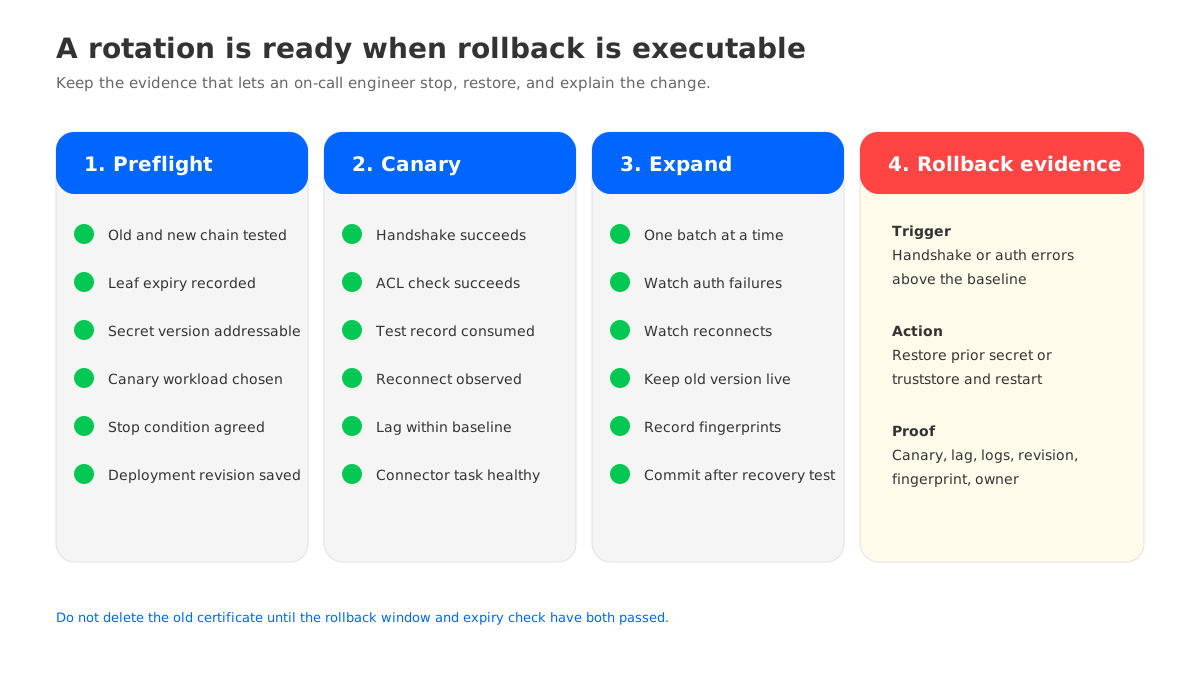
A rollback can fail if the old leaf certificate has already expired, if the previous CA was removed from the trust bundle, or if deployment automation replaced both versions at once. The runbook should therefore record the old certificate’s NotAfter date, the secret version ID, and the exact deployment revision. “We can roll back” is not evidence until a clean deployment can restore those three things.
5Monitor the expiry boundary after the change
Certificate work is complete only when the next expiry is visible to the team that owns the client. Monitor at three levels:
- Endpoint view: periodically inspect the certificate presented by each MSK bootstrap endpoint and record issuer, subject, SAN, and expiry. This catches unexpected trust-chain changes.
- Client view: alert on TLS handshake failures, authentication failures, reconnect rate, and consumer lag. Correlate a spike with the deployment revision and the certificate fingerprint.
- Inventory view: alert on client leaf certificates and private keys before their expiry, with an owner and a secret path attached to each alert. An alert without an owner becomes a calendar reminder nobody acts on.
Do not set one expiry threshold for every certificate. A short-lived client certificate may need a different renewal lead time from a long-lived root. Use the time required to issue, distribute, restart, and validate the slowest client, then add room for an incident. Record the assumption in the runbook so the threshold can be reviewed when the deployment process changes.
6Where a Kafka-compatible platform fits
TLS rotation exposes an operating-model question: how many independent clients, workers, and storage paths must the team keep compatible with the Kafka contract? If the answer spans MSK, self-managed Kafka, and another deployment boundary, a portable client contract reduces the number of application changes during a platform decision.
This is where AutoMQ, a Kafka-compatible streaming platform with shared storage, can be evaluated as a separate architecture option. AutoMQ does not make an MSK certificate rotation disappear, and its authentication and certificate controls still need to be tested for the deployment model you choose. The useful comparison is whether the same Kafka clients, truststore discipline, and certificate evidence can be carried across a customer-controlled environment.
If you are evaluating that boundary, use the AutoMQ architecture documentation to understand the shared-storage model, then run your own compatibility matrix. Keep broker certificates, client certificates, ACLs, and rollback ownership as separate rows. Portability is useful only when the operational evidence moves with it.
The first certificate question still decides the next action: is AWS renewing an MSK broker certificate, or is your team renewing a client identity? Once that answer is explicit, the truststore test, canary, and rollback path become ordinary engineering work instead of an outage gamble. For a workload-specific architecture review, use the AutoMQ deployment assessment.
7FAQ
7.1Does Amazon MSK require clients to download a new broker certificate every 13 months?
Usually, no. AWS documents that MSK brokers use public AWS Certificate Manager certificates, and clients that trust Amazon Trust Services can validate those certificates. A custom truststore that pins a narrower chain should be tested before the renewal window because its behavior depends on the certificates it contains.
7.2Can I roll back an AWS-managed MSK broker certificate?
No customer-controlled rollback is documented for the broker certificate renewal. Protect the client side instead: use a compatible public trust path, avoid brittle pinning, and keep a canary and monitoring plan ready for the maintenance operation.
7.3How do I rotate a mutual TLS client certificate?
Issue a new client certificate from the accepted AWS Private CA, validate its key usage and chain, store it as a new secret version, canary one client, and roll out in batches. Keep the old leaf certificate and secret version until the new path has passed reconnect, authorization, and rollback checks.
7.4Does Amazon MSK support certificate revocation lists for mTLS?
AWS states that Amazon MSK does not support certificate revocation lists for TLS client authentication. Use certificate expiry, ACLs, security groups, secret removal, and client isolation controls to respond to a compromised identity.
7.5What should I check in MSK Connect?
Check worker and connector trust settings, plugin-specific TLS configuration, private-key permissions, the secret version read by the worker, task state after restart, and the connector’s normal produce or consume path. A healthy worker process alone does not prove that the connector authenticated to MSK.


