
Table of Contents
Table of Contents
An Amazon MSK ZooKeeper-to-KRaft migration is easy to misunderstand. The cluster stays available and no topic data is moved, but the control plane changes underneath every broker. The safest question is therefore not “Will my producers reconnect?” It is “Which parts of my platform still assume that ZooKeeper exists, and how will I prove that metadata, clients, and operations are ready for the change?”
AWS now documents an in-place migration for eligible Amazon MSK Provisioned clusters. MSK provisions KRaft controllers, moves cluster metadata into the KRaft quorum, and removes the ZooKeeper nodes. The operation is long-running and irreversible. A production plan should treat it as a control-plane change with an explicit readiness gate, a canary workload, and a one-way rollback boundary.
1What changes when Amazon MSK moves to KRaft
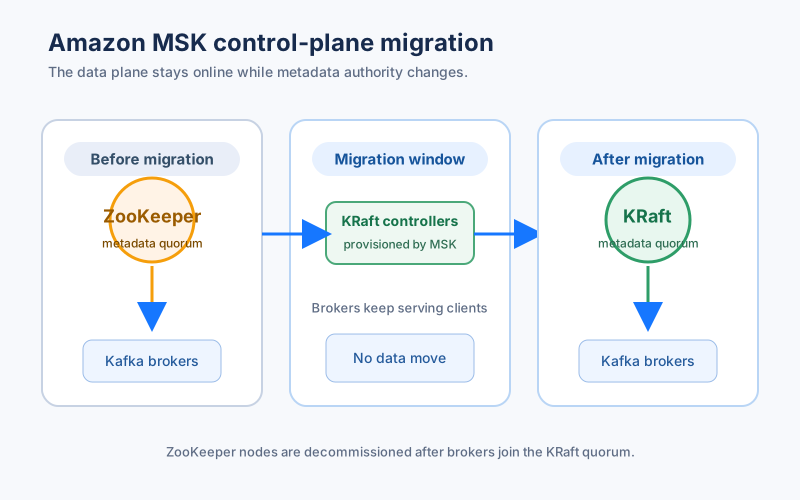
ZooKeeper and KRaft solve the same broad problem, metadata coordination, through different ownership models. In ZooKeeper mode, a separate ZooKeeper ensemble stores Kafka metadata and tools can connect to a ZooKeeper endpoint. In KRaft mode, Kafka controllers form the metadata quorum inside the Kafka cluster. Brokers still handle client data traffic, but metadata leadership and replication are handled by the KRaft controllers.
That distinction matters because application traffic is one dependency in an MSK environment. A deployment script may still call --zookeeper. An older Cruise Control build may expect direct ZooKeeper access. A monitoring job may treat a ZooKeeper endpoint as the way to discover controller health. Those dependencies can be invisible during normal produce and consume tests because the Kafka clients themselves use the bootstrap server.
After migration, the ZooKeeper connection string is no longer available. Clients that already use --bootstrap-server continue to work without a connection-string change, according to the Amazon MSK migration documentation. The compatibility promise is useful, but it applies to Kafka client access, not to every operational tool around the cluster.
The migration also does not move partition data. Brokers are reconfigured to use the KRaft quorum while they continue serving client traffic, then MSK decommissions the ZooKeeper nodes after the brokers register with KRaft. Think of it as replacing the metadata authority while keeping the data plane in place.
2The version and topology gates come first
Do not schedule a change window until the cluster passes the service’s eligibility checks. Current AWS guidance lists these gates for a ZooKeeper-to-KRaft migration:
- A Standard broker cluster must span three Availability Zones. Express brokers provide this topology by default.
- The cluster must run Apache Kafka
3.9.xin ZooKeeper mode. Older clusters need a normal version upgrade before the migration. - The cluster must be
ACTIVEwith no pending operations. - Standard clusters must have ZooKeeper client access disabled through
UpdateConnectivitywithZookeeperAccess.Enabled=false. Express clusters do not require that step. - The cluster cannot have Public Access and Open Monitoring enabled at the same time.
- The cluster cannot use
kafka.t3.smallbrokers or dynamically setadvertised.listeners.
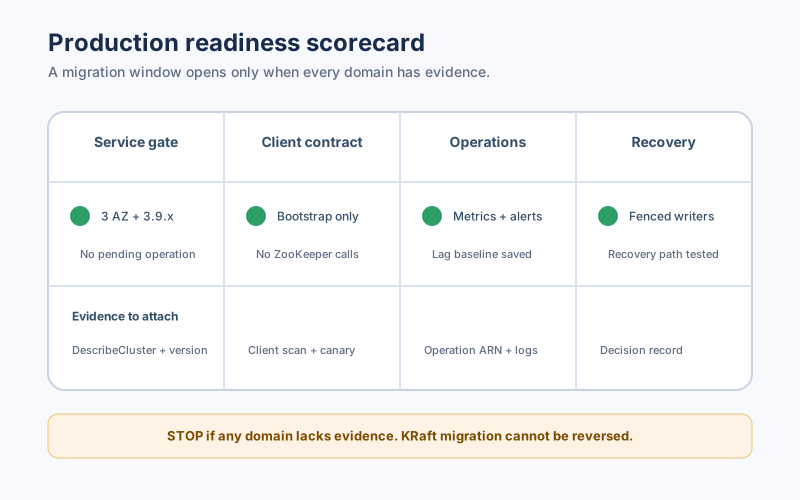
These are service gates, not suggestions for a design document. Record the evidence for each one in the change ticket. For example, save the output of DescribeCluster, the compatible-version query, and the broker configuration check. A green console status without those artifacts makes it hard to distinguish “eligible” from “we looked at it once.”
The last gate is particularly easy to miss. Check for a dynamic advertised.listeners property from a client machine:
bin/kafka-configs.sh \
  --bootstrap-server "$BOOTSTRAP_SERVER" \
  --entity-type brokers \
  --describe
The output should not contain a dynamically configured advertised.listeners entry. If it does, resolve that configuration before opening a migration window. The MSK configuration reference explains which broker properties are dynamic and which are controlled by the service.
3Build a client and tool inventory
The migration risk is concentrated in hidden control-plane dependencies. Build an inventory that answers four questions for every producer, consumer, connector, admin script, and monitoring job:
- Which endpoint does it use: a Kafka bootstrap server or a ZooKeeper connection string?
- Which Kafka version and client library does it run, and where is that version pinned?
- Does it use Kafka Admin APIs, or does it depend on a ZooKeeper-specific library or shell command?
- What evidence shows that it can reconnect, discover metadata, and report errors during a controller change?
Search repositories and deployment manifests for --zookeeper, zookeeper.connect, and direct ZooKeeper libraries. Search container images and runbooks too. The command may not be in the application repository if a platform team owns topic creation or an operations script owns Cruise Control. Treat each match as a dependency to test, not as proof that the migration will fail.
For Kafka Connect, inspect worker and connector plugins separately. The worker should use MSK bootstrap brokers and the selected security protocol. A connector may still contain a vendor-specific admin script or a custom health check that assumes ZooKeeper. Validate internal topics, connector offsets, and task restart behavior on a test cluster before the production change.
4Use a canary to measure the real blast radius
The migration is performed in place, so a canary is not a second migration mode. It is a controlled workload and evidence package that lets the team test the assumptions around the service operation. Halodoc’s third-party write-up on migrating AWS MSK from ZooKeeper to KRaft with a canary approach is useful as a pattern, but its timings and topology are not a substitute for your own baseline.
Start with a low-risk topic and a disposable consumer group. Produce records at a known rate, consume them with a client that uses --bootstrap-server, and capture the application’s end-to-end acknowledgement. In parallel, run metadata operations that resemble production: create or describe a topic, fetch partition metadata, commit offsets, and restart one client. If those checks pass, add a representative connector or stream-processing job. The canary should prove behavior rather than merely show that a broker is reachable.
The evidence package should include:
- Producer error rate, consumer error rate, and reconnect counts during the operation.
- Consumer lag and end-to-end record timestamps before, during, and after migration.
- Successful metadata requests from the Kafka Admin API.
- Connector task state, internal-topic health, and offset continuity where Connect is used.
- The exact cluster operation ARN and state transitions returned by
DescribeClusterOperation.
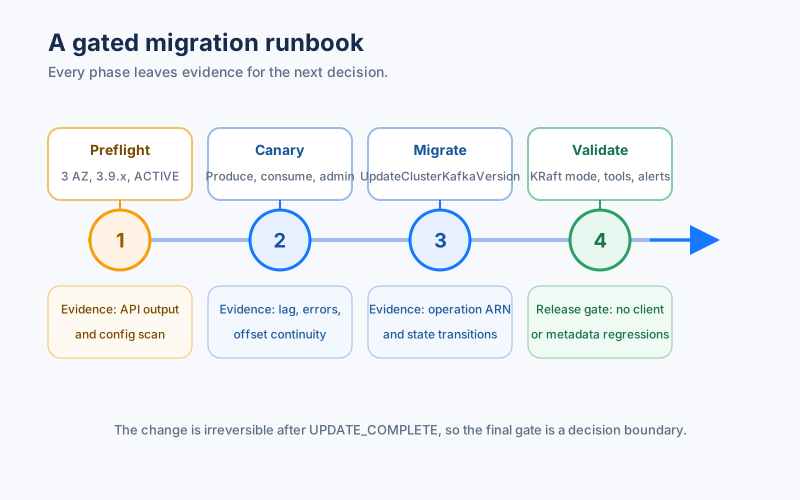
Do not define success as “no alerts fired.” Define it as a set of assertions that can fail. For example: no lost records in the canary topic, no consumer group reset, no sustained increase in lag beyond the agreed threshold, and successful topic metadata calls after the operation reaches UPDATE_COMPLETE.
5Start the operation only after the rollback decision is explicit
AWS exposes KRaft target versions through GetCompatibleKafkaVersions. An eligible cluster returns a target with a .kraft suffix. Use the exact current version from DescribeCluster; Kafka version strings are not interchangeable integers.
aws kafka get-compatible-kafka-versions \
  --cluster-arn "$CLUSTER_ARN"

aws kafka update-cluster-kafka-version \
  --cluster-arn "$CLUSTER_ARN" \
  --current-version "$CURRENT_VERSION" \
  --target-kafka-version "3.9.x.kraft"
Track the resulting operation with DescribeClusterOperation:
aws kafka describe-cluster-operation \
  --cluster-operation-arn "$CLUSTER_OPERATION_ARN"
The operation moves through UPDATE_IN_PROGRESS and completes with UPDATE_COMPLETE. The current AWS documentation says that the operation can take several hours depending on cluster size. Keep the change window open for the service operation and the post-migration validation, rather than assuming the version command returns quickly.
The rollback boundary needs to be written in plain language: Amazon MSK cannot switch a migrated cluster back to ZooKeeper. If the operation has completed, rollback means restoring client or tool configuration, failing traffic to a previously prepared cluster, or repairing an application dependency. It does not mean reversing the control-plane migration. This is why an export of topic configuration, ACLs, connector settings, and runbook commands is part of readiness, even though partition data remains in place.
6Validate the cluster after UPDATE_COMPLETE
Post-migration checks should run at three levels. First, confirm the service state: the cluster reports KRaft mode, ZooKeeper nodes are gone, and the operation is complete. Second, confirm the Kafka contract: producers can publish, consumers can fetch and commit, Admin API calls succeed, and transactional or idempotent clients behave as expected. Third, confirm the surrounding platform: connectors, dashboards, alerts, deployment scripts, and access policies still report the right state.
The ZooKeeper endpoint disappearing is expected. A monitoring system that raises an alarm because it cannot resolve that endpoint needs a rule change, not a cluster rollback. If open monitoring is enabled, use the ListNodes API to discover KRaft controller endpoints as documented by AWS, and confirm that your Prometheus or metrics agent is collecting the intended targets.
Keep the first post-migration observation period long enough to cover the normal operational cycle. A quiet five-minute window may miss a scheduled rebalance, a connector restart, or a deployment that still calls a ZooKeeper command. Use the same canary topic and consumer group for a before-and-after comparison, then expand the checks to representative production traffic.
7Where a different storage model enters the discussion
KRaft changes Kafka metadata management. It does not change the broker storage model, retention behavior, or how a platform handles broker scaling. If the migration is also a trigger to revisit broker-local storage and compute coupling, keep that evaluation separate from the MSK control-plane change.
That is where AutoMQ, a Kafka-compatible cloud-native streaming platform with Shared Storage architecture, can become a separate architecture option. AutoMQ documents stateless brokers and object-storage-backed stream storage, which changes the relationship between broker replacement, retention, and data movement. It does not make an Amazon MSK KRaft migration reversible, and it does not remove the need to validate Kafka clients and connectors.
If the immediate goal is to complete an MSK migration, keep the runbook focused on eligibility, client contracts, and irreversible control-plane behavior. If the goal is a broader platform decision, compare the storage model and operational boundaries after the migration evidence is complete. AutoMQ’s architecture documentation gives the technical starting point for that second conversation.
8FAQ
8.1Does an Amazon MSK KRaft migration move topic data?
No. AWS describes the operation as an in-place metadata migration. Brokers continue serving client traffic while MSK provisions KRaft controllers, moves metadata to the KRaft quorum, and removes ZooKeeper nodes.
8.2Will Kafka clients need a new bootstrap server?
Clients that already use the --bootstrap-server connection string can continue without a connection-string change. The ZooKeeper connection string is unavailable after migration, so tools that use it must be updated before the change.
8.3Can I roll back from KRaft to ZooKeeper?
No. The migration is irreversible. Prepare an application-level recovery path, such as a previously validated secondary cluster or restored client configuration, before starting the operation.
8.4Which Amazon MSK versions support the migration?
Current AWS guidance requires Apache Kafka 3.9.x in ZooKeeper mode and exposes eligible KRaft targets through GetCompatibleKafkaVersions. Recheck the MSK migration page before scheduling a change because supported versions and service prerequisites can change.
8.5How does AutoMQ relate to this migration?
AutoMQ is a separate Kafka-compatible streaming platform with a shared-storage architecture. Evaluate it when storage and broker operating models are part of the platform decision. It is not a rollback mechanism for an Amazon MSK KRaft migration.
Once the readiness evidence is complete, use the AutoMQ deployment assessment to compare a Kafka-compatible shared-storage design with the operating model you run today.


