
Table of Contents
Table of Contents
Architecture diagrams make Apache Pulsar vs Kafka look like a clean choice between two streaming models. Production makes the choice messier. The platform that looks elegant in a design review still has to survive rolling upgrades, broker failures, storage saturation, metadata drift, noisy consumers, and the 3 a.m. alert where the dashboard says lag is rising but the root cause is not polite enough to name itself.
That is why the operational comparison matters as much as throughput, retention, or feature lists. Kafka and Pulsar can both run serious streaming workloads, but they ask different things from the teams that operate them. Kafka concentrates more responsibility inside brokers and local log storage. Pulsar separates serving, storage, and metadata into explicit layers, which can improve elasticity but also expands the set of components your team must understand deeply.
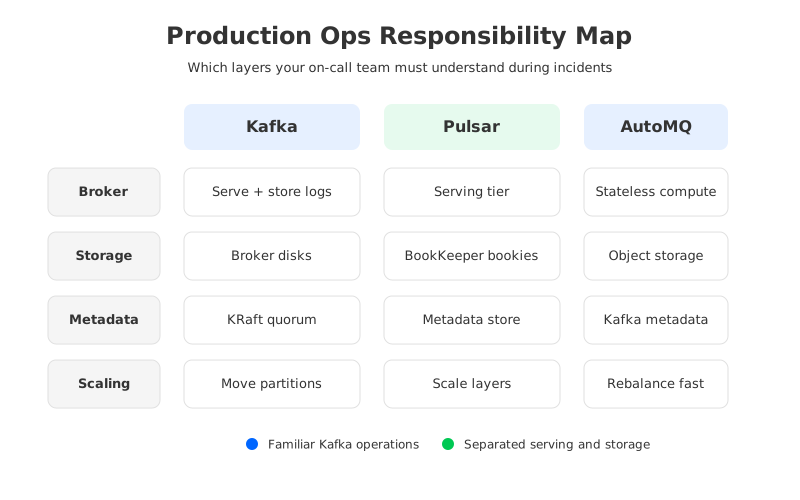
The practical question is whether the architecture moves operational risk to places your team can manage. A platform team with dedicated distributed-systems expertise may value Pulsar's layered model. A smaller SRE team supporting many Kafka users may value Kafka's simpler mental model and ecosystem familiarity. A cloud team trying to reduce local-disk operations may look for Kafka compatibility with a storage model that changes broker recovery and partition movement.
1Why Operations Should Drive the Platform Decision
Streaming platforms rarely fail in tidy categories. A producer retry storm can become broker CPU pressure, which becomes delayed replication, which becomes consumer lag, which becomes a business incident. When that chain crosses multiple subsystems, the on-call engineer needs more than a dashboard. They need a mental model that maps symptoms to likely causes and likely causes to safe corrective actions.
Kafka's model is direct: brokers serve clients, store partitions, replicate logs, and expose operational state through metrics, logs, and administrative commands. KRaft also makes metadata quorum part of Kafka rather than an external ZooKeeper dependency. That consolidation reduces one historical boundary, but it does not remove Kafka's core storage reality: partitions live on broker-attached disks, and data movement matters whenever brokers are added, removed, replaced, or rebalanced.
Pulsar starts from a different split. Its brokers are stateless serving nodes, persistent message storage is handled by Apache BookKeeper bookies, and cluster metadata is stored through a metadata store such as ZooKeeper, etcd, or RocksDB-backed local metadata storage depending on deployment mode and version. This separation changes capacity planning, failure isolation, and recovery. It also means the team is operating a streaming system plus a storage service plus a metadata service.
The trade-off is easier to see as a responsibility map.
| Operational area | Kafka production responsibility | Pulsar production responsibility | What changes for SREs |
|---|---|---|---|
| Serving layer | Brokers handle client traffic and partition leadership. | Brokers route traffic and coordinate with bookies for durable storage. | Pulsar separates traffic handling from storage ownership, but operators must trace issues across layers. |
| Storage layer | Broker-local logs and optional tiered storage policies. | BookKeeper ledgers on bookies, plus offload options for long retention. | Pulsar makes storage a distinct service with its own capacity, quorum, disk, and recovery work. |
| Metadata | KRaft metadata quorum in current Kafka deployments. | Metadata store for cluster, namespace, topic, and cursor metadata. | Pulsar's metadata choices and version behavior need explicit planning. |
| Scaling | Add brokers, move or rebalance partitions, watch disk and network. | Add brokers for serving, add bookies for storage, check ledger placement. | Pulsar can scale serving and storage separately, while Kafka keeps fewer component classes. |
| Troubleshooting | Broker logs, JMX metrics, lag, under-replicated partitions, reassignment state. | Broker, bookie, metadata, managed ledger, cursor, and namespace signals. | Pulsar offers sharper boundaries, but there are more boundaries to inspect. |
This table is a staffing map. If the same team owns brokers, storage, observability, Kubernetes, and application support, every extra subsystem adds coordination cost. With clear ownership and rehearsed failure drills, separating responsibilities can become an advantage.
2Operational Components Compared
Kafka brokers are operationally dense. They handle client requests, partition leadership, replication, local log retention, compaction, controller communication, and cluster metadata interaction. This density gives Kafka a compact operational topology, but it is also why broker replacement and storage pressure can become high-stakes events. A broker is not a disposable proxy when it owns a large amount of local partition data.
Pulsar brokers are closer to a serving tier. They receive producer and consumer traffic, manage topic ownership, and coordinate reads and writes through managed ledgers backed by BookKeeper. Serving capacity can be changed without moving durable data in the same way Kafka moves partition logs. The catch is that storage moved to the bookies, where operators now manage disk, journal, ledger placement, quorum behavior, and bookie health.
Metadata is another major difference. Kafka's KRaft mode folds metadata management into Kafka's own quorum, so Kafka operators focus on broker and controller roles inside Kafka. Pulsar documents a broader metadata-store layer, including ZooKeeper and other supported implementations, so version-specific guidance matters.
The result is a difference in diagnostic shape. Kafka incidents often begin with broker-centric questions: Which brokers are leaders? Which partitions are under-replicated? Which disks are full? Pulsar incidents require a layered trace across broker, bookie, ledger, and metadata signals.
3Scaling and Failure Recovery
Scaling Kafka and scaling Pulsar both require capacity discipline, but the path is different. In Kafka, adding brokers is the start of the operation, not the end. Partitions must be redistributed to use the capacity, and moving partitions usually means moving data. Production teams treat reassignment carefully because disk, network, and replica catch-up can interfere with live traffic.
In Pulsar, adding brokers can relieve serving pressure without relocating durable data from broker-local disks because the data lives in BookKeeper ledgers. Adding bookies addresses storage pressure, and placement policies determine how ledgers use the bookie fleet. This is attractive when traffic and storage grow at different rates, but capacity planning now has two axes.
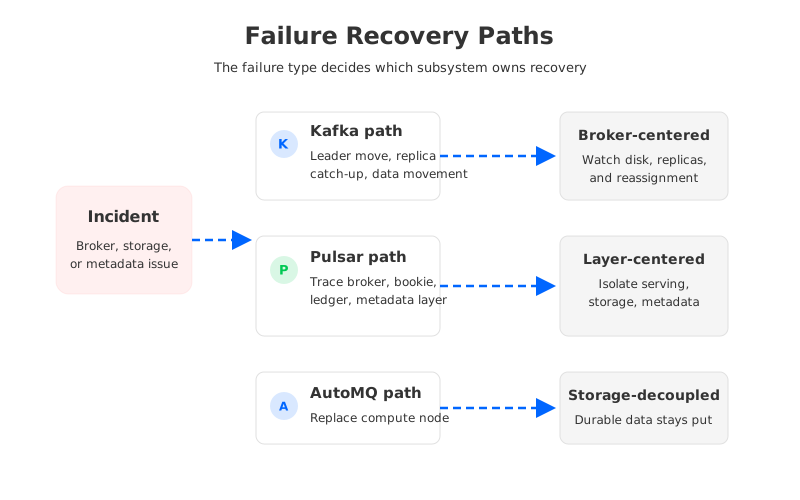
Failure recovery follows the same pattern. A Kafka broker failure triggers leadership movement and replica catch-up after recovery or replacement. Kafka can recover well when replication, disk, and network are provisioned correctly, but the operator's job is still shaped by broker-local log ownership.
A Pulsar broker failure is usually more like losing a serving node, while BookKeeper continues to hold durable ledgers. A bookie failure involves storage quorum, ledger replication, disk health, and recovery behavior. A metadata-store issue can affect ownership, discovery, and administrative operations across the cluster.
Kafka tends to make the broker the center of incident response, while Pulsar distributes incident response across serving, storage, and metadata layers. That distribution can reduce blast radius for some failures and increase diagnostic work for others.
4Monitoring and Troubleshooting
Monitoring should reflect the system's shape. Kafka teams usually build dashboards around broker request rates, network throughput, disk usage, under-replicated partitions, offline partitions, controller state, consumer lag, and JVM health. The official Kafka operations documentation also keeps administrative actions close to broker and partition state, which matches the way incidents unfold in many Kafka clusters.
Pulsar monitoring needs a wider lens. The official Pulsar monitoring and metrics references cover brokers, bookies, metadata-store components, proxies, functions, topics, subscriptions, managed ledgers, and storage signals. A single "Pulsar is slow" page will not be enough for production.
For on-call work, the most useful dashboard design is usually a top-down drill path:
- Start with client-visible symptoms: produce latency, consume latency, backlog, error rates, and throttling.
- Move to serving signals: broker CPU, request rates, topic ownership churn, connection count, and namespace-level load.
- Check storage signals: bookie disk usage, journal latency, ledger replication health, and read/write rates.
- Check metadata signals: metadata-store latency, session stability, watch behavior, and administrative operation failures.
- End with workload context: topic count, partition or bundle distribution, retention, compaction, and consumer behavior.
This shape prevents a common mistake: treating Pulsar as "Kafka plus different commands." Copying a Kafka dashboard and swapping metric names will miss the storage and metadata paths that make Pulsar different.
5Upgrade and On-Call Considerations
Upgrades expose operational complexity because they force a team to touch every layer deliberately. Kafka upgrades are not trivial, especially across protocol, metadata, or feature-version boundaries, but the moving parts are mostly inside Kafka itself: brokers, controllers, clients, configurations, and rolling restart strategy.
Pulsar upgrades involve a broader component map. The official upgrade guidance covers sequencing across ZooKeeper or metadata store, BookKeeper, brokers, proxies, functions workers, and clients. That does not make Pulsar unmanageable; it means upgrade discipline has to match the architecture.
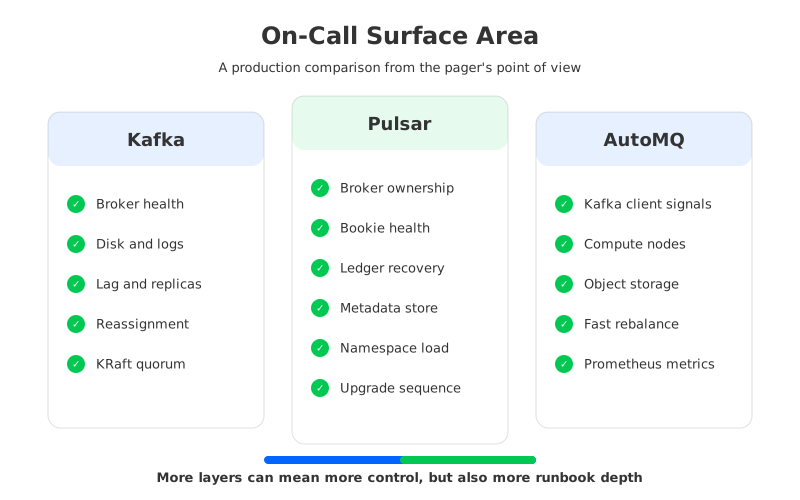
The on-call burden also depends on how much of the platform is self-managed. A managed Pulsar or managed Kafka service can hide infrastructure chores, but it rarely removes application-facing ownership. Someone still has to explain lag, quota behavior, retention pressure, connector failures, schema issues, and client retry storms.
Ask who will own each failure class before choosing the architecture.
- If application teams own their own topics but a central SRE team owns the cluster, Kafka's familiar tooling and ecosystem may reduce handoff friction.
- If a platform team owns the full streaming stack and wants independent serving and storage scaling, Pulsar's layered model can be a strong fit.
- If the organization runs Kafka workloads but the biggest operational pain is broker-local storage, partition reassignment, and cloud disk over-provisioning, Kafka-compatible shared storage deserves a separate evaluation.
6How AutoMQ Changes Kafka Operations
The hardest Kafka operations are often not about the Kafka protocol. They are about the storage model under the protocol. Broker-local logs make brokers stateful, and stateful brokers make scaling, replacement, and partition reassignment expensive operational events.
This is where AutoMQ fits naturally into the comparison. AutoMQ is a Kafka-compatible cloud-native streaming system that keeps Kafka clients and ecosystem behavior while moving durable data away from broker-local disks into object storage. It keeps the Kafka operational mental model familiar but changes the storage ownership that makes many Kafka operations heavy.
That does not turn operations into magic. Teams still need observability, capacity management, upgrade plans, quotas, and client discipline. The difference is the failure and scaling path. Replacing a broker is less tied to copying its local partition data, and reassignment can become more of a metadata and traffic-routing operation.
The most credible way to evaluate AutoMQ is to ask which operational problem you are trying to remove. If the team wants Pulsar's separation of serving and storage but cannot afford a migration away from Kafka APIs, Kafka-compatible shared storage is a different path. If the team wants Pulsar-specific topic and subscription semantics, AutoMQ is not a substitute for that design goal.
7Decision Guide by Team Maturity
Platform decisions become clearer when mapped to the team that will own the pager. Small teams often need fewer component classes, fewer specialized failure modes, and strong defaults. Kafka may fit that shape when the workload is well understood and local storage operations are manageable. AutoMQ may fit when the same team needs Kafka compatibility but wants to reduce the operational weight of stateful brokers in the cloud.
Dedicated platform teams can absorb more architectural surface area if it buys them meaningful control. Pulsar can be compelling when the team wants separated serving and storage layers, is comfortable operating BookKeeper, and has enough observability discipline to debug broker, bookie, and metadata paths separately.
Global or multi-region teams should look beyond normal-day operations. They need to evaluate replication model, failover drills, data placement, network cost, and control-plane behavior during regional impairment.
FinOps-focused teams should pay close attention to over-provisioning and data movement. Kafka clusters often reserve disk and broker capacity for peak load, retention, and reassignment headroom. Pulsar separates some of those concerns, but BookKeeper capacity and replication still need careful sizing. AutoMQ changes the equation for Kafka-compatible workloads when broker disk growth and partition movement are recurring waste.
8FAQ
8.1Is Pulsar harder to operate than Kafka?
Pulsar is not automatically harder, but it has a larger operational surface area. Kafka concentrates more responsibility in brokers and local logs. Pulsar separates brokers, BookKeeper storage, and metadata, so teams need expertise across more components.
8.2Does Kafka still require ZooKeeper?
Current Kafka releases support KRaft, which moves metadata management into Kafka's own quorum rather than relying on ZooKeeper. Operators should check the version and deployment mode of their own cluster, especially during upgrades or migrations from older Kafka releases.
8.3Does Pulsar still use ZooKeeper?
Pulsar supports metadata-store choices, and ZooKeeper remains part of documented deployment and administration paths. The right answer depends on Pulsar version and deployment mode, so production planning should follow the current Pulsar metadata-store documentation rather than older assumptions.
8.4Which platform is better for small SRE teams?
Small SRE teams usually benefit from fewer component classes and familiar tooling. Kafka can be easier to staff if the team already knows Kafka operations. AutoMQ is worth evaluating when the team wants Kafka compatibility but wants to reduce broker-local disk and reassignment burden.
8.5When should a team choose Pulsar over Kafka?
Pulsar is worth serious evaluation when independent serving and storage scaling, BookKeeper-backed durability, Pulsar's subscription model, or Pulsar-specific multi-tenancy patterns are central to the architecture. The decision is strongest when the team can operate the layered system with confidence.
8.6Where does AutoMQ fit in a Pulsar vs Kafka decision?
AutoMQ fits when the team wants to keep Kafka APIs and ecosystem compatibility while changing the storage architecture that makes traditional Kafka operations heavy. It is not a replacement for Pulsar-specific semantics, but it is a strong candidate for Kafka teams whose main pain is stateful broker operations in the cloud. A practical next step is to test a representative Kafka workload with the AutoMQ migration guide and compare recovery, reassignment, and monitoring workflows against your current runbooks.
9References
- Apache Pulsar architecture overview
- Apache Pulsar metadata store administration
- Apache Pulsar ZooKeeper and BookKeeper administration
- Apache Pulsar monitoring guide
- Apache Pulsar metrics reference
- Apache Pulsar upgrade guide
- Apache Kafka 4.3 documentation
- Apache Kafka KRaft documentation
- Apache Kafka partition reassignment documentation
- Apache Kafka tiered storage documentation
- AutoMQ partition reassignment example
- AutoMQ Prometheus observability integration
- AutoMQ migration from Apache Kafka


