
Table of Contents
Table of Contents
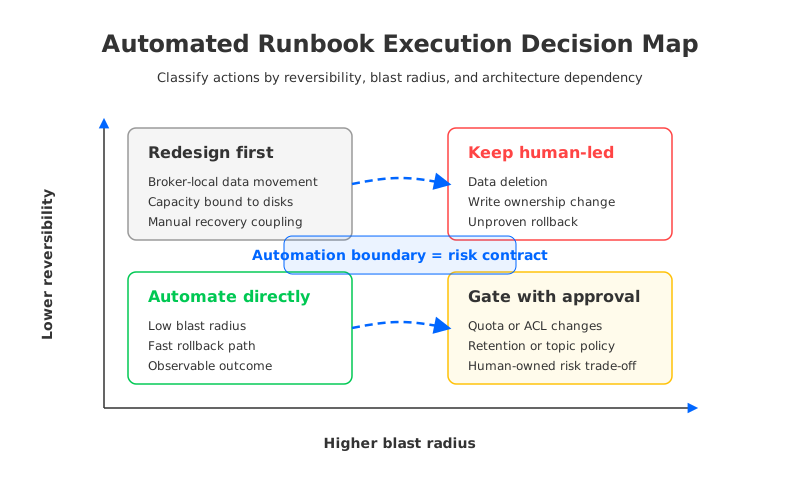
Search for automated runbook execution kafka and the real question is rarely "Can we run more scripts?" Most Kafka teams already have scripts for restarting connectors, expanding topics, resetting Consumer group offsets in test environments, collecting broker diagnostics, or applying known configuration changes. The pressure arrives when the same actions move closer to production traffic, customer-facing data, and on-call decisions. At that point, automation is not a tooling problem. It is a boundary problem: which actions are safe for software to execute, which actions need approval, and which actions reveal that the Kafka architecture is asking the runbook to compensate for too much state.
That boundary matters because Kafka operations are full of actions that look similar in a ticket but behave very differently in production. Restarting a failed connector task is not the same as changing retention on a compacted Topic. Adding broker capacity is not the same as moving retained partitions across disks. Resetting offsets for a replay workflow is not the same as changing write ownership during migration. The better automation program starts by separating reversible operations from decisions that change data, cost, security, or recovery posture.
1Why teams search for automated runbook execution kafka
Teams usually reach this search after the first wave of Kafka standardization has already happened. They have dashboards, alerts, Terraform modules, topic naming rules, client defaults, and incident playbooks. They can identify Consumer lag, broker disk pressure, controller issues, under-replicated partitions, connector failures, and request latency. What still hurts is the time between detection and safe response.
The first temptation is to automate every repeated response. That makes sense for narrow symptoms with proven fixes. A connector restart after a transient downstream failure can be automated when the task error is known, retry limits are bounded, and the downstream system is healthy again. A broker diagnostic bundle can be collected automatically when latency crosses a threshold. A notification can open the right incident channel with the Topic, Partition, broker, Consumer group, and alert context already attached.
The trouble begins when the runbook action changes the system rather than observing it. A script can scale a worker pool, but it should not silently decide that a business-critical Consumer group can fall behind for 30 minutes. A controller can rebalance load, but it should not hide that disk headroom has been running below the team's risk threshold. Automation is useful when it makes known responses faster. It is dangerous when it turns unresolved architecture and ownership questions into background behavior.
Use this split before writing the next automation rule:
- Observation can be automatic by default. Collect metrics, logs, configuration snapshots, client versions, lag positions, and broker status without waiting for a human.
- Low-blast-radius remediation can be automatic with guardrails. Restarting a failed task, moving traffic within known capacity, or rolling back a recent configuration change can be safe when the rollback condition is tested.
- Business-impacting changes need approval. Retention, deletion, write ownership, ACL policy, quota changes, and production offset resets need a named owner because they change more than infrastructure state.
- Repeated high-risk actions need architecture review. If every traffic burst requires manual partition movement or every broker failure starts a storage recovery project, the runbook is exposing a deeper constraint.
That last category is where many Kafka automation programs stall. The team can make the script cleaner, but the script still waits for data movement, disk replacement, or careful capacity math. Automation cannot erase the work created by broker-local durable state.
2The production constraint behind the problem
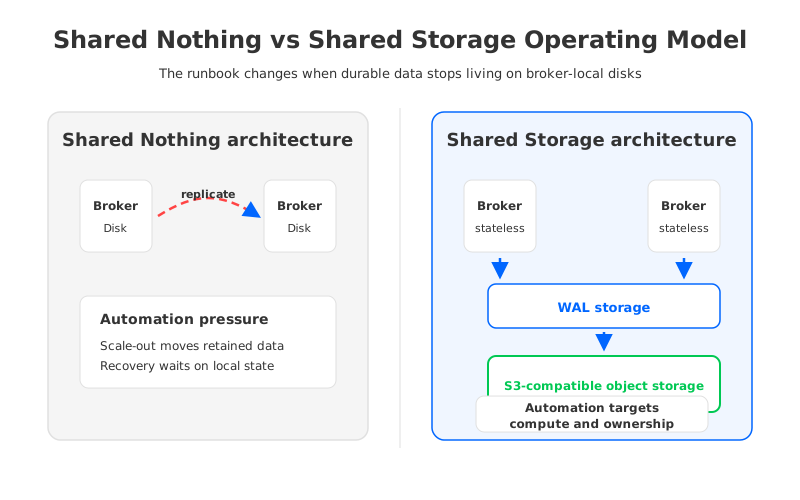
Apache Kafka's classic operating model is built around Shared Nothing architecture. Each Broker owns local storage, each Partition has a leader, follower replicas copy data through the broker layer, and durability depends on replication and acknowledgments. This model is mature and well understood. It also means that broker operations are often storage operations.
That storage coupling changes the safety profile of automation. If a broker fills a disk, the runbook is not only "add capacity." The team has to decide where partitions should live, how fast reassignment should run, how much network and disk I/O the cluster can absorb, and whether the current replication factor and ISR (In-Sync Replicas) state leave enough margin. If a broker fails, the team has to reason about leader election, replicas, catch-up behavior, and whether the remaining brokers can handle traffic. These are legitimate Kafka operations, but they are not low-friction automation targets.
The same pattern appears during scaling. In a broker-local design, adding compute capacity does not automatically make retained data available on that compute. The cluster may need partition reassignment, data copy, throttling, and follow-up balancing. If the automation system treats that as a routine scale-out, it can create the very incident it was meant to prevent: higher replication traffic, slower fetches, longer maintenance windows, and on-call uncertainty about whether the action is reversible.
Tiered Storage helps with long-term retention economics by moving older data to remote storage while keeping recent data on broker-local disks. It is a useful option for some Kafka estates, and it deserves evaluation on its own terms. It does not, by itself, make the broker stateless for the hot path. Automated runbook execution still needs to ask what data remains local, what happens during broker replacement, and whether scaling can proceed without a large placement event.
This is why a useful automation boundary is not based on the command name. It is based on four properties:
| Property | Automation question | Why it matters |
|---|---|---|
| Reversibility | Can the action be rolled back without data ambiguity? | Offset resets, retention changes, and write cutovers can be hard to undo. |
| Blast radius | Which teams, tenants, and applications can be affected? | A local connector restart is different from a cluster-wide policy change. |
| Evidence | Does the system expose enough signals to know the action worked? | Automation without verification becomes delayed manual debugging. |
| Architecture dependency | Does the action wait on broker-local storage movement or ownership transfer? | The safest script can still be slow when the platform must move data. |
The table is deliberately plain. It gives platform teams a way to argue about automation without turning every conversation into a tool preference. If an action is reversible, narrow, observable, and not blocked by storage movement, automate it. If one of those properties is missing, add an approval gate or redesign the underlying operating model.
3Architecture options and trade-offs
There are several reasonable ways to approach Kafka runbook automation. The right choice depends on whether the team is trying to improve an existing cluster, reduce on-call toil, support self-service application teams, or change the cost and recovery model of the platform.
Hardening an existing Apache Kafka deployment is the right first move when the main problem is inconsistent operations. Standardize alert thresholds, define owners for each class of action, rehearse rollback, and make every automation rule write evidence back to the incident timeline. Kafka's official documentation gives the common vocabulary for Consumer groups, offsets, transactions, KRaft, Connect, and storage behavior; automation should be built against those semantics, not against tribal shorthand.
Managed Kafka services can reduce some infrastructure work, but they do not remove every operating boundary. Teams still need to govern topics, clients, ACLs, quotas, schemas, connectors, dashboards, and incident response. The decision becomes one of shared responsibility: which actions can the service perform, which actions remain with the customer team, and what evidence is visible when an automated operation occurs.
Kafka-compatible platforms change a different part of the equation. Compatibility protects the application and ecosystem contract: clients, Producers, Consumers, offsets, Consumer groups, transactions, Kafka Connect, stream processing jobs, and operational tooling remain central to the evaluation. Architecture determines whether the operating model still binds durable data to brokers or moves that state into shared storage.
That distinction should shape the automation plan. A platform team can safely expose self-service actions to application teams when the action has a narrow contract: create a Topic within policy, view Consumer lag, restart a connector task, request a quota increase, or trigger a tested replay workflow. The same team should keep human approval around actions that affect many teams or change data interpretation: retention reduction, Topic deletion, broad ACL changes, production offset reset, migration promotion, or rollback from a target cluster to a source cluster.
4Evaluation checklist for platform teams
A practical checklist should force evidence, not optimism. "We have a runbook" is not enough. A runbook is ready for automation only when the team can point to tests, dashboards, owners, and rollback conditions.
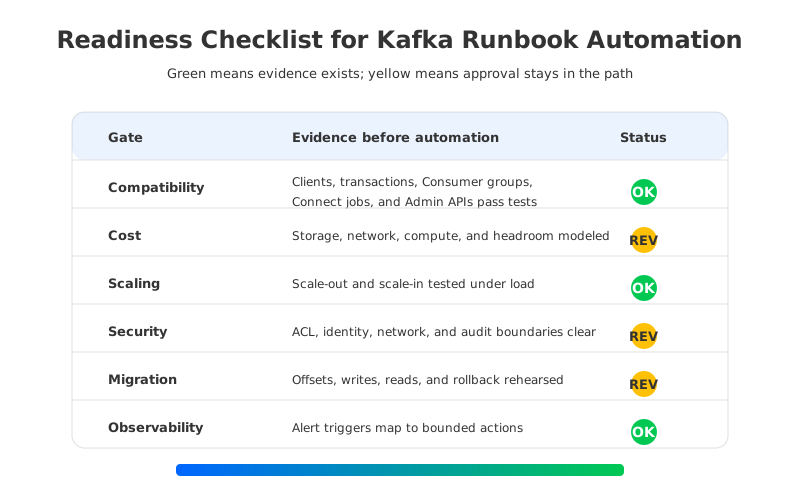
Start with compatibility. Verify the exact client versions, authentication mechanisms, compression settings, idempotent Producer behavior, transactional workloads, Consumer group behavior, Connect workers, schema integrations, and Admin API scripts that production uses. A small produce-and-consume test is necessary, but it is not a compatibility proof for an estate that depends on Kafka semantics during incidents.
Then check the operating surface:
- Cost and capacity: The runbook should know whether the action consumes compute, storage, network, object requests, or reserved headroom. If the cost model is unclear, keep approval in the path.
- Scaling and failure recovery: The team should test scale-out, scale-in, broker replacement, slow storage behavior, and cache warm-up under load. Automation should record the before-and-after state.
- Security and governance: ACLs, identity, network boundaries, audit logs, and support access need explicit owners. Automated actions should not widen access as a side effect.
- Migration and rollback: Write paths, read paths, offsets, lag, DNS, client configuration, and rollback authority must be rehearsed before any automated cutover.
- Observability: Every automated action needs a success condition, a timeout, and an escalation path. If the system cannot tell whether the action worked, it is not ready.
The scorecard should be strict. Green means tested evidence exists. Yellow means the action is understood but still needs approval. Red means the team is relying on an assumption. This discipline keeps platform automation useful without making application teams inherit hidden infrastructure risk.
5How AutoMQ changes the operating model
After the neutral checklist, one architecture question becomes hard to avoid: does the team need Kafka compatibility, or does it need broker-local durable storage? Many production estates need the Kafka API and ecosystem because applications, connectors, stream processors, dashboards, and incident workflows already depend on Kafka behavior. Far fewer workloads need the operational side effect that retained data lives on broker-attached disks.
AutoMQ is a Kafka-compatible, cloud-native streaming platform that uses Shared Storage architecture to separate compute from storage. AutoMQ Brokers handle Kafka protocol work, request routing, leadership, caching, and scheduling, while durable stream data is stored through S3Stream using WAL (Write-Ahead Log) storage and S3-compatible object storage. From an automation perspective, the important shift is that broker replacement, scaling, and balancing no longer need to be treated primarily as retained-data copy events.
This does not mean every runbook disappears. Platform teams still need compatibility tests, capacity policies, security reviews, observability, migration plans, and rollback authority. The difference is where the hardest operations sit. With stateless brokers, scaling can focus more on compute placement, ownership, cache behavior, and traffic distribution. With Self-Balancing, the platform can continuously adjust broker load without turning every imbalance into a manual data movement project. With AutoMQ Console, Terraform workflows, monitoring, Self-healing, and Kafka compatibility, the operational contract becomes easier to encode as policy.
AutoMQ BYOC is also relevant for governance boundaries. In BYOC (Bring Your Own Cloud), the control plane and data plane run in the customer's cloud account and VPC. That matters when automated runbooks touch data location, network access, audit trails, object storage permissions, or support workflows. Automation is easier to trust when the deployment boundary matches the organization's control model.
For migration, AutoMQ Kafka Linking can help teams move Kafka workloads while preserving Topic data and Consumer group progress semantics. The automation lesson is the same as the rest of this article: do not treat migration as a copy job. Treat it as a controlled change to writes, reads, offsets, observability, and rollback. A good migration runbook makes the promotion boundary explicit before any production traffic moves.
The starting search was about automated runbook execution for Kafka. The better answer is an operating model where automation has a clear contract: observe broadly, remediate narrowly, gate business-impacting changes, and redesign the platform when repeated runbooks are fighting broker-local state. If your current Kafka runbooks keep turning scaling and recovery into storage projects, talk to the AutoMQ team and compare the same runbook against a Shared Storage architecture.
6FAQ
6.1What is automated runbook execution for Kafka?
It is the practice of letting software execute predefined Kafka operational responses such as diagnostics, connector restarts, scaling actions, alert enrichment, rollback steps, or controlled remediation. In production, it should include guardrails, evidence collection, timeouts, escalation paths, and ownership rules.
6.2Which Kafka runbook actions are safest to automate first?
Start with observation and low-blast-radius remediation: collecting diagnostics, enriching alerts, restarting known failed connector tasks, opening incident channels with context, and applying tested rollback for recent configuration changes. Avoid silent automation for deletion, retention reduction, production offset resets, and write ownership changes.
6.3Does Kafka compatibility remove the need for runbook testing?
No. Kafka compatibility preserves the API and ecosystem contract, but teams still need to test their actual clients, security settings, Consumer groups, Connect workers, transactions, dashboards, and failure procedures. Compatibility reduces rewrite risk; it does not replace operational verification.
6.4How does Shared Storage architecture affect runbook automation?
Shared Storage architecture moves durable stream data away from broker-local disks. That can make broker replacement, scaling, and balancing less dependent on retained-data movement. The runbook still needs controls, but more actions can focus on compute, metadata, ownership, and observability rather than disk recovery.
6.5When should a team keep human approval in the path?
Keep approval for actions that affect data interpretation, security posture, many tenants, or rollback ambiguity. Examples include retention reduction, Topic deletion, broad ACL updates, production offset reset, migration promotion, and any action whose success condition cannot be observed automatically.


