
Table of Contents
Table of Contents
1Introduction
Today we’re announcing that, in addition to support for S3 WAL and EBS/Regional EBS WAL[1], AutoMQ will add full support for Amazon FSx for NetApp ONTAP(Short for FSxN) as a new WAL storage option in the December 2025 release.
AutoMQ is a next‑generation, fully Apache Kafka–compatible, S3‑backed "Diskless Kafka". It uses a self‑developed "WAL + object storage" streaming storage engine to decouple write‑ahead logs from large‑scale durable storage. This design preserves Kafka’s semantics and stability while significantly reducing storage costs and simplifying operations, and has already seen broad adoption in the industry.
With FSx WAL, AutoMQ on AWS finally fills in a critical missing piece: on AWS you can now have a truly Diskless Kafka deployment that simultaneously eliminates cross‑AZ data transfer costs, provides multi‑AZ fault tolerance, and delivers latency that is close to local disk.
2Latency challenges for Diskless Kafka
In recent years, the S3 API—driven by its extremely low cost, elasticity, and shared‑storage nature—has gradually become the new standard for cloud data infrastructure. On this foundation, Diskless Kafka architectures that rebuild the streaming storage engine on top of object storage have started to emerge. Since AutoMQ first proposed a shared‑storage–based Kafka architecture in 2023, Diskless Kafka has become an important trend in the data streaming space: in the cloud, it naturally delivers compute–storage decoupling, elastic scale‑out and scale‑in, and significant cost advantages.
A particularly impactful benefit is the elimination of cross‑AZ data transfer charges by leveraging shared storage. On major public clouds such as AWS and GCP, a multi‑AZ Kafka cluster can save from thousands to tens of thousands of dollars per month in network costs. This has been widely validated by Kafka users running in the cloud and is one of the primary drivers pushing them to consider migrating to Diskless Kafka.
At the same time, Diskless Kafka faces a fundamental challenge: if you simply abandon local disks and synchronously write all data directly to object storage, you lose one of Kafka’s most important capabilities—low latency . Object storage is designed for high durability and high throughput, not sub‑millisecond write latency. Under typical conditions, direct writes to S3‑class object stores have average write latencies in the 200–500 ms range; even with the latest offerings such as S3 Express One Zone (S3 E1Z), write latency is still around 150 ms.
For latency‑sensitive financial and trading workloads—such as microservice call chains, matching engines, risk decisioning, and real‑time risk control—this level of latency is completely unacceptable. It also severely limits where most "direct‑to‑object‑storage" Diskless Kafka solutions can be applied, restricting them mainly to observability, log ingestion, and near real‑time event stream analytics where end‑to‑end latency requirements are much less stringent.
In 2023, AutoMQ proposed and implemented a different technical path: a shared‑storage architecture based on a "WAL acceleration layer + object storage." By inserting a high‑performance, low‑latency shared storage layer in front of object storage and using it as a Write‑Ahead Log (WAL), AutoMQ decouples the write path from low‑cost object storage. While preserving Kafka semantics, it keeps most writes and read hot spots on low‑latency storage, then asynchronously flushes data to object storage in batches—delivering a truly low‑latency Diskless Kafka.
This architecture brings two key benefits. First, it leverages low‑latency shared storage in the cloud to significantly improve both write and read performance. Second, by aggregating writes in the WAL and flushing in batches, it reduces the number of S3 API calls, further improving throughput and controlling costs. On clouds such as GCP and Azure that offer Regional EBS (or equivalent multi‑AZ shared block storage), a WAL + object storage architecture built on Regional EBS is widely regarded in the industry as the "ideal form" of Diskless Kafka available today.
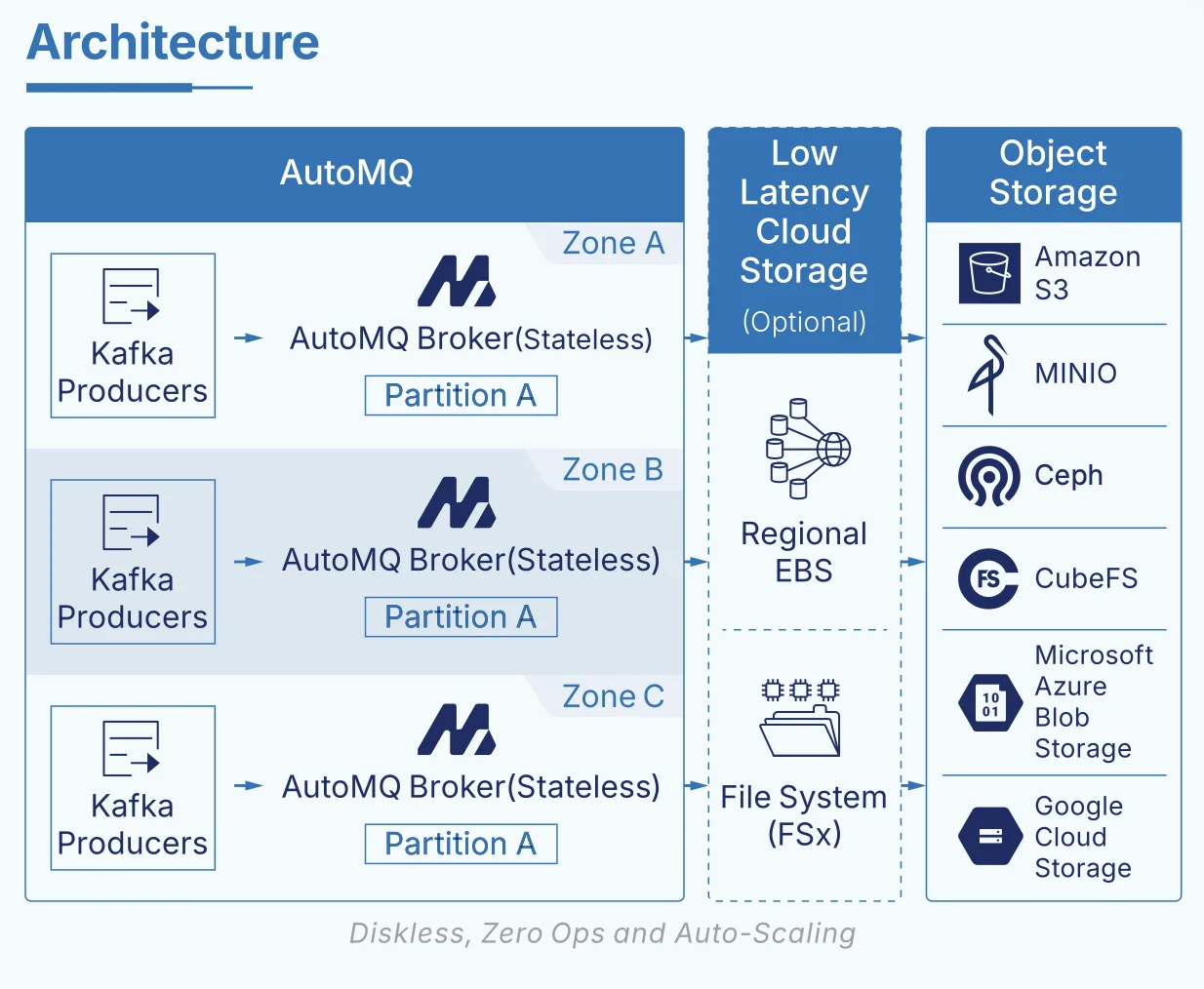
The real technical challenge appears on AWS. Unlike GCP and Azure, AWS has long lacked a Regional‑EBS‑style multi‑AZ shared block storage service. This gap makes it hard to build a low‑latency Diskless Kafka architecture on AWS without painful trade‑offs between EBS and S3:
-
Use EBS as the WAL: you get decent latency, but you’re still exposed to cross‑AZ replication costs and operational complexity.
-
Use S3 directly as the WAL: you completely avoid cross‑AZ data transfer costs, but end‑to‑end latency cannot meet the needs of latency‑sensitive workloads.
This is why Diskless Kafka on AWS has long suffered from a structural dilemma: it is either affordable but too slow, or fast enough but too expensive.
To break this deadlock, after evaluating multiple shared‑storage options in the AWS ecosystem, AutoMQ ultimately chose AWS FSx for NetApp ONTAP as the foundational WAL layer. FSx ONTAP is a highly available shared file storage service that spans multiple AZs and, in multi‑AZ deployments, can deliver average write latencies below 10 ms. At the same time, its pricing model does not charge extra for cross‑AZ traffic. This combination aligns almost perfectly with Diskless Kafka’s composite requirements for "low latency + shared storage + multi‑AZ."
Leveraging AutoMQ’s WAL abstraction, we only need a fixed amount of FSx capacity as a high‑performance WAL space. Writes are first persisted to FSx as the WAL, then flushed to S3 in batches. This enables, for the first time on AWS:
-
Preservation of all Diskless Kafka advantages: compute–storage separation, elastic scaling, and S3‑level low cost.
-
Elimination of cross‑AZ data transfer fees, while supporting multi‑AZ deployment and fault tolerance.
-
Low‑latency write and consume performance that is close to local‑disk Kafka.
This makes AutoMQ one of the very few Diskless Kafka solutions on AWS that has no obvious weaknesses across cost, multi‑AZ high availability, and latency. It also truly opens up Diskless Kafka for latency‑sensitive production workloads on AWS.
3How FSx Eliminates Cross‑AZ Data Transfer Charges
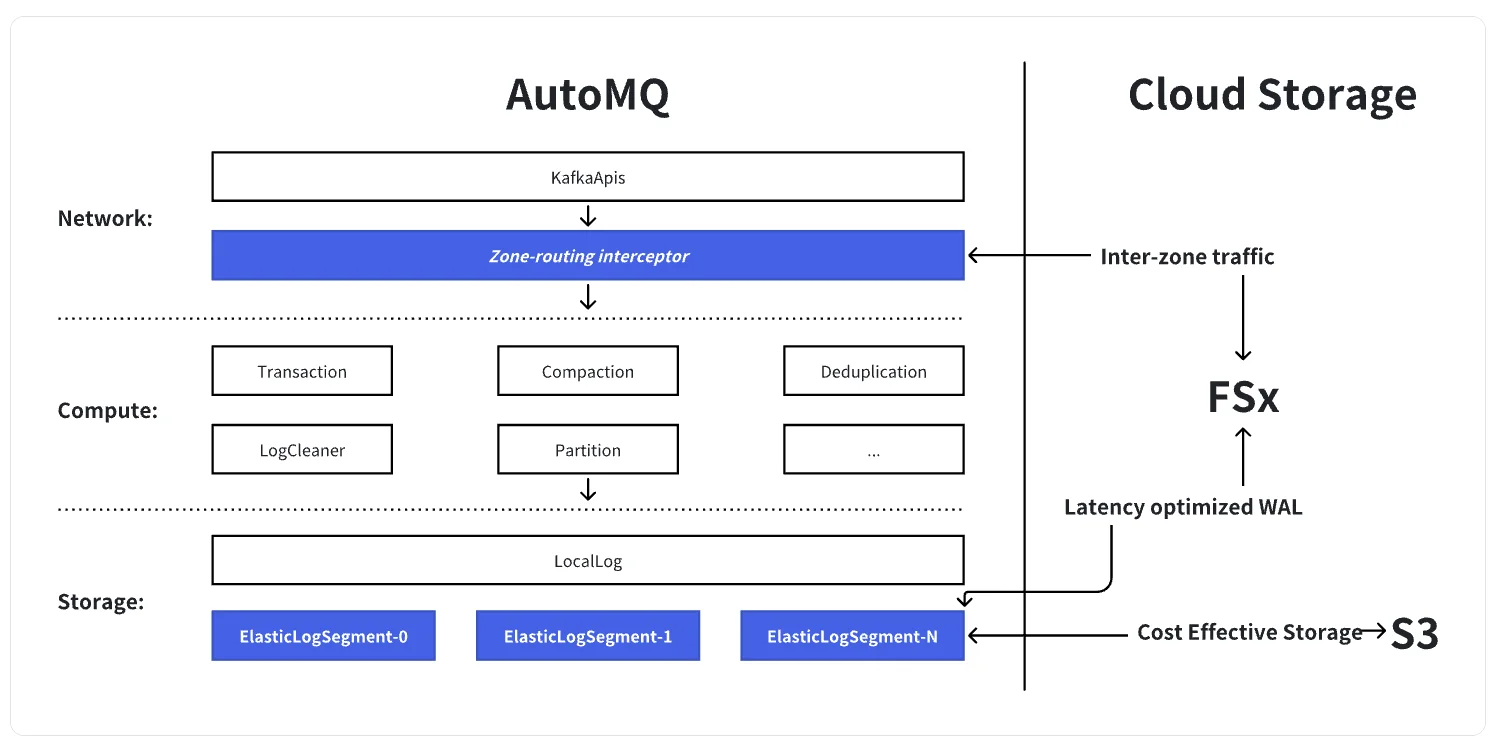
To see how FSx helps AutoMQ eliminate Kafka cross‑AZ data transfer costs, it’s useful to start with a basic question: which layer of Kafka did we actually change? Once that’s clear, we can look at what FSx does in this new architecture.
Apache Kafka can be roughly decomposed into three layers:
-
The network layer , which handles
KafkaApisrequests. -
The compute layer , which implements core logic such as transactions, compression, deduplication, LogCleaner, and so on. This is where most of Kafka’s code lives.
-
The storage layer at the bottom, where
LocalLogandLogSegmentpersist the unbounded log to the local file system.
AutoMQ keeps Kafka’s native network and compute layers intact. The only change is at a very thin slice of the storage layer: the LogSegment . At this layer, we swap out local disks for a shared storage engine built on "S3 + low‑latency WAL (FSx)". On top of the network layer, we add a Zone‑routing interceptor.
In this design, FSx acts as a region‑wide shared volume that provides durable WAL storage. All writes are first appended sequentially to FSx, and then asynchronously flushed down to S3.
In a multi‑AZ deployment, traditional Kafka incurs cross‑AZ data transfer charges from three main sources: triplicate replication, cross‑AZ consumption, and cross‑AZ writes.
AutoMQ addresses the first two fairly directly. By using a single replica plus cloud storage (S3/FSx) for durability and multi‑AZ availability, the cluster no longer needs three in‑cluster copies of the data, so all the replication traffic between brokers disappears. Combined with rack‑aware scheduling, consumers can be placed to read from the nearest brokers, avoiding cross‑AZ traffic on the consumption path.
The hardest remaining piece is producer write traffic across AZs. This is where FSx is critical. Acting as a shared WAL, FSx allows brokers in different AZs to "append to the same log" without replicating data between brokers. At the same time, the Zone‑routing interceptor "localizes" cross‑AZ writes: when a producer writes to a broker in another AZ, the interceptor transparently proxies that write to a broker in the producer’s local AZ. Only a very small amount of control metadata is sent cross‑AZ; the actual large data blocks are always written to FSx from within the same AZ and then eventually persisted to S3.
With this design, AutoMQ maintains full Kafka protocol compatibility and cross‑AZ high availability, while driving cross‑AZ data‑plane traffic down to near its theoretical minimum.
Practically, this architecture enables AutoMQ on AWS to achieve three goals:
-
Use FSx as a low‑latency WAL to deliver write and read performance close to local disks.
-
Leverage regional shared storage and Zone‑routing to reduce cross‑AZ data‑plane traffic to almost zero, leaving only lightweight control messages.
-
Offload primary storage to S3, preserving all the cost and elasticity benefits of Diskless Kafka.
Learn more details from this blog: https://go.automq.com/how-does-automq-implement-sub-10ms-latency-diskless-kafka?utm_source=blog
4Benefits
With FSx in the picture, AutoMQ’s diskless architecture on AWS no longer has to trade off "ultra‑low latency" against "ultra‑low cost." On one side, it still preserves all the original advantages: compute–storage separation, elimination of cross‑AZ data‑plane traffic, and extremely low storage cost backed by S3. On the other side, by adding a relatively small, fixed‑size FSx volume as a region‑wide low‑latency WAL, we can pull end‑to‑end latency back down to levels suitable for demanding real‑time workloads such as microservices and financial trading.
The rest of this section will walk through the benefits of this combined design from two angles: performance and cost.
4.1Performance Analysis
From an architectural perspective, AutoMQ + FSx directly addresses a specific problem: in a cross‑AZ high‑availability setup, how do you retain local‑disk‑class latency without introducing cross‑AZ replication traffic?
We adopt AWS FSx for NetApp ONTAP in Multi‑AZ mode: within a single Region, FSx runs an HA pair across two AZs and exposes them as a single region‑wide shared file system. All brokers mount this file system as their only persistent WAL device. With this regional shared WAL layer in place, the system reaches a new balance across availability, elasticity, and network cost:
-
FSx delivers random I/O performance close to local EBS, while automatically replicating across multiple AZs, inherently satisfying cross‑AZ HA requirements.
-
AutoMQ brokers remain stateless compute nodes that can scale elastically with load. All hot writes are funneled into FSx and then asynchronously offloaded to S3.
-
Because data is no longer replicated between brokers, cross‑AZ data‑plane traffic is effectively eliminated; only control‑plane communication remains.
Under this architecture, we benchmarked end‑to‑end performance in AWS us‑east‑1 with a representative high‑throughput workload:
-
Environment : 6× m7g.4xlarge brokers; FSx for NetApp ONTAP in Multi‑AZ, dual‑node, generation 2, configured with 1,024 GiB capacity, 4,000 provisioned IOPS, and 1,536 MB/s throughput.
-
Workload model : 4:1 read/write ratio, 64 KB messages, sustained 460 MB/s writes and 1,840 MB/s reads, simulating the mixed pressure of large‑scale microservices and real‑time compute.
-
Results : write latency averaged 6.34 ms with P99 at 17.50 ms; end‑to‑end latency averaged 9.40 ms with P99 at 28.00 ms.
As you can see, while still providing cross‑AZ disaster recovery, full compute–storage separation, and S3 as the primary storage tier, AutoMQ uses a fixed‑size FSx WAL layer to pull diskless Kafka’s average write latency down from "hundreds of milliseconds" into the "sub‑10 ms" range—approaching the experience of traditional local‑disk Kafka.
This eliminates the concern that the diskless architecture might not be suitable for mission‑critical workloads. Even complex microservice call chains, millisecond‑sensitive risk control, and order matching systems can run on AutoMQ + FSx with latency that is both stable and predictable.
4.2Cost interpretation
From a cost perspective, the core design of AutoMQ is to build a reliable, regional persistent WAL with a small amount of FSx and use massive S3 to undertake long-term data storage—thus forming a cost structure completely different from traditional Kafka.
-
FSx is solely responsible for the high-reliability, low-latency persistent WAL, used only to handle the most recent log entries rather than long-term accumulation of business data;
-
S3 stores the vast majority of historical data and serves as the main component for real capacity expansion of the cluster, with primary data always residing in S3, and the overall storage unit price remaining at object storage levels;
-
Since replica redundancy is handled through the high availability of FSx and S3 at the service level, AutoMQ no longer needs to perform log replication between brokers or replicate data across availability zones (AZs), thereby fundamentally reducing storage and cross-AZ traffic costs.
Thanks to this layered design, even a 10 GBps ingestion, 50-node AutoMQ cluster requires less than 100 GB of WAL space on FSx; in a typical scenario with 1 Gbps ingestion/consumption and a TTL of 3 days, only 6 m7g.4xlarge instances and FSx with 2 × 1536 MBps are needed to meet performance and reliability requirements. In other words, although FSx has a higher price per unit of capacity, we only need a small, basically fixed amount of FSx for the WAL. This cost is almost independent of the business TTL or the scale of historical data and will not exponentially increase with extended retention periods as is the case with traditional Kafka's replica storage fees. Furthermore, by eliminating cross-AZ log replication and most of the cross-AZ data plane traffic through the architecture, AutoMQ avoids the enormous network and replication costs that traditional Kafka incurs in multi-AZ deployments. As a result, the overall TCO is still dominated by inexpensive S3 storage and on-demand scalable compute instances, rather than being tied up by large-scale, high-priced block storage and cross-AZ bandwidth fees.
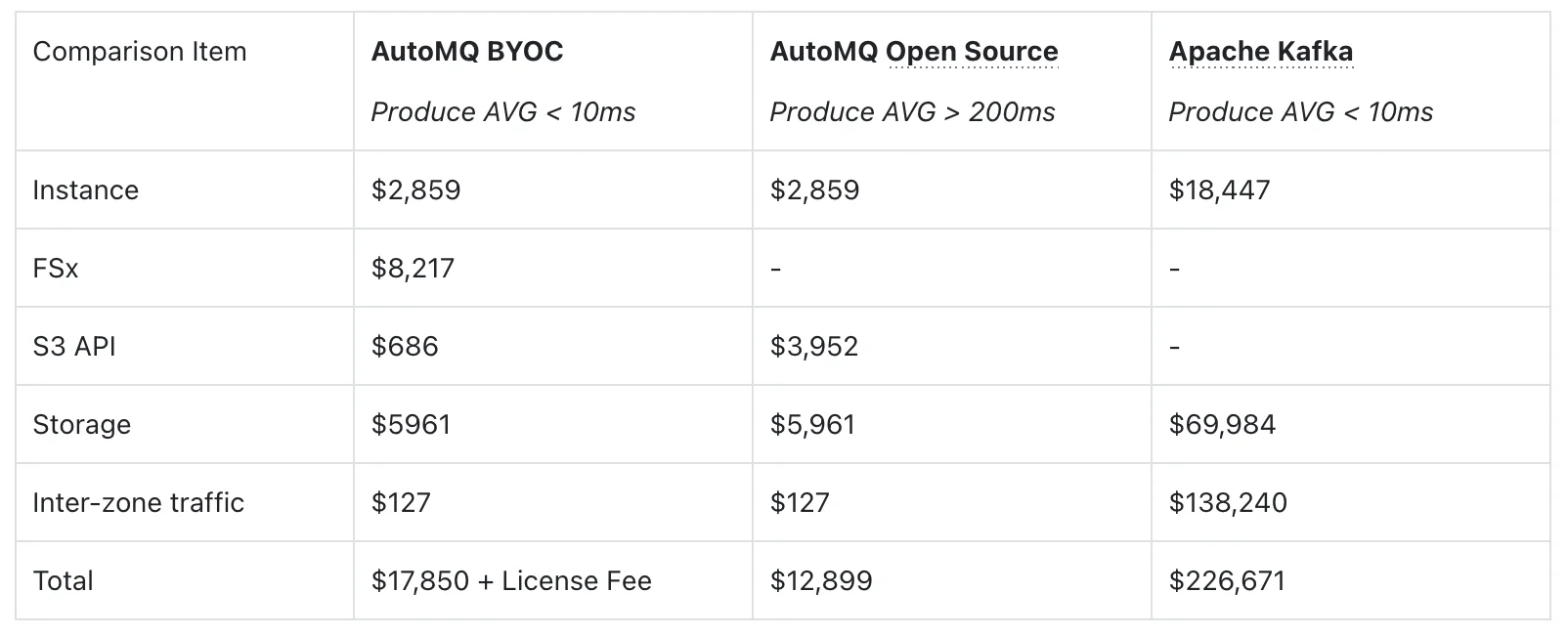
Next, we illustrate the price advantage with the following concrete pricing example (in USD per month). This set of comparative data more intuitively shows the value of FSx in the overall cost structure: under the same latency target of P99 write latency < 10ms, traditional Apache Kafka can only just satisfy the requirements, relies on a large number of high-spec instances, three-replica storage, and cross-AZ replication, resulting in a total monthly cost of around USD 227,000, with the vast majority of expenses being consumed by expensive block storage and cross-AZ traffic. On the other hand, AutoMQ BYOC + FSx, through a fixed-capacity FSx WAL combined with S3, shifts replica redundancy to the high availability provided by FSx/S3 at the service level—no longer performing log replication among brokers and nearly eliminating cross-AZ data plane traffic. Under the same (or even more predictable) sub-10ms write latency, the total cost is only on the order of USD 18,000 per month, achieving an overall saving of nearly 10×.
Compared to the AutoMQ open-source (S3 direct write) solution, although the introduction of FSx adds approximately USD 8,000 in FSx costs, the associated S3 API call overhead drops significantly, and the P99 latency is pulled back from nearly 900ms to tens of milliseconds, completing an upgrade of "exchanging a very small additional cost for near-local disk latency." This demonstrates that choosing AutoMQ + FSx on AWS essentially means using a controllable, linearly predictable FSx cost to obtain comprehensive benefits—including low latency, multi-AZ high availability, and nearly zero cross-AZ traffic costs—that traditional Kafka finds difficult to achieve.
5AutoMQ BYOC x FSx: Free Trial from AutoMQ Cloud
5.1Install AutoMQ BYOC Control Plane
You can refer to the official AutoMQ documentation [2] to complete the installation of the AutoMQ control plane. Register on AutoMQ Cloud to start your free 30-day trial.
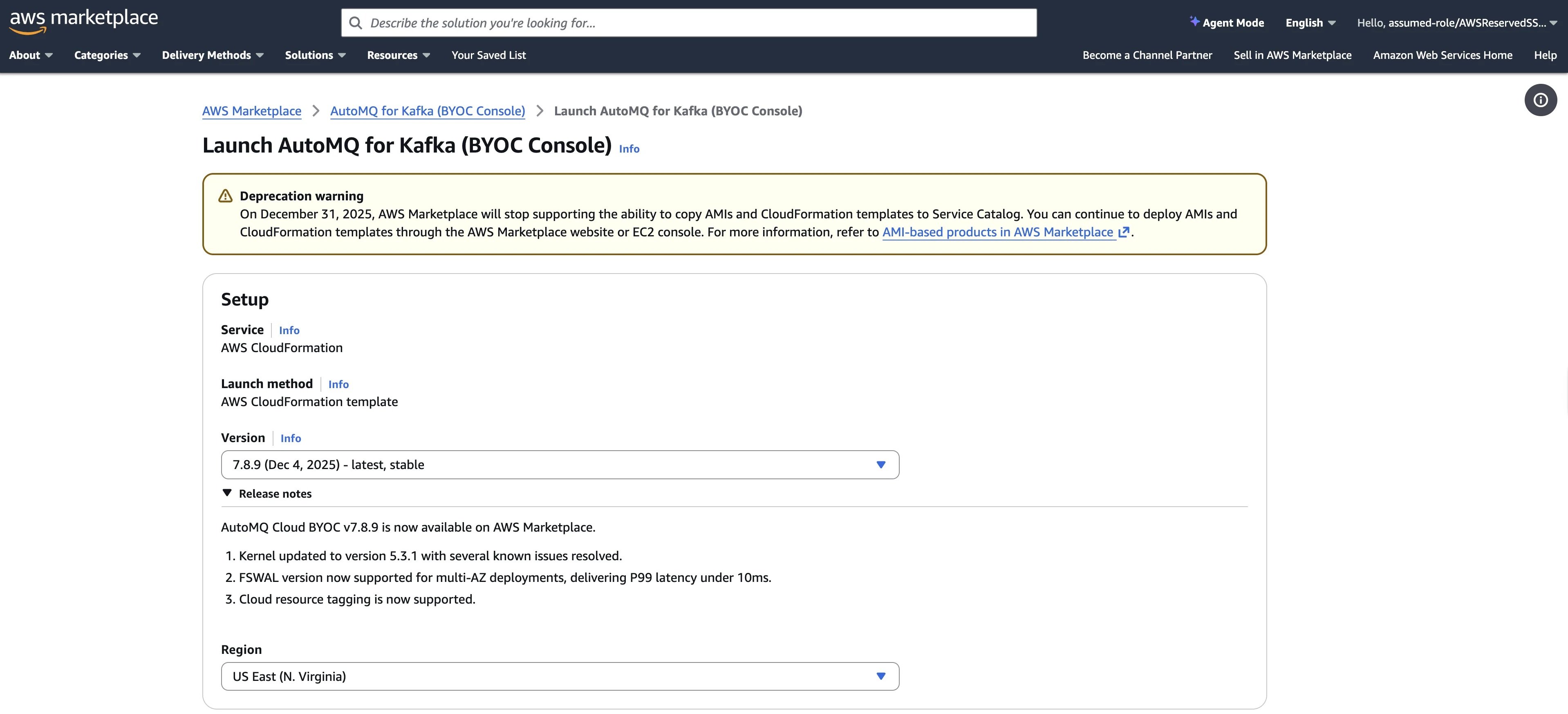
5.2Create Cluster
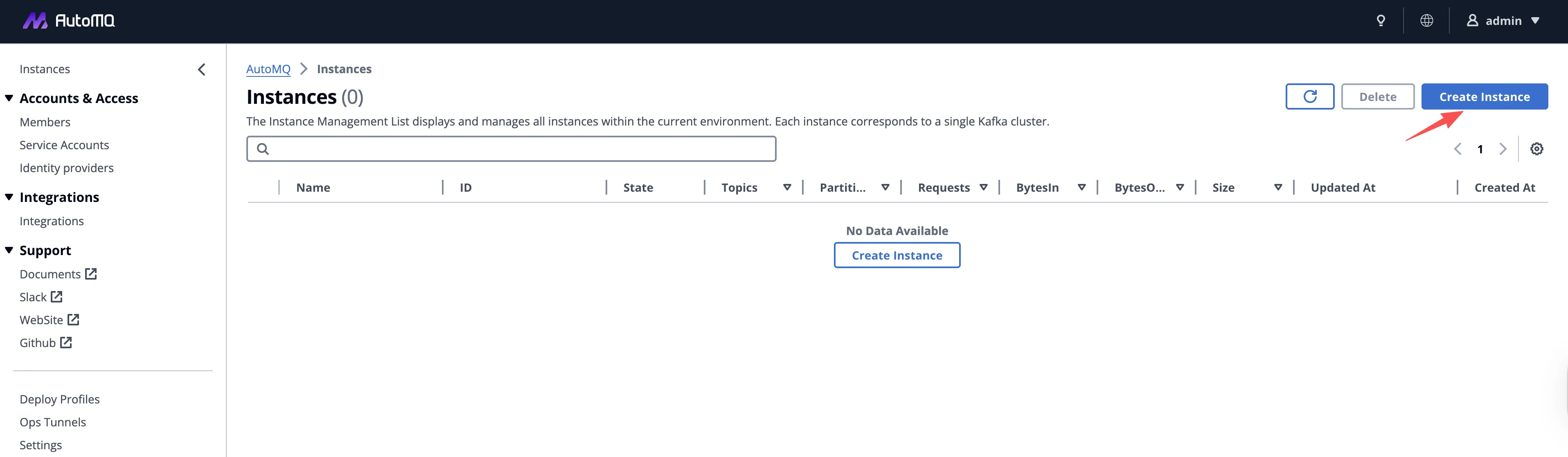
Log in to the AutoMQ control plane's Dashboard and click the Create Instance button to begin the cluster creation process.
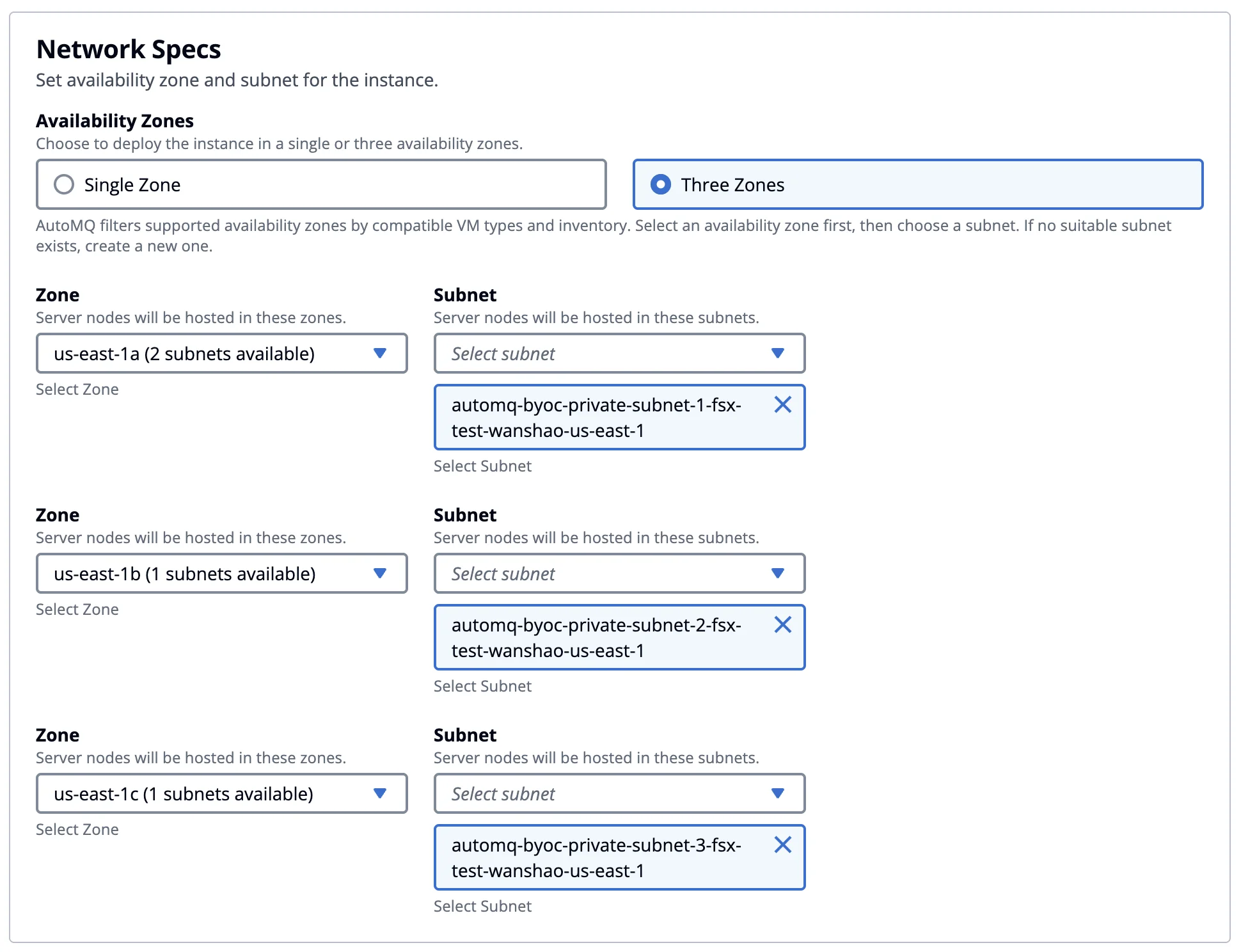
In the cluster creation step under the Network Specs section, choose the 3-AZ deployment. On AWS, if a single-AZ deployment is selected, we still recommend using EBS WAL first, as it offers the best performance and cost efficiency. For multi-AZ deployments, considering the cross-AZ network transfer costs, you can opt for S3 WAL or FSx WAL. For details on the cost and performance differences when choosing different WAL options in AutoMQ, please refer to the official documentation [3].
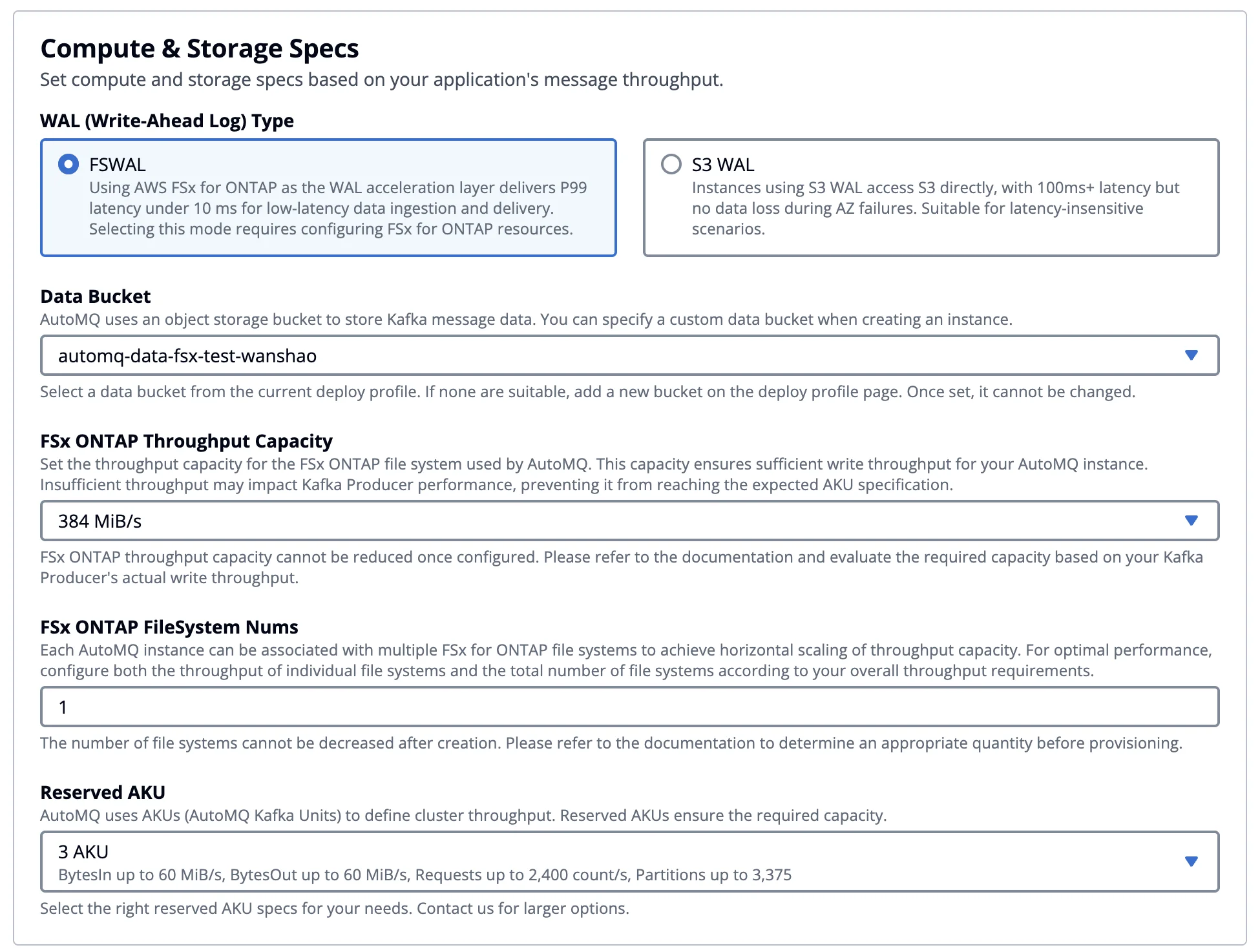
After selecting a multi-AZ deployment, you can check FSx WAL in the compute and storage configuration and then set the cluster capacity.
When you choose options such as EBS WAL or S3 WAL, the cluster capacity planning is simplified to configuring a single parameter: AKU (AutoMQ Kafka Unit). You no longer need to worry about how to choose the EC2 instance type, specification, and quantity. AutoMQ will automatically select a combination of EC2 instances that have been thoroughly benchmarked and validated to be optimal in terms of both performance and cost, ensuring the cluster can reliably meet the throughput performance metrics promised by the platform. For example, with a configuration of 3 AKU, AutoMQ promises to deliver 60 MB/s of write, 60 MB/s of read throughput, 2,400 RPS, and at least 3,375 partitions. By abstracting the underlying capacity and computing power into AKU, AutoMQ simplifies the complex and error-prone capacity planning process in traditional Kafka deployments into a clear, quantifiable metric. For a detailed explanation of the AKU design philosophy, benchmarking methods, and capacity conversion rules, please refer to the official AutoMQ documentation [4].
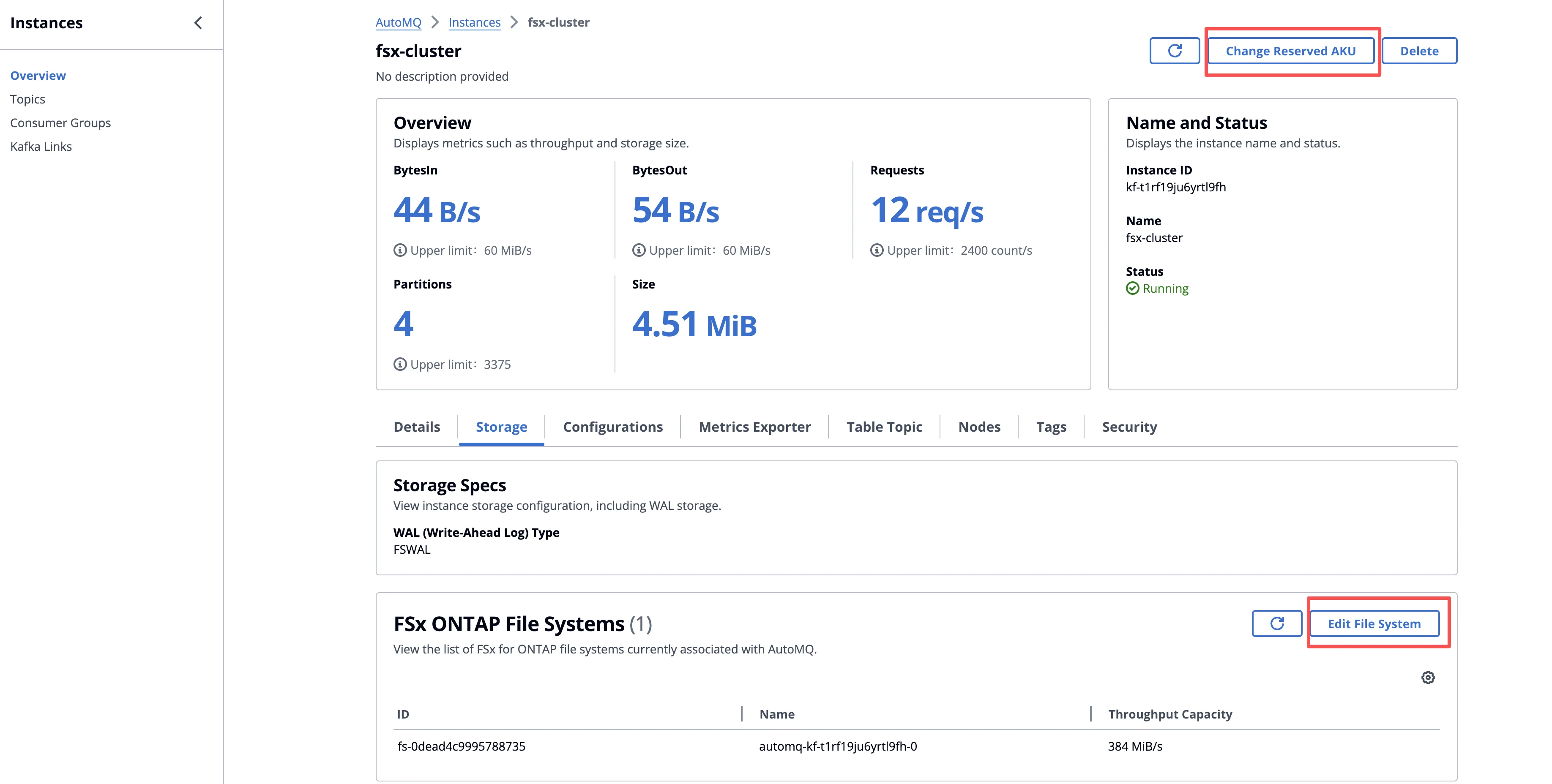
In this example, we choose FSx WAL. In addition to configuring the AKU, you also need to select the instance specifications and quantity for Amazon FSx for NetApp ONTAP. AutoMQ has systematically benchmarked and validated the performance of different FSx ONTAP instance specifications, so users don’t need to handle complex planning based on IOPS, bandwidth, capacity, and other dimensions on their own; they can quickly estimate the required number of FSx instances based on the target write throughput by referring to the table below. In the current configuration, we have chosen 3 AKU (which supports 60 MB/s of both read and write throughput), and only 1 FSx instance with a 384 MBps specification is needed to meet the WAL write performance requirement.
-
FSx 384MBps specification provides 150 MiB/s Kafka write throughput.
-
FSx 768MBps specification provides 300 MiB/s Kafka write throughput.
-
FSx 1,536MBps specification provides 600 MiB/s Kafka write throughput.
5.3Read and Write
After the cluster has been created, you can view its basic information on the cluster details page and elastically adjust the cluster capacity as needed.
-
FSx: Thanks to AutoMQ’s decoupled storage and compute architecture, primary data is fully persisted in object storage, while FSx is only used to accelerate hot-path I/O such as WAL. You can scale horizontally by increasing or decreasing the number of FSx instances, without the heavy partition migrations and data movement typically associated with traditional Kafka, thus increasing or decreasing FSx capacity and bandwidth without impacting business operations.
-
AKU: After adjusting the FSx instances, you can further modify the number of AKU to ensure that the cluster’s maximum processing capacity matches the maximum write throughput that FSx can provide. This achieves decoupled scaling of compute and storage and optimizes overall resource utilization.
In this example, we use the perf tool wrapped by AutoMQ based on OpenMessaging[5], to perform performance testing. We initiated the following workload test from an EC2 instance within the same VPC.
KAFKA_HEAP_OPTS="-Xmx2g -Xms2g" ./bin/automq-perf-test.sh \
--bootstrap-server 0.kf-t1rf19ju6yrtl9fh.fsx-test-wanshao.automq.private:9092,1.kf-t1rf19ju6yrtl9fh.fsx-test-wanshao.automq.private:9092,2.kf-t1rf19ju6yrtl9fh.fsx-test-wanshao.automq.private:9092 \
--producer-configs batch.size=0 \
--consumer-configs fetch.max.wait.ms=1000 \
--topics 10 \
--partitions-per-topic 128 \
--producers-per-topic 1 \
--groups-per-topic 1 \
--consumers-per-group 1 \
--record-size 52224 \
--send-rate 160 \
--warmup-duration 1 \
--test-duration 5 \
--reset
Below are the read/write performance test results for this demonstration scenario, provided for reference. As shown by the actual test data, FSx’s write latency is on par with that of native Apache Kafka, satisfying the requirements of most event streaming and real-time processing scenarios sensitive to end-to-end latency.

6Summary
In this article, we demonstrate how AutoMQ, after introducing FSx as the WAL layer on AWS, brings the end-to-end latency back to a level that accommodates core real-time operations—all while preserving all the benefits of the Diskless Kafka architecture. On one hand, leveraging the "FSx + S3" shared storage architecture, AutoMQ achieves true decoupling of compute and storage, multi-AZ high availability, and nearly zero data-plane traffic between AZs. On the other hand, by constructing a small yet efficient regional WAL on FSx, the write and read hot spots are entirely converged onto low-latency shared storage, with asynchronous sinking to S3. This fundamentally redefines Kafka’s cloud performance and cost structure. In this demonstration, we also conducted a simple performance validation of AutoMQ based on FSx, which can stably deliver an average write latency of under 10ms and end-to-end latency in the tens of milliseconds, all while continuing to benefit from S3-level low-cost storage and the extremely elastic, scalable capabilities provided by stateless brokers.
If you are evaluating how to build a truly cloud-native, low-cost, and horizontally scalable Kafka infrastructure on AWS for latency-sensitive businesses such as microservices, financial transactions, or risk control decisions, register on AutoMQ Cloud for a free 30-day trial. Deploy and experience the AutoMQ with FSx solution, and verify firsthand the performance and value of a sub-10ms latency Diskless Kafka in your production environment.
7References
[2] Guide: Install AutoMQ from AutoMQ Cloud
[5] The OpenMessaging Benchmark Framework


