
Table of Contents
Table of Contents
An Amazon MSK client that “cannot connect” can be failing before it ever reaches a broker. The client may resolve a bootstrap name to private IP addresses it cannot route to, reach the right subnet but hit a security-group rule, complete TCP and then fail TLS, or connect successfully while sending every fetch across an Availability Zone. These symptoms look similar in an application log because Kafka discovers brokers after the first connection.
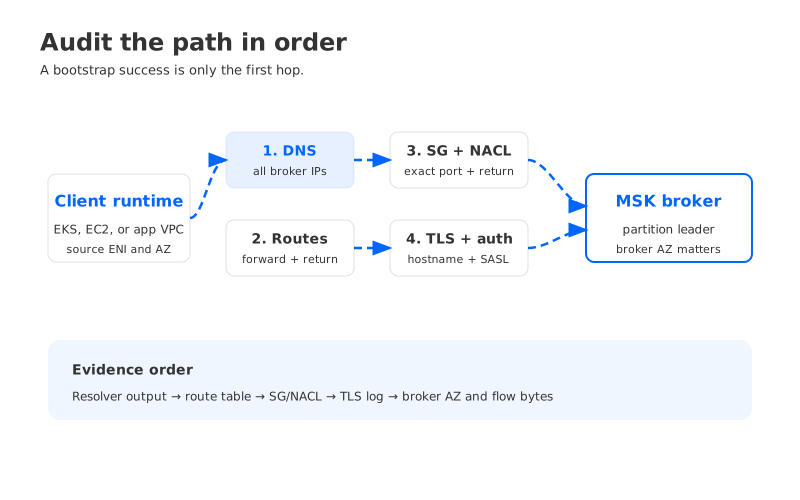
A useful audit follows the packet and the protocol in order: name resolution, route selection, stateful and stateless filtering, TLS and authentication, broker locality, then evidence from flow logs and client metrics. That order prevents the common mistake of changing a security group when the real issue is a missing route, or treating cross-AZ latency as a broker failure.
1Start with the client’s actual network identity
Before looking at a cluster, record where the failing process runs. Capture the workload’s VPC, subnet, Availability Zone, security groups, route table, DNS resolver, and whether it uses a NAT gateway, transit gateway, VPC peering connection, or AWS PrivateLink path. Kubernetes users should record the node subnet and the pod’s security-group behavior when using security groups for pods. A test from a laptop or bastion in another subnet proves very little about an application running in EKS.
Write down one failing connection as a tuple:
client ENI / source IP → resolved broker IP:port → destination subnet and AZ
The tuple becomes your audit key. Repeat it for a healthy client so that “the cluster is reachable” does not hide a subnet-specific problem.
Amazon MSK brokers expose private endpoints in the subnets selected for the cluster. AWS’s client access guidance describes the requirement for network connectivity from the client VPC or a connected network. The practical consequence is direct: the client must be able to reach each broker address returned during Kafka metadata discovery, not just the bootstrap server used for the first TCP connection.
2Layer 1: DNS and bootstrap discovery
Kafka clients usually start with a bootstrap broker string. They connect to one address, request metadata, and then open connections to the leaders returned for the partitions they use. A successful bootstrap TCP check therefore does not prove that the application can reach all brokers.
Run the DNS query from the same runtime environment as the client. For a Linux process, use the container or node network namespace rather than a developer workstation:
getent hosts <bootstrap-broker-hostname>
dig +short <bootstrap-broker-hostname>
Check four details:
- The resolver path. VPC DNS support and DNS hostnames must be enabled, and custom Route 53 Resolver rules must forward the MSK name to a resolver that can answer it.
- The returned addresses. Record every A record and its TTL. Do not assume the first answer is the broker the client will use for every partition.
- The client’s address family. An IPv6-capable runtime can prefer AAAA records or attempt a path that your security controls do not allow.
- Name rewriting. Split-horizon DNS, service meshes, or
/etc/hostsentries can return an address from a different VPC or environment.
If DNS resolves but the IP is unexpected, stop there and fix name resolution. If all returned IPs belong to the cluster’s private subnets, move to routing. A DNS success is evidence about the resolver, not about packet delivery.
3Layer 2: route selection and return traffic
For each resolved broker IP, inspect the route table associated with the client subnet. AWS VPC route tables use the most specific matching route. A local VPC route should cover brokers in the same VPC; a peering, transit gateway, or other target must be present for a connected VPC. The return path must also exist, and asymmetric routing can make a connection appear to hang even when the forward route is correct.
A compact route test is more useful than a generic “network looks fine” statement:
ip route get <broker-ip>
traceroute -T -p <tls-port> <broker-ip>
traceroute may be incomplete inside a VPC because intermediate devices can suppress responses, so treat it as a hint. The route table and VPC Reachability Analyzer provide stronger evidence. VPC route-table behavior explains how subnet associations and longest-prefix matching determine the next hop.
For connected VPCs, check both sides of the connection. A route to a transit gateway in the client VPC does not help if the MSK VPC route table has no return route. For a centralized inspection VPC, verify that the inspection appliance preserves the destination and return state. If the client uses a NAT gateway to reach a private broker address, that is usually a design smell: the path should be private and routable, and the NAT adds an unnecessary dependency and data-processing charge.
4Layer 3: security groups and network ACLs
Security groups are stateful. A permitted inbound connection to the broker can receive return traffic without a separate ephemeral-port rule, but the client’s outbound rule still has to allow the destination port. Network ACLs are stateless and require both directions, including the client’s ephemeral return ports.
Start with the MSK broker security group and identify the exact source security group or CIDR that should be allowed. Prefer a security-group reference for workloads in the same VPC over a broad CIDR. Then inspect the client security group’s egress rules. A common failure pattern is an inbound rule added to the broker group while a restrictive client egress rule continues to block the connection.
The broker port depends on the authentication mode and cluster configuration. Do not infer a port from a different cluster or from a copied security-group template. Use the broker connection string returned for this cluster and map each listener to its TLS and authentication requirement. For Kafka clients, an open TCP socket with an authentication error is a different class of problem from a timeout caused by a dropped packet.
Network ACLs deserve a separate check because a newly created subnet association can inherit a deny rule that the original subnet did not have. AWS’s security-group reference and network ACL guidance define the stateful versus stateless behavior. Keep the rules narrow, but make the test deterministic: source, destination, port, protocol, and direction should all be known.
5Layer 4: TLS and authentication after TCP succeeds
Once routing and filtering are proven, validate the protocol. A TLS handshake can fail because the client trusts the wrong certificate authority, sends an incompatible protocol version, or uses a hostname check against an address rather than the broker hostname. An IAM, SCRAM, or mTLS authentication failure can look like a connection retry loop if the client logs only the final Kafka exception.
Use a TLS probe from the same runtime environment, with the broker hostname preserved for SNI and certificate validation:
openssl s_client -connect <broker-hostname>:<port> \\
  -servername <broker-hostname> -showcerts
The probe does not replace a Kafka client test. It separates certificate and TCP issues from SASL configuration. Then run a minimal Kafka metadata request with the exact security protocol, truststore, and authentication mechanism used by the application. Record the first broker, the returned broker list, and the first failed stage.
Avoid turning a trust failure into a security exception by disabling hostname verification or certificate validation. A temporary diagnostic must be time-boxed and removed after the test. The production fix is to distribute the correct trust material and keep the broker hostname intact.
6Layer 5: broker locality and cross-AZ traffic
A client can be fully healthy and still pay a latency or data-transfer penalty because its traffic crosses an Availability Zone. Kafka leaders are assigned to broker nodes, and a consumer fetches from the leader for each partition. A producer may also send to a leader in another AZ. The bootstrap broker’s AZ is not the same thing as the partition leader’s AZ.
Build a locality view from client logs and Kafka metadata. For each high-volume topic, sample the partitions the client uses, map their leaders to broker subnets or AZs, and compare those AZs with the client’s subnet. Look for a pattern rather than a single partition: a consumer group with most leaders remote is a topology problem; one remote partition may be expected during a rebalance.
The audit should answer three questions:
- Is the client intentionally spread across AZs for resilience, or is it pinned to one AZ while the workload is elsewhere?
- Is the cross-AZ path caused by leader placement, replica fetches, or a connector task running in the wrong subnet?
- Does the workload’s availability requirement justify the network path and its operational cost?
AWS data-transfer pricing varies by path and region, so do not publish a universal per-GB estimate. Measure bytes first, then apply the current pricing page to the actual source and destination. Use client-side bytes, broker metrics, and VPC Flow Logs to reconcile the estimate.
7Evidence: make the audit repeatable
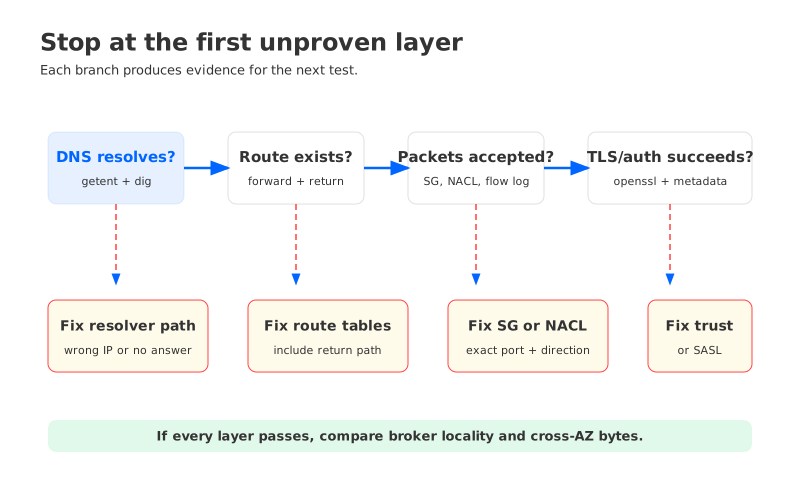
A useful incident packet contains the same fields for every failed attempt. VPC Flow Logs can show whether traffic was accepted or rejected and which interface, address, port, and action were involved. VPC Flow Logs do not show the Kafka protocol or TLS error, so pair them with client logs and broker-side metrics.
Use a worksheet like this:
| Layer | Test | Evidence | Failure meaning |
|---|---|---|---|
| DNS | Resolve from the workload namespace | A/AAAA records, resolver, TTL | Wrong endpoint or resolver path |
| Route | Inspect route and return route | Route table, Reachability Analyzer | Missing or asymmetric path |
| SG/NACL | Check both directions | Rule IDs, Flow Log action | Packet rejected or return blocked |
| TLS/auth | Probe and run metadata request | Handshake and SASL error | Protocol or identity mismatch |
| Locality | Map leaders to client AZ | Broker metadata, client AZ | Remote leaders and possible cross-AZ traffic |
Capture timestamps in UTC and retain the command output. A later security-group change can make a retry succeed, but without the original evidence you cannot tell whether the fix was routing, filtering, or timing.
8What changes with a shared-storage Kafka architecture?
The network audit still matters for any Kafka-compatible system, but the shape of the path can change when broker compute and durable storage are separated. In a traditional MSK topology, clients connect to broker nodes that also anchor local storage and replica traffic. In a shared-storage design, brokers remain on the client data path for Kafka protocol traffic, while durable log segments and metadata may use object-storage or shared-storage endpoints. That creates additional endpoints to audit and can reduce some broker-to-broker storage movement, depending on the implementation and deployment topology.
AutoMQ is a Kafka-compatible cloud-native streaming system that separates compute from object-storage-backed durability. That architecture can be relevant when the team’s constraint is broker-local storage or independent scaling, but it does not erase VPC routing, security-group, TLS, or cross-AZ considerations. A BYOC deployment still requires a deliberate network design and evidence for every path.
The decision boundary is practical: first prove which path creates the incident or cost. Then compare architectures using the same worksheet, including client locality, storage endpoints, failure behavior, and ownership of network controls. A platform change is justified when it removes a recurring constraint, not when it merely changes the name of the broker service.
9A runbook you can use during an incident
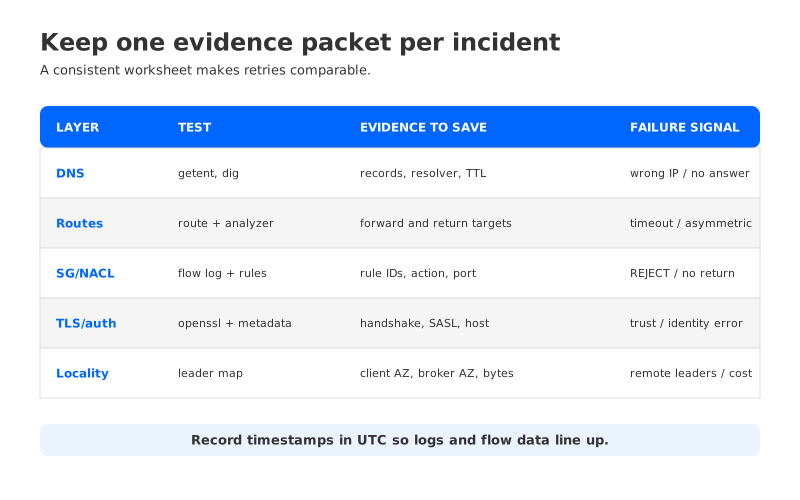
When a client reports an MSK connection failure, avoid changing multiple layers at once. Run the following sequence and stop at the first layer that lacks evidence:
- Resolve every bootstrap and metadata broker hostname from the failing runtime.
- Verify forward and return routes for one failing broker IP.
- Check client egress, broker ingress, and both NACL directions for the exact port.
- Run a TLS probe and a minimal metadata request with production-like authentication.
- Compare client AZ with partition-leader AZs for the affected topics.
- Correlate VPC Flow Logs, client retries, broker metrics, and timestamps.
- If cross-AZ traffic is confirmed, quantify bytes before changing placement or architecture.
After recovery, turn the successful commands into automated checks. A canary that resolves all broker addresses and requests metadata from each client subnet catches a broken route before a production deployment does.
10FAQ
10.1Does a successful bootstrap connection prove that MSK is reachable?
No. Kafka performs metadata discovery after bootstrap and may connect to different broker addresses for partition leaders. Test the full broker list from the workload’s network namespace.
10.2Should I allow the entire VPC CIDR in the MSK security group?
Only when the broader trust boundary is intentional. A security-group reference or a narrowly scoped CIDR is easier to review. Confirm the client egress rule and NACL return path as well.
10.3Can VPC Flow Logs explain a TLS handshake failure?
They can show whether packets were accepted or rejected, but they do not contain the TLS or SASL reason. Pair them with a client-side handshake and Kafka metadata log.
10.4Does putting clients in the same AZ eliminate all cross-AZ traffic?
No. Partition leaders can move, replicas and connectors may be elsewhere, and some control or storage paths use different endpoints. Measure the actual flow and leader distribution.
11References
- Amazon MSK client access
- VPC route tables
- Amazon VPC security groups
- Amazon VPC network ACLs
- VPC Flow Logs
- Amazon EC2 On-Demand pricing and data transfer
When the worksheet shows that broker-local storage or independent compute and storage scaling is the recurring constraint, explore AutoMQ BYOC in the same AWS account and validate the network paths before moving production traffic.


