
Table of Contents
Table of Contents
You've been there. Traffic spikes at 2 AM, your MSK cluster is running hot, and the only option is to add brokers, a process that takes hours of partition rebalancing before the new capacity actually absorbs any load. By the time the rebalance finishes, the spike is over. You just paid for brokers you didn't need, and the ones you had were struggling the entire time.
The problem is architectural, not configurational. AWS MSK inherits Apache Kafka's Shared Nothing storage model, where every broker owns its data on local EBS volumes. That design made sense in on-premises data centers a decade ago. On the cloud, it creates a set of Day 2 operational problems that Amazon left for you to deal with.
1What "Managed" Actually Means with MSK
Amazon MSK handles Day 1: provisioning brokers, configuring ZooKeeper (or KRaft), patching the OS, and managing certificates. That's real value. But the hard problems in running Kafka at scale are all Day 2: scaling capacity to match demand, rebalancing partitions, recovering from failures, and keeping costs under control when traffic is unpredictable.
MSK doesn't solve any of these. It sells you a managed Kafka cluster, not a managed Kafka service. The distinction matters: the cluster is infrastructure, the service is what makes that infrastructure responsive, elastic, and cost-efficient. When your workload changes, MSK expects you to figure out the rest.
2The Scaling Problem: Hours, Not Seconds
Adding a broker to an MSK cluster is straightforward. Making that broker useful is not. A fresh broker joins the cluster empty: it holds zero partitions and serves zero traffic. To redistribute load, you need to run kafka-reassign-partitions.sh (or use Cruise Control, or a third-party tool) to move partitions onto the new broker.
This partition reassignment is where things break down. Every partition migration requires copying the full data set for that partition from the source broker to the destination broker over the network. For a cluster with 10 TB of data spread across 50 brokers, reassigning even 20% of partitions means moving 2 TB of data, a process that competes with production traffic for network bandwidth and disk I/O.
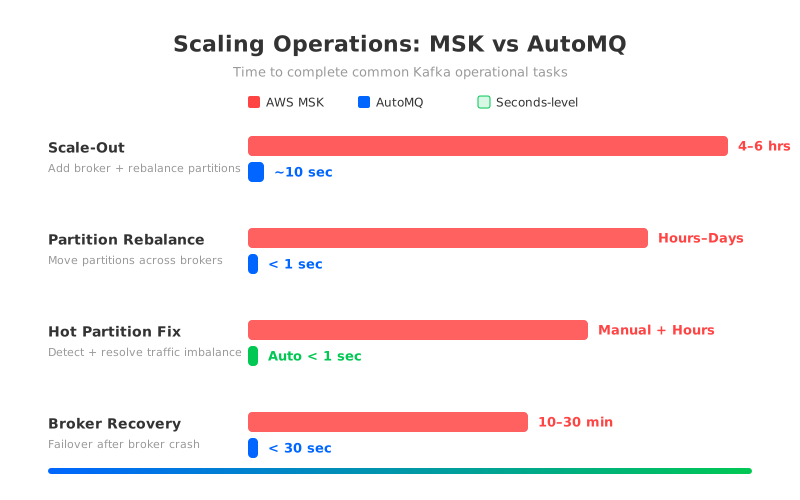
The math is unforgiving. At a conservative 100 MB/s migration throughput (throttled to avoid impacting production), moving 2 TB takes roughly 5.5 hours. During that entire window, the source brokers are under elevated load from both serving production traffic and streaming data to the new broker. Latency spikes are common. Consumer lag grows. If anything goes wrong mid-migration, a broker restart or a network hiccup, the reassignment may need to start over.
Scaling down is even worse. Removing a broker requires draining all its partitions first, which means the same hours-long data migration in reverse. In practice, most teams never scale down. They add brokers during crises and leave them running forever, paying for idle capacity month after month.
3Every Change Triggers a Rebalance
Scaling is painful enough. But the rebalancing tax doesn't stop at scaling. It hits every operational change you make to an MSK cluster. Add a broker? Rebalance. Remove one? Rebalance. A broker fails and comes back with a fresh EBS volume? Same story, full rebalance, and this time you didn't even choose to trigger it.
The root cause is Kafka's storage model. Because each broker physically stores the partitions it owns on local EBS volumes, any change in partition ownership requires physically moving data. There's no shortcut. The data has to travel over the network, land on a new disk, and catch up to the leader's log before the partition is fully migrated.
For large clusters, this creates a compounding problem. A 100-broker MSK cluster with 50 TB of data can take 12-24 hours to complete a full rebalance. During that time, some partitions are under-replicated, some brokers are overloaded with migration traffic, and the operations team is watching dashboards hoping nothing else goes wrong.
The AviaGames team experienced this firsthand. Their game event streaming infrastructure ran on MSK, and every maintenance operation (OS patches, broker restarts, version upgrades) triggered partition reassignments that consumed network and I/O resources while disrupting live gaming workloads. The timing was unpredictable and uncontrollable, with no ability to set dedicated maintenance windows. As their engineering team put it: "Reliance on AWS MSK introduced a level of unpredictability that was incompatible with our SLAs."
4The Idle Broker Problem: Paying 24/7 for Peak Capacity
Because MSK can't scale fast enough to handle traffic spikes, teams are forced to provision for peak load at all times. Industry practice calls for 50% headroom on both network bandwidth and disk capacity to handle unexpected surges and broker failures. The result: more than half your MSK brokers sit idle most of the time.
The waste adds up fast. Consider a workload that averages 100 MB/s but peaks at 300 MB/s during business hours. With MSK, you need enough brokers to handle 300 MB/s plus 50% headroom, so you're provisioning for 450 MB/s around the clock. During off-peak hours, you're paying for over 4x more capacity than you actually use.
The problem compounds with EBS. Every MSK broker has EBS volumes attached, and those volumes are billed whether the broker is busy or idle. You can't detach them, share them across brokers, or reclaim the storage when traffic drops. The broker and its disks are a package deal, always on, always billing.
5Hot Partitions and Blind Spots
While you're paying for idle brokers around the clock, the brokers that are busy face a different problem. Traffic across Kafka topics is rarely uniform. A handful of partitions often receive disproportionate write or read traffic, creating hot spots that overload individual brokers while others remain underutilized. MSK provides no built-in partition-level traffic monitoring or automated partition rebalancing. You're left to scrape JMX metrics, build custom dashboards, identify problematic partitions manually, and then run the same hours-long reassignment process to move them.
Because the rebalancing itself is slow and risky, teams often tolerate hot spots rather than fix them, accepting degraded performance as the cost of operational safety.
6The Architecture Root Cause
These problems trace back to a single design choice: tying data to individual brokers via local EBS volumes. Each broker is a stateful node that owns specific partitions, stores their data on attached disks, and replicates that data to other brokers for durability. That design was elegant in the data center era, where servers were long-lived and network bandwidth between machines in the same rack was effectively free.
On the cloud, every assumption breaks. EBS volumes are expensive (with the default replication factor of 3, 50 TB becomes 150 TB of billed storage). Cross-AZ replication generates massive network transfer fees. Brokers can't be treated as disposable compute because they carry irreplaceable state. Scaling requires physically moving data, which is slow, risky, and resource-intensive. MSK inherits the existing architecture without re-engineering the storage layer for cloud economics.
7What an Architecture-Level Fix Looks Like
Because the root cause is stateful brokers, the fix is making them stateless. AutoMQ takes this approach. It replaces Kafka's local-disk storage layer with a shared storage architecture built on S3. Brokers become stateless compute nodes that process messages and serve clients, but don't store data locally. All partition data lives in object storage, accessible by any broker in the cluster.
This architectural change transforms every operation that was painful with MSK:
Scaling out no longer requires data migration. When a new broker joins, it picks up partition assignments by reading metadata. No data copying, no hours-long rebalance. The entire process completes in seconds.
Scaling down works the same way: metadata update, partition handoff, done. No data draining, no migration window, and no lingering impact on production traffic.
Partition rebalancing is where the difference is sharpest. Moving a partition from Broker A to Broker B means updating a pointer in S3, not copying terabytes over the network. AutoMQ's Self-Balancing mechanism does this continuously, redistributing hot partitions in under a second without anyone touching a dashboard.
Broker failures become recoverable in seconds. A failed broker's partitions get reassigned to healthy nodes with zero data loss (RPO=0) and recovery under 30 seconds.
After migrating from MSK, AviaGames reduced their maintenance-related disruptions from multi-hour rebalancing windows to sub-minute metadata updates, with zero impact on live gaming traffic. Maintenance could be scheduled during actual low-traffic windows instead of being dictated by AWS's patch schedule.
8The Cost Dimension You're Not Tracking
MSK's scaling limitations silently inflate your bill. The inability to scale down means you're permanently paying for peak capacity. The hours-long rebalancing process means you over-provision even further to absorb the performance impact of migrations. And the idle brokers with their attached EBS volumes keep billing whether they're serving traffic or not.
For a concrete example: a 300 MB/s average throughput workload with 50 TB retention in a Multi-AZ deployment on MSK costs roughly $70,529/month (US-East-1 pricing). The same workload on a diskless architecture that can scale elastically costs $21,513/month, a 3.3x difference. The gap comes primarily from eliminating cross-AZ replication traffic ($20,531/month on MSK vs. $0), reducing storage costs, and right-sizing compute through elastic scaling. These numbers are based on published benchmark comparisons using standard AWS pricing.
9Making the Decision
If your MSK cluster is small, stable, and rarely needs to scale, these limitations may not matter much. The managed Day 1 experience is genuinely useful for static workloads.
But if you're dealing with unpredictable traffic spikes, frequent broker additions, hot partitions that degrade performance, or a monthly bill that keeps climbing because you can't scale down, the problem isn't your configuration. It's the architecture underneath.
MSK works fine for Day 1. The real question is whether you want to keep solving Day 2 problems that your "managed" service was supposed to handle.
AutoMQ is a diskless Kafka platform that runs natively on S3. It's 100% Kafka compatible, same APIs, same client libraries, same ecosystem tools, with elastic scaling in seconds and zero cross-AZ traffic costs. See how it compares to MSK, or try it in your own AWS account.


