
Table of Contents
Table of Contents
Kafka storage cost on Azure is rarely a single line item. A platform team may see broker VMs, Managed Disks, snapshots, inter-zone traffic, backup exports, and idle capacity all tied to one promise: keep enough log data online for producers, consumers, replays, and incident recovery. When retention grows from hours to days or weeks, Kafka starts looking less like a compute problem and more like a storage economics problem.
That is why many teams search for Azure Blob Kafka cost and Kafka object storage Azure. Azure Blob Storage has a different billing model from broker-attached disks: capacity is charged by stored data, access tier, redundancy option, operations, retrieval, and data transfer behavior. For long-retention streams, that model can be attractive. But the architectural leap is not "put Kafka logs in a bucket." Kafka is a log-structured, replicated system with producer acknowledgments, consumer offsets, leader election, partition ownership, and ecosystem expectations. Blob Storage changes the cost boundary only when the Kafka storage architecture is designed around it.
The useful question is narrower and technical: which Kafka bytes should live on hot broker storage, which bytes can live in object storage, and what system design preserves Kafka semantics while letting object storage carry the durable layer? Answering that requires starting with Azure Blob pricing semantics before discussing shared-storage Kafka.
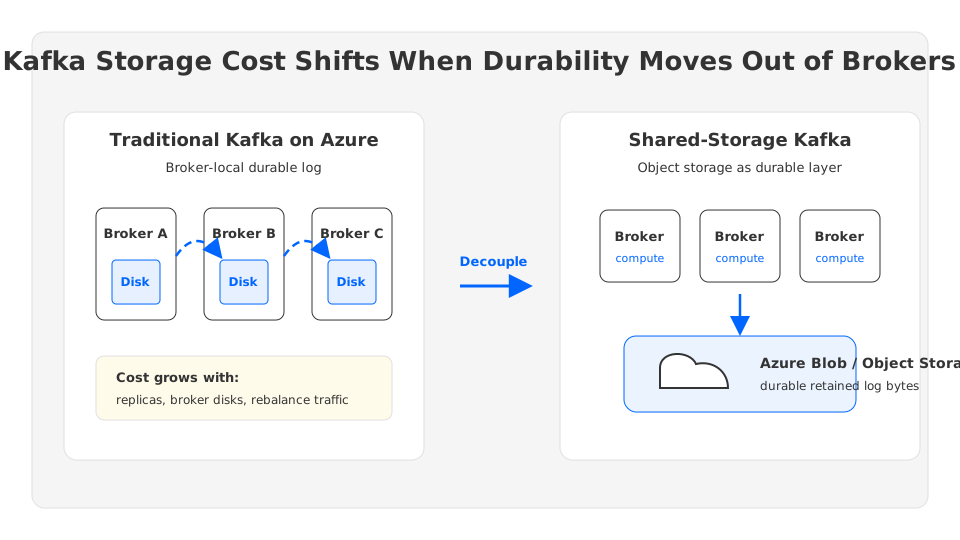
1Why Kafka Retention Gets Expensive With Broker-Local Disks
Traditional Kafka stores partition log segments on broker-local or broker-attached storage. Replication factor multiplies those bytes across brokers, and multi-zone deployments add network movement between failure domains. The model is robust and familiar, but storage and compute are coupled: increasing retention often means increasing broker disk, broker count, rebalance time, and operational headroom together.
For a short-retention workload, that coupling may be acceptable. The problem appears when the platform becomes a replay buffer for fraud signals, clickstream, IoT telemetry, CDC, observability, or ML feature pipelines. Retention is no longer a small safety margin. It becomes a product requirement.
Three cost patterns usually show up:
- Replication multiplies retained bytes. A replication factor of three means each logical byte is stored three times inside Kafka before snapshots, backups, or downstream archives are considered.
- Brokers must be sized for peak and storage together. A broker with adequate disk may be overpowered for compute, while a broker with adequate CPU may not have enough retained capacity.
- Operational changes move data. Replacing brokers, scaling out, reassigning partitions, and recovering from failures can copy large retained logs across the network.
This is not a sign that Kafka is poorly designed. Kafka was designed around local disk performance and broker-owned logs. The issue is that cloud storage primitives have changed: object storage offers durable capacity without asking each compute node to own a fixed slice of disk. Azure Blob Storage is one of those primitives, but its bill has its own vocabulary.
2How Azure Blob Storage Is Priced
Microsoft's Azure Blob Storage pricing separates several meters that Kafka teams should model independently. The exact price varies by region, redundancy, access tier, account type, reserved capacity, and operation pattern, so a production estimate should use Azure pricing data rather than copied numbers from a blog.
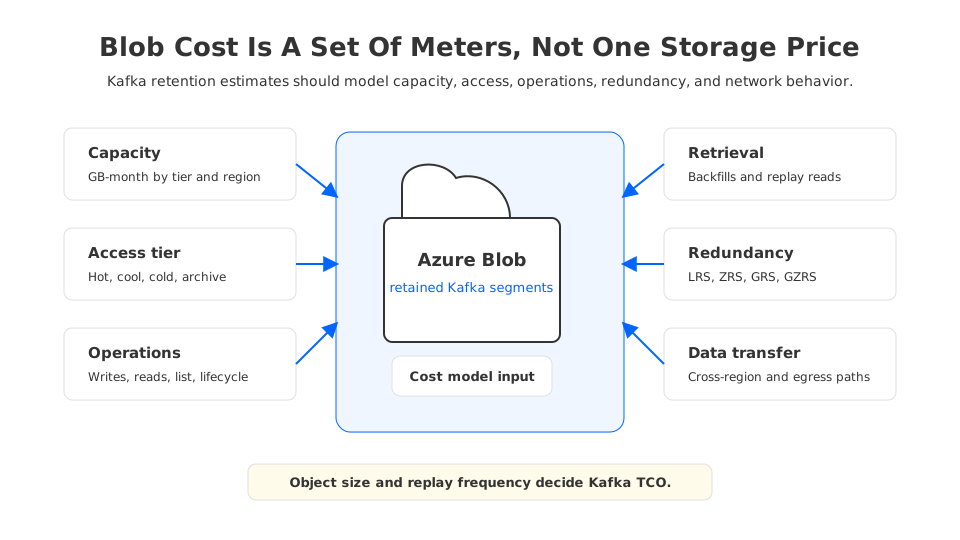
The main Blob cost dimensions are:
| Blob billing dimension | Why it matters for Kafka-like workloads |
|---|---|
| Capacity | Long retention shifts the bill toward GB-month storage rather than broker disk allocation. |
| Access tier | Hot, cool, cold, and archive tiers have different storage, access, and early deletion trade-offs. |
| Operations | Writes, reads, list operations, lifecycle moves, and metadata activity can matter at high segment counts. |
| Retrieval | Lower access tiers may reduce capacity cost but can charge more when data is read back. |
| Redundancy | LRS, ZRS, GRS, GZRS, and read-access variants change durability, availability, and price. |
| Data transfer | Cross-region, internet egress, and some network paths can add cost outside the storage meter. |
For Kafka, the operation pattern is as important as total bytes. A stream broken into many tiny objects may produce more transaction overhead than a design that writes larger, well-batched segments. A workload that replays historical data every day should not be modeled like a cold archive.
Redundancy also deserves attention. Azure Storage redundancy is not Kafka replication. Kafka replication protects the stream at the broker and partition layer, drives leader/follower behavior, and participates in producer acknowledgment semantics. Blob redundancy protects objects inside the storage service. A shared-storage Kafka design may use object storage durability to reduce broker-local replicated data, but it still needs a stream storage layer that maps Kafka's log semantics onto that substrate.
3Why Object Size And Access Pattern Matter
Object storage is efficient when the system respects its access model. Kafka should not write one object per message. A well-designed engine batches records into segments, tracks offsets and metadata, and manages read paths so consumers do not pay a transaction penalty for every small event.
FinOps teams should ask five workload questions before estimating Azure Blob Kafka storage cost:
- How many retained logical bytes does each topic produce per day?
- What is the replication factor or durability model in the current Kafka cluster?
- What percentage of retained data is read after the first hour?
- How often do consumers replay historical ranges during incidents, reprocessing, or model training?
- What object size, segment cadence, and cache strategy will the Kafka storage layer use?
The last question is where architecture and cost meet. Large objects can reduce transaction overhead, but they can make small-range reads less efficient if the storage layer cannot index and cache intelligently. Smaller objects improve granularity, but may raise operation count and metadata pressure.
Lifecycle policies can help when streams have predictable access patterns. Azure Blob lifecycle management can move data between tiers or expire objects according to rules. For Kafka, lifecycle movement must align with retention and replay semantics. Moving segments to a colder tier too early can turn a backfill into a slow retrieval event; deleting objects outside the Kafka metadata model can break readers.
4Why Kafka Needs More Than A Storage Bucket
Kafka's storage layer is not only bytes at rest. It is also the contract between producers, consumers, brokers, and metadata. A broker must accept writes, make records visible in order, handle acknowledgments, serve reads by offset, recover after failure, and coordinate partition ownership. Object storage can hold durable bytes, but it does not implement Kafka's append log, fetch path, or controller metadata by itself.
There are three common patterns for using object storage with Kafka:
| Pattern | What it does | Cost implication |
|---|---|---|
| External archive | Kafka writes to local disks, then exports data to Blob through connectors or jobs. | Helps downstream retention, but Kafka still pays broker-local storage for online retention. |
| Tiered storage | Kafka keeps hot data locally and offloads older segments to remote storage. | Reduces long-retention pressure, while brokers remain stateful for active logs. |
| Shared-storage Kafka | Durable log storage is designed around object/shared storage, with brokers acting more like stateless compute. | Changes scaling, recovery, and retained-data economics more deeply. |
Tiered storage is valuable when teams keep hot data on low-latency local disks and move older segments out of the broker fleet. Apache Kafka's tiered storage work formalizes remote log storage concepts so older data can be fetched from a remote tier. But tiered storage and shared storage are not identical. Tiered storage extends a broker-local architecture; shared-storage Kafka changes the primary durability boundary.
That distinction matters for Azure cost. If the active log remains broker-local, the cluster still needs broker disk and replication capacity for hot data, leader movement, and recovery. Blob reduces the long tail. If durable storage moves into a shared object-storage layer, retained data can scale separately from broker compute.
5Shared-Storage Kafka Architecture On Azure
A shared-storage Kafka architecture on Azure should be judged by the full write and read path, not by the presence of Blob Storage in the diagram. The system needs a low-latency write path, durable object storage, metadata that maps Kafka offsets to stored segments, cache for hot reads, and failure handling that lets another broker serve a partition without copying retained bytes from a failed broker.
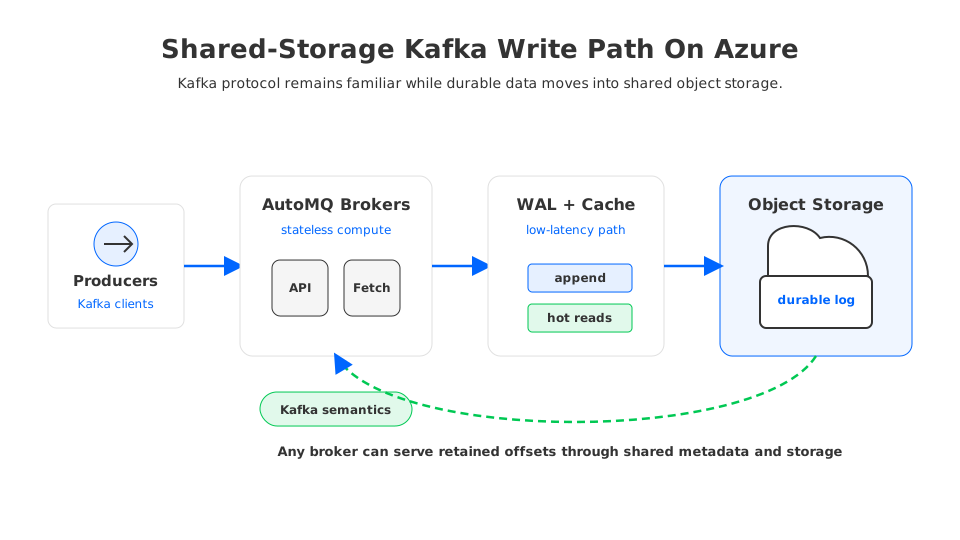
In this architecture, producers still speak Kafka protocol. Brokers handle client connections, batching, fetch requests, quotas, and coordination. The difference is where durable state lives. Instead of treating broker-attached disk as the source of truth, the system uses a shared storage layer and a write-ahead or buffering path for latency-sensitive writes.
This is where AutoMQ naturally enters the discussion. AutoMQ is a Kafka-compatible streaming platform that keeps the Kafka protocol and ecosystem compatibility while changing the storage architecture underneath. Its S3Stream/shared-storage design uses object storage as the durable layer and makes brokers closer to stateless compute nodes, so object storage becomes part of the primary stream-storage architecture rather than a passive archive.
For teams evaluating Azure, the exact storage backend support and deployment model should be verified against current AutoMQ documentation and release notes. Public AutoMQ materials describe an S3-first, diskless architecture and S3-compatible storage portability; an Azure design should confirm endpoint, networking, authentication, latency profile, and runbook before procurement.
6Cost Modeling Checklist For Azure Blob Kafka Storage
The right cost model compares architectures under the same workload assumptions. Do not compare a three-replica Kafka cluster with 14 days of online retention against a Blob estimate that ignores replay reads, operations, redundancy, and cache.
Use this checklist:
- Logical ingest: MiB/s average and peak, events per second, topic count, partition count, and daily retained bytes.
- Retention: hours or days per topic, compaction behavior, compliance requirements, and deletion policy.
- Replication and durability: Kafka replication factor today, Azure zone or region redundancy target, and recovery point expectations.
- Read behavior: steady consumers, consumer group fanout, replay frequency, historical backfills, and ML or analytics scans.
- Blob meters: capacity tier, transaction volume, retrieval behavior, lifecycle transitions, redundancy, and data transfer.
- Compute layer: broker VM or service capacity, cache size, metadata services, and headroom for peak fetches.
- Migration risk: compatibility with Kafka clients, Kafka Connect, Kafka Streams, admin APIs, observability, security, and incident operations.
The result is often nuanced. Object storage can be cost-effective for long retention and bursty compute needs because storage capacity no longer has to be provisioned on every broker. But workloads with constant historical reads, small-object churn, or strict ultra-low-latency requirements may need more cache, hotter tiers, or a hybrid design. FinOps should not force all streams into one storage policy.
7When Azure Blob Can Reduce Kafka Storage Cost
Azure Blob is most compelling when Kafka's retained-data curve grows faster than its compute curve: CDC streams retained for reprocessing, telemetry kept for incident analysis, audit streams retained for compliance, and event histories used by analytics. In these cases, the old model asks brokers to carry data that is not frequently read.
The cost case is weaker when most retained bytes are hot. If many consumers repeatedly scan historical ranges, Blob retrieval and transaction patterns must be modeled carefully. The answer may still be object storage, but the system will depend on cache placement, segment size, prefetching, and tier selection.
Architecturally, Blob-backed Kafka makes the most sense when the platform also wants operational elasticity. If a broker no longer owns the durable log, replacing it does not require reconstructing all retained bytes from peer brokers. If a topic grows retention, storage can grow in the shared layer without attaching larger disks to every broker.
For Azure teams, the decision should be framed as a storage architecture choice:
| Choose this path | When it fits |
|---|---|
| Traditional Kafka on VMs and disks | Short retention, stable traffic, strong need for familiar operations, and acceptable broker-local storage cost. |
| Kafka with tiered storage | Hot data needs local disk, older data needs lower-cost retention, and the team accepts stateful brokers. |
| Shared-storage Kafka | Long retention, elastic scaling, faster broker recovery, and storage-compute decoupling are primary goals. |
| Event Hubs or another managed stream service | Kafka protocol depth is less important than managed ingestion into Azure analytics. |
8Practical Guidance For Architects And FinOps
Start with a topic-level inventory. Group topics by retention, read frequency, compliance importance, and consumer behavior. A single cluster-level retention target hides the fact that some topics are hot operational streams while others are mostly retained for audit or reprocessing.
Then build two estimates: current Kafka cost across broker compute, storage, replication, headroom, traffic, backup jobs, and toil; and the object-storage-backed model across Blob capacity, redundancy, access tier, operations, retrieval, lifecycle transitions, cache, broker compute, and migration work.
Finally, test semantics before trusting economics. A Kafka-compatible system must preserve the client behaviors your applications rely on. Validate producer acknowledgments, consumer lag behavior, offset fetches, admin tooling, Connect tasks, Streams applications, quotas, ACLs, observability, failure recovery, and replay latency.
The architectural direction is clear: long-retention Kafka workloads should not automatically be forced onto broker-local disks. Azure Blob Storage gives platform teams a cloud-native durability and capacity primitive. Shared-storage Kafka designs, including AutoMQ's S3Stream approach, show how Kafka compatibility and object-storage economics can meet. The careful work is modeling every billing meter and validating Kafka semantics before calling the design production-ready.
9References
- Estimate costs for Azure Blob Storage
- Azure Blob Storage access tiers
- Azure Storage redundancy
- Azure Blob Storage lifecycle management
- Azure Blob Storage pricing
- Apache Kafka documentation
- Apache Kafka tiered storage
- AutoMQ overview
- AutoMQ GitHub repository
10FAQ
10.1Can Kafka use Azure Blob Storage directly?
Not in the sense of replacing broker logs with a bucket by configuration alone. Kafka needs append, fetch, offset, metadata, replication, and recovery semantics. Blob Storage can support Kafka retention through archive pipelines, tiered storage, or a shared-storage Kafka engine that is designed to map Kafka logs onto object storage.
10.2Is Azure Blob always lower cost than Kafka broker disks?
No. Blob can reduce long-retention storage pressure, but the final cost depends on access tier, operations, retrieval, redundancy, data transfer, cache, and compute. It is strongest when retained data is large and relatively cold, and weaker when historical data is read constantly.
10.3What is the difference between Kafka tiered storage and shared-storage Kafka?
Tiered storage keeps a broker-local hot log and moves older segments to remote storage. Shared-storage Kafka makes shared object storage part of the primary durable log architecture, so brokers can behave more like stateless compute. The second model changes scaling and recovery more deeply.
10.4Which Azure Blob access tier should Kafka retention use?
There is no universal tier. Hot fits frequently read retained data, cool or cold may fit less frequently accessed data, and archive is generally for offline retrieval patterns. Kafka replay requirements, retrieval latency, and lifecycle rules should determine the tier.
10.5Where does AutoMQ fit in this architecture?
AutoMQ fits as a Kafka-compatible shared-storage implementation. It preserves Kafka protocol and ecosystem compatibility while using an object-storage-backed durable layer and stateless broker compute. For Azure deployments, teams should verify current supported storage endpoints and operational guidance before production rollout.


