
Table of Contents
Table of Contents
Azure Event Hubs is attractive when a Kafka estate is already moving toward Azure. It is fully managed, integrates with Azure networking and identity patterns, and exposes a Kafka endpoint so Kafka clients can publish and consume without adopting a completely different protocol. For teams tired of broker patching, disk planning, and cluster operations, that is a serious offer.
The catch is hidden in the word "endpoint." A Kafka endpoint is not the same thing as a full Kafka platform. It can be exactly enough for a producer-and-consumer workload that uses common client APIs, but it can become a migration risk when the application depends on Kafka administration, transactions, Kafka Connect, Kafka Streams, topic-level semantics, or operational tooling that expects broker behavior instead of service abstraction.
That makes the real question sharper than "Event Hubs vs Kafka." The better question is: which parts of Kafka does your workload actually use?
1What the Kafka Endpoint Solves
Microsoft positions Event Hubs for Apache Kafka as a protocol-compatible endpoint for Kafka clients. In practice, that means many applications can switch the bootstrap server, configure TLS/SASL authentication, and continue using Kafka client libraries rather than rewriting producer and consumer code for the native Event Hubs SDK. Microsoft documentation describes support for Apache Kafka clients version 1.0 and later, with no Kafka brokers or ZooKeeper clusters for the customer to manage.
That solves a specific adoption problem. If the application is mostly doing high-throughput event ingestion and fan-out, the platform team gets an Azure-managed service while application teams keep familiar Kafka client code. The value is operational, not philosophical: fewer moving parts, an Azure service boundary, built-in integration with Event Hubs Capture, Azure Monitor, private endpoints, and the rest of the Azure ecosystem.
The strongest fit usually looks like this:
- Producer and consumer workloads with common Kafka client behavior. Applications publish records, consume by consumer group, commit offsets, and do not depend heavily on broker internals.
- Azure-first integration pipelines. The event stream feeds Azure Functions, Stream Analytics, Synapse, Data Explorer, or storage workflows where Event Hubs is already the natural event ingestion layer.
- Teams prioritizing managed service simplicity. The platform team wants namespace, event hub, throughput, and retention management rather than broker sizing, partition reassignment, and operating-system maintenance.
This is why Event Hubs can be the right answer even for teams that already know Kafka well. The Kafka endpoint is a bridge into Azure's eventing service. It is not a promise that every Kafka ecosystem component will behave the same way it does against Apache Kafka.
2Where Kafka Compatibility Can Break Down
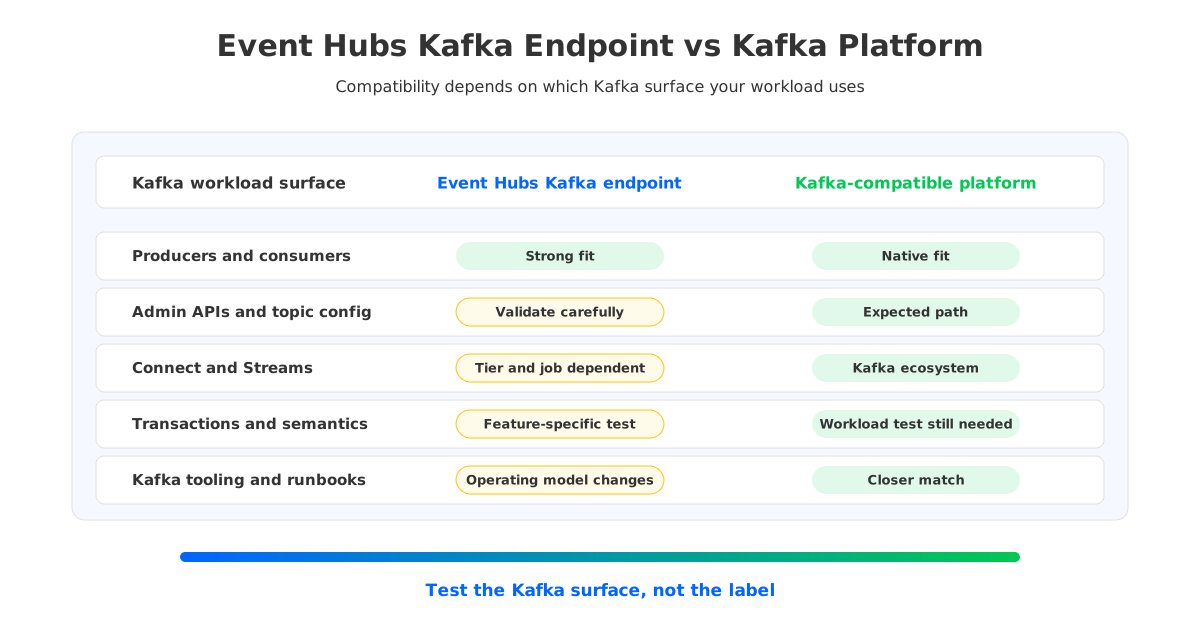
Kafka compatibility breaks down when a workload uses Kafka as more than a wire protocol. Many production systems depend on the Kafka ecosystem around the broker: admin APIs, topic configuration, Connect workers, Streams applications, exactly-once semantics, ACL tooling, consumer group inspection, lag monitoring, schema governance, and incident runbooks. A service can accept Kafka producer and consumer requests while still drawing boundaries around some of those surfaces.
The first boundary is protocol and feature coverage. Microsoft documents the Kafka endpoint as supporting Kafka clients 1.0 and later, but it also documents feature-specific behavior, configuration requirements, and service-tier constraints. For example, Kafka Streams support depends on Event Hubs Premium or Dedicated tiers, and transactions are listed as preview in the Event Hubs Kafka feature documentation. That does not make Event Hubs "not Kafka-compatible." It means compatibility depends on the exact features the application exercises.
The second boundary is administration. Apache Kafka administrators are used to changing topic configuration, inspecting cluster metadata, running admin clients, managing quotas, and relying on tooling that assumes Kafka broker semantics. Event Hubs has its own resource model: namespaces, event hubs, partitions, consumer groups, throughput units or processing units, and Azure RBAC or SASL-based access paths. Some concepts line up cleanly; others require a different operating model.
Use a compatibility matrix before calling a migration low risk:
| Workload surface | Why it matters | What to verify on Event Hubs |
|---|---|---|
| Kafka clients | Producer and consumer behavior is the minimum migration path | Client version, authentication config, compression, batching, retries, and offset commits |
| Admin APIs | Many internal tools assume Kafka broker admin behavior | Topic creation, topic config changes, metadata calls, quotas, ACLs, and consumer group inspection |
| Kafka Connect | Connectors often depend on topic semantics and offset storage | Source and sink connector support, internal topics, authentication, offset handling, and error recovery |
| Kafka Streams | Streams uses repartition topics, state stores, commits, and processing guarantees | Tier requirements, app reset tooling, repartition behavior, state restore, and transactions if used |
| Transactions and idempotence | Exactly-once workflows are sensitive to subtle semantic gaps | Current support status, preview limits, producer settings, failure tests, and rollback behavior |
| Observability tooling | Dashboards and alerts often assume broker metrics | Lag, throughput, throttling, quota signals, partition metrics, and Azure Monitor mapping |
This table is deliberately practical. It avoids the vague debate over whether Event Hubs is "real Kafka" and turns the decision into test cases. If the table is mostly green, Event Hubs may be a clean migration. If several rows require exceptions, a Kafka-compatible platform may be safer.
3Cost and Operational Tradeoffs on Azure
Event Hubs pricing should be compared against Kafka by workload shape, not by a single headline number. Azure Event Hubs pricing depends on tier and dimensions such as throughput or processing capacity, event retention, capture, and dedicated capacity. Kafka on Azure, whether self-managed or vendor-managed, usually exposes a different bill: compute, disks, storage throughput, network transfer, snapshots or backups, managed service fees, and the people cost of operating the platform.
The pricing trap is that the lower operational surface can hide compatibility and migration work. Event Hubs may reduce broker operations, but a Kafka-heavy estate still needs time for test environments, dual writes or replication, connector validation, monitoring changes, security review, and rollback planning. Those are temporary costs, but they matter because migration risk concentrates during overlap.
For a fair model, separate the worksheet into four cost categories:
- Steady-state service cost. Include Event Hubs tier capacity, retained data, capture, Kafka platform compute, attached storage, object storage, and managed service fees.
- Network path cost. Inspect ingress, egress, availability-zone traffic, private endpoints, cross-region replication, and downstream reads. Azure bandwidth pricing changes by path and destination, so do not assume all internal movement is free.
- Operational cost. Event Hubs shifts more work to the Azure service boundary; Kafka-compatible platforms still require cluster, upgrade, scaling, and incident ownership depending on the vendor model.
- Migration overlap. Run the source and target in parallel long enough to validate offsets, ordering assumptions, consumer lag, connector recovery, replay, and rollback.
The result is rarely "Event Hubs is always lower cost" or "Kafka is always lower cost." Event Hubs can be cost-effective when the workload fits the service model and avoids Kafka-specific operational burden. A Kafka-compatible platform can be cost-effective when compatibility gaps would otherwise force rewrites, paid engineering work, or risky exceptions.
4When to Choose a Kafka-Compatible Platform Instead
Choose a Kafka-compatible platform when the workload needs Kafka as an ecosystem, not only as a client protocol. That does not always mean self-managing Apache Kafka on virtual machines. On Azure, the options include self-managed Kafka, managed Kafka from a vendor, and cloud-native Kafka-compatible architectures such as AutoMQ.
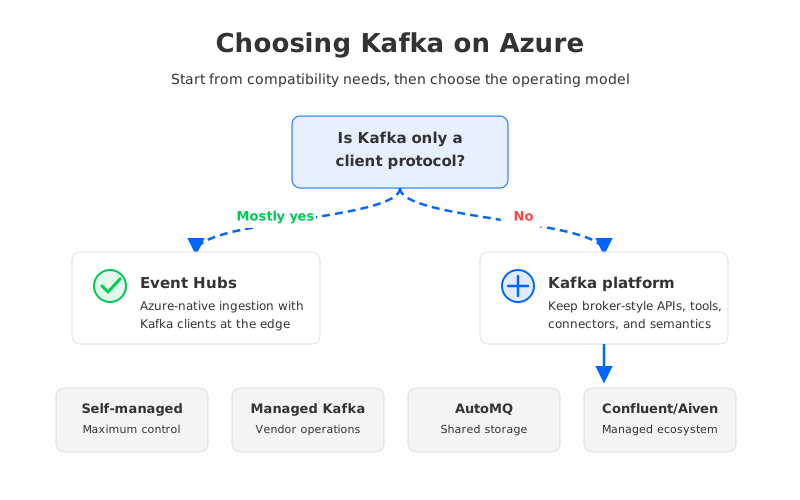
The decision becomes clearer if you classify the workload:
| Scenario | Event Hubs Kafka endpoint | Kafka-compatible platform |
|---|---|---|
| Simple event ingestion into Azure services | Strong fit when client behavior is standard | May be unnecessary unless Kafka ecosystem tools are required |
| Existing Kafka estate with Connect and Streams | Possible, but needs feature-by-feature validation | Often safer because the surrounding ecosystem remains Kafka-native |
| Strict exactly-once or transaction workflows | Validate current tier, preview status, and failure behavior carefully | Prefer when mature Kafka transaction semantics are a hard requirement |
| Heavy admin automation and broker-style tooling | Expect operating model changes | Better fit when tooling assumes Kafka admin APIs and topic configs |
| Long retention and elastic scaling pressure | Model retention, capacity, and throughput tiers | Consider shared-storage Kafka-compatible architectures |
AutoMQ enters the discussion for teams that want to preserve Kafka compatibility while changing the storage economics on Azure. AutoMQ is Kafka-compatible and uses a storage-compute separated architecture; for Azure deployments, AutoMQ BYOC supports deployment on AKS and Azure Blob Storage through the supported BYOC path. That matters when the migration goal is not only "get out of broker operations" but also "keep Kafka behavior while reducing the operational weight of broker-local storage."
The important distinction is architectural. Traditional Kafka ties durable log storage to broker-local disks, so scaling, replacement, and reassignment can involve moving retained data between brokers. Event Hubs abstracts the broker away by moving the workload into an Azure eventing service. AutoMQ keeps the Kafka-compatible platform model but uses object storage as the durable data layer with WAL-backed persistence and recovery. Different tradeoff, different test plan.
5Compatibility Test Checklist
A Kafka endpoint migration should end with evidence, not confidence. Build a test cluster or namespace, run real clients, and force the uncomfortable cases before production traffic moves. The point is not to prove a vendor right or wrong. It is to learn which assumptions your applications have been making about Kafka.
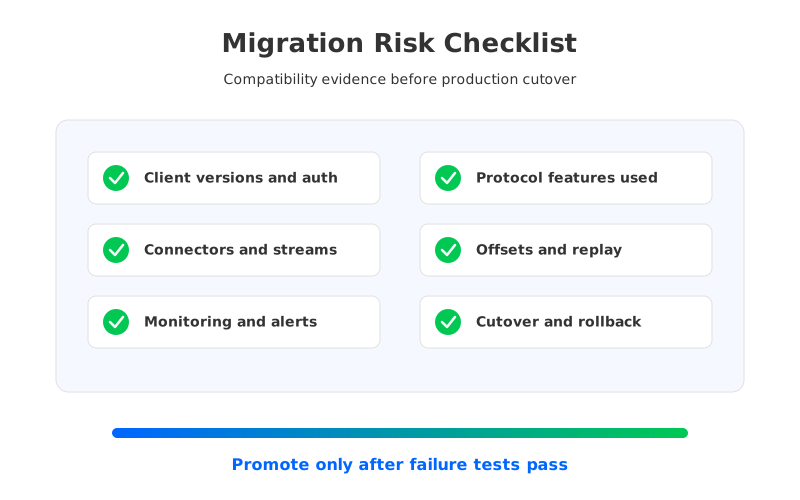
Start with client behavior. Test the exact producer and consumer versions used in production, including authentication, TLS settings, compression, batching, retries, idempotence, offset commits, rebalance behavior, and error handling. A toy producer tells you almost nothing about a service with tuned retry policies and delivery guarantees.
Then validate the ecosystem around the clients:
- Connectors and stream processors. Run representative source connectors, sink connectors, Kafka Streams applications, Flink jobs, or Spark jobs with their real internal topics, state restore paths, and failure recovery settings.
- Operational tooling. Check admin clients, topic management scripts, lag dashboards, ACL or RBAC workflows, schema registry integration, quota alerts, and incident runbooks.
- Semantics under failure. Kill clients, interrupt network paths, throttle throughput, restart processors, replay from old offsets, and test duplicate handling. This is where protocol-level compatibility either becomes operational compatibility or exposes a gap.
- Cutover and rollback. Define how offsets move, how dual-run validation works, how long the old cluster remains available, and what event loss or duplication budget the business accepts.
For Event Hubs, the checklist decides whether the Kafka endpoint is enough. For AutoMQ or another Kafka-compatible platform, the same checklist validates whether Kafka behavior survives the architectural change. Either way, the discipline is the same: treat compatibility as a workload property, not a vendor label.
6Sources
- Microsoft Learn: Azure Event Hubs for Apache Kafka overview
- Microsoft Learn: Apache Kafka applications with Azure Event Hubs
- Microsoft Learn: Azure Event Hubs features and terminology
- Microsoft Learn: Azure Event Hubs quotas and limits
- Azure Event Hubs pricing
- Azure bandwidth pricing
- AutoMQ compatibility with Apache Kafka
- AutoMQ object storage configuration
- AutoMQ deploy to Azure AKS
7FAQ
7.1Is Azure Event Hubs the same as Apache Kafka?
No. Azure Event Hubs is an Azure-managed event ingestion service that exposes a Kafka-compatible endpoint for Kafka clients. Apache Kafka is a distributed streaming platform with its own broker, log storage, admin APIs, and ecosystem. The overlap is useful, but it is not complete identity.
7.2Can Kafka clients connect to Azure Event Hubs?
Yes. Microsoft documents support for Apache Kafka clients version 1.0 and later through the Event Hubs Kafka endpoint. You still need to configure the client correctly for Event Hubs authentication, TLS, bootstrap servers, and service-specific behavior.
7.3Does Event Hubs support Kafka Connect and Kafka Streams?
Some Kafka ecosystem workloads can work, but they need validation. Kafka Streams support is documented with tier requirements, and connector behavior depends on the connector, internal topics, authentication, offset handling, and failure recovery. Test the exact jobs you run in production.
7.4Is Event Hubs cheaper than Kafka on Azure?
It depends on workload shape and migration cost. Event Hubs can reduce broker operations and fit Azure-native ingestion well, but the bill depends on tier capacity, retention, capture, and network paths. Kafka-compatible platforms have different cost lines, including compute, storage, network, vendor fees, and operational ownership.
7.5When should I choose AutoMQ instead of Event Hubs?
Consider AutoMQ when the workload needs Kafka ecosystem compatibility, Azure data-plane control, and a storage-compute separated architecture. Event Hubs is compelling when the Kafka endpoint is enough; AutoMQ is more relevant when applications and tools expect Kafka-like behavior beyond basic produce and consume paths.
7.6What is the safest first step for an Event Hubs Kafka migration?
Build a compatibility test matrix from your real workload before changing production traffic. Include client versions, producer settings, consumer groups, admin tooling, connectors, stream processors, transactions if used, monitoring, failure scenarios, cutover, and rollback.


