
Table of Contents
Table of Contents
Minimal code changes does not mean zero architecture changes. That is the most important sentence for any team evaluating Azure Event Hubs for Apache Kafka. Microsoft provides a Kafka endpoint that lets many existing Kafka clients connect to Event Hubs by changing configuration rather than rewriting application code. For ingestion-heavy workloads, that can mean fewer brokers to run, Azure-native operations, and a shorter migration runway.
The risk is treating "Kafka endpoint" as equivalent to "Kafka platform." Apache Kafka is not just a producer and consumer protocol. Production systems often rely on broker-side configuration, topic automation, AdminClient behavior, Kafka Connect workers, Kafka Streams internals, transactions, retention assumptions, offset behavior, monitoring, and runbooks built around Kafka clusters. Event Hubs maps well to many Kafka concepts, but it is still an Azure managed service with its own tiers, quotas, authentication model, and control plane.
This guide is for architects, SREs, data engineers, and platform leaders already considering a Kafka migration to Event Hubs. It helps you avoid the common failure mode: a producer-consumer smoke test passes, the cutover looks low-risk, and then a deployment pipeline, connector, stream processor, or retention scenario breaks after production traffic arrives.
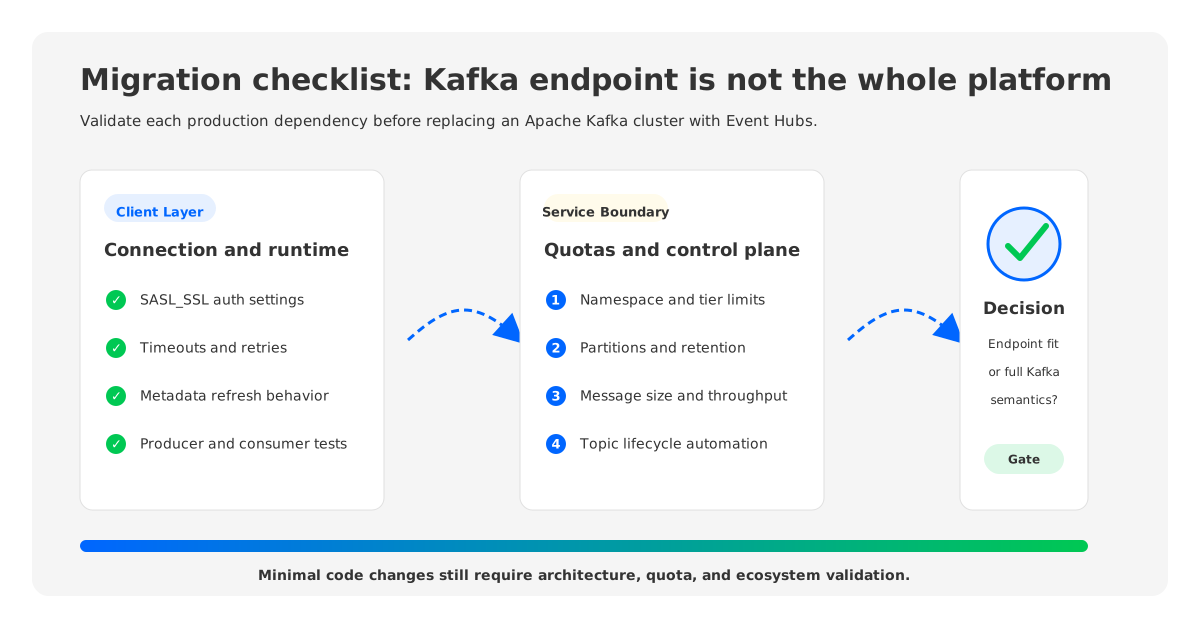
1Start With The Boundary: Endpoint, Service, Or Platform
Microsoft's Event Hubs for Apache Kafka documentation is explicit about the value proposition: connect Kafka protocol applications to Event Hubs without setting up a Kafka cluster, often by modifying only configuration. It also states that the Kafka feature is supported in Standard, Premium, and Dedicated tiers and supports Kafka clients from version 1.0 and later.
The same documentation also describes the architectural difference. In Kafka, clients usually discover and communicate with brokers in a cluster. In Event Hubs, clients connect through a namespace endpoint, and the service abstracts away servers, disks, networks, and brokers. That is why Event Hubs reduces operational burden, and why migration validation must include the service boundary.
Think of the decision in three levels:
| Migration question | What it proves | What it does not prove |
|---|---|---|
| Can my producer and consumer connect? | Basic Kafka client compatibility and authentication | Compatibility with all operational, admin, and ecosystem dependencies |
| Can my workload meet SLOs under tier quotas? | Throughput, latency, message size, partition, and retention fit | Full replacement of Kafka cluster control |
| Can my platform workflows still operate? | CI/CD, observability, replay, connectors, stream processing, failure handling | That all Kafka semantics are preserved by default |
If your use case is mostly event ingestion into Azure analytics services, the endpoint model may be enough. If your workload treats Kafka as a programmable streaming platform, the migration needs a deeper compatibility review.
2Client Configuration Differences To Validate
The first limitation category is the practical difference between connecting to a managed Event Hubs namespace and connecting to Kafka brokers. Event Hubs requires Kafka clients to use the namespace host on port 9093, SASL_SSL, and either SAS-based credentials or OAuth through Microsoft Entra ID. That can still affect secret rotation, local developer setup, Kubernetes secrets, Terraform modules, and connector runtime configuration.
Microsoft's Kafka client configuration guide lists settings that differ from typical Kafka defaults or have Event Hubs-specific constraints. Examples include metadata refresh and idle connection settings, request timeout guidance, and producer request size constraints. These details turn a proof of concept into production-grade migration work. A client may connect in a demo and still show expired batches, latency spikes, or connection churn under real traffic if settings were copied from a broker-based deployment without review.
Validate these client concerns before cutover:
- Authentication path: Decide whether clients use SAS or OAuth, then test rotation and least-privilege access in the same environment where production runs.
- Connection lifecycle: Review
metadata.max.age.ms,connections.max.idle.ms, and timeout settings against Event Hubs guidance. - Request size: Confirm
max.request.size, compression, and batch settings against the Event Hubs tier and publication size limits. - Offset behavior: Test first-time consumers, reset policy, lag visibility, and replay after retention boundaries.
- Language clients: Test the actual clients you run in production, not only the Java client if your estate includes Go, Python, .NET, Node.js, or librdkafka-based applications.
Keep Kafka client changes minimal, but make validation realistic. A sample producer says little about your highest-throughput service, connector fleet, or stream processor.
3Quotas And Tiers Become Architecture Inputs
Kafka operators think in brokers, disks, partitions, replication factor, ISR health, and network bandwidth. Event Hubs shifts that conversation to namespaces, event hubs, partitions, throughput units or processing units, dedicated capacity, retention, consumer groups, connection quotas, and message size. That is a better fit for Azure-managed streaming, but it changes capacity planning.
The Azure Event Hubs limits page documents tier-specific values for publication size, consumer groups, Kafka consumer groups per namespace, brokered connections, retention period, and retained storage capacity. The migration guide also calls out practical tier guidance: Standard can be appropriate for lower-throughput or development scenarios, while Premium or Dedicated is the route Microsoft recommends for stronger Kafka protocol compatibility and production workloads that need more resources.
This is where "Event Hubs vs Kafka" becomes an architectural comparison. In Apache Kafka, longer retention usually means sizing disks, tiered storage, replication, and recovery procedures. In Event Hubs, maximum retention depends on tier. In Kafka, large messages may be controlled through broker and topic configuration. In Event Hubs, publication size is a service-tier limit. In Kafka, partition changes and topic configuration can be part of an AdminClient-driven automation flow. In Event Hubs, topic-equivalent resources are event hubs controlled through Azure portal, CLI, ARM, Bicep, Terraform, or service APIs.
Before migration, create a capacity table from current production data:
| Current Kafka attribute | Event Hubs check |
|---|---|
| Peak ingress and egress MiB/s | Throughput units, processing units, or dedicated capacity |
| Largest message and largest batch | Tier publication-size limit and client request size |
| Topic count and partition count | Event hub count, partitions per event hub, namespace design |
| Retention by topic | Maximum retention period and retained storage capacity by tier |
| Consumer group count | Consumer group and Kafka consumer group quotas |
| Private connectivity and firewall rules | Namespace networking, private endpoints, and Azure policy |
This table should be owned by the platform team. Namespace design, quota headroom, and replay behavior are shared decisions.
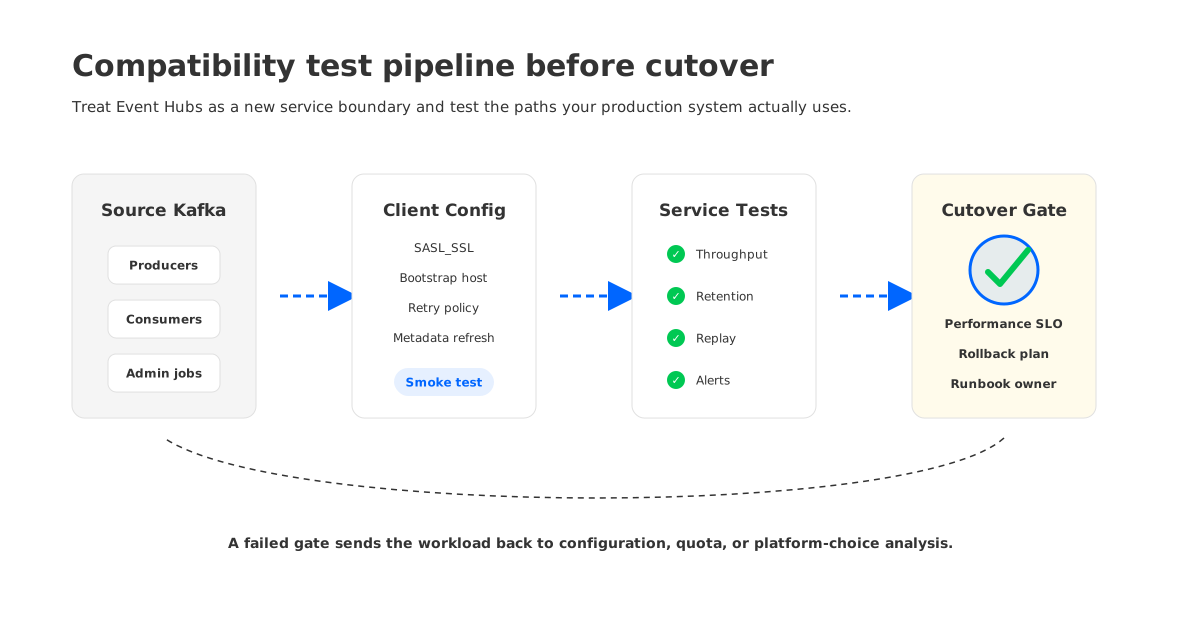
4AdminClient And Topic Automation Are A Common Surprise
Many Kafka platforms automate topic creation, partition expansion, ACLs, configuration inspection, and operational checks through Kafka AdminClient. Apache Kafka's API documentation describes AdminClient as the API for managing and inspecting topics, brokers, ACLs, and other Kafka objects. That assumption does not carry over cleanly to Event Hubs.
Microsoft's Event Hubs Kafka client configuration guidance says Kafka AdminClient topic management is not available with Event Hubs and directs users to Azure portal, CLI, or ARM templates instead. It also notes that broker configurations are managed by Event Hubs and that topic-level configuration is limited, with partition count and retention handled through Azure control-plane mechanisms rather than Kafka AdminClient.
This matters because AdminClient is often invisible in architecture diagrams. It may be embedded in:
- deployment pipelines that create topics before releasing a service;
- internal platform portals that allocate topics and consumer groups;
- connector workers that expect to inspect or create internal topics;
- stream processing applications that rely on internal repartition or changelog topics;
- observability jobs that describe cluster, broker, partition, or configuration state.
Do not validate AdminClient behavior by assumption. Run the same automation scripts against a test Event Hubs namespace, record every unsupported call, and decide whether the replacement belongs in Azure infrastructure-as-code, a platform API, or a different migration target.
5Kafka Connect, Streams, And Transactions Need Workload-Specific Tests
Kafka Connect and Kafka Streams are where compatibility reviews often become nuanced. Microsoft documents Kafka Connect integration with Event Hubs and states that Kafka Streams support is available, with Kafka Streams in public preview in Premium and Dedicated tiers according to the Event Hubs Kafka overview. Microsoft also has separate documentation for Kafka transactions in Event Hubs, where transactions are in public preview for Premium and Dedicated tiers and Event Hubs automatically aborts transactions that exceed its configured transaction timeout behavior.
Those facts are encouraging, but they are not a substitute for testing your exact usage pattern. A simple source connector is different from a sink connector that relies on topic creation, compaction expectations, large batches, or connector-specific AdminClient behavior. Kafka Streams also uses producers, consumers, admin operations, internal topics, state stores, repartition topics, changelog topics, and processing guarantees that vary by application design.
Use a test matrix that mirrors production:
| Dependency | What to test |
|---|---|
| Kafka Connect | Worker startup, connector configs, internal topics, offset storage, task rebalance, error handling |
| Kafka Streams | Internal topic creation, repartition paths, changelog recovery, standby replicas, state restoration |
| Transactions | Tier availability, timeout behavior, commit and abort paths, processing guarantee expectations |
| Schema tooling | Registry integration, serializers, compatibility policy, deployment automation |
| Monitoring | Lag, throttling, send errors, consumer failures, Azure Monitor mapping, alert routing |
Test failure paths, not only success paths. Restart workers, pause consumers beyond retention windows, force throttling in a controlled environment, rotate credentials, and simulate rollback. If a migration cannot explain how replay, recovery, and observability change, it is not ready.
6Retention, Replay, And Audit Semantics Can Change The Decision
Event Hubs retention is tier-dependent, and Event Hubs Capture can archive streams to Azure Blob Storage or Azure Data Lake Storage. That can be excellent for analytics and archival workflows, but it does not mean every Kafka topic's replay model transfers unchanged.
Kafka teams use retention for consumer outage recovery, reprocessing after a bad deploy, audit lookback, late downstream jobs, and ad hoc investigation. Some long-retention topics become a practical event store, even if that was never the original design. Migrating them to Event Hubs requires an explicit replay design: Event Hubs retention, Capture plus downstream storage, a separate lake path, or keeping some workloads on Kafka-compatible infrastructure.
Ask these questions topic by topic:
- How long can the slowest consumer be offline without data loss?
- Is replay from the streaming system required, or is replay from archived storage acceptable?
- Are offsets, timestamps, headers, and ordering assumptions used by downstream audit tools?
- Does the platform need compaction-style behavior, or is append-only retention enough?
- Who owns restoring a consumer after retention has expired?
The decision is less about whether Event Hubs can ingest events and more about whether your organization has redesigned replay semantics deliberately.
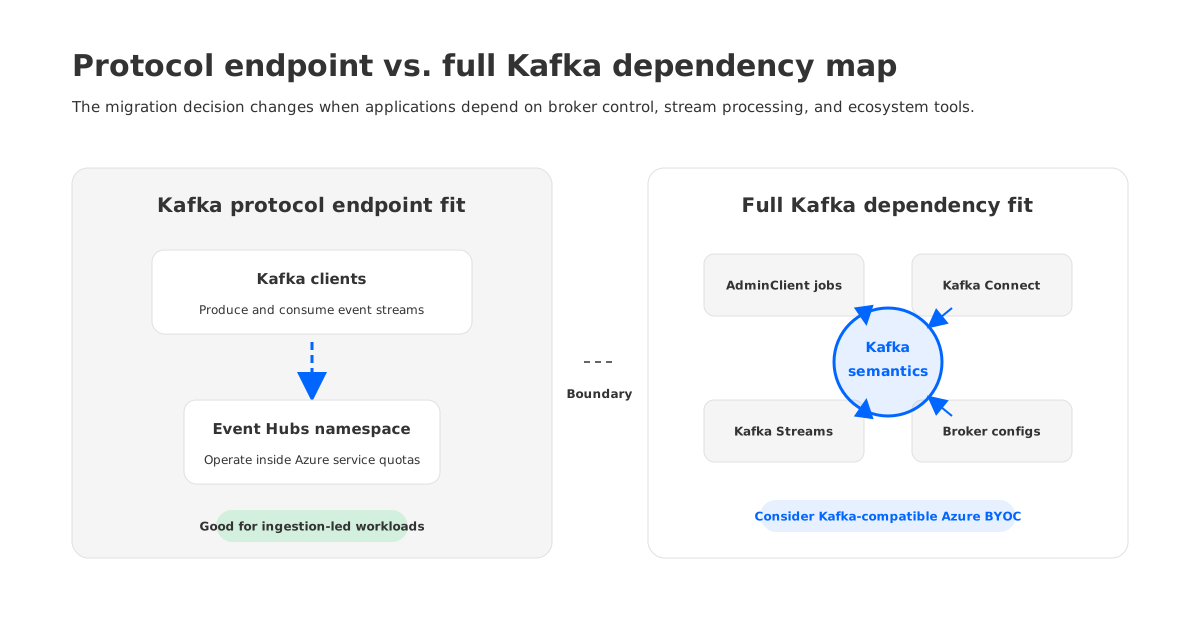
7When A Kafka-Compatible Platform Is The Safer Azure Target
Event Hubs is often a good Azure-native answer when the workload is ingestion-led and fits its service model. A Kafka-compatible platform becomes more compelling when the migration goal is different: keep Kafka clients, Kafka Connect, Kafka Streams, AdminClient-driven workflows, monitoring conventions, and operational semantics close to the source cluster while improving cloud operations.
This is where AutoMQ can enter the decision naturally. AutoMQ is a Kafka-compatible streaming platform that keeps Kafka protocol and ecosystem compatibility while changing the storage architecture underneath. Its documentation describes a shared-storage approach where durable data is offloaded to object storage and brokers become stateless. For Azure teams, that matters when the problem is not "we need an Event Hubs endpoint" but "we need Kafka behavior with a cloud-native operating model and data plane control."
In practical terms, that puts AutoMQ in a different branch of the decision tree:
- If your applications mostly need producers, consumers, Azure-native ingestion, and managed service simplicity, evaluate Event Hubs deeply.
- If your applications depend on full Kafka semantics, Kafka ecosystem tooling, and platform automation, evaluate a Kafka-compatible target.
- If your governance model requires the data plane to run in your own Azure environment, include BYOC-style deployment and network boundaries in the comparison.
- If storage cost, broker scaling, and partition movement are the main Kafka pain points, examine object-storage-backed architectures rather than replacing the protocol endpoint alone.
This is not a universal replacement rule. Some teams will run Event Hubs for Azure-native telemetry and a Kafka-compatible platform for workloads that need Kafka semantics. The clean architecture is the one that makes the boundary explicit.
8A Practical Pre-Migration Checklist
Before approving a Kafka migration to Event Hubs, require evidence in five areas.
1. Client evidence. Every production client type connects with the intended authentication model, tuned settings, and realistic batch sizes. Tests include credential rotation, idle connection behavior, retries, and error handling.
2. Quota evidence. Peak throughput, message size, retained storage, partitions, consumer groups, and connection counts fit the selected tier with headroom. The team has documented what happens during throttling.
3. Control-plane evidence. Topic creation, partition changes, retention changes, and access management have moved from Kafka AdminClient assumptions to Azure infrastructure automation where required.
4. Ecosystem evidence. Connect, Streams, schema tooling, transactions, MirrorMaker or migration tooling, and observability workflows have been tested with the actual versions and connectors you run.
5. Rollback evidence. The cutover plan includes offset handling, dual-write or replication strategy where appropriate, rollback ownership, alert thresholds, and a clear definition of when to stop the migration.
That checklist is stricter than a quick proof of concept, but it is cheaper than discovering after cutover that the old Kafka cluster did more than accept produces and serve consumes.
9References
- Microsoft Learn: Azure Event Hubs for Apache Kafka
- Microsoft Learn: Apache Kafka client configurations for Azure Event Hubs
- Microsoft Learn: Azure Event Hubs limits
- Microsoft Learn: Migrate to Azure Event Hubs for Apache Kafka
- Microsoft Learn: Transactions in Apache Kafka for Azure Event Hubs
- Apache Kafka: APIs
- AutoMQ Documentation: Compatibility with Apache Kafka
- AutoMQ Documentation: Architecture overview
10FAQ
10.1Is Azure Event Hubs the same as Apache Kafka?
No. Event Hubs provides a Kafka-compatible endpoint and maps several Kafka concepts, but it is still a fully managed Azure service rather than an Apache Kafka broker cluster. That distinction affects quotas, control plane, topic management, broker configuration, observability, and some ecosystem workflows.
10.2What is the biggest Event Hubs Kafka limitation to check first?
Start with the difference between client compatibility and platform compatibility. If the workload only produces and consumes events, the migration may be straightforward. If it depends on AdminClient topic management, broker configs, Connect, Streams, transactions, long replay windows, or Kafka-specific monitoring, validate those paths first.
10.3Can Kafka Connect work with Azure Event Hubs?
Microsoft documents Kafka Connect integration with Event Hubs, but behavior depends on the connector, worker configuration, internal topic usage, authentication, and Kafka admin operations. Test the exact connectors, versions, and failure paths you run in production.
10.4Does Event Hubs support Kafka Streams and transactions?
Microsoft documents Kafka Streams support and Kafka transactions for Event Hubs, with preview status and tier considerations called out in the official pages. Because Streams and transactions rely on multiple Kafka client and internal-topic behaviors, teams should validate the exact processing guarantees, timeout behavior, state restoration, and failure recovery they require.
10.5When should an Azure team choose AutoMQ instead of Event Hubs?
Choose based on architecture fit. Event Hubs is attractive for Azure-native managed ingestion with Kafka client convenience. AutoMQ is worth evaluating when the workload needs Kafka-compatible behavior, ecosystem tooling, object-storage-backed shared storage, stateless brokers, and a data plane that can run in the team's Azure environment.


