
Table of Contents
Table of Contents
Teams usually search for an Azure Kafka alternative after they have already ruled out a naive answer. Event Hubs can accept Kafka protocol clients, but it is not the same operating model as an Apache Kafka cluster. Self-managed Kafka gives control, but it brings back broker disks, patching, capacity planning, partition movement, and incident ownership. HDInsight Kafka can be a fit for teams that want an Azure-hosted Apache Kafka cluster, yet it is still a cluster service with infrastructure choices and version lifecycle work. A managed SaaS Kafka service can reduce operations, but procurement, networking, data residency, and cost predictability may still become blockers.
That is why the real question is not "What is the Azure equivalent of Kafka?" The better question is: which Kafka properties are non-negotiable, and which operational burdens are you trying to remove?
For platform teams, architects, SREs, data engineers, CTOs, and FinOps stakeholders, the answer should start with an evaluation framework. A Kafka-compatible alternative on Azure should be judged by API semantics, ecosystem fit, storage economics, scaling behavior, networking boundaries, and migration risk.
1Why Teams Look for an Azure Kafka Alternative
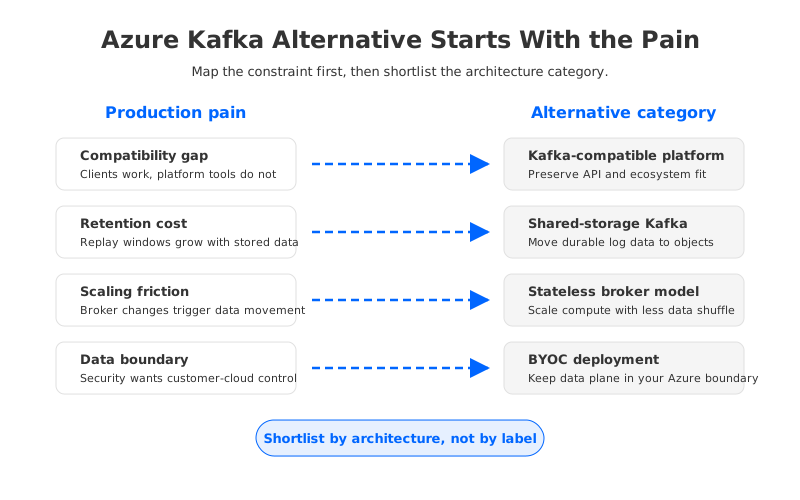
The phrase "Azure Kafka alternative" hides several different pains. Some teams are not trying to leave Kafka at all; they are trying to leave a particular deployment model. Others want a Kafka-like event ingestion service and do not need broker-level semantics. The wrong alternative can look simpler during procurement and then become expensive during migration.
The most common drivers are:
- Compatibility gaps: Kafka clients may connect through a Kafka endpoint, but some teams also depend on Kafka Connect, Kafka Streams behavior, admin APIs, topic configuration semantics, consumer group tooling, or broker-level observability.
- Cost pressure: long retention, high write throughput, replay-heavy consumers, and over-provisioned brokers can make traditional Kafka economics difficult on cloud infrastructure.
- Scaling friction: adding brokers or changing partitions in disk-based Kafka often means data movement, reassignment windows, and operational coordination.
- Data control: regulated teams may need data to remain in their Azure subscription, VNet, private network path, or specific storage account boundary.
- Operational ownership: teams want fewer broker incidents, less disk management, and less manual capacity planning without losing Kafka ecosystem compatibility.
An endpoint service, a full Kafka cluster, a SaaS service, and a shared-storage Kafka platform optimize for different parts of that list. Treating them as interchangeable "Kafka alternatives" is where architecture reviews go sideways.
2The Main Categories of Azure Kafka Alternatives
Azure gives teams several paths, but each path has a different control plane and data plane model.
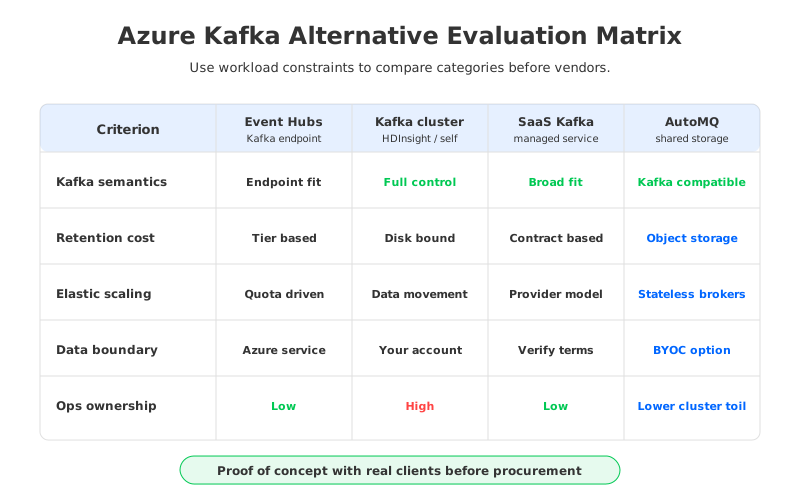
| Category | What It Optimizes For | What to Validate Before Choosing |
|---|---|---|
| Event Hubs with Kafka protocol support | Managed event ingestion with Kafka client connectivity | Kafka feature compatibility, topic/admin behavior, quotas, retention, client configuration, ecosystem tooling |
| HDInsight Kafka | Apache Kafka cluster on Azure-managed infrastructure | Version lifecycle, cluster sizing, storage, network design, operational runbooks |
| Self-managed Kafka on Azure VMs or Kubernetes | Maximum control over Kafka internals | SRE capacity, disk failure handling, upgrades, security patching, scaling operations |
| SaaS managed Kafka on Azure | Managed operations and Kafka ecosystem support | Data residency, private networking, commercial model, support boundaries, egress and integration cost |
| Kafka-compatible shared-storage platform | Kafka semantics with decoupled storage and compute | Compatibility coverage, Azure object storage integration, BYOC model, latency profile, migration path |
Event Hubs is often the first option evaluated because Microsoft documents Kafka protocol support and positions it as an entry point for Kafka clients. That can be valuable when the workload is primarily event ingestion and the application does not require full Kafka cluster control. The risk is assuming protocol support equals full platform equivalence. The operational and semantic boundary is different.
HDInsight Kafka and self-managed Kafka sit closer to traditional Apache Kafka. They preserve the familiar broker model, but that model also means the team owns disks, broker capacity, topic placement, upgrades, monitoring, and disaster recovery design. For organizations with deep Kafka expertise, this can be acceptable; for teams trying to reduce operational load, it may only move the problem into another queue.
SaaS Kafka services can be attractive when the priority is a managed Kafka experience. The evaluation should then move beyond the feature list and into data control: where data is stored, how private connectivity works, who can access the data plane, and how cost scales with retention and traffic.
Shared-storage Kafka platforms take a different route. Instead of keeping durable data tied to broker-local disks, they move the durable storage layer to cloud object storage and make brokers more stateless. AutoMQ belongs in this category: it is Kafka-compatible, can run in a BYOC model, and uses object-storage-backed shared storage so compute and storage can scale more independently. That architecture is not the right answer for every workload, but it directly addresses the cost, elasticity, and data-control pressures that often trigger the search for an Azure Kafka alternative.
3Evaluation Criteria That Matter in Production
The production decision should begin with the workload contract. A payment authorization stream, a customer activity log, a CDC pipeline, an observability firehose, and an AI feature pipeline can all use Kafka, but they do not stress the same parts of the system.
3.1Kafka Compatibility
Start with the compatibility surface your applications actually use. Kafka compatibility is not a single yes-or-no property. It includes producer and consumer APIs, consumer group behavior, transactions if used, admin operations, topic configuration, security mechanisms, Kafka Connect, stream processing frameworks, and operational tooling.
Event Hubs Kafka support can reduce client migration work, but Microsoft also publishes separate Kafka FAQs, configuration guidance, and quotas because it is an Event Hubs service exposing a Kafka-compatible endpoint, not a general-purpose Kafka cluster. If your application uses basic produce and consume patterns, the endpoint model may be enough. If the platform team needs deep Kafka ecosystem compatibility, a Kafka-compatible platform or managed Kafka cluster deserves a closer look.
Create a compatibility inventory:
- Client libraries and versions used by producers and consumers.
- Kafka features used by applications, including transactions, idempotence, headers, compression, and offset behavior.
- Admin operations used by CI/CD, platform tooling, and support scripts.
- Connectors, stream processors, schema tooling, monitoring exporters, and security integrations.
- Operational expectations around lag, topic configuration, and replay.
This prevents a common mistake: selecting an alternative that satisfies the application demo but breaks the platform workflows around it.
3.2Storage and Retention Cost
Kafka economics on Azure depend heavily on storage architecture. Traditional Kafka stores durable log segments on broker-attached disks. Retention increases disk footprint, and scaling storage often ties back to broker sizing. Managed services package these costs differently, but the underlying tradeoff remains: the more tightly storage and compute are coupled, the more likely you are to pay for capacity in chunks.
Event Hubs pricing is organized around service tiers and capacity concepts rather than broker disks. That can be cleaner for ingestion workloads, but teams should still validate throughput, retention, capture, consumer, and quota behavior. For Kafka clusters on Azure VMs or HDInsight, VM cost, managed disk cost, storage redundancy, network transfer, monitoring, and labor all belong in the model. For SaaS services, review cluster charges, networking, data transfer, support, and retention.
Object-storage-backed Kafka changes the model because durable log data can live in Azure Blob Storage or compatible object storage while brokers focus on compute and cache. This is where AutoMQ becomes relevant: by separating durable storage from broker-local disks, teams can evaluate retention and replay economics without forcing every retained byte to sit on broker-attached storage.
3.3Scaling and Recovery
Scaling is where many Kafka alternatives reveal their architecture. Traditional Kafka scaling is not only about starting another broker; the hard part is moving partition replicas, preserving replication health, recovering from disk or node failure, and avoiding side effects during traffic spikes.
Test each alternative against three scaling events:
- Planned growth: adding capacity for a new product, region, or pipeline.
- Burst handling: absorbing temporary traffic without permanently over-provisioning.
- Failure recovery: replacing unhealthy compute without turning storage recovery into a long incident.
Endpoint services and SaaS products hide much of this from the user, which can be a benefit. The tradeoff is that teams need to understand quotas, scaling units, and the support boundary. Shared-storage Kafka aims to reduce data movement tied to compute changes because brokers are less responsible for owning durable local replicas.
3.4Data Control and Networking
Data control is often the deciding factor for enterprise Azure teams. Procurement may approve a managed service, but security teams still ask where data lands, what network path it takes, who can access it, how keys are managed, and whether the data plane remains inside the organization's cloud boundary.
The right questions are concrete:
- Does the service run inside your Azure subscription or in the vendor's environment?
- Can producers and consumers use private networking rather than public endpoints?
- Which storage account, disks, or managed service boundary holds the retained data?
- How are encryption, identity, role assignment, and operational access handled?
- What logs, metrics, and support workflows expose data plane details?
BYOC matters when the organization wants managed operations but does not want to move the data plane into a vendor-owned cloud account. AutoMQ's BYOC model is relevant because it can keep the deployment aligned with the customer's cloud boundary while still providing a Kafka-compatible architecture. For Azure teams, the design has to show where brokers run, where object storage lives, and where control-plane interactions stop.
4Where AutoMQ Fits as an Azure Kafka Alternative
AutoMQ should not be evaluated as "another managed Kafka label." Its fit is architectural: Kafka-compatible clients and ecosystem tools on top of a cloud-native storage model that decouples broker compute from durable data. On Azure, that matters when the existing choices force an uncomfortable tradeoff between full cluster ownership, endpoint-level compatibility, SaaS data-plane concerns, and disk-heavy cost structure.
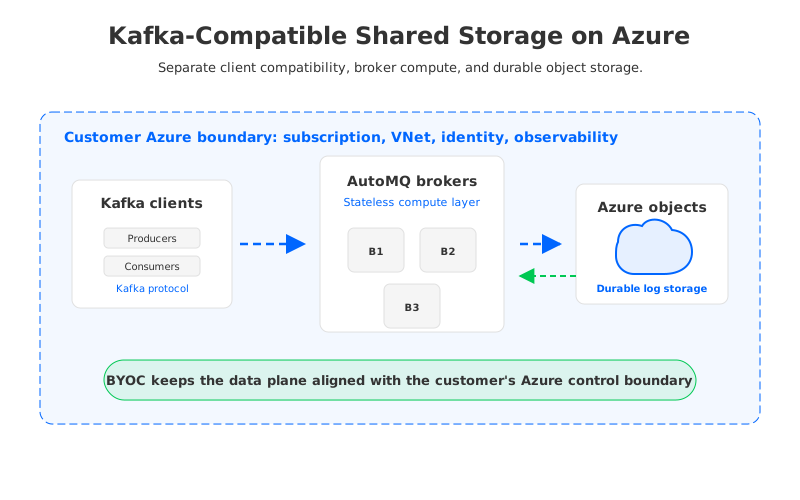
The practical fit is strongest when several conditions appear together:
- The workload already depends on Kafka APIs, Kafka ecosystem tooling, or migration safety.
- Long retention or replay requirements make broker-attached storage expensive or hard to scale.
- The team wants more elasticity than traditional Kafka broker scaling typically provides.
- Security and compliance teams prefer a BYOC or customer-cloud data boundary.
- Platform teams want to standardize on a Kafka-compatible interface across cloud environments.
This is also where the decision should stay honest. If a workload only needs simple event ingestion with a Microsoft-native operational surface, Event Hubs may be more natural. If a team wants to operate Apache Kafka exactly as it does today, self-managed Kafka or HDInsight Kafka may remain viable. AutoMQ becomes interesting when compatibility, cost, elasticity, and data control all matter at the same time.
5Decision Matrix
Use the matrix below as a first-pass filter, then validate with a proof of concept using real clients, throughput, retention, and network design.
| If Your Main Pain Is... | Shortlist First | Watch For |
|---|---|---|
| Basic event ingestion with Kafka clients | Event Hubs Kafka endpoint | Feature differences from Apache Kafka, quotas, retention, ecosystem fit |
| Full Apache Kafka control on Azure | HDInsight Kafka or self-managed Kafka | Operational load, disk sizing, upgrades, recovery, version lifecycle |
| Managed Kafka with broad ecosystem support | SaaS managed Kafka | Data plane location, private networking, egress, contract terms |
| Long retention and replay cost | Shared-storage Kafka, including AutoMQ | Object storage design, cache/WAL behavior, latency profile |
| BYOC and data boundary requirements | BYOC Kafka-compatible platform | Control plane access, storage ownership, identity, auditability |
| Elastic scaling without heavy partition movement | Stateless or shared-storage Kafka architecture | Compatibility coverage, operational maturity, observability |
The strongest architecture reviews compare categories before comparing vendors. Event Hubs is a different service boundary. Traditional Kafka is a mature model with known operational costs. SaaS may be exactly what some teams want. AutoMQ is compelling when the shared-storage, stateless-broker, Kafka-compatible model directly matches the pain behind the search.
6Migration Checks Before You Commit
Before selecting any Azure Kafka alternative, run a migration assessment across application behavior, platform workflows, and business constraints.
First, test compatibility with real clients rather than synthetic producers. Include old client versions, authentication settings, compression, message headers, retry behavior, consumer group rebalances, and admin automation. A small incompatibility in an internal platform script can delay a migration longer than a throughput issue.
Second, model cost under retention and replay, not only write throughput. A platform that looks inexpensive for short retention may change shape when teams keep weeks of data and run multiple consumer fan-outs.
Third, validate network and security boundaries with the teams that approve production. A proof of concept that uses public endpoints, relaxed firewall rules, or a vendor-managed data plane may not survive the real security review. Draw the final data path early.
Finally, design rollback. The alternative should support staged migration, offset validation, consumer cutover, observability comparison, and a clear rollback window. A Kafka-compatible platform reduces migration risk only when the team validates the compatibility surface it actually uses.
7References
- Microsoft Learn: Azure Event Hubs for Apache Kafka overview
- Microsoft Learn: Event Hubs for Apache Kafka frequently asked questions
- Microsoft Learn: Event Hubs quotas and limits
- Microsoft Learn: Apache Kafka on HDInsight
- Azure pricing: Event Hubs
- Azure pricing: Managed Disks
- Azure pricing: Blob Storage
- AutoMQ Docs: What is AutoMQ?
- AutoMQ Docs: What is AutoMQ Cloud?
8FAQ
8.1Is Event Hubs a full replacement for Apache Kafka on Azure?
Event Hubs can expose a Kafka-compatible endpoint for many producer and consumer workloads, but it is still Azure Event Hubs rather than a general-purpose Apache Kafka cluster. Validate the Kafka features, admin workflows, quotas, retention model, and ecosystem tools your platform depends on before treating it as a full replacement.
8.2What is the most important criterion when choosing an Azure Kafka alternative?
Kafka compatibility is usually the first gate because migration risk depends on the APIs and tools already in production. After that, storage cost, scaling behavior, data control, private networking, and operational ownership determine whether the alternative will remain viable after the proof of concept.
8.3When should AutoMQ be considered on Azure?
AutoMQ should be considered when teams need Kafka compatibility, a BYOC deployment posture, object-storage-backed shared storage, and more elastic broker operations. It is especially relevant when long retention, replay, and broker disk scaling are major cost or reliability concerns.
8.4Can a Kafka-compatible platform reduce migration risk?
It can, but compatibility must be tested against the real workload. Producers, consumers, connectors, stream processors, admin scripts, security settings, and observability tooling should all be included in the migration assessment.
8.5Is self-managed Kafka on Azure still a reasonable option?
Yes, especially for teams with strong Kafka operations expertise and strict control requirements. The tradeoff is operational responsibility: sizing, disks, upgrades, patching, partition reassignment, failure recovery, and on-call ownership stay with the team.


