
Table of Contents
Table of Contents
Kafka compatibility on Azure is easy to overstate. A producer can connect to an Azure Event Hubs Kafka endpoint, send records, and convince a team that the platform is "Kafka-compatible." That first test is useful, but it is not enough for architects, SREs, and platform engineers who are responsible for production migration. Kafka compatibility is not one label. It is a test plan that spans client behavior, control-plane APIs, ecosystem runtimes, stream-processing semantics, transactions, security, observability, and failure recovery.
The distinction matters because Azure offers several ways to run Kafka-shaped workloads. Event Hubs provides an Apache Kafka endpoint for Kafka clients. Teams can also run self-managed Kafka on Azure VMs or AKS, use a managed Kafka vendor, or choose a Kafka-compatible platform such as AutoMQ. Each option can be rational, but each changes what "compatible" means. Event Hubs is an Azure event streaming service with a Kafka protocol endpoint. A Kafka-compatible platform is expected to preserve more of the Kafka application and ecosystem contract. Self-managed Kafka preserves the contract most directly, but also returns broker operations to the team.
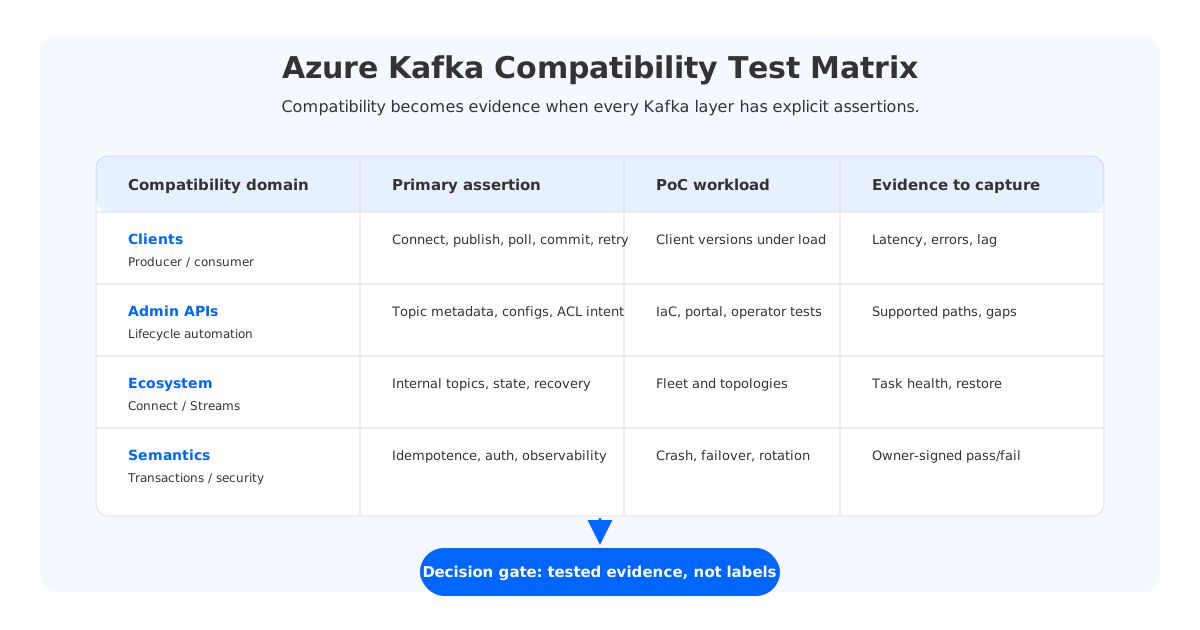
This article treats Azure Kafka compatibility as an engineering validation framework, not a vendor checklist. The goal is to help teams find semantic gaps before they appear in production.
1Compatibility Is A Test Plan, Not A Label
A useful compatibility test starts by separating the Kafka surface area into layers. The wire protocol is the bottom layer. Above it are client libraries, consumer group behavior, topic and partition operations, Kafka Connect, Kafka Streams, transactions, security, monitoring, and operations. A platform can pass one layer and still fail another for a given workload.
For Azure Event Hubs, Microsoft documents the Kafka endpoint as a way for Kafka clients to communicate with Event Hubs using Kafka protocol support. Microsoft also provides client configuration guidance for producer and consumer settings such as bootstrap servers, SASL_SSL security, authentication mechanisms, request timeouts, metadata settings, and connection behavior. Those pages are exactly where a serious validation should begin, because they show that compatibility depends on configuration and service behavior, not only on the client library name.
For Apache Kafka, the official documentation describes separate concerns for producers, consumers, AdminClient, Connect, Streams, transactions, and security. A team moving a Kafka workload to Azure should convert those concerns into test cases. Ask whether the target platform supports the application behavior you use today, the operational workflows your platform team runs, and the failure modes your SREs need to survive.
That framing avoids two common mistakes: declaring success after one producer-consumer demo, or declaring failure after one unsupported operation. Mature platform decisions define the compatibility contract by workload.
2Kafka Producer And Consumer Clients
Producer and consumer clients are the first layer because they determine whether existing applications can connect without rewriting the data path. A practical Azure Kafka client test should cover every client language and library version used in production, not only the Java client. Java, Go, Python, .NET, Node.js, and C++ clients may differ in default timeouts, metadata refresh behavior, retry handling, compression, error messages, and TLS/SASL configuration.
Start with the producer. Validate bootstrap configuration, authentication, acks, retries, request timeout, batching, compression, partitioning, headers, record size behavior, and error handling. Do not stop at a successful send. Test sustained throughput, burst traffic, broker or endpoint failover, throttling behavior, and application logs. A producer that works in a sample can still fail a production SLO if it retries too aggressively, hides errors, or treats service-side throttling as transient noise.
Then validate consumers. Consumer tests should include group membership, partition assignment, offset commits, pause/resume, rebalance behavior, timestamp-based starts, lag measurement, retry policies, and application-level deduplication. If your workload relies on strict ordering within a partition, the test must include enough parallelism and failure injection to prove ordering assumptions after reconnects and rebalances.
Capture specific evidence:
- Which client libraries and versions were tested.
- Which security mechanisms and connection strings were used.
- Which producer settings are required for Azure Event Hubs or the target Kafka platform.
- How consumers behave during rebalance, restart, checkpoint recovery, and offset commit failure.
- Whether monitoring can distinguish client error, network error, service throttling, and application backpressure.
This is where Event Hubs and Kafka-compatible platforms can differ even when clients connect successfully. Event Hubs validation focuses on service-specific configuration and Azure namespace behavior. A Kafka-compatible platform should be tested against the producer and consumer semantics your applications already rely on.
3AdminClient And Topic Operations
AdminClient is where compatibility projects become platform projects. Application teams often think about Kafka as topics and records. Platform teams think about lifecycle automation: topic creation, partition counts, configuration, retention, ACLs, quotas, ownership, drift detection, and deletion controls. If those workflows are embedded in Terraform, GitOps, a developer portal, or a Kafka operator, AdminClient compatibility becomes central.
On Event Hubs, the Kafka endpoint does not turn Event Hubs into a full Kafka broker control plane. Event hubs are Azure resources, and important settings are managed through Azure management surfaces rather than arbitrary Kafka broker configuration APIs. That is not a defect; it is the service model. But it means teams must decide whether their platform automation should be rewritten around Azure APIs or whether the workload needs a Kafka-native control plane.
The AdminClient test plan should include:
| Area | What to validate | Why it matters |
|---|---|---|
| Topic lifecycle | Create, describe, alter, and delete behavior for topics or event hubs | Platform automation depends on repeatable lifecycle operations |
| Partition changes | Partition count creation and expansion rules | Partition count affects ordering, throughput, and migration design |
| Configs | Retention, cleanup policy, min ISR, message size, and broker/topic settings in use | Unsupported config changes can break internal platform assumptions |
| ACLs and quotas | Principal mapping, authorization, quota behavior, and audit trail | Security teams need enforceable controls, not only connectivity |
| Metadata | Cluster, topic, partition, and consumer group visibility | SRE runbooks and developer tools depend on metadata APIs |
The key is to avoid generic feature matrices unless they are tied to your actual automation. If your team never uses Kafka AdminClient to create topics, the limitation may be acceptable. If topic provisioning is part of your developer platform contract, it can become a migration blocker.
4Kafka Connect And Kafka Streams
Kafka Connect and Kafka Streams are not ordinary clients. They are ecosystem runtimes built around Kafka semantics. Connect workers manage connector tasks, offsets, internal topics, error handling, converters, schema behavior, and rebalancing. Streams applications create internal repartition and changelog topics, maintain local state stores, recover state, and may use exactly-once processing patterns.
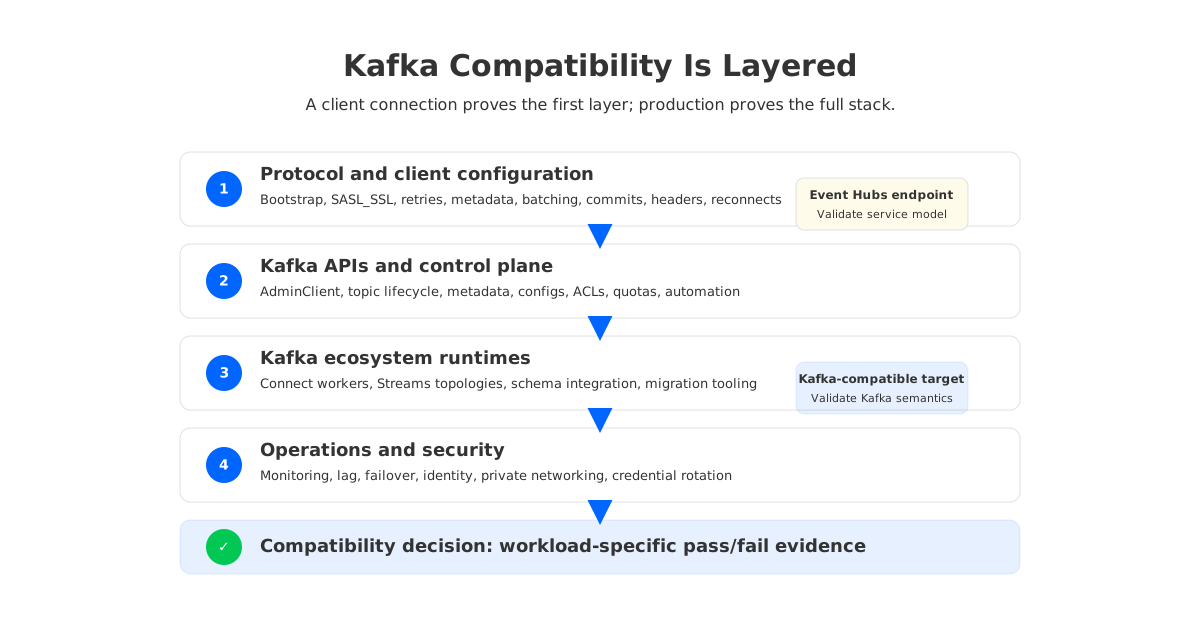
For Kafka Connect on Azure, first decide what is being validated. If the workload is an Event Hubs source or sink connector with a documented Azure integration pattern, test that connector path. If the workload is a shared Connect platform, test worker deployment, plugins, internal topics, converters, schema registry integration, dead-letter topics, offset recovery, task scaling, and connector-specific retries.
Kafka Streams requires equal care. Microsoft has documented Kafka Streams support scenarios for Event Hubs in specific service tiers and configurations, but a production team should still validate the exact topology. Test repartition topics, changelog topics, standby tasks, state restore time, processing guarantees, application reset, key distribution, and behavior under task failure. Also test whether operational tools can inspect the internal topics and consumer groups in a way your SRE team can use.
For teams choosing a Kafka-compatible platform on Azure, this is where AutoMQ enters the discussion naturally. AutoMQ is designed to maintain Kafka protocol and semantics compatibility so Kafka clients and ecosystem tools remain usable while shared storage sits underneath. That architectural direction is relevant when the compatibility requirement includes Kafka Connect, Kafka Streams, Schema Registry, MirrorMaker-style migration, and existing Kafka observability workflows. The important test remains the same: run your connector fleet and Streams applications, not a generic demo.
5Transactions, Idempotence, And Security
Transactions and idempotence are high-risk compatibility areas because they are easy to mention and hard to validate. Kafka idempotent producers depend on producer IDs, sequence numbers, retries, and ordering guarantees. Kafka transactions coordinate writes across partitions and optionally offsets, giving applications a way to build exactly-once processing patterns. In Kafka Streams, processing guarantees can rely on these mechanisms.
Do not write "transactions are supported" into an architecture decision without a workload-specific test. Validate idempotent producer configuration, retries, transaction initialization, commit and abort, fencing behavior, offset commits within transactions, and recovery after process crash. If support is tier-, version-, or configuration-specific, the PoC must match those conditions.
Security compatibility deserves the same rigor. On Azure, security often crosses Kafka, Azure identity, networking, and compliance boundaries. A Kafka client might authenticate with SASL_SSL, use connection strings, use OAuth with Microsoft Entra ID where supported, traverse Private Link or private endpoints, and run inside a locked-down VNet. A Kafka-compatible platform may use TLS, SASL, ACLs, cloud IAM integration, Kubernetes secrets, or private networking depending on the deployment model.
Security validation should include:
- Authentication mechanism and credential rotation.
- TLS configuration, certificate trust, and hostname verification.
- Authorization model, including ACL behavior and least-privilege policies.
- Private connectivity, firewall rules, DNS, and egress paths.
- Audit trails for topic operations, admin operations, and failed access.
- Incident handling for credential leak, client compromise, and network isolation.
Monitoring closes the loop. Kafka compatibility is incomplete if SREs cannot observe the system with enough fidelity to act. Validate producer errors, request latency, consumer lag, rebalance frequency, topic growth, partition skew, throttling, connector task health, Streams state restore, transaction failures, and service-side capacity signals. Azure-native metrics may be enough for some Event Hubs workloads; Kafka-native metrics matter when runbooks depend on Kafka internals.
6Build A PoC Suite Before You Choose
A serious Azure Kafka proof of concept should look like a release gate: representative clients, data volume, failure injection, ecosystem tools, security controls, observability, and a written pass/fail decision.
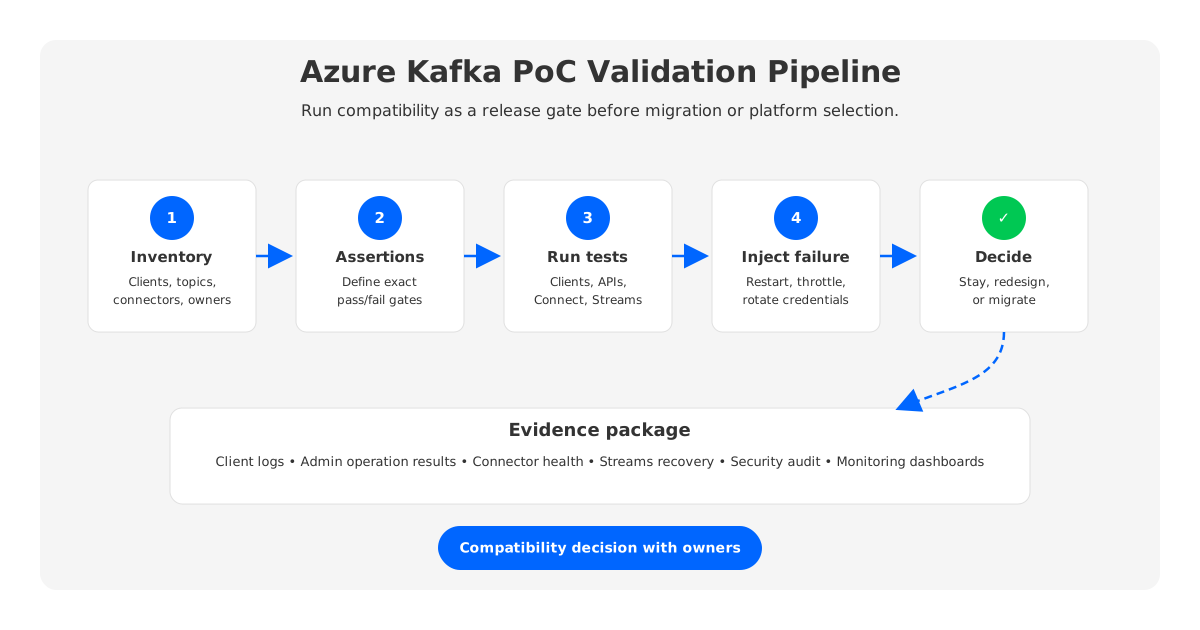
A practical PoC sequence:
- Inventory workloads. List producers, consumers, connectors, Streams apps, schemas, topics, partitions, retention policies, client libraries, security mechanisms, and operational owners.
- Define compatibility assertions. Decide what must behave exactly like Kafka, what can be translated into Azure-native operations, and what can be redesigned.
- Run client tests. Validate producer, consumer, offset, rebalance, retry, compression, headers, and partitioning behavior under normal and stressed conditions.
- Run control-plane tests. Validate topic lifecycle, configs, metadata, ACLs, quotas, and automation paths.
- Run ecosystem tests. Validate Connect, Streams, schema integration, monitoring, and migration tooling.
- Run failure tests. Restart clients, kill workers, simulate network interruption, test failover, validate recovery, and record operational evidence.
- Decide with evidence. Keep the platform if it satisfies the contract. Redesign the workload if the mismatch is small. Choose a Kafka-compatible target if the mismatch affects the application and operations model.
This framework also prevents product bias. Event Hubs may be right for Azure-native ingestion where Kafka clients are convenient but Kafka operations are not required. Self-managed Kafka may fit teams with strong Kafka operations. AutoMQ is a natural fit when the requirement is Kafka protocol and ecosystem compatibility with a cloud-native shared-storage architecture that keeps brokers less tied to local disk state.
7How AutoMQ Approaches Kafka Compatibility On Azure
AutoMQ's relevance in an Azure Kafka compatibility discussion is architectural. It preserves the Kafka-facing compute and protocol surface while changing the storage layer underneath to shared object storage. The intended outcome is that Kafka clients, Connect, Streams, and familiar ecosystem tools remain part of the operating model while broker storage is no longer fixed local state.
That distinction matters for teams leaving a pure endpoint model. If the pain is only "we need a managed Azure ingestion service," Event Hubs remains compelling. If the pain is "our applications and platform tools depend on Kafka semantics," the target should be judged by Kafka compatibility, operational control, and migration evidence. A shared-storage Kafka-compatible platform can reduce the amount of broker-local storage management without asking teams to abandon the Kafka ecosystem.
For SREs, the main questions are concrete: Can my existing clients run? Can my connector and Streams workloads recover? Can I see lag and failures clearly? Can I scale without a large data movement project? Can I keep the data plane in the network and cloud boundary my security team expects? Those questions are better than asking whether something is "Kafka-compatible" in the abstract.
The best Azure Kafka compatibility review ends with a table of tested evidence, not a slogan. If the target passes the client, AdminClient, Connect, Streams, transaction, security, monitoring, and failover gates that your workloads require, it is compatible for your platform. If it only passes a producer-consumer sample, keep testing.
8References
- Microsoft Learn: What is Azure Event Hubs for Apache Kafka?
- Microsoft Learn: Apache Kafka client configurations for Azure Event Hubs
- Microsoft Learn: Azure Event Hubs quotas and limits
- Apache Kafka documentation
- Apache Kafka Streams documentation
- Apache Kafka security documentation
- Apache Kafka exactly-once semantics
- AutoMQ documentation: Compatibility with Apache Kafka
- AutoMQ documentation: Architecture overview
9FAQ
9.1Is Azure Event Hubs Kafka endpoint fully compatible with Apache Kafka?
It depends on the workload contract. Event Hubs provides a Kafka endpoint that lets Kafka clients communicate with Event Hubs, and Microsoft documents client configuration guidance. That does not automatically mean every Kafka AdminClient operation, broker configuration, ecosystem runtime, transaction pattern, or operational workflow behaves like a Kafka cluster. Validate the exact producer, consumer, Connect, Streams, security, and monitoring behavior your applications use.
9.2What should I test first for Azure Kafka compatibility?
Start with the clients and workloads already in production. Test each client library version, authentication mechanism, producer configuration, consumer group behavior, offset handling, and failure recovery path. Then add AdminClient automation, Connect, Streams, transactions, security, and monitoring tests. A single producer-consumer demo is not enough for a platform decision.
9.3Does Kafka Connect work with Azure Event Hubs Kafka endpoint?
Some Kafka Connect scenarios can be built around Event Hubs, and Microsoft provides Azure integration documentation. The correct question is whether your connector fleet works. Validate worker deployment, internal topics, offsets, dead-letter topics, converters, schema registry integration, plugin behavior, task recovery, and connector-specific retry semantics.
9.4Are Kafka Streams and transactions safe to assume on Azure?
No. Kafka Streams and transactions should be tested against the exact Azure service tier, client version, topology, and processing guarantee you plan to use. Validate internal topics, state restore, idempotent producers, transaction commits and aborts, fencing behavior, and crash recovery before treating the design as production-ready.
9.5When should a team choose AutoMQ instead of Event Hubs Kafka endpoint?
Choose Event Hubs when the workload is primarily Azure-native event ingestion and the Kafka endpoint satisfies the required client behavior. Consider AutoMQ when the platform contract requires Kafka protocol and semantics compatibility, Kafka ecosystem tools, operational control, and a cloud-native shared-storage architecture that reduces dependence on broker-local disk state.


