
Table of Contents
Table of Contents
Kafka cost on Azure rarely grows in a straight line with producer throughput. A FinOps review may start with, "How much are we ingesting?", but the bill usually answers a different question: how much data is retained, replicated, replayed, moved across zones, protected for peak load, and operated under failure. The workload may not triple, yet storage, bandwidth, managed capacity, or operational spend can move faster than the business metric.
The first mistake is treating "Azure Kafka" as one pricing model. It can mean Azure Event Hubs with the Kafka endpoint, HDInsight Kafka, self-managed Kafka on Azure Virtual Machines, a third-party managed Kafka service, or a Kafka-compatible BYOC platform running inside an Azure subscription. Each option prices different things. Event Hubs emphasizes capacity units and service tiers. Self-managed Kafka exposes VMs, Managed Disks, bandwidth, monitoring, and operations. A shared-storage Kafka architecture, such as AutoMQ running with Azure Blob or another object storage layer, changes the line items again by separating broker compute from durable log storage.
The second mistake is looking only for discounts. Commitments, reserved capacity, compression, retention cleanup, and topic hygiene can help. If the expensive part is broker-local replication, long retention on premium disks, cross-zone replica traffic, or partition movement during scaling, configuration optimization buys time but does not change the curve.
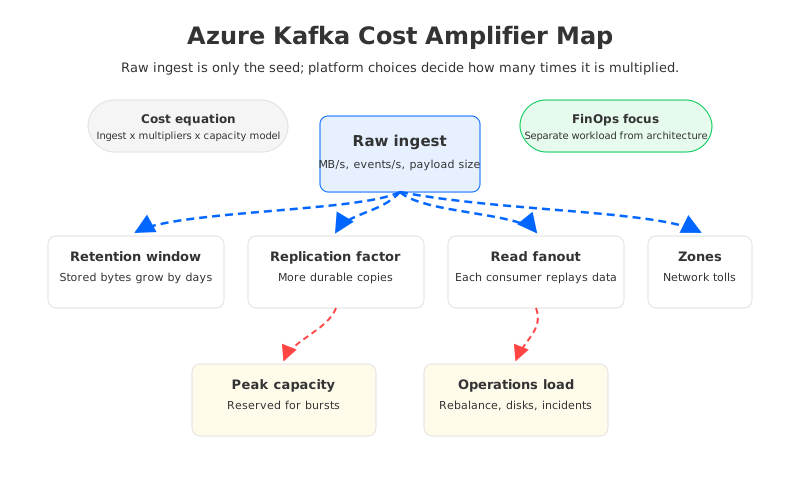
The useful way to model Azure Kafka cost is to start with raw ingest, then apply the multipliers that streaming systems create by design. Kafka is a replicated log with replay, fanout, retention, and strong operational expectations. Those features are why teams use Kafka, but they also explain why the bill can grow faster than the data source.
1Why Raw Ingest Volume Is Only the Starting Point
Raw ingest gives you the first input: events per second, average message size, and write throughput. For Kafka-style streaming, it is only the seed. A topic that receives 100 GB of logical data per day may need multiple durable copies, days or weeks of retention, several consumer groups reading the same bytes, and headroom for failover, replay, and traffic spikes.
The cost model also changes by service boundary. Event Hubs for Apache Kafka lets Kafka clients communicate with Event Hubs through Kafka protocol support, but the underlying service is still Event Hubs. You model capacity, throughput, retention, partitions, Capture if used, and tier limits. For Kafka on Azure VMs, you model broker compute, disks, network transfer, monitoring, backup strategy, incident labor, and spare capacity.
For architects, the important distinction is workload cost versus architecture cost. Workload cost is the irreducible demand: messages, bytes, retention objective, and reader count. Architecture cost is how the platform satisfies that demand. Two systems can process the same stream while producing different bills because durability, scaling, and availability are implemented differently.
2Storage Retention and Replication Cost Drivers
Retention is the cost driver that most teams underestimate. Kafka retention is usually configured by time, size, or both. When retention extends from hours to days, the storage footprint grows with the retained log, not only current traffic. If the topic uses multiple replicas, broker-local Kafka stores additional copies across brokers. That multiplication is intentional: replication protects availability and durability when brokers fail.
For self-managed Kafka on Azure, that translates into disk capacity and disk performance choices. Teams may choose higher-performance Azure Managed Disks because Kafka brokers are sensitive to write throughput, recovery, and page cache pressure. A retention increase can cascade into larger disks, more brokers, or a different disk SKU. The unit price is only part of the story; the constraint is whether brokers can serve traffic while holding a larger local log.
The retention multiplier is sharper when teams use Kafka as a replayable event archive. CDC pipelines, fraud detection, observability, personalization, and AI feature pipelines often need several consumer groups and long replay windows. The cost question is whether every retained byte must live on broker-local storage, with broker-local replication and data movement during cluster changes.
Event Hubs has a different storage model, but it is not free from retention economics. Microsoft prices Event Hubs by tier and capacity concepts such as throughput units, processing units, or capacity units depending on tier. A Kafka team migrating to Event Hubs must translate Kafka assumptions into Event Hubs capacity and retention settings instead of mapping broker count to a namespace.
3Network and Zone Traffic Cost Drivers
High availability on Azure is not only a compute decision. Availability zones, virtual networks, private connectivity, cross-region replication, and consumer placement all affect the network bill. Kafka makes this easy to underestimate because the logical write is not the only network movement. Broker replication, consumer reads, replays, mirror pipelines, and cross-zone application access all add paths.
In broker-local Kafka, replication factor determines how many brokers receive log data. When brokers are distributed across zones, replica traffic can cross zone boundaries. Consumers may also read from another zone if application placement, leader distribution, or networking is not aligned. Large replay events can turn a quiet historical topic into a temporary egress-heavy workload.
Azure pricing documentation separates bandwidth and data transfer scenarios, including internet egress, inter-region transfer, and availability-zone-related movement. Exact cost depends on region, service, path, and architecture, so use current Azure pricing pages rather than inherited assumptions. For FinOps, the practical step is to map flows: producer to broker or service, broker-to-broker replication, broker to consumer, cross-zone reads, cross-region replication, and capture or sink paths.
Read fanout deserves special attention. Kafka lets multiple consumer groups independently read the same topic. That is a feature, not waste. But every additional consumer group can increase read throughput, client-side processing, network transfer, and downstream service usage. A topic with one producer and six consumers can be far more expensive than the ingest line suggests.
4Over-Provisioning and Scaling Cost Drivers
Streaming systems are usually provisioned for the worst hour, not the average hour. Under-provisioning causes producer latency, consumer lag, throttling, hot partitions, rebalance instability, and incident pages. Over-provisioning makes the monthly bill look padded. Most teams choose the quieter failure mode.
The over-provisioning pattern appears in several forms:
- Broker headroom: Self-managed Kafka clusters keep spare CPU, memory, disk throughput, and network capacity for failures and traffic spikes.
- Disk headroom: Local or managed disks are sized for retention growth, compaction, burst writes, and recovery, not only current stored bytes.
- Managed capacity: Event Hubs and managed services may require selecting capacity units, processing units, dedicated capacity, or contract levels that fit peak demand.
- Operational headroom: Teams reserve engineer time for upgrades, partition reassignment, incident response, security patches, and capacity reviews.
Some of this is healthy engineering discipline. Waste appears when headroom compensates for an architecture that cannot scale one dimension independently. If adding storage requires adding broker compute, or adding compute triggers partition movement, teams buy capacity earlier than the workload requires and keep it after the peak has passed.
Reserved commitments can reduce unit cost for a stable workload, but they can also freeze yesterday's architecture into tomorrow's bill. Before signing a longer commitment, benchmark the workload, model growth, and separate workload demand from platform inefficiency.
5Broker-Local Replication vs Object Storage Durability
Traditional Kafka couples three responsibilities inside the broker: serving clients, coordinating partitions, and storing durable log data on broker-local disks. That coupling made Kafka practical and performant for many years. The cost side effect is that storage growth, availability, and scaling are tied to broker fleets.
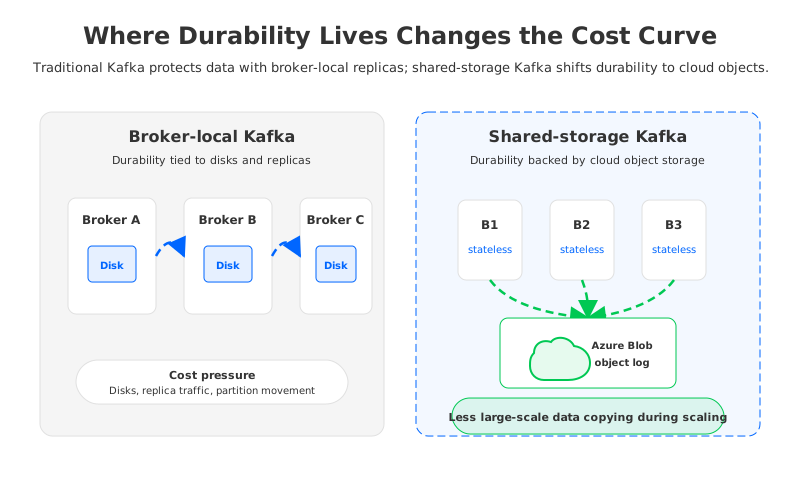
Object-storage-backed Kafka changes the cost conversation by moving durable log storage away from broker-local disks and into a shared layer such as Azure Blob or another object storage service. Brokers still serve Kafka clients and coordinate workload execution, but the durable data plane no longer depends on every broker carrying its own long-lived local copy of the log.
AutoMQ fits into this category. It is Kafka-compatible, but its architecture is built around shared object storage and stateless brokers. On Azure, object storage can be evaluated separately from broker compute, and scaling brokers does not need to imply the same level of large-scale partition movement. The point is not that an architecture label magically lowers every bill. The point is that cost drivers move into line items that can be modeled independently: compute for active serving, object storage for durable retention, and network paths for actual reads and writes.
For workloads with short retention, low fanout, and predictable capacity, the difference may not justify migration. For long retention, many consumer groups, frequent scaling events, or painful reassignment operations, shared storage can be a structural alternative to buying more broker-local capacity.
6Event Hubs Kafka Cost vs Kafka Cluster Cost
Event Hubs with the Kafka endpoint is often attractive because it removes broker operations. That can be the right tradeoff for ingestion pipelines that fit the service model. The cost model, however, should be evaluated in Event Hubs terms, not Kafka broker terms: tier selection, capacity units, throughput behavior, partitions, retention, Capture, networking, and dedicated capacity where applicable.
Kafka cluster cost is more visible but more fragmented. A self-managed deployment exposes VM SKUs, disk SKUs, load balancers, private links, bandwidth, monitoring, backup tooling, and staff time. HDInsight Kafka or another managed cluster model may reduce some tasks while still requiring capacity planning and storage design. Third-party managed Kafka can simplify operations, but the commercial model may be based on capacity bundles, ingress, egress, partitions, retention, support, or private networking.
The choice is therefore not "managed is expensive" or "self-managed is inexpensive." The right question is which cost model matches the workload's variability and governance constraints:
| Workload pattern | Cost risk to model | Likely evaluation focus |
|---|---|---|
| High ingest, short retention | Peak throughput and capacity units | Capacity sizing and compression |
| Long retention, moderate ingest | Stored log footprint and storage tier | Broker-local disks vs object storage |
| Many consumer groups | Read throughput and network paths | Fanout, replay, and consumer placement |
| Multi-zone production Kafka | Replica traffic and failover headroom | Zone design and network transfer |
| Frequent scaling or repartitioning | Data movement and operational time | Stateless broker or shared storage options |
Vendor comparisons are less useful until the team knows which multiplier is driving the bill.
7How to Reduce Azure Kafka Cost Without Breaking the Platform
Start with configuration and workload hygiene. Audit retention by topic, not by cluster default. Remove abandoned topics. Validate compression. Check message size patterns. Identify consumer groups that repeatedly replay large windows because of application bugs. Align producers, brokers, and consumers by zone where practical. Review partition counts, hot partitions, dead-letter topics, and connector internal topic retention.
Then model capacity. For Event Hubs, translate Kafka traffic into the relevant tier and capacity terms from current Microsoft pricing and quota documentation. For self-managed Kafka, estimate VM, disk, bandwidth, observability, and operational labor. Use actual broker metrics: bytes in, bytes out, disk used, page cache pressure, latency, under-replicated partitions, partition movement, and consumer lag. A worksheet that lacks read throughput and retention is not a Kafka cost worksheet.
Only after that should the team consider architecture replacement. Replacement is appropriate when the same expensive pattern persists after cleanup: long retention forces more broker storage, scaling requires data movement, failover needs too much idle capacity, or cross-zone replica traffic dominates the design. In that situation, evaluating shared-storage Kafka is a technical hypothesis: if durable storage is separated from broker compute, the platform may need less over-provisioned broker-local capacity for the same retention and availability goals.
AutoMQ's pricing calculator and architecture documentation are useful here because they express the workload in Kafka-native inputs such as write throughput, read fanout, and retention, then evaluate how an object-storage-backed model changes the cost structure. The calculator should not replace a production benchmark, but it can show whether the cost pain is large enough to justify deeper migration assessment.
8When to Optimize vs Replace the Architecture
The cleanest decision rule is this: optimize when the waste is accidental; replace when the waste is structural. Accidental waste includes stale topics, excessive defaults, poor compression, idle capacity after a migration, or capacity units selected without measurement. Structural waste comes from the platform's relationship between storage, compute, availability, and scaling.
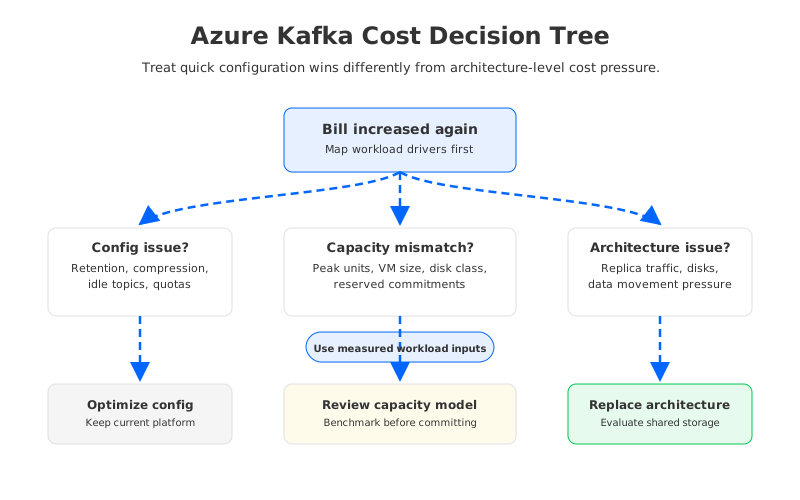
A practical review should ask four questions:
- Can we reduce retained bytes without violating product or compliance requirements? If yes, optimize retention first.
- Can we reduce read and network amplification by changing placement or consumer behavior? If yes, tune topology and applications.
- Are we paying for peak capacity that is predictable and stable? If yes, consider commitments after benchmarking.
- Are we buying more brokers or disks mainly because storage and compute are coupled? If yes, evaluate architecture alternatives.
For CTOs and platform leaders, this distinction keeps the cost conversation honest. Nobody wants a migration project that moves the same inefficiency to a new invoice. At the same time, line-item negotiation cannot change the fact that broker-local replication, long retention, and large-scale partition movement can be the wrong cost shape for elastic cloud streaming.
Azure Kafka cost gets expensive because Kafka workloads are valuable: they retain business events, serve many teams, support replay, and must stay available during failures. The goal is to stop paying architectural premiums that are no longer necessary for the workload. Measure the multipliers, fix accidental waste, and decide whether a shared-storage Kafka model belongs in the next architecture review.
9References
- Azure Event Hubs pricing
- Azure Event Hubs for Apache Kafka overview
- Azure bandwidth pricing
- Azure Managed Disks pricing
- Azure Blob Storage pricing
- Apache Kafka documentation: replication and design
- Apache Kafka documentation: topic configuration
- AutoMQ pricing calculator
- AutoMQ documentation
10FAQ
10.1Why does Azure Kafka cost increase faster than ingest volume?
Because ingest is only one input. Kafka-style workloads also multiply cost through retention, replication, read fanout, cross-zone traffic, replay, peak capacity, and operational headroom.
10.2Is Event Hubs Kafka endpoint always less expensive than running Kafka on Azure?
No. Event Hubs can reduce broker operations, but its pricing model is based on Event Hubs tiers and capacity concepts. Kafka clusters expose line items such as VMs, disks, and network. The lower-cost option depends on throughput, retention, fanout, feature requirements, and operational ownership.
10.3What is the biggest Kafka Azure storage cost driver?
Long retention combined with replication is often the biggest driver for broker-local Kafka. The platform stores retained log data across multiple brokers, and disk choices must satisfy both capacity and performance requirements.
10.4How can teams reduce Azure Kafka cost without migration?
Start with topic-level retention, compression, abandoned topics, consumer replay behavior, partition sizing, zone placement, and capacity right-sizing. Review commitments only after production metrics validate the required headroom.
10.5When should a team evaluate AutoMQ for Azure Kafka cost?
Evaluate AutoMQ or another shared-storage Kafka architecture when the expensive pattern is structural: long retention on broker-local disks, scaling events that trigger large data movement, high over-provisioning for failover, or frequent partition reassignment. In those cases, object storage and stateless brokers may change the cost model more than configuration tuning.


