
Table of Contents
Table of Contents
IoT telemetry looks simple until the fleet becomes uneven. A device sends a few kilobytes, another device reconnects after a network outage, a gateway flushes buffered readings, and a firmware rollout doubles traffic for an hour. The streaming layer has to absorb that shape without forcing every downstream system to process at the same pace.
That is why searches for Azure Kafka IoT often end in a decision between Azure Event Hubs and a Kafka-compatible platform. Event Hubs is a strong Azure-native ingestion service for telemetry. Kafka is a broader event streaming ecosystem with durable logs, independent consumers, connectors, stream processing, and operational patterns that many data teams already use. The right choice depends less on brand preference and more on how your telemetry will be produced, consumed, retained, replayed, and governed.
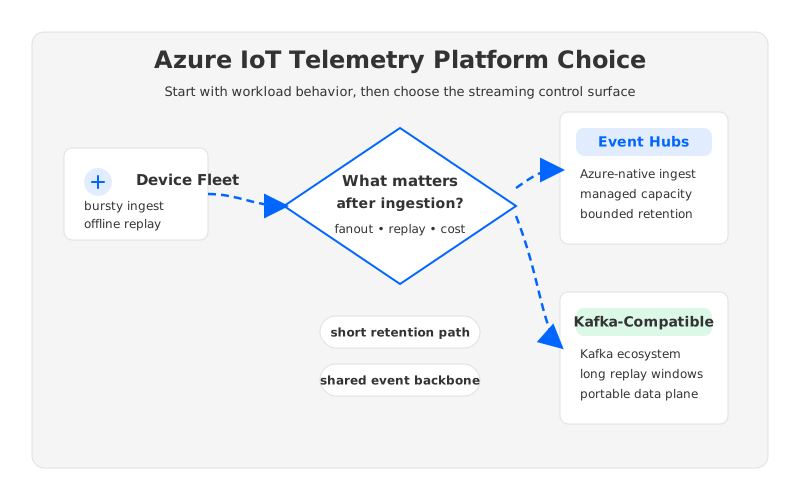
For many Azure teams, Event Hubs is the clean first answer. For teams that need Kafka semantics, long replay windows, multi-consumer pipelines, or portability across clouds, a Kafka-compatible platform can become the better architectural center. The hard part is noticing that point before the fleet is already in production.
1What IoT Telemetry Needs From a Streaming Layer
IoT telemetry is not only an ingest problem. Ingest is the visible part because device count, message rate, payload size, and connectivity patterns are easy to estimate. The deeper architecture question is what happens after the first write succeeds.
A production IoT stream usually serves several consumers at once:
- Real-time operations need low-latency alerting, anomaly detection, and control-plane feedback.
- Data engineering needs reliable movement into a lakehouse, warehouse, or time-series store.
- Product analytics needs historical joins, cohort analysis, and model training data.
- SRE and security teams need replay during incidents, pipeline recovery, and forensic analysis.
- Partner or customer-facing applications may need filtered streams with different delivery contracts.
These consumers do not move at the same speed. The alerting path may process seconds after ingestion, while a feature engineering job may replay yesterday's telemetry after a model change. A lakehouse sink can fall behind during compaction or maintenance. A new analytics team may ask for a replay from the previous month because a field interpretation changed.
The streaming platform therefore has to answer four questions: How much burst can it absorb? How many independent consumers can read without slowing producers? How long can data remain available for replay? How expensive does retention become when the fleet grows?
2Why Event Hubs Is Often The First Azure Choice
Event Hubs fits a large share of Azure IoT telemetry designs because it is managed, integrated, and built for high-throughput event ingestion. Microsoft describes Event Hubs as a fully managed real-time data streaming platform that supports Apache Kafka, AMQP 1.0, and HTTPS, and lists IoT telemetry ingestion as a core scenario. That matters when an IoT team wants to avoid operating brokers, disks, partitions, replicas, and upgrades.
The Azure-native path is especially compelling when devices already land through Azure IoT Hub. IoT Hub exposes a built-in service-facing endpoint named messages/events that is Event Hubs-compatible, so backend services can read device-to-cloud messages using Event Hubs mechanisms. Microsoft also documents direct integrations with Azure Functions, Stream Analytics, Spark, Kafka, and Azure Databricks through that endpoint.
Event Hubs also gives architects a clear capacity model. In Standard, throughput units provide a documented ingress and egress allowance; Premium uses processing units; Dedicated uses capacity units. The quotas page documents retention limits, consumer group limits, storage allowances, partition limits, and tier-specific capabilities. That is useful for IoT sizing because it turns vague scale discussions into concrete knobs.
Event Hubs is a strong fit when the architecture has these properties:
| Requirement | Why Event Hubs Fits |
|---|---|
| Azure-first ingestion | Native integration with Azure analytics, monitoring, networking, and identity reduces platform glue. |
| Managed operations | Teams avoid broker maintenance, disk sizing, replica placement, and cluster upgrades. |
| Short to medium retention | Standard supports up to 7 days of event retention; Premium and Dedicated support up to 90 days. |
| Simple Kafka access | Kafka clients can connect to Event Hubs through the Kafka endpoint with configuration changes. |
| Predictable Azure governance | Enterprise teams can use familiar Azure controls around networking, RBAC, diagnostics, and billing. |
This is not a small advantage. Many IoT programs fail because teams overbuild the platform before they understand the data product. If your primary need is Azure-native telemetry ingestion into Azure analytics, Event Hubs deserves to be the default baseline.
3Where Event Hubs Starts To Feel Less Like Kafka
The phrase Event Hubs Kafka IoT can hide an important distinction: Kafka protocol access is not the same thing as operating on a Kafka platform. Event Hubs exposes an Apache Kafka endpoint, and Microsoft maps concepts such as Kafka topics to event hubs, partitions to partitions, and consumer groups to consumer groups. For many producers and consumers, that mapping is enough.
The edge appears when applications depend on Kafka as more than a wire protocol. Kafka teams often rely on AdminClient workflows, topic-level configuration patterns, connector internal topics, stream-processing conventions, replay scripts, consumer group tooling, and broker-side behaviors. Microsoft's Kafka client configuration guidance for Event Hubs is explicit that broker and server configurations are managed by Event Hubs, and topic-level configuration is limited compared with a self-managed Kafka cluster.
For IoT telemetry, those differences tend to surface in five places:
- Topic lifecycle. Platform teams may want Kafka-native topic creation, topic configuration, compaction choices, retention policies, and automation through standard Kafka tools.
- Connector behavior. Kafka Connect deployments often assume Kafka broker semantics for internal topics, offsets, and sink/source coordination.
- Stream processing. Kafka Streams, Flink, Spark, and custom consumers may rely on repartition topics, changelog topics, transactional behavior, or exact offset control.
- Replay operations. Incident response often requires precise offset movement, consumer isolation, and repeatable backfill patterns.
- Portability. Some IoT fleets eventually span Azure, AWS, factories, edge locations, and partner clouds. Kafka semantics can become the common data-plane contract.
None of this makes Event Hubs a poor platform. It means the decision should be framed as Event Hubs versus a Kafka-compatible platform, not merely Event Hubs versus self-managed Kafka.
4Retention And Replay Change The Cost Curve
Telemetry retention is where architecture stops being theoretical. A fleet that writes continuously can turn a modest per-device event rate into a large durable log. Keeping 24 hours for operational recovery is one model; keeping 30, 90, or 180 days for reprocessing, ML features, compliance investigation, or delayed consumers is another.
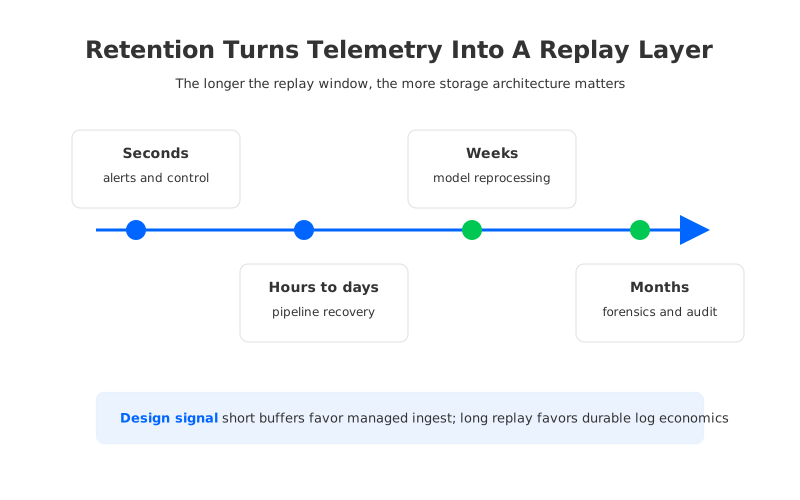
Event Hubs has clear documented retention boundaries. The built-in endpoint for IoT Hub can retain device-to-cloud messages for up to 7 days. Event Hubs Standard supports up to 7 days, while Premium and Dedicated support up to 90 days. The pricing page also documents included storage allowances and extended retention charging behavior for Premium and Dedicated. In Standard, the throughput unit model includes storage allowance, and data beyond allowance can affect cost.
Kafka gives teams a different operating model: the log is the platform. Retention can be configured by time or size, consumers can replay from offsets, and multiple downstream systems can read independently. Traditional Kafka on Azure VMs or AKS makes that flexibility expensive because broker-local disks, replicas, and rebalancing become part of the retention bill. A large replay window increases storage, recovery time, and operational risk.
This is where object-storage-backed Kafka-compatible platforms enter the discussion. AutoMQ is one example: it keeps Kafka compatibility while moving durable stream storage to object storage and making brokers stateless. In an IoT telemetry context, the interesting part is not a slogan about lower cost. It is the architectural separation: long retention and replay history can live in object storage, while compute capacity can scale around live traffic and catch-up reads.
That separation matters when traffic is bursty. Device fleets can be quiet for hours, then surge during reconnect storms, shift changes, or incident windows. Stateless brokers are easier to scale for that traffic shape because scaling does not have to wait for large broker-local log migration. For teams that already depend on Kafka consumers, Kafka Connect, Kafka Streams, schema tooling, and offset-based replay, a Kafka-compatible object-storage model can preserve the ecosystem while changing the economics of retention.
5Fanout Is The Real Test
IoT streams rarely have one downstream consumer for long. The first use case may be a dashboard; the second is alerting; the third is lakehouse ingestion; the fourth is predictive maintenance; the fifth is a partner API. The platform decision becomes more consequential every time a new consumer appears.
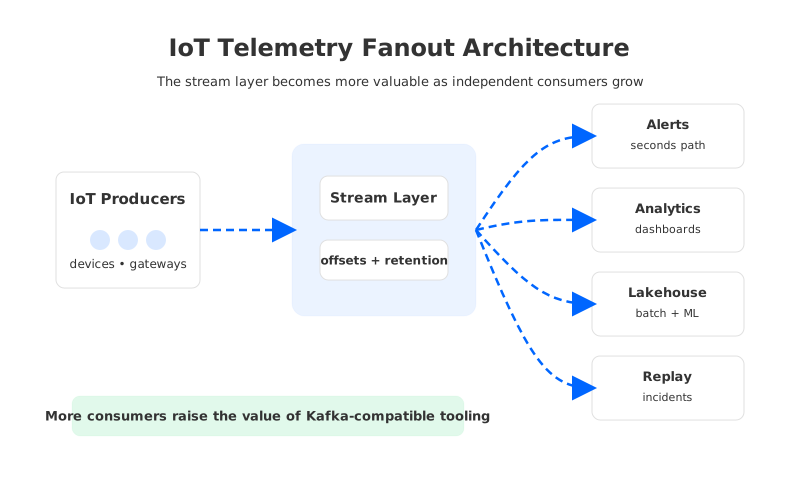
Event Hubs supports consumer groups, and the quotas page documents tier-specific limits. For Azure-native fanout, this works well: Stream Analytics, Functions, Data Explorer, Databricks, and storage capture can form a clean pipeline. Capture is particularly useful when the team wants near-real-time archiving into Azure Blob Storage or Data Lake Storage while live consumers continue reading the same stream.
Kafka-compatible platforms become more attractive when fanout needs Kafka ecosystem depth:
- You run Kafka Connect as the standard integration layer across databases, object storage, warehouses, observability tools, and SaaS sinks.
- You use Kafka Streams or Flink jobs that rely on Kafka topics as durable state movement and replay boundaries.
- You need standardized consumer group operations, offset resets, lag tooling, and replay runbooks across cloud providers.
- You expect the telemetry stream to become a shared internal product, not only an Azure service input.
The decision is less about whether Event Hubs can ingest enough events. It can often do that very well. The question is whether the downstream organization wants an Azure-native ingestion service or a Kafka-compatible streaming backbone.
6A Practical Decision Framework For Azure Kafka IoT
Use Event Hubs when the platform goal is managed Azure telemetry ingestion and most downstream systems are Azure services. Use a Kafka-compatible platform when Kafka semantics, ecosystem tooling, and long replay windows are core requirements. Use Azure IoT Hub when device identity, device management, command-and-control, and IoT-specific protocol handling are part of the problem; then decide whether the downstream event stream should remain on the built-in Event Hubs-compatible endpoint or move into a broader streaming layer.
For architecture review, ask these questions before choosing:
| Question | Event Hubs Signal | Kafka-Compatible Platform Signal |
|---|---|---|
| Is the workload mostly Azure-native ingestion? | Strong fit, especially with Azure analytics integrations. | Useful if Kafka ecosystem is already the standard. |
| How long is replay needed? | Good for bounded windows within documented tier limits. | Better fit when replay is long, frequent, or shared by many teams. |
| How many independent consumers will exist? | Works well for Azure service fanout and documented consumer group limits. | Strong when many Kafka-native teams need offset control and tooling. |
| Are Kafka Admin APIs and topic configs important? | Expect Event Hubs-managed controls and limited topic-level configuration. | Better fit for Kafka-native platform automation. |
| Is traffic highly bursty? | Scale with TUs, PUs, or CUs depending on tier and workload. | Stateless broker designs can scale compute around traffic without moving durable logs. |
| Is multi-cloud portability required? | Azure-native by design. | Kafka semantics can become the portable contract. |
The most expensive mistake is treating this as a binary vendor comparison too early. First decide what the telemetry stream is supposed to become. If it is an Azure ingestion edge, Event Hubs is often the right center. If it is a durable shared event log for many engineering teams, Kafka compatibility carries more architectural value.
7Where AutoMQ Fits For Telemetry Workloads
AutoMQ fits the discussion when the answer is “we need Kafka, but traditional Kafka storage economics and operations are the constraint.” IoT telemetry is a natural version of that problem because retention and replay can grow faster than live ingest, and fleet traffic can be spiky enough to make static broker capacity wasteful.
The architectural points are specific:
- AutoMQ keeps Kafka protocol and ecosystem compatibility, which matters when producers, consumers, Kafka Connect, Kafka Streams, and operational tools already exist.
- It uses object storage as the primary durable storage layer, which can make long retention and replay more economical than keeping all durable history on broker-local disks.
- Its stateless broker model separates serving capacity from persistent data ownership, which helps with bursty ingest and catch-up reads.
That does not make AutoMQ the default for every Azure IoT telemetry project. If your team wants a managed Azure ingestion service with short retention and Azure-native consumers, Event Hubs is a clean answer. AutoMQ becomes relevant when the telemetry platform is expected to behave like Kafka over the long term, but the team wants cloud-native storage economics and elasticity rather than a traditional stateful Kafka cluster.
The better architecture is the one that still feels correct after the third consumer, the first replay incident, and the first fleet-wide traffic spike.
8References
- What is Azure Event Hubs?
- Azure Event Hubs quotas and limits
- Event Hubs pricing
- Read device-to-cloud messages from the IoT Hub built-in endpoint
- What is Azure Event Hubs for Apache Kafka?
- Apache Kafka client configurations for Azure Event Hubs
- Apache Kafka documentation
- AutoMQ overview
- AutoMQ stateless broker documentation
9FAQ
9.1Is Event Hubs a good choice for Azure IoT telemetry?
Yes, Event Hubs is often a strong choice for Azure IoT telemetry, especially when the main requirement is managed high-throughput ingestion into Azure analytics services. It is particularly natural when devices flow through Azure IoT Hub and backend systems can read from the Event Hubs-compatible built-in endpoint.
9.2Does Event Hubs replace Kafka for IoT workloads?
It can replace Kafka for workloads that mostly need producer and consumer access through a managed Azure service. It is less straightforward when the application depends on Kafka-native administration, connector internals, stream processing conventions, long replay, or multi-cloud portability.
9.3When should IoT teams choose a Kafka-compatible platform on Azure?
Choose a Kafka-compatible platform when telemetry becomes a shared event backbone rather than a single ingestion path. Signs include many independent consumers, frequent replay, Kafka Connect usage, Kafka Streams or Flink workloads, strict offset tooling requirements, and a need to keep Kafka semantics across clouds.
9.4How does retention affect the Event Hubs vs Kafka decision?
Retention determines whether the stream is only an ingestion buffer or a durable replay layer. Event Hubs has documented retention limits by tier, while Kafka-compatible platforms can be designed around longer log retention. Traditional Kafka may make that expensive on broker-local disks; object-storage-backed Kafka-compatible platforms change that cost and operations model.
9.5Where does AutoMQ fit in Azure Kafka IoT architecture?
AutoMQ fits when teams want Kafka compatibility for telemetry pipelines but need a more elastic and retention-friendly architecture than traditional stateful Kafka. Its object-storage-backed design supports long replay windows, while stateless brokers help scale around bursty device traffic without tying durable data to broker-local disks.


