
Table of Contents
Table of Contents
The most dangerous Azure Kafka migration failure does not look like a failure at first. Producers connect. Consumers receive records. Dashboards show traffic. Then a replay job reads from the wrong offset, a connector restarts with a different internal topic behavior, a schema compatibility edge case appears, or a consumer group loses the lag profile the SRE team expected during cutover.
That is why "can my app connect?" is too small a migration question. Kafka is also topic configuration, partition ordering, consumer group offsets, transactions, schemas, connector state, ACLs, observability, and rollback muscle memory. A migration that preserves the API but changes enough of those surfaces can still break Kafka semantics.
Azure gives Kafka teams several target patterns: Azure Event Hubs with its Kafka endpoint, self-managed Kafka on VMs or AKS, or a Kafka-compatible platform such as AutoMQ. The right checklist depends on the target. Event Hubs can fit Azure-native event ingestion; Kafka-compatible platforms need stricter validation around client behavior, topic semantics, Connect, Streams, replication, and operational continuity.
1Define the Target Before Planning Cutover
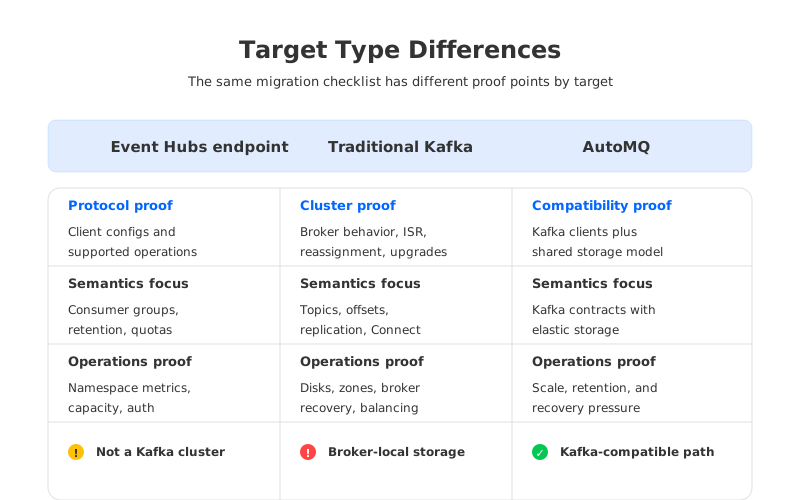
Start by naming the target architecture, not the cloud region. "Move Kafka to Azure" can mean different things:
| Target pattern | What changes most | Validation focus |
|---|---|---|
| Event Hubs Kafka endpoint | Kafka clients connect to an Event Hubs namespace instead of a Kafka cluster. | Supported Kafka protocol behavior, client configuration, throughput units or capacity, consumer groups, retention, and feature differences. |
| Self-managed Kafka on Azure | Kafka remains traditional broker-local Kafka, but infrastructure moves to Azure. | Disk tiers, zones, networking, replication, rebalancing, upgrades, backup, and SRE ownership. |
| Kafka-compatible shared-storage platform | Kafka clients and ecosystem remain, while the storage architecture changes. | Protocol compatibility, migration tooling, shared object storage behavior, scaling model, and observability continuity. |
This distinction matters because an Event Hubs Kafka migration and a Kafka-to-Kafka migration do not have the same acceptance tests. Event Hubs exposes a Kafka endpoint so existing Kafka clients can publish and consume, but Microsoft documents configuration expectations and service concepts that differ from operating a Kafka cluster. A Kafka-compatible target should be tested more like a cluster replacement: client libraries, topic configuration, offsets, Connect, Streams, ACLs, and replication workflows all need evidence.
The first gate is architectural intent:
- Replacing Kafka with an Azure-native event service?
- Keeping Kafka semantics while moving infrastructure to Azure?
- Keeping Kafka clients while changing the storage model?
- Consolidating clouds while preserving runbooks?
Only after that answer is explicit should teams choose replication tools, DNS strategy, offset cutover, and rollback shape.
2Inventory Clients, Topics, and Application Contracts
A practical Azure Kafka migration checklist begins with a contract map of how applications actually use Kafka. For producers, capture library, version, authentication, serializers, idempotence, compression, batching, retries, partitioning, transactions, and headers. For consumers, capture group IDs, offset reset policy, isolation level, max poll settings, manual commits, assignment strategy, lag alerts, and stable-partition assumptions. For Kafka Streams, include state stores, changelog topics, repartition topics, processing guarantees, and restore expectations.
Topic inventory should include:
- Topic name, partition count, replication factor, retention, cleanup policy, compaction, min ISR, message size, and timestamp behavior.
- Owners, SLOs, peak write rate, read fan-out, and tolerated duplicate or replay behavior.
- Dependencies on ordering by key, exactly-once processing, transactional producers, compacted topics, or long retention.
- Operational labels: regulated data, tenant boundary, criticality, backup requirement, and rollback tier.
The inventory should expose which topics are portable and which carry semantic assumptions. A metrics topic with short retention may tolerate a simple migration. A payment stream with compaction, transactions, schema rules, and downstream replay jobs requires deeper validation. Do not assume that a topic with the same name is the same contract; quotas, retention controls, compaction behavior, message limits, partition scaling, and visibility can differ.
3Validate Offsets, Consumer Groups, and Replay Behavior
Consumer offsets are where many migrations become expensive. Kafka stores committed offsets for consumer groups in the internal __consumer_offsets topic, and applications depend on those offsets to decide where processing resumes. Moving data without a clear offset strategy can cause replay storms, missed records, or consumers starting at latest when the business expected a historical catch-up.
There are three common offset approaches:
| Offset strategy | When it fits | Risk to test |
|---|---|---|
| Preserve offsets through replication tooling | Kafka-to-Kafka migrations where group state can be synced or translated. | Offset translation correctness, lag windows, and tool compatibility with the source and target. |
| Controlled replay from known timestamps | Teams can tolerate reprocessing and have idempotent consumers. | Duplicate processing, downstream saturation, and replay duration. |
| Fresh consumer groups at cutover | Low-risk topics or applications with no historical dependency. | Lost expectations about lag, alert baselines, and recovery workflows. |
Apache Kafka MirrorMaker 2 is often used for Kafka-to-Kafka migration because it builds on Kafka Connect and includes topic replication, checkpointing, heartbeat topics, and offset synchronization. It still needs testing: translated offsets should land consumers at the expected records, lag should be measured against the correct cluster, and internal replication topics should be protected.
For Event Hubs Kafka endpoint migrations, do not assume Kafka internal topic semantics transfer one-to-one. Validate documented Event Hubs behavior for consumer groups, retention, protocol support, and client configuration. A safer plan runs a shadow phase with test groups and record comparison before deciding whether offsets will be preserved, translated, or reset.
4Check Schemas and Serialization Before Traffic Moves
Schema compatibility usually fails later than connection tests and earlier than business trust. A producer can publish, but consumers may still fail if the registry endpoint, subject naming strategy, compatibility mode, serializer configuration, or authentication path changed.
List every serialization path: Avro, Protobuf, JSON Schema, raw JSON, custom binary, or mixed formats. Then verify:
- Registry URL, authentication, TLS truststore, and Azure reachability.
- Subject naming strategy and compatibility mode.
- Serializer version compatibility.
- Handling of tombstones for compacted topics.
- Whether embedded schema IDs remain resolvable.
If schema registry stays outside Azure, latency and private connectivity become part of the migration SLO. If it moves into Azure, the cutover plan must include registry migration, compatibility validation, and rollback for schema lookup.
5Rehearse Connectors, Connect State, and Data Pipelines
Kafka Connect is a migration trap because connector success depends on more than bootstrap servers. Source and sink connectors may keep offsets in internal Connect topics and depend on exact topic names, converters, schemas, secrets, SMTs, task counts, plugin versions, database routes, and backpressure behavior. Kafka Connect workers use config, offset, and status storage topics in distributed mode. Those topics are operational state.
Build a connector checklist:
- Export configs, plugin versions, converters, transforms, secrets, and task parallelism.
- Identify source offsets and sink idempotency.
- Validate Azure paths to databases, object stores, SaaS APIs, and private endpoints.
- Create target internal Connect topics with proper cleanup and durability.
- Run a limited replay or shadow connector task before production cutover.
- Define what happens if the connector succeeds but the downstream system rejects writes.
CDC connectors deserve extra caution because they are coupled to database logs, snapshots, transaction boundaries, and connector offsets. Moving them to Azure may also change database latency. If the target is Event Hubs, validate connector compatibility explicitly. If the target is Kafka-compatible, run the same connector plugins against target topics under representative load.
6Secure Networking, Identity, and Encryption
Networking should be designed as part of the migration, not repaired after a failed cutover. Azure migrations often add virtual networks, private endpoints, public access controls, DNS zones, firewall rules, ExpressRoute or VPN paths, and identity changes.
For Event Hubs Kafka clients, Microsoft documents SASL over TLS configuration using the Event Hubs namespace connection string and Kafka endpoint. That differs from a typical self-managed Kafka SASL/SCRAM or mTLS design. For Kafka clusters or compatible platforms on Azure, you may retain Kafka-native TLS, SASL, ACLs, client certificates, secret rotation, and listener design.
The security checklist should include:
- Bootstrap DNS and whether clients change through DNS or code.
- TLS truststore and certificate validation from every runtime.
- SASL mechanism, username format, secret rotation, and vault integration.
- ACL mapping, including service accounts and admin tools.
- Private connectivity, firewall rules, and public access posture.
- Audit logging, authentication failures, and alert routing.
Do not treat security as a final environment variable patch. Authentication and network differences can change retry behavior, failover time, metadata refresh, and incident access.
7Observability: Keep the Old Signals Until the New Ones Prove Themselves
Kafka migrations often break dashboards before they break applications. The old cluster might expose broker JMX metrics, under-replicated partitions, ISR events, request latency, disk utilization, network throughput, controller metrics, Connect task status, consumer lag, and topic throughput. The target may expose different native metrics or aggregate them differently.
Before cutover, build an observability parity table:
| Signal | Source cluster meaning | Target equivalent | Cutover gate |
|---|---|---|---|
| Producer error rate | Client-side send failures and retries. | Same client metric plus target-side ingress errors. | No unexplained increase during shadow traffic. |
| Consumer lag | Group offset distance from end offsets. | Target lag metric or external lag exporter. | Lag trend matches test replay expectations. |
| Broker or service saturation | CPU, disk, network, request queues, quota pressure. | Target capacity metrics, throttling, or namespace metrics. | Headroom is visible and alertable. |
| Connector health | Task state, offset progress, errors, restart count. | Connect worker and connector metrics on target. | Task state and throughput match source behavior. |
| Replication lag | Source-to-target copy delay. | MirrorMaker 2 or replication tool metrics. | Lag below the declared cutover threshold. |
Keep old dashboards during migration and create target dashboards before production traffic moves. Cutover should not proceed until SREs can answer three questions: is the platform accepting writes, are consumers making progress, and can we distinguish application failure from platform saturation?
8Cutover and Rollback: Use Gates, Not Hope
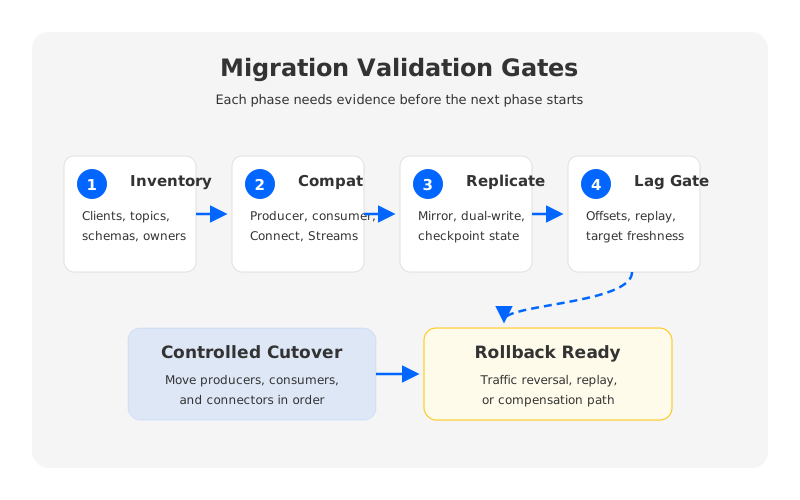
The safest Azure Kafka migration plan is a sequence of gates. Each gate should have an owner, evidence, threshold, and rollback decision.
A practical gate sequence looks like this:
- Inventory gate. Every client, topic, schema, connector, ACL, and operational owner is mapped.
- Compatibility gate. Representative producers, consumers, Connect, Streams, and admin tools work against the target.
- Replication gate. Source-to-target replication or dual-write path is running, with measured lag and error handling.
- Offset gate. Consumer group strategy is tested: translated offsets, timestamp replay, or fresh groups.
- Security gate. Private networking, TLS, SASL, ACLs, and secrets are verified.
- Observability gate. Target dashboards and alerts can detect failure modes SREs expect.
- Cutover gate. DNS, bootstrap configs, producer traffic, consumer groups, and connector tasks move in a controlled order.
- Rollback gate. The team knows the exact point after which rollback becomes replay or compensation rather than traffic reversal.
Rollback must be designed around data direction. If producers move to the target and consumers still read from the source, you need a bridge back or a freeze window. If consumers move first while producers stay on the source, you need replication freshness. Bidirectional writes need a conflict model and should be avoided unless the application semantics are designed for them.
9Where AutoMQ Fits in an Azure Kafka Migration
AutoMQ enters the decision when the goal is to keep Kafka clients and ecosystem patterns while reducing the operational drag of broker-local storage after migration. In a traditional Kafka move, Azure changes the infrastructure provider but not the core scaling constraint: brokers still carry compute and durable log data together.
AutoMQ is a Kafka-compatible streaming platform that shifts durable log storage to shared object storage while keeping Kafka protocol compatibility for clients and common ecosystem components. In an Azure migration, that means the platform team can evaluate a target that preserves Kafka application contracts while changing the storage and scaling model underneath. It does not remove migration work: clients, offsets, schemas, connectors, security, and observability still need validation. It changes the post-cutover destination toward a platform where retention, scaling, and recovery pressure are less tied to broker-local disks.
This is relevant for teams leaving self-managed Kafka because of cost, operational toil, or slow expansion cycles. A shared-storage Kafka-compatible target can make the post-migration model more elastic while preserving the Kafka mental model application teams already use.
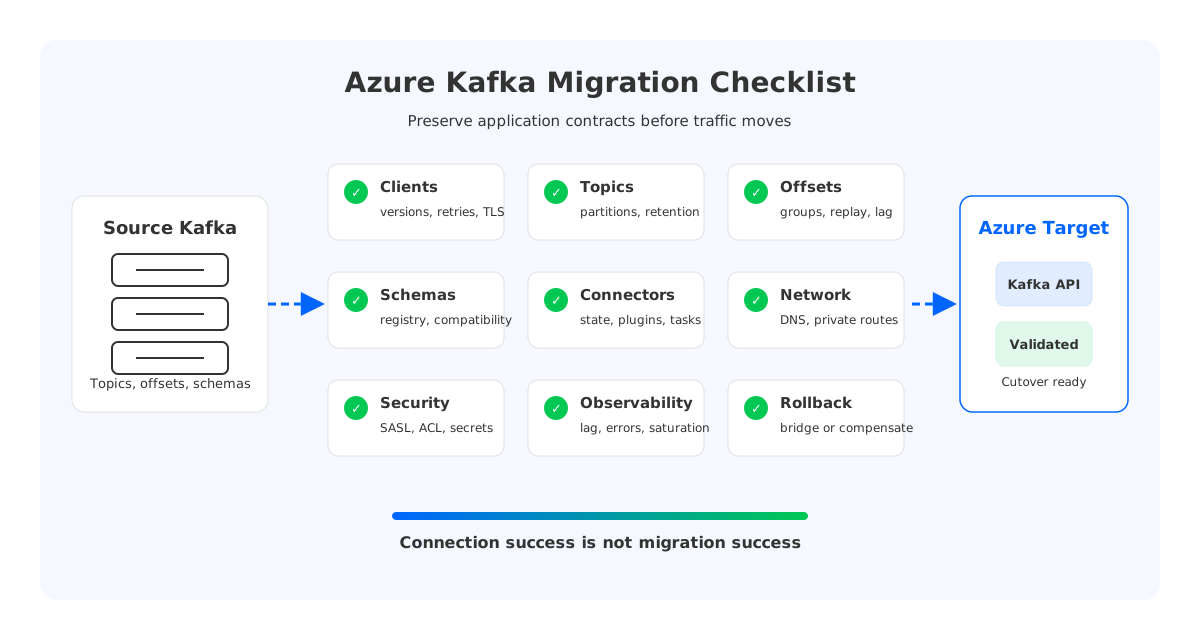
10Final Readiness Checklist
Use the final readiness review to force clarity:
- Clients: producers, consumers, Streams, admin, and connector clients are tested.
- Topics: partitioning, retention, compaction, message size, and ownership are mapped.
- Offsets: consumer group cutover strategy is tested with real records and measurable lag.
- Schemas: registry access, compatibility, serializer versions, and schema ID behavior are verified.
- Connectors: internal topics, source offsets, sink idempotency, secrets, and network paths are rehearsed.
- Networking: DNS, private connectivity, firewall, route, and failover behavior are validated.
- Security: TLS, SASL, ACLs, identity, secret rotation, and audit signals are production-ready.
- Observability: dashboards and alerts answer application progress and platform saturation questions.
- Rollback: the team has a written rollback or compensation plan for each cutover phase.
An Azure Kafka migration succeeds when the applications keep their Kafka contracts, not when the first bootstrap connection works. The checklist should make hidden contracts visible before traffic moves. That is the difference between a migration that merely lands on Azure and one that gives architects, SREs, and data teams a platform they can trust after the cutover weekend ends.
11References
- Microsoft Learn: Migrate from Apache Kafka to Azure Event Hubs
- Microsoft Learn: Use Azure Event Hubs from Apache Kafka applications
- Microsoft Learn: Azure Event Hubs for Apache Kafka developer guide
- Microsoft Learn: Network security for Azure Event Hubs
- Apache Kafka documentation: MirrorMaker 2.0
- Apache Kafka documentation: Kafka Connect configuration
- Apache Kafka documentation: Security
- AutoMQ documentation: Migrating from Apache Kafka to AutoMQ
- AutoMQ documentation: Compatibility with Apache Kafka
12FAQ
12.1Is Event Hubs the same as running Kafka on Azure?
No. Event Hubs provides a Kafka endpoint that allows many Kafka clients to publish and consume, but it is an Azure event streaming service, not an Apache Kafka cluster you operate. Validate client configuration, feature expectations, quotas, retention, consumer group behavior, and observability before treating it as a drop-in replacement.
12.2Should we migrate offsets or start new consumer groups?
It depends on application tolerance for replay or data loss. Critical consumers often need offset preservation or timestamp-based replay testing. Low-risk workloads may start fresh groups, but the team should document the business impact and reset lag alerts accordingly.
12.3Is MirrorMaker 2 enough for an Azure Kafka migration?
MirrorMaker 2 is useful for Kafka-to-Kafka replication and offset checkpointing, but it is not a complete migration plan. You still need schema, connector, security, networking, observability, and rollback validation. It also may not cover every target pattern, especially when the destination is not a Kafka cluster with equivalent behavior.
12.4Where should Kafka Connect run during migration?
Run Connect where it has reliable network access to both Kafka and external systems. For some migrations, that means a temporary bridge environment. For others, it means moving workers into Azure after internal topics, plugins, secrets, and source or sink connectivity have been validated.
12.5When does AutoMQ make sense as an Azure migration target?
AutoMQ is worth evaluating when the team wants Kafka-compatible clients and ecosystem behavior but wants to reduce the long-term operational pressure of broker-local storage. It is most relevant when scaling, retention, recovery, and cost are part of the migration motivation, not when the goal is only to use an Azure-native event ingestion service.


