
Table of Contents
Table of Contents
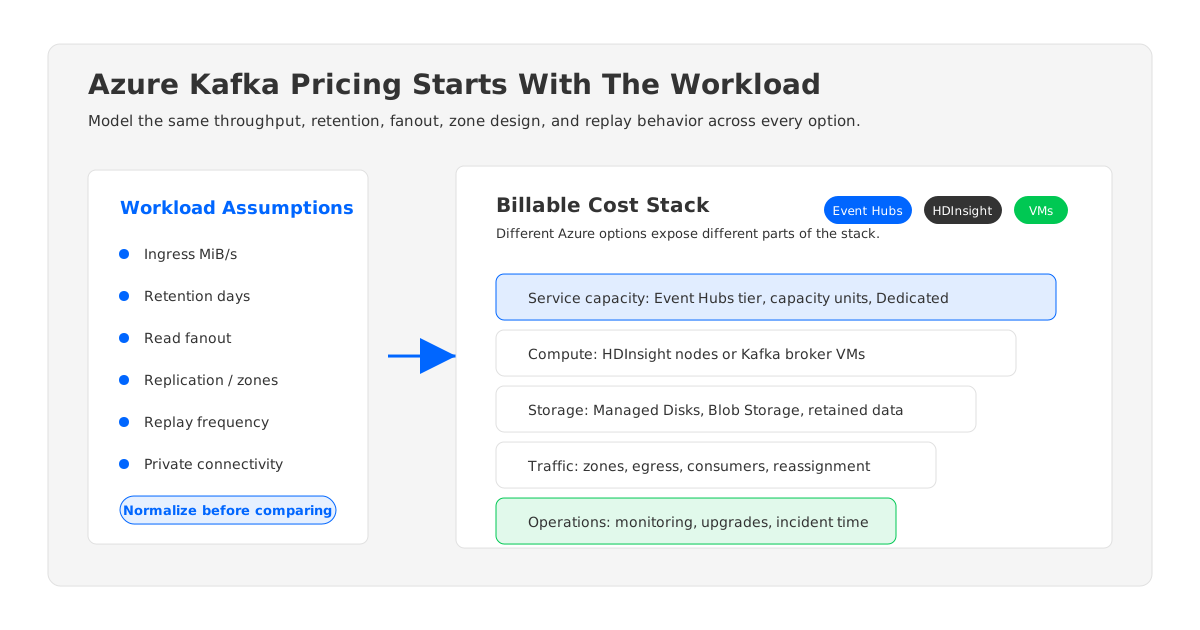
Azure Kafka pricing depends on which "Azure Kafka" you mean. A team using Azure Event Hubs through its Kafka endpoint is paying for a managed event streaming service. A team running Kafka on HDInsight is paying for an Azure-managed Hadoop-style cluster footprint. A platform team deploying Kafka on virtual machines is paying for compute, managed disks, networking, operations, and the mistakes hidden in capacity assumptions. A team evaluating a Kafka-compatible shared-storage platform is modeling a different architecture again.
That distinction matters because Kafka cost is rarely one line item. The visible invoice may say Event Hubs, HDInsight, virtual machines, Managed Disks, Blob Storage, bandwidth, Private Link, or monitoring. The workload, however, thinks in throughput, partitions, retention, replication, read fanout, failover, and data movement. FinOps teams can only compare options when those two views are reconciled.
This guide does not restate Azure price tables. Those pages change by region, tier, reservation, currency, and commercial agreement. Instead, it gives cloud architects, Kafka platform owners, SREs, and budget owners a TCO modeling framework for Kafka-style streaming on Azure. Use it before procurement asks for a number, not after the first invoice creates a surprise.
1The First Question: Which Azure Kafka Option?
"Azure managed Kafka pricing" is an ambiguous search phrase. Microsoft Azure does not reduce every Kafka workload to one managed Kafka SKU. In practice, teams usually compare four patterns.
Event Hubs with the Kafka endpoint is the most Azure-native option. Kafka clients can connect to Event Hubs with configuration changes, while Microsoft operates the underlying service. Pricing is driven by the Event Hubs tier and capacity model, plus optional features such as Capture, networking, and monitoring. It can be a strong fit when the workload maps well to Event Hubs semantics and the team values managed ingestion over full Kafka cluster control.
HDInsight with Kafka is closer to managed infrastructure. Azure provisions and manages the HDInsight cluster service, but the bill still reflects the cluster resources underneath it. Compute nodes, storage, and cluster lifetime matter. This is not the same cost model as a brokerless managed service.
Self-managed Kafka on Azure VMs gives the platform team the most control and the most responsibility. Pricing comes from VM sizes, Managed Disks, availability zones, inter-zone traffic, backup or tiering choices, monitoring, and the human time required to operate Kafka safely.
Kafka-compatible shared-storage platforms, including AutoMQ, separate broker compute from durable storage. In this model, brokers can be more stateless, and long-retention data lives in object storage rather than being pinned primarily to broker-local disks. That does not make cost disappear; it changes which variables dominate the model.
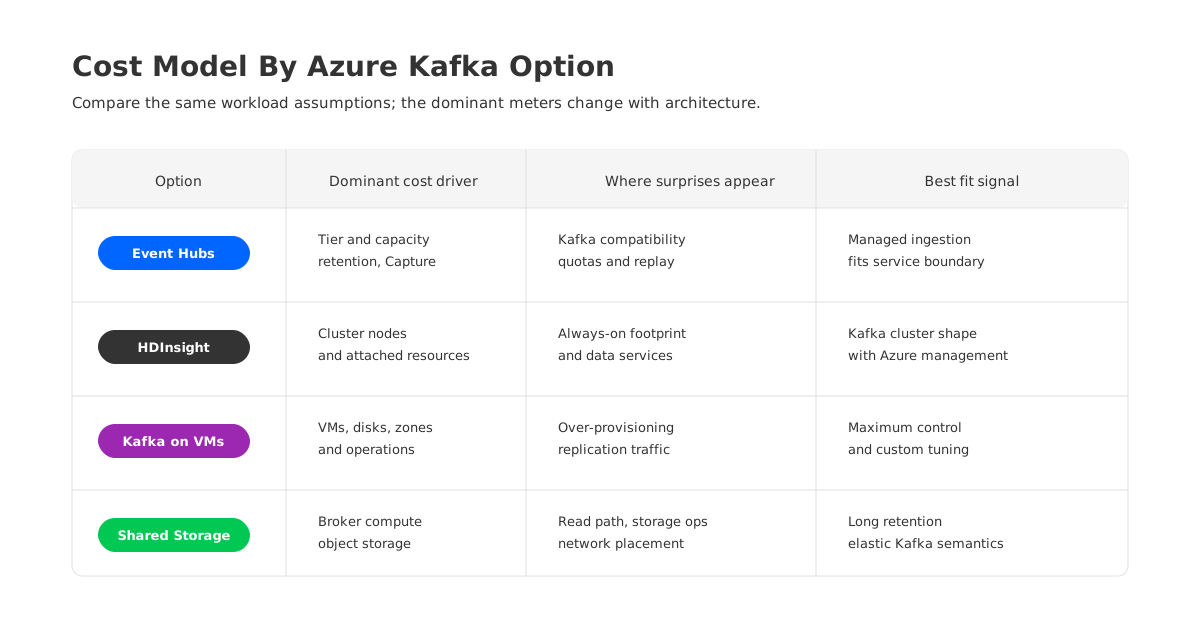
The comparison should start with architecture, not vendor names:
| Option | Main billable surface | Cost model strength | Cost model risk |
|---|---|---|---|
| Event Hubs Kafka endpoint | Event Hubs tier and capacity | Managed service simplicity | Kafka compatibility and quota fit must be validated |
| HDInsight Kafka | Cluster nodes and attached resources | Familiar Kafka cluster shape | Always-on cluster footprint and data estate complexity |
| Kafka on Azure VMs | VMs, disks, traffic, operations | Maximum control | Over-provisioning, replication traffic, disk growth |
| Shared-storage Kafka | Broker compute, object storage, traffic | Elasticity and long-retention economics | Requires architecture review and workload modeling |
The goal is not to declare one option universally lower cost. The goal is to compare the right unit of work: the same ingress rate, retention window, read fanout, durability requirement, network boundary, and operational SLO.
2Event Hubs Kafka Endpoint Pricing Drivers
Event Hubs pricing is built around Event Hubs concepts, not broker concepts. The important variables include tier, capacity units, ingress and egress workload, retained data, Capture, dedicated capacity if used, and networking choices. The Kafka endpoint changes client compatibility; it does not turn Event Hubs into a self-managed Kafka cluster with broker disks and replica placement knobs.
For a pricing model, start with workload shape:
- Ingress throughput: peak and sustained writes, with compression assumptions stated.
- Egress throughput: consumer groups, read fanout, replay frequency, and downstream services.
- Retention: how long data must be available for replay.
- Partitioning: whether required partition count fits the intended tier and namespace design.
- Capture: whether Event Hubs Capture writes data to Azure Storage or Azure Data Lake Storage.
- Connectivity: public endpoint, VNet integration pattern, Private Link, firewall, and cross-region consumers.
This is where many Event Hubs Kafka estimates go wrong. A producer-only proof of concept may look inexpensive because it ignores consumer fanout, replay, long retention, private connectivity, and operational telemetry. Kafka workloads rarely stop at ingestion. They often include real-time consumers, batch backfills, stream processors, connector fleets, and audit replay. Each of those changes the consumed capacity profile.
Use Event Hubs pricing when the service boundary is acceptable. Do not use it as a drop-in price estimate for a Kafka platform unless you have validated admin operations, client behavior, Kafka Connect, Kafka Streams, transaction needs, topic automation, quotas, and monitoring workflows against Event Hubs. A low price for a mismatched workload is not a savings plan; it is a migration risk.
3HDInsight And Self-Managed Kafka Pricing Drivers
HDInsight Kafka and self-managed Kafka look different operationally, but both expose a cluster-shaped cost model. You size machines. You attach storage. You decide how much headroom to keep. You pay for resources while the cluster is running. You also carry the engineering cost of upgrades, incident response, partition balancing, broker replacement, and capacity planning.
For HDInsight, model the cluster as a collection of billable Azure resources rather than a single abstract Kafka price. The HDInsight pricing page describes charges for the cluster service and the underlying compute resources. Kafka teams should also account for storage, networking, monitoring, and any supporting services used by the deployment.
For self-managed Kafka on VMs, the billable surfaces are more explicit:
| Cost layer | What to model | Kafka-specific question |
|---|---|---|
| VM compute | Broker size, controller nodes, ZooKeeper or KRaft controllers, reserved vs on-demand use | What peak throughput and failover headroom must brokers absorb? |
| Managed Disks | Disk type, provisioned size, IOPS, throughput, snapshots | How much replicated retained data sits on broker-local disks? |
| Network | zone, region, internet, and private endpoint data movement | How much traffic is created by replication, consumers, and reassignment? |
| Operations | monitoring, alerting, upgrades, support, incident time | How often does the team rebalance or expand the cluster? |
The uncomfortable part is over-provisioning. Kafka clusters are commonly sized for peak write traffic, replica catch-up, consumer bursts, broker failure, and maintenance windows. If the same broker is responsible for compute and durable local storage, capacity planning tends to bundle CPU, network, and disk together. You may need a larger VM because disk throughput is insufficient, or larger disks because retention grows, even when CPU is not the limiting factor.
4Storage, Retention, And Network Traffic Costs
Kafka pricing on Azure becomes difficult when retention and replication enter the conversation. A logical GiB written to Kafka is not always one GiB of billable infrastructure impact. With replication factor three, data is written to multiple broker disks. With zone-aware placement, replica traffic may cross availability zone boundaries. With multiple consumer groups, the same retained data may be read several times. With partition reassignment, rebalancing can move large volumes of data that are not new business events at all.
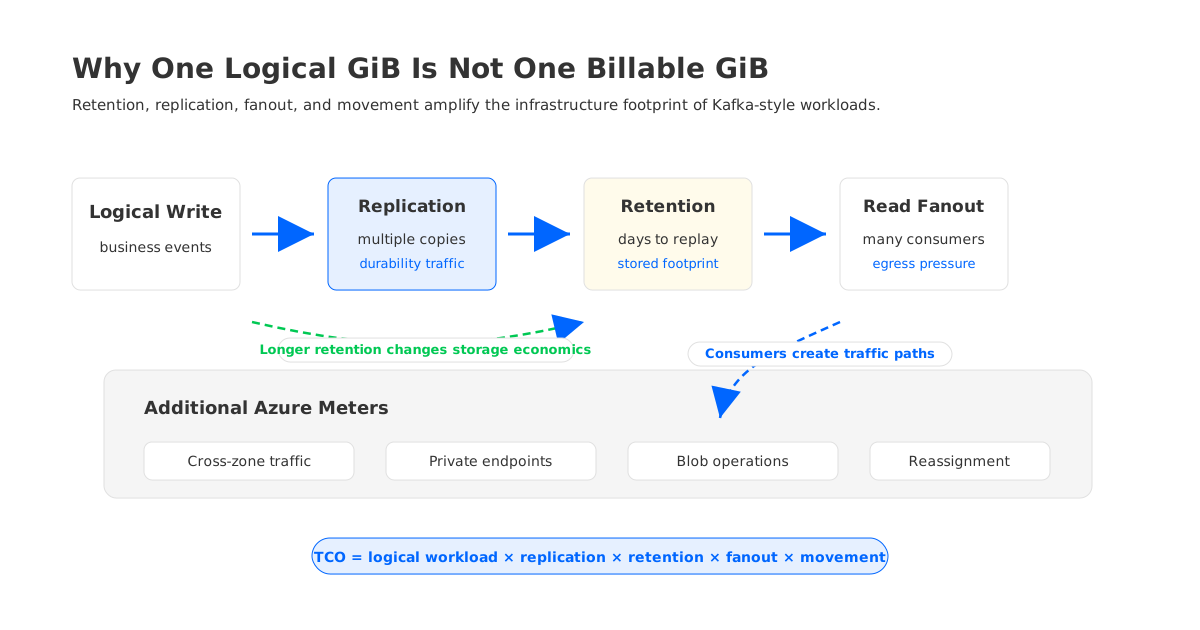
A practical TCO worksheet should separate logical workload from infrastructure amplification:
| Variable | Why it matters |
|---|---|
| Logical write throughput | The business event volume before replication and replays |
| Replication factor | Multiplies broker storage writes and durability traffic |
| Retention period | Converts daily throughput into retained storage footprint |
| Read fanout | Multiplies egress and broker read pressure |
| Zone placement | Can create cross-zone data transfer during replication and reads |
| Reassignment rate | Adds data movement during scaling, repair, and balancing |
Azure pricing pages for Managed Disks, Blob Storage, bandwidth, and Private Link should be treated as separate inputs. Managed Disks are usually modeled by disk type, provisioned capacity, and performance characteristics. Blob Storage pricing depends on account type, redundancy, access tier, operations, and data retrieval patterns. Bandwidth pricing distinguishes types of outbound data transfer. Private Link adds private endpoint and data processing dimensions.
The right model asks: where does each byte travel, how many times is it stored, and which Azure meter sees it? Without that mapping, estimates can undercount the most Kafka-specific parts of the system.
5How Shared-Storage Kafka Changes The Cost Model
Shared-storage Kafka changes the equation by decoupling broker compute from durable storage. AutoMQ is one example of this category: a Kafka-compatible streaming system that uses object storage as the durable storage layer and treats brokers as more stateless than traditional Kafka brokers. The important point for pricing is architectural, not promotional.
In a traditional broker-local design, long retention increases pressure on broker disks. Scaling or replacing brokers can require moving partition data. Replication and recovery traffic can consume network capacity that does not correspond to new application writes. Teams often keep extra broker headroom because storage, compute, and network are tied together.
With shared storage, long-retention data can live in object storage, which changes how teams model retained bytes. Stateless brokers can make scaling more about compute capacity than large partition movement. Reduced dependence on broker-local replicas can lower some data movement and replica traffic pressures, though teams still need to model object storage operations, read paths, availability design, and network placement.
This is why AutoMQ should appear in an Azure Kafka pricing discussion only after the cost anatomy is clear. If a workload has short retention, low fanout, stable traffic, and strong Event Hubs compatibility, a managed service estimate may be compelling. If the workload has long retention, uneven traffic, frequent scaling, Kafka ecosystem dependencies, and strict control requirements, a Kafka-compatible shared-storage architecture deserves a line in the TCO model.
6A Practical Azure Kafka Cost Modeling Framework
Use the same worksheet for every option. Changing the architecture should change the values, not the questions.
Start with workload assumptions:
- Region and availability design.
- Peak and sustained ingress in MiB/s.
- Compression ratio.
- Retention by topic or workload class.
- Number of consumer groups and expected read fanout.
- Replay and backfill frequency.
- Required private connectivity and cross-region access.
- Target recovery time and broker or zone failure assumptions.
Then map each option to billable services:
- For Event Hubs, model tier, capacity units or dedicated capacity, retained data, Capture, namespace design, private connectivity, and monitoring.
- For HDInsight, model cluster nodes, service charges, storage, network traffic, support services, and cluster lifetime.
- For self-managed Kafka, model VM compute, Managed Disks, snapshots, bandwidth, Private Link, monitoring, automation, and engineering operations.
- For shared-storage Kafka, model broker compute, object storage capacity, storage operations, network paths, metadata or control plane components, and operational ownership.
For any numerical example, state the assumptions before showing the result. A useful example would say: East US, sustained 200 MiB/s ingress, compression ratio X, seven-day retention, replication or zone assumptions, two consumer groups with average fanout, private endpoints, and no cross-region replay. Without those assumptions, a cost number is more likely to mislead than help.
The final comparison should include sensitivity analysis. Ask what happens when retention grows from one day to seven days, when a new analytics consumer doubles read fanout, when zone-aware replication is required, or when the business asks for longer replay. Kafka costs often become strategic when these second-order variables change.
7Procurement Questions That Reveal Hidden Cost
Procurement teams usually ask for a quote. Kafka platform teams should ask for a failure-mode price.
What happens to cost when one broker fails? What happens when traffic doubles for two hours? What happens when a team needs to replay three days of data into a new warehouse? What happens when a compliance requirement extends retention? What happens when private connectivity becomes mandatory? What happens when partition movement is triggered during expansion?
These questions are not edge cases. They are normal streaming-platform events. A pricing model that only captures steady-state ingestion will favor the option that hides the most assumptions.
Use this final checklist before choosing:
| Decision area | Question to answer |
|---|---|
| Service fit | Does the workload need Kafka protocol access only, or Kafka platform semantics? |
| Retention economics | Is long retention better held on broker disks, Event Hubs retention, Blob Storage, or shared object storage? |
| Traffic path | Which bytes cross zones, regions, private endpoints, or public egress boundaries? |
| Elasticity | Can capacity scale without large data movement or long rebalance windows? |
| Operations | Who owns upgrades, tuning, incident response, and quota management? |
| Exit path | Can the team keep Kafka clients, connectors, and stream-processing code portable? |
Azure Kafka pricing is not one calculator. It is a model of how your streaming workload uses compute, storage, traffic, and operations. The teams that get the best cost outcomes are not the ones that memorize the latest SKU table. They are the ones that make every byte, replica, replay, and retention day visible before architecture becomes invoice.
8References
- Azure Event Hubs pricing
- Azure Event Hubs for Apache Kafka overview
- Azure HDInsight pricing
- Azure Linux Virtual Machines pricing
- Azure Managed Disks pricing
- Azure Blob Storage pricing
- Azure Bandwidth pricing
- Azure Private Link pricing
- AutoMQ pricing
- AutoMQ documentation
9FAQ
9.1Is Azure Event Hubs the same as managed Kafka on Azure?
No. Event Hubs provides a Kafka-compatible endpoint for many Kafka clients, but it is an Azure event streaming service with its own tiers, quotas, control plane, and pricing model. Treat it as a managed service option, then validate whether your Kafka ecosystem dependencies fit.
9.2What is the biggest hidden cost in Kafka on Azure?
For self-managed Kafka, the hidden cost is often the combination of replicated storage, cross-zone traffic, over-provisioned brokers, and operational time. Long retention and frequent partition movement can make the gap between logical data volume and infrastructure cost much larger than expected.
9.3Should I use HDInsight Kafka or Kafka on VMs for lower cost?
It depends on operational ownership and workload shape. HDInsight can reduce some cluster-management burden, while VMs give more direct control over broker sizing and configuration. Both still require modeling compute, storage, network traffic, monitoring, and Kafka operations.
9.4How should I estimate Event Hubs Kafka pricing?
Start with tier and capacity, then add ingress, egress, retention, Capture, private connectivity, monitoring, and replay behavior. Do not estimate only producer throughput if the workload has multiple consumers or backfill requirements.
9.5Where does AutoMQ fit in Azure Kafka pricing?
AutoMQ fits when teams want Kafka compatibility but need a different cost structure for long retention, scaling, and data movement. Its shared-storage design moves durable data toward object storage and makes brokers more stateless, which can change the storage, traffic, and elasticity assumptions in the TCO model.


