
Table of Contents
Table of Contents
An Azure Kafka replacement fails in boring places. The target cluster can be healthy, the first producer test can pass, and the migration can still break because consumer offsets were not mapped, DNS was cut over too early, connector tasks were forgotten, or the rollback path only existed in a slide. Kafka teams replacing Azure Event Hubs Kafka endpoint, HDInsight Kafka, self-managed Kafka on Azure, or another managed Kafka service need a plan that treats migration as a system change rather than a data copy.
The hard part is not moving bytes. The hard part is preserving application behavior while the write path, read path, security model, network boundary, and operating model are changing at the same time. That is why a practical Azure Kafka migration plan starts with inventory and compatibility, then moves through replication, offset validation, cutover, rollback, and cost modeling.
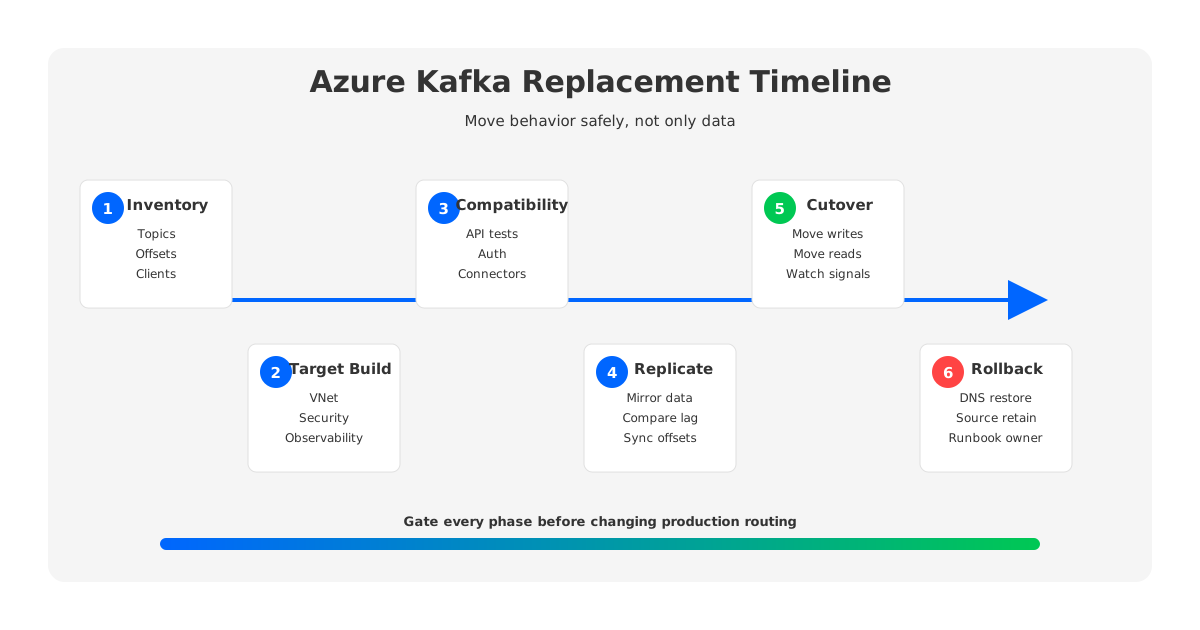
The timeline above is intentionally conservative. Teams that compress these stages often discover the missing dependency during cutover, when the safest action would have been to find it during inventory.
1When Replacement Is Better Than Tuning the Current Setup
Not every Kafka pain on Azure requires replacement. A badly sized Event Hubs namespace, an overloaded broker cluster, or a misconfigured consumer group should be fixed where it runs. Replacement becomes rational when the current platform model no longer matches the workload. The usual signal is recurring architectural friction: the team can tune around symptoms, but the same class of incident keeps coming back.
For Event Hubs Kafka endpoint users, the issue is often a service-model mismatch. Microsoft documents Event Hubs for Apache Kafka as a way for Kafka clients to communicate with Event Hubs by changing configuration, using Kafka protocol support rather than running Kafka brokers. That is useful for many ingestion workloads, but teams with deep Kafka dependencies may need broker-side behavior, AdminClient expectations, Kafka Connect patterns, offset migration control, or operational conventions that do not map cleanly to an Event Hubs service boundary.
For self-managed Kafka on Azure, the issue is usually operations. Broker-local disks, partition reassignment, storage growth, and zone-aware replication can turn every scaling event into a data-movement project. A team may still want Kafka semantics, but no longer want the old storage model to dominate capacity planning and recovery.
2Inventory Your Azure Kafka Environment
Inventory is where migration risk becomes visible. A topic list is not enough because Kafka estates are application ecosystems. Each topic has retention expectations, schemas, producer contracts, consumer groups, connector dependencies, ACLs, network paths, dashboards, and incident playbooks attached to it. If those assets are not recorded, they will be rediscovered at the worst possible time.
Start with a migration inventory that your application owners can verify:
- Topics and partitions: Record partition counts, replication assumptions, retention, compaction, message size, write rate, read fan-out, and topics that are externally shared.
- Consumer groups and offsets: Capture group IDs, committed offset positions, lag patterns, reset policies, and whether applications can tolerate replay or gaps.
- Client behavior: List Kafka client versions, authentication settings, TLS configuration, producer idempotence, transactions, AdminClient usage, and retry behavior.
- Schemas and connectors: Include Schema Registry dependencies, Kafka Connect source and sink tasks, dead-letter topics, stream processors, CDC tools, and batch consumers.
- Network and security paths: Map VNets, private endpoints, firewall rules, DNS names, service principals, secrets, certificates, and cross-region or hybrid links.
- Operational ownership: Identify who owns deployment, monitoring, alerting, incident response, cost review, and rollback approval.
This inventory should be attached to a migration wave, not stored as a generic document. Low-risk topics can move first. Topics with high fan-out, external consumers, exactly-once expectations, or strict data-loss constraints deserve separate waves and stricter gates.
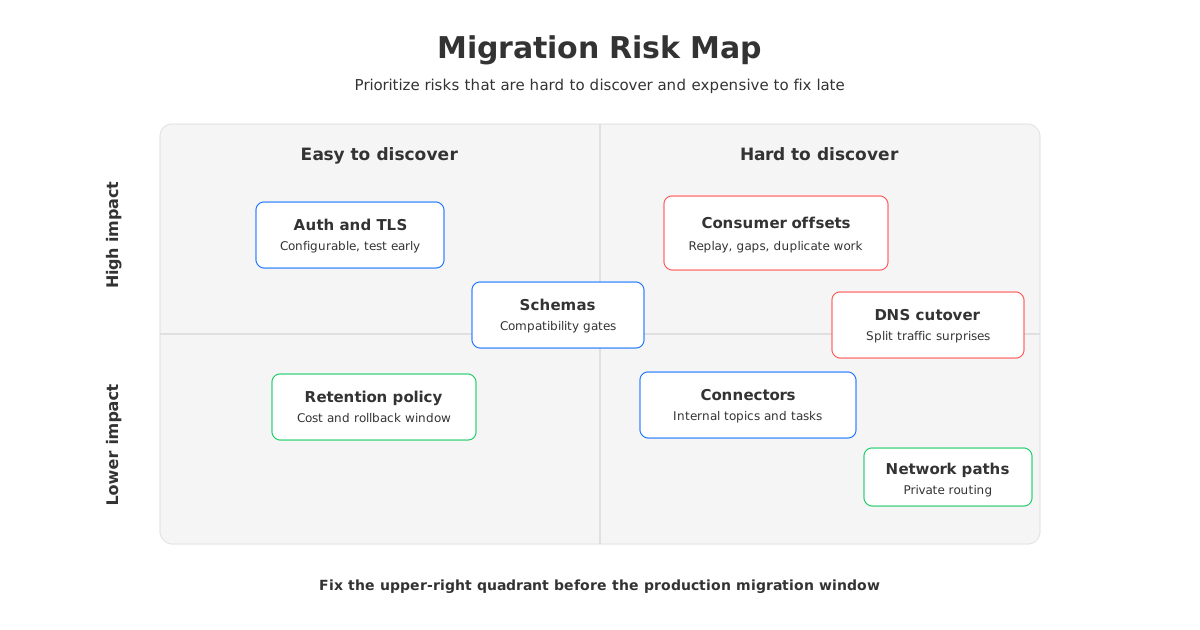
The risk map is a useful steering artifact for platform teams. It keeps the discussion focused on migration failure modes rather than preference debates about vendors or services.
3Validate Compatibility Before Moving Data
Compatibility testing should happen before replication is configured. A basic producer-consumer smoke test proves that a client can connect; it does not prove that the workload can migrate. Event Hubs Kafka endpoint, Apache Kafka clusters, and Kafka-compatible platforms can all support common client flows while differing in supported APIs, configuration behavior, quotas, operational visibility, and failure modes.
Treat compatibility as a contract test. For each application class, run the exact producer and consumer code against the candidate target with production-like settings. Verify authentication, TLS, topic creation or provisioning, headers, compression, batching, idempotent producers, transactions if used, offset commits, consumer rebalances, and AdminClient calls. Kafka Connect and Kafka Streams deserve their own tests because they often depend on internal topics and operational behavior beyond simple produce and consume.
The target choice changes what you test:
| Migration target | Compatibility focus | Main risk to prove early |
|---|---|---|
| Event Hubs Kafka endpoint replacement | Kafka client config, auth, quotas, feature behavior | Protocol compatibility is not equal to full platform equivalence |
| Apache Kafka or HDInsight Kafka | Broker config, storage, replication, operations | Operational burden remains after migration |
| Managed Kafka service | API support, private connectivity, service limits, commercial boundary | Service model may constrain network or governance requirements |
| Kafka-compatible BYOC platform | Client behavior, storage model, deployment boundary, observability | Architecture changes require explicit validation, even when clients remain Kafka-compatible |
AutoMQ belongs in the last category. It can serve as a Kafka-compatible migration target in an Azure BYOC model, with a customer-controlled data plane and object-storage-backed shared storage. The important migration point is not a marketing claim that every workload can move unchanged. The useful point is that teams can validate Kafka clients and ecosystem tools while also evaluating a target architecture that separates broker compute from durable storage.
4Replicate, Compare, and Test Consumer Offsets
Replication is the bridge between the old platform and the target. In Kafka-to-Kafka migrations, teams commonly evaluate tools such as MirrorMaker 2 or managed replication services because they can mirror topics and coordinate offset translation through checkpointing concepts. The practical requirement is simple to state and hard to execute: the target must contain the data applications need, and consumers must resume from positions that match the intended cutover semantics.
Build replication around explicit acceptance checks:
- Topic coverage: Every in-scope topic is mirrored or deliberately excluded, including internal topics used by connectors or stream processors when required.
- Data comparison: Message counts, latest offsets, timestamps, key distribution, and sample payloads are compared between source and target.
- Lag budget: Replication lag has a documented threshold for each wave, with an owner who can decide whether to pause cutover.
- Offset mapping: Consumer group offsets are translated, imported, or reset according to a preapproved policy.
- Replay policy: Each application owner signs off on whether duplicate processing, replay from a checkpoint, or temporary pause is acceptable.
Offset validation deserves special attention because it is where many migration plans overfit to infrastructure and underfit to application semantics. Some consumers can replay safely. Some can replay only if idempotency keys are preserved. Some cannot replay without business impact. The platform team should not guess. Make the replay contract part of the migration wave.
5Design Networking Before Cutover
Azure networking is not a finishing step. It is part of the migration design. Private Endpoint, Private Link, VNet routing, firewall rules, and DNS behavior decide whether applications can reach the target without exposing data paths or creating brittle exceptions. Microsoft documents Private Link as a way to access Azure services through private endpoints in a virtual network, and its private DNS guidance is important because name resolution often becomes the hidden cutover mechanism.
For Kafka teams, the networking checklist should include:
- Bootstrap addresses and advertised listener behavior for every application environment.
- Private connectivity requirements between producers, consumers, replication workers, schema services, and the target.
- DNS cutover sequencing, including TTLs, split-horizon DNS, and rollback records.
- Firewall and identity changes required before the migration window.
- Observability paths for metrics, logs, traces, and packet-level troubleshooting during cutover.
Network design also shapes target-platform choice. A SaaS-managed Kafka service, an Azure-native service, self-managed Kafka, and a BYOC platform do not expose the same responsibility boundary. AutoMQ's Azure BYOC deployment model is relevant for teams that want the Kafka data plane inside their Azure environment, aligned with their VNet and security controls, while still reducing the broker-local storage burden.
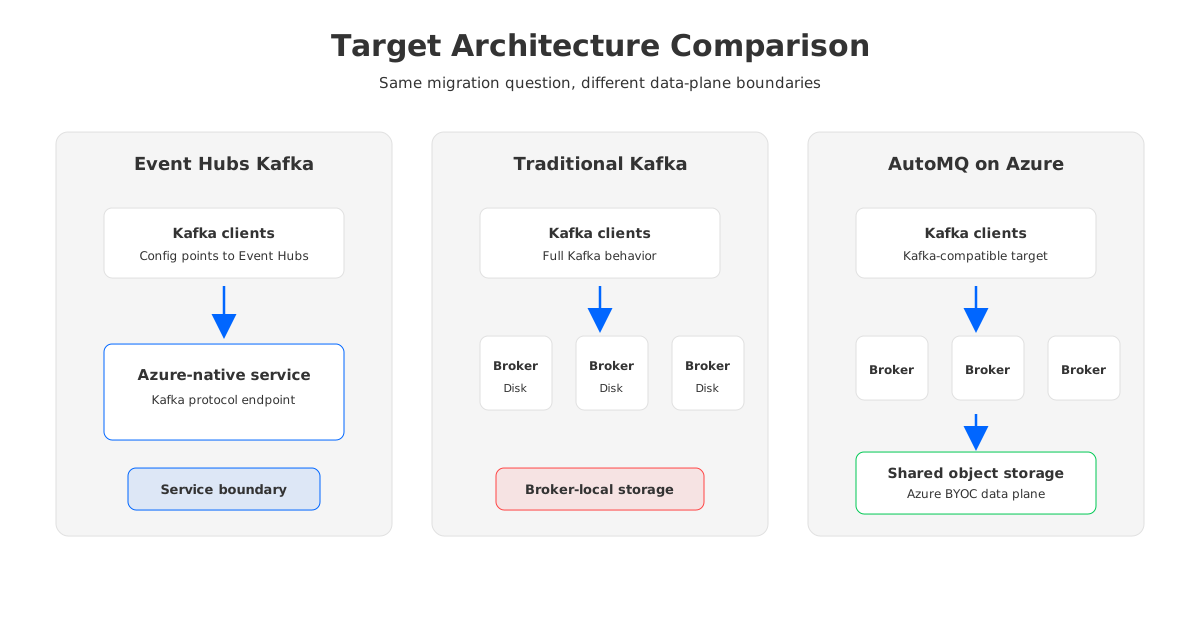
This comparison is not a scorecard. It shows the control boundary. Replacing Azure Kafka is partly a feature decision, but it is equally a decision about where the data plane lives and who operates each layer.
6Cut Over Producers and Consumers Safely
Cutover should be boring. If it feels dramatic, the team probably skipped a gate. The safest approach is to move in waves, starting with topics that have low fan-out, tolerant replay semantics, and clear owners. Do not start with the topic that powers an externally visible customer workflow.
A typical cutover sequence looks like this:
- Freeze the migration wave definition and confirm source, target, owners, and rollback trigger.
- Verify replication lag, data comparison, offset mapping, authentication, DNS, and monitoring.
- Move a small producer group or route writes through a controlled switch, then verify target-side consumption.
- Move consumers according to the approved offset policy.
- Watch lag, error rates, duplicate processing, throughput, latency, and business-level signals.
- Keep source retention long enough to support rollback and forensic comparison.
Rollback must be designed before the migration window. The team needs to know whether rollback means moving clients back to the source, pausing consumers, replaying from source retention, restoring DNS, or running a dual-write window. A rollback plan that depends on fresh data no longer available in the source is not a rollback plan; it is hope written in operational language.
7Model Cost After the Architecture Changes
Azure Kafka replacement is often justified by cost, but cost modeling needs to match the target architecture. A traditional Kafka cluster spends money through compute, disks, replication, over-provisioned capacity, network traffic, operations, and incident recovery. Event Hubs, managed Kafka services, self-managed Kafka, and shared-storage Kafka-compatible platforms expose different cost surfaces.
For a replacement business case, model at least these drivers:
| Cost driver | Why it matters during replacement |
|---|---|
| Write throughput and peak headroom | Determines required capacity and whether the platform must scale elastically |
| Retention window | Drives storage cost and the operational pain of broker-local disk growth |
| Read fan-out | Can turn a low-ingest workload into a high-read workload |
| Zone or region design | Affects replication, availability, networking, and recovery choices |
| Migration tooling and parallel run | Creates temporary double-spend during replication and validation |
| Operations time | Determines whether a lower infrastructure bill is offset by ongoing platform toil |
This is where AutoMQ's architecture can change the discussion. With object-storage-backed shared storage and stateless broker scaling, teams can evaluate a cost model that is less tied to broker-local disk ownership and partition movement. That does not remove the need to calculate throughput, retention, and network paths, but it gives Azure teams a different set of levers than traditional self-managed Kafka.
8The Final Gate Checklist
The final gate should be short enough for an executive review and detailed enough for an SRE to trust. Every item needs an owner and evidence:
- Inventory approved for the migration wave.
- Compatibility tests passed for producers, consumers, connectors, and stream processors.
- Replication running with lag inside the approved threshold.
- Offset policy approved by each application owner.
- Private connectivity, DNS, firewall, and identity changes tested.
- Dashboards and alerts pointed at source, target, and migration tooling.
- Cutover and rollback runbooks rehearsed.
- Source retention window covers the rollback period.
- Cost model includes parallel-run cost and post-migration operating model.
The point of an Azure Kafka replacement is not to prove that a target cluster can accept messages. The point is to change platforms without losing control of application behavior. If your current environment is being replaced because protocol compatibility, cost, data control, and operational elasticity all matter, include Kafka-compatible BYOC options such as AutoMQ in the target architecture review. Then hold every option to the same migration evidence: tested clients, mapped offsets, proven network paths, clear rollback, and a cost model that reflects how the platform actually stores and moves data.
9References
- Microsoft Learn: Azure Event Hubs for Apache Kafka overview
- Microsoft Learn: Use Azure Event Hubs from Apache Kafka applications
- Microsoft Learn: Azure Private Link overview
- Microsoft Learn: Azure Private Endpoint DNS configuration
- Apache Kafka Documentation: Geo-replication and MirrorMaker
- Apache Kafka Documentation: Consumer configuration
- AutoMQ Documentation: Install AutoMQ BYOC environment on Azure
10FAQ
10.1What is the safest first step in an Azure Kafka replacement?
Start with inventory, not replication. Record topics, partitions, consumer groups, offsets, schemas, connectors, client settings, network paths, and application owners before any data movement begins.
10.2Can Event Hubs Kafka endpoint be replaced without rewriting applications?
Sometimes. Kafka clients may be able to move with configuration changes, but teams must validate API behavior, authentication, offsets, connectors, quotas, and operational expectations. A producer-consumer smoke test is not enough.
10.3How should consumer offsets be handled during migration?
Offsets should be mapped, imported, or intentionally reset according to each application's replay tolerance. The right policy depends on whether duplicate processing, replay, or temporary pause is acceptable.
10.4Where does AutoMQ fit in an Azure Kafka migration?
AutoMQ fits when the team wants a Kafka-compatible target with Azure BYOC data-plane control, object-storage-backed shared storage, stateless broker scaling, and less partition-movement burden than traditional broker-local disk Kafka.
10.5What should be included in the rollback plan?
Rollback should define client routing, DNS restoration, offset position, source retention, data comparison, and business approval triggers. It should be executable during the migration window, not invented after a failed cutover.


