
Table of Contents
Table of Contents
The first Kafka retention discussion sounds harmless: keep seven days instead of 24 hours so teams can replay after a bad deployment. The second one is less harmless: keep 30, 60, or 90 days for audit, ML backfills, customer analytics, fraud investigations, or CDC reprocessing. At that point, Azure Kafka retention cost stops being a topic-level setting and becomes an architecture decision.
That shift catches platform teams because Kafka makes retention look simple. You can set retention.ms, cap storage with retention.bytes, use compaction, and move on. But in production, every extra replay day has to live somewhere, be replicated somehow, be read during backfills, and be protected from noisy consumers. On Azure, those choices map to Event Hubs tiers, managed disks, Blob Storage access patterns, zone redundancy, network paths, and the operational model of the Kafka-compatible platform you choose.
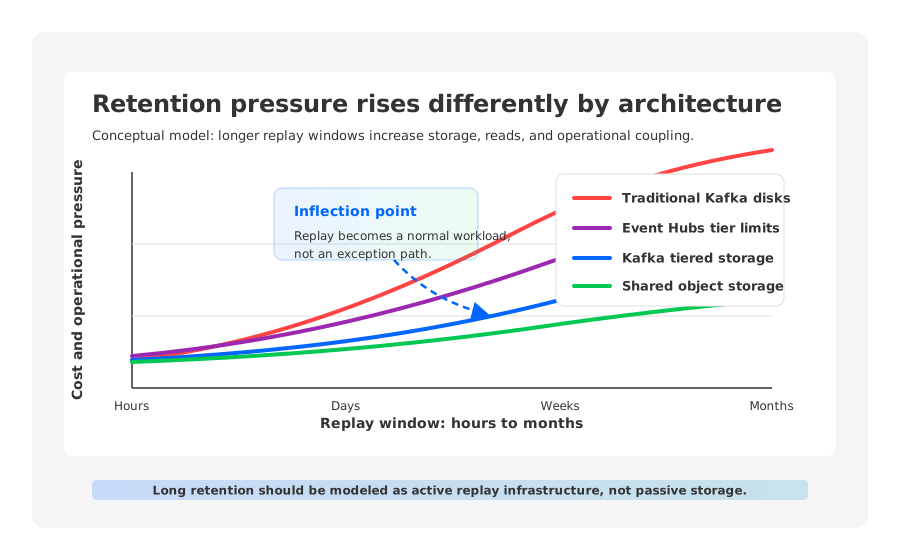
The important question is not “How many days can this service retain data?” It is “What happens when replay changes from an exception to a normal workload?” Short operational replay can optimize for simplicity. Long-term replay has to model stored bytes, replicas, read amplification, storage tier behavior, compaction, and recovery workflows together.
1Why Retention Becomes The Hidden Kafka Cost Multiplier
Retention cost starts with a simple sizing identity:
logical retained bytes =
  write throughput per second
  x seconds retained
  x compression factor
  x retention policy effect
That identity is only the first layer. In traditional Kafka, the footprint also depends on replication factor, broker-local disk headroom, segment overhead, compaction behavior, and whether historical reads fight with hot reads for disk and page cache. A topic that retains 30 days does not cost 30 times a one-day topic in every architecture, but longer retention always increases stored data and cold-read probability.
For Azure platform teams, this creates six budget dimensions that should be reviewed together:
- Stored bytes: The product of ingest rate and replay window. Longer retention multiplies bytes even when traffic is flat.
- Replica strategy: Kafka replication factor multiplies retained data across brokers. Cloud storage redundancy may also sit underneath, so architects should know which durability layers they are paying for.
- Read path: Catch-up consumers, reprocessing jobs, and audit queries turn retained data into read traffic: retrieval, transactions, broker pressure, and downstream egress.
- Storage tier: Azure Managed Disks, Event Hubs retained storage, and Blob Storage access tiers price different behaviors. Low capacity price can be paired with higher access cost or retrieval latency.
- Network path: Replays may cross zones, VNets, private endpoints, or analytics boundaries. A retention design that ignores network placement can surprise FinOps after the first large backfill.
- Compaction and cleanup: Delete retention and log compaction have different cost shapes. Compaction can reduce logical history for keyed topics, but it adds background I/O and should not be treated as free compression.
The architectural mistake is to model retention as passive storage. Kafka retention is active: producers write it, brokers protect it, consumers replay it, and operators rebalance around it.
2Event Hubs Retention Cost Considerations
Azure Event Hubs is often the first Azure-native option in the conversation because it removes broker operations. Microsoft documents tier-specific quotas for retention period and retained storage: Basic supports a one-day maximum retention period, Standard supports up to seven days, and Premium and Dedicated support up to 90 days. The same limits page also lists retained storage capacity by tier, expressed as capacity per Throughput Unit, Processing Unit, or Capacity Unit depending on the tier.
That tier language matters. Event Hubs pricing is not a Kafka broker-and-disk model. Standard is shaped around Throughput Units, Premium around Processing Units, and Dedicated around Capacity Units. Retention is tied to the service tier and capacity envelope. If your replay requirement fits that model, the architecture is clean: no broker disks, no partition reassignment to expand storage, and a managed Azure operational surface.
The fit becomes nuanced when “Kafka retention” means “Kafka as a replayable event log with Kafka ecosystem expectations.” Event Hubs exposes a Kafka endpoint in Standard, Premium, and Dedicated tiers, but remains Event Hubs behind that endpoint. Teams should validate clients, consumer groups, transactions, Connect, Streams, observability, partition behavior, and tooling before treating it as a drop-in long-retention Kafka platform.
| Requirement | Event Hubs Question To Ask |
|---|---|
| Seven days or less | Can Standard meet throughput, retained storage, and compatibility needs? |
| 30 to 90 days | Does Premium or Dedicated satisfy capacity, isolation, and budget constraints? |
| Beyond service retention | Should Capture write to Blob Storage or Data Lake with a separate replay path? |
| Kafka-native replay | Do offsets, transactions, compaction, or tooling require validation? |
Event Hubs Capture can write event data to Azure Blob Storage or Azure Data Lake Storage. That is useful for archival and analytics, but not the same as keeping data inside a Kafka log for transparent replay by existing Kafka consumers. A platform team may choose two retention systems: Event Hubs for online streaming and Blob or Data Lake for historical data.
3Traditional Kafka On Azure Disks
Self-managed Kafka on Azure VMs or Kubernetes gives teams the Kafka control surface they know: broker configs, partitions, retention, compaction, Connect, Streams, transactions, ACLs, monitoring, and upgrades. The tradeoff is that long retention lands directly on broker-owned storage, commonly Managed Disks or AKS persistent volumes.
Traditional Kafka’s strength is local sequential I/O. Hot consumers often read from page cache, and the design works well when retention is short and consumers stay close to the head of the log. Long retention changes the workload. The cluster now needs disk for replicated history, broker headroom for catch-up reads, and operational slack for expansion, partition movement, broker replacement, and compaction.
The cost model looks like this:
billable Kafka storage footprint =
  logical retained bytes
  x replication factor
  x broker headroom
  x disk tier and redundancy choices
There is no universal multiplier because compression, workload shape, segment settings, and disk layout vary. Still, retention capacity is bound to brokers. If disk grows faster than CPU, you may buy larger disks or more brokers before compute needs them. If catch-up reads become intense, historical consumers can disturb hot-path latency.
This is why FinOps conversations around Kafka on Azure should not stop at disk capacity. Azure Managed Disks differ by disk type, performance characteristics, redundancy option, and region pricing. A retention-heavy Kafka cluster may also pay for idle headroom because storage, compute, network, and page cache are coupled inside the broker fleet.
4Blob Storage Is Attractive, But Access Pattern Matters
Azure Blob Storage is the obvious place to look when Kafka retention gets large. Microsoft’s Blob Storage access tiers separate hot, cool, cold, and archive data by access frequency and latency requirements. Hot is optimized for frequent access. Cool and cold lower storage cost for less frequently accessed data but introduce minimum retention guidance and higher access costs. Archive is offline and can require rehydration before reads.
That distinction is why “put old Kafka data in Blob” is not a complete design. Some data is retained for compliance and almost never read. Other data is retained because a team expects to reprocess it after schema changes, model retraining, downstream bugs, or customer investigations. Those are different access patterns.
For Kafka-style replay, the dangerous tier is the one that looks inexpensive until a real replay happens. Cooler Blob tiers can be excellent for archive and batch analytics, but Microsoft documents higher access costs as tiers get cooler and archive rehydration latency measured in hours. If an SRE expects to restart a consumer group and read historical data immediately, archive semantics are the wrong model.
Blob Storage is strongest when the architecture uses it according to its strengths:
- Online object storage for long retained segments when replay is expected but not constantly hot.
- Lifecycle policies for data moving from replayable history into audit archive.
- Analytical copies for lakehouse workloads that read files rather than Kafka offsets.
- Separate cache layers so cold reads do not force every retained byte through broker-local disks.
Object storage changes retention economics only if the streaming platform’s read path, metadata model, compaction strategy, and cache behavior are designed for it.
5Tiered Storage Versus Shared Storage For Replay
Kafka tiered storage and shared-storage Kafka are often grouped together because both involve object storage. They solve different problems.
Kafka tiered storage, as documented in Apache Kafka’s tiered storage configuration, lets older log segments move to remote storage while brokers continue to serve the Kafka API. It can reduce pressure on local disks and make longer retention more practical. The key phrase is “older segments.” The broker still has a local log, local storage responsibilities, and a broker-owned hot path.
Shared-storage Kafka starts from a different premise: durable data should live in shared storage, while brokers behave more like stateless compute plus cache. AutoMQ is one example of this category. It keeps Kafka protocol compatibility but places durable stream data in object storage, uses cache for hot and catch-up reads, and avoids making broker-local disk capacity the primary retention boundary.
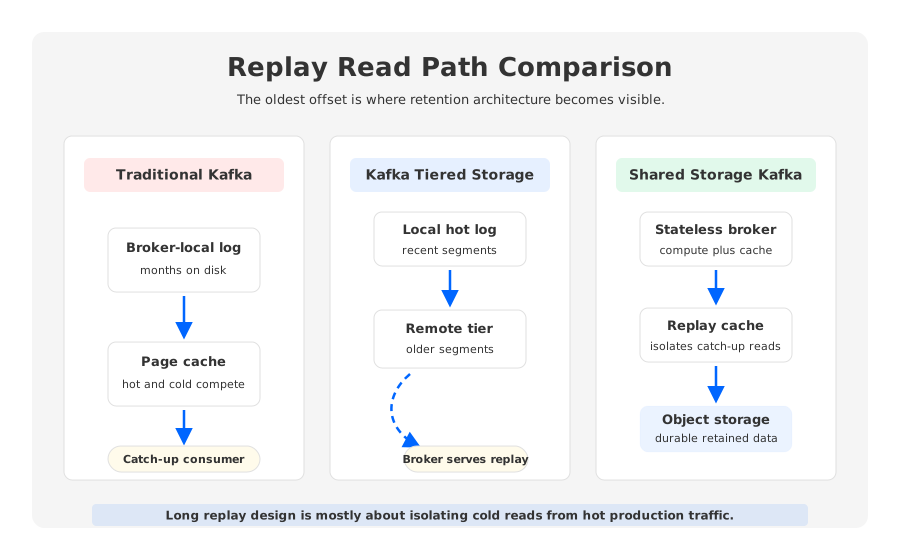
The difference appears during backfills. In disk-bound Kafka, a replaying consumer can drag old segments through broker disks and page cache. In tiered storage, older segments may be fetched from remote storage through the broker path, so operators must test how lagged reads affect hot consumers. In shared-storage designs, cache and object-storage reads are first-class components, shifting tests toward cache hit ratio, object read concurrency, metadata scaling, compaction efficiency, and hot/cold read isolation.
The retention architecture should be chosen by replay behavior, not generic preference for disks or object storage.
| Architecture | Strong Fit | Watch Carefully |
|---|---|---|
| Event Hubs | Azure-native ingestion, documented tier limits | Kafka ecosystem behavior, Capture-to-archive semantics |
| Traditional Kafka | Full Kafka control and mature operations | Disk growth, RF multiplier, page cache pressure |
| Kafka tiered storage | Longer retention with less local disk pressure | Remote read impact, version constraints, compaction |
| Shared-storage Kafka | Long retention, frequent replay, elastic compute | Object-read path testing, cache sizing, compatibility |
6How AutoMQ Fits The Long-Retention Problem
AutoMQ should enter the decision only after the retention problem is clear. If the workload only needs short-lived event ingestion inside Azure, Event Hubs may be simpler. If you already operate Kafka and need a conservative extension, tiered storage may be enough. But when the replay window moves from hours to months and Kafka compatibility still matters, broker-local disk ownership becomes worth questioning.
AutoMQ’s architecture addresses that pressure by keeping durable stream data in object storage and making brokers largely stateless. Hot reads are served through cache, while catch-up reads can fetch retained data without requiring each broker to own months of local disk. In retention-heavy Azure designs, that pattern maps naturally to Blob-style object storage economics and a compute layer less bound to retained capacity.
This is not a claim that object storage makes every workload automatically lower cost. Object storage introduces request patterns, cache sizing choices, metadata management, and compaction responsibilities. AutoMQ’s object compaction work exists because raw objects need organization for efficient retrieval. The practical value is that object storage is the primary durable layer rather than an afterthought bolted onto full local-disk ownership.
For platform teams, the evaluation should be concrete:
- Test hot-path latency near the head of the log.
- Test catch-up reads from the oldest retained offset while hot consumers are active.
- Measure cache hit ratio, object throughput, broker CPU, and lag recovery time.
- Test compaction-heavy topics separately from append-only topics.
- Model cost from current Azure pricing pages.
The right result is a retention design where the replay window can grow without forcing every broker sizing decision to grow with it.
7Retention Architecture Checklist
Before increasing Kafka retention on Azure, write down the replay contract in engineering language. “Keep 90 days” is not enough. A useful contract says who replays, how often, how fast, from where, and with what isolation.
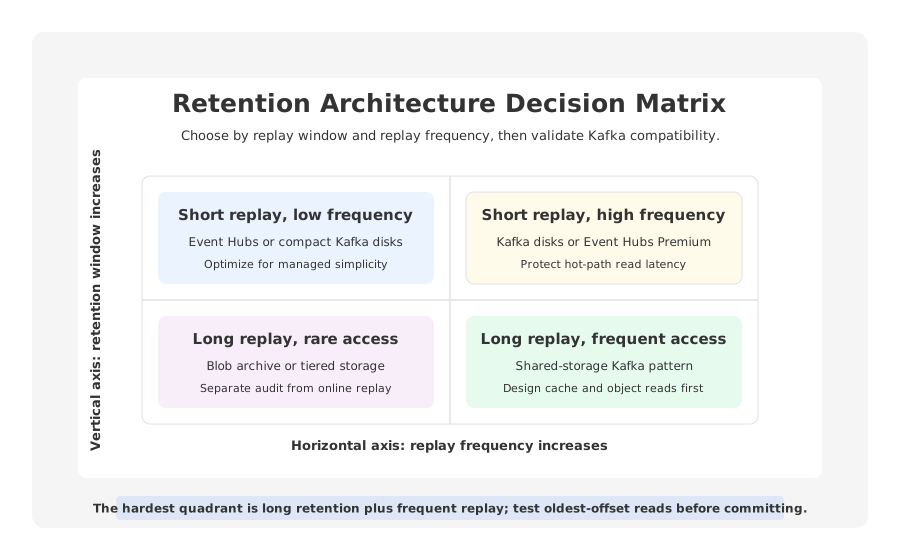
Use this checklist before committing to Event Hubs, disks, tiered storage, or shared storage:
- Define the replay window by use case. Operational recovery, audit, ML backfill, CDC reprocessing, and legal hold may need different paths.
- Separate online replay from archive. Kafka-consumer replay has different requirements from offline audit retention.
- Calculate logical retained bytes first. Use throughput, compression, retention days, and topic policy before choosing a service.
- Apply the architecture multiplier. Include replication factor, broker headroom, retained storage capacity, redundancy, and cache layers.
- Model read cost, not just storage cost. Replays create retrieval, transaction, broker, network, and downstream processing costs.
- Treat compaction as a workload. Compaction can reduce keyed history, but it adds background work.
- Run a replay test at the oldest offset. Many designs look fine until a real backfill reads the coldest data during production traffic.
Long-term replay changes the architecture because it changes what Kafka is being asked to be. A short-retention stream can behave like an operational buffer. A long-retention stream becomes durable event history with production replay obligations. Azure Kafka retention cost is the bill for that architecture.
For teams evaluating that architecture, AutoMQ’s Azure materials and pricing calculator can be useful inputs when comparing Kafka-compatible shared storage against disk-bound Kafka or Event Hubs. The productive next step is to model your retained bytes and run the oldest-offset replay test, where retention assumptions become visible.
8References
- Microsoft Learn: Azure Event Hubs quotas and limits
- Azure Event Hubs pricing
- Microsoft Learn: Access tiers for blob data
- Azure Blob Storage pricing
- Microsoft Learn: Azure managed disk types
- Azure Managed Disks pricing
- Apache Kafka documentation: topic configurations
- Apache Kafka documentation: tiered storage configurations
- AutoMQ documentation: S3Stream shared streaming storage
- AutoMQ documentation: stateless broker
- AutoMQ documentation: 5x catch-up read efficiency
- AutoMQ blog: Efficient data organization in object storage compaction
- AutoMQ pricing calculator
9FAQ
9.1What is the main driver of Azure Kafka retention cost?
The main driver is retained byte volume multiplied by the architecture that stores and serves it. Traditional Kafka adds replication and broker headroom. Event Hubs ties retention to tiers and retained storage capacity. Object-storage-based designs shift data into Blob-style storage, but read pattern and cache design still matter.
9.2Is Event Hubs cheaper than Kafka for long retention on Azure?
It depends on retention length, throughput, replay frequency, and Kafka compatibility. Event Hubs can be attractive for Azure-native ingestion inside documented tier limits. If teams need Kafka-native replay, Connect, Streams, transactions, or long reprocessing, they should validate architecture rather than compare only headline pricing.
9.3Can Azure Blob Storage be used for Kafka retention?
Blob Storage can be part of Kafka retention, especially for archive, analytics, or object-storage-backed streaming platforms. It is not automatically a transparent Kafka log. Teams must decide whether Blob stores an offline copy, tiered segments, or primary durable stream data.
9.4How does Kafka tiered storage differ from shared-storage Kafka?
Tiered storage usually keeps broker-local storage as the hot log and moves older segments to remote storage. Shared-storage Kafka places durable data in object storage as a primary layer, with brokers acting more like compute and cache. The difference matters during scaling, recovery, and long replay.
9.5When should a team evaluate AutoMQ for Azure retention workloads?
Evaluate AutoMQ when the workload needs Kafka compatibility, long retention, frequent replay, and less binding between broker-local disk capacity and retained data. The proof of concept should include hot reads, oldest-offset catch-up reads, compaction-heavy topics, and current Azure cost modeling.


