
Table of Contents
Table of Contents
Search for "Azure Kafka" and the first problem is not Kafka itself. The problem is the phrase. It can mean an Azure-native event ingestion service with a Kafka protocol endpoint, an Apache Kafka cluster on HDInsight, Kafka installed on Azure VMs or AKS, a third-party managed Kafka service, or a Kafka-compatible platform deployed into your own Azure environment. Those are not small implementation differences. They change who owns the brokers, how storage is paid for, how deeply Kafka APIs are supported, and how much operational control your team keeps.
That distinction matters because many Azure data platform teams begin with a narrow question: "What is the Azure Kafka service?" The more useful question is sharper: "Which Azure Kafka option matches my workload's protocol requirements, operational model, retention needs, network boundary, and cost structure?" A telemetry pipeline with basic producers and consumers may fit a very different option than a platform running Kafka Connect, Kafka Streams, long retention, and strict VNet data control.
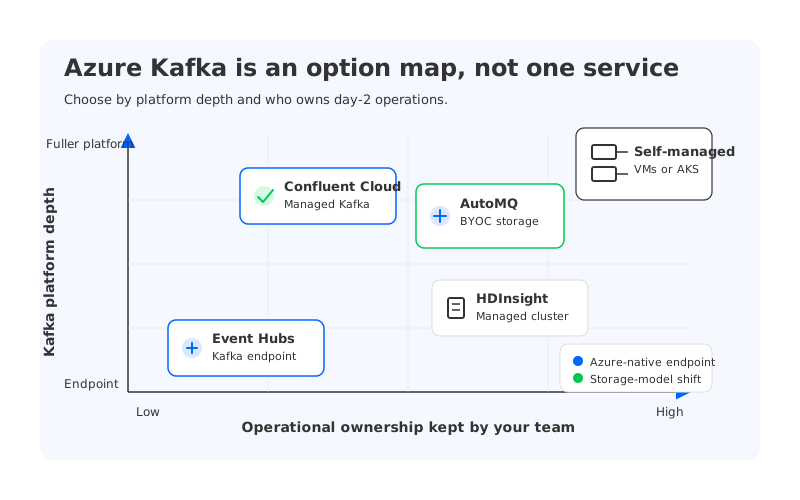
The map above is the practical starting point. "Azure Kafka" is not one product. It is a decision space with five credible routes: Event Hubs Kafka endpoint, HDInsight Kafka, self-managed Apache Kafka, Confluent Cloud on Azure, and AutoMQ deployed in a BYOC model. Each route optimizes for a different definition of "Kafka on Azure."
1Why "Azure Kafka" Is Not One Single Service
Azure has a first-party service that exposes an Apache Kafka protocol endpoint: Azure Event Hubs. Microsoft describes Event Hubs for Apache Kafka as an Event Hubs feature that lets Kafka applications connect to an event hub using the Kafka protocol by changing client configuration rather than running a Kafka cluster. That is useful, but it is not the same thing as operating a Kafka broker fleet.
The difference sounds academic until an application depends on broker-side behavior. Kafka is more than a wire protocol. Teams often depend on AdminClient behavior, topic configuration, broker configuration, Connect operational patterns, Streams behavior, transactions, monitoring conventions, and ecosystem tooling. A Kafka-compatible endpoint can be enough for some workloads, but it does not automatically make the service a full Kafka platform.
The options can be grouped by what they actually give you:
- Kafka protocol endpoint: Event Hubs lets Kafka clients produce and consume against Event Hubs through the Kafka protocol. This reduces cluster operations but shifts you into the Event Hubs service model.
- Managed open-source cluster: HDInsight Kafka gives you Apache Kafka as part of Azure's managed big data platform. You still reason about clusters, nodes, storage, networking, and Kafka operations.
- Self-managed Kafka: Running Apache Kafka on Azure VMs or AKS gives maximum control but puts broker lifecycle, storage design, scaling, upgrades, and incidents on your team.
- Third-party managed Kafka: Confluent Cloud on Azure provides a managed Kafka ecosystem with cloud networking options, private connectivity patterns, and commercial service ownership.
- Kafka-compatible BYOC platform: AutoMQ can run as a Kafka-compatible platform in the customer's Azure environment, using object-storage-backed shared storage and stateless brokers to change the storage and operations model.
The right choice depends on which boundary you are optimizing. If your team only asks whether a Kafka client can connect, you may miss the larger architecture decision.
2Option 1: Azure Event Hubs Kafka Endpoint
Event Hubs is often the first place Azure teams look because it is native to Azure, fully managed, and designed for high-volume event ingestion. Its Kafka endpoint is attractive when producers or consumers already use Kafka client libraries and the team wants to avoid running brokers. Microsoft states that the endpoint is supported in Standard, Premium, and Dedicated tiers, and that Event Hubs for Apache Kafka supports Kafka clients from version 1.0 onward.
This option is strongest when the workload is closer to event ingestion than to a full Kafka platform. IoT telemetry, application events, logs, and service integration streams often care more about managed ingestion, Azure identity integration, and operational simplicity than about broker internals. The trade-off is the service boundary: you do not configure brokers, disks, or broker networks, and you operate within Event Hubs quotas, tiers, and feature behavior. If the workload expects broker control, custom Kafka settings, or broad ecosystem behavior, the compatibility check must be more than a producer-consumer smoke test.
Use Event Hubs Kafka endpoint when the primary goal is Azure-native ingestion with Kafka client convenience. Be more cautious when the primary goal is to preserve an existing Kafka platform with deep operational and ecosystem dependencies.
3Option 2: Apache Kafka on HDInsight
HDInsight is Azure's managed big data cluster platform for open-source frameworks including Apache Kafka, Spark, Hive, HBase, and Hadoop. For teams that want first-party Azure support while still running Apache Kafka as a recognizable cluster, HDInsight Kafka is a more literal interpretation of "Azure Apache Kafka" than Event Hubs Kafka endpoint. You get Kafka clusters, Kafka topics, broker-like operational thinking, VNet placement, and Azure-managed cluster provisioning.
The trade-off is that "managed cluster" is still not "serverless Kafka." Capacity, storage, monitoring, upgrades, and cost governance remain architectural responsibilities. Microsoft also warns in its HDInsight Kafka quickstart that billing is prorated per minute whether a cluster is used or not, so idle capacity and over-provisioning still matter.
HDInsight Kafka makes the most sense when your Azure organization already accepts cluster operations and wants Apache Kafka in a first-party Azure big data environment. It is less compelling when the main reason for moving to Azure is to reduce Kafka operations, avoid local-disk storage planning, or move toward elastic streaming infrastructure.
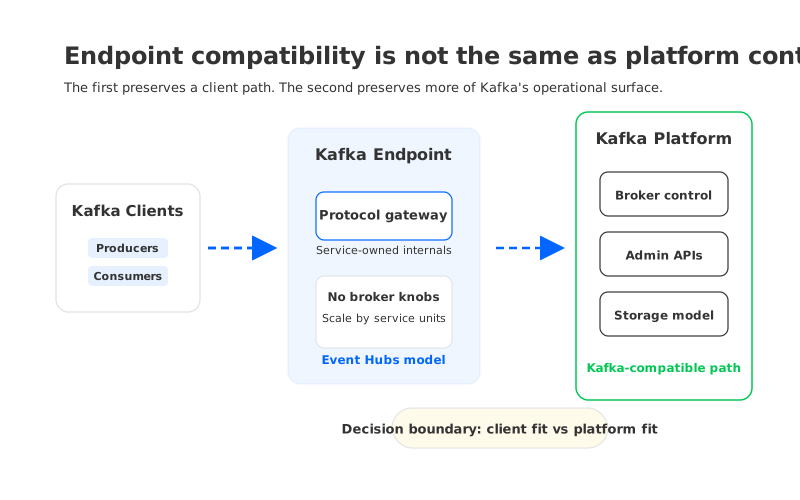
The boundary in the diagram is the one many evaluations miss. A Kafka endpoint can preserve client connectivity for a class of workloads, but a Kafka platform preserves more of the broker-side control surface. Neither model is universally better. They solve different problems.
4Option 3: Self-Managed Kafka on Azure VMs or AKS
Self-managed Kafka remains the control-maximizing option. You choose the Kafka version, broker configuration, storage layout, rack awareness, replication factor, networking model, observability stack, upgrade cadence, and incident procedures. If your platform team has strict requirements around custom plugins or exact open-source Kafka behavior, self-managed Kafka may be the cleanest way to keep those knobs.
The cost is operational drag. Kafka was designed around broker-local persistent storage and replication between brokers. In Azure, that means you must design compute, managed disks, availability zones, replication behavior, backup or tiered storage strategy, and recovery procedures. AKS can improve deployment ergonomics, but it does not remove Kafka's storage coupling by itself.
Self-managed Kafka is reasonable when the organization already has a Kafka platform team and the workload needs deep control. It is a weak default for teams whose real requirement is "Kafka-compatible streaming on Azure" rather than "we want to be in the Kafka operations business."
5Option 4: Confluent Cloud on Azure
Confluent Cloud is the most obvious commercial managed Kafka route for teams that want a broad Kafka ecosystem without running the broker fleet themselves. It can fit organizations that value managed Kafka, Schema Registry, connectors, governance features, and vendor-managed operations. For Azure networking, Confluent documents Azure Private Link options, including dedicated-cluster private connectivity and private endpoint configuration in the customer's Azure VNet.
This option usually enters the shortlist when "Kafka compatibility" means more than basic client connectivity. Teams that rely on Kafka ecosystem conventions often prefer a managed Kafka service over an event-ingestion service with a Kafka endpoint. The main evaluation points are commercial and architectural: private connectivity, connector access, data egress patterns, procurement terms, regional availability, and the fact that the service boundary is vendor-owned.
6Option 5: Kafka-Compatible Platforms in Your Azure Environment
Some Azure teams want a different trade-off: keep Kafka clients and ecosystem behavior, reduce broker-local storage pain, and run the data plane in their own Azure environment. This is where Kafka-compatible platforms with shared storage become relevant. The architectural bet is different: separate durable storage from broker compute.
AutoMQ fits this category. It is a Kafka-compatible cloud-native streaming platform that can be deployed in a BYOC model on Azure, with the data plane inside the customer's Azure Virtual Network. In this model, Azure teams can keep Kafka protocol compatibility while using object-storage-backed shared storage, such as Azure Blob-compatible storage, and stateless brokers. Durable data is not treated as broker-local disk ownership in the traditional Kafka sense.
That architecture matters most under pressure:
- Long retention: When retention windows grow, broker-local disk capacity and replication overhead become planning constraints. Object-storage-backed shared storage changes the retention cost and capacity model.
- Elastic scaling: Adding or replacing broker compute is less tied to moving partition data between machines.
- BYOC control: Customer data plane placement in the Azure environment can align with VNet, security, and compliance expectations that are harder to satisfy with external SaaS-only models.
- Migration continuity: Kafka-compatible behavior lets teams evaluate migration without rewriting every producer, consumer, connector, and operational practice at once.
This does not mean every Azure Kafka workload should use AutoMQ. Event Hubs may be simpler for Azure-native ingestion. Confluent Cloud may win when SaaS-managed ecosystem depth is the priority. Self-managed Kafka remains available for total custom control. AutoMQ belongs in the evaluation when Kafka compatibility, Azure data-plane control, storage cost, and operational elasticity matter together.
7How to Choose by Compatibility, Cost, Operations, and Data Control
A useful Azure Kafka decision starts with the workload, not the vendor list. Two systems may both "support Kafka clients" while having different operational behavior. The cleanest evaluation asks what the application actually depends on.
| Question | Event Hubs Kafka endpoint | HDInsight Kafka | Self-managed Kafka | Confluent Cloud on Azure | AutoMQ on Azure |
|---|---|---|---|---|---|
| Do you need basic Kafka client produce/consume? | Strong fit | Strong fit | Strong fit | Strong fit | Strong fit |
| Do you need full broker-side control? | Limited by service model | Partial cluster control | Strongest | Managed-service boundary | Kafka-compatible platform boundary |
| Is reducing operations the main goal? | Strong fit | Moderate | Weak | Strong fit | Strong fit |
| Is long retention a major cost driver? | Depends on tier and Capture design | Cluster storage planning required | Disk and replication planning required | Service pricing review required | Shared object storage is central to the design |
| Must the data plane run in your Azure environment? | Azure-native service | Azure environment | Azure environment | Depends on SaaS networking and service model | BYOC data plane in customer Azure environment |
| Do you need Kafka ecosystem continuity? | Validate feature by feature | Good for Apache Kafka workloads | Strongest but self-operated | Strong | Strong for Kafka-compatible workloads |
The table is not a scorecard. Each option changes the responsibility boundary. Event Hubs removes broker operations by changing the platform model. Self-managed Kafka preserves control by keeping operations with your team. Confluent shifts much of the platform to a managed service. AutoMQ changes the storage architecture while keeping a Kafka-compatible interface and customer-environment deployment model.
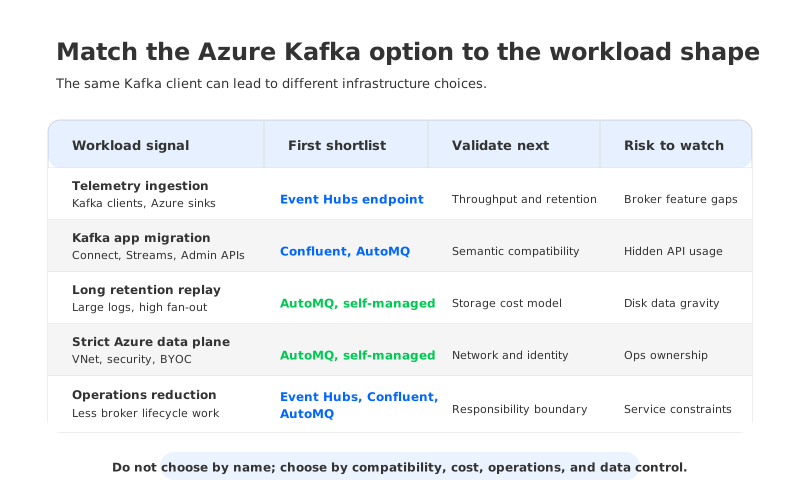
The selection matrix is more useful than a generic feature checklist. It turns "Azure Kafka" into workload questions: telemetry ingestion, Kafka application migration, long-retention replay, regulated BYOC deployment, or cost-pressure case. Each answer points to a different shortlist.
8Migration Checks Before You Choose
The fastest way to make the wrong Azure Kafka choice is to test only a happy-path producer and consumer. That proves the bootstrap path, not the platform fit. A real evaluation should include application, operational, and failure behavior.
Use this migration checklist before selecting a target:
- Client and API behavior: Confirm supported client versions, authentication, topic operations, consumer groups, offsets, Kafka Connect, Kafka Streams, transactions, and AdminClient calls.
- Network and security boundary: Confirm VNet, Private Link or private endpoint patterns, DNS behavior, firewall rules, identity model, and data residency.
- Cost drivers: Model steady-state throughput, peak capacity, retention, read fan-out, zone design, private connectivity, storage, and operations workload.
This checklist forces the core distinction back into view. An Azure Kafka option is not selected by name. It is selected by the operational contract it creates.
9Where AutoMQ Fits for Azure Teams
AutoMQ should not enter the conversation as a generic "Kafka alternative." It fits a specific gap: Azure teams that need Kafka-compatible behavior and want the data plane in their Azure environment, but do not want traditional Kafka's broker-local storage model to dominate scaling, recovery, and retention economics. That gap is common in mature Kafka estates because the first wave of pain rarely comes from producers and consumers. It comes from operating the storage-heavy broker fleet behind them.
The architecture is the reason AutoMQ belongs in the Azure Kafka option map. By using object-storage-backed shared storage and stateless brokers, AutoMQ changes what a broker failure, scale-out event, or retention increase means operationally. For Azure teams, that can align with Blob/object-storage economics, BYOC deployment boundaries, and a desire to keep Kafka clients and tooling relevant.
The decision is still workload-specific. Teams should validate compatibility against their own producers, consumers, connectors, security model, and operational runbooks. If your search for "Azure Kafka" started as a hunt for one product, the better outcome is a shortlist that reflects the workload you actually run. To evaluate the BYOC path, start with the AutoMQ Azure installation guide and compare it against your own VNet, security, and retention requirements.
10References
- Microsoft Learn: Azure Event Hubs for Apache Kafka
- Microsoft Learn: Azure HDInsight documentation
- Microsoft Learn: Create an Apache Kafka cluster in Azure HDInsight
- Confluent Documentation: Use Azure Private Link connections with Confluent Cloud
- AutoMQ Documentation: Install AutoMQ BYOC environment on Azure
11FAQ
11.1Is Azure Kafka the same as Azure Event Hubs?
No. Azure Event Hubs provides a Kafka protocol endpoint, which lets Kafka clients connect to Event Hubs. It is an Azure-native event streaming service, not a Kafka broker cluster that exposes every broker-side control surface.
11.2What is the closest first-party Azure service for Apache Kafka?
For Kafka client compatibility without running brokers, Event Hubs Kafka endpoint is usually the first service to evaluate. For a more literal Apache Kafka cluster on Azure, HDInsight Kafka is the first-party managed cluster option.
11.3Can I run Apache Kafka myself on Azure?
Yes. Teams can run Apache Kafka on Azure VMs or AKS, but they own cluster operations, storage design, upgrades, observability, capacity planning, and incident response.
11.4When should I consider AutoMQ for Kafka on Azure?
Consider AutoMQ when you need Kafka-compatible behavior, customer-environment data plane control, long retention, and a storage architecture based on shared object storage rather than broker-local disks.
11.5How should I compare Azure Kafka options?
Compare them by workload dependency: Kafka API depth, broker-side control, ecosystem tools, retention, cost drivers, network boundary, security model, and who operates the data plane. A basic producer-consumer test is necessary but not sufficient.


