
Table of Contents
Table of Contents
When a platform team searches for azure managed kafka, the question sounds simple: does Azure have a managed Kafka service? The useful answer is more precise than yes or no. Azure offers managed services that accept Kafka protocol traffic, managed big-data clusters that run Apache Kafka, and infrastructure for operating Kafka yourself. Those choices solve different problems.
The difference matters because Kafka teams rarely buy "Kafka" as a label. They need predictable compatibility, operational ownership, security boundaries, cost behavior, and migration risk. A Kafka-compatible endpoint may be enough for telemetry ingestion. A full Kafka platform may be required when applications depend on broker behavior, Kafka AdminClient operations, Kafka Connect, Kafka Streams, custom security models, or deep tuning.
As of June 2, 2026, Microsoft does not position a single first-party "Azure Managed Kafka" product in the same sense that AWS has Amazon MSK. The Microsoft-native path usually starts with Azure Event Hubs for Apache Kafka. If you need an Apache Kafka cluster shape, HDInsight Kafka and self-managed Kafka on Azure infrastructure remain part of the evaluation, with HDInsight support checked before commitment. A Kafka-compatible BYOC platform such as AutoMQ can also fit when the requirement is managed operations while keeping the Kafka data plane in the customer's Azure environment.
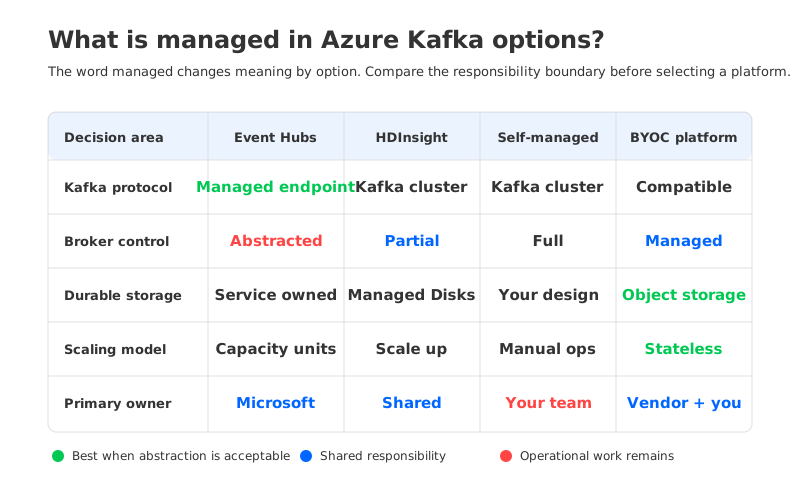
1What "Managed Kafka" Means on Azure
"Managed Kafka" can mean at least four things in Azure architecture reviews. Procurement may assume the provider handles operations. Application teams may assume clients, admin scripts, connectors, and runbooks keep working. FinOps may assume billing follows a native Azure SKU. Security teams may ask where the data plane runs.
Those meanings overlap, but they are not interchangeable:
- Kafka protocol endpoint: Applications use Kafka clients against a managed Azure service endpoint. This reduces cluster operations but does not necessarily expose a configurable Apache Kafka broker cluster.
- Managed Apache Kafka cluster: The service provisions and supports a Kafka cluster shape, while the team still manages partitions, broker capacity, retention, replication, scaling, and rebalancing decisions.
- Self-managed Kafka on Azure: The team runs Kafka on Azure VMs, disks, Kubernetes, or another compute substrate. Azure manages infrastructure primitives, not Kafka operations.
- Managed BYOC Kafka-compatible platform: A vendor manages Kafka-compatible software in the customer's cloud account or VNet, often with a clearer data-control story than SaaS and less operational work than self-managed Kafka.
Treating all four as equivalent creates bad purchase decisions. A managed endpoint fits event ingestion without broker ownership. A managed cluster is better when Kafka semantics and ecosystem compatibility are part of the application contract. A BYOC model matters when regulated teams want managed operations and an Azure-local data plane.
2Event Hubs Kafka Endpoint: Managed Service, Different Platform
Azure Event Hubs is the Microsoft-native answer most teams encounter first. Microsoft describes Event Hubs for Apache Kafka as a way to stream data from Kafka applications without setting up a Kafka cluster. Applications often change configuration, such as the bootstrap endpoint and authentication settings, rather than application code. Event Hubs maps familiar Kafka concepts into its own service model: namespace, event hub, partition, and consumer group.
That is practical for teams that want managed ingestion. Event Hubs handles the service backend, exposes a stable endpoint, integrates with Azure identity and networking patterns, and bills through Event Hubs capacity constructs. For Azure-first telemetry, IoT, logs, and application events flowing into Azure analytics, this can be the right abstraction.
The boundary appears when "Kafka endpoint" becomes "Kafka platform" in a planning document. Microsoft documentation is explicit that Event Hubs is fully managed and does not provide broker-side configuration access. Client-side Kafka settings are configurable; broker/server settings are managed by Event Hubs; topic-level settings are limited and handled through Azure management paths.
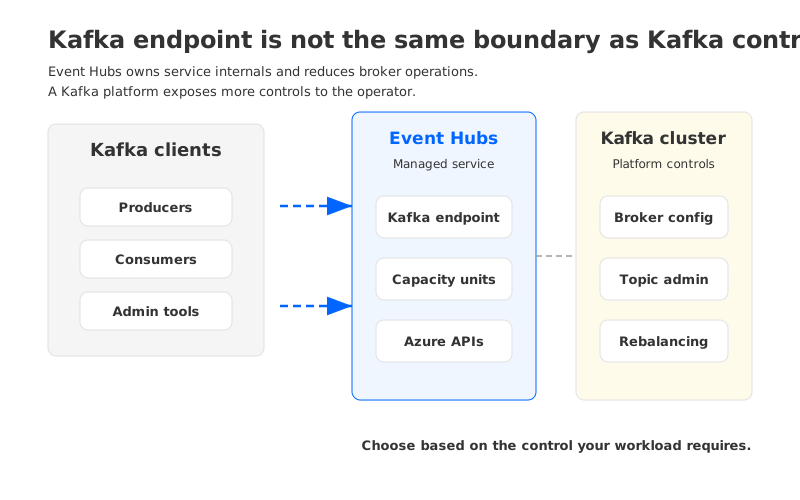
That changes the evaluation for workloads beyond basic produce and consume paths:
- Broker-side tuning: Event Hubs intentionally abstracts broker configuration, log segment behavior, replica placement, and cluster-level tuning.
- Administration model: If automation depends on Kafka AdminClient behavior, test the exact commands and failure modes.
- Ecosystem dependencies: Kafka Connect, Kafka Streams, Schema Registry, MirrorMaker, ksqlDB, Flink integrations, and security plugins need specific validation.
- Throughput and retention model: Event Hubs scales through Azure service capacity units, not broker counts, disks, and partition rebalancing.
The clean framing is not "less Kafka." Event Hubs is a managed Azure event-ingestion service with Kafka protocol support. That lets it win the right workloads without creating surprises for teams that actually need a Kafka platform.
3HDInsight and Self-Managed Kafka: Kafka Control with Operational Work
If Event Hubs abstracts too much, the next Azure-native path is Apache Kafka on HDInsight or a self-managed Kafka deployment on Azure infrastructure. HDInsight Kafka provides a Microsoft-supported cluster service with Apache Kafka running on worker nodes. Microsoft documentation describes Kafka on HDInsight as a managed service with a simplified configuration process, Azure Managed Disks as the backing store, monitoring integration through Azure Monitor logs, and scale-up through Azure management interfaces. It is still a versioned HDInsight service, so support status matters: Microsoft Learn lists HDInsight 5.1 as the current generally available target and documents retirement behavior for older versions.
That gives Kafka teams more familiar control than Event Hubs. Producers talk to brokers, topics partition records across brokers, replication protects against broker outages, and Kafka operational concepts remain visible. The trade-off is familiar Kafka work. HDInsight documentation notes that after scaling worker nodes, Kafka partition replicas should be rebalanced so the cluster can use the new capacity. It also notes that HDInsight Kafka does not support downward scaling of brokers within a cluster.
Self-managed Kafka on Azure gives the most control and the largest operational surface. Teams choose VM families, disks, zones, networking, operators, monitoring, and upgrades. That may be necessary for customized deployments, but Azure is then managing primitives, not the Kafka service.
For procurement, the important distinction is where the bill and the risk land:
| Option | What Azure manages | What the Kafka team still owns | Best fit |
|---|---|---|---|
| Event Hubs Kafka endpoint | Event ingestion service, endpoint, service scaling model | Kafka compatibility testing, client configuration, service limits, migration semantics | Azure-native ingestion and analytics integration |
| HDInsight Kafka | Cluster provisioning, supported configuration, Azure infrastructure integration | Kafka capacity planning, partition strategy, replica rebalancing, version lifecycle decisions | Teams needing a real Kafka cluster shape on Azure |
| Self-managed Kafka | Infrastructure primitives | Nearly all Kafka operations | Highly customized Kafka deployments |
| Managed BYOC alternative | Kafka-compatible platform operations within customer cloud boundary | Vendor evaluation, cloud resource policy, shared responsibility controls | Teams needing Kafka compatibility, managed operations, and data-plane control |
No row is universally right. The question is whether the workload values Azure-native abstraction more than Kafka platform control.
4Evaluation Criteria for Production Kafka Teams
A serious kafka managed service azure evaluation should start with the workload contract, not with a vendor list. Kafka is often an application protocol, a data contract, and an operational contract at the same time. Breaking one of those can turn a "managed" migration into a compatibility project.
4.1Client and Protocol Compatibility
Start with the exact clients in production: Java, librdkafka, Go, Python, .NET, Kafka Streams, or framework-managed clients inside Spark, Flink, Debezium, or Kafka Connect. Event Hubs supports Kafka protocol access, but Microsoft publishes Event Hubs-specific configuration guidance, including request size constraints, timeout recommendations, and compression support. That makes the boundary testable.
Treat compatibility as a workload test matrix:
- Can producers preserve required keys, partitioning behavior, compression choices, and retry semantics?
- Can consumers preserve group behavior, offset commit patterns, lag monitoring, and rebalancing assumptions?
- Can platform automation create, describe, alter, and delete resources through a supported control path?
- Can the team observe throttling, connection resets, quota limits, and broker-side errors in a way existing runbooks understand?
If the answer is yes for the critical paths, a Kafka endpoint may be enough. If the answer depends on broker internals or exact Kafka admin behavior, you need a Kafka platform, not only a Kafka listener.
4.2Broker-Side Configuration and Operations
Managed services intentionally remove control. That is the point. The problem starts when the removed control was part of your production safety model. Some teams have simple Kafka usage: fixed retention, basic traffic, no unusual broker configuration, and no custom automation. Others rely on topic policies, quota behavior, security controls, replication settings, and operational hooks.
Name the controls you are willing to give up. If the managed service owns broker replication, retention enforcement, scaling units, network routing, and failure handling, your team must be comfortable with service-level behavior rather than broker-level behavior. If your risk model depends on broker-level visibility, HDInsight, self-managed Kafka, or a Kafka-compatible platform with exposed Kafka operations may fit better.
4.3Connect, Streams, and Admin Tooling
Kafka's ecosystem is often the reason teams hesitate to move. The hard part is not a producer sending records; it is the tooling around that producer. Kafka Connect workers may rely on internal topics, offset storage, and restart patterns. Kafka Streams applications may care about repartition topics, changelog topics, and state-store recovery. Admin tooling may assume Kafka cluster metadata behaves like Apache Kafka.
Procurement language should be precise here. "Kafka-compatible" is not a certificate that every ecosystem tool works in every mode. Ask for test evidence on the components you run, not generic compatibility statements.
4.4Storage and Cost Model
Kafka cost on Azure is not only the service list price. It includes compute, storage, replication, network traffic, retention, over-provisioning, operations, and migration risk. Event Hubs prices through service capacity and retention features. HDInsight uses cluster infrastructure such as VMs and Managed Disks. Self-managed Kafka adds labor and usually conservative over-provisioning.
For FinOps teams, the key architecture question is whether durable data is tied to broker-local or broker-attached disks. Traditional Kafka keeps primary data on broker storage and uses replication across brokers for durability. That gives strong local control, but it turns scaling and recovery into data-movement problems. When retention grows, disks grow. When brokers change, partitions move.
5Where AutoMQ Fits as an Azure Managed Kafka Alternative
After the evaluation criteria are clear, AutoMQ enters as one architecture category rather than a generic replacement pitch: a Kafka-compatible, cloud-native streaming platform that separates broker compute from durable storage. In an Azure context, the relevant deployment model is usually BYOC, where the Kafka-compatible data plane runs in the customer's Azure environment and the team keeps control over network and data boundaries.
AutoMQ's design changes the part of Kafka that creates much of the operational work. Traditional Kafka brokers own local persistent data. AutoMQ uses shared object-storage-backed storage and makes brokers stateless from an operational perspective. The practical effect is that broker replacement, scaling, and partition movement are less tied to copying large amounts of local disk data. For Azure teams, the question becomes whether they want Kafka compatibility with a cloud storage model instead of disk-bound cluster operations.
This does not make AutoMQ the default answer for every managed kafka azure search. Event Hubs remains a strong fit when Azure-native ingestion is the priority and the application can accept the Event Hubs abstraction. HDInsight or self-managed Kafka may fit when teams want direct Apache Kafka control and can staff the operational work. AutoMQ is most relevant when teams need a managed Kafka-compatible platform, an Azure-local data plane, and less broker-local disk management.
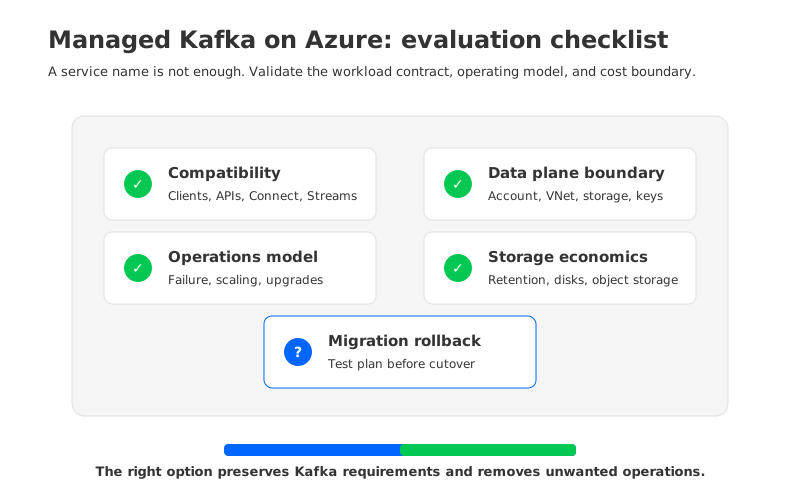
The vendor questions should be concrete:
- Where does the data plane run, and who owns the Azure account, VNet, storage account, keys, logs, and metrics?
- Which Kafka APIs, clients, Connect patterns, Streams patterns, and admin operations are validated?
- What happens during broker failure, scaling, storage growth, zone impairment, and version upgrade?
- Which costs are billed by Azure, which are billed by the vendor, and which are operational labor hidden outside the invoice?
- What is the rollback path if a migration exposes compatibility gaps?
For teams evaluating an azure managed kafka alternative, these questions prevent the classic procurement failure: buying "managed" before defining what must remain Kafka.
6Decision Framework: Which Azure Kafka Option Fits?
Use the simplest option that preserves the workload contract. If producers and consumers use Kafka clients mainly as an ingestion protocol and the downstream system is already Azure analytics, start with Event Hubs. If the application is tightly coupled to Apache Kafka behavior, test whether HDInsight Kafka or self-managed Kafka gives the control you need, and be honest about the operations budget. Running Kafka on Azure is still running Kafka.
If your organization wants Kafka compatibility, managed operations, and data-plane control inside Azure, evaluate BYOC alternatives. This is where AutoMQ can be considered alongside other managed Kafka choices. The decisive factor is whether the architecture preserves your Kafka contract while removing work your team no longer wants to own.
The original search question was "does Azure have managed Kafka?" A better production question is: which parts of Kafka do we need to keep, and which parts do we want someone else to manage? For teams testing BYOC, review the AutoMQ architecture and environment model against Azure networking, identity, and FinOps requirements before writing a migration plan.
7References
- Microsoft Learn: What is Azure Event Hubs for Apache Kafka?
- Microsoft Learn: Apache Kafka client configurations for Azure Event Hubs
- Microsoft Learn: What is Apache Kafka in Azure HDInsight
- Microsoft Learn: Azure HDInsight component retirements and action required
- Microsoft Azure: Event Hubs pricing
- Microsoft Azure: HDInsight pricing
- AutoMQ Docs: AutoMQ overview
- AutoMQ Docs: AutoMQ architecture overview
- AutoMQ Docs: AutoMQ Cloud BYOC environment overview
8FAQ
8.1Does Azure have a managed Kafka service?
Azure has managed services that support Kafka workloads, but the meaning depends on what you need. Event Hubs provides a managed event-ingestion service with an Apache Kafka endpoint. HDInsight can run Apache Kafka in a Microsoft-supported cluster service. Azure also provides infrastructure for self-managed Kafka.
8.2Is Azure Event Hubs the same as Apache Kafka?
No. Event Hubs accepts Kafka protocol traffic and maps important Kafka concepts to Event Hubs concepts, but it is a different managed service. Microsoft documents that users do not have broker-side configuration access in Event Hubs.
8.3When should I use Event Hubs instead of a Kafka cluster on Azure?
Use Event Hubs when the workload needs managed ingestion, Azure-native integration, Kafka client access, and low broker-operations overhead. Be cautious when the workload depends on Kafka AdminClient behavior, broker configuration, Kafka Connect internals, Kafka Streams semantics, or specific operational tooling.
8.4When does a BYOC managed Kafka alternative make sense on Azure?
BYOC makes sense when the team wants managed operations but needs the data plane inside its Azure environment for security, network, governance, or cost-control reasons. AutoMQ fits this category as a Kafka-compatible platform with shared object-storage-backed storage and stateless brokers.
8.5What should procurement ask before buying managed Kafka on Azure?
Ask what is managed, where the data plane runs, which Kafka APIs and tools are validated, how scaling and failure recovery work, how retention and storage are billed, and what rollback path exists. The phrase "managed Kafka" is not specific enough for a production purchase.


