
Table of Contents
Table of Contents
The strongest Azure Kafka alternative is rarely the vendor with the shortest pitch. It is the platform whose responsibility boundary matches the reason your team is replacing Kafka. A team frustrated by Event Hubs Kafka endpoint limitations is solving a different problem from a FinOps team reducing long-retention storage cost. A CTO evaluating data-plane control has a different risk model than an SRE team trying to stop broker scaling from becoming a weekend operation.
That is why ranked lists are weak for serious Kafka decisions. They mix protocol endpoints, managed clusters, SaaS services, self-managed deployments, and shared-storage Kafka platforms as if interchangeable. They are not. Each category moves a different part of the Kafka operating model into the provider, the customer cloud account, or the platform team.
For Azure teams, the practical question is sharper: which alternative preserves enough Kafka behavior while changing the cost, storage, and operations model that made the current platform painful?
1The Pain Determines The Category
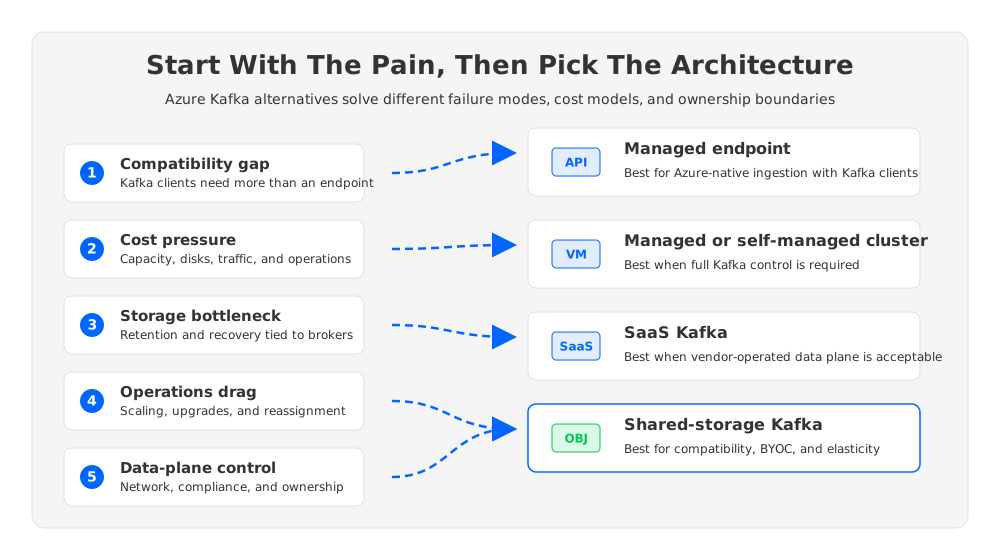
"Azure Kafka alternative" can mean at least five things. Microsoft Event Hubs gives Kafka clients a managed Azure streaming endpoint. Azure HDInsight and self-managed Kafka keep you closer to Apache Kafka cluster semantics. SaaS Kafka services shift more operational work to a vendor. Kafka-compatible BYOC platforms keep the data plane closer to the customer's cloud boundary. Shared-storage Kafka changes the architecture underneath the brokers by moving durable data away from broker-local disks.
Those categories matter because Kafka is not one requirement. It is a bundle of client protocol behavior, topic and partition semantics, consumer groups, admin operations, connector ecosystems, stream processing dependencies, observability expectations, and recovery runbooks. A platform can satisfy one layer and still disappoint another.
Replacement projects usually begin with one of these pain patterns:
- Compatibility gap: existing applications, connectors, or admin workflows assume Apache Kafka behavior that a protocol endpoint does not fully provide.
- Cost pressure: the bill is shaped by provisioned capacity, managed disks, retained bytes, inter-zone traffic, peak sizing, or vendor service units.
- Storage bottleneck: long retention, frequent replays, or broker replacement keeps dragging the team back into disk sizing and data movement.
- Operations drag: scaling, partition reassignment, upgrades, and failure recovery require too much manual coordination.
- Data-control requirements: security, compliance, or procurement teams want the data plane inside a known Azure network and account boundary.
If your primary problem is Azure-native event ingestion, Event Hubs may be the right answer. If your primary problem is maintaining Apache Kafka control, a managed or self-managed cluster may be the first candidate. If your primary problem is Kafka's broker-local storage model, the stronger answer is likely a Kafka-compatible shared-storage architecture.
2A Five-Dimensional Evaluation Framework
Start with a framework before discussing vendors. It keeps the decision honest and prevents a common procurement mistake: buying a lower-operations product that does not support the workload that made Kafka valuable.
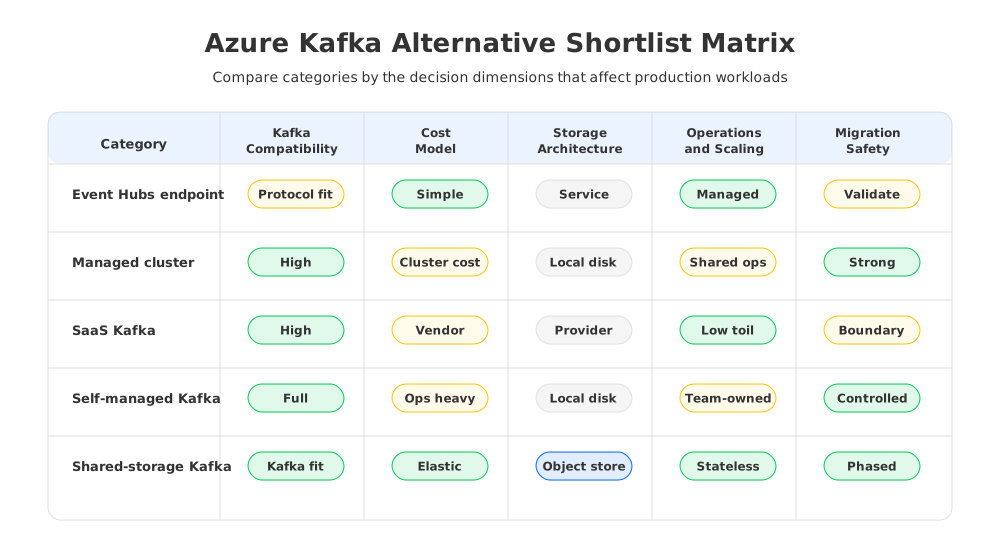
| Dimension | What to test | Why it matters |
|---|---|---|
| Compatibility | Producer and consumer clients, consumer groups, transactions, admin APIs, Kafka Connect, Kafka Streams, schema tooling, monitoring agents | "Kafka-compatible" must be proven against the application contract, not assumed from a protocol label. |
| Cost model | Provisioned capacity, compute nodes, managed disks, object storage, retained bytes, storage operations, inter-zone or egress paths, operational labor | The lowest line item is not always the lowest total cost. Kafka cost follows workload shape. |
| Storage architecture | Broker-local disks, managed service abstraction, tiered storage, shared object storage, recovery path after broker loss | Storage decides whether scaling and recovery are compute events or data-movement events. |
| Operations and scaling | Broker replacement, scale-out, scale-in, upgrades, partition movement, observability, incident handoff | SRE teams need to know which failures still wake them up. |
| Migration safety | Client compatibility tests, offset strategy, rollback design, network paths, security mapping, phased cutover | A successful migration preserves behavior under failure, not only under happy-path traffic. |
This framework also separates two questions that often get mixed together. "Can my client connect?" is a compatibility question. "Can my production system behave the same way during rebalances, failover, replays, and admin operations?" is a migration-safety question. Treating the first as proof of the second creates hidden risk.
3Category 1: Event Hubs Kafka Endpoint
Azure Event Hubs for Apache Kafka is often the first Azure-native option because it allows Kafka clients to connect to Event Hubs without running Kafka brokers. Microsoft documents Event Hubs as a Kafka endpoint on an event hub, with Kafka topics mapping to event hubs and Kafka clients connecting to the Event Hubs service. For teams sending telemetry, service events, or application logs into Azure analytics, this can be a clean fit.
The value is operational. There are no Kafka brokers for your team to patch, no disks to rebalance, and no cluster controllers to debug. Capacity and availability are expressed through Event Hubs tiers and namespace choices rather than broker fleets. If the workload mostly needs ingestion into Azure services, the platform boundary is attractive.
The tradeoff is architectural. Event Hubs is not Apache Kafka software operated by Microsoft under another name. It is a managed Azure streaming service with Kafka protocol support. That distinction matters when workloads depend on Kafka admin behavior, ecosystem assumptions, deep broker semantics, or exact operational patterns from an existing Apache Kafka cluster.
Event Hubs should be on the shortlist when the workload values Azure-native managed ingestion more than full Kafka control. It should be tested carefully when the team is migrating connectors, Kafka Streams applications, custom admin tooling, or workloads with strict assumptions about transactions, partition operations, and observability.
4Category 2: Managed Cluster Or Self-Managed Kafka
Azure teams that need real Apache Kafka behavior often evaluate HDInsight Kafka, Kafka on Azure VMs, or Kafka on AKS. These options preserve more of the Kafka cluster model: brokers, topics, partitions, replication, disk throughput, controller behavior, security configuration, and operational control.
That control is useful. It lets teams run the Kafka ecosystem with fewer semantic surprises, tune broker configuration, keep familiar runbooks, and support applications that expect Apache Kafka rather than a managed endpoint abstraction. It also keeps the hardest parts of Kafka architecture in scope.
Traditional Kafka still couples broker compute and durable storage. A broker is not only a protocol server; it owns partition replicas on local or attached disks. When capacity changes, data often moves. When retention grows, disk planning becomes central. When a broker is replaced, the recovery path includes log ownership, replica catch-up, and placement decisions. In Azure, those choices also interact with VM families, Managed Disks, availability zones, bandwidth pricing, and operational labor.
Self-managed Kafka is a strong fit when control is worth the staffing cost. It is a weaker fit when the main objective is to reduce storage-driven operations or make scaling feel like normal cloud infrastructure.
5Category 3: SaaS Kafka
SaaS Kafka can reduce operational work more aggressively. The provider owns much of the control plane and day-two operations, while the customer consumes Kafka as a service. This can be attractive for teams that want Kafka behavior without building a platform team around brokers, disks, upgrades, and incident response.
The decision point is not whether SaaS is convenient. It often is. The deeper questions are about data location, networking, procurement, cost predictability, and feature control. Some organizations are comfortable sending stream data through a vendor-operated cloud boundary. Others need tighter control over where the data plane runs, how private connectivity is configured, and how security teams audit the environment.
SaaS Kafka is a serious candidate when procurement, data governance, and latency requirements align with the provider's operating model. It becomes less attractive when the organization wants managed operations but still needs the data plane to remain inside its own Azure environment.
6Category 4: Shared-Storage Kafka On Azure
Shared-storage Kafka changes the decision from "who operates the brokers?" to "why do brokers own durable storage at all?" In the traditional Kafka model, broker-local logs shape retention cost, scaling time, and recovery behavior. In a shared-storage design, brokers handle Kafka protocol and compute work while durable data is persisted through object storage or a shared storage layer.
This is the category where AutoMQ enters naturally. AutoMQ is a Kafka-compatible streaming platform that separates compute from storage, uses stateless brokers, and supports BYOC deployment. For Azure evaluations, its documentation includes an Azure BYOC installation path and object storage configuration, while its Kafka compatibility documentation frames the migration discussion around existing Kafka clients and ecosystem expectations.
The important point is not that every Azure Kafka workload should move to AutoMQ. The useful point is that a shared-storage architecture attacks a different root cause than a managed endpoint or a traditional managed cluster. If your current pain comes from broker-local disk ownership, long retention, large replay windows, expensive over-provisioning, or slow capacity changes, a platform built around object storage deserves a different kind of evaluation.
In this model, the cost conversation also changes. Azure Blob Storage, storage operations, compute, network placement, and control-plane services become part of the model. Broker-local disk capacity stops being the main durability lever. That can be especially relevant for FinOps teams comparing retained bytes, replay patterns, and peak capacity against the traditional Kafka habit of provisioning brokers for both compute and storage.
7Where AutoMQ Belongs On The Shortlist
AutoMQ belongs on the Azure Kafka alternative shortlist when five conditions appear together: Kafka compatibility matters, data-plane control matters, long-retention economics matter, scaling speed matters, and migration safety cannot be treated as an afterthought.
The architecture fit is easiest to see through responsibility boundaries. In an Azure BYOC model, the customer can evaluate a data plane in its Azure environment rather than treating the vendor service as an external black box. In the shared-storage model, brokers become more stateless, so scaling and recovery are less tied to moving large volumes of broker-owned log data. In the compatibility model, existing Kafka clients, topics, consumer groups, and ecosystem tools remain part of the test plan rather than being dismissed as legacy details.
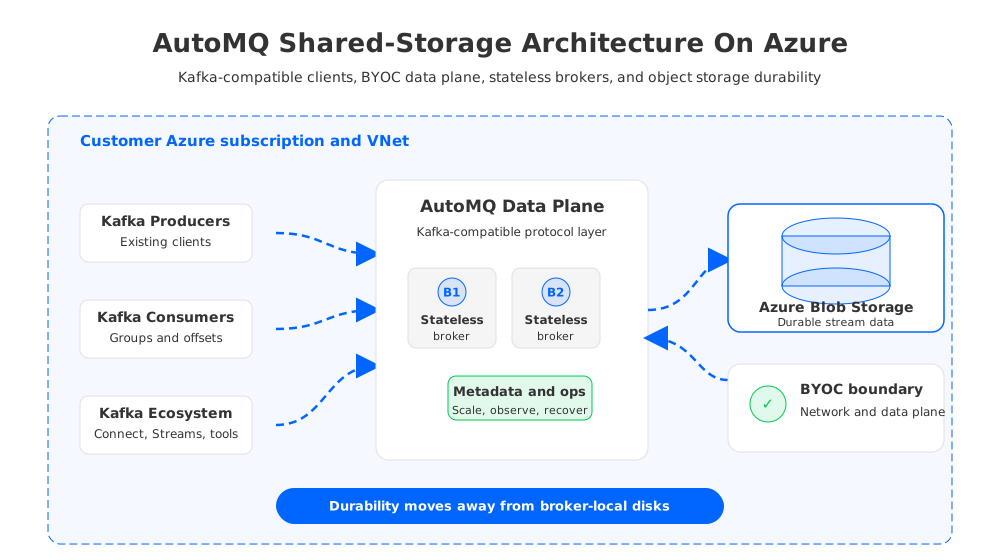
This is not a reason to skip workload validation. AutoMQ should be tested against the same five dimensions as every other option:
- Compatibility: validate the exact client libraries, security configuration, admin workflows, connectors, and stream processing applications that run in production.
- Cost model: compare broker compute, Azure Blob/object storage, storage operations, network paths, and operational ownership against the current platform.
- Storage architecture: confirm how durable data is written, retained, read during replay, and protected across failure domains.
- Operations: test scale-out, scale-in, broker replacement, observability, alerting, and incident handoff.
- Migration safety: design phased cutover, rollback, offset handling, data validation, and parallel-run procedures before the purchase decision hardens.
The strongest AutoMQ fit is not "we want a generic Kafka alternative." It is more specific: "we need Kafka-compatible behavior on Azure, but the old broker-local storage model is distorting cost, elasticity, and operations."
8A Practical Decision Checklist
Use the following checklist before committing to a platform. It is intentionally category-neutral, because the right answer may be Event Hubs, a managed cluster, SaaS Kafka, self-managed Kafka, AutoMQ, or a staged combination.
| Decision question | Strong signal |
|---|---|
| Do applications only need Kafka client connectivity into Azure services? | Start with Event Hubs and validate compatibility. |
| Do applications require deep Apache Kafka semantics and custom operations? | Evaluate managed or self-managed Kafka first. |
| Does governance allow a vendor-operated external data plane? | SaaS Kafka may reduce operations if networking and compliance fit. |
| Must the data plane remain in the customer Azure environment? | BYOC Kafka-compatible platforms should be compared. |
| Is long retention or broker replacement the main pain? | Shared-storage Kafka, including AutoMQ, should be tested. |
| Is procurement focused on total cost rather than list price? | Model retained bytes, peak capacity, traffic, storage operations, and labor. |
The final decision should be evidence-based. Run representative traffic. Include real partition counts. Exercise consumer lag and replay. Validate connector behavior. Break brokers or equivalent serving nodes. Measure recovery. Compare bills using Azure's pricing pages and each platform's pricing model. A platform that looks strong in a feature table but weak under failure is not ready to carry production streams.
The phrase "best Azure Kafka alternative" is useful for search, but the engineering answer is conditional. If the pain is endpoint simplicity, Event Hubs may be best. If the pain is control, self-managed Kafka may be best. If the pain is vendor operations, SaaS may be best. If the pain is Kafka compatibility plus storage-driven cost and scaling, AutoMQ is one of the most relevant architectures to evaluate.
9References
- Azure Event Hubs for Apache Kafka overview
- Azure Event Hubs Apache Kafka troubleshooting guide
- Azure Event Hubs pricing
- Apache Kafka on Azure HDInsight overview
- Azure HDInsight pricing
- Azure Virtual Machines pricing
- Azure Managed Disks pricing
- Azure Blob Storage pricing
- Azure bandwidth pricing
- Apache Kafka documentation
- Apache Kafka Connect documentation
- Apache Kafka Streams documentation
- AutoMQ Azure BYOC installation guide
- AutoMQ compatibility with Apache Kafka
- AutoMQ architecture overview
- AutoMQ object storage configuration
- AutoMQ pricing
10FAQ
10.1What is the best Azure Kafka alternative?
The best Azure Kafka alternative depends on the pain you are replacing. Event Hubs is strong for Azure-native managed ingestion, self-managed Kafka is strong for full control, SaaS Kafka can reduce operational work, and AutoMQ is strong when teams need Kafka compatibility with BYOC data-plane control and shared object storage.
10.2Is Azure Event Hubs a full Apache Kafka replacement?
No. Azure Event Hubs provides a Kafka endpoint that Kafka clients can use, but it is a managed Azure streaming service rather than Apache Kafka broker software. Treat it as a serious option for Kafka client connectivity, then validate the exact Kafka features and operational behaviors your workloads require.
10.3When should an Azure team choose self-managed Kafka?
Self-managed Kafka fits when the team needs full Apache Kafka control, custom broker configuration, specialized plugins, or exact operational behavior. It also requires mature ownership of upgrades, disks, networking, monitoring, security, and incident response.
10.4Why does object storage matter for Kafka on Azure?
Object storage matters because traditional Kafka ties durable log data to broker-local disks. Shared-storage Kafka can move durable data toward Azure Blob Storage, changing retention economics and making broker scaling less dependent on moving local log segments.
10.5Where does AutoMQ fit compared with Event Hubs?
Event Hubs is a managed Azure streaming service with Kafka protocol support. AutoMQ is a Kafka-compatible streaming platform with shared storage and stateless brokers. AutoMQ fits better when the workload needs deeper Kafka compatibility, BYOC data-plane control, and an architecture aimed at reducing broker-local storage constraints.
10.6How should FinOps teams compare Azure Kafka alternatives?
FinOps teams should compare workload-shaped cost, not service names. Model compute, provisioned capacity, Managed Disks, Azure Blob Storage, retained bytes, storage operations, network paths, inter-zone traffic, support, and operational labor. Then test whether the architecture can scale without forcing over-provisioned brokers.
10.7What should be tested before migrating to a Kafka-compatible Azure platform?
Test producer and consumer clients, authentication, TLS, topic administration, consumer groups, offset behavior, connector workloads, Kafka Streams applications, monitoring, failure recovery, replay, and rollback. A migration is safe only when production behavior is proven under realistic traffic and failure conditions.


