
Table of Contents
Table of Contents
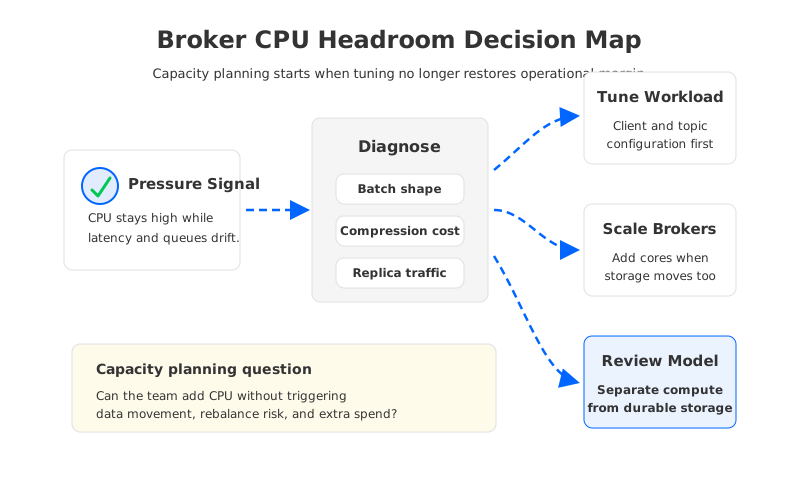
Broker CPU headroom is one of those Kafka problems that looks tactical until the dashboard refuses to calm down. A team changes batch.size, stretches linger.ms, checks compression, and moves a few busy partitions. The cluster improves for a while, then the same pattern returns during a larger traffic window: broker CPU is high, request latency gets uneven, rebalances become less forgiving, and every extra broker brings a question the budget owner can hear from across the room. Are we buying performance, or are we buying a larger operating problem?
That question matters because Kafka broker CPU is rarely an isolated compute metric. The broker is also coordinating replication, serving fetches, writing local logs, compacting data, handling TLS, and participating in controller-driven cluster state. When CPU headroom shrinks, the team is not deciding whether to add a few cores in a vacuum. It is deciding whether the current architecture can absorb more throughput without turning every capacity event into data placement, network traffic, recovery time, and governance work.
1Why Teams Search for broker cpu headroom kafka
The search usually begins after an incident review or a capacity review. The cluster is not down, but it has stopped feeling boring. A producer workload that used to fit inside the broker envelope starts competing with consumer fan-out. A connector or stream processing job reads more historical data than expected. A retention change increases local disk pressure, which slows background work that used to be invisible. CPU is the metric on the first chart, but the root cause is often the shape of the workload.
Kafka gives operators several tuning levers before architecture enters the conversation. Producer batching can reduce per-record overhead. Compression can reduce network and disk bytes while spending more CPU on encode and decode work. More partitions can increase parallelism, but too many partitions increase metadata, open files, recovery complexity, and consumer coordination work. Broker thread settings can help when the bottleneck is request handling, yet they do not create infinite CPU capacity.
The practical mistake is treating every headroom problem as a tuning problem. Tuning is the right first move when the workload is inefficient. It is the wrong last move when the workload is growing in a way that forces the broker to carry compute, storage, replication, and recovery as one bundle.
The useful diagnostic split is this:
- If CPU is high because clients are sending small records one by one, client batching and compression deserve attention before the infrastructure plan changes.
- If CPU is high because brokers are serving more replicas, more fetches, and more local storage work at the same time, the team needs a capacity model that includes storage and network side effects.
- If CPU is high during recovery, reassignment, or broker replacement, the team is looking at an operating model problem, not a steady-state throughput problem.
This distinction keeps the capacity discussion honest. It also prevents two bad outcomes: over-buying broker instances for an inefficient workload, or over-tuning a cluster whose architecture is already forcing compute and data movement to scale together.
2The Cloud Cost Drivers Behind Broker CPU
In a data center, adding broker capacity often looked like a hardware planning exercise. In the cloud, the same action crosses several billing dimensions. More brokers mean more compute. Larger brokers often mean larger attached storage. More replication and reassignment can mean more network traffic across availability zones. Longer retention increases storage footprint. None of these are strange costs by themselves; the problem is that they become entangled when the broker is the unit of both compute and durable data placement.
The table below is a capacity planning view, not a pricing sheet. Exact numbers depend on cloud provider, region, instance family, storage class, and network path, so they should be verified against current provider pages before a purchase decision.
| Pressure signal | Common first reaction | Hidden planning question |
|---|---|---|
| Broker CPU stays high during peak writes | Add brokers or larger instances | Will partition movement and replica catch-up create more load during the change? |
| CPU rises with consumer fan-out | Add fetch capacity | Is the cluster paying for the same data to move across zones repeatedly? |
| CPU spikes during compaction or retention growth | Increase broker resources | Is local storage growth forcing compute growth even when CPU is the visible symptom? |
| CPU is tight during recovery | Reserve more idle capacity | How much headroom must sit unused so a failure does not become a second incident? |
The uncomfortable part is that headroom is supposed to be unused capacity. A production Kafka cluster needs it because failures, traffic bursts, and maintenance events do not wait for a quiet hour. But unused capacity has a real cloud bill, and the bill is easier to defend when the team can explain what risk it buys down. Headroom for normal peak traffic is one thing. Headroom required because adding or replacing brokers moves large amounts of data is a different category of cost.
That is why the right metric is not average CPU utilization. Average CPU hides the moments that matter most: controller events, ISR changes, large consumer catch-up, partition reassignment, and broker restart windows. A platform team should look at CPU together with request latency, request handler idle time, network throughput, produce and fetch rates, under-replicated partitions, page cache behavior, and storage saturation. CPU tells you there is pressure. The surrounding metrics tell you whether more compute will relieve it or amplify work elsewhere.
3Storage, Network, and Compute Trade-Offs
Traditional Kafka is a shared-nothing system. Each broker owns local log segments for the partitions assigned to it, and replication keeps multiple broker-local copies available. This model is robust and well understood, which is why Kafka became the default event streaming backbone for so many teams. It also means a broker is not a disposable compute worker in the way a stateless service pod is disposable. A broker carries data gravity.
That data gravity is the reason CPU headroom becomes capacity planning. When the team adds brokers to recover CPU margin, it often needs to move partitions to use the added capacity. Moving partitions consumes network and disk IO, increases broker work during the operation, and can stretch the exact headroom the change was meant to restore. When the team avoids movement, the added brokers may sit underused while hot partitions keep burning CPU on the old brokers. Both outcomes are familiar to Kafka operators.
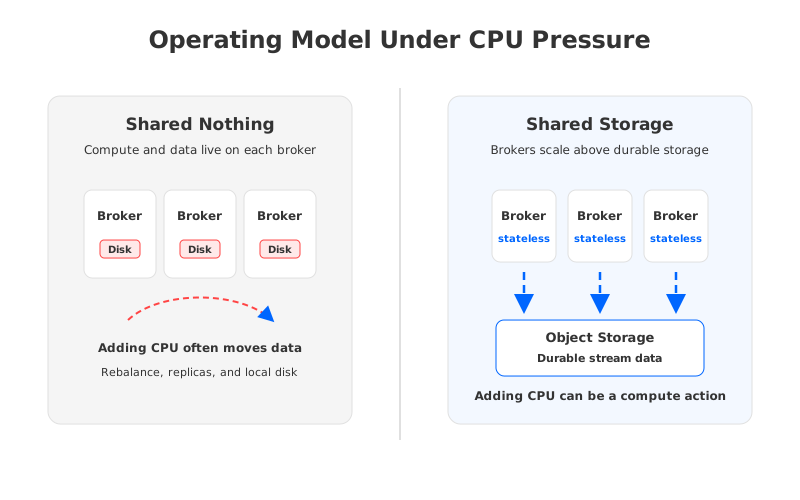
A shared-storage architecture changes the planning unit. Brokers still speak the Kafka protocol, process produce and fetch requests, and enforce the runtime behavior clients expect. Durable stream data is no longer tied to broker-local disks in the same way. With stateless or near-stateless brokers above object storage, adding compute capacity can be closer to adding request-processing capacity instead of moving a fleet of local logs.
That distinction does not make tuning irrelevant. Batching, compression, partition design, and consumer behavior still matter because waste at the client layer will waste any backend. The difference is where the next constraint appears after those basics are handled. In a local-disk model, CPU scale frequently drags storage placement with it. In a shared-storage model, the team can evaluate compute, durable storage, and cross-zone traffic as separate questions.
For architects, the evaluation should be neutral and mechanism-based:
- Compatibility: Can existing Kafka clients, topics, ACLs, consumer groups, and operational tools continue to work without application rewrites?
- Elasticity: Can the platform add request-processing capacity without making data movement the dominant operational event?
- Durability: Where does committed data live, and what failure boundary protects it?
- Network cost: How much traffic is created by replication, fetch fan-out, cross-zone placement, and recovery?
- Recovery: During broker replacement or zone impairment, does the system need to copy large local logs before full capacity returns?
- Governance: Can the deployment stay inside the team cloud account, network boundary, IAM model, and audit process?
This framework is deliberately vendor-neutral. It keeps the discussion focused on workload mechanics instead of benchmark theater. A benchmark can prove that a system performs well under a stated shape. It cannot prove that your next capacity event will be easy unless it also models recovery, scaling, placement, network paths, and operational controls.
4Evaluation Checklist for FinOps and Platform Teams
CPU headroom planning becomes easier when the team separates three conversations that are often blended together. The first is performance efficiency: are clients and topics shaped well enough for the broker to do less work per useful byte? The second is failure margin: how much unused capacity is required to survive a broker or zone event without violating latency and recovery objectives? The third is economic coupling: when the team buys more CPU, what else is it forced to buy?
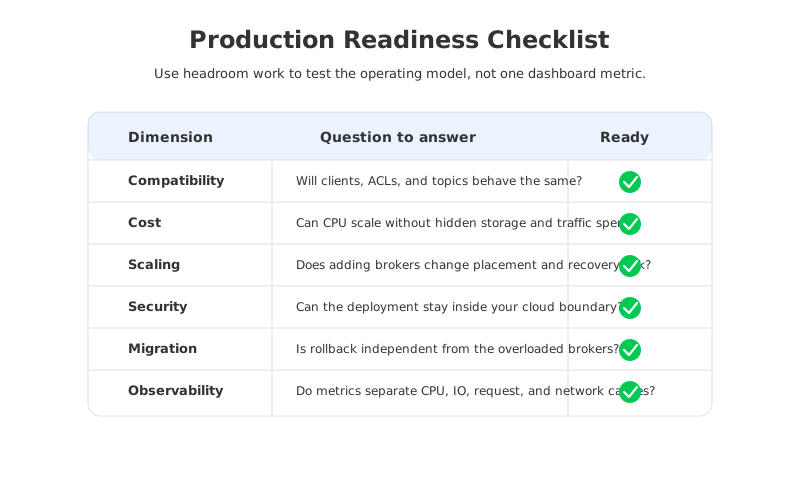
Use the following checklist in capacity reviews. It is written for Kafka-compatible platforms, so it applies whether the current deployment is self-managed Kafka, a managed Kafka service, or a cloud-native implementation.
| Area | Question | Evidence to collect |
|---|---|---|
| Client efficiency | Are producers batching enough records for the workload? | Producer configs, request rate, average record size, compression ratio |
| Broker saturation | Is CPU high because of request processing, replication, TLS, compaction, or fetch load? | Broker metrics, thread idle time, network throughput, disk IO, log cleaner metrics |
| Partition shape | Are hot partitions or too many partitions creating uneven work? | Per-partition throughput, leader distribution, consumer lag, metadata growth |
| Scaling blast radius | What happens when brokers are added or replaced? | Reassignment duration, replica catch-up behavior, throttling plan, rollback path |
| Cloud economics | Does more CPU require more disk, more replicas, or more cross-zone traffic? | Instance sizing, storage allocation, inter-zone data transfer model |
| Operating boundary | Who owns the account, network, IAM, encryption, and audit controls? | Deployment model, security architecture, compliance review |
The evidence column is more important than the answer column. Teams get into trouble when they say "add brokers" without knowing which component will be relieved. If request handler threads are saturated, more request-processing capacity may help. If disk IO is the bottleneck, more CPU can leave the cluster almost as constrained as before. If partition movement is the biggest operational risk, adding brokers can be the beginning of a maintenance plan rather than the end of the incident.
This is also where FinOps and SRE concerns meet. FinOps wants to know whether idle headroom is disciplined or wasteful. SRE wants to know whether the cluster can absorb failure and maintenance without a page. The shared artifact should be a headroom policy: target utilization ranges, alert thresholds, scaling triggers, reassignment rules, and a cost model that shows what each margin protects.
5How AutoMQ Changes the Operating Model
Once the team has separated workload efficiency from architectural coupling, a Kafka-compatible shared-storage system becomes easier to evaluate. AutoMQ is in that category: it keeps Kafka protocol compatibility while rebuilding the storage layer around shared object storage and stateless brokers. The important point is not that a product appears in the diagram. The important point is that the scaling unit changes.
In AutoMQ, brokers can focus more directly on serving Kafka-compatible traffic while durable data is persisted through a shared storage design. This makes compute scaling less dependent on broker-local data placement. When CPU headroom is the constraint, the team can ask a cleaner question: how much request-processing capacity do we need, instead of how much data must be moved before the added capacity is useful?
AutoMQ also addresses a cloud-specific cost pattern that often hides behind capacity planning. In a multi-zone Kafka deployment, replication and consumer traffic can create cross-zone data movement depending on placement and access paths. AutoMQ documents a zero cross-AZ traffic architecture for its cloud deployment model, which is relevant when headroom work is part of a broader cost review rather than a narrow performance sprint.
This does not remove the need for production discipline. A platform team still needs compatibility tests, client rollback plans, observability baselines, security review, and failure drills. The difference is that these reviews can focus less on moving broker-local data around and more on whether the platform preserves Kafka semantics while changing the economics of storage and scaling. That is a more useful conversation for teams that already know how to operate Kafka and want fewer capacity events to become infrastructure projects.
If your current headroom plan depends on keeping large amounts of broker capacity idle because scaling is disruptive, evaluate whether the storage model is the real constraint. AutoMQ's architecture overview is a good next step for that review, and the AutoMQ team can help map the assessment to your workload without requiring you to turn a CPU discussion into a procurement shortcut.
6References
- Apache Kafka producer configuration
- Apache Kafka broker configuration
- Apache Kafka topic configuration
- AutoMQ architecture overview
- AutoMQ zero cross-AZ traffic overview
7FAQ
7.1What is healthy Kafka broker CPU headroom?
Healthy headroom depends on workload shape, failure assumptions, and scaling speed. A cluster that can add request capacity quickly may need a different margin than a cluster where adding brokers triggers long partition movement. Treat the target as an SLO-backed policy, not a universal percentage.
7.2Should I tune producer batching before adding brokers?
Yes, when the workload is inefficient. Kafka producer settings such as batch.size, linger.ms, and compression.type can reduce per-record overhead when they match the latency budget. Tuning cannot solve every capacity problem, especially when the broker is already carrying storage, replication, and recovery work that scale with traffic.
7.3Does high broker CPU always mean the cluster needs more compute?
No. CPU can be the visible symptom of disk pressure, network saturation, small requests, TLS overhead, compaction, hot partitions, or recovery work. Always read CPU with broker request metrics, network throughput, storage behavior, and partition distribution before deciding what to buy.
7.4How does shared storage help broker CPU planning?
Shared storage can decouple durable data placement from broker compute capacity. That changes a CPU headroom event from "add brokers and move data" toward "add request-processing capacity and validate the workload path." The exact benefit depends on the implementation and deployment model, so it should be tested with your traffic pattern.
7.5Is this only a cost optimization issue?
No. Cost is one part of the problem, but the stronger reason to study broker CPU headroom is operational control. When the team understands why headroom disappears, it can set better scaling triggers, maintenance rules, recovery plans, and migration criteria.


