
Table of Contents
Table of Contents
Kafka capacity planning often starts as a spreadsheet and turns into an argument. The platform team sees broker CPU, disk pressure, partition skew, network egress, controller events, and consumer lag. Finance sees storage, compute, and data transfer lines. Application teams see produce latency, delayed consumers, and topic limits. The hard part is turning those signals into a capacity model that everyone can trust.
That trust breaks when teams plan from averages. A cluster can look healthy at daily mean throughput while a few partitions carry most of the write load. Storage can look safe until retention meets replay traffic. Broker count can look conservative until a reassignment or broker replacement competes with production writes. Telemetry-driven capacity planning has to expose those hidden constraints before they become purchase orders or incident timelines.
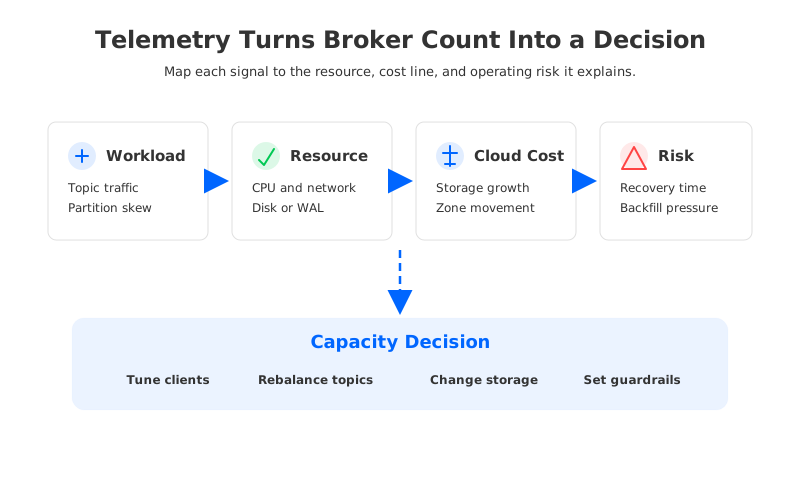
The right question is not "how many brokers should we buy?" It is "which telemetry signals explain the next capacity decision?" Once that question is clear, broker count becomes one output of the model. The model itself includes workload shape, durability, recovery, placement, governance, and cloud boundaries.
1Why teams search for kafka capacity planning telemetry
This search usually appears when a Kafka cluster is no longer owned by one application. Shared clusters support CDC pipelines, payment events, observability streams, data lake ingestion, feature engineering, and replay workflows. Each workload has a different pressure pattern, but the infrastructure bill and incident response queue land on the same platform team.
Apache Kafka exposes a large set of operational metrics through JMX, and cloud-native Kafka deployments often export those metrics to Prometheus, CloudWatch, Datadog, VictoriaMetrics, or another observability system. The raw material is available: broker request rates, produce and fetch latency, bytes in and out, ISR changes, under-replicated partitions, consumer lag, controller events, disk usage, network throughput, and topic-level traffic. Yet more charts do not automatically create a planning model.
The planning problem is interpretation. A rising BytesInPerSec may mean business growth, a producer batching change, a hot key, or an upstream replay. A growing consumer lag may mean downstream slowness, not broker capacity. A low broker CPU average may still coexist with saturated network or overloaded leaders. Telemetry is useful only when each signal is mapped to the resource or operational risk it represents.
2The production constraint behind the problem
Traditional broker-local Kafka binds compute, durable storage, partition placement, and recovery into the broker fleet. That design is familiar and mature, but it makes capacity planning multi-dimensional. When write throughput grows, the cluster must accept producer traffic, replicate data, flush to storage, serve fetches, and retain enough recovery headroom. When retention grows, the same brokers carry more local data even if compute demand does not grow at the same rate.
That coupling is why a single metric rarely tells the truth. CPU might be fine while disk utilization approaches a retention limit. Disk might be fine while network egress grows because followers, consumers, or cross-zone clients are reading more data. Produce latency might be acceptable while reassignment traffic quietly consumes the capacity needed for the next maintenance window. If the telemetry view treats these signals as separate dashboards, the capacity plan becomes a collection of guesses.
A useful model groups telemetry into resource questions:
- Can producers be admitted without queueing? Watch produce request rate, request size, network ingress, request handler idle time, error rate, and tail latency.
- Can the cluster make data durable under load? Watch replication health, ISR movement, storage write pressure, WAL or disk latency, and broker failures during peak periods.
- Can consumers and replays coexist with writes? Watch fetch traffic, lag growth, read amplification, cache behavior, and backfill windows.
- Can the team recover capacity during stress? Watch reassignment time, partition skew, offline partitions, controller stability, and how much traffic remains available during broker replacement.
The last question is the one most capacity plans underweight. Kafka clusters are not purchased for perfect steady state; they are purchased so the business can keep moving while something changes. Telemetry has to measure that change path.
3Build a telemetry model before buying capacity
The model should start at topic granularity, not cluster granularity. Cluster-level telemetry is good for executive summaries, but topic and partition signals explain why the cluster behaves the way it does. A single hot topic can distort broker network, disk, and request queues while the rest of the system looks balanced.
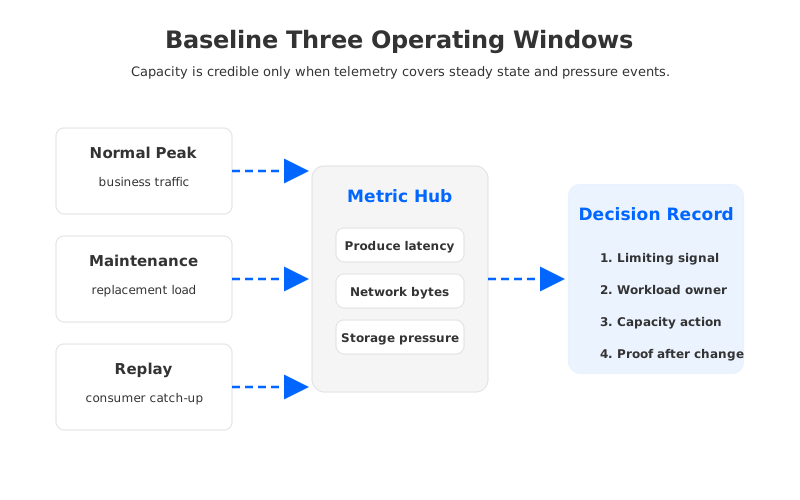
The first pass is a baseline across three windows: normal peak, maintenance pressure, and replay pressure. Normal peak shows the business workload. Maintenance pressure shows what happens while a broker is replaced, a topic is reassigned, or a deployment changes leader placement. Replay pressure shows whether consumers can catch up without taking write headroom away from producers. These windows turn capacity planning from a static sizing exercise into an operational readiness test.
| Telemetry group | What it explains | Capacity decision it informs |
|---|---|---|
| Producer request and byte rates | Write admission, batching efficiency, and client pressure. | Broker network, request threads, quotas, and producer tuning. |
| Partition and leader distribution | Whether traffic is balanced or hidden behind averages. | Partition count, leader movement, topic placement, and tenant isolation. |
| Storage and durability signals | Retention, write path saturation, and recovery exposure. | Disk, WAL, object storage, retention policy, and failure budget. |
| Fetch traffic and lag | Read pressure, replay demand, and downstream health. | Consumer placement, cache, read replicas, and backfill governance. |
| Cloud boundary metrics | Cross-zone movement, storage requests, and network billing exposure. | AZ placement, routing policy, and architecture selection. |
This table avoids a common anti-pattern: translating every signal into "add brokers." Some signals require producer tuning, topic ownership, storage architecture changes, or no capacity purchase at all because the issue is a downstream consumer or a one-time replay.
4Architecture options and trade-offs
Telemetry also helps teams compare architecture choices without turning the conversation into vendor preference. Broker-local Kafka, Kafka with Tiered Storage, and Kafka-compatible shared storage all move different constraints.
Broker-local Kafka keeps hot data and durable log segments on the broker fleet. Capacity planning is direct: brokers need enough compute, network, and storage for active traffic plus recovery headroom. The trade-off is that retention, write load, and recovery movement are hard to separate. When telemetry shows that disk, network, and reassignment time rise together, the model is telling you that architecture coupling is now part of the cost.
Kafka Tiered Storage changes the retention side of the equation by offloading older log segments to remote storage. That can reduce pressure on broker-local disks for long retention, but it does not make the hot write path disappear. Telemetry still needs to show local tier usage, remote fetch behavior, metadata effects, and replay patterns. Tiered Storage is a capacity tool; it is not the same thing as stateless brokers.
Kafka-compatible shared storage changes a deeper layer. Durable stream data is moved below the broker fleet, while brokers focus more on serving, coordination, and cache. That can make compute and storage planning more independent, but it introduces its own proof points: WAL behavior, object storage access, cache hit patterns, metadata scalability, and client compatibility. Telemetry should be used to validate those proof points rather than assume them.
Pick the architecture whose failure mode you can observe, explain, and operate. If telemetry cannot show why a cluster is close to a limit, the capacity plan is not ready for production governance.
5Evaluation checklist for platform teams
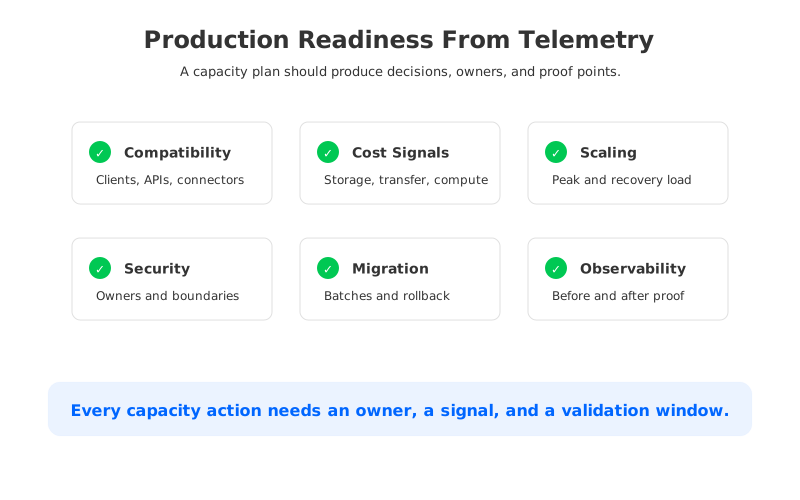
Capacity planning becomes repeatable when it produces the same artifacts every time. A platform team should be able to review a workload, score the risk, and decide whether the answer is tuning, quotas, isolation, migration, or architecture change.
Start with workload identity. Every high-volume topic needs an owner, expected peak write rate, message size range, retention, replay expectation, partition key, consumer groups, and security boundary. Without that metadata, telemetry cannot distinguish healthy growth from accidental overload.
Then define thresholds by resource and owner. Broker CPU and disk thresholds matter, but topic-level traffic thresholds often catch problems earlier. A producer that changes serialization format or retry behavior may not break the cluster, but it can change the cost profile.
The checklist should include these decisions:
- What is the limiting resource today? Identify whether the current pressure is CPU, network, disk, WAL, object storage, controller activity, or downstream consumption.
- Which workload created the pressure? Link the cluster symptom to topic, partition, producer, and consumer telemetry before increasing shared capacity.
- What changes under failure? Measure the same signals during broker replacement, partition movement, and replay traffic.
- Which cost line moves with the signal? Map telemetry to compute, block storage, object storage, requests, data transfer, and observability cost.
- What is the rollback path? For architecture changes or migrations, define topic batches, client compatibility checks, offset validation, and cutover criteria.
The cost-line mapping is where SRE and FinOps meet on the same page. AWS documents Availability Zones as separate locations inside a Region, and cloud services often price storage, requests, and transfer as distinct dimensions. Kafka telemetry should therefore be tagged with placement and ownership wherever possible.
6How AutoMQ changes the operating model
Once a team has separated workload telemetry from architecture constraints, AutoMQ becomes relevant as a Kafka-compatible shared-storage option. AutoMQ keeps Apache Kafka protocol compatibility while replacing the broker-local storage layer with S3Stream, WAL storage, and object storage. Capacity planning does not go away; the signals move into cleaner categories.
In a broker-local model, more retention, more write traffic, and more recovery headroom often point to the same action: change the broker fleet. In AutoMQ's Shared Storage architecture, brokers are stateless, durable stream data is placed in shared storage, and compute can be evaluated more independently from retained data.
AutoMQ's public metrics follow Prometheus-style naming and include Kafka-compatible broker signals such as connection count, network throughput, request counts, topic request failures, partition counts, and object-storage-related stream metrics. Those signals are useful for telemetry-driven capacity planning because they connect Kafka behavior with the shared storage layer. A platform team can ask whether capacity pressure comes from client requests, partition distribution, S3 object growth, or background balancing.
The cross-zone part also changes. AutoMQ documentation describes an S3-based shared storage architecture that minimizes inter-broker and inter-zone replica replication traffic and offers zone-aware routing for clients. Teams still need to verify placement, cloud configuration, and workload behavior in their own environment, but the planning surface is different from a broker-local replica model. Instead of accepting cross-zone broker replication as a fixed consequence of durability, the team can model how data enters, where it is stored, and where consumers read it.
Migration should still be treated as a telemetry project, not a checkbox. AutoMQ's migration documentation emphasizes business-scope inventory, topic batches, producer and consumer switch steps, synchronization monitoring, and rollback planning. The pre-migration baseline and post-migration telemetry must use comparable windows. If the team cannot compare produce latency, request failures, lag, object growth, network movement, and recovery behavior before and after cutover, the migration has not produced an operational answer.
7A practical telemetry planning sequence
The safest sequence begins with one representative workload and expands only after the model explains reality. Export topic and partition traffic over a normal peak window, then add producer request size, error rate, latency, broker network, request handler idle rate, storage pressure, consumer lag, and controller events. Annotate the data with owner, application, AZ placement, retention policy, and expected replay behavior.
Next, run a controlled pressure window. That does not need to be dramatic. A broker replacement, a partition reassignment, a consumer replay, or a maintenance deployment can reveal how much headroom is actually usable. Compare the telemetry to normal peak. If producer latency rises while network egress or fetch traffic spikes, the model should show whether the bottleneck is writes, reads, recovery, or placement.
After that, turn the result into a decision record. The record should state the limiting signal, the workload that caused it, the recommended action, and the evidence that the action worked. The answer might be a producer batching change, topic split, quota, retention policy change, dedicated cluster, Tiered Storage, or shared-storage migration.
Finally, keep the model alive. Kafka capacity plans age quickly because workload behavior changes faster than infrastructure policy. The recurring review should ask whether the top topics changed, whether lag moved to a different consumer group, whether replay windows became longer, whether cross-zone movement grew, and whether any cost line diverged from traffic growth. That review is where capacity planning becomes governance rather than annual sizing.
If your telemetry keeps pointing to the same broker-local coupling between retention, write traffic, recovery, and cross-zone movement, evaluate whether a Kafka-compatible shared-storage architecture changes the model for your workload. You can start with AutoMQ's architecture and run it against your own telemetry baseline here: Explore AutoMQ's Shared Storage architecture.
8References
- Apache Kafka documentation: monitoring
- Apache Kafka documentation: producer configuration
- Apache Kafka documentation: Tiered Storage
- AWS documentation: Regions and Availability Zones
- AWS S3 pricing
- AutoMQ documentation: Prometheus metrics
- AutoMQ documentation: architecture overview
- AutoMQ documentation: compatibility with Apache Kafka
- AutoMQ documentation: inter-zone traffic overview
- AutoMQ documentation: migrating from Apache Kafka to AutoMQ
9FAQ
9.1What is Kafka capacity planning telemetry?
Kafka capacity planning telemetry is the set of operational signals used to decide whether a cluster has enough compute, network, storage, recovery headroom, and governance controls. It includes broker metrics, topic and partition traffic, producer and consumer behavior, replication health, lag, placement, and cloud-cost proxies.
9.2Which Kafka metrics matter for capacity planning?
Start with bytes in and out, produce and fetch request rates, produce latency, request errors, partition and leader distribution, under-replicated or offline partitions, disk or WAL pressure, consumer lag, and controller events. The exact set depends on the workload, but topic-level and partition-level views are usually more useful than cluster averages.
9.3Is adding brokers the normal answer to capacity pressure?
Sometimes, but it should not be the default answer. Telemetry may show that the real fix is producer batching, partition-key changes, topic isolation, quota policy, retention governance, consumer replay control, Tiered Storage, or a shared-storage architecture. Broker count should be the output of the diagnosis.
9.4How does shared storage affect Kafka capacity planning?
Shared storage can separate retained stream data from broker-local disks, which changes how teams plan compute, storage, and recovery. The capacity model still needs telemetry, especially for WAL behavior, object storage growth, cache effectiveness, request latency, and client placement.
9.5When should a team evaluate AutoMQ?
AutoMQ is worth evaluating when Kafka telemetry repeatedly shows that retention growth, write traffic, broker replacement, and cross-zone movement are tied to the same broker-local constraint. The evaluation should use the team's own workload baseline, client compatibility requirements, migration plan, and failure scenarios.


