
Table of Contents
Table of Contents
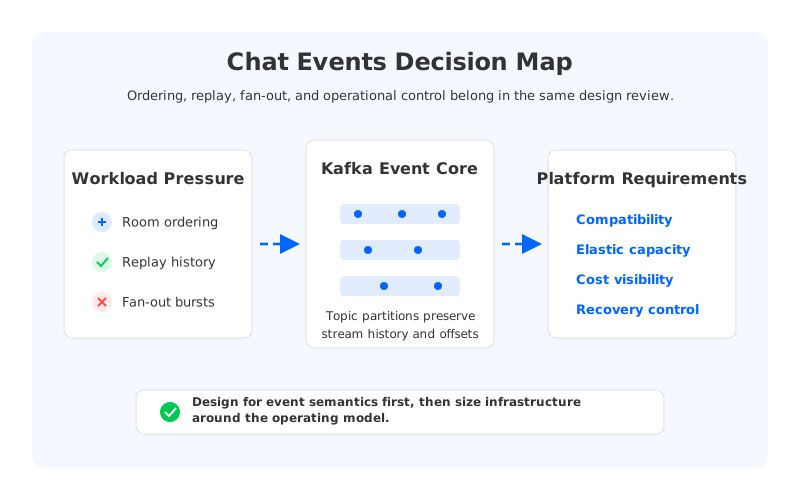
A chat system stops feeling like simple messaging once every message becomes input to moderation, notifications, search, analytics, AI assistants, and support workflows. The user sees a room, a thread, or a direct conversation. The platform team sees an event stream with ordering rules, replay requirements, fan-out pressure, retention cost, privacy boundaries, and recovery objectives.
That is why teams search for chat application events kafka. They already know how to deliver a message from one client to another. The harder question is what should happen after the send button is pressed. A message may need to be persisted, indexed, copied to a notification service, scanned by a safety service, joined with user metadata, and replayed months later. At that point, Kafka is not a queue bolted onto chat. It is the system of record for event movement around the product.
1Why teams search for chat application events kafka
The common starting point is a service that accepts a chat message, writes it to a database, and broadcasts it to connected clients. That works while chat is a feature. It starts to crack when chat becomes a source of real-time product intelligence. Every downstream workflow either polls the database, subscribes to an internal callback, or asks the application service to add another integration.
Kafka changes the shape of the problem because it gives every message an append-only event representation. Producers write records to topics. Consumers track progress through offsets. Consumer groups let multiple services read independently without negotiating directly with the producer. The Apache Kafka documentation covers this model, and it maps cleanly to chat because conversations are naturally event-shaped: message sent, message edited, reaction added, attachment scanned, room membership changed, thread archived.
The value is not only decoupling. A chat event stream gives teams a way to replay state into additional systems. Search indexing can be rebuilt, notification logic can be reprocessed after a bug fix, and a fraud model can consume historical messages under policy controls. Replay is where Kafka becomes more than transport; it keeps future product options open.
That flexibility forces architecture decisions that the application server used to hide:
- What key determines ordering: conversation ID, room ID, tenant ID, or something more granular?
- How long should chat events remain replayable, and who is allowed to replay them?
- Which consumers must receive every event, and which can tolerate sampling or filtering?
- What happens when one downstream pipeline falls behind during a launch or incident?
- How will the team migrate schema, retention, and access rules without breaking older clients?
These are not library questions. A Kafka client can publish a record, but it cannot decide whether room-level ordering is more important than tenant-level load distribution. A managed service can provision brokers, but it cannot decide how much replay the business needs. The decision should go deeper.
2The production constraint behind the problem
Ordering is the first constraint chat teams notice because users notice it immediately. If two messages in the same room appear in the wrong order, the product feels broken. Kafka preserves ordering within a partition, so the usual design is to key chat messages by a conversation or room identifier. That gives each room an ordered log, while different rooms spread across partitions for parallelism.
This is where the first trade-off appears. If a few rooms are much busier than the rest, keying by room can create hot partitions. If the key is made more granular to spread load, ordering becomes weaker and must be reconstructed elsewhere. Direct messages, support chats, livestream rooms, and gaming lobbies rarely share the same tolerance.
Replay is the second constraint, and it is easy to underprice. A few hours of retention supports transient recovery. Weeks or months support search rebuilds, analytics backfills, compliance workflows, and model training pipelines. Longer retention increases storage requirements and operational risk because backfill traffic can compete with live consumers.
Fan-out is the third constraint because chat is rarely consumed by one service. A production event stream may feed notifications, presence, search, moderation, warehouse ingestion, support tooling, billing, recommendations, and AI features. Kafka consumer groups fit this model because each service can own its offset and failure domain. The hard part is making sure the broker layer can tolerate that fan-out.
| Design area | Good first question | Production failure mode |
|---|---|---|
| Ordering | What entity owns strict sequence? | Hot partitions or inconsistent user-visible order |
| Replay | How far back can each team read? | Backfills disrupting live traffic or violating governance |
| Fan-out | Which consumers are independent products? | One slow service creating shared platform pressure |
| Retention | What is the business value of history? | Storage grows without a matching access policy |
| Recovery | What must be restored first after failure? | Brokers recover but downstream state remains stale |
The table matters because chat event streaming is a bundle of competing workloads sharing the same log. The platform must keep write latency stable, replay possible, and cost predictable as retention and consumers grow. That balance is where the Kafka operating model starts to matter.
3Architecture options and trade-offs
Traditional Kafka uses a shared-nothing architecture: brokers own compute and local persistent storage. That model is proven and familiar. It works well when teams can size brokers carefully, keep partitions balanced, and plan retention against local disks. For chat systems with predictable growth, it may be enough for a long time.
The same model becomes harder when chat traffic grows unevenly. Scaling a broker is not only adding CPU; the broker also owns data. Rebalancing partitions, expanding disk, replacing failed nodes, and moving replicas create background work that competes with foreground traffic. The user-facing symptom may be higher send latency, delayed notifications, consumer lag, or slow replay.
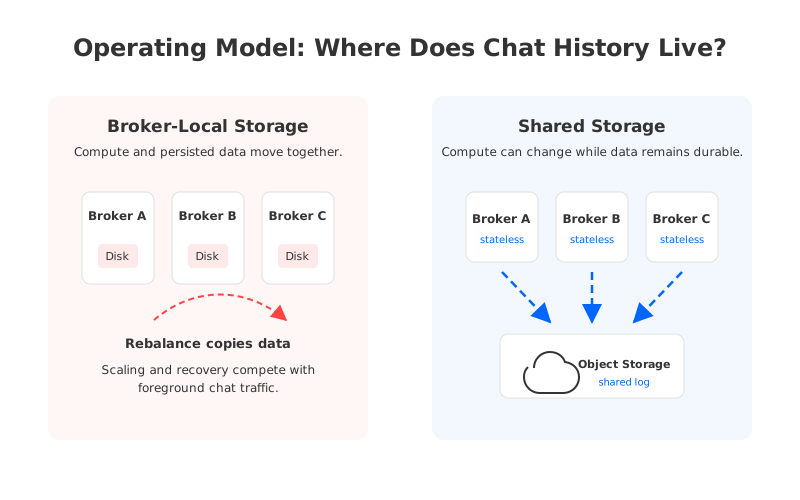
Tiered storage can reduce pressure on local disks by moving older log segments to remote storage. That is useful for long retention, but it does not make brokers stateless. Teams should separate "Where can older data live?" from "What happens when compute changes?" Those are related, but they are not the same claim.
A cloud-native Kafka-compatible design changes the review by separating broker compute from durable log storage. In this model, brokers can be treated more like stateless compute nodes, while object storage provides the durable backing layer. A write-ahead log still has to absorb low-latency writes before data is committed into object storage, so the design is not "write every chat message directly to S3 and hope." The important shift is that storage durability and broker lifecycle are separate operational units.
This is where AutoMQ enters naturally. AutoMQ is a Kafka-compatible cloud-native streaming system that keeps the Kafka API model while moving storage toward shared object storage and stateless brokers. Its documentation describes a shared-storage architecture for Kafka workloads, and that matters because the expensive operational moments are often scaling, recovery, and replay rather than the happy-path publish call.
The right comparison is not "Kafka or not Kafka." It is which Kafka-compatible operating model fits the workload. A team with short retention, limited fan-out, and steady traffic may choose a conventional deployment. A team building high-retention chat history, AI feature pipelines, and multi-service fan-out should ask whether broker-local storage will become a recurring tax.
4Evaluation checklist for platform teams
A good evaluation starts with semantics because semantics are painful to retrofit. Decide which events need strict ordering, which can be eventually consistent, and which should never share a topic. Message bodies, membership changes, delivery receipts, reactions, moderation decisions, and attachment scan results may all relate to a room, but they do not need the same partitioning, retention, or access policy.
Then move to the platform boundary. Kafka is often shared by many teams, which means a chat decision can become a company-wide data infrastructure decision. If chat events are the most active stream, they will influence broker sizing, storage policy, network traffic, observability, and incident response. Treating this as an application-only architecture hides the cost from the people who operate it.
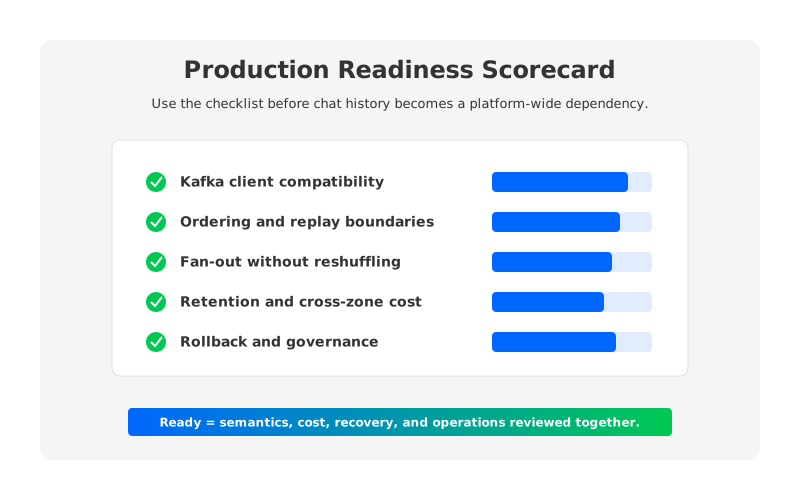
The checklist below prevents a successful prototype from becoming an expensive production habit.
| Capability | What to verify | Why it matters |
|---|---|---|
| Kafka compatibility | Client libraries, producer settings, consumer group behavior, transactions if used | The chat application should not depend on proprietary semantics for basic event movement |
| Partition strategy | Key choice, hot-room mitigation, partition growth plan | Ordering and parallelism are coupled through partitions |
| Replay isolation | Backfill limits, access controls, consumer quotas, retention tiers | Historical reads should not destabilize live message delivery |
| Cost model | Storage, compute, cross-zone traffic, private connectivity, monitoring | Fan-out and retention can dominate cost after launch |
| Failure recovery | Broker replacement, partition reassignment, offset recovery, downstream rebuild | The platform must recover chat state, not only broker health |
| Governance | Schema evolution, PII handling, audit trails, tenant boundaries | Chat events often contain sensitive user context |
The checklist also helps with vendor evaluation. A platform that only reports broker CPU and disk utilization is showing the wrong abstraction. The more useful view is whether it can answer questions about lag by consumer group, replay load, partition skew, retention growth, access policy, and the blast radius of a scaling event.
Consumer fan-out also changes accountability. Each consumer group can be owned by a different team with a different release cycle. That is good for autonomy, but it means the streaming platform becomes the contract between teams. Good contracts need schema discipline, compatibility testing, and rollback paths.
5How AutoMQ changes the operating model
The case for shared storage is strongest when the chat platform needs elasticity without making data movement the center of every operation. In a broker-local model, capacity changes and failure recovery are tied to data placement. In a shared-storage model, durable data is not trapped inside the lifecycle of a broker instance.
For chat workloads, this shows up in three places. Scaling can focus more on compute capacity than on moving partitions between local disks. Replay can rely on object-storage-backed history without forcing all historical data to remain on broker-local volumes. Recovery can avoid treating every broker replacement as a large data-copying exercise.
AutoMQ's Kafka compatibility is important because most chat systems already assume Kafka clients, producer and consumer configuration, and consumer-group behavior. A useful platform change should not force every application team to rewrite those assumptions. The architectural change should be below the API boundary: how brokers persist data, how storage scales, how cross-zone traffic is controlled, and how deployment boundaries align with the cloud account model.
Cost is the other reason this architecture deserves attention. Chat teams often underestimate the cost of reading history because replay is not part of the first user journey. Once search rebuilds, safety models, analytics jobs, and support tools consume the same events, read amplification becomes normal. Object storage can be a natural place for retained history, but the platform still needs controls around egress, cross-zone traffic, and consumer behavior.
The strongest AutoMQ fit is not "every chat app." It is a chat event backbone where Kafka semantics are required, retention matters, multiple consumer groups are expected, and the team wants cloud elasticity without constantly rebalancing broker-local data. Some teams need better Kafka operations. Others need a different storage model behind the same Kafka interface.
6Migration and rollout considerations
Migration should begin with the topic contract, not with cluster provisioning. Identify event types, keys, headers, schema formats, retention periods, and consumer ownership. Then decide what can move first. A common pattern is to start with a non-critical consumer, mirror or dual-write selected events, compare offsets and derived state, and then move the producer path.
Backfill deserves its own plan. Historical chat data may live in a database, object store, archive, or older Kafka cluster. Replaying it into a Kafka-compatible platform can create duplicates, violate retention policy, or reorder events if the team treats it as a bulk copy. A safer approach defines idempotency keys and validates downstream state before exposing the stream to more consumers.
Observability should be in place before the cutover. Producer error rates, produce latency, consumer lag, partition skew, broker saturation, storage growth, and replay traffic all need dashboards and alerting. Chat incidents are visible within seconds, but the root cause may be a consumer that fell behind, a hot partition, or a replay that consumed capacity during peak hours.
Governance is the last piece teams postpone, and it is the one that becomes hardest to repair. Chat events may include user identifiers, message content, attachments, moderation metadata, and tenant context. Topic-level access, schema review, retention policy, audit logging, and deletion workflows should be part of the launch checklist.
If your chat event system is moving from a feature-level stream to a platform dependency, review the storage and operations model before the next large consumer comes online. The AutoMQ architecture overview is a useful next step for evaluating Kafka compatibility, shared storage, and cloud-native deployment boundaries.
7References
- Apache Kafka Documentation
- AutoMQ Documentation: What Is AutoMQ
- AutoMQ Documentation: Architecture Overview
- Amazon S3 User Guide
8FAQ
8.1Is Kafka a good fit for chat application events?
Kafka is a strong fit when chat messages need to feed multiple downstream systems, be replayed, and preserve ordering within a room or conversation. It is less compelling for a small application that only needs direct delivery and has no independent consumers.
8.2How should chat messages be partitioned in Kafka?
Most teams start by keying messages with a room ID or conversation ID because Kafka preserves order within a partition. That gives clean per-room ordering, but it can create hot partitions for very active rooms. High-scale systems may split event types or use looser ordering rules for large public rooms.
8.3How long should chat events be retained?
Retention should follow business use, not habit. Short retention can support transient recovery and delayed consumers. Longer retention supports search rebuilds, analytics backfills, compliance workflows, and AI pipelines, but it also increases storage, access-control, and replay-risk requirements.
8.4What is consumer fan-out in a chat event system?
Consumer fan-out means multiple independent services read the same chat events for different purposes. Notifications, search, moderation, warehouse ingestion, and AI features can each run as separate consumer groups. That independence increases the need for schema compatibility, lag monitoring, and capacity isolation.
8.5Where does AutoMQ fit in this architecture?
AutoMQ fits when the team wants Kafka-compatible APIs with a cloud-native storage model underneath. For chat event systems with high retention, replay, and many consumers, shared storage and stateless brokers can reduce the operational weight of scaling and recovery.


