
Table of Contents
Table of Contents
A Kafka client compatibility matrix usually starts as a small table in a migration plan. Someone lists Java, Go, Python, Flink, Kafka Connect, a few internal SDKs, and the broker version they currently talk to. The table looks administrative until the first production application behaves differently after a broker upgrade, a managed service migration, or a move to a Kafka-compatible platform. At that point the matrix stops being documentation and becomes an operational control surface.
The phrase client compatibility matrix kafka captures that pressure well. Platform owners are not asking whether Kafka has clients. They are asking whether the exact client behaviors they depend on will survive a platform change: producer idempotence, transactions, consumer group rebalances, offset commits, Admin API calls, SASL/TLS settings, schema tooling, connector behavior, and observability assumptions. Compatibility is a set of workload-specific tests with clear pass, fail, and rollback criteria.
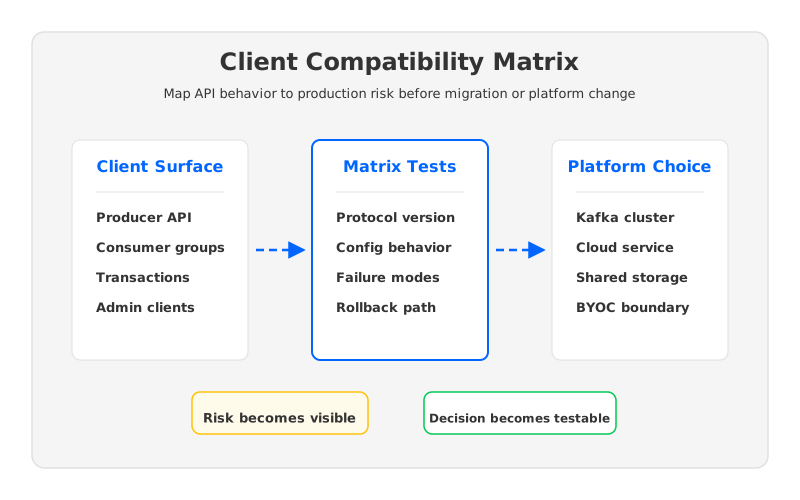
Client compatibility sits between application teams and infrastructure teams. Application teams know code paths, timeout settings, and release calendars. Platform teams know brokers, networking, storage, security, and failure domains. A useful matrix gives both sides a shared language: which client behaviors are critical, which are replaceable, which are unknown, and which ones should block a production cutover.
1Why Kafka Client Compatibility Becomes a Platform Problem
Kafka compatibility is often discussed as a protocol question, but production risk usually appears at the edges of that protocol. The Apache Kafka protocol is versioned, and clients negotiate capabilities with brokers, which gives the ecosystem a strong foundation for rolling upgrades and mixed-version operation. That foundation does not remove the need to test how a particular application uses the protocol. A batch producer with acks=all creates a different risk profile from a transactional producer that coordinates writes across topics, and a stateless consumer group behaves differently from a stateful stream processor that treats offsets as part of a recovery contract.
This is where a version table becomes too thin. A platform team may know that a client library can connect, produce, and consume. That still leaves migration questions. Does the application depend on a specific rebalance strategy? Does it use headers, timestamps, compression, custom partitioners, idempotent producers, or transactions? Does the monitoring stack assume particular error messages, metric names, or lag calculations?
A good compatibility matrix is not larger because engineers enjoy spreadsheets. It is larger because Kafka is a coordination system, not a file format. Every client participates in a distributed protocol with timing, leadership, metadata refresh, authorization, retry, and offset semantics. The matrix should capture the behavior that production depends on, not every configuration option Kafka exposes.
2What Belongs in a Kafka Client Compatibility Matrix
The most useful matrix starts from application behavior and maps that behavior to platform checks. Teams often begin with language and library versions because those fields are visible, but the fields that prevent outages are more specific. A compatibility matrix should separate inventory, behavior, test evidence, and ownership.
| Matrix dimension | What to record | Why it matters |
|---|---|---|
| Client inventory | Library, version, runtime, owning team, criticality | Finds unsupported or unowned clients before cutover |
| Protocol behavior | Produce, consume, metadata, Admin API, transactions, offsets | Links client activity to broker-side compatibility |
| Configuration dependency | Retries, timeouts, compression, security, partitioner, group protocol | Exposes implicit assumptions hidden in application code |
| Failure behavior | Broker restart, leader change, network delay, authorization failure | Tests the paths that appear during real incidents |
| Migration control | Dual-write plan, consumer catch-up, rollback owner, validation metric | Turns compatibility from a test result into an operating procedure |
This table should not be treated as a compliance artifact that gets filled once and archived. It is closer to a release readiness model. Every critical client needs an owner, a representative workload, and a rollback decision. A low-volume audit topic can pass with a narrower test. A payment stream, fraud pipeline, or customer-facing event feed needs evidence under broker failover and deployment changes.
The matrix also needs a place for unknowns. Unknowns are not failures, but they are scheduling risks. An old client library with no active owner may be fine in steady state and still be unacceptable for a migration window because nobody can explain its retry behavior. Calling that out early gives the platform team options: upgrade the client, isolate the workload, keep it on the current cluster for longer, or create a narrower compatibility shim.
3The Architecture Constraint Behind Compatibility
Client compatibility work often reveals a storage and operations problem that was not visible at the API layer. Traditional Kafka binds broker identity, compute, and local persistent storage together. That design is mature and well understood, but it means many operational changes also become data placement events. Replacing a broker, expanding a cluster, shrinking a cluster, or moving workloads across availability zones can trigger replica movement, rebalancing, and capacity planning work.
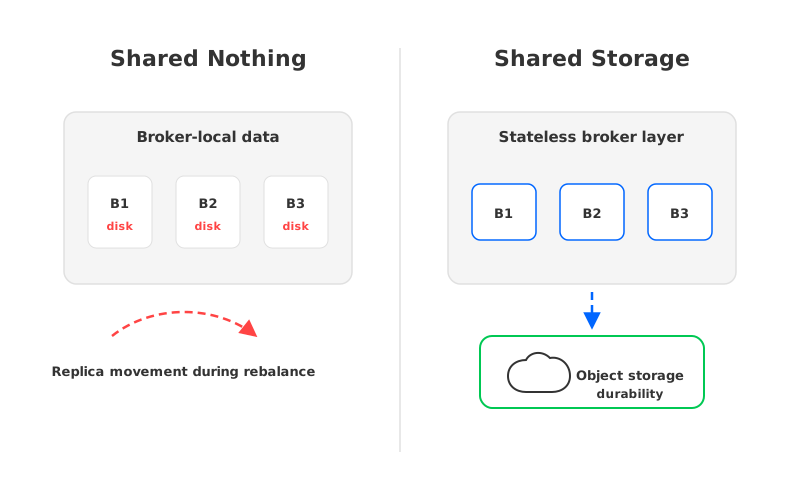
That matters because application behavior is sensitive to the operating model around the broker. A client may tolerate a controlled rolling restart but struggle with extended leader movement, metadata churn, throttled replicas, or overloaded network paths during a rebalance. A migration plan that tests protocol calls but ignores storage movement can produce false confidence.
Cloud infrastructure sharpens the issue. Compute, block storage, object storage, and cross-zone networking are billed and scaled through different primitives. A Kafka platform owner evaluating a Kafka-compatible option has to ask whether compatibility is being achieved by preserving the old operational coupling or by changing the architecture below the protocol.
The practical question is not "Is this platform Kafka-compatible?" The practical question is more specific: "Can our clients keep their expected Kafka behavior while the platform changes capacity, replaces brokers, handles failures, and controls cost?" A matrix that includes architecture helps teams answer that question before a maintenance window.
4A Neutral Evaluation Framework for Platform Owners
When platform teams compare self-managed Kafka, a managed Kafka service, and a Kafka-compatible architecture, the matrix should cover more than client library support. The client-facing API is the entry point, but the production decision includes cost, governance, elasticity, recovery, and team boundaries. If those dimensions stay outside the matrix, they reappear as surprises during the migration.
Start with compatibility, then widen the frame:
- API and protocol behavior. Confirm producer, consumer, Admin API, transactional, offset, security, and metadata behavior for the clients that matter. Test with representative configurations rather than generic samples.
- Operational behavior. Measure what clients see during broker restarts, leader changes, network impairment, quota pressure, and authorization failures. A platform that passes steady-state tests can still fail the incident path.
- Scaling model. Check whether adding or replacing brokers causes data movement that affects client latency, consumer lag, or migration duration. Compatibility should include the operational actions the platform team performs every month.
- Cost model. Map the client workload to compute, storage, replication, retention, and cross-zone traffic. The matrix should identify which clients drive the cost curve, not merely whether they can connect.
- Governance boundary. Record where data lives, who controls encryption keys, which network paths are allowed, how identity is managed, and how audit requirements are met.
- Rollback mechanics. Define how a client returns to the previous platform, how offsets are reconciled, and what metric proves the rollback is complete.
This framework keeps the conversation grounded. A client team can see what is being asked of its application. A platform team can distinguish compatibility risk from capacity risk. A CTO or architecture board can see whether a proposed platform change reduces operational burden or moves it elsewhere.
5How AutoMQ Changes the Operating Model
Once the matrix exposes the coupling between client behavior and broker operations, the next question is architectural: can a Kafka-compatible platform keep the client contract while reducing the operational work behind it? This is where AutoMQ fits into the evaluation, not as a replacement for compatibility testing, but as an architecture that changes what the platform team has to test.
AutoMQ is a Kafka-compatible cloud-native streaming system that separates broker compute from durable storage. Instead of making broker-local disks the center of durability, AutoMQ uses a shared-storage architecture backed by object storage and a write-ahead log layer. Brokers become more stateless from an operational perspective, so replacing or scaling broker compute is less tightly coupled to moving large volumes of topic data between broker disks.
That distinction affects a compatibility matrix in concrete ways. The client API still needs to be tested, because applications depend on Kafka semantics. But the operational test cases can focus less on long data rebalancing windows and more on whether clients behave correctly during compute changes, failover, and planned migration steps. In other words, the matrix remains necessary, while the platform architecture can reduce the number of storage-coupled events that make compatibility risky.
AutoMQ also helps teams evaluate cloud cost through architecture rather than manual tuning alone. Separating compute and storage allows broker compute to scale with traffic while durable data remains in shared storage. For organizations that care about deployment boundaries, AutoMQ supports customer-controlled models such as BYOC and self-managed software.
None of this removes the need for a readiness checklist. It changes what a serious checklist should ask. If a platform claims Kafka compatibility, test it. If it claims a cloud-native operating model, test the operational actions that motivated the evaluation in the first place.
6Production Readiness Checklist
A compatibility matrix earns its place in production when it drives decisions. The checklist below is a useful gate before a Kafka platform change.
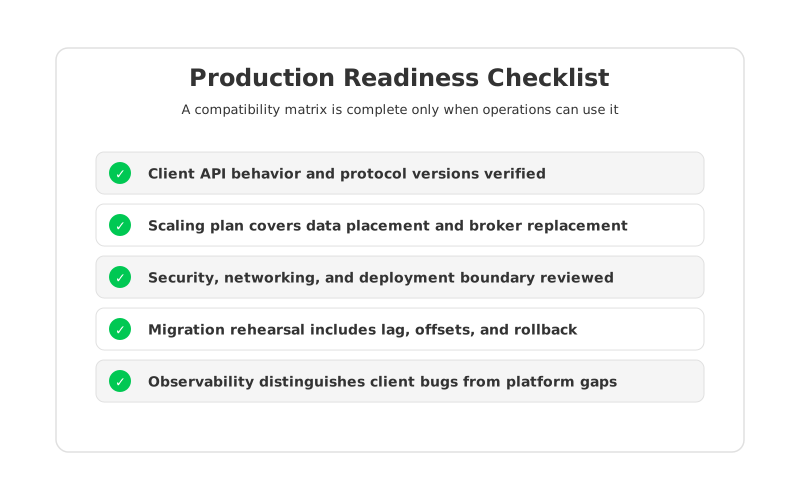
The checklist should be owned jointly. Platform teams own broker behavior, network paths, storage design, access control, and observability. Application teams own client versions, code paths, release timing, and application-level validation. Security teams own authentication, authorization, encryption, and audit evidence. The migration owner ties those pieces into a cutover plan.
One practical pattern is to score every critical application across four states:
- Green: representative workload tested, owner confirmed, rollback path documented, observability ready.
- Yellow: client behavior appears compatible, but one operational path remains untested or weakly owned.
- Red: compatibility failure, missing owner, unsupported library, or no rollback path.
- Deferred: workload is intentionally kept out of the migration wave with an approved exception.
This scoring model keeps the matrix honest. It prevents a large table of "supported" entries from hiding unresolved ownership and gives leaders a cleaner way to sequence migration waves. Green clients can move early, yellow clients need a specific work item, red clients become blockers, and deferred clients stop silently dragging the schedule.
7Building the Matrix Without Turning It Into Bureaucracy
The fastest way to make a compatibility matrix useless is to ask every team to fill dozens of fields by hand. Platform teams should start with data they can collect automatically: client IDs, connection sources, TLS principals, library versions where visible, topic access patterns, consumer group names, throughput, error rates, and lag.
From there, application owners add the fields automation cannot infer: criticality, deployment calendar, code owner, transactional semantics, custom partitioning, schema dependency, expected recovery behavior, and rollback constraints. These fields are often the difference between a safe migration and an expensive surprise.
Keep the matrix small enough to use during an incident review. If every row has twenty columns and nobody can tell which columns block cutover, the matrix has failed. Separate reference fields from decision fields: reference fields help engineers investigate; decision fields decide whether the workload can move.
The final matrix should answer three questions quickly. Which clients are compatible under representative workload? Which clients are compatible in steady state but risky during failure or rollback? Which clients require application work before the platform can change? If the matrix answers those questions, it is doing its job.
8Natural Next Step
The point of a Kafka client compatibility matrix is not to prove that every platform is the same. It is to make the differences visible before production traffic discovers them. If your team is evaluating a Kafka-compatible architecture and wants to reduce the storage-coupled operations behind broker scaling, review AutoMQ's architecture and migration approach or discuss a fit assessment with the AutoMQ team: Schedule an AutoMQ demo.
9References
- Apache Kafka protocol documentation: https://kafka.apache.org/protocol/
- Apache Kafka compatibility matrix: https://cwiki.apache.org/confluence/display/KAFKA/Compatibility+Matrix
- Apache Kafka consumer configuration documentation: https://kafka.apache.org/documentation/#consumerconfigs
- Apache Kafka producer configuration documentation: https://kafka.apache.org/documentation/#producerconfigs
- AutoMQ architecture overview: https://docs.automq.com/automq/architecture/overview?utm_source=blog&utm_medium=reference&utm_campaign=client-compatibility-matrix-kafka
- AutoMQ migration overview: https://docs.automq.com/automq/migration/overview?utm_source=blog&utm_medium=reference&utm_campaign=client-compatibility-matrix-kafka
10FAQ
10.1What is a Kafka client compatibility matrix?
A Kafka client compatibility matrix is a production readiness table that maps each application client to the Kafka behaviors it depends on, the platform versions or services it can use, the tests that prove compatibility, and the rollback path if the migration fails.
10.2Is broker version compatibility enough?
No. Broker and protocol version compatibility provide the baseline, but production applications also depend on configuration, authentication, retries, partitioning, transactions, consumer group behavior, monitoring, and incident paths.
10.3Should platform teams test every Kafka client the same way?
No. Critical workloads need representative load, failure, and rollback tests. Low-risk internal workloads can use lighter checks. The matrix should make that risk tier visible rather than forcing every application through the same process.
10.4How does shared storage affect client compatibility planning?
Shared storage does not remove client compatibility testing. It changes the operational model behind the brokers, which can reduce the amount of data movement tied to broker replacement or scaling. The matrix should still verify client behavior during compute changes, failover, and migration.
10.5Where should AutoMQ appear in a platform evaluation?
AutoMQ should appear after the team has defined its compatibility, cost, governance, and operations criteria. That keeps the evaluation neutral: first define what the platform must prove, then assess whether AutoMQ's Kafka-compatible shared-storage architecture fits those requirements.


