
Table of Contents
Table of Contents
Searches for kafka cli workflows usually come from a team that already knows how to run the command. Someone can create a Topic, describe a Consumer group, restart a connector, or change retention from a terminal. The harder question is whether that command should change production without a second human staring at the same screen. A reliable Kafka command-line workflow is not a pile of shell scripts. It is a controlled change path for metadata, Connect workers, ownership, rollback, and the storage architecture underneath the cluster.
That distinction matters because Topic and connector changes look small from the command line. A kafka-topics.sh --create command can add a customer-facing event stream. A connector restart can replay data into a warehouse. A config change can expand retention and shift the storage bill. A consumer reset can repair a bad deployment or erase the only clean recovery point an application team still has. The command succeeds or fails quickly, but the operational effect keeps running long after the terminal exits.
1Why teams search for kafka cli workflows
Most platform teams begin with CLI work because it is concrete. The Kafka distribution includes command-line tools for routine operations, and Kafka Connect exposes administrative operations through its own control surface. Engineers can put those calls behind Makefiles, CI jobs, runbooks, or GitOps pipelines without waiting for a full platform product. That is a reasonable starting point, especially when the Kafka estate is small enough for the same team to own clusters, applications, connectors, and incident response.
The workflow starts to crack when ownership splits. Developers want self-service Topic creation because tickets slow feature work. SREs want guardrails because every self-service action can create partition, retention, ACL, lag, or cost exposure. Data engineers want connector changes to be repeatable because manual restarts are a poor substitute for release management. Security teams want to know who changed which stream, under which approval path, and with which rollback plan.
The common failure mode is to treat the CLI as the workflow. The CLI is the actuator. The workflow is the set of decisions around it:
- Who is allowed to request the change? Topic ownership, connector ownership, ACL scope, and environment boundaries need to be explicit before a script runs.
- What is validated before execution? Partition count, retention, cleanup policy, connector class, task count, secret handling, and rollback behavior should be checked before production state changes.
- What proves the change is healthy? A successful command is not the same as a healthy connector task, stable Consumer lag, clean producer error rate, or predictable storage growth.
- How does the team reverse it? Rollback means more than restoring a previous JSON file. Some changes affect offsets, downstream writes, and retention windows.
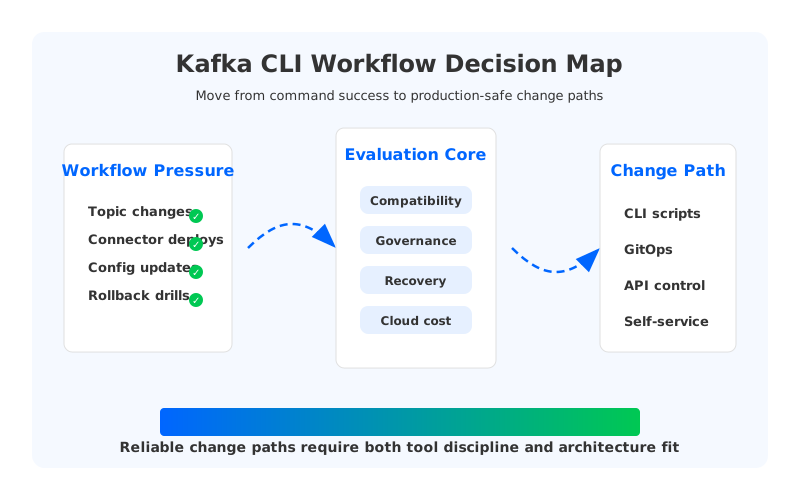
The map separates command execution from platform judgment. A team can keep familiar Kafka commands while moving risky parts into a controlled path: policy, validation, deployment, observation, and rollback. The more teams depend on Kafka as shared infrastructure, the less acceptable tribal command knowledge becomes.
2The production constraint behind the problem
Traditional Kafka runs on a Shared Nothing architecture: each Broker owns local storage, partitions live on broker disks, and durability is maintained through replication between brokers. This model has served Kafka well, and it remains a good mental model for many operators. It also means that operational changes can trigger data movement, storage pressure, or placement constraints that are not visible from the CLI command itself.
Consider a Topic workflow. The CLI can declare partitions and retention, but the actual production impact depends on broker disk headroom, leader distribution, replica placement, rack or Availability Zone awareness, and future read patterns. A connector workflow has a similar split. The Connect API can submit or restart a connector, but the platform still has to account for task placement, source system limits, sink idempotency, secret rotation, dead-letter handling, and the cost of reprocessing. The command is the smallest part of the change.
Cloud deployment sharpens the problem. Storage and network decisions that were hidden inside a data center become line items and failure domains. Cross-zone traffic, broker replacement, partition reassignment, and retained data all interact with the architecture. A script that changes retention from 24 hours to 30 days is not only a metadata edit; it changes durable data volume and future recovery work.
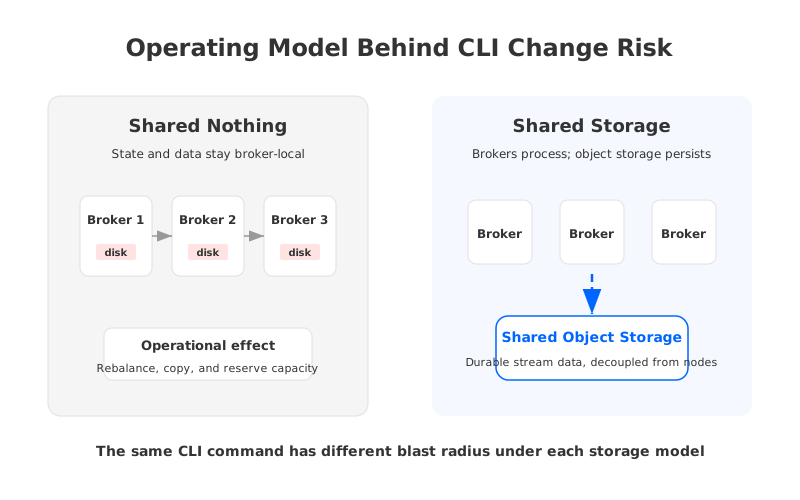
This is why platform teams should design CLI workflows around the operating model, not only around command syntax. Under Shared Nothing architecture, more self-service often means more guardrails around capacity reservation, data movement, and broker-local state. Under Shared Storage architecture, the risk shifts toward compatibility, control-plane policy, and object storage configuration, while broker replacement and storage elasticity become less tightly coupled to individual nodes.
3Architecture options and trade-offs
There are several credible ways to make command-line Kafka operations safer. The right answer depends on team boundaries, compliance requirements, workload shape, and how much of the Kafka estate is already standardized. A platform team that runs a few internal clusters may not need the same control surface as a company exposing Kafka as a shared developer platform across many business units.
The options fall into a practical spectrum:
| Change path | What it improves | What still needs attention |
|---|---|---|
| Runbook plus CLI | Fast adoption, low tooling overhead, direct operator control | Auditability, repeatability, approval, and drift detection |
| Scripted CI job | Repeatable execution and reviewable diffs | Runtime health checks, secrets, rollback, and environment-specific limits |
| GitOps for Topics and connectors | Clear ownership, history, and policy review | Emergency changes, live status, offset-sensitive rollback, and connector task health |
| Platform API or console | Self-service with stronger guardrails | Compatibility with existing Kafka tools and migration effort |
| Architecture-level redesign | Better elasticity and lower stateful-operation burden | Requires evaluation of compatibility, deployment model, and operational responsibilities |
The key is not to declare one path universally right. Runbooks are often enough for rare administrative work. GitOps is strong when desired state can be cleanly represented as files. A platform API becomes valuable when application teams need delegated access without cluster-admin credentials. Architecture-level redesign becomes relevant when the same operational problems keep returning: broker replacement takes too long, storage planning dominates every retention change, and partition movement becomes a recurring tax on developer autonomy.
Connector workflows deserve special treatment because they sit between Kafka and other systems. A failed source connector can duplicate ingest. A failed sink connector can back up a Topic and turn Consumer lag into an application incident. A harmless-looking config edit may trigger task rebalance, re-authentication, schema change, or replay. Treat connector deployment as an application release, not a cluster administration shortcut.
Topic workflows have a different risk profile. They are often created earlier in the application lifecycle, which makes naming, ownership, retention, cleanup policy, and partition count difficult to fix later. A good workflow should validate the Topic request against a catalog of conventions before it reaches Kafka. It should also make trade-offs visible: more partitions can improve parallelism, but they also add metadata, file, leadership, and operational overhead.
4Evaluation checklist for platform teams
Before choosing tooling, evaluate the workflow against production questions. This keeps the conversation grounded and prevents a familiar trap: building a polished wrapper around commands that still encode unsafe assumptions.
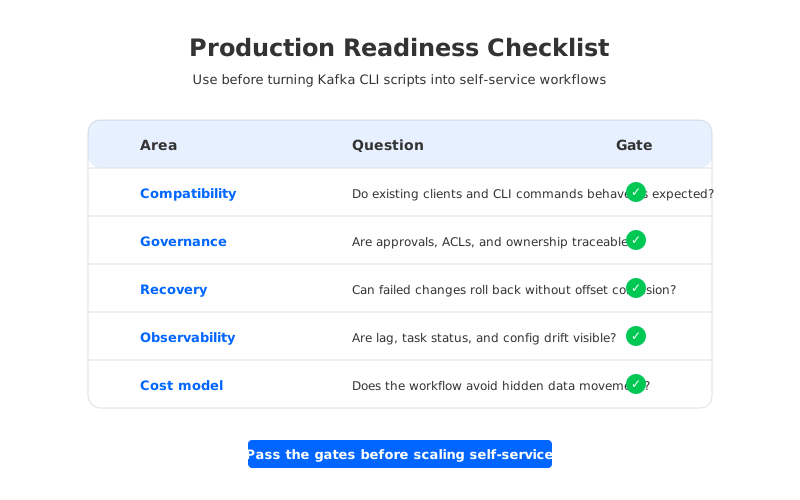
Use this checklist as a readiness gate:
- Compatibility: Can existing clients, Kafka tools, Connect plugins, and automation scripts keep working with minimal change? If the workflow requires teams to rewrite every client-side assumption, adoption will stall.
- Governance: Is every Topic, connector, ACL, and config change tied to an owner, an approval path, and an audit trail? Self-service without ownership becomes ticketless chaos.
- Recovery: Can the team roll back a failed connector deployment, Topic config change, or offset operation without losing the recovery point? The rollback path should be tested, not described.
- Observability: Does the workflow check lag, connector task status, producer errors, request latency, and config drift after execution? A command returning zero should start verification, not end it.
- Scaling: Does the architecture absorb partition growth, retention growth, and broker replacement without turning every change into a data movement project?
- Cost model: Does the workflow surface storage, compute, and cross-zone network effects before approval? Cost surprises are usually design feedback arriving late.
The strongest workflows make failure boring. They reject invalid changes early, apply valid changes consistently, and expose the same post-change signals every time. They also let platform engineers keep a narrow manual break-glass path for incidents without teaching every application team how to improvise with cluster-admin credentials.
5How AutoMQ changes the operating model
Once the evaluation moves from command syntax to operating model, AutoMQ becomes relevant as a Kafka-compatible cloud-native streaming platform built around Shared Storage architecture. It keeps Kafka protocol compatibility while replacing broker-local durable log storage with S3Stream, where WAL storage handles durable write buffering and S3-compatible object storage becomes the primary data repository. AutoMQ Brokers remain responsible for Kafka protocol processing, leadership, caching, routing, and scheduling, but persistent stream data is not bound to a specific broker's local disk.
That changes the shape of CLI and automation workflows. A Topic creation request still needs policy. A connector deployment still needs validation. A bad offset operation is still dangerous. The difference is that many capacity and replacement concerns move out of the broker-local disk model. When brokers are stateless brokers and storage is shared, platform teams can reason about compute scaling and storage growth more independently than they can in a conventional Shared Nothing cluster.
This does not remove the need for disciplined workflows. It changes where the discipline should focus. Instead of spending most of the guardrail budget on avoiding broker disk exhaustion or planning data movement after every scaling event, teams can put more attention on application ownership, connector release safety, observability, and migration boundaries. That is usually where developer experience work should have been focused in the first place.
For Kafka-compatible evaluations, AutoMQ is not a replacement for workflow design. It is an architecture option that can make workflow design less dominated by stateful broker operations. Teams still need to test client behavior, Connect plugin assumptions, security model, Terraform or API boundaries, and failure drills in their own environment. The practical question is whether the platform should keep wrapping stateful storage constraints in more automation, or reduce those constraints at the architecture layer.
6A practical change path design
A mature CLI workflow has four stages. First, the request is declared in a reviewable format: Topic spec, connector config, ACL change, or offset operation. Second, policy checks run before execution. Third, the workflow applies the change through the right Kafka or platform interface. Fourth, post-change verification compares expected and observed behavior.
For Topic changes, preflight checks should cover naming, owner, environment, partition count, retention, cleanup policy, replication factor where applicable, and expected traffic class. For connector changes, they should cover connector class, task count, secret references, source or sink permissions, error handling, idempotency, and downstream blast radius. For offset workflows, they should force a stronger approval path because offsets are operational state, not configuration decoration.
The workflow should also separate normal changes from emergency changes. Normal changes deserve review, automated validation, staged rollout, and recorded health checks. Emergency changes need speed, but they should still leave evidence: who executed them, why the normal path was bypassed, what was changed, and what verification followed. If the emergency path becomes the normal path, the workflow is admitting that the platform is too slow for its users.
Here is a concise scorecard for deciding whether a CLI workflow is ready for broader self-service:
| Question | Ready signal | Not-ready signal |
|---|---|---|
| Can developers request changes without cluster-admin access? | Delegated workflow with scoped permissions | Shared credentials or manual operator copy-paste |
| Are configs reviewable before execution? | Versioned specs and automated policy checks | Shell history, chat approvals, or local files |
| Is rollback tested? | Rehearsed rollback for Topics, connectors, and offsets | "Revert the PR" as the entire plan |
| Are health checks automatic? | Lag, task status, errors, and drift checked after apply | Command exit code treated as success |
| Does architecture reduce operational drag? | Scaling and replacement are routine operations | Every growth event triggers storage rebalancing work |
The scorecard is intentionally plain. A workflow that fails these checks does not need a prettier CLI wrapper. It needs a clearer ownership model, stronger validation, and, in some cases, a different Kafka operating model.
7CTA
If your team is turning Kafka command-line work into a shared developer platform, evaluate both layers at the same time: the change path and the broker architecture underneath it. Start with your real Topic and connector workflows, then compare the operational model against AutoMQ BYOC when you need Kafka-compatible streaming with customer-controlled cloud boundaries and Shared Storage architecture.
8References
- Apache Kafka: Basic Kafka operations
- Apache Kafka: Kafka Connect administration
- Apache Kafka: Kafka documentation and operations guide
- AWS Architecture Blog: Overview of data transfer costs for common architectures
- AutoMQ Docs: Compatibility with Apache Kafka
- AutoMQ Docs: Architecture overview
- AutoMQ Docs: Continuous Self-Balancing
9FAQ
9.1Are Kafka CLI workflows still useful if a team has a platform console?
Yes. Many mature teams keep the CLI for diagnostics, break-glass operations, and local testing while routing routine production changes through a controlled workflow. The goal is not to ban the CLI. The goal is to make production changes traceable, validated, and observable.
9.2Should Topic creation be self-service?
It can be self-service when the platform has clear ownership, policy checks, naming rules, retention limits, ACL handling, and post-change visibility. Without those controls, self-service Topic creation tends to move toil from ticket queues into production incidents.
9.3Why are connector workflows riskier than they look?
Connectors interact with systems outside Kafka. A restart, config edit, or task rebalance can affect source reads, sink writes, authentication, schema handling, and replay behavior. Treat connector changes like application releases, with validation and rollback plans.
9.4Does Shared Storage architecture remove the need for Kafka workflow governance?
No. Shared Storage architecture can reduce the operational burden tied to broker-local durable data, but governance still matters. Teams still need ownership, approval, compatibility testing, observability, and safe rollback for Topic, connector, and offset changes.
9.5How should a team start improving kafka cli workflows?
Pick one high-volume workflow, usually Topic creation or connector deployment, and map it from request to post-change verification. Add policy checks before execution, health checks after execution, and an audit trail for ownership. Once that path is reliable, expand the same pattern to more sensitive operations.


