
Table of Contents
Table of Contents
The hardest Kafka clusters to size are not always the largest ones. They are the clusters whose traffic curve looks calm until a product launch, flash sale, live match, device firmware rollout, fraud-model refresh, or marketing campaign turns the next hour into the only hour that matters. The average throughput is easy to defend in a planning meeting. The peak is what wakes up the on-call engineer.
For SREs, architects, and FinOps teams evaluating a Confluent Cloud alternative, bursty workloads change the buying question. You are not only asking whether the platform can run Kafka-compatible producers and consumers. You are asking how quickly capacity becomes usable, how much idle headroom you carry between peaks, and whether scaling requires moving partition data at the exact moment the cluster is already under pressure.
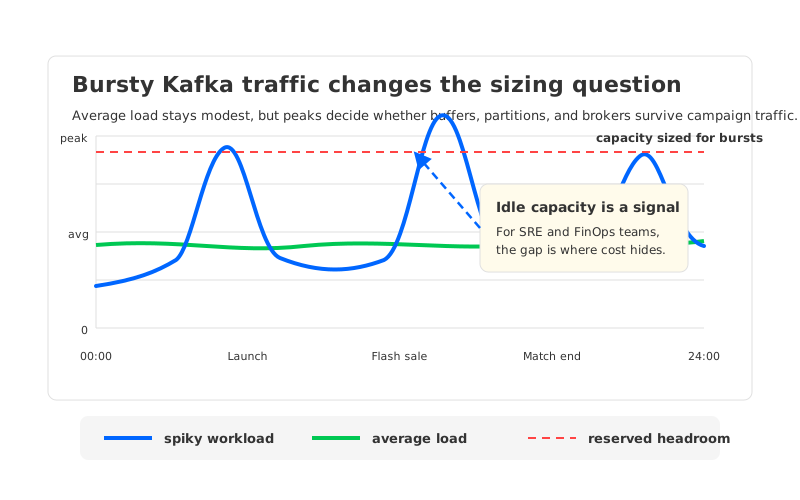
That distinction matters because Confluent Cloud already offers several Kafka cluster types, including elastic options. For many steady workloads it removes a great deal of operational work. The evaluation becomes more interesting when your business has a high peak-to-average ratio. At that point, the storage and scaling model determines whether elasticity is a billing feature, an operational feature, or both.
1Why bursty Kafka is expensive to size
Bursty Kafka is expensive because Kafka protects continuity by forcing you to plan for the busiest plausible interval, not the prettiest average. An e-commerce site might see normal checkout traffic all week, then multiply event volume during a flash sale. A game platform might ingest routine telemetry during quiet hours, then absorb matchmaking, inventory, and combat events after a tournament starts. IoT fleets often push device state in waves. Log platforms and campaign analytics systems face the same pattern whenever humans or machines synchronize around a deadline.
The painful part is not only compute. Kafka capacity is a combined function of broker CPU, network ingress, network egress, partition count, replication, retention, client behavior, and storage throughput. If one of those dimensions is undersized, the symptom may appear somewhere else: producer latency rises, consumer lag grows, broker network threads saturate, or partition leadership concentrates on a few nodes. Teams then add margin because the cost of under-sizing is visible and immediate.
That margin becomes idle capacity after the spike passes. In a self-managed cluster, it shows up as brokers and disks that sit around waiting for the next peak. In a managed service, it shows up through the pricing dimensions and cluster type you choose. Confluent's pricing materials describe Kafka cluster billing around eCKUs or CKUs, networking, and storage, while Confluent's cluster documentation describes differences between Basic, Standard, Enterprise, Dedicated, and Freight clusters. The operational question is therefore sharper than "managed or self-managed": which capacity unit expands and contracts with your traffic, and which unit remains reserved because the architecture needs it?
For bursty teams, a useful cost review separates four forms of headroom:
- Throughput headroom protects ingress and egress during the spike. This is the most obvious dimension, but it is rarely the only limiter.
- Partition headroom protects routing and parallelism. A topic design that works at normal traffic can create hotspots when only a few partitions receive campaign traffic.
- Storage headroom protects retention and local disk behavior. If storage is tied to brokers, scaling compute and scaling stored data become entangled.
- Operational headroom protects the humans. A platform that requires manual reassignment plans during a peak still leaves the incident loop in human hands.
2What to evaluate in Confluent Cloud
Confluent Cloud should be evaluated by cluster type and workload shape, not by a single generic "Confluent cost" number. Confluent's public pricing page says Elastic Confluent Units for Kafka, or eCKUs, autoscale up and down based on workload, and that Kafka clusters are billed for eCKUs or CKUs, networking, and storage. Its cluster type documentation also shows that different cluster families expose different scaling models and limits. That is already a hint: the right answer for a bursty workload depends on whether your spike fits the chosen tier's throughput, partition, networking, latency, compliance, and connectivity constraints.
Dedicated clusters deserve a separate look. Confluent documents resize operations for Dedicated Kafka clusters and notes constraints such as per-CKU limits for partitions and ingress or egress throughput. The same documentation points to provisioning and scaling time guidance, and warns that shrinking a highly loaded cluster can cause application performance issues. FinOps teams should model the operational path, not only the steady-state bill.
The evaluation table should match the spike:
| Evaluation area | Why it matters for bursty Kafka | What to verify |
|---|---|---|
| Capacity unit | Peaks may require temporary throughput without permanent over-provisioning. | Whether your cluster type uses eCKUs, CKUs, or another capacity model. |
| Scale timing | A campaign spike may last minutes, not days. | How fast capacity becomes available for your tier and region. |
| Partition limits | Hot topics often need more partitions or better leader spread. | Per-cluster and per-capacity-unit limits. |
| Storage model | Broker-local data can slow reassignment and shrink operations. | Whether scaling requires moving stored partition data. |
| Network billing | Fan-out consumers can make egress a major line item. | Public, private, cross-zone, and cloud-provider network paths. |
| Automation boundary | Humans cannot reliably rebalance during every spike. | Which actions are automatic, policy-driven, or ticket-driven. |
This table prevents a common mistake: treating "autoscaling" as a yes-or-no feature. Elastic Kafka for bursty workloads is a chain: detect load, provision capacity, rebalance partitions, let clients recover, and contract the bill after the event. One weak link can turn a theoretically elastic platform into a platform that still needs peak sizing.
3Why broker-local storage makes scaling harder
Apache Kafka was designed around partitions whose logs live on brokers. That model is robust and well understood, but it makes scaling a data-placement problem. When you add brokers to a traditional Kafka cluster, the new brokers do not automatically carry useful partitions. Operators use partition reassignment to move replicas and leadership so the new capacity can absorb traffic. Apache Kafka's operational documentation explicitly treats cluster expansion as a process that involves assigning partitions to the new brokers; it is not the same thing as adding empty machines.
That design is why bursty traffic exposes a timing gap. The business wants capacity now, while the cluster may still need to move data from old brokers to new brokers. Reassignment traffic can compete with live producer and consumer traffic. Throttling protects the workload but lengthens the operation. Running reassignment aggressively can shorten the operation but increase risk. Neither option is pleasant when the trigger was a real production spike.
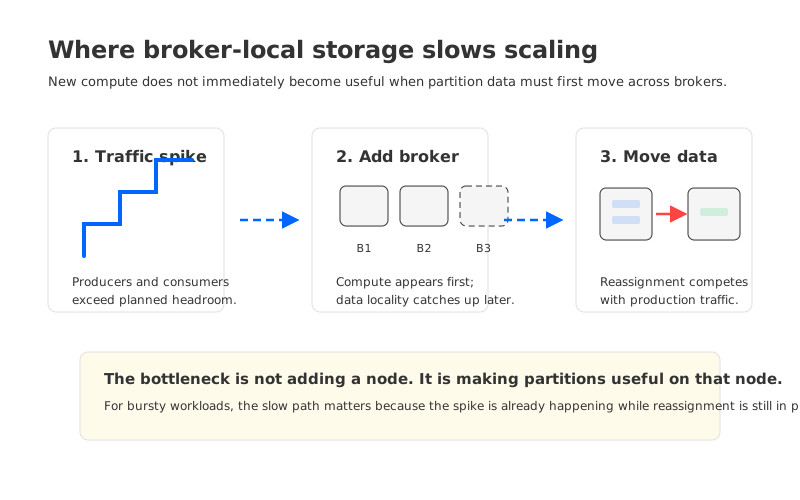
Kafka tiered storage can reduce the amount of local data that must remain on brokers, but it does not automatically make brokers stateless. If the active log, recent segments, or leadership state remains tied to broker-local resources, scaling still has a state movement problem. This is the difference between using object storage as a colder tier and using shared storage as the primary durability boundary.
The practical effect is easy to state: if scaling requires copying a large amount of partition data before capacity is useful, the platform is poorly matched to short-lived spikes. If scaling mostly requires adding compute and redirecting partition ownership, it can respond closer to the pace of the workload.
4How stateless brokers and shared storage improve elasticity
A Confluent Cloud alternative for bursty Kafka should be judged by how it breaks the coupling between compute and stored data. Stateless brokers are not magic; they are an architectural decision. Durable partition data lives in shared storage, while brokers serve protocol, caching, coordination, and read/write paths without being the long-term home of the log. Once the broker is no longer the durable storage boundary, adding or removing brokers becomes closer to adding or removing compute.
That change simplifies several peak-time operations. Partition reassignment no longer has to mean copying the full history of a partition to a new local disk. Self-balancing can focus on traffic distribution, CPU, and network pressure. Auto scaling can add brokers and rely on fast reassignment to make them useful. The loop becomes: observe load, adjust compute, move ownership, rebalance traffic, and scale back when the spike disappears.
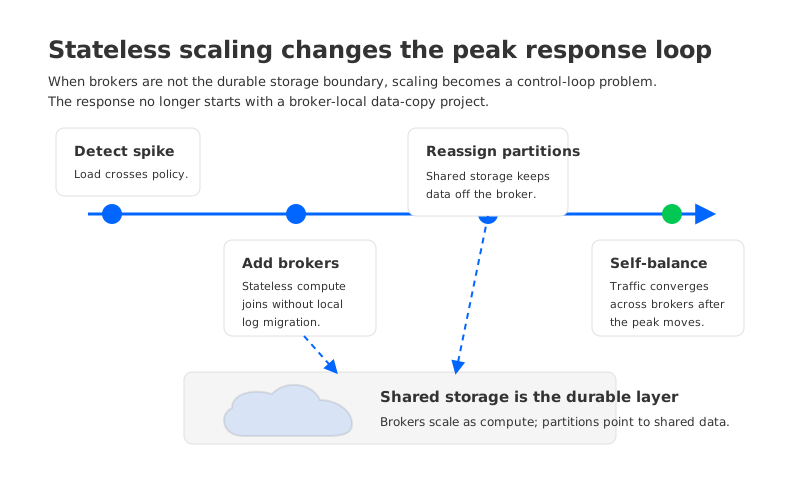
Stateless brokers do not remove the need for capacity planning. They change which variables dominate the plan. You still need topic design, partition counts, client limits, network capacity, retention policy, and backpressure strategy. But the response no longer starts with "copy a large amount of old data before new capacity helps." For high peak-to-average workloads, that difference is often the point.
5Where AutoMQ fits
AutoMQ is a Kafka-compatible cloud-native streaming system that uses shared storage to separate broker compute from durable data. Its documentation describes stateless brokers, second-level partition reassignment, continuous self-balancing, and scale-out or scale-in in seconds. The relevant idea for this article is not "serverless Kafka." The relevant idea is that broker-local storage is no longer the center of the scaling path.
In AutoMQ's architecture, partition data is stored in shared object storage through its storage layer, and broker nodes are designed to be stateless. AutoMQ's technical documentation says this enables second-level partition reassignment, automatic scaling, and continuous traffic rebalancing. Its self-balancing documentation explains that metrics are collected and used to generate reassignment plans so traffic can converge across brokers. For bursty workloads, those mechanisms map directly to the operational pain: peaks create hotspots, hotspots need redistribution, and redistribution must complete while the event is still relevant.
The strongest way to evaluate AutoMQ is to put it against your own spike profile. For e-commerce launches, test cart and payment latency during scale-out. For gaming telemetry, test hot-partition balance after match-end bursts. For IoT ingestion, test scheduled device waves without carrying all peak capacity for the rest of the day. For log or campaign platforms, test fan-out consumers because read amplification can be as important as write throughput.
AutoMQ's fit is strongest when the workload has a large gap between average and peak, when scaling operations happen often enough to become routine, and when partition movement time dominates the incident response. It is less compelling if your workload is steady, your current Confluent Cloud tier already autoscales within the required envelope, and your bill is dominated by managed ecosystem services rather than Kafka broker capacity, storage, or operational headroom.
6A bursty workload evaluation checklist
The most useful evaluation is a rehearsal, not a debate. Take one real traffic curve from a past event and replay it against the platform candidates. Include producer retries, consumer group behavior, partition leadership, private networking, monitoring delay, and post-peak scale-in. Bursty workloads punish averages, so preserve the minute-by-minute shape of the event.
Use this checklist before you call any platform a Confluent Cloud alternative:
| Question | Good sign | Warning sign |
|---|---|---|
| How is capacity metered? | The bill expands and contracts with the workload dimensions you actually use. | You carry reserved capacity for rare peaks. |
| How does scale-out become useful? | New brokers quickly receive partition ownership or traffic. | New brokers sit idle while data copying catches up. |
| What happens to hot partitions? | Balancing is continuous or policy-driven. | Operators manually design reassignment plans under pressure. |
| How does scale-in work? | Capacity can shrink after traffic falls without unsafe data movement. | Shrink is blocked by partition, throughput, or storage constraints. |
| What does failure look like? | Client retries and leadership movement are understood and tested. | The test only measures happy-path provisioning. |
The final decision should combine performance, operational risk, and unit economics. Confluent Cloud may still be the right answer when its managed ecosystem and elastic tiers match your requirements. A Confluent Cloud alternative becomes worth serious evaluation when your workload needs faster control over broker capacity, less broker-local data movement, or a clearer path to reducing idle capacity after peaks.
Peak traffic is not an edge case for these systems. It is the moment the architecture has to tell the truth. If your Kafka workload is defined by flash sales, game events, IoT waves, log storms, or campaign traffic, evaluate the scaling path as carefully as the steady-state feature list. AutoMQ's stateless brokers, shared storage, Self-Balancing, and Auto Scaling are worth testing when the business problem is not "run Kafka" but "make Kafka elastic without turning every spike into a data movement project." Explore the AutoMQ documentation and run a spike-shaped proof of concept before your next launch window.
7References
- Confluent Cloud pricing
- Confluent Cloud billing overview
- Kafka cluster types in Confluent Cloud
- Resize a Dedicated Kafka cluster in Confluent Cloud
- Apache Kafka basic operations: expanding your cluster
- AutoMQ architecture overview
- AutoMQ stateless broker
- AutoMQ partition reassignment in seconds
- AutoMQ continuous self-balancing
- AutoMQ scale-out/in in seconds
8FAQ
8.1What is the best Confluent Cloud alternative for bursty Kafka workloads?
The best alternative depends on the spike shape, not only on feature parity. For bursty Kafka, prioritize platforms that can add useful broker capacity quickly, rebalance hot partitions without large data movement, and scale down after the event. AutoMQ is a strong candidate when stateless brokers and shared storage directly address your scaling bottleneck.
8.2Does Confluent Cloud support autoscaling?
Yes, Confluent describes eCKUs as elastic capacity units that autoscale based on workload, and its cluster documentation lists autoscaling behavior for specific cluster types. You still need to verify the cluster family, limits, region, connectivity, storage, and billing dimensions that apply to your workload.
8.3Why does partition reassignment matter during traffic peaks?
Kafka traffic is routed through partitions. If traffic concentrates on a subset of partitions or brokers, adding brokers helps only after partition ownership and leadership are redistributed. In broker-local architectures, reassignment may involve moving data, which can compete with production traffic during the same peak.
8.4Is AutoMQ a serverless Kafka service?
This article does not position AutoMQ as serverless. The relevant architecture is Kafka-compatible shared storage with stateless brokers, fast partition reassignment, Self-Balancing, and Auto Scaling. That design targets elasticity by reducing the amount of broker-local state involved in scaling.
8.5How should FinOps teams compare Confluent Cloud and alternatives?
Model the full event window: pre-peak headroom, peak capacity, network egress, storage, post-peak scale-in, and operational labor. A lower steady-state number can be misleading if the platform cannot safely absorb the peak, while a higher managed-service bill may be justified if it removes operational risk.
8.6What workloads benefit most from stateless Kafka brokers?
Workloads with high peak-to-average ratios benefit most: flash-sale events, gaming match telemetry, IoT device waves, campaign analytics, and log ingestion storms. Stateless brokers are most valuable when capacity needs to change frequently and partition data movement would otherwise dominate scaling time.


