
Table of Contents
Table of Contents
A Kafka bill becomes urgent when it stops behaving like the workload your team thought it was running. The invoice rises, the budget owner asks for an explanation, and the first instinct is to search for a single culprit: one expensive cluster, one careless topic, one connector that ran too hot. Sometimes that culprit exists. More often, a Confluent Cloud pricing surprise is the visible edge of several workload changes in the same billing period.
That is why a Confluent Cloud bill audit should start as an evidence exercise, not as a vendor argument. Confluent's billing documentation lists many billable dimensions across Kafka clusters, connectors, Cluster Linking, Flink, Tableflow, support, storage, partitions, and data movement. Kafka teams see the same system through different signals: bytes in, bytes out, retained bytes, consumer lag, topic count, partition count, connector task count, and network flow logs. The audit work is to join those two worlds until the invoice can be explained in workload language.
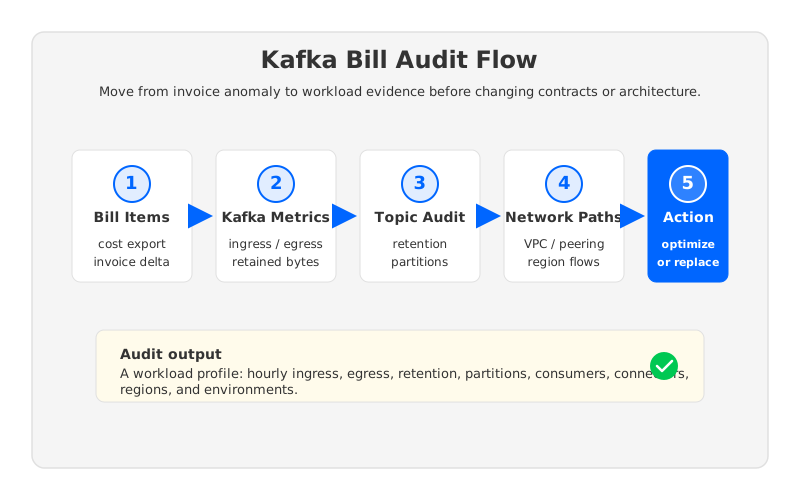
The output should be a workload profile that an SRE, FinOps analyst, and platform engineering manager can all use: hourly ingress and egress, retained data by topic, partition inventory, consumer fan-out, connector activity, environment ownership, cloud regions, and network paths. With that profile, the team can separate quick fixes from deeper architecture questions.
1Why Kafka Bills Surprise Teams
Kafka cost surprises usually come from the workload changing faster than the team's mental model. A product team adds another downstream consumer, and egress grows without a matching ingress increase. A compliance policy extends retention, and storage becomes the dominant line item. A migration leaves a temporary environment alive, and the invoice quietly includes production-like data movement for a system nobody claims.
Confluent Cloud adds another layer because the commercial model is not one flat Kafka fee. Public Confluent material describes pricing that varies by cloud provider, region, cluster type, and usage dimensions such as data transfer, storage, partitions, and capacity units for Dedicated clusters. The billing documentation also exposes a Cost API and a dimension summary so teams can retrieve costs and map them to product areas. That is useful, but it does not automatically explain why a Kafka workload generated the cost.
The cleanest audit question is not "why is Confluent Cloud expensive?" It is more specific: which bill item changed, which Kafka behavior caused it, and whether that behavior is intentional.
2Step 1: Map Bill Items to Workload Metrics
Start with the official cost data, then refuse to stop there. Download invoices, export costs through the Confluent Cloud billing or Costs API where available, and group the data by environment, cluster, service, region, and usage dimension. Identify which line items changed month over month, then translate each changed line item into a Kafka metric or inventory question.
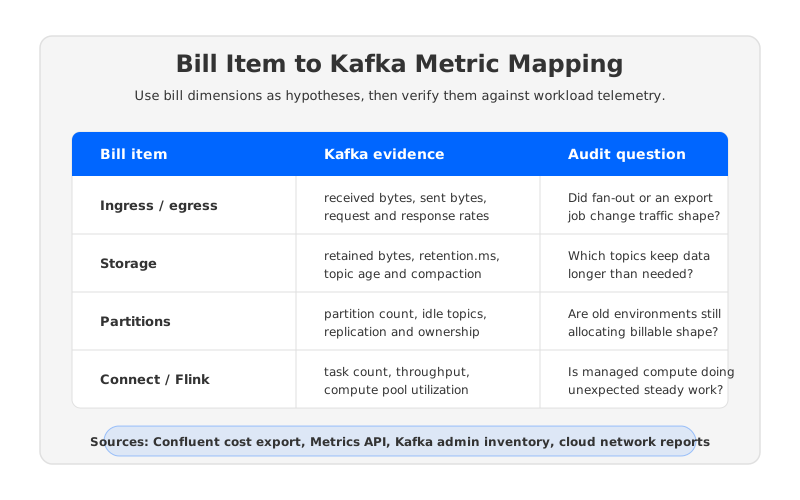
This mapping is where many audits become useful. Ingress and egress should be compared with Confluent Cloud Metrics API signals and client-side producer or consumer metrics. Retained storage should be compared with retained bytes, topic-level retention settings, compaction behavior, and topic age. Partitions, managed connectors, and custom connectors should be checked against inventory, task count, throughput, and continuous read/write behavior.
| Bill movement | Kafka evidence to pull | What it can reveal |
|---|---|---|
| Data transfer increased | Bytes received, bytes sent, consumer count, connector throughput, cluster links | New fan-out, bulk export, migration traffic, or cross-environment reads |
| Storage increased | Retained bytes, retention policy, compaction settings, topic growth by owner | Retention drift, compliance growth, unowned topics, or missing lifecycle review |
| Capacity pressure increased | Peak throughput, throttle metrics, request latency, dedicated capacity utilization | Peaks that force headroom even when average traffic looks stable |
| Environment count increased | Clusters by environment, owner, region, lifecycle tag, last activity | Development or migration systems that became permanent by accident |
Use the same time window for cost and metrics. If the bill is monthly but traffic changed during one week, a monthly average can hide the cause. Pull hourly or daily metric windows around the cost inflection and compare them with deployment history, release events, data backfills, incident timelines, and additional consumers. A finance dashboard can show the spike; Kafka telemetry explains whether the spike was useful work.
3Step 2: Audit Topics, Retention, and Consumers
After the bill-to-metric mapping, move down to the topic level. Kafka cost is often shaped by topic ownership more than by cluster ownership because teams create topics for product events, CDC streams, observability, model features, audit trails, and temporary migrations. The platform team may own the cluster, but the retention and fan-out decisions sit elsewhere.
Create a topic inventory with these fields: topic name, owner, environment, partition count, retention policy, compaction setting, retained bytes, average ingress, peak ingress, consumer groups, connector dependencies, and business criticality. The inventory should also mark stale topics whose producers or consumers disappeared. A stale topic with long retention is a governance gap with a cost signature.
Consumer fan-out deserves special attention because it often grows invisibly. A source topic may receive the same volume as last quarter, but if analytics, fraud detection, search indexing, and AI feature pipelines all read it independently, egress and downstream processing grow while producers look unchanged. Confluent's Metrics API documentation includes Kafka metrics for data flowing in and out of clusters, and Apache Kafka's own metrics model exposes broker, producer, and consumer signals that help locate the read side of the workload. For cost audit purposes, bytes out can matter as much as bytes in.
Retention is the other quiet driver. Teams often extend retention because storage feels abstract in a managed service. That decision may be correct for auditability or replay, but it should be explicit. Ask topic owners whether long retention is a business requirement, a debugging habit, or a forgotten default.
4Step 3: Audit Networking and Environments
Network charges are where Kafka bills and cloud bills can disagree. Confluent Cloud may show data movement as part of its own billable dimensions, while the customer's cloud provider can also charge for private connectivity, inter-zone traffic, inter-region traffic, NAT gateways, load balancers, or internet egress depending on the architecture. A Kafka bill audit that ignores cloud network reports is incomplete.
On AWS, for example, the EC2 pricing page states that data transferred across Availability Zones in the same region is charged in each direction for several services, while data transferred between certain resources in the same Availability Zone is free. Azure and Google Cloud publish their own bandwidth and VPC network pricing pages with different regional and zonal rules. Use current cloud pricing pages rather than copying an old spreadsheet.
Map each Kafka data path:
- Producer location to Confluent Cloud cluster, including whether traffic uses public internet, private link, peering, transit gateway, VPN, or another route.
- Confluent Cloud cluster to consumers, especially analytics systems, data lakes, warehouses, and applications in other regions or clouds.
- Cluster Linking, replication, migration, and disaster recovery flows that move data because of architecture, not direct application reads.
- Development, staging, and test environments that mirror production topics or replay production data longer than expected.
Then compare the map with actual flow logs and cloud cost reports. If a consumer moved from the same region to a different region, the Kafka application may still work perfectly while the economics changed materially. If staging reads production-like streams every day, the engineering workflow may be convenient but expensive.
5When Cost Audit Points to Replacement
Many Confluent Cloud bill surprises can be fixed in place. Delete unused topics, reduce stale retention, shut down abandoned environments, right-size dedicated capacity, tune connectors, and put ownership tags on clusters. These changes remove waste without asking the organization to absorb migration risk.
Some audits lead to a harder conclusion: the workload is valid, but the cost structure is a poor fit. This happens when the bill is driven by sustained high throughput, heavy read fan-out, long retention, multi-region movement, or capacity headroom that cannot be smoothed away. The team can clean up waste and still face the same structural problem next quarter.
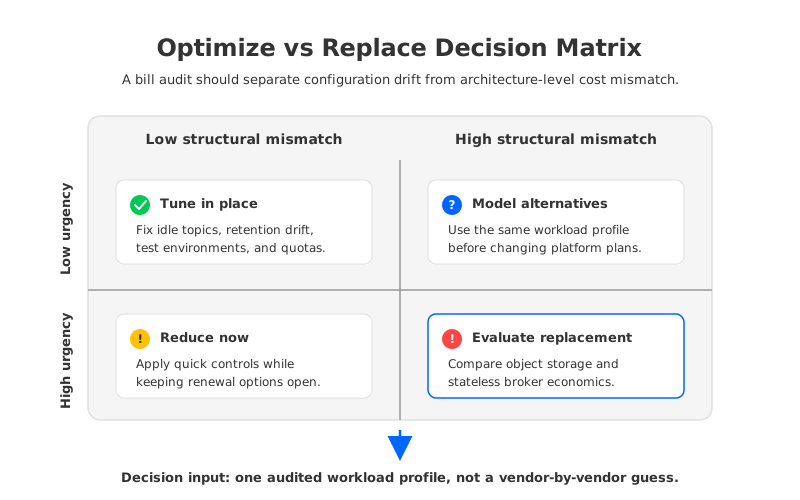
The replacement discussion should still use the audit data, not a generic vendor comparison. A Kafka-compatible alternative must be evaluated against the same workload profile: ingress rate, egress rate, fan-out, retained bytes, partition count, availability requirements, region topology, recovery objectives, operational ownership, and migration constraints.
This is where architecture starts to matter more than per-unit price. Traditional Kafka ties brokers to local or attached storage and replicates data through the broker layer. That model can be reliable and familiar, but it also couples compute, storage, rebalancing, and capacity planning. A workload with long retention and bursty compute demand may need storage that scales with retained bytes, compute that scales with traffic, and less data movement during scaling events.
6How AutoMQ Can Be Evaluated With the Same Workload Profile
When an audit points to replacement, AutoMQ should enter the discussion as a Kafka-compatible cloud-native streaming option, not as a shortcut around analysis. AutoMQ's architecture documentation describes a shared storage design that moves Kafka data into object storage, uses a write-ahead log layer for write efficiency, and makes brokers stateless. The important cost-model implication is that storage, compute, and broker lifecycle can be modeled as separate parts of the workload instead of one tightly coupled cluster shape.
Use the Confluent audit profile as the input to an AutoMQ cost model. Keep the assumptions constant: hourly write throughput, read fan-out, retained data, topic and partition count, region placement, availability target, network paths, and operational boundary. In a Confluent Cloud model, the relevant public dimensions include cluster type, capacity units, ingress and egress, storage, partitions, connectors, and related services. In an AutoMQ BYOC model, include compute nodes, object storage, WAL choice, cloud network charges, observability, and the operational model your team will actually run.
The useful question is whether the architecture aligns with the workload's dominant cost driver. If retained data is the problem, object storage economics deserve close attention. If scaling events move too much data, stateless brokers matter. If the team wants data plane control inside its own cloud account, BYOC boundaries become part of the risk model.
AutoMQ provides public architecture documentation and a pricing calculator that can help teams turn the audit output into a structured comparison. That comparison is strongest when it is boringly specific: same workload, same retention, same regions, same traffic assumptions, and explicit cloud network charges.
7A Practical Bill Audit Template
The template below is intentionally plain. Put it in a spreadsheet, assign owners, and make every row traceable to a source. The moment a cost owner, topic owner, and platform owner can look at the same row and agree on the cause, the conversation becomes much easier.
| Field | Example value type | Source |
|---|---|---|
| Billing period | Month or custom date range | Confluent invoice or Costs API |
| Environment and cluster | Production, staging, development, cluster ID | Confluent Cloud console or API |
| Bill dimension | Storage, data transfer, capacity, connectors, support | Confluent billing export |
| Kafka metric | Bytes in, bytes out, retained bytes, partitions, task count | Confluent Metrics API, Kafka metrics, admin inventory |
| Workload owner | Team or service name | Internal service catalog |
| Change event | Release, backfill, added consumer, retention change | Deployment history or change log |
| Classification | Optimize, monitor, renegotiate, evaluate replacement | SRE, FinOps, platform review |
Run the template on the last full billing period, then rerun it after workload changes: an added consumer domain, retention change, regional expansion, backfill, or renewal negotiation. The audit turns Kafka cost from a monthly shock into an operating signal.
The bill that triggered the audit may be uncomfortable, but it is also useful. It tells you where the system's commercial shape has drifted from the engineering model in your head. Once you can explain that drift with workload evidence, you can decide whether to optimize Confluent Cloud in place, renegotiate with better facts, or model a Kafka-compatible architecture such as AutoMQ with the same workload profile.
8References
- Confluent Cloud billing documentation
- Confluent Cloud pricing
- Confluent Cloud Metrics API
- Apache Kafka monitoring documentation
- AWS EC2 data transfer pricing
- Azure bandwidth pricing
- Google Cloud VPC network pricing
- AutoMQ architecture overview
- AutoMQ pricing calculator
9FAQ
9.1What is the first thing to check when a Confluent Cloud bill spikes?
Start with the bill dimension that changed the most, then map it to Kafka evidence in the same time window. For example, a data-transfer increase should be checked against bytes in, bytes out, connector throughput, consumer fan-out, Cluster Linking, and network flow logs. A storage increase should be checked against retained bytes, topic retention, compaction, and stale topics.
9.2Can a Confluent Cloud bill increase even if producer traffic is flat?
Yes. Producer traffic is only one side of the workload. More consumers, additional connectors, data export jobs, longer retention, regional movement, or managed processing can increase cost even when ingress is stable. That is why a useful audit includes egress, retained storage, partitions, connectors, and network paths.
9.3Should SRE or FinOps own the audit?
Both teams should participate, but neither can complete it alone. FinOps can identify cost deltas and cloud-provider charges; SRE and platform teams can explain Kafka metrics, topology, ownership, and operational constraints. The best owner is usually the platform team, with FinOps providing the cost data and business cadence.
9.4When should a team evaluate a Confluent Cloud replacement?
Evaluate replacement when waste has been removed but the dominant cost driver remains structural: sustained throughput, heavy read fan-out, long retention, multi-region data movement, or capacity headroom that the workload genuinely requires. Use the audited workload profile as the input, so alternatives are compared against measured demand.
9.5How should AutoMQ be compared after a Confluent bill audit?
Use the same workload profile: write throughput, read fan-out, retained bytes, partitions, region topology, network paths, and availability requirements. Then compare Confluent Cloud's managed-service dimensions with AutoMQ's object-storage and stateless-broker cost structure, including compute, WAL, object storage, network, observability, and BYOC operational boundaries.


