
Table of Contents
Table of Contents
The uncomfortable question in a Confluent renewal is not whether Apache Kafka is open. It is what would happen if your team had to leave. Your applications may use standard Kafka clients, but your production platform may also depend on managed networking, Schema Registry, connectors, Flink jobs, topic links, billing units, IAM models, and support terms. That is where Confluent vendor lock-in becomes a practical architecture question instead of a slogan.
Confluent deserves credit for making Kafka easier to run at enterprise scale. For many teams, Confluent Cloud is a rational choice: it reduces operational burden, packages governance features, and gives platform teams a single control surface. The risk starts when "we use Kafka" quietly becomes "we can only operate this workload inside one vendor's platform." A good Kafka exit strategy does not require you to leave tomorrow. It gives you the option to leave without discovering, during an incident or renewal window, that the option was never real.
1Kafka Compatibility Is Not Platform Portability
Apache Kafka sits in an open ecosystem. The Apache Software Foundation lists Apache License 2.0 as its current license, and Confluent's own Community License FAQ says the Confluent license change does not apply to Apache Kafka itself. That matters: the Kafka protocol, client APIs, and major ecosystem patterns remain broadly portable.
But portability lives above and below the protocol. A producer can publish through the Kafka protocol while the surrounding platform is much harder to move. Schema IDs may come from a managed registry. Connectors may use vendor-hosted runtime behavior. Flink SQL jobs may depend on a vendor catalog and cloud service. Private networking may be wired through PrivateLink, VPC peering, DNS, allowlists, and service accounts. Billing and support terms may steer how fast you can scale down, pause, or duplicate a workload.
The practical definition is simple: a platform is portable when your team can move the workload, preserve the data and offsets you care about, replace the surrounding services, and keep applications running with bounded change. Kafka API compatibility helps with that. It is not the whole plan.
2Where Lock-In Shows Up In Managed Kafka
Managed Kafka lock-in usually appears in layers. Some layers are desirable during normal operation because they remove toil. The same layers become risky when there is no export path, no substitute, or no tested rollback.
- Data plane ownership. Topics, partitions, offsets, timestamps, and retention policies are the core assets. If you cannot replicate them with the offsets and ordering assumptions your consumers need, your exit path is theoretical.
- Network topology. Confluent Cloud networking docs describe public connectivity and several private connectivity models across AWS, Azure, and Google Cloud. The same docs note that after a cluster is provisioned, you cannot change its networking solution type between public and private. That makes the initial topology part of your future migration surface.
- Managed services. Confluent Cloud Schema Registry, managed connectors, stream governance, and Confluent Cloud for Apache Flink add useful capabilities. They also create metadata, runtime behavior, and operational habits that sit outside the Kafka broker.
- Migration tooling. Confluent Cluster Linking is useful for supported topologies, but the official docs describe billing based on links and mirroring throughput. The specific supported direction and management surface should be checked against the topology you plan to use.
- Commercial structure. Confluent Cloud billing docs use dimensions such as CKU or eCKU capacity, ingress, egress, and storage depending on cluster type. That model may fit your workload, but procurement should understand which costs continue during parallel migration, replay, and cutover.
None of these points means Confluent is a bad platform. They mean the platform boundary must be visible. The more capabilities you consume above Kafka, the more your exit plan must include services around Kafka.
3The Vendor Lock-In Risk Matrix
The healthiest way to discuss lock-in is to remove drama from it. Treat each layer as low, medium, or high risk based on how hard it would be to replace and how much downtime or application change it would require.
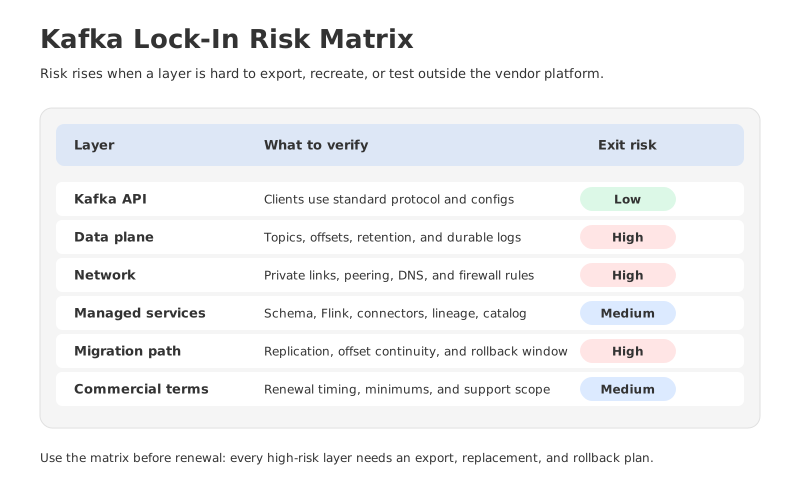
| Layer | Low-risk signal | Higher-risk signal |
|---|---|---|
| Kafka API | Standard clients, documented configs, no custom protocol assumptions | Client behavior depends on vendor-specific extensions or side channels |
| Data plane | Replication plan preserves required data and consumer offsets | Exit requires topic recreation, offset reset, or long write freeze |
| Network | Topology is documented as code, with target connectivity tested | Private connectivity, DNS, and firewall rules exist only in console setup |
| Managed services | Schemas, connectors, and jobs can be exported or rebuilt elsewhere | Runtime behavior depends on managed services with no tested replacement |
| Pricing and contract | Parallel-run costs and termination terms are known | Renewal pressure is the first time anyone prices a migration window |
The matrix should be owned jointly by architecture, platform engineering, security, and procurement. Engineering alone cannot answer contract lock-in. Procurement alone cannot judge offset semantics. Security alone cannot decide whether a managed connector can be replaced. Lock-in hides in the gaps between those teams.
4Keep Ownership Of The Full Exit Path
A Kafka exit path is a set of owned artifacts. You need the source cluster, target cluster, replication path, schema plan, connector plan, network plan, and rollback plan to exist at the same time. The hard part is not drawing the arrow from left to right. The hard part is knowing who owns every object the arrow crosses.
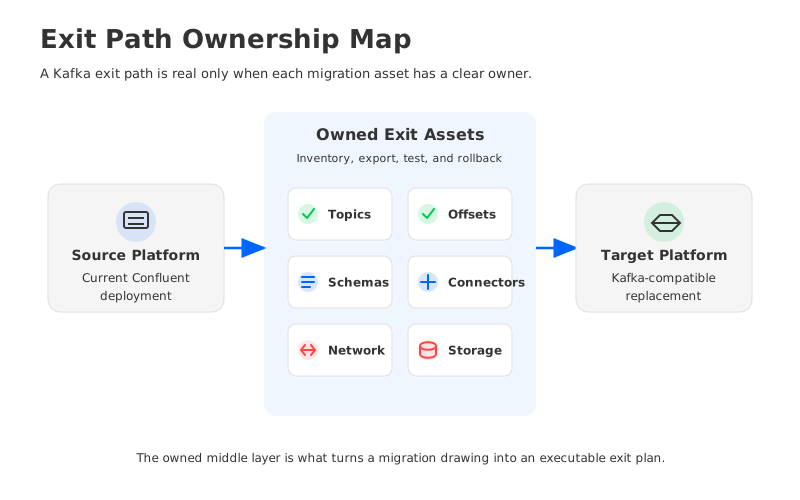
Start with the boring inventory. List all topics, partition counts, retention policies, ACLs, service accounts, client configs, schemas, connector definitions, Flink or stream-processing jobs, alert rules, dashboards, and private network dependencies. Then mark which items are portable as-is, which are rebuildable, and which are vendor-specific.
That inventory usually changes the conversation. A team may say "we can migrate Kafka" and then discover that the real dependency is not Kafka at all. It is a managed Debezium connector, a schema compatibility rule, a private DNS pattern, or a Flink SQL statement that assumes Confluent Cloud metadata integration. Confluent's Flink docs describe Kafka topics appearing as queryable Flink tables with schemas and metadata attached by Confluent Cloud, plus integration with Schema Registry, Connectors, and Tableflow. That integration is valuable, but it is also part of the workload definition.
The same logic applies to Schema Registry. Confluent's Schema Registry docs describe it as a centralized repository for managing and validating schemas, including serialization and deserialization over the network. That is useful infrastructure. It also means schema IDs, subject naming strategy, compatibility modes, and client serializer behavior must be in the migration plan.
5How BYOC And Open-Source Posture Change The Risk
BYOC does not magically remove lock-in. A vendor can run in your cloud account and still create dependencies through control planes, proprietary services, or closed migration tooling. But BYOC can change the balance if it gives you clearer ownership of network boundaries, infrastructure resources, operational data, and storage.
AutoMQ approaches this problem from the Kafka-compatible side. The AutoMQ repository is published under Apache License 2.0, and the AutoMQ docs state 100% Kafka API compatibility. AutoMQ BYOC documentation describes a model where the underlying resources belong to the user's cloud account under the VPC, with the control plane and data plane deployed in the user-defined network environment. For buyers worried about exit paths, those details matter more than broad "open" language.
The architecture angle matters too. AutoMQ's technical architecture docs describe a Shared Storage architecture that moves Kafka data away from broker-local disks and into shared object storage, while brokers become stateless. That does not eliminate migration planning, and it does not replace every managed service a Confluent user may consume. It does make the ownership model easier to reason about: compute can be replaced more cleanly, and durable data is not trapped inside broker-local volumes.
Migration still has to be tested. AutoMQ's Kafka Linking documentation describes migration from Apache Kafka or other Kafka distributions to AutoMQ, including Confluent Platform support, byte-to-byte copy, unchanged offset information, and synchronized consumer progress. That kind of tooling is relevant when your primary requirement is to keep Kafka clients and consumer positions stable while changing the platform underneath them.
The fair comparison is not "Confluent lock-in versus no lock-in." Every production platform has some switching cost. The better comparison is whether the switching cost is visible, testable, and owned by your team.
6Questions To Ask Before Signing Or Renewing
Ask exit-path questions before the renewal, not after the migration project is approved. Put them into the architecture review and the procurement checklist.
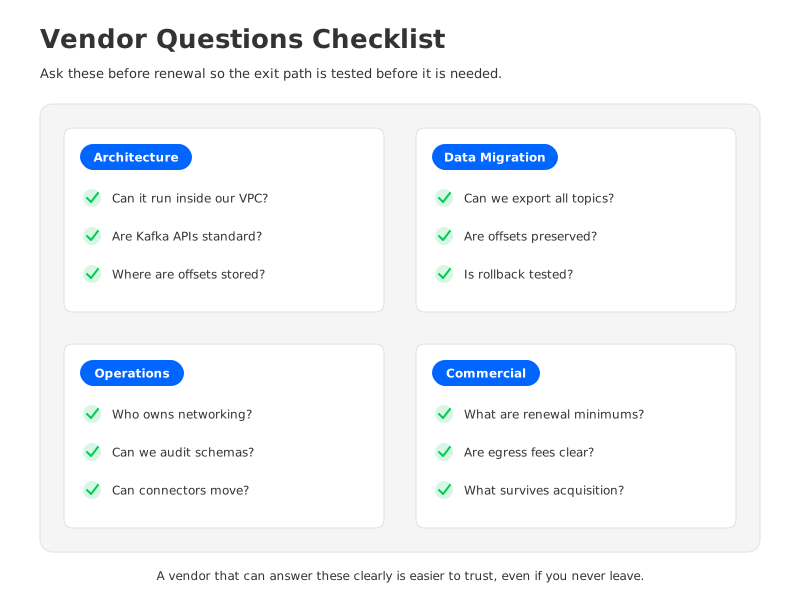
- Can we export topic metadata, ACLs, schemas, connector configs, and audit logs without support intervention?
- Can we replicate the data we need while preserving the consumer offsets our applications rely on?
- Which managed services have open-source or vendor-neutral substitutes, and which require application changes?
- Can our private networking pattern be recreated for a target platform in the same cloud account or VPC?
- What costs apply during a parallel-run migration window, including read, write, storage, replication, and private networking?
- Can we run a small production-like cutover test before the renewal date?
- Which Terraform resources, APIs, and CLI commands cover migration-critical objects?
- Can we pause, shrink, or delete unused capacity cleanly during phased migration?
- Who owns schema compatibility rules, subject naming strategy, and serializer behavior?
- What happens to support, roadmap, and account terms after vendor acquisition or product integration events?
- What is the tested rollback path if producers move before consumers, or consumers move before producers?
- Which parts of the workload are truly Kafka dependencies, and which are dependencies on the vendor platform around Kafka?
Those questions are intentionally uncomfortable. They force the vendor to separate Kafka compatibility from platform portability. They also force your internal team to admit where it has relied on tribal knowledge instead of documented ownership.
7FAQ
7.1Is Confluent Cloud vendor lock-in?
Confluent Cloud is a managed data streaming platform, and managed platforms always involve trade-offs. It becomes a lock-in risk when critical workload behavior depends on services, networking, metadata, or commercial terms that your team cannot export, recreate, or test outside the platform.
7.2Does Apache Kafka compatibility solve the exit problem?
It solves an important part of the problem: applications can often keep using Kafka clients and APIs. It does not automatically move schemas, connectors, private networking, Flink jobs, governance metadata, alerting, or procurement commitments.
7.3Did IBM's Confluent acquisition change the lock-in conversation?
It changed the governance context. IBM announced an agreement to acquire Confluent on December 8, 2025, and IBM said it completed the acquisition on March 17, 2026. That is not a reason to panic, but it is a reason to keep vendor roadmap, account ownership, and contract terms on the risk register.
7.4Should teams avoid proprietary managed services?
No. Managed services can be worth it when they reduce operational risk and accelerate delivery. The right rule is to know what you are buying: if a service becomes part of the critical path, document its data model, export path, replacement option, and rollback plan.
7.5When should AutoMQ be on the shortlist?
AutoMQ is worth evaluating when you want Kafka-compatible clients and ecosystem behavior, but you also want BYOC deployment, cloud-owned infrastructure, object-storage-backed durability, and a tested migration path from existing Kafka distributions. Start with the AutoMQ Kafka Linking migration docs and the AutoMQ BYOC environment architecture.
The goal is not to make every Kafka platform interchangeable. That is not how production systems work. The goal is to make your exit path real enough that you can choose your platform for its value, not because the cost of leaving is hidden. To evaluate a Kafka-compatible BYOC path for your own workload, book an AutoMQ architecture discussion.


