
Table of Contents
Table of Contents
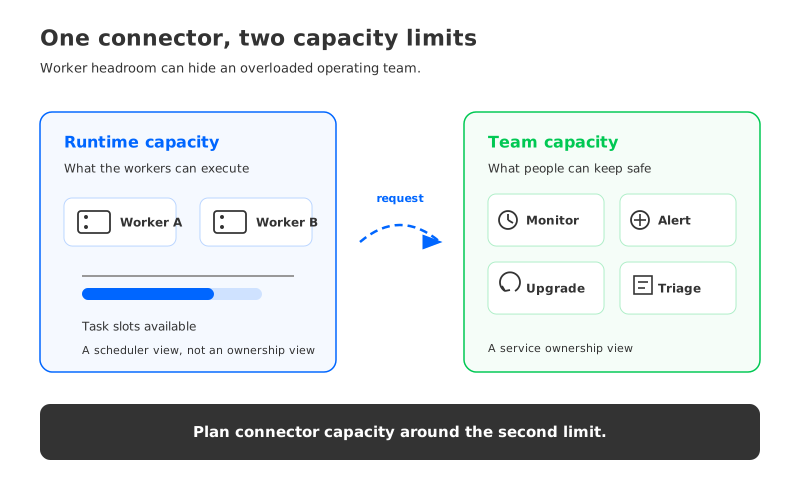
A Kafka Connect cluster can have spare worker capacity and still be overloaded. The workers may accept another task, the CPU graph may look calm, and the deployment pipeline may create a connector in minutes. The people responsible for that connector may already be carrying an alert queue, an upgrade backlog, and several pipelines whose failure modes are different enough to require separate runbooks.
That is the capacity question teams often skip: not how many tasks a worker can run, but how many connectors a team can understand, observe, upgrade, and recover without turning every incident into a negotiation. Connector capacity planning is a people-and-process calculation. Measure recurring work, reserve room for failures, and reduce repetition through templates.
1Connector sprawl starts with good intentions
Connector sprawl rarely begins with a reckless design. A product team needs a source from a database. Analytics asks for a sink to a warehouse. Security asks for an isolated path. A migration creates a temporary connector, and a backfill creates another. Each request can be reasonable while the combined estate becomes a second production platform that the original team never staffed.
An anonymous illustrative scenario makes the imbalance visible. A platform group owns a growing set of source and sink connectors for several application teams. The connector inventory looks manageable in a spreadsheet because many entries share the same plugin and similar settings. In operation, though, each one has a different owner, source limit, target behavior, credential, schema expectation, alert threshold, and recovery path. The team has enough runtime capacity to start more tasks, but not enough attention to keep every path current.
The first symptom is usually deferred maintenance. A connector version stays behind, an alert is routed to a shared channel, and a task restart fixes the visible symptom while source throttling remains unexplained. The estate has crossed a capacity boundary even though the worker dashboard has not.
That boundary is why tasks.max cannot answer the team’s planning question. In Kafka Connect, a connector describes the integration and tasks perform parallel work. More tasks can use available parallelism, but task parallelism also creates more assignments, state to observe, and recovery combinations. The right task count depends on the connector and its source and sink; the right estate size depends on the team that operates all of them.
2The carrying cost of one connector
Treat a connector as a small service with a lifecycle. Its steady-state cost is the recurring attention required to know that it is healthy, respond when it is not, and change it safely. The number of active tasks matters because it affects runtime behavior, but the human cost is shaped by the connector’s dependency surface and the quality of its operating controls.
Four work streams make that cost visible:
- Monitoring: Define the signals that prove data is moving. Depending on the connector, that can include source freshness, task state, record throughput, retry rate, consumer lag, sink acceptance, and backlog age. A green process status is not a complete health signal.
- Alerting: Decide which changes deserve an alert, who receives it, and what action follows. An alert without an owner becomes noise; an alert with no runbook becomes an on-call interruption that still requires investigation.
- Upgrades: Track plugin and worker compatibility, configuration changes, credentials, and rollback conditions. An upgrade is a change to a data path, not a package replacement. The safe unit is a tested change procedure with an owner.
- Troubleshooting: Preserve enough context to distinguish a connector failure from a source limit, sink rejection, schema change, network fault, or Kafka-side backlog. Each additional dependency can add another branch to the incident tree.
These streams are related, but they are not interchangeable. Better dashboards reduce detection time; they do not test a plugin upgrade. A standard alert route helps triage; it does not make a sink idempotent. Count the work separately before compressing it into one capacity number.
The most useful unit is not “one connector” by itself. It is a connector profile. A low-change sink with a stable target and a standard template has a different marginal cost from a source that performs an initial snapshot, talks to a rate-limited API, or needs a custom transformation. Record those differences instead of assigning every connector the same weight.
3A capacity formula for teams, not nodes
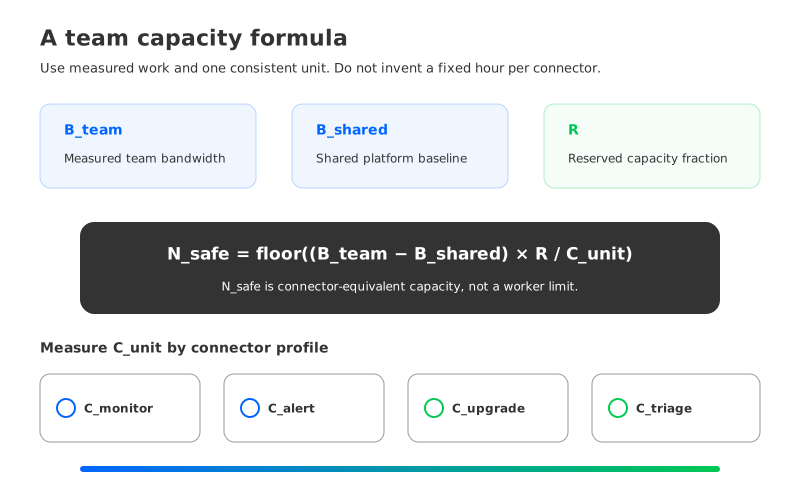
Start with a budget that the team can measure. Let the planning period be any interval the team already uses for staffing and operations. Define:
N_safe = floor((B_team - B_shared) × R / C_unit)

C_unit = C_monitor + C_alert + C_upgrade + C_triage
N_safe is the safe number of connector-equivalents the team can carry. B_team is the team’s measured operational bandwidth for that period. B_shared is the shared baseline for the Connect runtime and platform work that exists before another connector is added. R is the reserve fraction the team keeps for incidents, urgent changes, and unplanned work. C_unit is the marginal cost of one connector profile, split into monitoring, alerting, upgrade, and troubleshooting effort.
This formula stays in variables because teams have different staffing models and no connector consumes a universal number of hours. Choose one measurable unit—calendar time, on-call load, change slots, or another internal capacity measure—and use it on both sides. If the records use mixed units, normalize them or keep separate budgets.
Measure the variables from work that already happened. For B_team, inspect the portion of the team’s schedule actually available for platform operations after planned project work, support commitments, and on-call duties. For B_shared, review Connect runtime changes, shared dashboard maintenance, common plugin work, and platform incidents that would exist even with a single connector. For C_unit, sample representative connectors across the estate and record the work attached to them:
- Count the monitoring and dashboard changes needed to keep the connector’s health signals meaningful.
- Count alerts that required human action, then separate actionable incidents from routing or threshold defects.
- Review upgrade requests, compatibility tests, deployments, and rollbacks rather than counting only successful releases.
- Review troubleshooting tickets and incident notes, tagging the dependency that created the investigation path.
The result is a distribution, not a magic average. Use a connector profile that reflects the class you are about to add, and keep a separate weight for unusual sources or sinks. If an additional connector resembles the high-attention tail, its weight should reflect that. The formula changes the request from “Can we add one more?” to “Which profile is this, and which capacity does it consume?”
Tasks belong in the model as a runtime multiplier. Record the configured maximum, active count, rebalance frequency, failures, and source and sink limits. More tasks may consume worker capacity without consuming the same human capacity; a low-throughput connector may still be costly when ownership or its target contract is fragile.
4Signals that the team is already overloaded
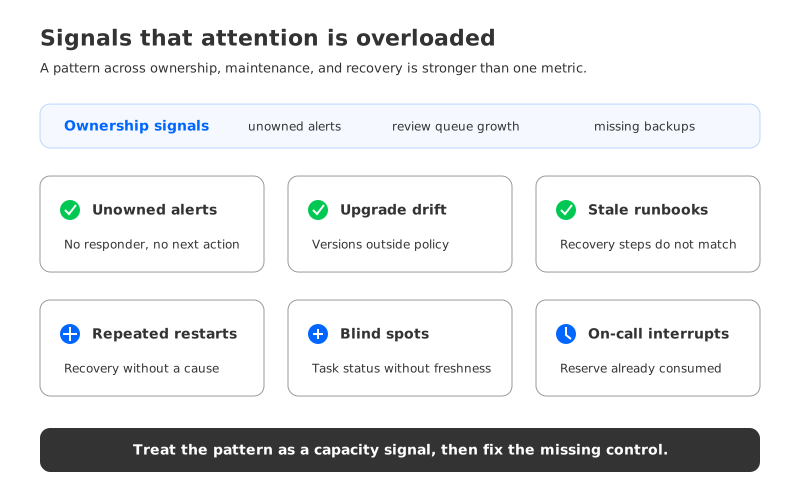
Capacity planning is most valuable before a hard limit. Look for signals that attention is being spread thinner than the operating model can support. The signals below should be reviewed together because any one of them can have another explanation; a pattern across them is stronger evidence.
| Signal | What to measure | What it usually means |
|---|---|---|
| Unowned alerts | Alerts without a named responder or documented next action | The estate is larger than the routing model |
| Stale runbooks | Connectors whose recovery steps do not match the deployed version | Maintenance is being deferred until an incident forces it |
| Upgrade drift | Plugins or workers outside the team’s supported version policy | Change capacity is being consumed by exceptions |
| Repeated restarts | Task failures followed by restart without a recorded cause | Recovery is treating symptoms as a workflow |
| Review queue growth | Connector requests waiting for design, security, or capacity review | Demand is exceeding the team’s intake bandwidth |
| Blind spots | Pipelines with task status but no freshness or delivery signal | Runtime health is being mistaken for business health |
| On-call interruption | Connector incidents that repeatedly wake the same responders | The reserve in the capacity model is already gone |
Separate runtime symptoms from operating signals. A restarting task may reflect an unavailable source, while a busy worker may reflect one hot connector. Neither proves that the cluster needs more workers or that the team can own more connectors. Use the pattern to find the missing control, then change the control or estate boundary.
Overload also changes the quality of decisions. When every request feels urgent, teams accept unreviewed credentials, copy an old configuration, or widen error tolerance to stop alerts. Those shortcuts make the marginal cost of the next connector higher because the next incident must explain another exception. Capacity is not only the amount of work available; it is the amount of careful work the team can still perform.
5Templates lower marginal cost when they own the boring parts
Template-based operations can change the curve. A template is a repeatable service contract that turns common decisions into defaults and leaves deliberate escape hatches for exceptions. The goal is predictable operation with checks that prevent a bad fit from entering production.
A useful connector template includes:
- an owner, escalation route, environment, data classification, and lifecycle date;
- validated plugin and worker compatibility, with approved versions and a rollback path;
- source and sink connection references that keep secrets out of configuration reviews;
- required health signals for freshness, task state, retries, lag, delivery, and backlog;
- alert thresholds tied to a response runbook rather than a generic task failure;
- defaults for error handling, dead-letter routing, retry behavior, and pause or resume actions;
- a capacity request that records task parallelism, expected traffic shape, dependency limits, and recovery headroom;
- a change workflow that can render the effective configuration and compare it with the deployed one.
This list reduces repeated judgment. It does not make all connectors equivalent. A Debezium source with an initial snapshot still needs source-specific validation. A sink with an external exactly-once claim still needs a target-side test. A regulated data path may need stronger access reviews. The template should make those differences explicit through required fields and policy checks, rather than hiding them in an engineer’s memory.
The next layer is a catalog that treats templates as interfaces. Each connector should answer the same questions: who owns it, what data does it move, what freshness is expected, how is failure contained, how is it upgraded, and when can it be retired? A catalog also exposes duplicate paths that teams cannot see from separate queues.
Automation should remove repetition at the edge of the workflow. It can validate names, render alerts, check required labels, create dashboards, compare plugin versions, and reject missing rollback information. It should not conceal a connector’s source and sink behavior behind a generic “approved” status. The platform team’s job is to make safe paths fast to use and unusual paths expensive to ignore.
If the effort to standardize a connector class is larger than its expected reuse, keep the class small or require a stronger review. Templates lower marginal cost when they are maintained as shared assets. An abandoned template is another special case with a friendly name.
6What a platform migration changes—and what it does not
The capacity model also clarifies platform migration. Moving Kafka workloads to another platform can change broker storage, network paths, scaling mechanics, or the boundary between customer-managed and vendor-managed infrastructure. Those changes can matter. They do not automatically reduce the number of connectors, the number of task failure modes, or the amount of governance the team needs.
AutoMQ is a Kafka-compatible streaming platform. Its Kafka compatibility documentation is the right place to check the source-side contract for a specific workload. A migration evaluation should still test the connector’s plugin, authentication, offsets, task lifecycle, error handling, and rollback behavior against the target environment.
The neutral conclusion is useful for both a migration and a stay-put decision: platform choice and connector governance solve different parts of the problem. A target platform may alter the operational boundary around Kafka. It does not change connector count or human operating cost by itself. The durable improvement comes from reducing exceptions, assigning ownership, standardizing health signals, and measuring the work that reaches the team.
Teams evaluating AutoMQ can also review the existing connector fleet observability framework and connector lifecycle automation checklist. Those resources address adjacent controls; they do not replace the team-capacity calculation in this article.
7A team-capacity self-assessment
Run this assessment before approving the next connector request. Use evidence from the deployed estate and record the answer beside the request, so the capacity decision can be revisited when the workload or team changes.
| Question | Evidence to collect | Decision signal |
|---|---|---|
| Who owns the connector in business and on call terms? | Named team, escalation route, and backup | No owner means no capacity should be allocated |
| Which connector profile does it match? | Template, dependency list, task shape, and exception fields | Unclassified work needs a higher review bar |
| What health proves the pipeline is working? | Freshness, task, lag, retry, delivery, and backlog signals | Process status alone is insufficient |
| What changes during an upgrade? | Version matrix, test evidence, rollback trigger, and data-path impact | Untested change consumes reserve before approval |
| What happens when the source or sink is slow? | Rate limits, retry policy, pause behavior, and recovery test | Backpressure without a runbook is hidden load |
| Which measured budget pays for the marginal work? | B_team, B_shared, R, and the connector profile cost | If the units do not match, the number is not ready |
| What will be retired or consolidated? | Duplicate paths, expiry date, and decommission owner | Additional capacity without retirement becomes sprawl |
The decision can be expressed in three states. Accept when the connector fits a known profile, has an owner, and fits the measured budget with reserve intact. Conditionally accept when it needs a temporary exception with an expiry date and a concrete control plan. Defer when the team cannot name the owner, measure the health signal, or show where the marginal operating capacity comes from.
This gives application teams a specific answer instead of “the platform is full.” The requested sink may fit a known profile and worker test while the team has no upgrade reserve; consolidate it, fund operating ownership, or schedule it after a retirement. That is a defensible capacity decision.
The team that began with a clean connector spreadsheet can regain control by reclassifying the estate, measuring each profile, keeping a failure reserve, and requiring the next connector to carry its own operating contract. The question was never whether a node could start another task. It was whether the team could still see, change, and recover every path it owns.
When ready to test that operating model on a Kafka-compatible platform, start an AutoMQ evaluation with a representative connector profile, task configuration, and recovery runbook. Measure who will carry it after migration.


