
Table of Contents
Table of Contents
Consumer lag feels like an application problem because the alert usually names a consumer group. The dashboard says one service is behind. The application owner checks deployment history, scans logs, and asks whether the last release made the handler slower. That is a reasonable move, but it is not enough. A consumer can fall behind because its own processing loop is slow, because a downstream dependency is throttling, because a rebalance interrupted progress, because a hot partition changed the fetch pattern, or because the broker storage path is under pressure.
That is why teams search for consumer lag debugging developers kafka after the obvious command has already been run. They do not need another reminder that lag is the difference between log end offset and committed offset. They need a debugging path that application developers can use without pretending to own the Kafka platform. The path has to separate local evidence from platform evidence, preserve timestamps, and make escalation useful instead of political.
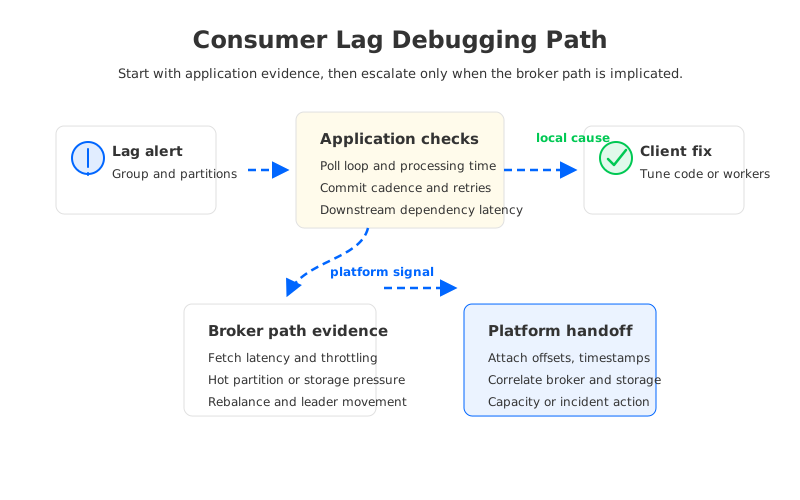
The core discipline is simple: start from the consumer group and move outward only when the evidence points outward. If application code is the bottleneck, the platform team should not be paged to rebalance brokers. If broker fetch latency or storage pressure is the bottleneck, the application team should not burn the incident window changing max.poll.records at random. Consumer lag debugging works when every step narrows the ownership boundary.
1Why Developers Own the First Five Minutes
The first five minutes belong to the application team because the consumer knows what "processed" means. Kafka can show offsets, partitions, commits, and group membership. It cannot know whether a fraud-scoring call slowed down, whether an image enrichment worker started retrying, or whether a deployment introduced a larger batch in memory. The developer path should begin with the consumer's own event age, handler time, poll cadence, commit cadence, error rate, and downstream latency.
The trap is stopping there. A consumer can be healthy internally and still lose ground because the data path around it changed. A partition may receive a burst that the group cannot parallelize because ordering constraints pin work to one partition. A rebalance may pause processing long enough to produce a visible backlog. A broker may still accept writes while serving slower fetches. The application view is necessary, but it is not authoritative.
A useful first-pass checklist is short enough to run during an incident:
- Scope the lag. Identify the consumer group, topic, partition set, log end offsets, committed offsets, and the exact time window when lag started growing.
- Compare lag with event age. Offset lag and business freshness are related but not identical. A few large records or a slow downstream sink can hurt freshness even when offset counts look manageable.
- Measure the processing loop. Check poll interval, handler duration, batch size, commit latency, retries, and dead-letter behavior before changing broker assumptions.
- Look for deployment and dependency changes. A client rollout, schema expansion, database throttle, feature flag, or network policy change can explain lag without any Kafka-side incident.
- Capture evidence before tuning. The worst lag investigation is one where several teams change settings at once and nobody can explain which change drained the backlog.
This checklist is intentionally application-heavy. It gives developers a way to prove what they own and what they do not own. That proof matters because Kafka lag incidents often cross team boundaries faster than they cross technical boundaries.
2The Production Constraint Behind Consumer Lag
Consumer lag is not a root cause. It is a queueing symptom. Records are arriving, processing is not keeping up, and the system is accumulating work somewhere between producer append and consumer side effect. Debugging becomes difficult because Kafka exposes several true statements at the same time: the topic may be writable, the brokers may be alive, the consumer group may be stable, and the business process may still be late.
The production question is therefore not "Which metric is lag?" The question is "Where did time enter the path?" Time can enter in the consumer handler, a downstream service, the client fetch loop, broker request queues, network throttling, storage reads, or operational events such as rebalances and leader changes. Each location creates a different fix. Scaling consumers helps only when more consumers can actually process more partitions or more downstream work. Adding broker capacity helps only when broker-side pressure is part of the delay.
This is where application and platform teams need a shared vocabulary. Developers should not escalate with "Kafka is slow." Platform teams should not close the page with "consumer lag is an app issue." The handoff should contain the group, topic, affected partitions, lag growth rate, event age, consumer processing metrics, deployment timeline, and the first timestamp where client-side evidence stopped explaining the symptom.
That last timestamp is the hinge. If handler time rose before lag grew, the investigation stays close to the application. If handler time stayed flat while fetch latency, rebalance duration, or broker-side throttling changed, the platform path deserves attention. Good debugging moves the incident to the team that can change the limiting factor.
3Architecture Options and Trade-Offs
Once lag evidence points beyond application code, architecture starts to matter. Traditional Kafka deployments use a shared-nothing model: brokers own compute and local durable log segments. That model is well understood and gives operators direct control over broker placement, disks, partitions, and replication. It also means that broker replacement, partition reassignment, scale-out, and storage pressure can become part of a consumer lag incident.
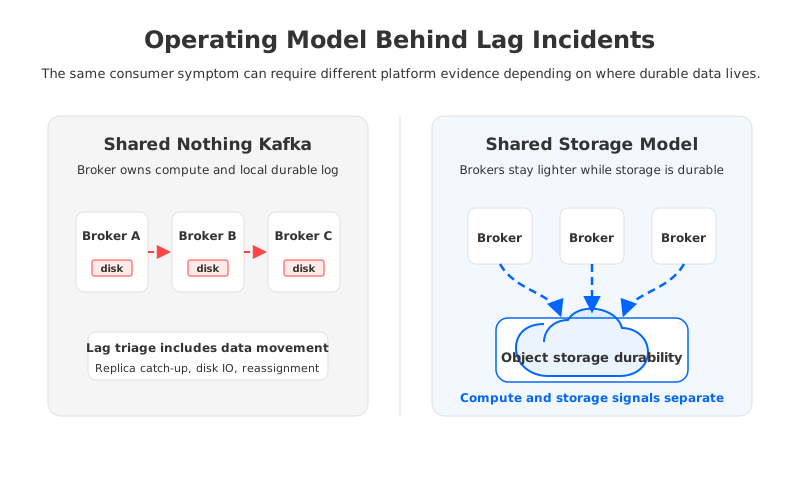
Tiered Storage changes one part of this model by moving older log segments to remote storage while keeping the broker-centric operating model. It can be valuable for long retention and historical replay, but teams still need to test how remote reads, cache behavior, local disk usage, and broker fetch capacity behave when a consumer catches up after a backlog. Tiered Storage is not the same as stateless brokers, and confusing the two leads to weak incident planning.
A shared-storage architecture changes the operating model more directly. Durable stream data lives in shared object storage, while brokers become less tied to local disks. That does not make consumer lag disappear. It changes which platform signals matter: object storage behavior, write-ahead log health, cache hit ratio, broker compute saturation, and network path quality become part of the same incident view. The benefit is a cleaner separation between compute pressure and durable storage placement.
The trade-off should be evaluated with production drills, not slogans:
| Question | Why it matters during lag | Evidence to collect |
|---|---|---|
| Can more consumers help? | A consumer group cannot process one partition with two active consumers. | Partition-level lag, key distribution, group membership |
| Is the client loop healthy? | Slow processing or commits can mimic platform pressure. | Poll duration, handler time, commit latency, retries |
| Is broker fetch healthy? | A consumer may be ready but unable to receive data fast enough. | Fetch latency, request queues, throttles, network errors |
| Is storage part of the delay? | Backlog catch-up may stress local disks, cache, or remote reads. | Disk IO, cache metrics, object storage errors, cold-read tests |
| Is recovery safe? | Draining lag by changing capacity can cause another rebalance or rollback risk. | Rebalance duration, lag drain rate, rollback criteria |
This table keeps the discussion neutral. A self-managed Kafka cluster, a managed Kafka service, a Kafka-compatible shared-storage platform, and a BYOC deployment can all be evaluated against the same questions. The right platform is the one that lets your team answer them quickly under load.
4A Developer Debugging Path That Survives Escalation
The developer path should be written as a sequence, not as a bag of commands. Start by freezing the incident window. Record when lag started, accelerated, stabilized, and drained. Then compare that timeline with application releases, consumer group membership changes, downstream dependency metrics, and broker events. Without a timeline, every team can find a metric that supports its favorite theory.
Next, separate backlog creation from backlog drain. Creation asks why the consumer fell behind. Drain asks whether the system can catch up after the cause is removed. A database outage may create lag; a partitioning limit may prevent fast recovery. A broker fetch problem may create lag; an under-scaled downstream sink may slow drain. Treating creation and drain as one problem often fixes the trigger while leaving recovery fragile.
Then change one variable at a time. Increase consumer instances only when the topic has enough partitions and the downstream system can absorb the extra work. Increase max.poll.records when larger batches reduce overhead without extending processing beyond the poll interval. Slow a rollout when the timeline connects deployment to lag growth. Escalate broker capacity when client evidence and platform evidence point to fetch, storage, or network pressure.
The handoff packet should look like engineering evidence, not a complaint:
- Consumer group, topic, partitions, and lag range.
- First bad timestamp and first recovery timestamp.
- Application release and dependency timeline.
- Poll, process, commit, retry, and error metrics.
- Broker fetch latency, rebalance events, throttles, and storage indicators if available.
- Proposed next action with a rollback trigger.
This format helps SREs and platform engineers because it preserves causality. It also helps developers because it prevents the incident from turning into a debate about whether application teams understand Kafka. Evidence is calmer than blame.
5How AutoMQ Changes the Operating Model
AutoMQ fits this conversation after the debugging path is clear. It is a Kafka-compatible cloud-native streaming platform that uses shared storage and stateless broker architecture to change the operational work behind the Kafka API. Applications still use Kafka clients and consumer groups, so developers still need the same first-five-minute discipline. The difference is what the platform team investigates when the evidence moves beyond application code.
In a broker-local storage model, lag catch-up can collide with the same local disks and broker state that are also responsible for durability, reassignment, and failure recovery. In AutoMQ's shared-storage model, durable data is backed by object storage, and broker compute can be scaled or replaced with less attachment to local log ownership. That can simplify some platform questions during lag incidents: is compute saturated, is the storage path healthy, is cache behavior expected, and can capacity change without large broker-local data movement?
This does not remove the need for proof. A serious evaluation should test normal tailing reads, backlog catch-up, high fan-out consumers, broker replacement, scale-out, scale-in, object storage errors, and network path behavior in the target cloud account. It should also verify Kafka compatibility for the client features your applications use: consumer groups, offset commits, transactions where required, ACLs, quotas, and operational tooling.
AutoMQ's Zero Cross-AZ traffic design can also matter for production operations because consumer lag incidents often occur when teams are already under cost and capacity pressure. If every recovery action creates more cross-zone traffic or requires more over-provisioned broker storage, teams become reluctant to run the right drills. A cloud-native design does not exempt teams from testing; it gives them a different operating model to test.
If your consumer lag review keeps returning to broker-local storage, replay, and capacity-change questions, test the same debugging path against a Kafka-compatible shared-storage system. Start with the AutoMQ GitHub project and run the workload patterns that already create lag in your environment.
6Production Readiness Checklist
The final artifact should be a checklist that both developers and platform teams can run during a real incident. A checklist is useful only if it protects decisions under pressure. It should tell the application owner when to debug locally, tell the platform owner when to take over, and tell the incident commander when rollback is safer than tuning.
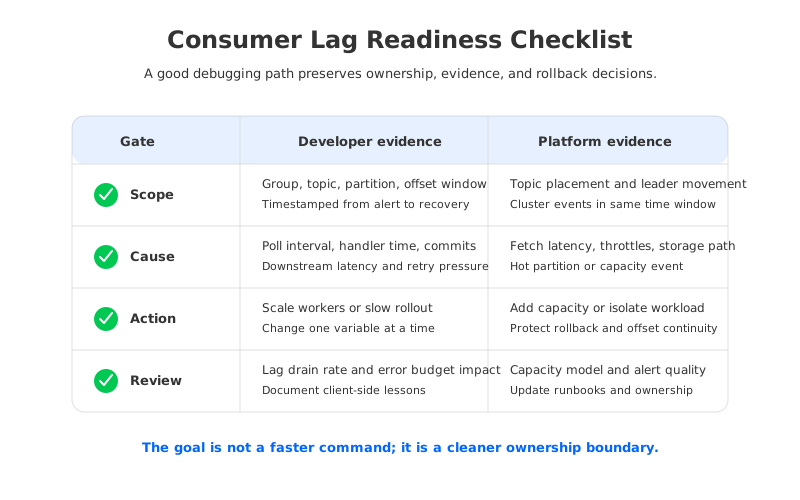
The checklist should include compatibility, ownership, observability, scaling, rollback, and review. Compatibility proves the client behavior is understood. Ownership prevents vague escalation. Observability lets teams correlate application and broker evidence in one timeline. Scaling rules prevent changes that increase lag through rebalances or downstream overload. Rollback criteria keep teams from treating a draining backlog as proof that the system is safe. Review turns the next lag alert into a shorter investigation.
The most important habit is to keep the debugging path close to the people who can act on it. Developers need enough Kafka knowledge to prove when code is or is not the bottleneck. Platform teams need enough application context to see when broker metrics are symptoms rather than causes. Architects need an operating model that makes both sides observable. When consumer lag debugging reaches that level, the incident stops being a search for someone to blame and becomes a controlled path from symptom to limiting factor.
7References
- Apache Kafka Documentation: https://kafka.apache.org/documentation/
- Apache Kafka Consumer Configuration: https://kafka.apache.org/documentation/#consumerconfigs
- Apache Kafka Operations Documentation: https://kafka.apache.org/42/operations/
- AWS Amazon S3 Data Durability: https://docs.aws.amazon.com/AmazonS3/latest/userguide/DataDurability.html
- AutoMQ Kafka Compatibility: https://docs.automq.com/automq/what-is-automq/difference-with-apache-kafka?utm_source=blog&utm_medium=reference&utm_campaign=rpb-0134-consumer-lag-debugging
- AutoMQ Architecture Overview: https://docs.automq.com/automq/architecture/technical-advantage/overview?utm_source=blog&utm_medium=reference&utm_campaign=rpb-0134-consumer-lag-debugging
- AutoMQ Zero Cross-AZ Traffic Overview: https://docs.automq.com/automq-cloud/eliminate-inter-zone-traffics/overview?utm_source=blog&utm_medium=reference&utm_campaign=rpb-0134-consumer-lag-debugging
8FAQ
What is consumer lag in Kafka?
Consumer lag is the gap between the latest offset available in a partition and the offset a consumer group has committed. It shows that the group has work remaining, but it does not by itself prove whether the cause is application code, downstream latency, broker fetch pressure, storage behavior, or a rebalance.
Should application developers debug Kafka consumer lag first?
Yes, for the first pass. Developers own the processing loop, commit behavior, retry behavior, downstream dependencies, and deployment timeline. They should collect that evidence before escalating. If those signals do not explain the lag, the platform path should inspect broker fetch latency, throttling, storage pressure, partition placement, and operational events.
Does increasing consumer instances always reduce lag?
No. A consumer group can process a partition with only one active consumer at a time. More instances help only when there are enough partitions, work is balanced across partitions, the downstream system can absorb the additional load, and the rebalance cost does not make the incident worse.
How does shared storage help with consumer lag debugging?
Shared storage does not eliminate lag. It changes the platform investigation by reducing the coupling between broker compute and broker-local durable data. During a backlog or recovery drill, teams can evaluate compute saturation, storage path health, cache behavior, and capacity changes more separately than in a broker-local storage model.
What should a consumer lag runbook include?
A practical runbook should include the group and partition scope, lag and event-age timeline, application processing metrics, dependency metrics, broker fetch and rebalance metrics, storage indicators, scaling rules, rollback triggers, and post-incident review requirements. The runbook should make escalation evidence-based rather than ownership-based.


