
Table of Contents
Table of Contents
Teams usually search for consumer replay window kafka after lag has already stopped being a tidy dashboard number. A consumer group fell behind during an incident, a downstream warehouse needs a historical rebuild, or a regulated workflow needs to prove that data can be replayed from a known boundary. The visible metric is lag, but the real question is harder: can the platform recover the application state within the time, cost, and governance limits the business expects?
That question changes the meaning of retention. In Kafka, consumers track offsets and topics retain records according to time, size, and cleanup policy. Those mechanics are powerful because applications can resume, rebuild, and fan out without asking producers to resend data. They are also easy to underestimate because a replay window is not only the number of hours retained. It is the period of data that can be read back fast enough, by the right consumers, while the rest of the production workload keeps running.
1Why teams search for consumer replay window kafka
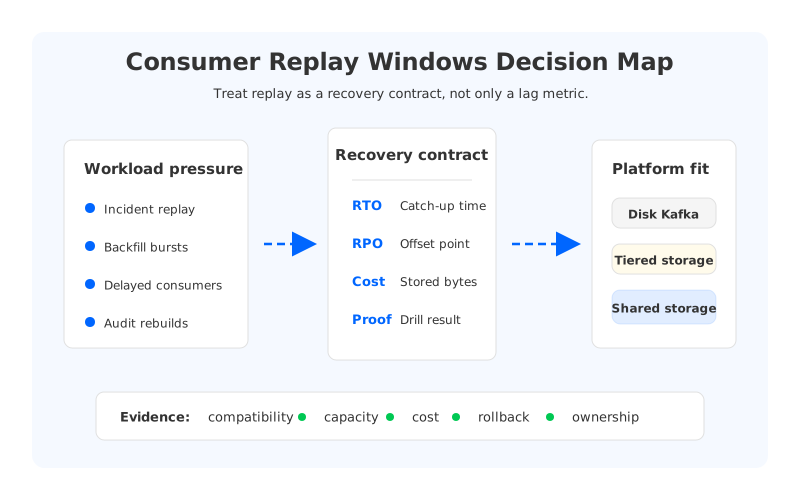
A replay window becomes visible when the consumer is no longer reading near the head of the log. The lag chart tells you how far behind the group is, but it does not say whether the retained data still exists, whether the catch-up read rate is high enough, or whether the cluster has enough spare capacity to serve historical reads during a peak write period. Lag is a symptom. A replay window is an operating contract.
That contract usually contains four boundaries. First, the offset boundary: which committed or externally recorded offset can the application trust after a restart, migration, or rollback? Second, the retention boundary: how far back can Kafka serve records before cleanup removes them? Third, the throughput boundary: how quickly can consumers reread data without starving producers or other groups? Fourth, the ownership boundary: who is allowed to extend retention, reset offsets, start a bulk replay, or declare a rebuild complete?
These boundaries matter because different consumers use the same topic for different reasons. A payments service may need a short recovery path from committed offsets. An analytics job may need a multi-day rebuild after a schema correction. A machine learning feature pipeline may reread historical events to regenerate features. Treating all of these as "consumer lag" hides the fact that each one has a different recovery objective.
2The production constraint behind the problem
Traditional Kafka makes replay operationally practical by storing an ordered log and letting consumer groups maintain independent offsets. The same design also pushes platform teams to plan storage and broker capacity before the incident that needs the replay. If a topic must support a longer replay window, retained bytes increase. If many groups replay the same historical range, read load increases. If a failed consumer returns during peak traffic, the catch-up path competes with live ingestion and near-tail reads.
The operational pressure is most visible in shared clusters. A single topic can carry production services, data integration, fraud analysis, lakehouse ingestion, and ad hoc recovery jobs. Each team sees its own consumer group, but the cluster sees retained bytes, file handles, network traffic, page cache pressure, broker CPU, and partition placement. The platform team becomes the place where application recovery promises meet physical infrastructure limits.
That is why a useful replay design cannot stop at retention.ms or auto.offset.reset. Those settings define part of the semantic surface, not the whole recovery plan. A team also has to know how offsets are stored, how transactional producers and idempotent writes behave during replay, how compaction changes historical availability, and how Kafka Connect or stream processors checkpoint their own state. Otherwise, the replay window exists on paper but fails as soon as the recovery path crosses application boundaries.
3Architecture options and trade-offs
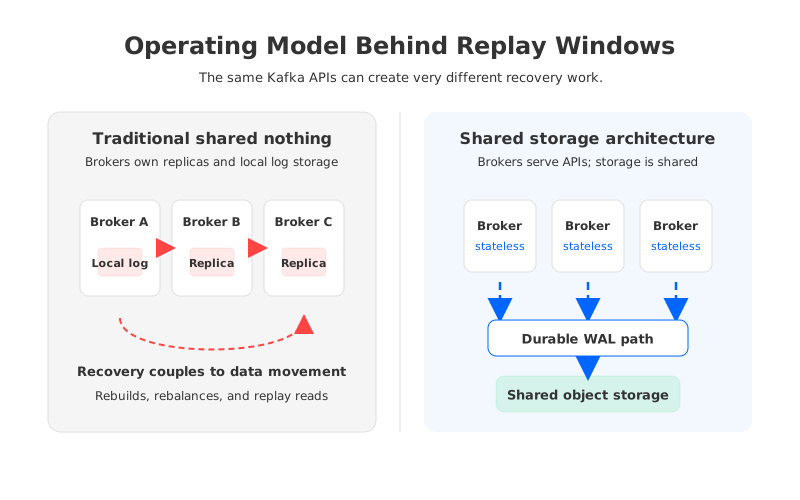
The first option is a traditional broker-local Kafka deployment. It is familiar, widely understood, and often the right answer for stable workloads with bounded retention and strong operations muscle. Its trade-off is that compute, network, and persistent log storage are tied to brokers. When replay windows grow, the cluster often needs more local disk, more broker headroom, or more careful partition placement even if write throughput has not changed.
Tiered storage changes part of that equation by moving older closed log segments to remote storage while keeping the active path on brokers. For replay-heavy workloads, that can reduce pressure from historical retention and give delayed consumers a larger buffer. The remaining trade-off is that the active serving and write path still depends on broker-local state, so scale events, broker replacement, and near-tail recovery still need careful validation. Tiered storage helps with history; it does not automatically make recovery stateless.
A shared-storage Kafka-compatible architecture moves the durable log away from broker-local disks and into a shared storage layer, usually backed by object storage plus a write-ahead log path. The promise is not magic latency or zero operational work. The meaningful change is separation of concerns: brokers serve Kafka protocol traffic, while durable data is no longer owned by a particular broker's disk. That separation can make broker replacement, scale-out, scale-in, and long replay windows easier to reason about.
The right choice depends on the workload shape. A latency-sensitive trading stream with short retention and strict tail latency may prefer a tightly controlled local-storage design. A CDC or lakehouse pipeline with long retention, many independent consumers, and periodic rebuilds should be judged differently. The mistake is to compare platforms only under steady-state write throughput. Replay windows are about what happens when the system is behind, rebuilding, or changing.
| Decision factor | What to measure | Why it matters during replay |
|---|---|---|
| Offset continuity | Committed offsets, reset policy, external checkpoints | Recovery starts from a trusted boundary, not from a guess. |
| Retained bytes | Ingest rate multiplied by replay duration | Storage demand grows even when live traffic is flat. |
| Catch-up rate | Historical read throughput per group | A long window is useful only if consumers can close it in time. |
| Cluster interference | Producer latency, near-tail reads, rebalance behavior | Recovery should not create a second incident. |
| Rollback path | Dual-run, mirroring, or cutback procedure | Migration and replay plans need a way back. |
This table is not a vendor comparison. It is a way to force the architecture conversation into measurable claims. If a platform cannot show how it behaves under these conditions, the replay window is an assumption rather than a plan.
4Evaluation checklist for platform teams
Start by naming the recovery scenarios, not by choosing a retention value. A consumer replay window for operational restart is different from a replay window for audit reconstruction or model backfill. Each scenario should have an owner, a maximum tolerable catch-up time, a data correctness rule, and a runbook entry. The platform team should be able to say which scenarios are supported by Kafka itself, which rely on downstream state stores, and which require an offline archive outside Kafka.
The second step is to test the uncomfortable path. Pause a non-critical consumer group, let it fall behind by a realistic amount, and then measure catch-up while normal producers and consumers continue. Repeat with a broker restart, a partition leadership change, a connector restart, and a consumer deployment rollback. The useful output is not a single lag chart; it is a recovery profile that shows read rate, producer impact, consumer error rate, offset movement, and time to return to the expected steady state.
Governance belongs in the same checklist. Replay is a powerful operation because it can regenerate data, duplicate side effects, reissue sink writes, or expose retained data to teams that did not originally need it. Production platforms need clear rules for who can reset offsets, increase retention, launch replay jobs, and approve replay against regulated topics. The technical controls may live in ACLs, deployment pipelines, topic templates, or service catalogs, but the ownership model has to be explicit.
Migration planning is where weak replay assumptions surface quickly. A Kafka-compatible replacement or managed service move has to preserve the behavior that applications depend on: clients, authentication, ACLs, topic configs, compression, transactions where used, offsets, connector semantics, monitoring, and rollback. The migration plan should decide whether consumers cut over from current offsets, replay from a copied topic range, or run in parallel until downstream state is reconciled. "Kafka-compatible" is the starting point; replay behavior is one of the proofs.
5How AutoMQ changes the operating model
Once the replay requirements are written down, AutoMQ becomes relevant as a Kafka-compatible shared-storage architecture rather than as a generic Kafka substitute. It keeps the Kafka-facing model that producers, consumers, and ecosystem tools expect, while changing the storage layer underneath. Durable data is stored through an object-storage-backed design with a WAL path, and brokers are designed to be stateless in the sense that durable log ownership is not tied to a single broker-local disk.
That distinction matters for replay windows because the hard part is often not the Kafka consumer API. The hard part is keeping enough durable history, serving catch-up reads, replacing brokers, and scaling around bursty recovery workloads without turning every storage decision into a broker sizing decision. A shared-storage model lets platform teams evaluate retention, broker compute, and recovery operations more independently than a pure shared-nothing design.
AutoMQ is strongest in the evaluation when replay pressure appears together with cloud operating constraints. Examples include long retention with many independent consumers, lakehouse or CDC backfills, migration programs that need rollback paths, and cloud deployments where cross-AZ traffic and overprovisioned local storage have become material cost items. AutoMQ's documentation describes Kafka compatibility, shared storage, WAL options, BYOC and software deployment boundaries, linking, self-balancing, and zero cross-AZ traffic capabilities. Those are not reasons to skip testing; they are the areas to test directly against the replay contract.
A practical proof should include at least three drills. First, run a consumer replay from a known offset while live traffic continues, and measure catch-up rate plus producer impact. Second, replace or restart brokers during the replay and verify that recovery progress remains explainable. Third, execute a migration or rollback simulation with mirrored or linked data paths where relevant, then reconcile downstream state. If the architecture changes the operating model, the proof should show fewer manual storage and placement decisions during these drills.
6A readiness scorecard for the final decision
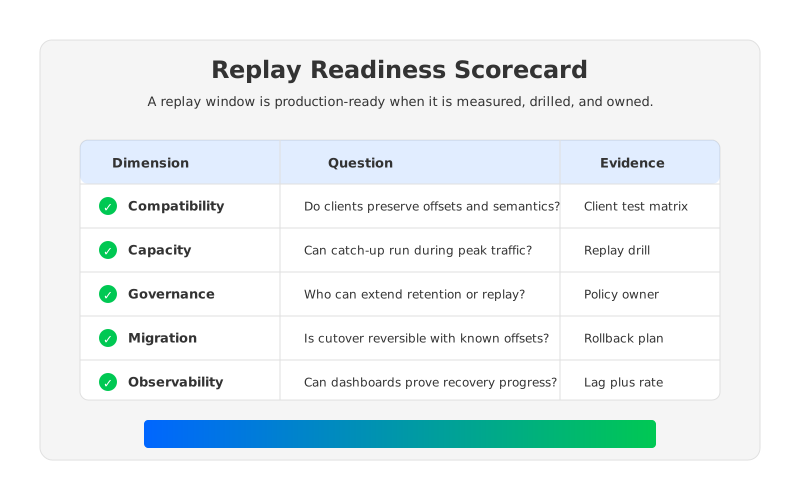
The decision should end with a scorecard that can survive an incident review. A green score means the team has measured evidence, not a hopeful design note. A yellow score means the scenario is plausible but not drilled. A red score means the replay window depends on assumptions that nobody owns. This is especially useful for platform teams that support many application owners, because it turns replay from a negotiation into an engineering contract.
Use these questions before extending retention or approving a platform migration:
- Can every critical consumer identify a trusted restart or replay offset?
- Is the retained window longer than the maximum expected detection and repair time?
- Can catch-up complete inside the recovery target while live traffic continues?
- Are side effects idempotent, suppressed, or isolated during replay?
- Does the cluster have a tested plan for broker failure during catch-up?
- Are retention changes, offset resets, and replay jobs governed by named owners?
- Can dashboards show replay progress in rate, time remaining, and application correctness?
Back at the lag dashboard, the most important number is no longer the current gap. It is whether that gap can be closed inside a tested recovery contract. If your Kafka estate is reaching the point where replay windows, storage growth, broker replacement, and migration risk are the same conversation, review the AutoMQ architecture and deployment path and test it against one replay-heavy workload before the next incident chooses the workload for you.
7References
- Apache Kafka Documentation: Consumer groups and basic operations
- Apache Kafka Documentation:
auto.offset.resetconsumer configuration - Apache Kafka Documentation: Message delivery semantics
- AutoMQ Documentation: Architecture overview
- AutoMQ Documentation: WAL storage
- AWS Documentation: Amazon S3 user guide
8FAQ
8.1Is a consumer replay window the same as consumer lag?
No. Consumer lag measures how far a group is behind the log head at a point in time. A replay window describes how far back the platform can serve data and whether consumers can catch up within the required recovery target.
8.2How should a team choose the replay window for Kafka topics?
Choose it from recovery scenarios. Operational restart, delayed consumer recovery, audit reconstruction, CDC backfill, and model feature rebuilds may need different windows. The topic setting should follow the strictest scenario that truly belongs in Kafka, with archive or lake storage used when offline retention is the better fit.
8.3Does longer retention always solve replay risk?
No. Longer retention keeps data available for a longer period, but it does not prove catch-up throughput, offset correctness, idempotent side effects, or cluster stability during historical reads. A replay drill is the proof.
8.4When does shared storage matter for replay planning?
Shared storage matters when broker-local disk ownership has become a constraint for retention, scaling, broker replacement, or recovery cost. It is most relevant when long replay windows combine with bursty backfills, many consumer groups, or frequent infrastructure changes.
8.5What should be tested before migrating a replay-heavy workload?
Test client compatibility, offset behavior, authentication, ACLs, topic configuration, producer semantics, consumer catch-up, connector restart, monitoring, broker failure, and rollback. A migration is ready when the replay path and the cutback path are both measured.


