
Table of Contents
Table of Contents
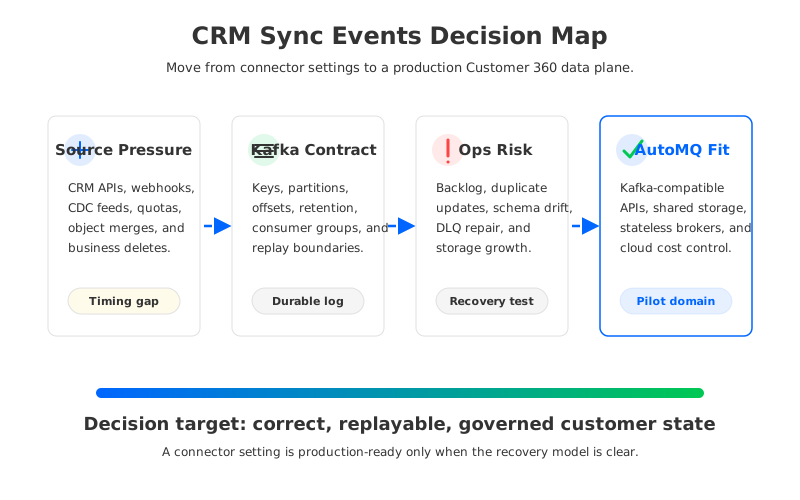
Teams search for crm synchronization kafka when the CRM has stopped being a sales application and has become a source of operational truth. Account ownership changes need to reach billing, support, lifecycle marketing, fraud review, customer success, and analytics while the customer is still active. A nightly export may still populate a warehouse, but it cannot keep a support assistant, entitlement service, or revenue workflow aligned with the latest customer state.
CRM synchronization looks small at the beginning. A source connector reads account, contact, opportunity, and entitlement changes. Kafka topics carry events. A few consumers update profile stores and downstream systems. Then the first production incident turns a neat diagram into a negotiation between API limits, connector offsets, schema changes, duplicate updates, privacy rules, and broker capacity.
A Customer 360 data plane needs more than event transport. It needs a contract for how CRM changes become durable, ordered, replayable, governable, and safe to consume across teams. Kafka fits that role because it gives teams a durable log and a broad ecosystem, but the infrastructure behind that log decides how much operational friction the team inherits.
1Why teams search for crm synchronization kafka
The search query usually comes from an integration team that knows batch synchronization is not enough. CRM data changes at business speed: an account is reassigned, a contract is amended, a consent flag changes, a renewal enters risk, or a customer upgrades a plan. Those changes may not be high-throughput compared with clickstream events, but they are high-consequence. A delayed or duplicated update can route a customer to the wrong support queue, trigger the wrong campaign, or give an AI assistant stale context.
Kafka becomes attractive because it decouples CRM extraction from downstream activation. A source connector or webhook receiver can publish changes into topics, while support, billing, analytics, profile building, and automation consumers move at their own pace. Consumer groups preserve independent progress, offsets provide recovery points, and retention lets the team rebuild state when a profile model changes or a sink falls behind.
The CRM side brings a different set of constraints than ordinary application events:
- API behavior matters as much as broker throughput. CRM platforms often expose polling APIs, webhook delivery, change event streams, or a mix of all three, and each path has quota, ordering, retry, and retention boundaries.
- Identity resolution is not optional. Contact, account, lead, user, subscription, and workspace identifiers may merge or split, so the event key strategy must match the business entity that downstream systems rebuild.
- Idempotence is part of correctness. A repeated opportunity update is acceptable when consumers can deduplicate by source event ID, version, or object timestamp; it is dangerous when downstream systems apply side effects blindly.
- Governance follows the data. Consent, deletion, residency, encryption, access control, and audit trails need to move with the stream rather than being reconstructed after the fact.
That is why CRM synchronization is not a connector selection exercise. The connector is the entry point, but the production question is whether the Kafka-compatible platform can preserve business correctness when sources slow down, sinks push back, and teams need to replay without damaging customer state.
2The operational constraint behind connector-heavy platforms
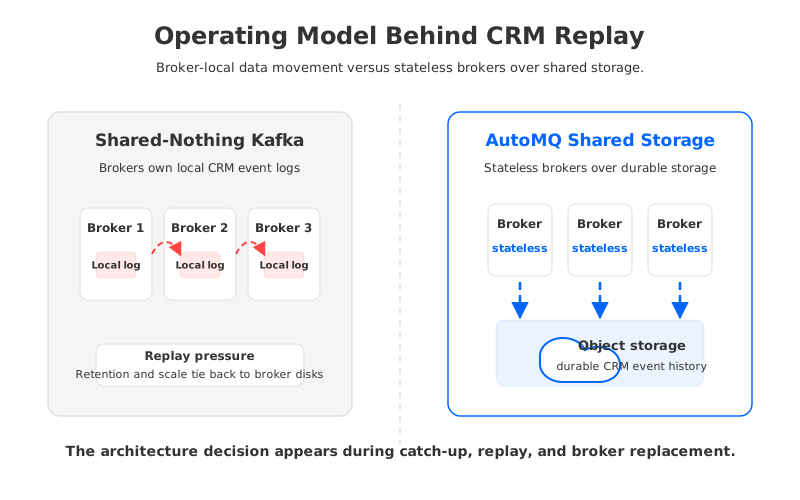
Traditional Kafka clusters use a shared-nothing model: each broker owns local log segments, replicas are placed across brokers, and durability depends on replication between broker nodes. This model is mature, but CRM synchronization exposes a specific weakness. The workload is not steady enough to size by average throughput, and recovery often requires retaining and replaying more history than daily traffic suggests.
A CRM connector can fall behind for reasons outside Kafka. The source API may throttle requests. A webhook receiver may need to drain retries after a network issue. A sink system may reject writes during maintenance. A schema change may send a subset of records to a dead letter queue until the integration team fixes the mapping. During that time, Kafka is doing more than passing messages; it is holding the recovery window for the whole Customer 360 plane.
In broker-local architecture, that recovery window becomes a storage and rebalancing concern. Longer retention consumes broker disks or attached volumes. Backfills increase read pressure on older segments. Adding brokers can require partition reassignment and data movement. Multi-AZ deployments add resilience, but replication and client traffic can create inter-zone network cost. These problems are not caused by CRM, yet they appear in the synchronization budget when the platform becomes uneven.
The connector runtime adds another layer of state. Kafka Connect keeps connector configurations, task status, and offsets. The CRM system has event IDs, object versions, and delivery guarantees. Downstream stores have write acknowledgments and retry rules. A clean design ties these timelines together so an operator can answer one question under pressure: which source changes were accepted, which Kafka offsets represent them, and which downstream systems applied them?
That question is also a cost question. Platform teams often benchmark the happy path and miss the expensive path: connector catch-up after downtime, replay after a logic fix, profile rebuild after an identity model change, or a compliance-driven reprocessing job. A cluster that is sized for average CRM updates can still be underbuilt for the moments when correctness requires replay.
3Failure handling, schema, and replay trade-offs
CRM synchronization failure modes are subtle because they do not always look like outages. A connector may keep running while dropping fields into a dead letter topic. A webhook endpoint may accept a retry after the original event has already been processed. A downstream profile builder may apply events out of business order because account and contact changes use different keys. A schema evolution may be technically compatible but semantically wrong for a consumer that treats a missing field as false.
The safest designs separate transport guarantees from business guarantees. Kafka can preserve order within a partition and provide durable offsets, but it cannot decide whether AccountUpdated should override EntitlementRevoked for a specific customer. That logic belongs in the event contract, partitioning strategy, schema policy, and downstream idempotence rules.
| Decision area | What to define | Failure it prevents |
|---|---|---|
| Event identity | Source event ID, CRM object version, and Kafka key | Duplicate side effects after retry or replay |
| Ordering scope | Account, contact, tenant, user, or subscription key | Out-of-order profile updates across related objects |
| Schema policy | Compatibility mode, required fields, and DLQ rules | Silent field loss or consumer crashes during rollout |
| Replay window | Topic retention and source-system recovery limits | Incomplete rebuild after connector downtime |
| Sink idempotence | Upsert key, version check, and delete handling | Replayed events corrupting downstream state |
This table is deliberately operational. A production-ready CRM synchronization pipeline needs a rulebook that an on-call engineer can use without reverse-engineering application code at 2 a.m. The rulebook should say when to reset connector offsets, how to identify applied events, how to replay one customer domain, and when to quarantine records instead of moving them into a Customer 360 profile.
Schema deserves special attention because CRM systems change through configuration as much as code. A sales operations team can add fields, rename stages, introduce custom objects, or change lifecycle rules without a platform release. That is normal business behavior, but the streaming layer has to absorb it. Schema Registry, compatibility checks, and contract tests keep business customization from becoming distributed data corruption.
4Evaluation checklist for platform teams
A neutral evaluation framework for crm synchronization kafka should cover four planes: source extraction, Kafka-compatible infrastructure, downstream application correctness, and governance. Teams often evaluate them separately because different groups own them. In production, they fail together.
Start with the source plane. Confirm whether CRM changes arrive through polling, webhooks, native change data capture, or a managed connector. Measure the source retention and retry window. Document API quotas, backoff behavior, object versions, deletion events, and merge behavior. A connector that looks adequate in a demo may be unsafe if it cannot retrieve missed changes after an outage.
Then evaluate the streaming plane. Kafka compatibility matters because most organizations already have client libraries, Connect plugins, stream processors, ACL tooling, observability dashboards, and runbooks built around Kafka behavior. The platform should support the producer, consumer, offset, security, and operational patterns the team depends on, not require every downstream team to absorb a protocol migration.
The downstream plane is where correctness becomes visible. A Customer 360 profile may be updated by support events, billing state, product usage, consent changes, and CRM records at the same time. The platform team should test replay with real sink behavior, including duplicate events, late events, deletes, object merges, schema changes, and sink downtime.
Use this scorecard before treating a CRM synchronization design as production-ready:
- Compatibility: Existing Kafka clients, connectors, security settings, monitoring, and offset tools work without application rewrites.
- Elasticity: The platform can absorb connector catch-up, profile rebuilds, and replay bursts without long partition reassignment events.
- Cost: Retention, inter-zone traffic, connector workers, private networking, and downstream writes are modeled under failure traffic, not only steady state.
- Governance: Topics, schemas, ACLs, encryption, audit logs, retention, deletion handling, and data residency are defined before broad fan-out.
- Recovery: Operators know how to replay a bounded domain, roll back a connector change, drain a DLQ, and prove which downstream systems are current.
- Migration: The team can validate one CRM domain while keeping the existing synchronization path available.
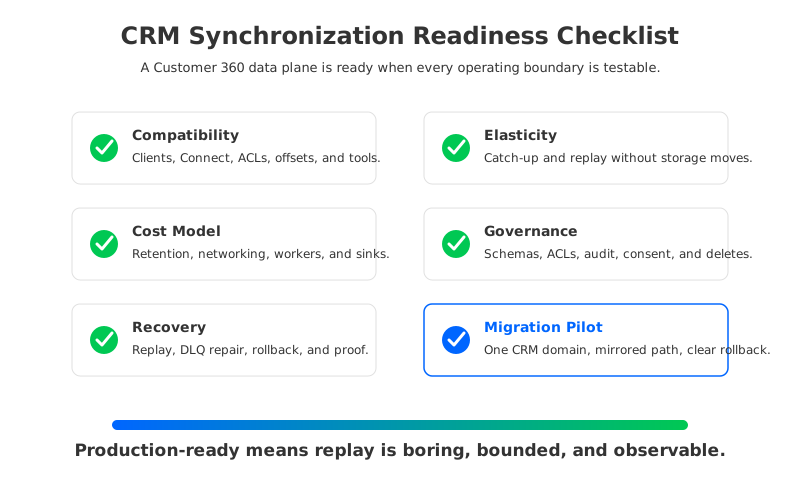
The checklist exposes the real decision: is the team building a lightweight integration, or is it building a customer data plane? The former can tolerate a narrow connector runbook. The latter needs a platform architecture that treats replay, fan-out, governance, and cost as first-class design constraints.
5How AutoMQ changes the operating model
Once CRM synchronization becomes a shared data plane, the architecture beneath Kafka matters. The useful question is not whether Kafka can carry CRM events; it can. The useful question is whether the Kafka-compatible platform can keep durable customer history, support replay, and scale through uneven connector traffic without turning brokers into long-lived storage bottlenecks.
AutoMQ approaches this problem as a Kafka-compatible cloud-native streaming system. It preserves Kafka protocol compatibility while using a shared storage architecture in which brokers are stateless with respect to durable stream data. The write path uses a write-ahead log for persistence, and object storage acts as the primary storage layer for stream data. In practical terms, compute capacity and durable storage capacity are no longer tied to the same broker-local disks.
For CRM synchronization, that separation changes three operating moments. During operation, the platform can retain customer change history without making broker-local storage the main scaling boundary. During catch-up, adding broker capacity does not have to be treated as a partition data movement project. During recovery, replacing a broker is less entangled with the durable ownership of CRM event history, so the team can focus on source event IDs, Kafka offsets, and downstream idempotence.
AutoMQ's shared storage model also affects the cloud cost profile of multi-AZ Kafka deployments. In traditional deployments, broker replication and client placement can create cross-AZ traffic even when the business event volume looks modest. AutoMQ documents an architecture intended to eliminate inter-zone traffic for Kafka workloads by using shared object storage and traffic routing patterns suited to cloud networks. For connector-heavy CRM data planes, that matters because resilience should not quietly multiply the network line item behind every customer update.
Deployment boundaries are another reason CRM teams should evaluate architecture early. Customer data often includes personally identifiable information, account status, sales activity, support context, and consent state. AutoMQ deployment documentation helps teams reason about customer-controlled cloud boundaries when security and compliance teams need to understand where business data flows.
AutoMQ is not a replacement for CRM connectors, Kafka Connect, schema governance, or downstream idempotence. Those contracts still matter. The value is at the substrate layer: Kafka-compatible APIs on top of an architecture where durable storage, broker scaling, and cross-zone traffic are handled differently from shared-nothing Kafka. If connector-heavy synchronization is forcing the platform team to buy broker headroom mainly for recovery windows and replay, shared storage is worth testing.
A practical pilot should use one bounded CRM domain such as account lifecycle or entitlement updates. Keep the existing path available, mirror a realistic event stream, verify client and connector compatibility, replay a known offset range, inject duplicate and late events, and compare operational steps under catch-up. The result should be a runbook, not a slide: what changed, what stayed the same, and which failure modes became easier to explain.
If your team is evaluating CRM synchronization as part of a Customer 360 data plane, test the storage and recovery model before the connector fleet grows around the wrong bottleneck. You can reach AutoMQ here: discuss Kafka-compatible CRM synchronization architecture.
6References
- Apache Kafka Documentation
- Salesforce Change Data Capture Developer Guide
- HubSpot Webhooks API documentation
- AWS PrivateLink documentation
- AutoMQ overview
- AutoMQ compatibility with Apache Kafka
- AutoMQ architecture overview
- AutoMQ deployment overview
- AutoMQ eliminate inter-zone traffic overview
7FAQ
7.1Is Kafka a good fit for CRM synchronization?
Kafka is a strong fit when CRM changes need durable fan-out, independent consumers, replay, and integration with stream processors or profile builders. It is less useful for point-to-point synchronization where one destination can tolerate delayed batch updates and no replay is required.
7.2What should be the Kafka key for CRM events?
The key should match the business ordering scope. Account-level workflows often use account or tenant ID. Contact-level workflows may use contact or user ID. If downstream profile logic depends on both, define the merge and routing rules explicitly rather than assuming one key will fit every consumer.
7.3How do teams prevent duplicate CRM updates?
Use a stable source event ID, CRM object version, or business timestamp, then make downstream writes idempotent. Consumers should be able to recognize that a replayed event has already been applied. This is especially important for sink systems that trigger emails, tickets, invoices, or entitlement changes.
7.4Does shared storage replace schema governance?
No. Shared storage changes the infrastructure operating model, but schema governance is still required. CRM systems evolve through configuration, so teams need compatibility checks, contract tests, DLQ handling, and clear rules for required fields, deletes, and object merges.
7.5When should a team evaluate AutoMQ for CRM synchronization?
Evaluate AutoMQ when Kafka-compatible CRM synchronization is becoming a shared Customer 360 data plane and broker-local storage, cross-zone traffic, replay windows, or scale events are becoming recurring operational concerns. Start with one bounded CRM domain and test compatibility, catch-up, replay, governance, and rollback before migration.


