
Table of Contents
Table of Contents
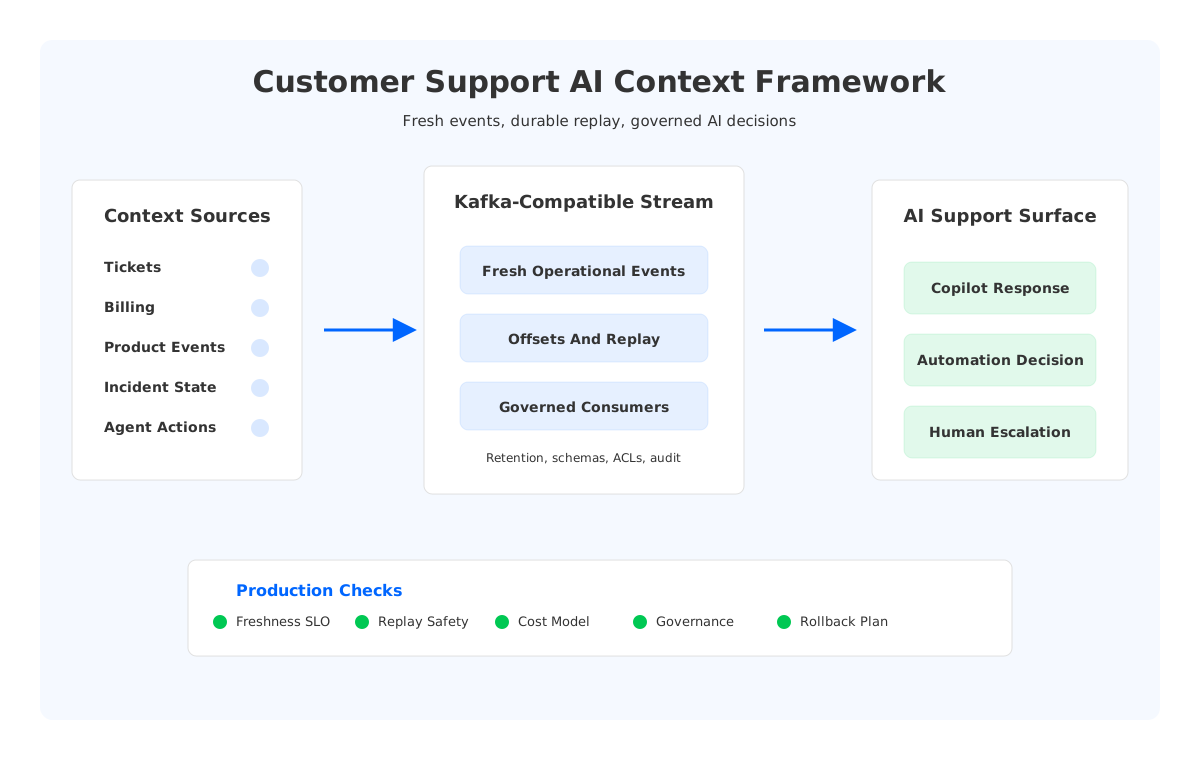
Customer support AI fails in a very ordinary way: it answers from yesterday's view of the customer. The model may know the policy, but it misses the refund that posted 10 minutes ago, the outage alert that changed the customer's region, or the handoff from chat to phone. Search interest around customer support ai real time context is really a search for data architecture that keeps AI assistance close to operational truth.
The hard part is not adding another retrieval step. Support context comes from ticketing systems, product telemetry, billing ledgers, feature flags, entitlement services, identity events, incident tools, CRM records, and human-agent actions. Some signals are useful for seconds; others need months of retention for compliance and escalation review. If the streaming layer cannot handle freshness, replay, governance, and cost together, the AI layer compensates with prompts.
1Why Customer Support AI Real-Time Context Matters
Support automation changes the cost of being slightly wrong. A human agent can pause, ask a teammate, or notice that the customer sounds upset. An AI copilot may move faster through incomplete state. The result can be confident but stale: refund already issued, account already restored, incident already mitigated, customer already promised a callback.
Production support AI needs several context types:
- Conversation context: chat turns, call summaries, agent notes, sentiment signals, and escalation history.
- Operational context: order events, product usage, feature flags, payment status, delivery state, and service health.
- Policy context: entitlements, SLAs, refund rules, compliance constraints, and regional handling rules.
- Decision context: what the AI suggested, what the agent accepted, what automation executed, and what the customer received.
- Audit context: who approved an action, which source was used, and which model or workflow produced the response.
These streams do not have the same latency or retention profile. A live outage signal should reach the support assistant quickly. A conversation transcript may need enrichment first. A refund decision may require consistent handling across the event that records the decision and the event that triggers the workflow. Apache Kafka is often used in this zone because its topic, partition, offset, and consumer group model lets many systems process the same event history independently.
That independence matters. The AI retrieval pipeline, analytics team, quality-review team, and human-agent desktop should not all depend on one fragile integration path. They should consume from durable streams, keep their own progress, and replay when processing logic changes.
2The Production Constraints Behind the Search
Early AI support pilots often work with a small cache, a few API calls, and selected knowledge sources. Production exposes a harder problem: assembling context while customers open tickets, agents edit records, tools emit events, and workflows change state.
Three constraints usually decide whether the architecture survives.
First, freshness is not one number. A fraud signal, incident alert, or account lock event may need to be visible within the active conversation. A support quality model can tolerate more delay. A legal audit export may care more about completeness and immutability than latency. Treating all context as one "real-time" feed hides the design choices that matter.
Second, replay is part of AI quality. When teams improve classification, safety filters, retrieval logic, or enrichment code, they need to reprocess historical support events. Kafka offsets and consumer groups let a new processor consume the same topic without disrupting the live agent desktop. But replay turns retention from a storage setting into a product requirement.
Third, governance cannot be bolted onto the model prompt. Support data may contain personal information, contract terms, payment status, security incidents, or regulated communications. The architecture has to answer where data lives, who can read it, how schemas evolve, how masking requests are handled, and how AI decisions are audited.
The streaming platform becomes the shared context backbone between the customer's live state, the human support workflow, and the AI system that interprets both.
3Architecture Patterns Teams Usually Compare
Most teams compare five patterns, even if they use different labels in design reviews.
| Pattern | Good Fit | Main Tradeoff |
|---|---|---|
| Direct API fan-out | Small number of tools and low traffic | Tight coupling grows as context sources and consumers multiply |
| Batch refresh into a vector store | Static policy and knowledge content | Operational state may be stale during live conversations |
| Event bus with short retention | Fresh context for online workflows | Replay and audit become weak unless history is stored elsewhere |
| Traditional Kafka | Durable event backbone with mature ecosystem tools | Broker-local storage and replication shape scaling, retention, and operations |
| Kafka-compatible shared storage | Kafka APIs with separated compute and durable storage | Requires validation of latency, compatibility, and migration path |
The first two patterns are not wrong. Direct APIs work for current-state lookups, and vector stores work for semantic retrieval over documentation and summarized history. They become fragile when asked to represent every operational transition. A support AI system needs both "what is the policy?" and "what happened to this account five seconds ago?"
Traditional Kafka is a strong baseline because it gives teams a durable log, independent consumers, replay, stream processing integrations, and well-understood semantics. Apache Kafka documents consumer position, replication, message delivery semantics, transactions, KRaft operations, and Tiered Storage. Those features map to support AI pipelines where ingestion, enrichment, retrieval, agent desktop updates, analytics, and audit systems need the same history.
The tradeoff sits underneath those semantics. Classic Kafka follows a Shared Nothing architecture: each broker owns local log data, and replication protects durability and availability. That model is battle-tested, but it makes capacity changes and retention decisions heavy. More retained support history means more storage pressure. Broker replacement and partition reassignment involve data movement because durable data is attached to broker-local storage.
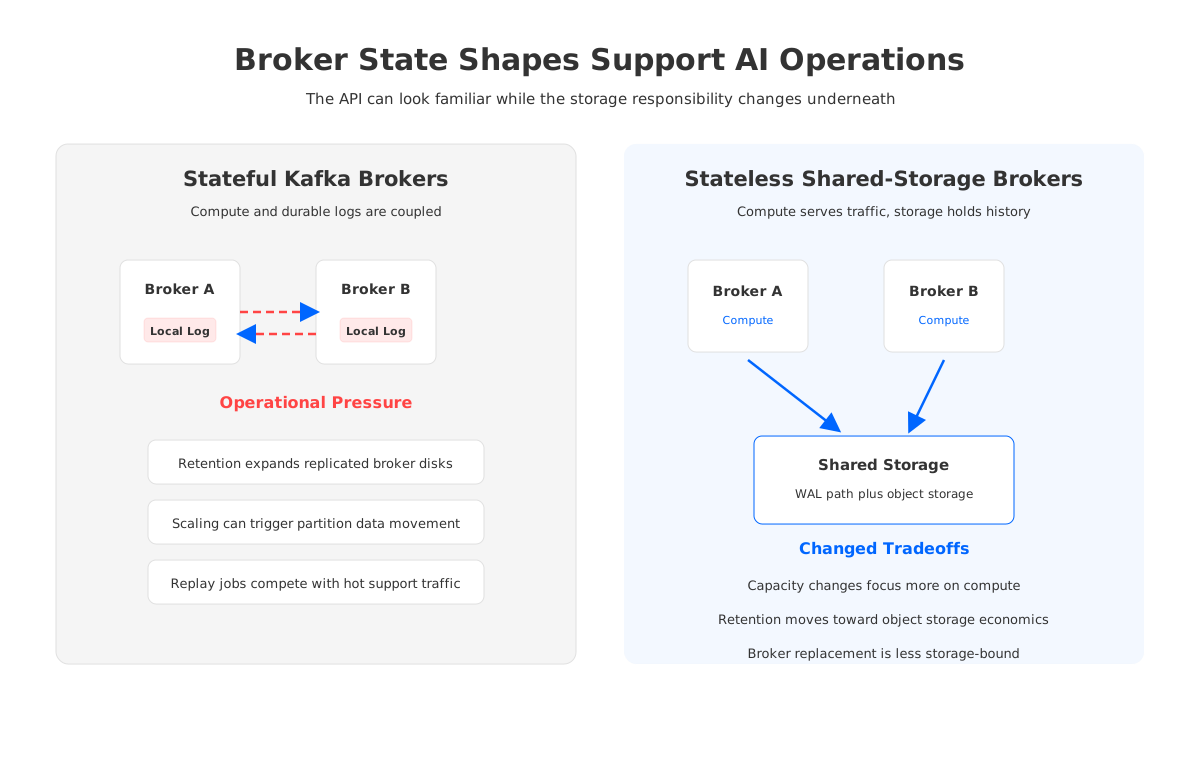
For customer support AI, those mechanics show up in plain language. Can the team keep enough context for replay without overbuilding brokers? Can it add capacity during a product incident without moving large volumes of local log data? Can it prove where customer data was stored and who consumed it?
4Design Context Streams Before You Size Infrastructure
Sizing the cluster before designing the context model usually produces the wrong answer. Support AI context is not one topic with a bigger retention value. It is a set of streams with different owners and failure modes.
A practical model starts with four decisions.
- Event boundaries: Separate raw tool events, normalized customer-state changes, AI retrieval requests, AI recommendations, human approvals, and workflow executions. These events answer different audit questions.
- Partitioning: Pick keys based on the ordering the business needs, such as customer ID, account ID, case ID, tenant ID, or conversation ID. Test for hot partitions when large enterprise accounts or incident-driven bursts dominate traffic.
- Retention classes: Keep live state streams short where appropriate, but retain decision and audit streams long enough for review, compliance, and model-quality work.
- Consumer isolation: Give agent desktops, AI copilots, automation workflows, quality review, analytics, and model-training pipelines independent consumer groups.
This design also clarifies where Kafka fits beside other stores. A cache may serve current customer state to the agent desktop. A vector database may hold searchable summaries and knowledge chunks. A warehouse or lakehouse may hold curated history for reporting. Kafka-compatible streaming ties these systems together by preserving event order and letting each downstream system build its own view.
The strongest designs keep raw, normalized, and AI decision events separate. Raw events preserve evidence. Normalized events give applications a stable contract. Decision events make the AI system observable. When a customer asks why an action was taken, the answer should not live inside a model trace alone.
5Evaluation Checklist for Platform Teams
A customer support AI platform should be tested against the failure cases that happen after the pilot succeeds. The checklist is more useful than a generic real-time data label.
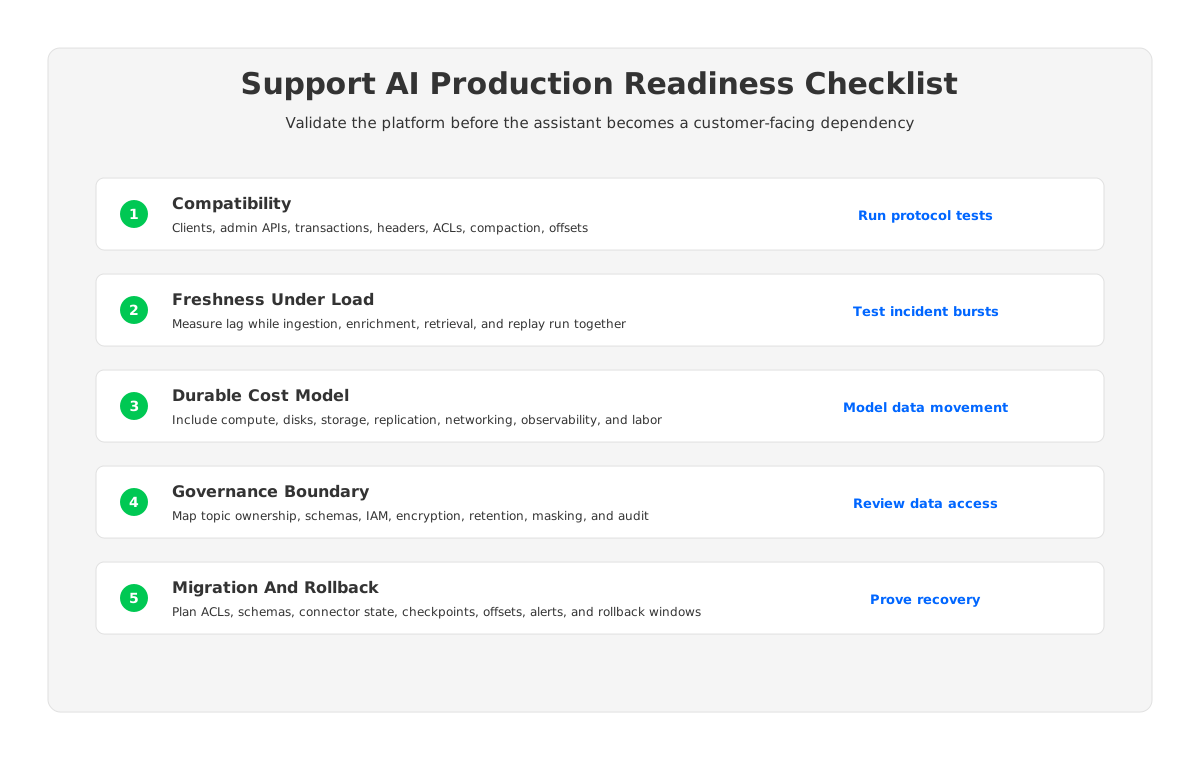
Start with compatibility. If the platform team already runs Kafka clients, Kafka Connect, Flink, Kafka Streams, schema tooling, or observability integrations, verify the APIs and protocol behavior used in production. Idempotent producers, transactions, headers, compaction, ACLs, consumer group behavior, offset commits, and administrative operations are worth testing explicitly.
Then test freshness under contention. Run ingestion, enrichment, retrieval updates, agent desktop consumers, and replay jobs at the same time. Watch consumer lag, producer retries, p99 request paths, object storage calls if applicable, network placement, and safety-critical topics. Average latency is not enough when one stale account-lock event can change the support answer.
Cost modeling should include the durable data path, not only broker instance prices. Support AI workloads accumulate conversations, state changes, recommendations, approvals, and audit records. For Kafka-style systems, the cost picture includes compute, disks, storage, replication traffic, cross-zone networking, observability, backups, connectivity, and on-call labor. Publishable estimates should use current cloud-provider pricing at procurement time, but data placement and movement often dominate the bill.
Governance needs the same discipline. Define topic ownership, schema rules, producer authentication, consumer authorization, encryption boundaries, retention policy, masking workflow, and audit-export behavior before model teams treat the stream as a common data source. For regulated environments, also map where data, metadata, credentials, and operational access reside.
Migration and rollback deserve early design. A credible plan covers topic creation, ACLs, schemas, connector state, stream-processing checkpoints, offsets, observability, alert thresholds, and dual-write or dual-read windows. Kafka-compatible does not mean risk-free migration. It means the team can often preserve client and ecosystem behavior while changing the platform underneath.
6Where AutoMQ Changes the Operating Model
Once the evaluation is framed around storage ownership, another option becomes visible. Instead of keeping durable Kafka log data tied to broker-local disks, a shared-storage design separates broker compute from durable storage. Brokers serve Kafka protocol traffic, while stream data is stored in shared storage with a WAL (Write-Ahead Log) path for immediate durability.
AutoMQ fits this category as a Kafka-compatible, cloud-native streaming platform built around Shared Storage architecture and stateless brokers. Its documentation describes compatibility with Apache Kafka clients and ecosystem tools, S3Stream as the storage layer, and stateless brokers that reduce broker-local data ownership. AutoMQ BYOC can also keep the data plane in the customer's cloud account, which may matter for support environments with strict data-boundary requirements.
For support AI, the practical difference is the operating model:
- Capacity can be evaluated more like compute because brokers do not own long-term persistent data.
- Retention can be modeled around object storage rather than treating all history as replicated local disk.
- Broker replacement and reassignment can be less storage-bound because persistent stream data is not attached to one broker instance.
- AI replay workloads can be tested against the same Kafka-compatible event backbone without forcing application teams onto a non-Kafka API.
There are still tradeoffs to prove. A support assistant needs realistic tests for WAL mode, producer acknowledgments, consumer lag, replay throughput, cache behavior, object storage request patterns, and failure recovery. A governance review should verify IAM, network boundaries, audit logging, and operational ownership. Shared storage changes the constraints; it does not remove engineering validation.
Evaluate AutoMQ when the pain comes from broker-local storage, retention cost, partition movement, or capacity planning, but test it with the same support workload and rollback plan used for any production streaming platform.
7Decision Table for Customer Support AI Architecture
Use this table as a first-pass filter before a proof of concept.
| Main Pressure | Optimize Existing Kafka | Evaluate Shared Storage | Split Workloads |
|---|---|---|---|
| Few context sources and low traffic | Strong fit | Usually premature | Rarely needed |
| Stale AI answers during live cases | Improve event modeling and cache paths | Useful if ingestion and replay also strain the cluster | Useful for separating online state from history |
| Long audit and decision retention | Partial fit with tiering and retention tuning | Strong fit if replay and governance tests pass | Useful for warehouse or lakehouse history |
| Frequent incident-driven capacity bursts | Limited by broker state and data movement | Strong fit if elasticity tests pass | Useful for isolating incident workloads |
| Strict Kafka ecosystem compatibility | Strong baseline | Validate client, admin, and connector behavior | Depends on integration boundary |
| Data-boundary and procurement control | Depends on deployment model | Strong fit when data plane stays in your account | Useful for regulated domains |
The winning design is rarely one component. A production support AI stack may use Kafka-compatible streams, low-latency caches, vector retrieval, lakehouse tables, workflow engines, and agent-desktop APIs. The streaming layer preserves operational truth long enough for those systems to build reliable views.
If your team is evaluating customer support AI real-time context, start with the event model and failure tests before choosing the platform. Include a Kafka-compatible shared-storage option such as AutoMQ in the proof of concept when retention, scaling, and broker-local movement are painful: review AutoMQ for your support AI streaming architecture.
8References
- Apache Kafka Documentation
- Apache Kafka Consumer Position
- Apache Kafka Message Delivery Semantics
- Apache Kafka Replication Design
- Amazon S3 User Guide
- OpenTelemetry Traces
- AutoMQ Documentation: Overview
- AutoMQ Documentation: Compatibility with Apache Kafka
- AutoMQ Documentation: Stateless Broker
9FAQ
9.1What is customer support AI real-time context?
Customer support AI real-time context is the live operational state an AI assistant needs to answer or act correctly during a support interaction. It can include conversation history, account status, product events, billing updates, incident state, entitlements, human approvals, and audit records.
9.2Is Kafka a good fit for customer support AI context?
Kafka is often a good fit when many systems need independent access to the same event history. Its topics, partitions, offsets, and consumer groups let AI pipelines, agent desktops, analytics jobs, and audit workflows consume and replay events without one consumer controlling another consumer's progress.
9.3Does a vector database replace the need for event streaming?
No. A vector database is useful for semantic retrieval over knowledge, summaries, and historical content. Event streaming is better suited to capturing operational transitions as they happen. Production support AI usually needs both: streams for fresh state and durable history, and retrieval stores for searchable context.
9.4When should a team evaluate shared-storage Kafka?
Evaluate shared-storage Kafka-compatible platforms when broker-local storage, long retention, partition movement, replay jobs, or bursty capacity needs are limiting the support AI operating model. The fit is strongest when teams want to keep Kafka APIs while changing the storage and elasticity model.
9.5Where does AutoMQ fit in a support AI architecture?
AutoMQ fits as a Kafka-compatible shared-storage option. It is relevant when platform teams want Kafka clients and ecosystem tools, but also want stateless brokers, object-storage-backed durability, and customer-controlled deployment boundaries. The right next step is workload testing, not a paper-only decision.


