
Table of Contents
Table of Contents
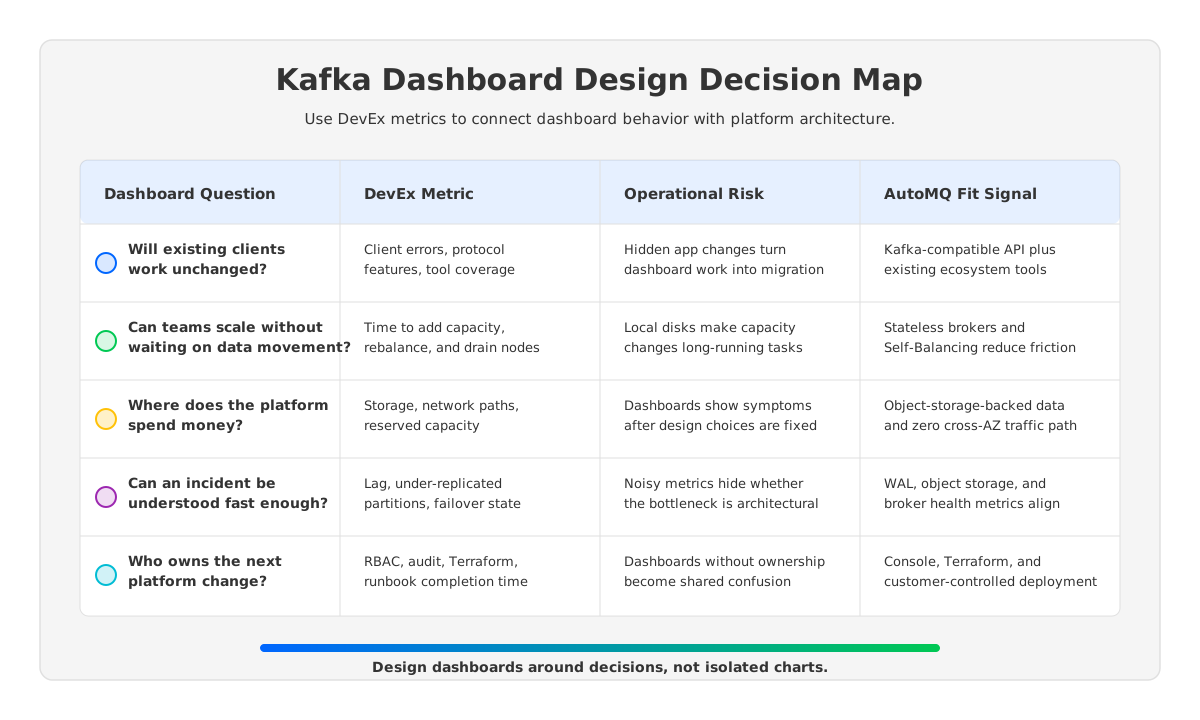
Teams rarely search for kafka dashboard design because they need another CPU chart. They search for it when the Kafka estate has become hard to reason about: an application team says lag is rising, the platform team sees broker disks filling unevenly, FinOps asks why network spend moved, and the incident channel cannot tell whether the next action is to scale consumers, move partitions, throttle producers, or change the platform architecture. A dashboard that answers only "what is red?" is too shallow for that moment.
The more useful question is this: can the dashboard reduce the time between a signal and a safe action? That is a developer experience metric, not a UI preference. It measures how quickly application developers, SREs, and platform engineers can understand topics, Consumer groups, offsets, brokers, storage, network paths, governance controls, and migration risk.
That is why kafka dashboard design belongs in architecture reviews. The panels you choose expose what the platform can change, what it can only observe, and where operational ownership becomes ambiguous. A production dashboard should not be a museum of Kafka metrics. It should be a decision surface for a Kafka-compatible streaming platform.
1Why Teams Search for kafka dashboard design
The first dashboard most Kafka teams build is cluster-centric. It shows broker count, CPU, disk usage, request rate, partitions, leader distribution, under-replicated partitions, and maybe Consumer lag. That is a reasonable starting point because Kafka exposes many useful broker and client metrics, and Apache Kafka documentation treats Consumer groups, offsets, transactions, KRaft, Kafka Connect, and tiered storage as separate operational domains.
The problem appears when the dashboard becomes the handoff point between teams. Application developers care about whether their Consumer group is falling behind and whether offset commits are safe. SREs care about whether an incident will spread across brokers or Availability Zones. Platform engineers care about whether reassignment, scaling, ACL changes, connector updates, or migration steps can be performed without creating a larger failure. Finance and security teams care about storage growth, cross-zone paths, data boundaries, audit evidence, and rollback control.
Those users do not need the same first screen. They need the same source of truth translated into different decisions:
- Application teams need to know whether lag is caused by their consumer code, upstream producer bursts, broker pressure, or a platform change.
- SREs need to know whether the platform can absorb failure without long data movement or manual coordination.
- Platform teams need to know whether capacity can be changed before the next business event, not after a reassignment window completes.
- Governance owners need to know which team can approve, execute, and audit the next change.
This is where dashboard design becomes a DevEx discipline. The experience is good when the dashboard shortens the path from "something is wrong" to "the right owner knows the least risky next action." It is poor when every alert opens a graph hunt.
2The Production Constraint Behind the Problem
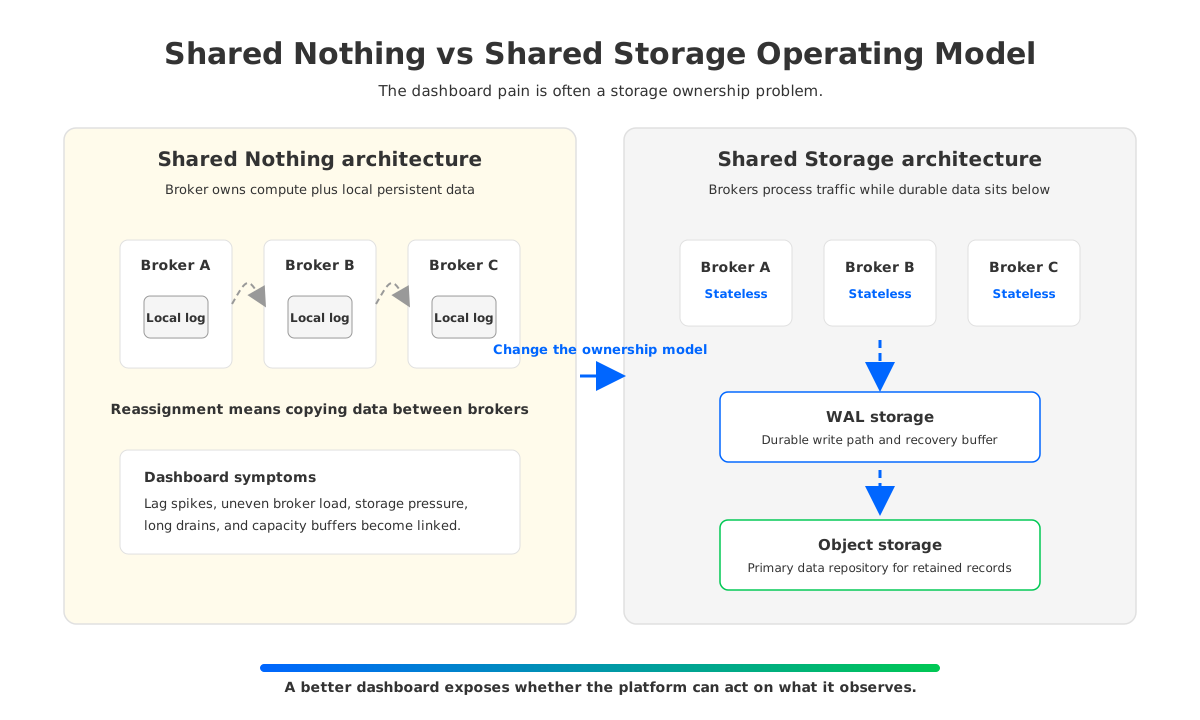
Traditional Kafka is a Shared Nothing architecture. Each broker owns local storage for the partitions assigned to it, and replication across brokers provides durability. That design is one reason Kafka became so dependable in data center environments: compute, network, and storage were tightly controlled, and the broker-local log was a practical abstraction for high-throughput append and fetch.
Cloud operations changed the failure and cost model around that abstraction. Local or cloud block storage must be sized before demand is fully known. Replication traffic can cross Availability Zone boundaries. Partition reassignment can turn a capacity change into a long-running data movement task. Broker replacement can mean both compute replacement and storage ownership transfer. None of these issues is invisible on a dashboard; they show up as disk imbalance, hot brokers, ISR churn, lag, throttled reassignment, noisy alerts, and conservative capacity buffers.
The trap is to treat those panels as isolated symptoms. A broker disk panel says "this node is full," but the operational question is "how long will it take to move the affected partitions, and what else will that movement disturb?" A lag panel says "this group is behind," but the useful question is "is this a consumer issue, a broker issue, a storage issue, or a planned maintenance side effect?" A network panel says "cross-zone traffic exists," but the design question is "which traffic path is unavoidable in the current architecture?"
That distinction matters because a dashboard cannot compensate for an operating model that cannot act quickly. It can reveal broker-local storage pressure, but it cannot make broker-local data portable. It can show reassignment progress, but it cannot remove the data copy that reassignment requires.
3Architecture Options and Trade-Offs
Kafka dashboard design should begin with a neutral architecture map. Before choosing panels or tools, list the operational actions the platform must support and the constraints behind them. A small team-owned Kafka cluster may need a simple broker and Consumer group dashboard. A platform team supporting regulated, multi-tenant, high-retention workloads needs a different surface for audits, migration rehearsals, cost reviews, and incident response.
The practical evaluation has four layers.
| Layer | Dashboard question | Architecture trade-off |
|---|---|---|
| Kafka semantics | Do clients, Consumer groups, offsets, transactions, Connect, and Streams behave as expected? | Compatibility determines whether the dashboard reflects real application behavior or hides migration work. |
| Storage ownership | Is durable data tied to brokers or separated from compute? | Broker-local storage makes scaling and failure recovery data-movement problems. Shared storage changes the action model. |
| Cloud cost paths | Which storage and network paths grow with workload? | The dashboard must distinguish unavoidable architecture cost from tunable placement, retention, and routing choices. |
| Governance boundary | Who can approve, execute, and roll back a platform change? | A clean graph without ownership still produces slow operations. |
Tiered Storage deserves a careful note here. It can reduce pressure on local disks by moving older log segments to object storage, and it may fit workloads where historical retention dominates. But it does not automatically make brokers stateless. Recent data, partition leadership, ISR behavior, and operational ownership can remain tied to local broker state. For dashboard design, that means a tiered-storage Kafka cluster still needs panels for primary storage pressure, reassignment progress, broker hotspots, and the boundary between hot and historical reads.
Managed Kafka services change another part of the map: they reduce infrastructure ownership but may also move some platform controls outside the customer's operating boundary. That can be a good trade-off when the goal is reduced staffing burden. It can be a poor fit when the team needs customer-controlled networking, storage accounts, audit paths, or custom migration runbooks. Dashboard design should make that boundary explicit instead of hiding it behind a green cluster health badge.
4Evaluation Checklist for Platform Teams
A useful Kafka dashboard starts with the decisions it must support. The checklist below is intentionally written as an evaluation tool rather than a panel catalog. If a metric does not connect to an owner and an action, it belongs in a drill-down view, not the primary screen.
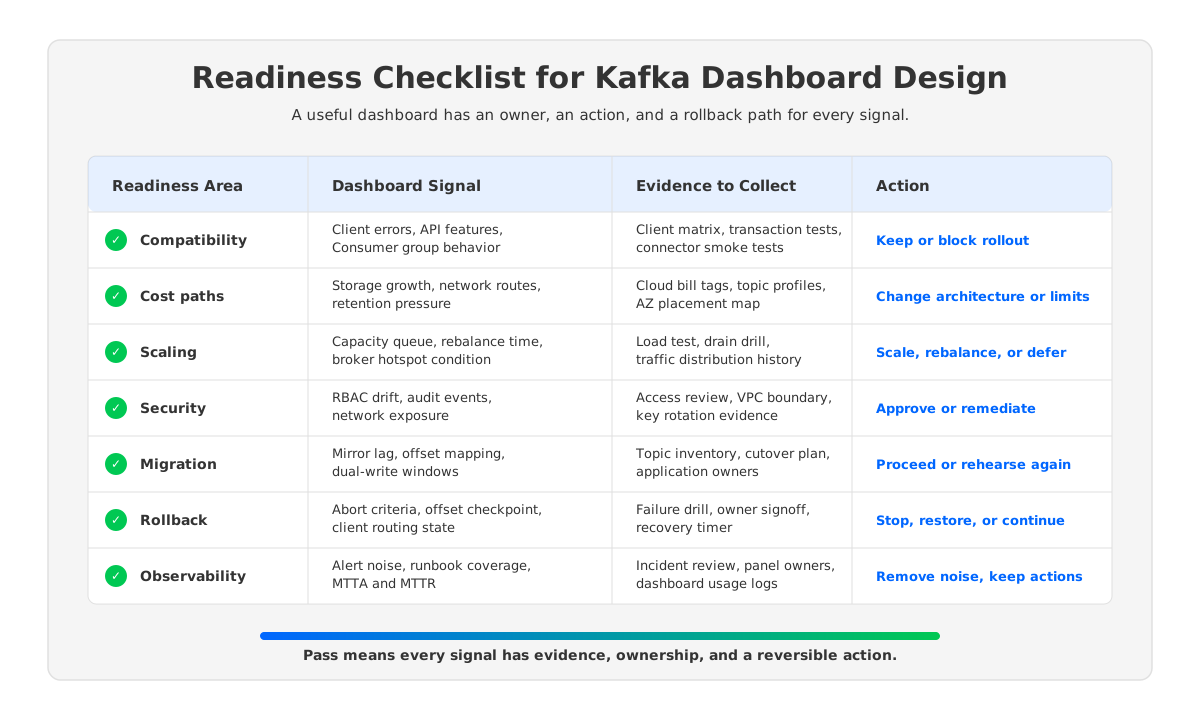
For production review, group metrics around seven readiness areas.
- Compatibility. Track client versions, authentication failures, request errors, transaction errors, Consumer group state, offset commit behavior, Kafka Connect task state, and stream processor health. The goal is to catch application-visible breaks before they become migration folklore.
- Cost paths. Show storage growth, retention pressure, network direction, zone placement, and topic-level contribution. Do not make finance reverse-engineer the platform from a cloud bill.
- Scaling. Measure time to add capacity, remove capacity, rebalance load, drain a node, and restore broker health after failure. A dashboard that shows "scale requested" but not "safe to route traffic" leaves teams guessing.
- Security and governance. Include ACL or RBAC drift, audit events, certificate or key rotation progress, network exposure, and approval state for sensitive operations.
- Migration. For cutovers, show topic inventory, replication or linking lag, offset mapping, application owner signoff, dual-write windows, and cutover blockers.
- Rollback. Define abort criteria in the dashboard itself: maximum lag, error rate, offset checkpoint freshness, client routing state, and recovery timer.
- Observability quality. Track alert noise, dashboard usage, runbook coverage, mean time to acknowledge, and mean time to restore. If nobody uses a panel during an incident, it is decorative.
This checklist changes how platform teams judge tools. A beautiful dashboard that cannot answer rollback readiness is incomplete. A dense dashboard that requires a Kafka specialist for every interpretation is also incomplete. A strong design usually has a short top-level path: workload health, platform health, cost and capacity, governance state, migration or maintenance state, then drill-down.
5How AutoMQ Changes the Operating Model
If the evaluation shows that broker-local storage is the source of scaling friction, recovery delay, or cost-path confusion, the platform question moves beyond dashboard layout. The team needs to evaluate a Kafka-compatible architecture where durable data is not owned by individual brokers.
AutoMQ is a Kafka-compatible, cloud-native streaming platform built around Shared Storage architecture. It keeps Kafka protocol and API compatibility as the application-facing contract, while replacing Kafka's broker-local log storage with S3Stream, WAL storage, data caching, and S3-compatible object storage. In that model, AutoMQ Brokers are stateless brokers: they handle Kafka traffic and leadership, but persistent data is stored in shared storage rather than on broker-local disks.
For dashboard design, this changes which metrics deserve primary attention. Traditional Kafka dashboards often spend a lot of space on disk pressure, reassignment progress, replica movement, and broker-local recovery because those are the slow operational constraints. In AutoMQ, the dashboard can shift more attention toward workload intent and platform action: traffic distribution, broker health, WAL behavior, object storage path health, cache efficiency, Self-Balancing state, Self-healing events, and whether the control plane action completed safely.
The control boundary also matters. AutoMQ BYOC deploys the control plane and data plane in the customer's cloud environment, while AutoMQ Software is designed for customer-operated private environments. That lets platform teams keep the dashboard connected to their own VPC, identity, network, object storage, Terraform workflow, and audit process. AutoMQ Console and Terraform support then become part of the same DevEx story: a signal should lead to a controlled operation, and the operation should leave evidence for review.
The architecture does not remove the need for careful dashboard design. It changes the questions. Instead of asking "which broker owns the data I need to move?" the team can ask "which broker should own traffic, is the WAL path healthy, is object storage serving the expected read profile, and did Self-Balancing converge?" Instead of treating migration as a one-time side project, teams can put Kafka Linking, offset consistency, application ownership, and rollback readiness into the same readiness view used for daily operations.
That is a better fit for developer experience because it narrows the gap between application signals and platform actions. Developers still see familiar Kafka concepts: topics, partitions, offsets, Consumer groups, producers, consumers, Connect, and Streams. Platform engineers get a different operating model underneath those concepts, one that is designed to make scaling, failure recovery, and cost control less dependent on broker-local data movement.
6A Practical Dashboard Design Pattern
Start with a single service journey rather than a generic cluster page. Pick one important workload and draw the path from producer to topic to Consumer group to downstream system. Then attach platform signals to that path. Producer errors belong near request rate. Consumer lag belongs near processing capacity and offset commits. Broker health belongs near leadership and routing. Storage and WAL health belong near durability and recovery. Cost belongs near retention, network paths, and workload ownership.
From there, build three levels of views:
- Executive operational view: workload health, active incidents, cost anomalies, and migration or maintenance state.
- Platform engineering view: broker health, traffic balance, storage path health, scaling state, governance events, and runbook links.
- Application owner view: topic throughput, Consumer group lag, offset commit health, schema or serialization errors, connector state, and rollback criteria.
The key is not to hide complexity. Kafka is complex because it sits between many systems and preserves durable ordering semantics. The key is to make complexity actionable. A panel should tell the reader whether they can scale, wait, roll back, route around, or escalate. If it cannot support one of those verbs, move it out of the first screen.
Return to the search that started the work: kafka dashboard design. The useful answer is not a screenshot template. It is a way to decide whether your streaming platform can turn metrics into safe operations. If your checklist points toward Kafka compatibility plus Shared Storage architecture, test the idea with a representative workload and a real failure drill. For a customer-controlled evaluation path, start with the AutoMQ BYOC entry point.
7FAQ
7.1What metrics should be on the first screen of a Kafka dashboard?
Use the first screen for decision metrics: workload health, Consumer group lag, producer and consumer error rates, broker health, storage pressure or storage path health, traffic balance, alert state, and active operational work such as scaling, migration, or maintenance. Put detailed JVM, request, and per-topic panels behind drill-down views.
7.2How is kafka dashboard design different for a Kafka-compatible platform?
The Kafka-facing concepts should stay familiar: topics, partitions, offsets, Consumer groups, producers, consumers, and Connect. The difference is underneath. A Kafka-compatible platform with Shared Storage architecture should expose storage path health, WAL behavior, object storage behavior, and stateless broker operations because those signals explain different actions than broker-local storage dashboards.
7.3Should dashboard design include cost metrics?
Yes. Cost is an operational signal when it is tied to workload ownership and architecture. Track storage growth, retention, network direction, Availability Zone placement, and topic-level contribution. Avoid turning the dashboard into a finance report; the goal is to show which engineering action can change the cost path.
7.4How should teams dashboard a Kafka migration?
Treat migration as a live operating mode. Show topic inventory, replication or linking progress, offset mapping, application owner signoff, client routing state, rollback criteria, and abort thresholds. The dashboard should answer whether the cutover is safe, not only whether bytes are moving.


