
Table of Contents
Table of Contents
Platform teams usually search for diskless kafka readiness after the easy Kafka tuning work is already done. Retention has been trimmed. Partitions have been rebalanced. Producers have been rack-aware where the deployment allows it. The remaining problem is harder: the cluster still behaves as if durable stream data belongs to broker-local disks, while the surrounding cloud infrastructure prices storage, replication, and cross-zone movement as separate resources.
That mismatch shows up in production planning more than in architecture diagrams. A FinOps review asks why the streaming platform pays for replicated block storage and inter-zone transfer at the same time. An SRE team wants faster broker replacement without waiting for large partition movements. A data platform owner wants longer replay windows for backfills, but not another storage expansion project. The question is not whether Kafka can use object storage somewhere. The question is whether the operating model is ready for durable topic data to stop being pinned to individual brokers.
Diskless Kafka readiness is therefore a validation discipline, not a product label. It should force the team to examine compatibility, latency, cloud cost, failure recovery, security boundaries, migration mechanics, and ownership. A cluster can be "diskless" in one sense and still keep local disks for metadata, cache, temporary files, or non-diskless topics. A production decision needs sharper language than the slogan.
1Why teams search for diskless kafka readiness
The search intent is usually practical. Teams are not trying to win an argument about whether local disks are old-fashioned. They are trying to decide whether their next Kafka platform should keep scaling by adding broker storage or move toward a model where compute and durable storage scale independently.
Traditional Kafka made a good historical trade-off. Brokers owned partitions, stored local log segments, replicated those segments to other brokers, and served consumers from the same local storage model. In a data center, that design gave Kafka excellent sequential I/O behavior and a clear failure model. In the cloud, the same design can turn routine operations into capacity and network planning exercises.
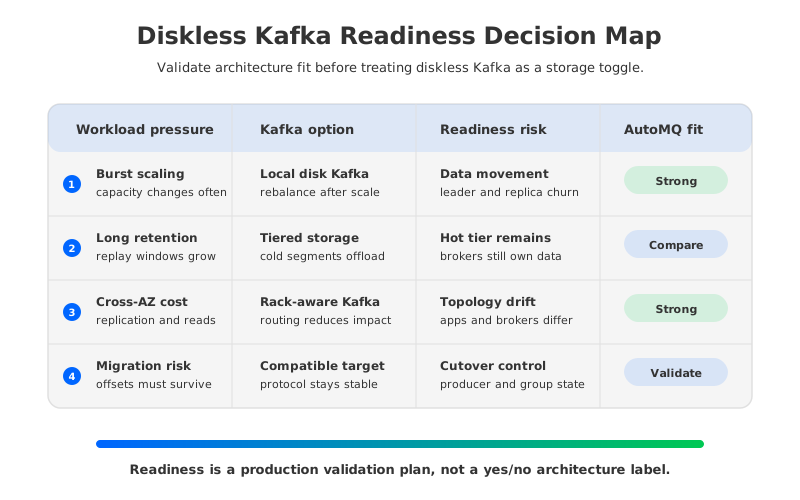
Three pressures tend to push the conversation toward diskless or shared-storage Kafka:
- Elasticity pressure. If traffic changes faster than partition movement can complete, broker-local storage becomes a scaling brake. You can add compute, but the cluster still has to move data or rebalance leadership around data placement.
- Retention pressure. Longer replay windows are useful for incident recovery, machine learning feature backfills, audit trails, and lakehouse ingestion. Local broker disks make retention a per-node capacity problem.
- Cost pressure. Cross-AZ replication, producer traffic, consumer reads, and replicated block storage can appear as different line items even though they all originate from one architectural choice: durable data is tied to brokers in multiple zones.
Those pressures do not make diskless Kafka automatically right. They define the workload profile that deserves evaluation. A low-latency trading pipeline, a telemetry stream with heavy replay, and an ecommerce event bus may all use Kafka APIs, but they should not accept the same storage trade-off without proof.
2The storage constraint behind cloud Kafka
The most expensive part of Kafka operations is often not a single visible component. It is the coupling between compute, storage, and replication. When a broker is both the serving node and the durable owner of partition data, capacity planning has to satisfy all three dimensions at once. A node may need more disk because retention grew, more CPU because consumers spiked, or more network because replication and reads are concentrated in one zone.
Tiered Storage, standardized through Apache Kafka's KIP-405 work, addresses part of that problem by moving older log segments to remote storage. That helps retention because cold data does not have to live entirely on broker-local disks. It does not make brokers stateless. Hot data, leader placement, local log management, and partition movement remain part of the operating model, so scaling compute still interacts with data placement.
Diskless topics, described in Apache Kafka KIP-1150, push the idea further by treating object storage as the primary durable location for topic data. The motivation is clear: reduce broker disk dependence, reduce data movement between zones, and let storage durability come from cloud object storage rather than from application-level replica movement alone. The trade-off is also clear. Object storage changes the latency, batching, caching, and failure-recovery profile of the system.
That is why readiness should start with workload evidence rather than a vendor comparison. A team should know the answer to questions like these before it evaluates platforms:
- Which topics are latency sensitive enough to require a low-latency write path?
- Which topics are retention-heavy and replay-heavy enough to benefit from object-storage-backed durability?
- Which consumer groups depend on stable offsets during migration or failover?
- Which workloads generate cross-zone traffic because producers, consumers, and partition leaders do not align?
- Which controls require data, credentials, logs, and management access to remain inside the customer's cloud account or VPC?
These questions separate architecture fit from architecture excitement. Diskless Kafka is not a universal replacement for every Kafka deployment pattern. It is a way to change the cost and operations curve for workloads where broker-local durable storage has become the constraint.
3Architecture options: local disk, tiered storage, and shared storage
Most platform teams evaluate three architecture families. The names sound similar, but their operating consequences are different enough to decide separately.
| Architecture | What changes | What still needs validation |
|---|---|---|
| Broker-local Kafka | Brokers own partition logs and replicate data across brokers. | Disk sizing, partition movement, cross-AZ replication, hot partition recovery, and expansion windows. |
| Kafka with Tiered Storage | Older segments can move to remote storage while the hot path remains broker-local. | Remote-read behavior, local hot-tier sizing, cache behavior, metadata load, and operational maturity. |
| Kafka-compatible Shared Storage | Brokers serve Kafka requests while durable stream data lives in shared storage with a WAL and cache layer. | Producer latency, object storage behavior, WAL durability, read amplification, migration process, and failure recovery. |
The shared-storage model changes the question from "How much disk does each broker need?" to "What durable write path, cache policy, and storage backend does each workload need?" That is a better question for cloud infrastructure, but it is also a more explicit one. The platform team has to understand the chosen WAL medium, object storage semantics, observability signals, and rollback plan.
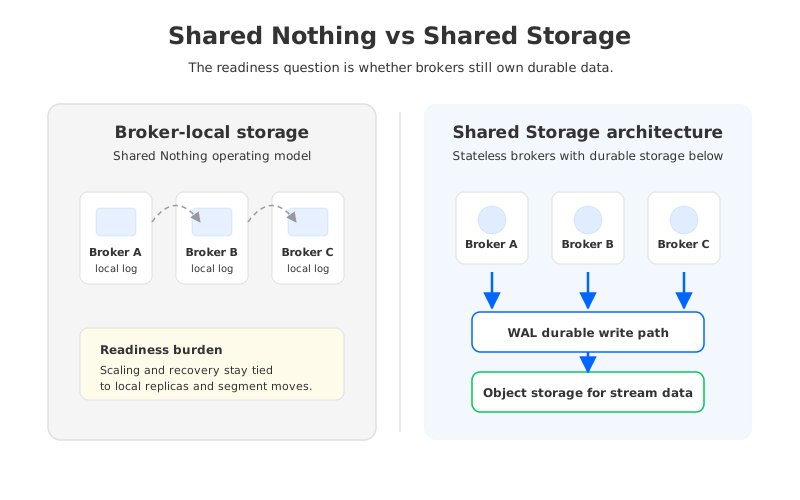
The diagram highlights the difference that matters in operations. In broker-local Kafka, replacing or scaling a broker is entangled with the data it owns. In a shared-storage architecture, brokers can be treated more like a serving layer because durable stream data is below them. This does not remove all operational work. It changes the work from moving large partition data between brokers to validating write durability, cache efficiency, metadata behavior, and object storage access.
4Evaluation checklist for platform teams
A serious diskless Kafka readiness review should look more like a production launch review than a feature checklist. The following gates are a practical starting point.
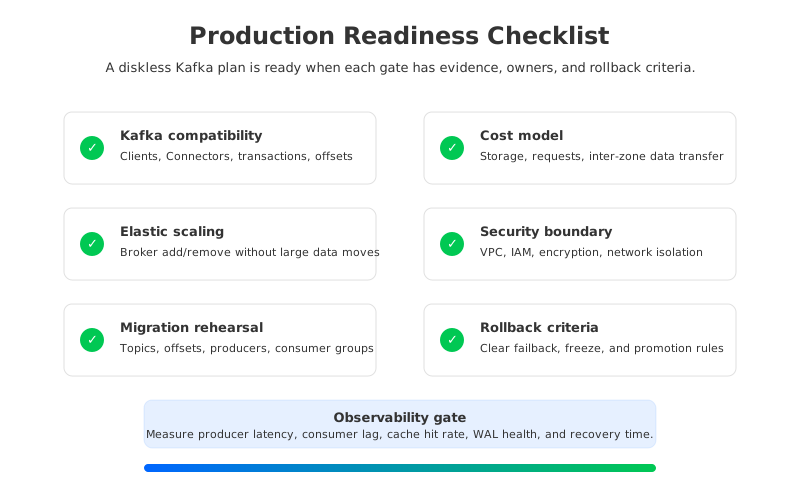
1. Compatibility. Start with the Kafka surface area your applications actually use: producer idempotence, transactions, consumer groups, offset commits, ACLs, quotas, Schema Registry integrations, Kafka Connect, stream processors, and operational tools. A platform that speaks the Kafka protocol may still expose differences in admin APIs, metrics, connector behavior, or failure timing. Build a compatibility matrix from production usage, not from the documentation table alone.
2. Latency and durability. Diskless or shared-storage systems usually introduce a WAL, batching, cache, and object storage write path. That can be perfectly acceptable for logs, metrics, audit streams, asynchronous application events, and replay-heavy topics. It needs direct testing for workloads that are sensitive to p99 producer latency, end-to-end freshness, or transaction completion time.
3. Cloud cost. Model storage, object requests, network transfer, block volumes, private connectivity, and operational headroom together. AWS documents both S3 durability characteristics and EC2 data transfer pricing as separate service concerns, and Google Cloud similarly exposes network pricing by topology. The point is not to memorize one region's price. The point is to prove whether your architecture reduces the traffic and storage classes that dominate your actual bill.
4. Failure recovery. Test broker loss, zone loss, object storage throttling, slow consumers, cache cold-start, metadata controller failover, and restore from retained data. The most important number is not the happy-path throughput benchmark. It is how quickly the platform returns to a known-good state when one layer is degraded.
5. Security and governance. Diskless Kafka moves more responsibility into cloud-native primitives: buckets, IAM roles, encryption keys, VPC endpoints, private networking, audit logs, and service ownership. For regulated teams, the readiness question includes where the control plane runs, where data is stored, and who can access metrics, credentials, and object storage paths.
6. Migration and rollback. Migration is not complete when producers can write to the target cluster. It is complete when topic data, consumer group progress, offset semantics, monitoring, access controls, and rollback rules are all tested. If the source and target clusters can both receive writes during a cutover, the team needs a precise promotion rule to prevent split-brain behavior at the application level.
7. Observability. A diskless architecture needs Kafka metrics plus storage-path metrics. Track producer latency, consumer lag, fetch latency, cache hit rate, WAL write latency, object storage request errors, throttling, compaction behavior, recovery progress, and cross-zone traffic. If the team cannot explain a latency spike by following those signals, the platform is not ready.
5How AutoMQ changes the operating model
Once the evaluation reaches the point where broker-local storage is the constraint, AutoMQ becomes relevant as a Kafka-compatible streaming platform built around Shared Storage architecture. It keeps the Kafka protocol surface while replacing Kafka's local log storage layer with S3Stream, WAL storage, object storage, and cache components. The practical outcome is that brokers handle request serving, partition leadership, scheduling, and cache behavior, while durable stream data is stored outside broker-local disks.
This architecture changes several readiness gates. Compatibility testing remains necessary, but application rewrites should not be the center of the project because AutoMQ aligns with Apache Kafka versions and ecosystem clients. Scaling tests should focus less on waiting for large retained logs to move between brokers and more on whether the serving layer, WAL choice, cache policy, and object storage backend match the workload.
AutoMQ's WAL options also make the latency discussion more concrete. AutoMQ documentation describes WAL storage as the durable write path that acknowledges client writes after persistence, then uploads data to object storage. Different WAL media have different latency and durability profiles, including object storage, file storage, and cloud block storage options in supported editions. That means readiness is not one binary choice between "fast local disk" and "slow object storage." It is a workload-to-WAL decision that should be tested with production-like producers and consumers.
The cost discussion changes as well. AutoMQ documentation describes patterns for avoiding inter-zone traffic generated by production, consumption, and server-side replica replication under specific multi-AZ conditions. That claim should still be validated against your topology. If producers and consumers are not balanced across zones, if some clients cannot expose rack locality, or if a cloud provider prices network paths differently, the savings model needs adjustment.
Migration is another place where architecture matters. AutoMQ Kafka Linking is designed to move data from Kafka-compatible sources while preserving partition counts, message offsets, and consumer progress, and it includes a producer proxy path for lower-disruption cutover planning. That does not remove the need for a rehearsal. It gives the platform team a migration mechanism to validate against the same readiness checklist: topic coverage, offset continuity, producer switch behavior, rollback, and observability.
If your platform team is evaluating diskless Kafka readiness, start with the checklist, not the marketing category. Then test one representative workload from each latency and retention tier. To explore the AutoMQ architecture and plan a proof of concept, use the AutoMQ overview as the next technical entry point.
6References
- Apache Kafka documentation
- Apache Kafka KIP-405: Kafka Tiered Storage
- Apache Kafka KIP-1150: Diskless Topics
- AutoMQ compatibility with Apache Kafka
- AutoMQ S3Stream Shared Streaming Storage overview
- AutoMQ WAL Storage
- AutoMQ Kafka Linking overview
- AutoMQ inter-zone traffic broker configuration
- Amazon S3 data durability documentation
- AWS EC2 data transfer pricing
- Google Cloud VPC network pricing
7FAQ
7.1Is diskless Kafka the same as Tiered Storage?
No. Tiered Storage moves older log segments to remote storage while the hot path and broker-local ownership model remain important. Diskless topics or shared-storage Kafka move durable topic data closer to object storage as the primary storage layer, with brokers acting more like a serving layer.
7.2Does diskless Kafka mean brokers use no disks at all?
Not necessarily. The term usually refers to topic data no longer being durably stored on broker-local disks. Brokers may still use local storage for metadata, cache, temporary files, logs, or non-diskless workloads depending on the implementation.
7.3Which workloads are usually the strongest fit?
Retention-heavy logs, observability events, audit streams, data lake ingestion, asynchronous application events, and replay-heavy pipelines are often good candidates. Ultra-low-latency transactional workloads need careful p99 and failure-mode testing before moving away from a broker-local hot path.
7.4What should a proof of concept measure?
Measure producer latency, end-to-end freshness, consumer lag, cold replay speed, cache hit rate, WAL latency, object storage errors, recovery time after broker loss, and cross-zone traffic. The proof should use real topic shapes, producer batching, consumer fan-out, and retention settings.
7.5Where does AutoMQ fit in a diskless Kafka evaluation?
AutoMQ fits when a team wants Kafka compatibility with a Shared Storage architecture, stateless brokers, object-storage-backed durability, WAL options, and cloud deployment boundaries that can be validated against production requirements. It should be evaluated after the team defines its readiness gates and workload tiers.


