
Table of Contents
Table of Contents
A Kafka client can connect to Azure Event Hubs, produce records, consume records, and keep an application shape that looks familiar to a Kafka team. That is the value of the Event Hubs Kafka endpoint: it removes migration friction for applications that already speak the Kafka protocol. The mistake is assuming that protocol compatibility makes Event Hubs equivalent to an Apache Kafka broker cluster. It does not, and that difference matters most when your workload depends on broker control, Kafka ecosystem tooling, long replay windows, or automation built around Kafka internals.
Microsoft positions Event Hubs as a fully managed, real-time data ingestion service that can expose an Apache Kafka-compatible endpoint in supported tiers. Apache Kafka is a distributed event streaming platform with its own broker configuration model, APIs, log storage behavior, ecosystem assumptions, and operational surface. Both can be valid Azure choices, but they optimize for different kinds of ownership. Event Hubs minimizes broker management. Kafka gives the platform team more direct control over broker behavior and ecosystem semantics.
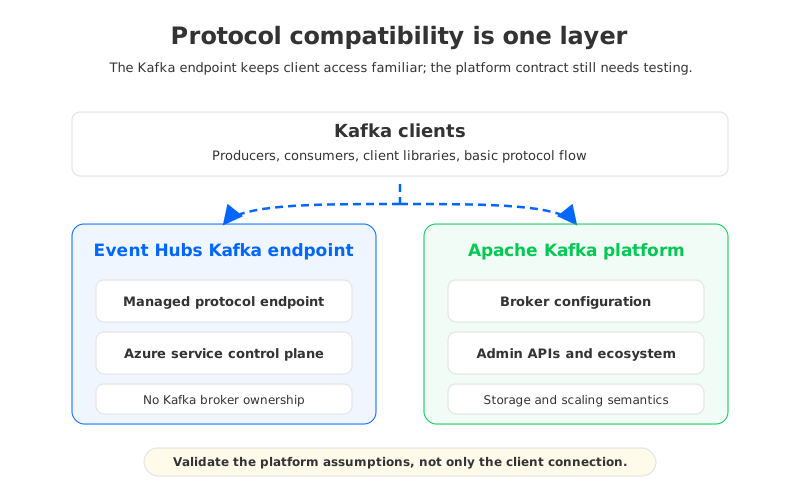
The practical question is not "Does Event Hubs support Kafka clients?" It does. The better question is "Which parts of my workload assume a Kafka platform, not only a Kafka wire protocol?" Once that question is explicit, the Event Hubs vs Kafka decision becomes an architecture fit discussion instead of a label-matching exercise.
1What the Event Hubs Kafka Endpoint Provides
Azure Event Hubs for Apache Kafka lets Kafka clients connect to Event Hubs without running Apache Kafka brokers. Producers and consumers use Kafka protocol-facing configuration, while Azure operates the underlying Event Hubs service. For teams already standardized on Azure identity, networking, monitoring, and ingestion pipelines, this can be a useful path: fewer broker nodes to patch, no ZooKeeper or KRaft planning, and a managed service boundary that fits many Azure-native ingestion workloads.
This is strongest when the application is using Kafka mainly as a client protocol and event transport. Telemetry pipelines, application event ingestion, log collection, and straightforward producer-consumer flows often fit this model. The team usually cares about reliable ingestion, consumer groups, Azure integration, throughput capacity, and operational simplicity more than it cares about setting broker-level parameters or running Kafka-native infrastructure tooling.
The boundary becomes visible when a Kafka workload treats the cluster as a programmable platform. A platform team may have automation around AdminClient operations, topic policies, connector deployment, stream processing state, or custom observability. Event Hubs supports Kafka protocol access, but the service remains Event Hubs underneath. Some Kafka assumptions map cleanly, some map partially, and some need redesign before migration.
2Where Event Hubs Behaves Differently from Apache Kafka
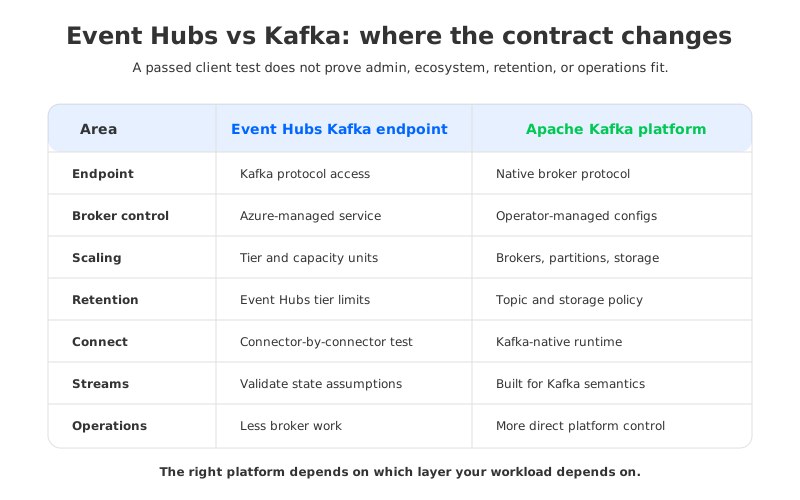
The fastest way to compare Event Hubs Kafka and Apache Kafka is to separate the layers. A Kafka client library sits at the top. Under it are administrative APIs, broker configuration, storage behavior, scaling model, ecosystem integrations, and failure operations. Event Hubs abstracts several of those layers because it is a managed Azure service, while Apache Kafka exposes them because the broker cluster is the platform.
| Evaluation area | Event Hubs Kafka endpoint | Apache Kafka cluster |
|---|---|---|
| Client protocol | Kafka clients can connect through the Event Hubs Kafka endpoint in supported tiers. | Native Kafka protocol and broker implementation. |
| Broker control | Broker internals are managed by Azure and not exposed as Kafka broker configuration. | Operators control broker configuration, storage, replication, quotas, listeners, and upgrade strategy. |
| Admin APIs | Basic Kafka-style topic and client interactions may work, but Kafka admin assumptions need validation against Event Hubs behavior. | AdminClient is designed for Kafka cluster operations, topic metadata, partition management, and broker-aware workflows. |
| Connect and Streams | Compatibility depends on connector or Streams behavior and the Kafka features it assumes. Test each workload. | Kafka Connect and Kafka Streams are built around Kafka semantics and are usually operated beside Kafka clusters. |
| Retention and replay | Retention follows Event Hubs tier limits and namespace or event hub settings. | Retention is controlled by Kafka topic and broker configuration, bounded by storage architecture and cost. |
| Scaling | Capacity is managed through Event Hubs units or Dedicated capacity, depending on tier. | Scaling involves brokers, partitions, storage, replication traffic, and rebalancing. |
| Operations model | Azure manages the service; teams manage namespace, tiers, throughput, networking, auth, and consumers. | Platform team manages cluster lifecycle, upgrades, storage, broker health, partition placement, and recovery. |
This table should not be read as a winner-takes-all comparison. Event Hubs is attractive precisely because it removes broker ownership from the user. Kafka is attractive precisely because the broker platform remains under the team's control. Problems appear when a migration plan wants both outcomes at once: no broker surface, but full Kafka platform behavior.
3Broker Configuration and Admin Operations
Kafka teams often underestimate how much production behavior is encoded in broker and topic configuration. Retention policies, compression defaults, message size limits, throttling, replication behavior, listener configuration, security controls, and partition operations are not incidental details. They are how Kafka operators express platform policy.
Event Hubs changes that control plane. You configure Event Hubs concepts such as namespaces, event hubs, partitions, consumer groups, tiers, throughput or processing capacity, networking, and authorization. You do not configure an Apache Kafka broker through server.properties, KRaft controller settings, broker listeners, or local log directories. That difference is healthy if your goal is a managed ingestion service. It is risky if your automation expects those Kafka controls to exist.
AdminClient is a good compatibility test because it exposes hidden assumptions quickly. A producer-consumer smoke test may pass, while deployment automation still relies on topic creation semantics, partition expansion behavior, metadata calls, ACL workflows, or policy validation written for Apache Kafka. Before moving a production workload to Event Hubs Kafka endpoint, run the same administrative automation you use in production.
4Topic, Partition, Retention, and Scaling Behavior
In Apache Kafka, partitions are both a concurrency unit and an operational object. They shape throughput, consumer parallelism, ordering, replication, rebalancing, storage placement, and recovery. Retention is also a broker and topic-level storage decision: teams tune time-based retention, size-based retention, compaction, segment behavior, and storage capacity according to replay needs and cost.
Event Hubs also has partitions and retention, but they live inside the Event Hubs service model. Microsoft documents tier-specific limits for retention, partition counts, message size, consumer groups, and capacity. Model them as Event Hubs limits exposed through a Kafka-compatible endpoint, not as Kafka broker limits with a managed control plane.
Scaling follows the same pattern. In Event Hubs, teams think in terms of service tiers and throughput or processing capacity. In Kafka, teams think in terms of broker count, partition count, storage architecture, replica traffic, controller behavior, consumer group rebalances, and operational time to move data. Event Hubs removes many of those moving parts. Kafka preserves them, which is either burden or necessary control depending on the workload.
5Kafka Connect, Streams, and Ecosystem Assumptions
Kafka Connect and Kafka Streams are where "Kafka-compatible" claims often become too broad. Connect is not just a producer-consumer wrapper. Connectors may depend on topic creation, internal topics, offset storage behavior, compaction assumptions, connector-specific configuration, and operational tooling. Kafka Streams has its own expectations around repartition topics, changelog topics, state stores, consumer group behavior, transactions in some designs, and recovery.
That does not mean Event Hubs cannot be used with Kafka ecosystem components. It means the unit of validation is the full component and its runtime behavior, not only the client library. A source connector that writes plain records may work well. A connector or Streams topology that depends on Kafka-specific internal topic behavior may require changes, a different runtime layout, or a Kafka-compatible platform.
For migration planning, split your inventory into these groups:
- Applications that only produce and consume records with standard Kafka clients. These are the strongest candidates for Event Hubs Kafka endpoint validation.
- Applications that use AdminClient, dynamic topic management, or broker-aware deployment automation. These need explicit control-plane tests.
- Connectors and stream processing jobs with internal topics, state, transactions, compaction, or offset assumptions. These need workload-level proof, not protocol-level proof.
- Platform tooling for monitoring, lag analysis, governance, schema workflows, security, and disaster recovery. These may need replacement or adaptation when the backend is Event Hubs.
The pattern is consistent: the closer a workload is to event transport, the more natural Event Hubs feels. The closer it is to Kafka as an application platform, the more you need full Kafka semantics and operational surface area.
6When Event Hubs Is the Right Choice
Event Hubs is often the right Azure choice when the workload is ingestion-oriented and the team wants the managed service boundary more than Kafka broker control. If producers send events into Azure, consumers process them downstream, and the main requirements are availability, Azure integration, capacity planning, and reduced operations, the Kafka endpoint can be a pragmatic bridge.
This is especially true when the migration goal is to remove Kafka operations rather than preserve Kafka internals. A team moving logs, telemetry, or product events into Azure analytics may accept some platform changes in exchange for a managed service. In that scenario, the Event Hubs Kafka endpoint is not a compromise; it is the point. It keeps familiar clients while adopting the Event Hubs operating model.
The decision should still include limits testing. Check message size, partition count, retention, throughput or processing capacity, consumer group needs, networking, authentication, and monitoring. Also check the exit path. A managed service can simplify today's operations while making tomorrow's reverse migration harder if platform-specific behavior spreads without documentation.
7When You Need a Kafka-Compatible Platform Instead
You need a Kafka-compatible platform when workload correctness or operations depend on Kafka behavior beyond the wire protocol. This is common in mature Kafka estates. The first migration blockers are rarely producer and consumer APIs; they are the surrounding systems that assume Kafka is a controllable distributed log.
The strongest signals are concrete:
- You run Kafka Connect or Kafka Streams workloads that depend on internal topics, compaction, state, transactions, or broker-aware failure behavior.
- You manage topics, partitions, ACLs, quotas, or retention through automated Kafka AdminClient workflows.
- You need long replay windows where storage architecture and retention economics are central design variables.
- You operate multi-environment Kafka platforms where observability, governance, backup, migration, and disaster recovery tooling already assumes Kafka semantics.
- You need portability across Azure and other environments without rewriting the platform model around a single cloud ingestion service.
At that point, the comparison is not Event Hubs versus "self-managed Kafka forever." It is Event Hubs versus a Kafka-compatible platform that reduces operations without removing the Kafka platform contract. Traditional self-managed Kafka on Azure is one option, but it keeps broker-local storage, replica traffic, disk planning, and data movement in the operator's lap. Managed Kafka services can reduce some work, but architecture and data-control boundaries vary by provider.
8How AutoMQ Fits the Kafka Platform Case
If the evaluation leads to "we need Kafka semantics, but we do not want traditional Kafka operations on Azure," the architecture requirement is more specific: Kafka-compatible clients and ecosystem behavior, a data plane that can run in the customer's Azure environment, and less dependence on broker-local disks. AutoMQ fits this category as a Kafka-compatible streaming platform that uses object-storage-backed shared storage and stateless brokers, with BYOC deployment patterns where the data plane can remain in the customer's cloud environment.
The relevance is not that every Event Hubs workload should move to AutoMQ. Many should not. Event Hubs is a strong choice for Azure-native ingestion when the managed service model is the priority. AutoMQ becomes relevant when the team wants the Kafka side of the tradeoff: Kafka protocol and ecosystem compatibility, Kafka-oriented operations, and more direct control over the streaming platform, while avoiding much of the storage and scaling friction of broker-local disks.
This distinction matters for architects and FinOps teams. In traditional Kafka, long retention and scaling are tightly coupled to broker storage and data movement. In an object-storage-backed design, durable data moves to shared cloud storage such as Blob or S3-compatible object storage, while brokers act more like stateless compute. That still requires capacity planning, security design, and performance testing, but it changes the tradeoff for teams that need Kafka on Azure rather than a Kafka-speaking ingestion endpoint.
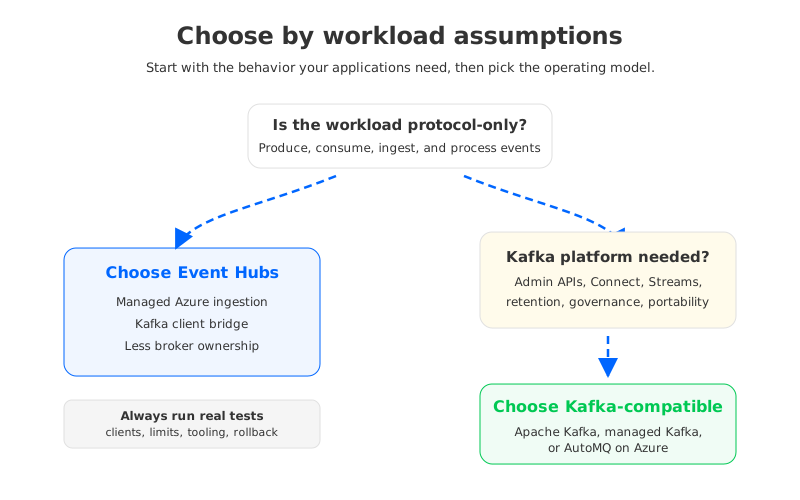
The safest next step is a compatibility test plan. Use real clients, connectors, stream processing jobs, admin automation, and retention requirements. If the workload passes under the Event Hubs service model, you get managed simplicity. If it fails because it expects Kafka platform behavior, choose a Kafka-compatible target deliberately instead of discovering the gap during cutover.
For teams evaluating that second path, AutoMQ's Azure deployment and Kafka compatibility materials are a useful reference point for a cloud-native Kafka-compatible architecture that does not put broker-local storage at the center of the design.
9References
- Microsoft Learn: Azure Event Hubs for Apache Kafka overview
- Microsoft Learn: Apache Kafka applications with Azure Event Hubs FAQ
- Microsoft Learn: Azure Event Hubs quotas and limits
- Apache Kafka: Official documentation
- AutoMQ Docs: AutoMQ documentation
10FAQ
10.1Is Azure Event Hubs the same as Apache Kafka?
No. Event Hubs can expose a Kafka-compatible endpoint for Kafka clients, but it is not an Apache Kafka broker cluster. Treat it as an Azure managed ingestion service with Kafka protocol support, not as a fully equivalent Kafka platform.
10.2Can Kafka producers and consumers connect to Event Hubs?
Yes, supported Kafka clients can connect to Event Hubs through the Kafka endpoint in supported tiers. You still need to validate authentication, networking, client configuration, message size, partitioning, throughput, and consumer behavior for your workload.
10.3Does Event Hubs support Kafka Connect and Kafka Streams?
Some Kafka ecosystem components can work, but compatibility depends on the component's assumptions. Connectors and Streams applications that rely on internal topics, compaction, transactions, AdminClient behavior, or broker-specific semantics need workload-level testing.
10.4When should I choose Event Hubs over Kafka?
Choose Event Hubs when the workload is mainly Azure-native event ingestion and you value managed service operations more than Kafka broker control. It is a strong fit for telemetry, log ingestion, and producer-consumer flows that do not rely heavily on Kafka platform internals.
10.5When should I choose a Kafka-compatible platform instead?
Choose a Kafka-compatible platform when your applications, tools, or operations depend on Kafka semantics beyond the client protocol. Common triggers include Kafka Connect, Kafka Streams, AdminClient automation, long retention, portability requirements, and existing Kafka governance tooling.
10.6Where does AutoMQ fit in an Azure Kafka strategy?
AutoMQ fits when a team needs Kafka compatibility and ecosystem behavior while reducing the operational burden of traditional broker-local Kafka storage. In Azure-oriented deployments, its BYOC model and object-storage-backed shared storage can be relevant for teams that need Kafka semantics and data-plane control in their own cloud environment.


