
Table of Contents
Table of Contents
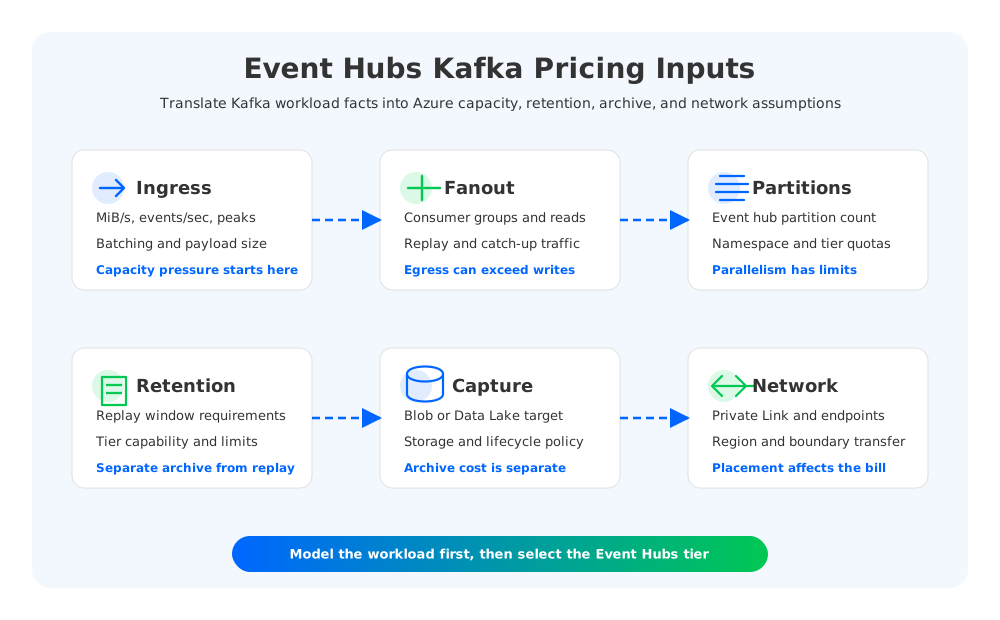
Kafka teams usually estimate infrastructure by asking how many brokers, disks, partitions, replicas, and availability zones a workload needs. Event Hubs asks a different question: which service tier and capacity model can absorb the event rate, throughput, retention, and consumer behavior? That difference is why Event Hubs Kafka pricing can look simple on a pricing page but become hard to forecast for a production Kafka migration.
The Kafka endpoint in Azure Event Hubs lets Kafka clients connect without running Kafka brokers, but it does not turn Event Hubs into a broker-count pricing model. A Kafka team has to translate its workload into Event Hubs language: throughput units in Standard, processing units in Premium, capacity units in Dedicated, plus retention, Capture, storage destinations, private networking, and operational dependencies around Kafka Connect, Kafka Streams, replay, and monitoring.
The right pricing exercise is not "is Event Hubs lower cost than Kafka?" It is "what must be equivalent for this migration to be acceptable?" A workload that only needs high-volume ingestion into Azure analytics may map cleanly to Event Hubs. A workload that depends on Kafka administration, long replay windows, Connect-heavy integration, or Kafka Streams state may need a broader cost model that includes the surrounding platform.
1Why Event Hubs Pricing Is Different From Kafka Cluster Pricing
In a traditional Kafka cluster, the cost model starts with infrastructure. You size broker compute, local or attached disks, replication factor, network placement, and operations. Even a managed Kafka service usually preserves that mental model: the bill is connected to broker shapes, storage, traffic, support, and sometimes extra managed-service units.
Event Hubs is a managed Azure event streaming service. Microsoft prices it by tier and capacity constructs rather than by Kafka broker count. Standard uses throughput units, Premium uses processing units, and Dedicated uses capacity units. The Kafka endpoint is supported in Standard, Premium, and Dedicated, so a Kafka migration must begin by selecting a tier before capacity can be modeled.
This changes the FinOps conversation in three ways.
First, broker sizing disappears from the customer-facing model, but workload behavior still matters. Ingress, egress, event size, consumer fanout, and replay can drive required capacity even when no broker exists in your bill. A team that only converts "three Kafka brokers" into "one Event Hubs namespace" is skipping the real constraint.
Second, operational line items move. Patching brokers and replacing disks are no longer part of the customer's Kafka runbook, but compatibility validation, security mapping, network design, Capture destinations, and downstream integration testing still have cost. The pricing page does not include the cost of rewriting an unsupported connector or changing an application that assumes a Kafka admin API behavior.
Third, retention is no longer a local-disk multiplication problem, but it still needs explicit modeling. Event Hubs tiers have retention features and limits, and Capture can archive event streams into Azure Blob Storage or Azure Data Lake Storage. That is valuable, but it means the estimate should include both the streaming service and the destination storage pattern when the workload needs long replay or lake ingestion.
2Event Hubs Capacity And Tier Cost Drivers
The tier decision is the first pricing fork. Standard is commonly evaluated for general event streaming and Kafka endpoint usage. Premium targets higher isolation and performance with processing units. Dedicated is intended for workloads that need single-tenant capacity and uses capacity units. Do not compare these tiers only by headline price; compare them by what capacity, isolation, retention, limits, and operational guarantees your workload requires.
For Kafka teams, the translation should look like this:
| Kafka workload question | Event Hubs pricing dimension to model |
|---|---|
| How much data do producers write per second? | Ingress throughput and event rate against tier capacity |
| How many consumer groups read the same data? | Egress throughput, fanout, and capacity headroom |
| How large are messages and batches? | Event size assumptions and quota limits |
| How many partitions are needed? | Event hub partition count and tier quotas |
| How long must data remain replayable? | Retention limits, tier choice, and Capture/archive strategy |
| Is isolation required for noisy-neighbor risk? | Premium processing units or Dedicated capacity units |
| Is private access required? | Private Link, VNet, DNS, and related networking charges |
This worksheet should be filled out before pricing is discussed with procurement. Event Hubs can be efficient when the workload shape fits the service model, but the estimate becomes fragile if the team ignores replay, fanout, or peak traffic. Kafka systems often have quiet average throughput and intense bursts during incident recovery, backfills, or downstream outages. Those moments decide how much headroom the service needs.
Peak traffic also deserves special attention. Kafka clusters are often over-provisioned because brokers, storage, and partition placement are hard to scale independently under pressure. Event Hubs removes broker operations, yet capacity still has to handle the largest realistic write/read envelope. If your consumers regularly replay hours of data while fresh producers continue writing, model that egress as a normal operating condition rather than an exception.
3Kafka Workload Variables That Change The Estimate
The most common Event Hubs Kafka pricing mistake is pricing only producer ingress. Kafka bills rarely grow from writes alone. They grow from the combination of writes, retention, replicas, consumer fanout, replay, and ecosystem behavior. Event Hubs has a different architecture, but the workload variables remain.
Start with a representative traffic table:
- Average and peak producer throughput in MiB/s.
- Average and peak events per second.
- P50, P95, and maximum message size.
- Number of partitions per high-volume stream.
- Number of active consumer groups and their read patterns.
- Expected replay volume during recovery, backfill, or downstream catch-up.
- Required retention window for operational replay versus compliance archive.
- Kafka Connect, Kafka Streams, schema registry, and monitoring dependencies.
The last line is easy to underestimate. A producer and consumer may connect successfully through the Kafka endpoint, while a migration still stalls because the broader Kafka ecosystem behaves differently. Kafka Connect sinks, source connectors, stream processors, transaction assumptions, admin scripts, ACL automation, and lag dashboards all need validation. If teams must replace or redesign these pieces, their engineering cost belongs in the migration model even though it is not a line item in Event Hubs pricing.
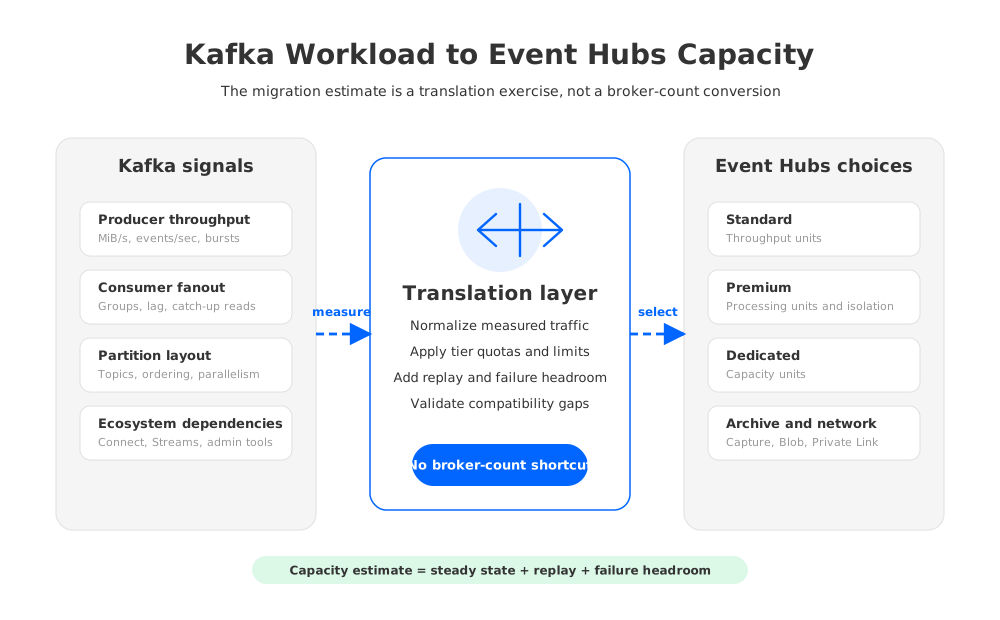
Partitioning is another example. Kafka teams use partitions for throughput, ordering boundaries, consumer parallelism, and operational layout. Event Hubs also uses partitions, but the service quotas and tier behavior determine how far a namespace or event hub can stretch. A lift-and-shift estimate should map existing topics to event hubs, current partitions to target partitions, and consumer group behavior to expected fanout. If the current Kafka cluster has many low-throughput topics, the namespace and event hub limits may matter as much as raw throughput.
Message size affects both capacity and compatibility. Large Kafka records, compression choices, batching behavior, and producer retry patterns can change the effective throughput requirement. A clean cost estimate uses measured production telemetry, not application-owner guesses. If telemetry is weak, run a short benchmark with real client libraries and representative payloads before committing to a tier.
4Retention, Capture, And Networking Costs
Retention is where Kafka and Event Hubs differ most visibly. In traditional Kafka, longer retention expands broker-local storage, and replication multiplies the footprint. Retention also affects operational actions: rebalancing, broker replacement, and disk expansion become heavier when durable data lives on broker-owned disks.
Event Hubs avoids that broker-local disk model for the customer, but the retention requirement still has to be priced. Short operational replay may fit inside the selected Event Hubs tier. Longer archival and lake-ingestion use cases may depend on Event Hubs Capture, which writes event data to Azure Blob Storage or Azure Data Lake Storage. Microsoft includes Capture in Premium and Dedicated; in Standard it is a feature to price separately. Either way, the storage destination, transaction pattern, lifecycle policy, and analytics consumption should be included in the estimate.
Networking is the other hidden cost category. Many Kafka workloads run inside private networks with strict identity, encryption, and boundary requirements. On Azure, that can mean Private Link, private endpoints, DNS design, VNet integration, firewall rules, and bandwidth charges. Private Link has its own pricing concepts, and data transfer charges can matter when producers, Event Hubs namespaces, Capture destinations, and consumers span regions or network boundaries.
A practical estimate separates these costs:
- Streaming capacity: Standard throughput units, Premium processing units, or Dedicated capacity units.
- Storage and archive: retention setting, Capture, Blob Storage or Data Lake Storage, lifecycle tiering, and analytics reads.
- Networking: private endpoints, inter-region transfer, cross-boundary egress, and downstream service placement.
- Migration engineering: client validation, connector replacement, stream processing changes, observability, and rollback.
- Operational risk: capacity headroom, incident replay, quota management, and support coverage.
This breakdown is more useful than a single monthly number because it shows which assumption is driving the bill. If retention dominates, optimize archive strategy. If fanout dominates, review consumer design. If migration engineering dominates, the issue may be compatibility rather than service price.
5Event Hubs Vs Kafka-Compatible Platform Cost Model
Event Hubs is often a strong Azure-native answer when the workload is event ingestion and the team wants managed service ownership. It can reduce Kafka broker operations and integrate well with Azure analytics. But for some Kafka teams, the hard requirement is not only Kafka client connectivity. It is the ability to preserve Kafka semantics, ecosystem workflows, and operational control while changing the cost structure of the underlying storage layer.
That is where a Kafka-compatible shared-storage platform enters the comparison. AutoMQ is one example: it keeps Kafka compatibility as a design goal, uses stateless brokers, and persists durable stream data in shared object storage. In Azure BYOC deployments, the data plane can run in the customer's Azure environment and use Azure Blob/object storage as the durable storage layer. The relevant comparison is not vendor versus vendor; it is service-capacity pricing versus Kafka-compatible infrastructure where compute and storage are modeled separately.
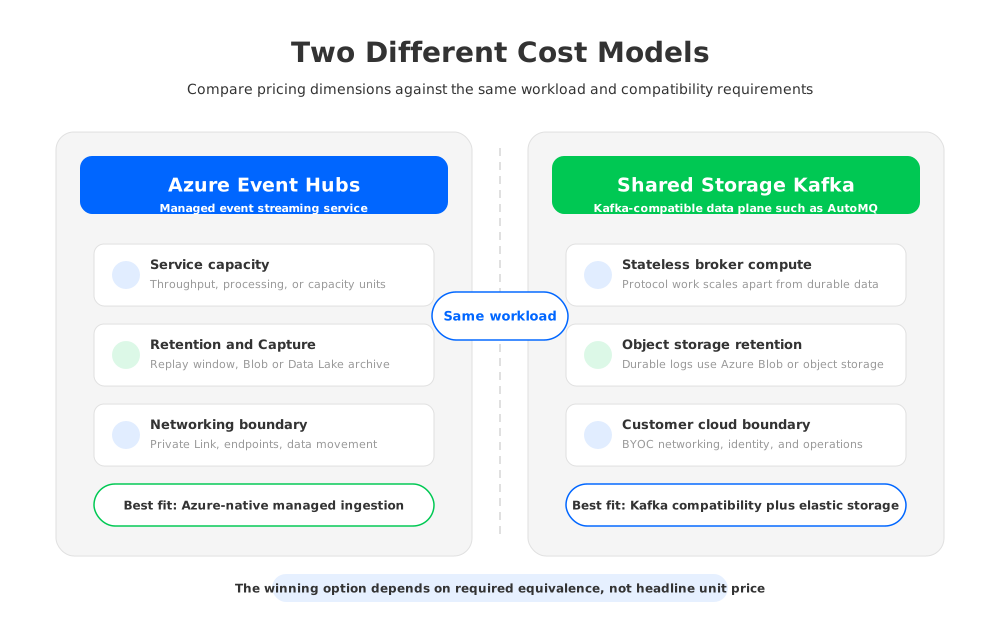
This distinction matters for long retention and elastic scaling. With broker-local Kafka, retention tends to inflate disks and make broker movement expensive. With Event Hubs, retention and Capture move into managed service and archive dimensions. With object-storage-backed Kafka, durable log storage is modeled around object storage while brokers focus on protocol and compute. These are three different cost shapes, and each can be right for a different workload.
For a CTO or architecture review, the decision should be framed around equivalence:
- If equivalent means "Kafka clients can publish and consume events into Azure services," Event Hubs may be the simplest fit.
- If equivalent means "existing Kafka ecosystem, Connect pipelines, Streams applications, and admin workflows remain central," validate compatibility more deeply.
- If equivalent means "Kafka semantics stay, but local-disk retention and broker data movement should stop dominating cost," include AutoMQ-style shared storage in the evaluation.
- If equivalent means "full control over every broker configuration and plugin," self-managed Kafka may still be required.
This is also why AutoMQ should not be inserted as a universal replacement. It is most relevant when Kafka compatibility and Azure data-plane control are important, but the team wants object storage retention, stateless scaling, and a more cloud-native cost model than traditional broker-local Kafka.
6A Practical Cost Modeling Checklist
Before a migration decision, build a worksheet with two columns: Event Hubs assumptions and Kafka-compatible alternative assumptions. Use the same workload on both sides. The model should state region, tier, retention window, peak throughput, average throughput, consumer fanout, message size, partitions, private networking, Capture/archive, and engineering changes. Keep official Azure pricing pages as the source of unit prices and avoid hard-coding numbers into architectural documents that will age quickly.
Then run three validation passes.
The first pass is capacity. Confirm that the selected Event Hubs tier and capacity model can handle producer ingress, consumer egress, partition count, retention, and replay. Include headroom for incident recovery, not only daily average traffic.
The second pass is compatibility. Test the actual Kafka clients, security settings, Connect pipelines, stream processing jobs, admin scripts, and observability stack. A pricing model that ignores a required rewrite is not a pricing model; it is a service subscription estimate.
The third pass is failure behavior. Simulate downstream outage, consumer catch-up, producer burst, credential rotation, private endpoint failure, and region or zone placement assumptions. Streaming platforms are priced by steady-state capacity, but they are judged during abnormal traffic.
The final decision is usually not whether Event Hubs Kafka pricing is attractive in isolation. It is whether the complete migration cost, operational model, and compatibility envelope make sense for the workload. If your team is evaluating Event Hubs because traditional Kafka has become expensive to retain, scale, and operate, compare it against both Azure-native managed ingestion and Kafka-compatible shared storage. That produces a more honest architecture decision than comparing a pricing page with a broker list.
7References
- Azure Event Hubs pricing
- Azure Event Hubs quotas and limits
- Azure Event Hubs for Apache Kafka overview
- Azure Event Hubs Capture overview
- Azure Private Link pricing
- AutoMQ pricing
- AutoMQ on Azure BYOC installation guide
- AutoMQ object storage configuration
8FAQ
8.1Is Event Hubs Kafka pricing based on Kafka brokers?
No. Event Hubs is priced by Azure service tier and capacity model rather than Kafka broker count. Kafka teams should translate broker-era assumptions into Event Hubs capacity, throughput, retention, and networking requirements.
8.2Which Event Hubs tiers support the Kafka endpoint?
Microsoft documents Kafka endpoint support for Standard, Premium, and Dedicated tiers. Basic is not the right target for a Kafka migration plan.
8.3Should I use throughput units or processing units in my estimate?
It depends on tier. Standard uses throughput units, Premium uses processing units, and Dedicated uses capacity units. Build the estimate around the tier that satisfies your performance, isolation, quota, and retention requirements.
8.4Does Event Hubs Capture replace Kafka retention?
Not exactly. Capture is useful for archiving event streams into Azure Blob Storage or Azure Data Lake Storage, but operational replay, consumer catch-up, and analytics archive are different requirements. Model them separately.
8.5Why include Kafka Connect and Kafka Streams in a pricing article?
Because migration cost is not limited to the Event Hubs bill. If connectors, stream processors, admin automation, or observability must change, that engineering effort belongs in the total cost model.
8.6Where does AutoMQ fit in an Event Hubs pricing comparison?
AutoMQ fits when teams need Kafka compatibility and Azure data-plane control but want a different cost shape from broker-local Kafka. Its shared object storage and stateless broker architecture make it relevant for long retention, elastic scaling, and Kafka ecosystem continuity.


