
Table of Contents
Table of Contents
Event Hubs vs Kafka cost is not a price-page contest. The answer depends on what must be equivalent: throughput, retention, replay, consumer fanout, high availability, ecosystem behavior, security boundaries, and operations. A workload that only needs durable ingestion into Azure analytics can land on a different answer from a platform that must preserve Kafka clients, Kafka Connect, Kafka Streams, long replay windows, and partition-level operational control.
That is why the first FinOps question should not be "which line item is lower?" It should be "what requirements are we holding constant?" Azure Event Hubs prices a managed event streaming service through tier and capacity constructs. Kafka on Azure is usually priced through compute, disks, storage, networking, replication, managed-service fees, and human operations. Both can be reasonable. Both can be mis-modeled.
The most reliable comparison starts with a workload model, then maps that model into each architecture. If the model is shallow, the spreadsheet will favor whichever platform hides more cost from the first screen. If the model includes replay, fanout, data retention, network paths, and integration work, the decision becomes much clearer.
1Do Not Compare Price Before Comparing Requirements
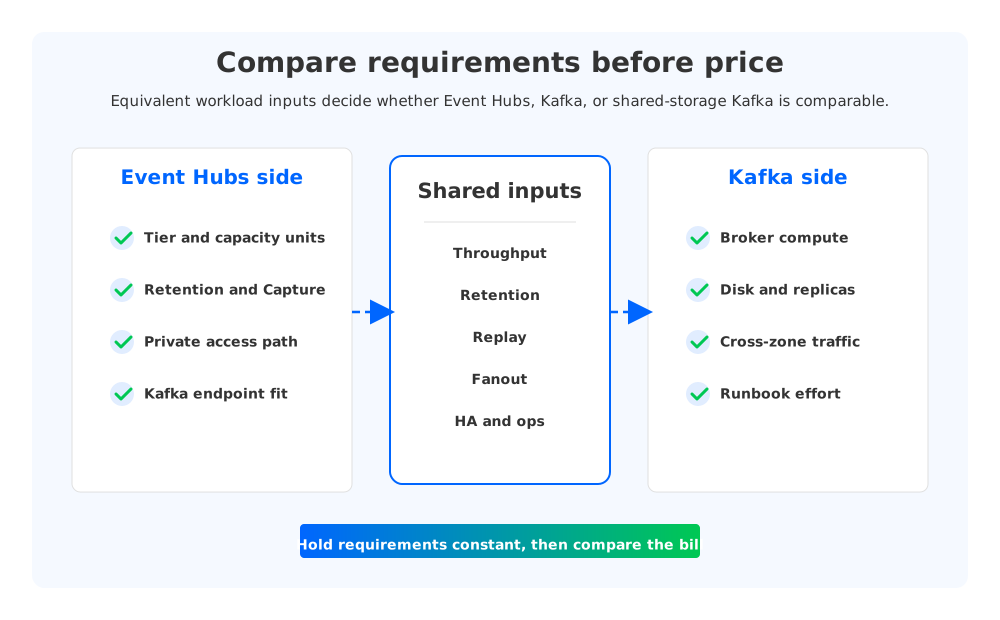
A fair Event Hubs vs Kafka cost comparison needs functional equivalence before financial equivalence. Event Hubs includes a Kafka endpoint, and Microsoft documents Kafka protocol support for clients that connect to Event Hubs. That is useful, but it does not mean every Kafka platform requirement becomes equivalent. Kafka teams often depend on administrative APIs, connector behavior, stream processing assumptions, topic-level operations, partition scaling practices, and retention semantics that must be tested before the cost model is accepted.
For an Azure budget owner, the equivalence checklist should include these dimensions:
| Requirement | Why it changes the bill |
|---|---|
| Write throughput and event rate | Drives Event Hubs capacity and Kafka broker sizing. |
| Read throughput and fanout | Multiple consumers can turn an ingest estimate into an egress estimate. |
| Retention and replay | Long replay windows can shift cost toward storage, archive, and over-provisioned capacity. |
| Availability model | Zone redundancy, replicas, and recovery objectives change both infrastructure and traffic. |
| Kafka ecosystem dependency | Connect, Streams, admin tooling, observability, and schema workflows may add migration work. |
| Network boundary | Private Link, VNet design, cross-zone or internet egress can become material line items. |
| Operations | Managed service effort, Kafka runbooks, incident response, and upgrade work should be budgeted. |
This is where many cost comparisons go wrong. They compare a basic Event Hubs namespace against a traditional Kafka cluster with three replicas, then call the result final. Or they compare a minimal Kafka cluster against an Event Hubs tier selected for isolation and peak replay, then draw the opposite conclusion. The useful comparison is not basic service versus overbuilt cluster. It is equivalent workload versus equivalent workload.
2Event Hubs Cost Drivers
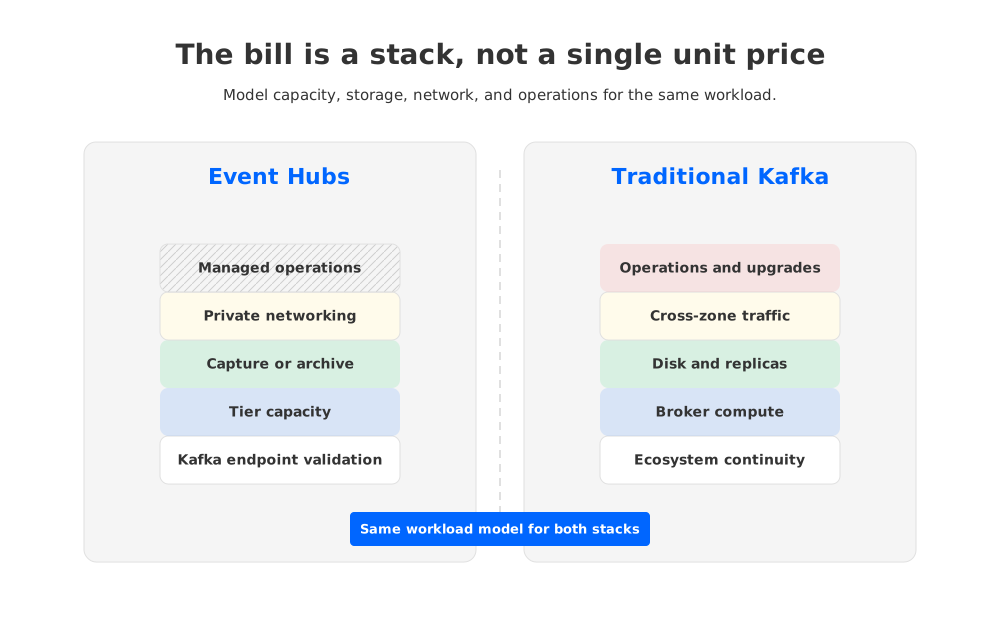
Event Hubs is priced by tier and capacity model, not by broker count. Microsoft lists Basic, Standard, Premium, and Dedicated tiers, with Standard using throughput units, Premium using processing units, and Dedicated using capacity units. The exact price varies by region and selected options, so a production estimate should always be built from the current Azure pricing page rather than copied from an old blog post.
For Kafka-style workloads, the Event Hubs model usually turns on these drivers:
- Tier selection: Standard, Premium, and Dedicated differ in capacity, isolation, features, quotas, and operational fit.
- Capacity units: throughput units, processing units, or capacity units must cover normal traffic and credible peaks.
- Retention: the required event retention window affects tier choice and whether Capture or downstream storage is needed.
- Capture and storage destinations: archiving to Azure Blob Storage or Azure Data Lake Storage can move part of the retention cost outside the Event Hubs line item.
- Private networking: private endpoints, DNS, and network design can add cost and operational work.
- Consumer behavior: fanout and replay can make read-side throughput as important as ingest throughput.
Event Hubs often looks attractive when the workload is primarily Azure-native ingestion: telemetry, application events, data entering Azure Stream Analytics, Azure Functions, Synapse, Fabric, or lake storage. In that pattern, the managed service removes Kafka broker operations, and the application may not require the full Kafka operational surface.
The estimate becomes more subtle when Kafka is not only an ingestion endpoint. A team using Kafka Connect for dozens of source and sink integrations, Kafka Streams for stateful applications, or custom tooling around partitions and topic operations should treat compatibility validation as part of cost. The bill is not only what Azure charges each month. It is also the engineering work required to keep the platform equivalent enough for the business.
3Traditional Kafka On Azure Cost Drivers
Traditional Kafka on Azure starts from a different architecture. Brokers own compute and storage. Topics are divided into partitions. Each partition has replicas across brokers for durability and availability. Retention is stored in log segments on broker-local or attached storage until it expires. That model is powerful and familiar, but the cost stack is broader than VM count.
The usual Kafka on Azure estimate includes:
- Virtual machines or managed Kafka broker capacity.
- Managed disks sized for retained data, write endurance, and performance.
- Replication factor, commonly increasing stored bytes and write amplification.
- Zone placement and cross-zone traffic for high availability.
- Load balancers, private endpoints, firewalls, monitoring, backups, and security tooling.
- Engineering time for upgrades, partition rebalancing, incident response, disk expansion, and performance tuning.
The storage multiplier is especially important. If a workload writes data that must be retained for several days and replicated across brokers, the effective storage footprint is not just the logical data size. It also includes replication, filesystem headroom, segment management, and operational safety margin. Teams add extra capacity because running Kafka disks close to full is operationally risky.
Networking is the other common blind spot. A multi-zone Kafka deployment is usually the right availability posture for critical systems, but replication and consumer traffic across zones can create real data-transfer cost. The estimate should separate producer ingress, inter-broker replication, consumer egress, replay traffic, and cross-boundary traffic. One large replay after a downstream outage can be the moment that proves whether the original model was honest.
4How Shared-Storage Kafka Changes The Kafka Cost Side
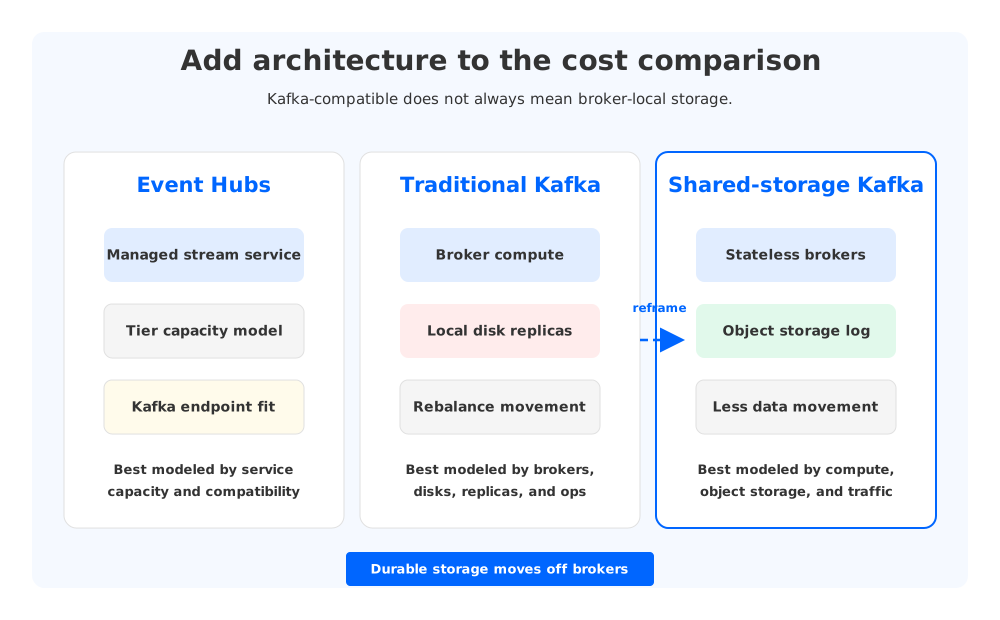
The comparison is no longer only Event Hubs versus traditional broker-local Kafka. Shared-storage Kafka changes the Kafka side of the spreadsheet by separating durable storage from broker compute. AutoMQ is one example of this architecture category: it keeps Kafka protocol compatibility while moving the durable log storage layer to object storage and making brokers more stateless.
That architectural shift matters for cost modeling because traditional Kafka ties three concerns together: broker compute, local persistent storage, and replica movement. When retained data lives on broker disks, scaling brokers, replacing failed nodes, expanding disks, and moving partitions often imply moving large volumes of data. The result is over-provisioning pressure. Teams buy more broker and disk capacity than average traffic requires because they need room for retention, rebalance, recovery, and traffic spikes.
With shared storage, the Kafka-compatible side can be modeled differently:
- Object storage can hold durable log data instead of multiplying all retained bytes across broker-local disks.
- Stateless brokers can scale compute capacity with less dependency on large partition data movement.
- Fewer broker-local replicas can reduce the disk and replication pressure that drives traditional Kafka capacity planning.
- Recovery and scaling can become more about metadata and compute placement than copying retained logs between brokers.
This does not make cost disappear. Object storage has storage, request, and data-transfer dimensions. Brokers still need compute. Network paths still matter. The point is more precise: shared-storage Kafka changes which line items dominate and can reduce the need to size the entire Kafka cluster around worst-case local storage and rebalancing behavior.
For CTOs and platform leaders, this creates a three-way decision. Event Hubs can be compelling when Azure-native ingestion and managed operations are the main goals. Traditional Kafka can fit teams that need maximum Kafka familiarity and already operate clusters well. Shared-storage Kafka becomes relevant when the team wants Kafka compatibility but wants the cost structure to look less like broker-local storage.
5Example Cost Model Inputs
Use sample workload inputs as a model, not as a promise of a fixed saving. The numbers below are placeholders for a spreadsheet. Replace them with observed metrics from producers, brokers, consumer groups, and billing exports.
| Input | Example telemetry workload | Example application streaming workload | Example long-retention workload |
|---|---|---|---|
| Average write throughput | 20 MiB/s | 80 MiB/s | 40 MiB/s |
| Peak write throughput | 60 MiB/s | 200 MiB/s | 100 MiB/s |
| Consumer fanout | 2 groups | 6 groups | 4 groups |
| Replay expectation | Rare | Incident backfill | Frequent analytics replay |
| Retention target | 24 hours | 72 hours | 14 days |
| Kafka ecosystem dependency | Low | Medium | High |
| Availability target | Zone-resilient | Zone-resilient | Zone-resilient |
For Event Hubs, map these inputs to the tier, capacity units, retention approach, Capture requirements, and private networking design. Check whether the Kafka endpoint behavior is sufficient for the applications that matter. If the team needs long replay, include archive destinations and downstream storage in the estimate.
For traditional Kafka, map the same inputs to broker count, VM family, managed disk type and size, replication factor, partition count, zone layout, monitoring, and operational staffing. Include storage headroom. Include burst and replay traffic. Include cross-zone replication if the high-availability design requires it.
For shared-storage Kafka, map the inputs to broker compute, object storage volume, object-storage requests, data transfer, and control-plane operations. The important modeling difference is that retained bytes are not automatically treated as broker-local disk capacity multiplied by every replica. That can make the model more elastic for workloads with long retention, bursty replay, or uneven topic growth.
6Which Option Is Lower Cost For Which Workload?
There is no universal winner, and that is the uncomfortable but useful answer. Event Hubs can be cost-effective when the workload is Azure-native, the Kafka endpoint covers the required client behavior, and the team values managed capacity over Kafka operational control. It is especially attractive when the business does not need to preserve the full Kafka ecosystem and wants a service that integrates naturally with Azure analytics.
Traditional Kafka can be rational when Kafka semantics, tooling, operational control, and ecosystem compatibility are non-negotiable. It may also fit teams that already have strong Kafka operations and predictable workloads. The risk is that the bill can expand through disk replication, cross-zone traffic, over-provisioned brokers, and the human cost of keeping the cluster healthy.
Shared-storage Kafka sits between those patterns. It is not a replacement for every Event Hubs use case, and it is not merely a lower-cost VM layout. It is a different Kafka-compatible architecture that reduces the coupling between brokers and durable storage. AutoMQ enters naturally in that part of the evaluation: if the organization wants Kafka APIs and ecosystem continuity but is trying to reduce broker-local storage cost, long-rebalance windows, and over-provisioning pressure, object-storage-backed Kafka deserves a line in the model.
The practical recommendation is to build a two-stage spreadsheet. Stage one validates functional equivalence. Stage two prices only the candidates that passed stage one. If Event Hubs does not support a required Kafka behavior, its apparent monthly cost is not the migration cost. If traditional Kafka needs large standby capacity to survive replay and disk growth, the VM subtotal is not the platform cost. If shared-storage Kafka changes the storage multiplier, the model should capture that instead of treating every Kafka-compatible option as the same broker-local design.
7Cost Comparison Worksheet
Before a budget review, ask the platform team to fill out this worksheet in the same region and pricing date for every candidate:
| Category | Questions to answer |
|---|---|
| Workload | What are average and peak MiB/s, event rate, message size, and partition count? |
| Reads | How many consumer groups read each stream, and how often do they replay? |
| Retention | How long must data remain available for operational replay, audit, or analytics? |
| Availability | Which zones, replicas, recovery objectives, and failure assumptions are required? |
| Networking | Which traffic crosses zones, VNets, private endpoints, or public boundaries? |
| Ecosystem | Which Kafka clients, Connect plugins, Streams apps, admin tools, and observability systems must continue working? |
| Operations | Who handles upgrades, incident response, quota planning, rebalance risk, and capacity changes? |
| Exit path | What is the cost of reversing the decision or moving workloads later? |
The team that answers these questions first will usually make a better decision than the team that starts with a unit price. Unit prices matter, but they only become meaningful after the architecture, workload, and migration constraints are explicit.
8References
- Azure Event Hubs pricing
- Azure Event Hubs tiers comparison
- Azure Event Hubs for Apache Kafka overview
- Azure Virtual Machines pricing
- Azure Managed Disks pricing
- Azure Blob Storage pricing
- Azure Private Link pricing
- Apache Kafka documentation: replication
- Apache Kafka documentation: log retention configuration
- AutoMQ documentation
- AutoMQ pricing
9FAQ
9.1Is Event Hubs lower cost than Kafka on Azure?
It depends on the workload and the equivalence requirements. Event Hubs can be cost-effective for Azure-native event ingestion when its Kafka endpoint and service model meet the application requirements. Kafka can become more expensive when broker-local storage, replicas, cross-zone traffic, and operations dominate the bill. The comparison should model throughput, retention, replay, fanout, HA, ecosystem dependencies, and operations before drawing a conclusion.
9.2Can I compare Event Hubs throughput units with Kafka brokers directly?
Not cleanly. Event Hubs uses tier-specific capacity constructs, while Kafka brokers combine compute, storage, replication, and operational behavior. Translate the workload into each platform's sizing language instead of trying to map one throughput unit to one broker.
9.3What Kafka costs are often missed on Azure?
Teams often miss disk headroom, replication storage, cross-zone replication traffic, replay traffic, monitoring, private networking, operational labor, partition rebalancing risk, and the engineering cost of preserving Kafka ecosystem behavior during migration.
9.4Where does AutoMQ fit in an Azure cost comparison?
AutoMQ fits when the team wants Kafka compatibility but wants to change the cost structure of Kafka itself. By using object storage for durable data and stateless brokers for compute, shared-storage Kafka can reduce broker-local storage pressure and make scaling less dependent on large data movement.
9.5Should I use precise Azure prices in an internal business case?
Yes, but pull them from the current Azure pricing pages for the target region and date. Public articles should avoid hard-coded prices because cloud pricing, discounts, reservations, and enterprise agreements vary. A good business case records the pricing date, region, assumptions, and workload inputs.


