
Table of Contents
Table of Contents
Azure teams comparing Event Hubs vs Kafka are usually not asking a vocabulary question. They are deciding whether the streaming layer should behave like an Azure-native ingestion service or like an application-level event streaming platform with the full Kafka ecosystem around it. Both choices are legitimate. The expensive mistake is treating them as interchangeable because both can receive records from Kafka clients.
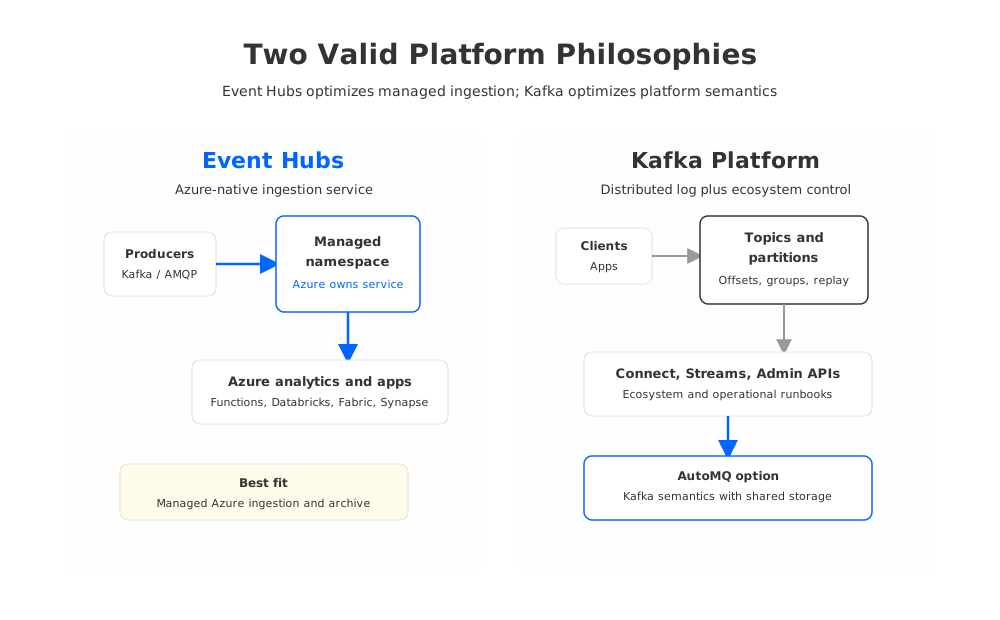
Event Hubs is optimized for managed event ingestion inside Azure. Apache Kafka is optimized for durable, partitioned event streams that applications, connectors, stream processors, and operations teams can control as a platform. The difference appears when a workload moves beyond "send events into Azure" and starts depending on topic administration, replay behavior, Kafka Connect, Kafka Streams, broker-level configuration, or portability across clouds.
1The Short Answer by Workload
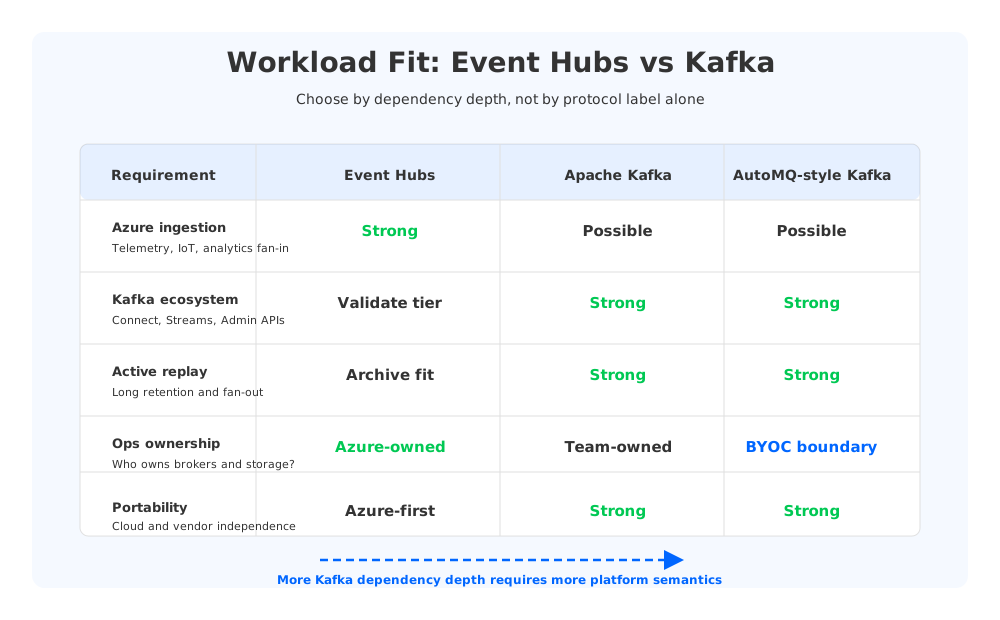
Choose Event Hubs when the workload is Azure-native ingestion, telemetry, service events, or analytics fan-in and the team wants Microsoft to own the service boundary. Choose Kafka when the workload is built around Kafka APIs, Kafka ecosystem tools, stateful stream processing, long replay windows, multi-cloud portability, or precise operational control. Consider a Kafka-compatible shared-storage platform such as AutoMQ when the team wants Kafka semantics and ecosystem compatibility but does not want traditional broker-local storage to dominate cost, scaling, and recovery on Azure.
| Workload question | Event Hubs is usually stronger when... | Kafka is usually stronger when... |
|---|---|---|
| Is the stream mainly ingestion into Azure services? | The target is Azure analytics, Functions, Fabric, Synapse, or Databricks with managed service ownership. | The stream is a shared application log used by many independent services and teams. |
| Do applications depend on Kafka ecosystem behavior? | Kafka clients publish or consume, but deeper Kafka admin assumptions are limited. | Kafka Connect, Streams, AdminClient workflows, schema tooling, or existing runbooks are central. |
| Is replay a product capability? | Retention and archival can follow Event Hubs tier behavior and Capture to Blob/Data Lake. | Consumers need long retention, frequent replay, or many independent fan-out patterns. |
| Who owns operations? | Azure should own brokers, disks, service availability, and scaling primitives. | The platform team needs control over topics, partitions, configs, upgrades, and data locality. |
| How important is portability? | The architecture is intentionally Azure-first. | The same workload must remain portable across Azure, AWS, GCP, on-premises, or Kafka vendors. |
This framing keeps the comparison fair. Event Hubs is not a lesser Kafka. It is a managed Azure event streaming service with an Apache Kafka endpoint. Kafka is not automatically the better Azure choice. It carries more platform surface area, which is only valuable when your workload actually uses that surface area.
2What Event Hubs Is Optimized For
Microsoft describes Event Hubs as a fully managed, real-time data ingestion service capable of receiving millions of events per second. That positioning matters. Event Hubs is designed around namespaces, event hubs, partitions, consumer groups, Azure identity and networking, and service tiers. The Kafka endpoint lets Kafka producers and consumers connect by changing configuration, while Event Hubs remains the managed service underneath.
That makes Event Hubs compelling for several Azure-first patterns:
- Telemetry and IoT ingestion. Devices, services, and gateways can push high-volume event streams into an Azure-managed service without teams operating Kafka brokers.
- Analytics fan-in. Event Hubs integrates naturally with Azure Stream Analytics, Azure Functions, Azure Databricks, Microsoft Fabric, Synapse-oriented pipelines, and downstream storage services.
- Operational simplicity. Teams provision namespaces and capacity rather than broker fleets, disks, controllers, and replication topology.
- Archival through Capture. Event Hubs Capture can write streaming data to Azure Blob Storage or Azure Data Lake Storage when the requirement is raw event archival rather than Kafka-style active-log replay.
- Azure resilience features. Event Hubs provides documented geo-disaster recovery and geo-replication capabilities, with behavior depending on the selected configuration and tier.
The Kafka endpoint is especially useful for modernization projects where applications already use Kafka clients but the target architecture is Azure-native. Microsoft documents support in Standard, Premium, and Dedicated tiers, with tier-dependent capabilities. Kafka Streams and Kafka transactions are documented as public preview in Premium and Dedicated, while Kafka compression support is limited to Premium and Dedicated with gzip support. Those details are not reasons to reject Event Hubs; they are reasons to validate the tier against the workload before migration.
Event Hubs is strongest when the streaming layer should feel like a cloud service. You size capacity with Event Hubs concepts such as throughput units, processing units, or dedicated capacity, depending on tier. You do not operate brokers, rebalance disks, or expose every broker to client networking rules. For many Azure analytics teams, that is exactly the right abstraction.
3What Kafka Is Optimized For
Kafka is a distributed log and event streaming platform, not only a wire protocol. Its value comes from producers, consumers, topics, partitions, offsets, replication, retention, consumer groups, Admin APIs, Connect, Streams, transactions, schema ecosystems, and operational tooling. Teams choose Kafka when the stream becomes part of the application architecture rather than an ingestion pipe.
That distinction shows up in production systems. A payment platform may use Kafka topics as durable integration contracts between services. A CDC platform may depend on Kafka Connect source and sink connectors, DLQs, offset storage, and schema evolution. A stream processing team may use Kafka Streams or Flink with Kafka as the replayable source of truth. An SRE team may have automation for topic creation, ACLs, quotas, reassignments, lag monitoring, and incident response.
Kafka is the stronger fit when the workload needs:
- Full control over topic and partition design, retention, compaction, and broker-side configuration.
- Compatibility with Kafka ecosystem tools beyond basic producer and consumer traffic.
- Predictable behavior for consumer groups, offsets, transactions, stream processing, and operational automation.
- Portability across clouds or deployment environments where Kafka remains the common platform layer.
- A long-lived event log that multiple independent teams can replay at different speeds.
The tradeoff is ownership. Traditional Kafka on Azure usually means brokers on VMs, Kubernetes, HDInsight, or a managed Kafka provider. You must reason about disks, replication, network paths, zones, upgrades, scaling, monitoring, and incident response. Kafka gives control because it exposes the platform. Exposed platforms need operators.
4Compatibility, Ecosystem, and Operational Differences
The most useful comparison separates five layers: protocol compatibility, platform semantics, ecosystem compatibility, operational control, and architectural portability. Event Hubs performs well at the first layer for many workloads. Kafka clients can produce to and consume from the Event Hubs Kafka endpoint with configuration changes. Microsoft also notes that Event Hubs can support multiple protocols, so Kafka, AMQP, and HTTP can coexist around the same service.
Kafka becomes harder to replace as you move up the layers. Admin automation may expect broker and topic behavior that maps imperfectly to a managed ingestion service. Kafka Connect deployments may depend on connector-specific offset, schema, retry, and DLQ behavior. Kafka Streams applications may need exact tier support and preview-status validation. Security and networking runbooks may assume broker endpoints, private connectivity, ACL models, or observability patterns that differ from Event Hubs.
| Dependency | Low-risk Event Hubs candidate | Needs Kafka-style validation |
|---|---|---|
| Producers and consumers | Standard Kafka clients with simple configs | Custom interceptors, unusual retries, compression, or transactions |
| Topic operations | Stable set of event hubs and partitions | Automated topic lifecycle, config changes, quotas, compaction expectations |
| Stream processing | Azure-native analytics or validated Kafka Streams tier | Kafka Streams, Flink, ksqlDB-style assumptions, stateful replay patterns |
| Connectors | Managed or custom integration path with tested behavior | Heavy Kafka Connect estate with many source/sink connectors |
| Operations | Azure service monitoring and capacity model | Broker metrics, rebalances, partition movement, custom SRE runbooks |
A telemetry pipeline that writes to Event Hubs and reads into Azure analytics may be cleaner than self-managed Kafka. A product platform whose teams treat Kafka as a shared application substrate may find that Event Hubs removes too much of the control surface they rely on.
5Cost and Retention Tradeoffs on Azure
Cost comparisons fail when teams try to map Event Hubs capacity directly to Kafka brokers. Event Hubs pricing is organized around service tiers and capacity concepts. Kafka cost is organized around compute, storage, network, replication, operations, and vendor or platform fees. The units are different because the responsibility boundary is different.
With Event Hubs, model tier, partition count, ingress, egress, consumer patterns, retention, Capture, private networking, and geo features. Standard, Premium, and Dedicated do not expose identical limits or feature sets. A workload that looks straightforward at small scale can change shape when it needs isolation, longer retention behavior, predictable throughput, or tier-specific Kafka features.
With traditional Kafka on Azure, storage and replication often dominate the architecture. Broker-local disks store log segments. Replication protects availability. More retention usually means more disk. More brokers can mean more balancing. Multi-zone deployment improves resilience but adds network and placement considerations. The bill is not only the VM or disk line item; it is also the operational labor required to keep a stateful distributed log healthy.
Retention is the clearest example. Event Hubs Capture is useful when events should be archived to Azure Blob Storage or Azure Data Lake Storage for downstream processing. Kafka retention is different: data remains part of the active log that consumers can replay through Kafka semantics. If the product requirement is audit archive, Capture may fit. If the product requirement is frequent replay by many Kafka consumers, Kafka-style retention matters more.
6Where AutoMQ Changes the Kafka Side of the Comparison
There is a third path between "use Event Hubs as the Azure-native ingestion service" and "operate traditional Kafka with broker-local disks." AutoMQ is a Kafka-compatible platform that keeps the Kafka ecosystem relevant while changing the storage architecture. Durable stream data is moved away from broker-local storage constraints and into shared object storage, with stateless brokers serving the Kafka protocol and compute path.
On Azure, that matters because many Kafka pain points are tied to data locality. When brokers own durable log segments on attached disks, broker replacement, scaling, and retention become data-movement problems. If durable data lives in Azure object storage/shared storage instead, brokers can behave more like elastic compute. The team still needs to validate latency, networking, security, and workload compatibility, but the cost and recovery model is no longer the same as traditional self-managed Kafka.
AutoMQ fits evaluations where these statements are all true:
- The workload needs Kafka clients, Kafka semantics, and ecosystem compatibility, not only a Kafka protocol endpoint.
- The organization wants a BYOC model where the data plane can run in its own Azure environment and network boundary.
- Long retention, high replay, broker replacement, or elastic scaling makes broker-local storage expensive or operationally slow.
- The architecture team wants Kafka portability without giving up cloud-native storage economics.
This is not a reason to force AutoMQ into every Azure streaming decision. If your workload is Azure-native telemetry ingestion and the downstream path is already Event Hubs-centric, Event Hubs may be the cleaner answer. AutoMQ becomes interesting when the team would otherwise choose Kafka but dislikes the operational and storage coupling of traditional Kafka on Azure.
7A Decision Framework for Azure Teams
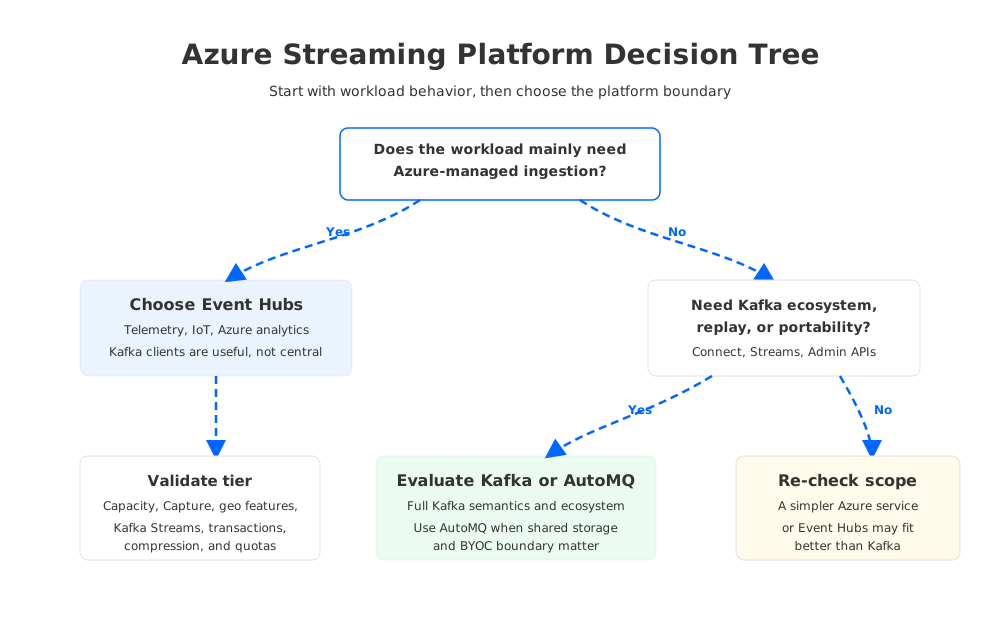
The final decision should start with the workload, not the brand name. If the stream is a managed ingress point into Azure analytics, Event Hubs is the natural first candidate. If it is a durable application log with Kafka ecosystem dependencies, Kafka or a Kafka-compatible platform belongs in the design. If it is a Kafka workload under cost, retention, or scaling pressure, include shared-storage Kafka architecture in the evaluation.
Use this sequence during architecture review:
- Classify the dependency. Separate Kafka client usage from Kafka platform dependency. The former may work well with Event Hubs; the latter needs deeper validation.
- Map the operating model. Decide whether Azure, the platform team, or a BYOC platform should own scaling, storage, upgrades, and failure recovery.
- Model retention honestly. Archive, replay, and active-log retention are different requirements with different cost curves.
- Validate the tier and feature set. Event Hubs tier behavior, Kafka Streams preview status, transactions, compression, geo features, and quotas should be checked against Microsoft documentation at design time.
- Run workload tests. Use production client libraries, realistic partition counts, real consumer fan-out, failure injection, and rollback tests before committing.
The right answer may be mixed. Event Hubs can be the Azure ingestion backbone for telemetry and analytics, while Kafka or AutoMQ supports application streams that require Kafka semantics. A single enterprise rarely has only one streaming workload shape.
If your Azure team is comparing Event Hubs vs Kafka because traditional Kafka is becoming expensive to scale or slow to operate, evaluate AutoMQ's Kafka-compatible BYOC model alongside Event Hubs and managed Kafka options. The question is not whether Event Hubs or Kafka is universally better. The question is which platform boundary fits the workload you actually have.
8References
- Azure Event Hubs overview
- Azure Event Hubs for Apache Kafka overview
- Compare Azure Event Hubs tiers
- Azure Event Hubs Capture overview
- Azure Event Hubs geo-disaster recovery
- Azure Event Hubs geo-replication
- Azure Event Hubs pricing
- Apache Kafka documentation
- Apache Kafka APIs
- Apache Kafka Connect
- Apache Kafka Streams
- AutoMQ on Azure BYOC installation guide
- AutoMQ object storage configuration
9FAQ
9.1Is Azure Event Hubs better than Kafka?
Event Hubs is often better for Azure-native ingestion, telemetry, and analytics integration where the team wants a managed service boundary. Kafka is often better when applications depend on Kafka platform semantics, ecosystem tools, replay behavior, and cross-environment portability.
9.2Is Event Hubs compatible with Kafka?
Event Hubs provides an Apache Kafka endpoint that Kafka producers and consumers can use with configuration changes. Compatibility should still be tested against the selected Event Hubs tier, client libraries, security settings, stream processing requirements, compression, transactions, and operational automation.
9.3Should Kafka teams migrate to Event Hubs?
Kafka teams should migrate to Event Hubs when the workload mainly needs managed ingestion and Kafka client connectivity. If the workload depends on Kafka Connect, Kafka Streams, Admin APIs, broker-level control, or long active-log replay, test carefully and consider Kafka-compatible alternatives.
9.4How does Event Hubs Capture differ from Kafka retention?
Event Hubs Capture writes event data to Azure Blob Storage or Azure Data Lake Storage for archival and downstream processing. Kafka retention keeps records in the active Kafka log so consumers can replay them through Kafka semantics. Archive and active replay are related, but they are not the same requirement.
9.5Where does AutoMQ fit in an Event Hubs vs Kafka comparison?
AutoMQ fits when Azure teams need Kafka compatibility and ecosystem behavior but want to avoid traditional broker-local storage constraints. Its BYOC and shared object storage model can be evaluated as a Kafka-compatible path for workloads where retention, scaling, replay, or broker recovery make traditional Kafka costly to operate.


