
Table of Contents
Table of Contents
Searching for a GCP Kafka alternative usually means one of two very different things. Some teams want to move away from Kafka semantics: topics, partitions, offsets, consumer groups, replay behavior, Kafka Connect, and client APIs. Other teams want to keep those semantics but stop operating Kafka as a disk-heavy, broker-local system. Those are not the same decision, and mixing them together is where many Google Cloud streaming evaluations get expensive.
Google Cloud gives you several credible paths. Pub/Sub is a native messaging service with a different programming model. Managed Service for Apache Kafka gives you a Google-operated Kafka cluster while preserving Apache Kafka interfaces. Self-managed Kafka on GKE or Compute Engine gives you maximum control, but also keeps the operational burden. AutoMQ fits a narrower category: it keeps Kafka protocol compatibility while replacing broker-local storage with shared object storage and stateless brokers.
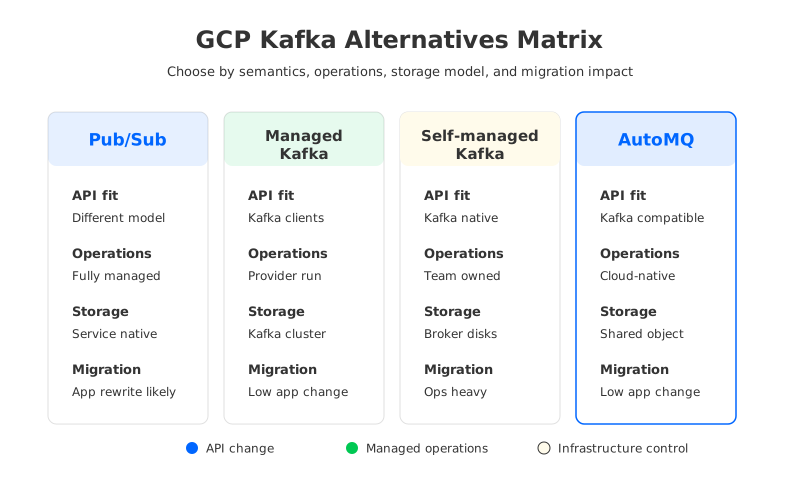
The right answer depends less on the service brand and more on what you are trying to preserve. If your application depends on Kafka offsets, topic-level replay, Kafka Connect plugins, or stream processing integrations, a service that is "Kafka-like" may still force a rewrite. If your problem is Kafka operations, storage cost, slow reassignment, and over-provisioning, replacing Kafka semantics may be unnecessary. You may need to replace the infrastructure model instead.
1What Does "Kafka Alternative" Mean on GCP?
A Kafka alternative can replace the API, the operating model, the cost structure, or all three. Pub/Sub is the common Google Cloud-native alternative because it removes broker management and offers a managed publish-subscribe model. But Pub/Sub is not Apache Kafka with a different logo. It has its own concepts for topics, subscriptions, acknowledgement, ordering, retention, and delivery behavior. That difference can be a strength for greenfield services on Google Cloud; it can be friction when you are migrating an existing Kafka estate.
Kafka-compatible alternatives start from a different premise. They assume the API and ecosystem are assets worth preserving. The migration question becomes: can you keep Kafka clients, connectors, and operational practices while changing the parts of the architecture that hurt most on cloud infrastructure? On GCP, that usually means looking at storage, cross-zone traffic, scaling, replay performance, and the human cost of running brokers.
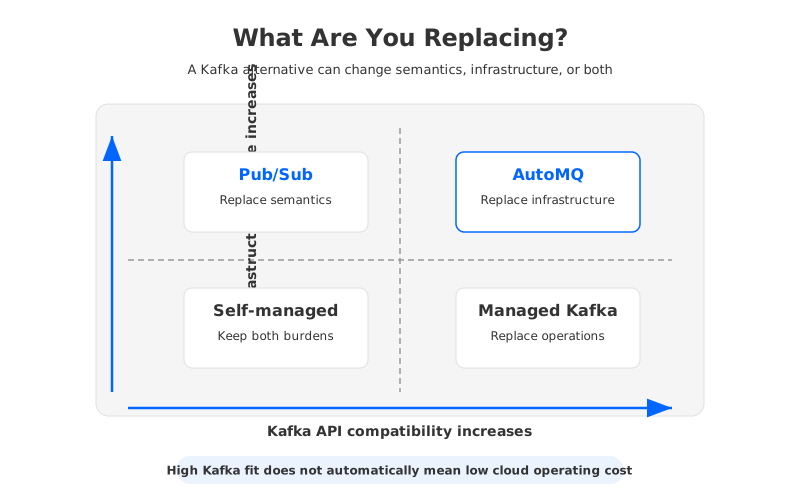
Many architecture reviews compare services at the wrong layer:
- Semantic replacement changes how producers, consumers, delivery guarantees, replay, and integrations work. It can simplify greenfield applications, but it usually requires application and platform changes.
- Operational replacement keeps Kafka behavior but moves cluster maintenance to a cloud provider. It lowers the toil of upgrades and provisioning, but the cluster still follows Kafka's local-disk storage assumptions.
- Infrastructure replacement keeps Kafka compatibility while changing where durable data lives and how brokers scale. This is the path to evaluate when Kafka itself still fits, but the cloud operating model does not.
Once you separate those layers, Pub/Sub, managed Kafka, self-managed Kafka, and AutoMQ stop looking interchangeable. They solve different parts of the same streaming problem.
2Alternative 1: Google Cloud Pub/Sub
Pub/Sub is the cleanest option when you want a fully managed Google Cloud messaging service and you are not trying to preserve Kafka behavior. Google describes Pub/Sub as an asynchronous and scalable messaging service that decouples services producing events from services processing events. For teams building applications around Cloud Run, Cloud Functions, Dataflow, BigQuery, or Google Cloud operations, that native integration can be more valuable than Kafka compatibility.
The trade-off is that Pub/Sub moves you into a different model. Kafka consumers read records from partitions and commit offsets. Pub/Sub subscribers receive messages from subscriptions and acknowledge them. Kafka retention and replay are topic-log concepts; Pub/Sub retention and seek behavior are subscription-oriented service features. These differences are manageable, but they are not free. They show up in code, SRE runbooks, backfill procedures, and how data teams reason about time.
Pub/Sub is strongest when the workload looks like this:
- Greenfield applications are being built directly on Google Cloud services.
- Producers and consumers do not require Kafka client APIs or Kafka Streams.
- The platform team prefers managed messaging over broker-level control.
- Integrations are centered on Google Cloud's analytics and serverless ecosystem.
- Replay requirements fit Pub/Sub's retention and subscription model.
For an existing Kafka estate, Pub/Sub should be evaluated as a migration project, not a drop-in replacement. The question is not "can Pub/Sub move events?" It can. The better question is whether your producers, consumers, connectors, schemas, replay tools, offset-dependent workflows, and incident response habits can move with acceptable risk.
3Alternative 2: Managed Service for Apache Kafka
Google Cloud Managed Service for Apache Kafka is the straightforward choice when you want Apache Kafka on GCP without owning the full cluster lifecycle. Producers and consumers continue to use Kafka clients, teams keep Kafka topics and consumer groups, and platform owners can offload parts of provisioning and maintenance to Google Cloud. For organizations standardizing on Google Cloud but not ready to rewrite streaming applications, this is a practical middle path.
The phrase "managed Kafka" deserves careful reading, though. Managed operation reduces the tasks your team performs, but it does not erase the architectural properties of Kafka. Kafka still organizes data into partitions. Brokers still serve reads and writes. Capacity still has to be planned around throughput, retention, partitions, replication, and failure domains. If your biggest problem is that nobody wants to patch brokers at midnight, a managed service is a good answer. If your biggest problem is that local-disk Kafka scales slowly and needs over-provisioned storage, the answer is less complete.
The evaluation usually comes down to four questions:
| Question | Why it matters on GCP |
|---|---|
| Does it preserve Kafka clients and tools? | This determines how much application migration is required. |
| How is storage provisioned and billed? | Kafka retention-heavy workloads often pay for reserved disk capacity before they use it efficiently. |
| How does scaling affect partitions? | Broker scaling can trigger reassignment, data movement, and operational windows. |
| What is the exit path? | A Kafka-compatible service is easier to leave than a service that changes application semantics. |
Managed Kafka is often the right answer when compatibility is mandatory and the team wants fewer operational responsibilities. It is less compelling when the architectural pain comes from Kafka's coupling of compute and storage. That coupling is exactly what makes traditional Kafka familiar, but it is also what makes cloud elasticity harder than it looks on a pricing calculator.
4Alternative 3: Self-Managed Kafka on GKE or Compute Engine
Self-managed Kafka on GCP gives you the broadest control. You can choose instance families, Persistent Disk types, Kubernetes operators, rack-awareness settings, network layout, monitoring stack, retention policy, and upgrade timing. That control can be valuable for regulated environments, specialized performance tuning, or organizations with a mature Kafka platform team.
It also means you inherit the full blast radius of stateful infrastructure. On GKE, Kafka typically runs as a stateful workload with persistent volumes, pod disruption constraints, anti-affinity, and careful broker identity management. On Compute Engine, the same concerns appear as instance lifecycle, disk attachment, zone placement, and failure recovery. In both cases, Kafka's broker-local storage model turns many routine cloud operations into data movement problems.
The hidden work usually appears after the first successful deployment:
- Capacity planning becomes a standing task. You size for throughput, retention, partitions, replication, and headroom for failures. A cluster that looks efficient during normal traffic may become fragile during backfills.
- Scaling is not only adding machines. Adding brokers often requires partition reassignment, while removing brokers requires moving data away first.
- Failure recovery depends on data locality. When broker disks hold durable log data, replacing a failed node is not merely a compute scheduling event.
- Cost is split across compute, disk, network, and people. A narrow VM-price comparison misses over-provisioned storage, cross-zone replication, monitoring, and change windows.
Self-managed Kafka remains a serious option for teams that need total control and have the engineering capacity to operate it well. It is a poor fit for teams hoping that Kubernetes alone will make Kafka cloud-native. Kubernetes can schedule brokers and attach storage; it does not remove Kafka's dependency on local durable log data.
5Alternative 4: AutoMQ for Kafka-Compatible Shared Storage
AutoMQ enters the comparison after a different diagnosis: Kafka's API is still useful, but the traditional infrastructure model is the bottleneck. AutoMQ is a Kafka-compatible cloud-native streaming system that separates compute from storage. Brokers handle protocol and traffic processing, while durable log data is moved to object storage such as Google Cloud Storage in a cloud deployment. The result is not a replacement for Kafka semantics; it is a replacement for the broker-local disk architecture behind many Kafka pain points.
This distinction is important. If your team wants to leave Kafka APIs behind, AutoMQ is not the right category; Pub/Sub or another cloud-native messaging model deserves a serious look. If your team wants to keep Kafka clients, Kafka Connect, replay behavior, and operational knowledge while changing the cost and scaling profile, then a Kafka-compatible shared-storage design is worth evaluating.
In traditional Kafka, brokers own both compute and durable storage. That design worked well in data centers where local disks and intra-cluster traffic were part of the same operational budget. In cloud environments, storage is reserved per broker, cross-zone replication generates network traffic, partition reassignment moves large volumes of data, and recovery depends on rebuilding local replicas. AutoMQ changes the failure and scaling model by making brokers closer to stateless compute nodes over shared stream storage.
The practical implications are concrete:
- Kafka client compatibility reduces the number of application changes in a migration.
- Shared object storage changes retention economics for workloads with large historical logs.
- Stateless brokers make scale-out, scale-in, and broker recovery less dependent on bulk data movement.
- BYOC-style deployment can keep infrastructure and data under the customer's cloud account and network controls.
- Existing Kafka evaluation criteria still apply: latency, throughput, durability, security, and ecosystem integration must be tested against your workload.
AutoMQ is not magic, and it should not be evaluated by slogans. A low-latency trading pipeline, an analytics ingestion platform, and a compliance archive do not stress the same parts of a streaming system. The useful claim is narrower: when the problem is Kafka's cloud infrastructure cost and operational drag, a Kafka-compatible shared-storage architecture gives you a different lever than managed operations alone.
6Which Alternative Fits Your Workload?
The decision becomes easier when you ask what must remain stable during the migration. Start with the application boundary. If producers and consumers can change APIs, Pub/Sub may give you the cleanest Google Cloud-native operating model. If clients and Kafka ecosystem tools must stay stable, compare managed Kafka, self-managed Kafka, and AutoMQ before you commit to a semantic rewrite.
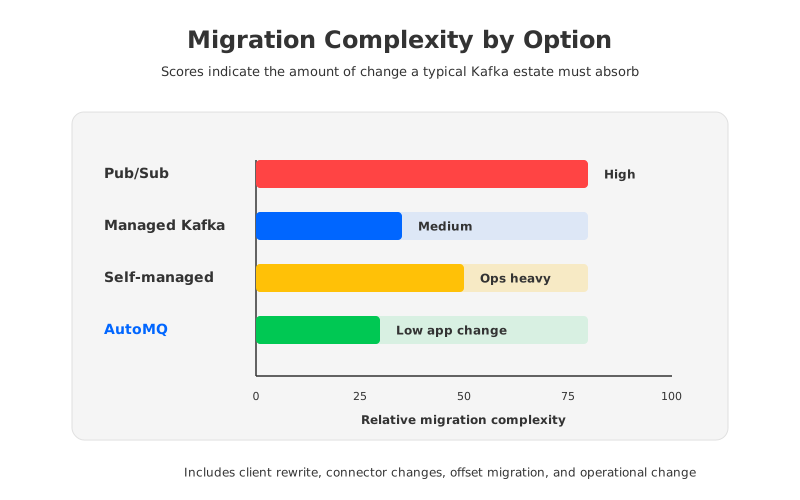
Use this matrix as a first-pass filter:
| Requirement | Pub/Sub | Managed Kafka | Self-managed Kafka | AutoMQ |
|---|---|---|---|---|
| Keep Kafka client APIs | Low | High | High | High |
| Reduce broker operations | High | High | Low | Medium to High |
| Preserve full infrastructure control | Medium | Medium | High | Medium to High |
| Change Kafka storage economics | Medium | Medium | Low | High |
| Minimize application rewrite | Low | High | High | High |
| Fit Google Cloud-native greenfield apps | High | Medium | Medium | Medium |
The table is blunt. It does not decide the architecture for you, but it prevents a common mistake: choosing a service because it is easier to operate, then discovering that the migration changed APIs you meant to preserve. For a CTO or platform architect, that mistake can be more expensive than the infrastructure bill because it spreads into roadmap delays and rollback complexity.
7A Practical Validation Checklist
Before you choose a GCP Kafka alternative, run a proof of concept that exercises the behaviors your production system actually uses. Do not stop at a hello-world producer and consumer. The hard parts of Kafka appear during backfills, consumer lag spikes, schema changes, broker failures, and retention-heavy workloads.
A useful evaluation should include:
- Client and connector compatibility. Test the exact client libraries, Kafka Connect plugins, schema registry patterns, and stream processing jobs you run today.
- Replay and backfill behavior. Measure old-data reads while producers continue writing.
- Failure and scaling paths. Simulate node failure, zone pressure, scale-out, scale-in, and partition growth.
- Cost under realistic retention. Include compute, storage, network, managed service fees, operational time, and over-provisioning.
- Exit and rollback plan. Define dual-write, mirroring, cutover, and rollback before production traffic moves.
There is no universal winner because the word "alternative" hides too many trade-offs. Pub/Sub fits teams ready to adopt Google Cloud-native messaging semantics. Managed Kafka fits teams that want Kafka with less platform toil. Self-managed Kafka fits teams that value control over operational simplicity. AutoMQ fits teams that still need Kafka compatibility but want to escape broker-local storage, slow reassignment, and cloud cost pressure.
If your current Kafka review started with a painful GCP bill or a cluster that takes too long to rebalance, do not frame the decision as "Kafka or not Kafka" too early. The sharper question is whether you need to replace Kafka semantics or replace the infrastructure assumptions behind traditional Kafka. AutoMQ's documentation and migration guides are a useful next step for teams evaluating the second path.
8References
- Google Cloud Pub/Sub overview
- Google Cloud Managed Service for Apache Kafka overview
- Google Cloud Pub/Sub pricing
- Google Cloud Managed Service for Apache Kafka pricing
- Google Cloud Compute Engine pricing
- Google Cloud Cloud Storage pricing
- Apache Kafka documentation
- AutoMQ architecture overview
- AutoMQ native compatibility with Apache Kafka
- AutoMQ deployment on Google Cloud GKE
- AutoMQ migration overview
9FAQ
9.1Is Pub/Sub a drop-in replacement for Kafka on GCP?
No. Pub/Sub can replace many event messaging use cases, but it uses different service concepts and client APIs. Treat it as a semantic migration, especially if your current system depends on Kafka offsets, Kafka Connect, Kafka Streams, or topic-level replay workflows.
9.2Is Google Cloud Managed Service for Apache Kafka the simplest GCP Kafka alternative?
It is often the simplest path when the goal is to keep Kafka compatibility while reducing cluster administration. It is not the same as changing Kafka's underlying storage architecture, so teams should still evaluate retention cost, partition scaling, and reassignment behavior.
9.3When does self-managed Kafka on GCP still make sense?
Self-managed Kafka makes sense when you need maximum infrastructure control, custom operations, or specialized tuning and you have a team that can operate stateful Kafka safely. It is less attractive when the main goal is reducing operational toil.
9.4Where does AutoMQ fit among GCP Kafka alternatives?
AutoMQ fits when the team wants to keep Kafka APIs and ecosystem integrations but move away from broker-local disk and heavy data movement. It is an infrastructure-model alternative rather than a Kafka semantics replacement.
9.5What should teams test before migrating from Kafka on GCP?
Test client compatibility, connector behavior, replay, backfill, consumer lag recovery, failure handling, scale-out, scale-in, security controls, observability, and full cost under realistic retention. A small demo that only sends and receives messages is not enough for a production architecture decision.


