
Table of Contents
Table of Contents
Kafka observability on Google Cloud often starts as a dashboard exercise. Teams add broker CPU, network throughput, disk usage, and a consumer lag panel, then assume the cluster is covered. That view holds only until the first incident where brokers look healthy, the application is stuck, storage is growing faster than expected, or the bill exposes a workload pattern nobody was watching.
Kafka on GCP is a layered system. A useful observability model connects Kafka protocol behavior, application progress, cloud infrastructure, logs, and cost drivers. Self-managed Kafka usually joins JMX or exporter data with Cloud Monitoring, Cloud Logging, node metrics, and billing signals. Google Cloud Managed Service for Apache Kafka exposes service metrics and logs through Google Cloud tooling. Kafka-compatible shared-storage systems such as AutoMQ add WAL behavior, object storage, cache effectiveness, S3Stream storage activity, and self-balancing decisions without requiring you to invent metric names that do not exist in your deployment.
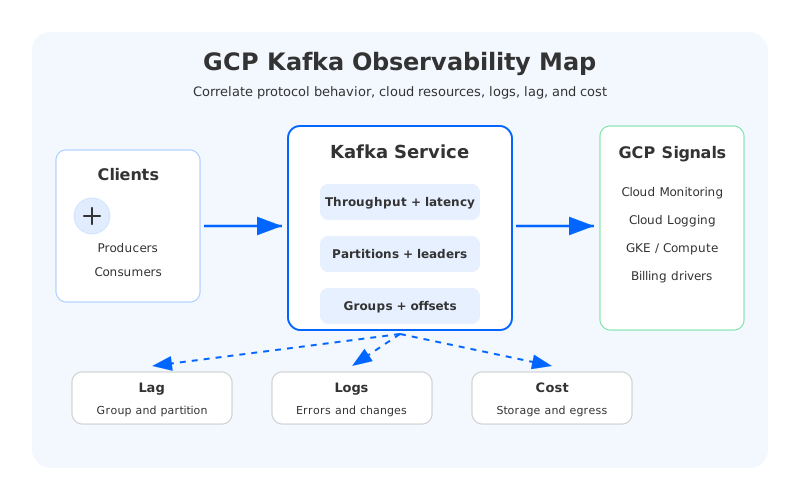
The goal is not to collect every possible number. The goal is to help SREs, platform engineers, Kafka operators, and observability teams answer three questions quickly: are users affected, which layer is failing, and is operational risk turning into financial risk?
1Start With Outcomes, Not Exporters
The first monitoring mistake is organizing dashboards by data source. A Kafka exporter creates one section, Cloud Monitoring creates another, logs sit in a separate tab, and billing data appears only in finance reports. That reflects collection mechanics, not system behavior.
A better GCP Kafka observability model starts with operational outcomes:
- Producers can write at the expected rate, with acceptable request latency and error rates.
- Consumers can make progress relative to incoming traffic and workload SLOs.
- Partitions have leaders, replication or service health is stable, and metadata changes are not thrashing.
- Infrastructure spend grows in proportion to useful workload, not hidden retention, fanout, or idle capacity.
These outcomes make raw telemetry useful. A consumer lag spike means different things when producer traffic also spiked, one partition is hot, or a downstream database is slow. CPU at 70 percent is not automatically bad. CPU at 70 percent with rising request queue time, growing lag, and saturated network egress is a different incident.
2Kafka Metrics Every GCP Team Should Monitor
Kafka metrics remain the foundation because applications experience Kafka behavior before they experience cloud abstractions. The core categories are throughput, request latency, request errors, partition health, metadata health, resource saturation, and consumer progress.
Throughput should be split by direction and topic. Bytes in, bytes out, message rate, and request rate separate a write-heavy workload from a read-fanout workload. Topic-level views also make ownership clearer because a topic with moderate ingest and many consumers can stress network egress more than a write-rate dashboard suggests.
Latency needs more than an average. Track produce request latency, fetch latency, request queue time, response queue time, and percentile distributions where available. If latency rises while broker queues stay low, the problem may sit in the client, a dependency, or the storage path. If queue time rises with CPU, disk, or network saturation, the broker or service has become the bottleneck.
Partition health deserves a prominent row. Offline partitions, under-replicated partitions, leader imbalance, hot partitions, and partition count per broker are early warnings for availability risk and maintenance pain. In self-managed Kafka, reassignment activity and replication traffic matter because balancing work consumes the same network and disk resources needed by production traffic.
Controller and metadata signals should not be buried. KRaft changed Kafka's metadata architecture, but the operational question is the same: can the cluster assign leaders, handle broker membership, and process topology changes reliably? Watch for controller instability, metadata errors in logs, and repeated leadership churn.
For Google Cloud Managed Service for Apache Kafka, Cloud Monitoring organizes service metrics around cluster, topic, topic partition, and topic-partition consumer group resources. That maps well to incident triage: cluster health, workload traffic, partition skew, and consumer progress.
3Consumer Lag Is a Symptom
Kafka consumer lag on GCP gets a lot of attention because it is easy to explain. A consumer group's committed offsets are behind the latest log offsets. The hard part is interpretation. Lag does not automatically mean Kafka is broken.
Lag can grow because producers created a real traffic spike, consumers slowed down, a downstream system saturated, one partition became hot, a consumer group started rebalancing repeatedly, broker fetch latency increased, or an application stopped committing offsets after a deployment. A single lag chart hides those causes.
The dashboard should put lag next to producer rate, consumer fetch rate, group state, rebalance activity, partition-level lag, broker latency, and downstream service indicators. Without that correlation, lag alerts become noisy. The platform team gets paged, brokers look healthy, and the real issue is a database, batch job, or application release.
Partition-level lag is especially important. A group can have manageable total lag while one partition grows without bound. That pattern points to key skew, insufficient consumer concurrency, or a single slow processing path. It also affects scaling: adding consumers beyond the number of active partitions will not help, and adding brokers may not help when the bottleneck sits after Kafka.
Alert thresholds should follow workload SLOs. A batch analytics pipeline may tolerate predictable backlog, while a fraud or payment stream may not tolerate short delays. Offset count alone is often less useful than lag age, end-to-end delay, and backlog growth rate.
4Storage, Network, and Cloud Resource Signals
Kafka's cloud failure modes often appear as infrastructure pressure before they become user-facing outages. On GCP, storage growth, network throughput, disk latency, egress-sensitive topology, and idle capacity can become both incident causes and budget surprises.
For self-managed Kafka on Compute Engine, track disk capacity, disk throughput, disk latency, filesystem usage, broker heap, node CPU, network packets, and network bytes. For Kafka on GKE, add pod restarts, node pressure, persistent volume behavior, scheduling events, and service-level network metrics. The responder should not need five tools to decide whether Kafka is slow because of the broker, VM, disk, network, or scheduler.
Managed Kafka abstracts more infrastructure, but it does not make infrastructure irrelevant. You still need service utilization, topic traffic, partition behavior, consumer lag, logs, and health indicators. Broker logs exported to Cloud Logging explain categorical events that metrics often compress.
Network deserves special attention. Kafka fanout can make read traffic much larger than ingest, and multi-zone layouts can introduce cross-zone movement. Client placement matters because producers and consumers in different zones, VPCs, or network paths can change latency and cost.
Storage is similar. Disk usage is not only a capacity alert. It is a retention, compaction, replay, and cost signal. Long-retention topics, CDC streams, and audit logs can look harmless in request metrics while quietly growing the durable data footprint.
5Cost Signals Belong on the Dashboard
Kafka cost usually becomes visible too late. Finance sees the bill after the platform team already made the capacity decision. Observability can close that loop by tracking the operational signals that drive cost before they become invoices.
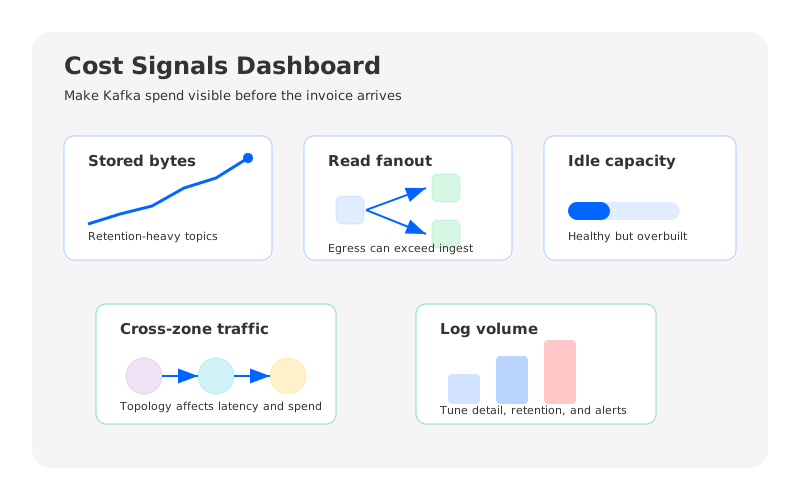
| Signal | Why it matters | Typical action |
|---|---|---|
| Stored bytes by topic class | Retention-heavy topics drive storage spend | Review retention, compaction, and archival policy |
| Read fanout | Egress and broker load can grow faster than ingest | Revisit consumer topology and cache strategy |
| Idle CPU or memory | Overprovisioning hides inside healthy-looking clusters | Right-size capacity or isolate workloads |
| Cross-zone traffic patterns | Availability design can create data movement cost | Align clients, brokers, and replication strategy |
| Log volume | Debug logs can become a platform cost | Tune sampling, retention, and log-based metrics |
| Reassignment traffic | Scaling events can move large amounts of data | Schedule changes and reduce broker-local coupling |
This is not FinOps theater. It is incident prevention. High idle capacity may survive today's traffic but lose credibility when the bill arrives. Fast storage growth can be technically healthy while creating a future retention emergency. Uncontrolled log volume can make troubleshooting more expensive without making incidents easier to solve.
Cost signals also help teams compare deployment models honestly. Self-managed Kafka, Google Cloud Managed Service for Apache Kafka, Confluent Cloud on GCP, and Kafka-compatible shared-storage systems expose different responsibilities. Observability should show what you provision, what the service abstracts, what scales with traffic, and what grows with retention.
6Logs, Alerts, and SLOs
Metrics explain trends. Logs explain context. Kafka logs on GCP should be searchable by cluster, broker where applicable, topic when available, client principal, error class, and deployment window. Cloud Logging can support log-based metrics and alerts for repeated authentication failures, authorization denials, broker restarts, controller instability, connection churn, or unexpected configuration changes.
Avoid log alerts that duplicate metric alerts. If a metric catches sustained request failure rate, a log alert on every individual failure will page too often. Logs are strongest when they capture categorical events: a client was denied, a configuration changed, a broker restarted, a controller election happened, or a group entered repeated rebalance cycles.
Kafka SLOs should be workload-specific. A fraud stream, observability pipeline, CDC flow, and analytics topic do not need the same latency or backlog objective. Useful SLOs include produce success rate, produce latency for critical topics, end-to-end delay, lag age, partition availability, and recovery time after scaling or maintenance.
Alert routing should reflect ownership. Broker availability and partition health belong to the platform team. Consumer lag may belong to the application team when brokers are healthy and downstream processing is slow. Security log alerts may belong to platform security. Cost anomalies may need both FinOps and platform review.
7Observability for Shared-Storage Kafka With AutoMQ
Traditional Kafka observability assumes brokers own local durable storage. That assumption shapes dashboards around disk usage per broker, replica movement, partition reassignment, local log flush behavior, and broker-level storage pressure. Shared-storage Kafka changes the operational center of gravity.
AutoMQ is a Kafka-compatible streaming system that keeps Kafka protocol semantics familiar while redesigning the storage layer around cloud-native shared storage. That does not replace Kafka metrics: producers, consumers, topics, partitions, request latency, consumer lag, and group state still matter. It adds signals that explain how durable storage, caching, and balancing behave when data is no longer tied to broker-local disks.
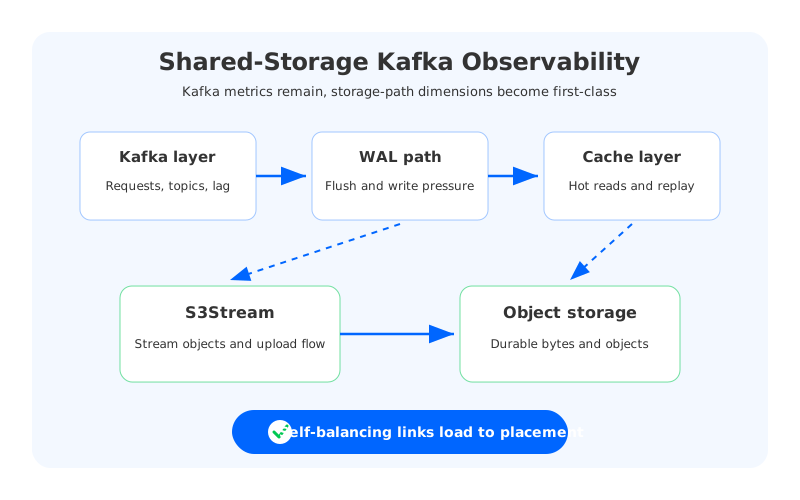
For AutoMQ-style shared-storage Kafka, teams should think in layers:
- Kafka-compatible layer: request throughput, request latency, topic traffic, partition health, consumer group offsets, and lag.
- Write path layer: WAL health, write pressure, flush behavior, and the relationship between produce latency and durable commit behavior.
- Object storage layer: storage growth, object request behavior, upload and download throughput, and replay pressure.
- Cache layer: cache effectiveness, read amplification, hot data locality, and fetch latency under replay or fanout.
- Balancing layer: self-balancing progress, workload skew, partition distribution, and whether balancing decisions keep up with traffic changes.
The practical takeaway is more important than any single metric name: a shared-storage Kafka dashboard should explain the storage path as clearly as a traditional Kafka dashboard explains broker disks. If replay is slow, the team should tell whether the bottleneck is broker CPU, object storage reads, cache behavior, network bandwidth, or the consumer application.
That is where AutoMQ can enter a GCP Kafka strategy without turning observability into a procurement shortcut. If the dashboard shows toil from broker-local storage, data movement during scaling, long retention cost, or partition rebalancing, then a Kafka-compatible shared-storage architecture is a reasonable option to evaluate. The decision should come from dashboard evidence.
8Dashboard Checklist
A strong GCP Kafka observability dashboard does not need hundreds of panels. It needs enough structure for a responder to move from symptom to cause.
Start with an executive row: cluster health, produce rate, consume rate, lag age for critical groups, request error rate, and cost trend. Add a Kafka workload row for topic throughput, top topics by bytes, latency percentiles, queue time, partition count, offline partitions, and hot partitions. Add an application progress row for consumer group lag, lag growth rate, group state, rebalance frequency, consumer fetch rate, and downstream service health.
Then add a GCP infrastructure row for vCPU, memory, disk capacity, disk latency where available, network throughput, Cloud Logging categories, GKE or Compute Engine health, and managed service metrics if applicable. Add a cost row for stored bytes, retention-heavy topics, read fanout, egress-sensitive traffic, idle capacity, log volume, and balancing traffic. Finally, add a change row for deploys, broker restarts, configuration changes, scaling events, maintenance windows, and migration activity.
The dashboard should make one thing clear: Kafka health is not one metric. It is the relationship between application demand, broker behavior, cloud resources, storage paths, logs, and cost. If broker-local storage is creating too much operational drag, review AutoMQ's architecture and observability documentation as part of the same evidence-driven process.
9References
- Apache Kafka documentation
- Google Cloud Managed Service for Apache Kafka: Monitor a cluster
- Google Cloud Managed Service for Apache Kafka overview
- Google Cloud Logging documentation
- Google Cloud Ops Agent Apache Kafka integration
- AutoMQ documentation: Integrating Metrics with Prometheus
- AutoMQ documentation: Prometheus Metrics
10FAQ
10.1What are the most important metrics for GCP Kafka monitoring?
Start with producer throughput, request latency, request errors, consumer lag, consumer group state, partition health, broker or service resource utilization, storage growth, and network throughput. Then add deployment-specific signals from Cloud Monitoring, Cloud Logging, GKE, Compute Engine, or Managed Service for Apache Kafka.
10.2How should I monitor Kafka consumer lag on GCP?
Monitor lag by consumer group, topic, and partition, then correlate it with producer rate, consumer fetch rate, group rebalances, broker latency, and downstream application health. Lag alone is a symptom. The surrounding signals tell you whether the bottleneck is Kafka, the consumer, or a dependency.
10.3Does Google Cloud Managed Service for Apache Kafka expose metrics?
Yes. Google Cloud documents Managed Service for Apache Kafka metrics in Cloud Monitoring, organized by cluster, topic, topic partition, and topic-partition consumer group resources. Broker logs are also exported to Cloud Logging for troubleshooting and log-based alerts.
10.4Should Kafka cost be part of observability?
Yes. Kafka cost is driven by operational behavior: storage retention, read fanout, network topology, idle provisioned capacity, log volume, and data movement during scaling or reassignment. Tracking these signals helps platform teams catch cost drift early.
10.5How does AutoMQ change Kafka observability?
AutoMQ keeps Kafka-compatible metrics relevant but adds shared-storage dimensions. Teams should observe WAL behavior, object storage usage, cache effectiveness, S3Stream-related storage activity, and self-balancing progress alongside normal Kafka request, topic, partition, and consumer group metrics.


