
Table of Contents
Table of Contents
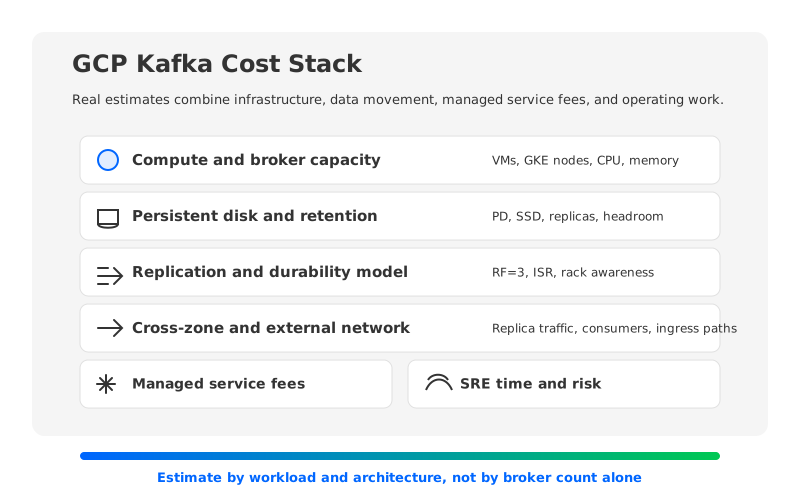
The first surprise in GCP Kafka pricing is that there is rarely a single Kafka line item. A team running Kafka on Google Cloud might pay for Compute Engine instances, GKE nodes, Persistent Disk, inter-zone traffic, external egress, monitoring, and operations. A team using Google Cloud Managed Service for Apache Kafka gets a managed control plane, but still has to understand capacity, storage, retention, network paths, and workload growth. The question is not "What does Kafka cost on GCP?" It is "Which architecture turns my workload into which billable resources?"
That framing matters because Kafka cost is workload-shaped. Two clusters with the same broker count can have different bills if one keeps seven days of logs and the other keeps ninety, if one has heavy consumer fanout, or if one spreads replicas across zones. Pricing pages tell you the unit rates. A useful estimate starts one layer higher, with the assumptions that convert events into CPU, storage, and traffic.
1Why Kafka Pricing on GCP Is Hard to Compare
Google Cloud gives teams several ways to run Kafka. You can operate Apache Kafka on Compute Engine, run it on GKE with an operator such as Strimzi, use Google Cloud Managed Service for Apache Kafka, or evaluate a Kafka-compatible system that changes the storage model. Each path moves responsibility and cost into different places, so comparing them by broker count alone creates a false sense of precision.
Self-managed Kafka exposes every infrastructure input: VM family, storage, GKE node pools, load balancers, observability, backups, and upgrades. Managed Kafka reduces that surface area, but it does not remove workload economics. You still need to know how much data enters the cluster, how long it is retained, how reads fan out, and whether applications sit in the same region and zone.
Kafka multiplies data in ways teams often miss during early sizing:
- Producer traffic becomes leader append traffic, follower replication traffic, retained storage, and consumer read traffic.
- Replication factor improves durability but multiplies broker-local storage in traditional Kafka.
- Multi-zone placement improves availability but can introduce cross-zone data movement.
- Retention extends the storage tail, which can dominate the bill for audit logs, CDC streams, and replay-heavy analytics.
- Peak traffic drives provisioned capacity even when average traffic is much lower.
The most reliable pricing exercise therefore starts with a workload worksheet, not a vendor quote. Once the workload is explicit, the architecture comparison becomes much cleaner.
2The Inputs You Need Before Opening a Pricing Page
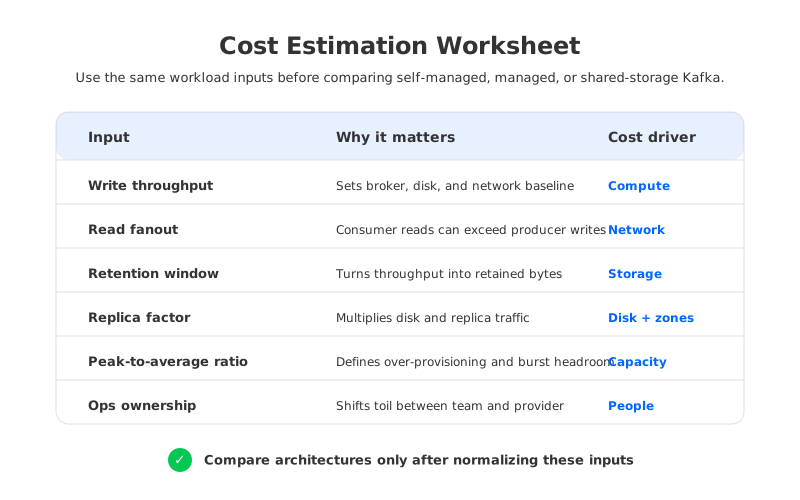
Start with write throughput, read throughput, retention, replication factor, zone layout, and peak-to-average ratio. Those six numbers explain most Kafka cost surprises. If you do not have production numbers yet, use conservative ranges and label them as assumptions.
The basic storage formula is straightforward: retained logical data equals write throughput multiplied by retention time. In traditional Kafka, broker-local storage then scales by replication factor and operational headroom. If the workload writes 50 MiB/s and retains data for seven days, the logical retained data is roughly 29.5 TiB before replication and headroom. With replication factor 3, the broker-local footprint is about 88.6 TiB before free space for segment rolling, rebalancing, and failure recovery. Those numbers are not a GCP quote; they are the input you take into Google Cloud's disk pricing page.
Network estimation needs the same discipline. Producer ingress is not the whole story. In a multi-zone Kafka deployment, follower replicas may receive copies of the same records, consumers may read from a different zone than the leader, and rebalancing can add temporary traffic during maintenance. Google Cloud's network pricing should be checked for the exact region, direction, and service path, because "inside Google Cloud" is not the same as "free in every path."
3Cost Components for Self-Managed Kafka
Self-managed Kafka on Compute Engine is the most transparent model because every component is visible. That transparency also means the estimate has to include more than broker VMs: compute, persistent storage, cross-zone traffic, monitoring, backup or snapshot strategy, and SRE ownership.
Compute is usually the most direct line to understand. Kafka brokers need enough CPU for compression, request handling, replication, TLS, and background log work, plus memory for page cache and JVM overhead. On GCP, that can mean Compute Engine VMs directly or GKE worker nodes if Kafka runs on Kubernetes. Separate steady-state capacity from spare capacity for broker failure, maintenance, or bursts.
Storage is where many first-pass estimates undercount. Apache Kafka stores logs as segments on broker disks, and topic retention is controlled by settings such as retention.ms and retention.bytes. With replication factor 3, a logical byte can become three broker-local bytes before free-space headroom. Persistent Disk type, provisioned capacity, snapshots, and regional design choices all affect the final storage cost.
Network tends to arrive late in the conversation. Kafka's replication protocol is part of the application, so cross-zone follower traffic can become material when leaders and followers are distributed across zones. Consumer traffic adds another multiplier when services read from different zones or regions. Rack awareness and follower fetching can help align reads with locality, but they need to be modeled intentionally.
The operational line is not a cloud SKU, but it belongs in the estimate. Someone owns broker replacement, partition reassignment, capacity planning, upgrades, security patching, alert tuning, and incidents. For many platform teams, that people cost is the reason to standardize on a narrower set of architectures.
4Cost Components for Managed Kafka on GCP
Google Cloud Managed Service for Apache Kafka changes the estimate by moving cluster operations into a managed service. That is valuable when the team wants Kafka compatibility without carrying the full burden of broker lifecycle management. The cost model still needs workload inputs, because managed infrastructure is capacity packaged behind a service model.
For managed Kafka, read the official pricing page as the source of truth for billable dimensions. As of June 2, 2026, the page is the right place to verify how Google prices the service in your region and how it describes capacity, storage, networking, and related charges. Do not reuse an old spreadsheet without checking the page again.
The decision question is whether the managed premium offsets the operational work you would otherwise do yourself. For teams with strict cost targets or unusual workload shapes, managed Kafka is one candidate in a broader architecture comparison.
Use this comparison structure when building an estimate:
| Cost area | Self-managed Kafka on GCP | Managed Kafka on GCP | What to verify |
|---|---|---|---|
| Compute | VM or GKE node cost, spare capacity, upgrades | Managed service capacity model | Region, capacity units, scaling behavior |
| Storage | Persistent Disk, replication factor, snapshots | Service storage model and retention inputs | Retention, storage limits, data growth |
| Network | Cross-zone replication, consumers, rebalancing | Service networking and client paths | Zone, region, VPC, external egress |
| Operations | SRE time, incidents, upgrades, tooling | Provider-managed operations plus team oversight | Responsibility boundary and support |
| Elasticity | Manual or operator-driven scaling | Managed scaling capabilities | Peak traffic and growth assumptions |
The table keeps the conversation honest. A managed service can reduce operational risk while still being expensive for long retention. A self-managed cluster can look cost-effective on paper while hiding people cost. The architecture only makes sense after the workload is visible.
5How Shared-Storage Kafka Changes the Equation
Traditional Kafka was designed around broker-local logs. That design is powerful and proven, but in cloud environments it ties compute, storage, and data movement together. When retained data grows, broker disks grow. When brokers are replaced or partitions move, data movement becomes part of the operation. When replication spans zones, durability can show up as network traffic.
Shared-storage Kafka changes the pricing model by separating durable log storage from broker-local disks. AutoMQ is one example of this category: it is a Kafka-compatible cloud-native streaming system that keeps Kafka protocol compatibility while moving the storage layer toward object storage and stateless broker design. The point is not that every billable item disappears. The point is that the cost inputs move to different places.
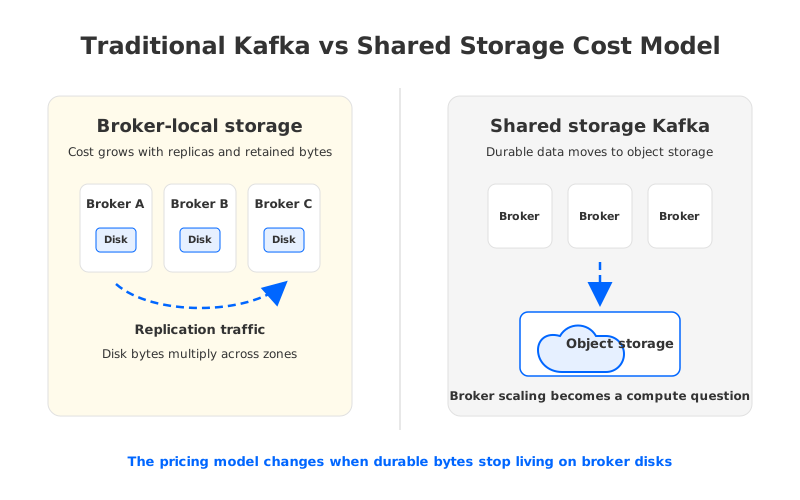
With shared storage, long-term retained data can be modeled against object storage instead of being multiplied across broker disks. Brokers become closer to a compute and cache layer, so scaling decisions focus more on traffic and less on moving retained log data. Recovery and reassignment can also become less data-movement-heavy because durable bytes are no longer owned by a single broker's local disk.
This distinction matters most for workloads with long retention, uneven traffic, or frequent scaling pressure. A short-retention, steady-throughput Kafka cluster may be well served by a conventional design. A replay-heavy CDC platform or audit pipeline can have a very different cost profile, so the estimate should compare broker-local storage against a shared-storage model.
AutoMQ should enter the evaluation after the team has done that math. If retained bytes, cross-zone replication, and partition movement dominate cost or operations, a Kafka-compatible shared-storage architecture becomes a serious option. Teams can then compare Google Cloud infrastructure costs, AutoMQ deployment requirements on GKE, and operational preferences using the same worksheet.
6A Practical GCP Kafka Cost Estimation Checklist
Normalize inputs before comparing products. Put these inputs in a spreadsheet and keep the source next to each number:
- Workload: average write throughput, peak write throughput, average read throughput, read fanout, message size, partition count, and expected growth.
- Durability and availability: replication factor, zone layout, rack awareness, failover requirements, and recovery time expectations.
- Retention: retention hours or days per topic class, compacted topic needs, replay requirements, and whether older data is read frequently.
- Infrastructure: Compute Engine or GKE instance families, disk type, disk capacity, object storage class, load balancers, and observability stack.
- Network: producer location, consumer location, cross-zone paths, cross-region paths, external egress, and rebalancing assumptions.
- Operations: upgrade cadence, on-call ownership, incident history, compliance controls, and vendor support requirements.
Once the inputs are stable, build three estimates: self-managed Kafka on Compute Engine or GKE, Google Cloud Managed Service for Apache Kafka, and a shared-storage Kafka-compatible model such as AutoMQ if retained data, scaling, or cross-zone traffic is a major driver. The goal is to expose which cost drivers change under each architecture.
A useful estimate also separates steady-state cost from change cost. Steady-state cost is what you pay when traffic behaves as expected. Change cost is what you pay during expansion, partition reassignment, broker failure, regional growth, or a retention policy change. Put both in the model while everyone is calm.
If your current estimate still starts with "three brokers should be enough," slow down. Broker count is an output of workload, durability, and architecture decisions. It should not be the first input.
7How to Lower Kafka Cost on Google Cloud Without Breaking Production
Cost reduction should follow risk order, not excitement order. Start with measurements. Use broker metrics, client metrics, and billing export data to find whether the biggest driver is compute, storage, cross-zone traffic, external egress, or operations.
After measurement, review retention by topic class. CDC, audit, retry, and operational event topics should not automatically share the same retention window. Reducing retention where replay value is low can lower storage pressure without touching client code.
Then review locality. If producers, brokers, and consumers are spread across zones or regions without a placement strategy, network traffic can grow quietly. Kafka rack awareness, client placement, and follower-fetching strategies can help, but they require validation against your workload.
Finally, compare architecture changes. Moving from self-managed Kafka to managed Kafka can reduce operational toil. Moving from broker-local storage to shared storage can change the relationship between retention, scaling, and disk cost. Both should be justified by the worksheet for your workload.
If retained data and broker-local replication are driving the bill, compare your estimate with an AutoMQ cost model using the same throughput, retention, and read fanout assumptions. The AutoMQ pricing page is a practical next step when you want to test whether a Kafka-compatible shared-storage architecture changes the economics without rewriting Kafka clients.
8References
- Google Cloud Managed Service for Apache Kafka pricing
- Google Cloud Compute Engine pricing
- Google Cloud Persistent Disk pricing
- Google Cloud Storage pricing
- Google Cloud network pricing
- Google Kubernetes Engine pricing
- Apache Kafka documentation
- AutoMQ architecture overview
- AutoMQ stateless broker documentation
- AutoMQ on Google Cloud GKE
9FAQ
9.1Is there one official GCP Kafka price?
No. Google Cloud has official pricing pages for managed Kafka and for the infrastructure used by self-managed Kafka, but the final cost depends on workload, region, retention, storage type, network path, and operations. A useful estimate starts with workload inputs and then maps them to the relevant pricing pages.
9.2Is managed Kafka on GCP always less expensive than self-managed Kafka?
Not always. Managed Kafka can reduce operational work and risk, which may be worth more than raw infrastructure savings. Self-managed Kafka can look lower-cost in a narrow infrastructure spreadsheet, but the comparison is incomplete if it ignores upgrades, incidents, on-call ownership, and scaling work.
9.3Why does replication factor affect Kafka cost so much?
In traditional Kafka, each replica stores a copy of the log on broker-local storage. Replication factor 3 means the storage estimate starts with roughly three copies of retained data before headroom, snapshots, and operational buffers. It can also affect network traffic when replicas are placed across zones.
9.4How should I estimate Kafka storage cost on GCP?
Convert write throughput into retained logical bytes, multiply by retention time, then apply replication factor and free-space headroom for traditional Kafka. After that, map the required capacity and performance to the appropriate Persistent Disk or storage pricing page. For shared-storage Kafka, model durable data against the object storage layer and broker cache separately.
9.5When should I evaluate AutoMQ for Kafka on Google Cloud?
Evaluate AutoMQ when your estimate shows that long retention, broker-local disk growth, cross-zone replication, or partition movement is a major cost or operations driver. AutoMQ is Kafka-compatible, so the evaluation can focus on architecture, deployment model, and economics rather than client rewrites.


