Table of Contents
Table of Contents
A private Kafka endpoint can be reachable and still fail the production review. The endpoint is only one hop. DNS policy, advertised broker addresses, connector egress, storage access, regional capacity, and project quotas can each create a different failure path.
“The service is private” is not an approval statement. A platform team needs to know which identity uses each endpoint, which quota protects it, and what an operator sees when the path is unavailable. The goal is a gate: trace every path, test the limits that can stop it, and keep evidence.
1Inventory every endpoint before you check its limit
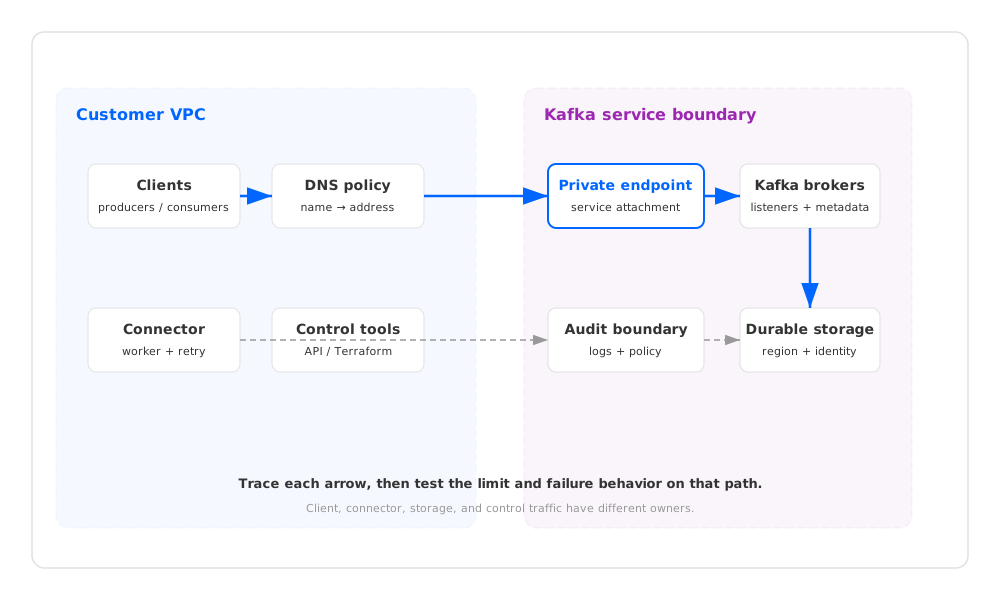
Start with an endpoint inventory, not a quota spreadsheet. Record the source, destination, name, address family, region, identity, and owner for each conversation. Kafka clients and management tools rarely use the same path, even when they share a VPC.
| Path | What to inventory | Evidence to capture |
|---|---|---|
| Client bootstrap | Producer and consumer DNS names, ports, TLS names, and subnets | Resolver output, route, firewall decision, and client connection log |
| Broker metadata | Addresses returned after bootstrap and during metadata refresh | Metadata response, advertised listener, and reachability from each client subnet |
| Connector traffic | Kafka Connect worker placement, source or sink endpoint, and retry route | Worker identity, egress rule, task log, and sink response |
| Storage traffic | Broker or storage-layer endpoint, region, and service identity | Route, IAM decision, storage request log, and encryption boundary |
| Control traffic | Console, Terraform, API, and break-glass path | Management endpoint, administrator identity, and audit event |
The inventory exposes a common gap: a client listener is private, but a connector exits through an unapproved route or a broker address resolves outside the intended network. Give each path a contract and state what happens when DNS, routing, authentication, or the endpoint fails.
2Treat limits as a map, not one quota
GCP limits live at different layers. Some are project or region quotas, some belong to a networking resource, and some are capacity or service constraints exposed by the Kafka provider. A documentation value is not a capacity reservation for your project. Record its scope, region, current allocation, requested peak, and check date.
Use the Private Service Connect documentation for endpoint and service-attachment constraints. Cross-check VPC quotas for the client and connector project, and Cloud DNS quotas for the zones and query volume. Values and increase processes can change, so capture the page and console view with the approval record.
| Limit family | Why it can block Kafka | What to test |
|---|---|---|
| Private endpoint and attachment limits | A new environment or failover path cannot create or use the required endpoint | Create the endpoint in the target project and exercise the client path |
| VPC and route limits | A valid endpoint exists, but a route, peering relationship, or firewall rule cannot represent the topology | Resolve, connect, and inspect the effective route from every runtime subnet |
| DNS zones and policy limits | Different workloads receive different addresses or fail to resolve broker names | Query from VM, Kubernetes, connector, and recovery networks |
| Regional service capacity | A requested cluster, attachment, or connector cannot be placed in the selected region | Run a capacity check or deployment rehearsal in the target region |
| Kafka provider limits | Connection, partition, throughput, or client settings reject the workload | Exercise the planned peak shape and keep provider responses with the review |
A throughput benchmark does not replace a limit review. It can pass while an endpoint cannot be created, a DNS policy cannot be attached, or a failover subnet cannot reach a broker. Test capacity and connectivity separately.
3Validate DNS and advertised broker addresses together
DNS is part of the security boundary because it selects the address that the client will use. Query each Kafka name from Kubernetes nodes, VM subnets, connector workers, and the recovery network. Capture the resolver, answer, TTL, and route. An administrator laptop is not evidence for a workload using another resolver policy.
After bootstrap, inspect broker metadata. Kafka can provide a reachable bootstrap address and advertise broker addresses that a subnet cannot route to. Check certificate name, authentication, address family, and port for every listener, then repeat after a restart or endpoint change.
The managed service documentation defines the endpoint and listener behavior for that service. The Google Cloud Managed Service for Apache Kafka overview defines the product boundary, but it does not turn every private networking pattern into a supported Kafka integration. Treat provider-specific endpoint support, regions, and authentication as items to verify against the target release and project.
A useful preflight sequence is:
- Resolve the bootstrap name from each client and connector network.
- Connect with the production TLS and authentication settings.
- Collect metadata and test every advertised broker address.
- Restart a client and a connector task to exercise reconnect and metadata refresh.
- Repeat after disabling the intended endpoint or route, and record whether the client fails closed or follows an approved private path.
That sequence turns “private access works” into evidence about the complete Kafka connection contract.
4Make failure tests part of the gate
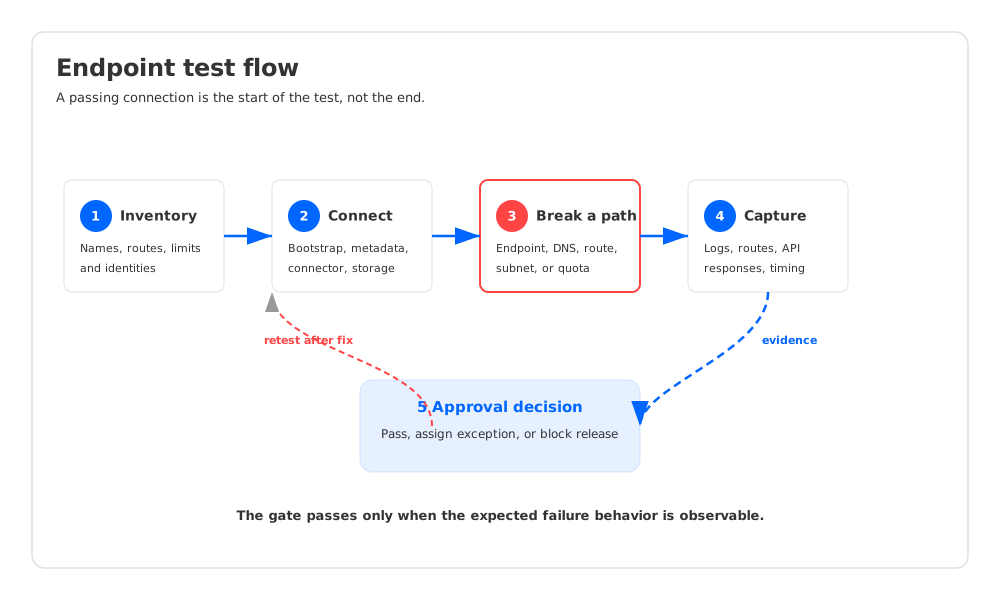
Normal traffic proves very little about an endpoint limit. Inject failures while the workload is small enough to inspect and while an operator is available to capture logs. Keep the test bounded: define the expected error, recovery action, and evidence before the change.
| Test | Expected observation | Approval evidence |
|---|---|---|
| Endpoint unavailable | Clients stop or use the documented private failover; no silent public route appears | Client error, DNS answer, effective route, and recovery log |
| DNS forwarding or policy mismatch | Resolution fails with an explicit error or returns the approved address | Resolver log from each workload class and packet path |
| Firewall or route removed | Bootstrap or metadata refresh fails at the affected hop | Flow log, client exception, and rule change record |
| One subnet or zone isolated | Workloads in the other failure domain retain their documented contract | Connection logs, lag or error metrics, and topology record |
| Connector sink unavailable | Tasks retry according to policy and backlog is visible | Worker log, retry state, queue or lag signal, and sink response |
| Quota or capacity boundary reached | Creation or traffic is rejected with an identifiable provider response | API response, quota snapshot, and operator runbook entry |
| Control path unavailable | Data traffic keeps its contract and an audited break-glass path remains | Admin attempt, data-plane check, and audit event |
The test is not complete when a connection returns. Record failure, detection, and recovery against the workload objective. For a stop policy, verify that the client does not retry through an unapproved address. For failover, verify that the replacement endpoint is created, resolved, authorized, and observed.
For a deeper path-oriented view, compare this checklist with the Kafka private networking path framework and the multi-region Kafka recovery framework. They use the same principle: a failure claim needs a path and an observable result.
5Convert test results into an operational approval
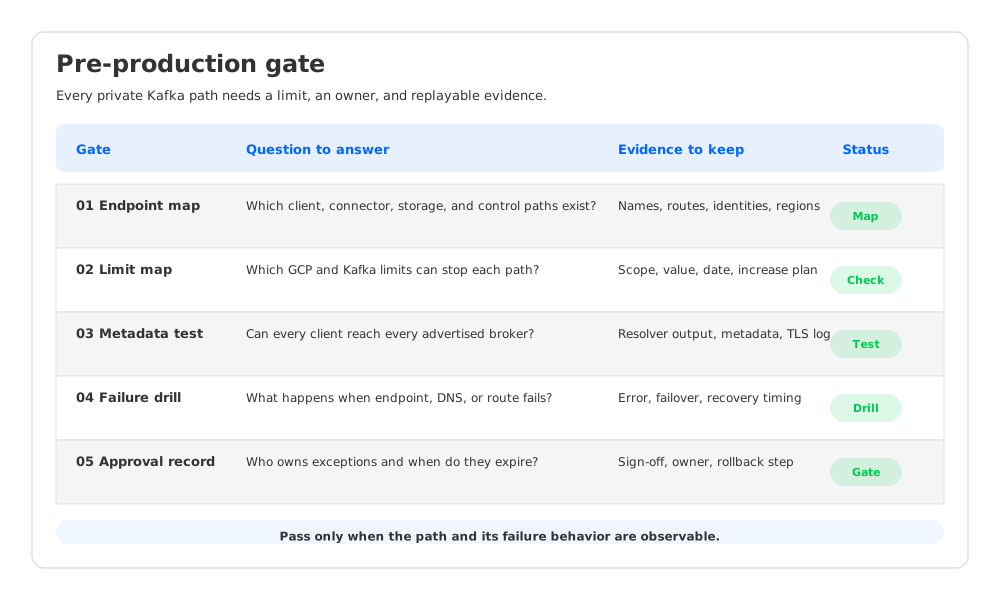
A pre-production checklist should produce auditable decisions. For every path, write a pass condition, an owner, and an exception expiry. Keep evidence beside the design.
| Gate | Pass condition | Owner and follow-up |
|---|---|---|
| Endpoint inventory | Every producer, consumer, connector, storage, and control path has an owner and approved boundary | Network owner signs the map |
| Limit map | Project, region, endpoint, DNS, and Kafka provider limits are recorded with check date and headroom method | Platform owner records quota requests |
| Name and metadata test | All runtime classes resolve approved names and reach every advertised broker address | Kafka owner attaches client output |
| Failure test | Endpoint, DNS, route, subnet, connector, and control failures match the documented policy | SRE attaches logs and recovery timing |
| Monitoring | Alerts identify path loss, metadata reachability, connector backlog, and quota errors | Observability owner links dashboards |
| Change plan | Endpoint, route, DNS, and quota changes have rollback steps | Release owner records change window |
Define “headroom” as a tested peak, a reserved quota increase, or a documented provider capacity response. A green quota page without that context creates false confidence.
6Where AutoMQ fits
Once the boundary and failure evidence are explicit, AutoMQ can be evaluated as a Kafka-compatible, cloud-native streaming platform with a shared storage layer. Evaluate its client, control, data, and storage paths against the customer’s GCP account and the same evidence.
In an AutoMQ BYOC design, the AutoMQ Data Plane Cluster runs in the customer environment. Map the Kafka listener, the AutoMQ BYOC Operator control channel, broker-to-object-storage access, connector traffic, and any Schema Registry path as separate flows. The AutoMQ architecture overview describes the separation between Kafka request handling and durable stream storage. Deployment-specific endpoint support, IAM roles, region availability, and quota requirements still need to be checked against the target GCP project and release.
That explicit storage path can make the review easier to reason about. A failed fetch can be investigated as listener reachability, broker metadata, cache or WAL behavior, or object-storage access, instead of being labeled “a private Kafka issue.” The same path map remains useful if the final choice is a managed Kafka service, a customer-owned Kafka cluster, or an AutoMQ deployment.
7A runbook you can replay
Use this order during the final rehearsal:
- Freeze the target project, region, subnets, Kafka release, and endpoint pattern in the change record.
- Export the endpoint, route, DNS, identity, and quota inventory.
- Run DNS, bootstrap, metadata, connector, and storage checks from workload networks.
- Inject endpoint, DNS, route, subnet, connector, and control failures.
- Attach logs, API responses, quota snapshots, and recovery timing to each gate.
- Record exceptions with an owner and rollback action, then repeat checks after endpoint or quota changes.
The design is ready when an operator can follow a record from producer connection to broker metadata, connector retries, storage access, and the administrative action that changed the path. If any hop depends on undocumented provider behavior, keep it open.
8FAQ
8.1Are GCP private service quotas the same in every region?
Do not assume that. Scope and capacity depend on the resource, project, region, and service contract. Record the value and check date.
8.2Does a private endpoint guarantee that Kafka metadata is reachable?
No. Bootstrap can succeed while an advertised broker address uses another route, DNS answer, or firewall rule. Test metadata refresh from each client and connector network.
8.3Should connector and storage paths be included?
Yes. Connectors have separate workers, identities, and egress rules, while brokers or a storage layer may use another object-storage path. A client-only test leaves both unverified.
A private endpoint earns approval when the path, limit, and failure behavior are all observable. Start with the inventory, break the path in rehearsal, and keep the evidence with the change record. If you want to run the same checklist against a Kafka-compatible shared-storage deployment, start an AutoMQ evaluation with your endpoint map and failure cases ready.