
Table of Contents
Table of Contents
A GCP cluster running Apache Kafka® can have spare brokers and still fail its next growth step. The blocker may be a project quota, a per-region CPU or memory ceiling, a broker disk limit, a recovery-heavy Partition layout, or an API operation rate that automation exhausts before the data path is busy. Counting brokers does not explain which limit will be reached first.
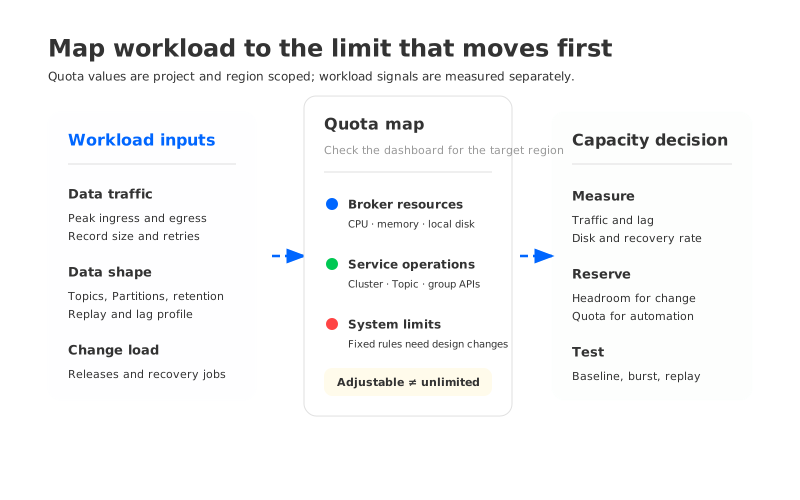
A useful capacity plan starts with workload behavior and ends with quota evidence. The plan separates data traffic from control operations, treats partition count as a recovery and metadata decision, and reserves headroom for the changes that happen during an incident. Google Cloud’s Managed Service for Apache Kafka quotas and limits page is the source of truth for the managed service boundary; its values change, and the page says default quotas can vary by project.
1Turn the workload into capacity inputs
Start with the traffic your applications create, not with a preferred machine shape. Record peak and sustained Producer and Consumer rates, record-size distribution, active connections, Topic and Partition layout, retention, and the busiest replay or recovery operation. Keep the observation window with each value. A weekday average can hide the burst that determines whether a broker returns to service in time.
The same workload creates different pressure depending on data arrangement. More Partitions can increase parallelism, but they also add metadata, cache, and recovery work. Longer retention increases replay storage, while a lagging Consumer group can create a large catch-up read. These inputs matter even when broker count stays constant.
Use a worksheet with four layers so one large number does not conceal the limiting path:
| Layer | Inputs to record | Why it matters |
|---|---|---|
| Data path | Peak ingress, peak egress, record size, compression, acknowledgements, and retry behavior | Determines broker request work and network demand during normal and burst traffic |
| Partition layout | Topics, Partitions, replication settings, leader distribution, and expected growth | Determines parallelism, metadata work, recovery scope, and rebalance cost |
| Storage path | Retention, expected replay range, local disk allocation, object or backup destination, and growth rate | Determines whether storage fills before compute or network reaches its limit |
| Control path | Cluster, Topic, Consumer group, and long-running operation changes per release or incident | Determines whether automation can complete before its operating window closes |
This model changes the first planning question from “How many brokers do we need?” to “Which layer grows fastest under the workload and during recovery?” That question is what makes a quota review useful instead of a list of numbers. The broader Kafka on GCP architecture comparison is useful when the worksheet exposes a deployment choice rather than a single quota.
2Read GCP Kafka quotas as a map of failure modes
Google Cloud distinguishes adjustable quotas from fixed system limits. Quotas usually apply at the Google Cloud project level and are shared within a region for the managed Kafka service. A quota increase can help with an adjustable limit, but it does not make a fixed limit disappear, and it does not add capacity to a bottleneck in another layer.
The managed-service documentation lists these typical defaults as of October 9, 2026. They are a dated planning reference, not a promise for every project. Check the Quotas & System Limits dashboard before approving a production change.
| Quota or limit | Typical documented value | What it constrains | Planning interpretation |
|---|---|---|---|
| Clusters per project per region | 5 | Managed Kafka cluster resources | A multi-environment layout can consume this before data throughput is high |
| CPU capacity per project per region | 750 | Broker CPU capacity | A larger broker shape can consume quota faster than adding a small node |
| Memory capacity per project per region | 6,000 GiB | Broker memory capacity | Cache and request pressure can reach this boundary before disk fills |
| Broker local disk capacity per project per region | 200 TiB | Aggregate broker local disk | Retention and replay planning must include the local-disk ceiling |
| Cluster authenticate connections per minute per project per region | 1,200 | Client authentication operations | Reconnect storms can consume this even when steady-state traffic is normal |
| Topic and Consumer group writes per minute per project per region | 100 each | Create, update, and delete operations | A release that changes many objects needs pacing and retry evidence |
| Long-running operations per minute per project per region | 1,200 | Service operations such as cluster work | Automation can hit the control quota while the data path is healthy |
| Managed-service disk capacity per broker | 100 GiB per vCPU minimum, 32 TiB maximum | Fixed broker sizing rule | A machine shape must satisfy the service rule and the project quota together |
The table also explains why a producer-rate dashboard is incomplete. The service page says cluster read and write request quotas are not quotas on Consumer read or Producer publish rates. Treat API figures as control-path signals, then measure data traffic with broker and client telemetry.
The page reports a default maximum message size of 10 MiB and a default of one Partition per Topic. Treat these as configuration starting points, then validate the applicable service and Apache Kafka settings in the target environment.
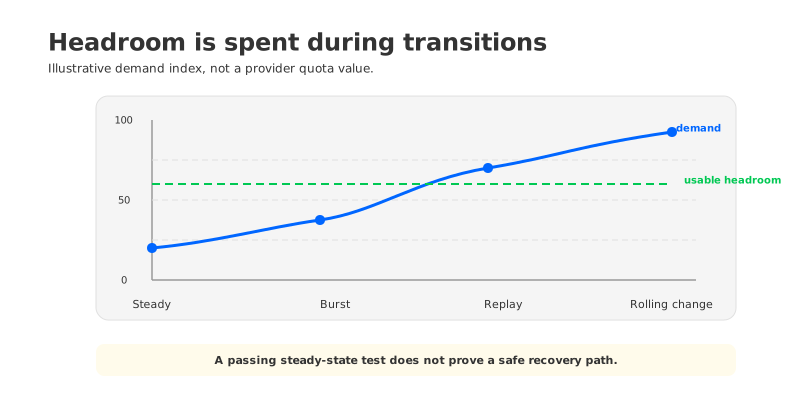
3Headroom is a transition budget
Steady-state utilization is only the first line on the worksheet. Capacity disappears during a rolling change, a Consumer catch-up, a partition movement, or a replay. A broker can be healthy at the end of the test and still have no room for the work required to get there.
Track headroom as a budget that can be spent by a known operation:
- Compute headroom covers request handling, compression, protocol work, and recovery tasks that overlap with live traffic.
- Memory headroom covers page or data cache, request buffers, and the extra read pressure created by a lagging Consumer group.
- Disk headroom covers retention growth, temporary files, and the data that must remain available while a broker is replaced or rebuilt.
- Network headroom separates client traffic from replication, recovery, and storage traffic so one aggregate number cannot hide the saturated stream.
- Control-plane headroom covers the API calls and long-running operations used by automation, Topic management, and incident runbooks.
Tie the gate to an operation, not a universal percentage. Require a rolling replacement to finish while consumer lag drains, local disk stays below the service limit, and control operations stay below the project quota. If the test needs an unplanned quota increase or manual retries, fix that dependency before production. A Kafka capacity planning guide provides a complementary worksheet for brokers, Partitions, and storage growth.
4Test growth before a quota becomes an incident
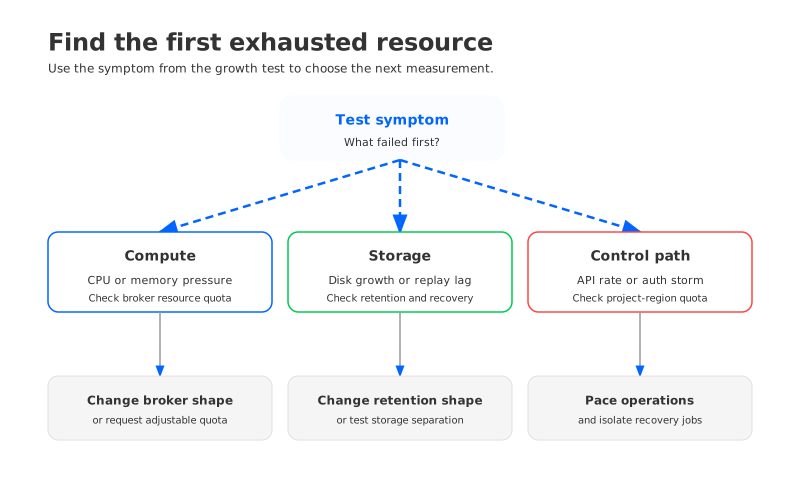
A capacity test should include the phases that steady-state benchmarks leave out. Start from a production-shaped baseline, increase traffic and the Partition mix in controlled steps, then run a replay and a broker replacement or equivalent maintenance action. Capture the same measurements so the first exhausted resource is visible.
Record at least these observations for each test interval:
- Producer and Consumer throughput, request latency, retries, and error codes.
- Partition leaders, skew, consumer lag, and the time required to drain the lag after a disruption.
- CPU, memory, disk bytes and growth rate, cache pressure, and network by traffic class.
- Quota usage and quota errors from the Google Cloud console, API, and automation logs.
- The exact region, project, broker shape, Topic settings, and client configuration used for the run.
The result should be a threshold with an explanation: “At this workload shape, recovery consumed disk headroom first,” or “The data path stayed within margin, but Topic updates exceeded the project’s write quota.” That statement tells the next operator what to change.
If the test crosses an adjustable quota, request an increase with the measured workload and the required date. If it crosses a fixed system limit, change the design or the workload shape. Do not treat a quota increase as proof that the rest of the capacity model is sound.
5When broker and storage growth need different answers
A recurring planning problem appears when the workload grows in storage volume faster than it grows in request compute. Adding brokers may provide more CPU, but it also adds local storage, moves ownership, and creates another set of recovery paths. The result can be a larger cluster that still carries the same storage coupling and a more expensive maintenance operation.
The architecture decision should follow the evidence. If the bottleneck is a project quota, the remedy may be a quota request or a project and region boundary. If the bottleneck is partition skew, the remedy may be a topic or keying change. If the bottleneck is broker-local storage, the team should evaluate whether compute and durable storage must remain tied to the same node.
That last question is where a Kafka-compatible shared-storage architecture becomes a meaningful comparison. AutoMQ keeps the Kafka protocol and uses a Shared Storage architecture: AutoMQ Brokers handle Kafka-facing compute, while S3Stream writes durable stream data to S3 storage through the selected WAL storage and Data caching path. The separation lets a team evaluate broker compute growth independently from the durable data footprint, while still measuring the project, region, network, IAM, and object-storage limits of the GCP environment.
That does not remove capacity work. The test still needs to cover Partition distribution, Consumer recovery, cache behavior, WAL choice, object-storage access, and the control operations used to scale or replace Brokers. The AutoMQ architecture overview and GKE deployment guide give the layers to verify for a customer-owned GCP deployment. The point is not to replace one count with another. It is to compare which resource grows with the workload and which resource is allowed to move independently.
6FAQ
6.1Are GCP Kafka API quotas the same as Producer and Consumer throughput limits?
No. The managed-service page separates cluster, Topic, Consumer group, and long-running-operation request quotas from the rate at which clients publish or read records. Measure data traffic with Kafka client and broker telemetry, then use the Google Cloud quota dashboard for service operations.
6.2Do more Partitions always require more brokers?
No. Partitions provide parallelism, but they also add metadata, cache, and recovery work. Test the expected Partition layout with the record size, key distribution, replay range, and Consumer behavior that production will use.
6.3Can I plan with the documented default quotas?
Use them as a dated starting point. Google Cloud says quota values can vary by project, and the service documentation distinguishes adjustable quotas from fixed system limits. Record the project, region, verification date, and dashboard evidence in the capacity plan.
6.4What should I do when a fixed limit blocks growth?
Change the workload shape, resource layout, or architecture. A quota request cannot change a fixed service limit; keep the failed test and measured symptom in the design record.
The next time a GCP Kafka plan says “add two brokers,” ask what the extra brokers are meant to absorb, which quota will move, and how recovery will spend the remaining headroom. That answer turns a count into an operating decision. If broker-local storage keeps appearing as the first exhausted resource, start an AutoMQ evaluation with the same workload worksheet and growth test.


